Kindly Reminder Email: Templates, Timing, and Better Wording
"Kindly reminder" is grammatically broken and reads as passive-aggressive to native speakers. Here is what to write instead, with 9 templates, timing rules, and reply-rate data.
TL;DR
- "Kindly reminder" is not correct English. The adjective form is "kind reminder"; "kindly" is an adverb. Native-speaking prospects notice, and in B2B that costs you credibility before the second sentence.
- Even when fixed, "a kind reminder" is filler. It adds zero new information and signals that your previous email was ignorable — reminder emails that lead with a new reason to reply consistently outperform ones that lead with an apology or a nudge.
- The highest-performing reminder structure is: context in one line → the new thing → a single, binary ask. No throat-clearing.
- Timing beats wording. Day 3, day 7, day 14 spacing with different angles per touch outperforms four polite pings sent 24 hours apart.
- Before you blame your copy, check your data. A reminder sent to a stale or unverified address never had a chance — bounce-driven "silence" looks identical to disinterest in your reporting.
What Does "Kindly Reminder Email" Actually Mean?#
A "kindly reminder email" is a follow-up message that nudges someone to respond to, act on, or complete something you previously asked for — an unpaid invoice, an unsigned contract, an unanswered proposal, a meeting they haven't confirmed.
The phrase itself is a grammatical error that has become a fixed expression in international business English. "Kindly" is an adverb (it modifies verbs: kindly send me the file). "Reminder" is a noun, so it needs an adjective: a kind reminder. If you write "kindly reminder," you are saying the equivalent of "a quickly email."
The phrase spread through non-native business English, especially in markets where it was taught as a politeness formula, and it is now searched tens of thousands of times a month by people who want to write it correctly. Here's the uncomfortable part: the grammatically correct version is barely better. "This is a kind reminder that..." still telegraphs three things you do not want to telegraph.
- You are apologizing for existing. Softening language at the top of an email reads as low status. You asked for something reasonable; act like it.
- You have nothing new to say. If the entire email is "did you see my last one," you are asking the recipient to do work you should have done — re-reading your thread.
- It scans as passive-aggressive to native speakers. "Kind reminder" and "gentle reminder" both carry an unmistakable subtext in US and UK offices: you are late and we both know it. That subtext is fine for an overdue invoice. It is terrible for a warm prospect.
Is "Kindly Reminder" Grammatically Wrong?#
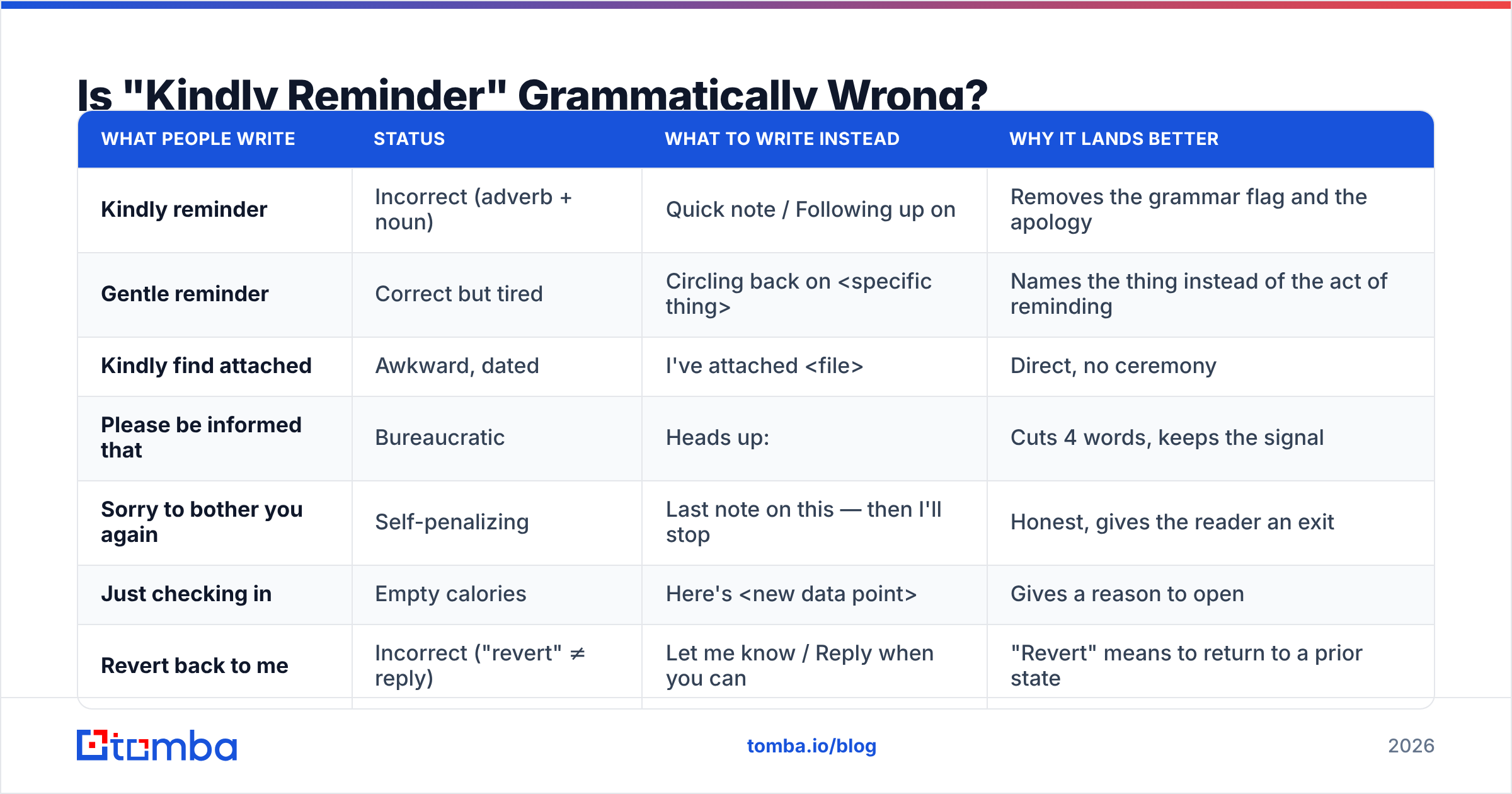
Yes, and the fix takes one character. Here is the full correction set, because "kindly reminder" rarely travels alone — it comes bundled with a family of near-miss business-English phrases.
| What people write | Status | What to write instead | Why it lands better |
|---|---|---|---|
| Kindly reminder | Incorrect (adverb + noun) | Quick note / Following up on | Removes the grammar flag and the apology |
| Gentle reminder | Correct but tired | Circling back on |
Names the thing instead of the act of reminding |
| Kindly find attached | Awkward, dated | I've attached |
Direct, no ceremony |
| Please be informed that | Bureaucratic | Heads up: | Cuts 4 words, keeps the signal |
| Sorry to bother you again | Self-penalizing | Last note on this — then I'll stop | Honest, gives the reader an exit |
| Just checking in | Empty calories | Here's |
Gives a reason to open |
| Revert back to me | Incorrect ("revert" ≠ reply) | Let me know / Reply when you can | "Revert" means to return to a prior state |
| As per my last email | Openly hostile | In my note on |
Same reference, no barb |
The pattern across every row is the same: replace a politeness ritual with a concrete noun. Business English rewards specificity, not deference. If you want a deeper reference on which phrases carry unintended tone in professional writing, Wikipedia's entry on business English covers the non-native/native divergence well.
What Should a Reminder Email Contain Instead?#
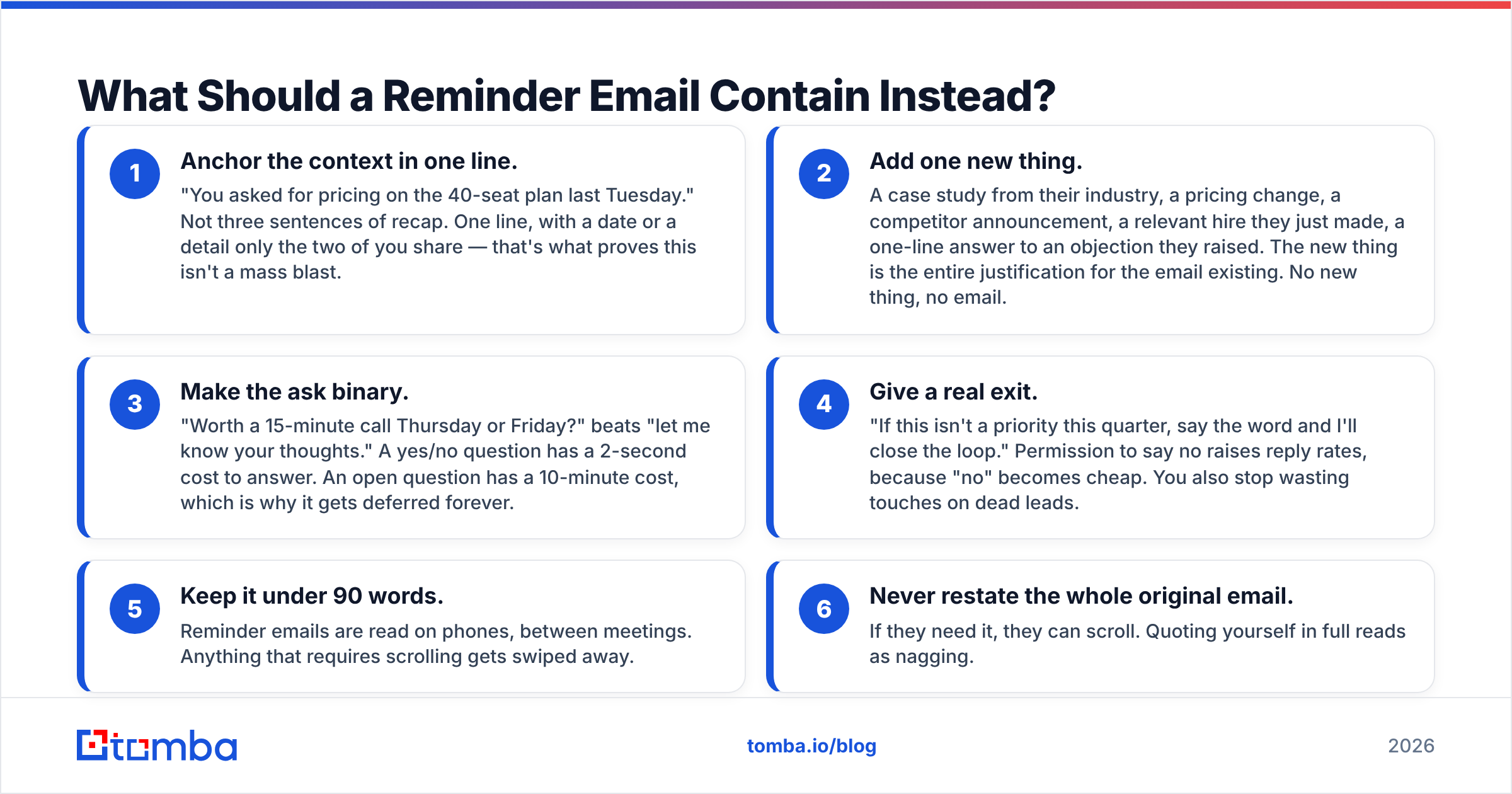
Strip the ritual and a reminder email has exactly four jobs. Run every follow-up you send through this checklist before hitting send.
- Anchor the context in one line. "You asked for pricing on the 40-seat plan last Tuesday." Not three sentences of recap. One line, with a date or a detail only the two of you share — that's what proves this isn't a mass blast.
- Add one new thing. A case study from their industry, a pricing change, a competitor announcement, a relevant hire they just made, a one-line answer to an objection they raised. The new thing is the entire justification for the email existing. No new thing, no email.
- Make the ask binary. "Worth a 15-minute call Thursday or Friday?" beats "let me know your thoughts." A yes/no question has a 2-second cost to answer. An open question has a 10-minute cost, which is why it gets deferred forever.
- Give a real exit. "If this isn't a priority this quarter, say the word and I'll close the loop." Permission to say no raises reply rates, because "no" becomes cheap. You also stop wasting touches on dead leads.
- Keep it under 90 words. Reminder emails are read on phones, between meetings. Anything that requires scrolling gets swiped away.
- Never restate the whole original email. If they need it, they can scroll. Quoting yourself in full reads as nagging.
Notice what's missing: there is no step for apologizing, no step for "I know you're busy," and no step for reminding them that they didn't reply. Those three moves are the most common content in a reminder email and the most reliably counterproductive.
What Are the Best Kindly Reminder Email Alternatives (9 Templates)?#
These are drop-in replacements organized by situation. Swap the brackets; keep the structure. Each one is deliberately short.
1. Proposal follow-up (day 3)
Subject: The 40-seat number
Hi [Name] — you asked what 40 seats would run. It's [$X] annually, and that includes the migration support we discussed.
Two options: I can send a one-pager your team can forward internally, or we do 15 minutes Thursday and I walk through it.
Which is easier?
2. Proposal follow-up (day 10, new angle)
Subject: [Competitor] just did this
Hi [Name] — [Competitor in their space] moved their [workflow] in-house last month and cut [metric] by [X]%. Wrote up how they did it here: [link].
Relevant to the project you described. Still worth a conversation, or has the timeline shifted?
3. Unsigned contract
Subject: Contract — one signature left
Hi [Name], the agreement is sitting at [signature step] and everything else is done. It's a two-minute e-sign: [link].
If it's stuck with legal or procurement, tell me who to ping and I'll chase it instead of you.
4. Overdue invoice (first notice)
Subject: Invoice [#] — due [date]
Hi [Name], invoice [#] for [$X] was due [date] and is still showing open on our side.
If it's already in your payment run, ignore this. If it needs a PO number or a re-issue, reply and I'll turn it around today.
5. Overdue invoice (second notice, firmer)
Subject: Invoice [#] — [X] days past due
Hi [Name], invoice [#] ([$X]) is now [X] days past due. Payment link: [link].
I'd rather sort this directly than route it through collections on [date]. Who's the right person if it isn't you?
6. Meeting confirmation
Subject: Still good for Thursday 2pm?
Hi [Name] — confirming Thursday 2pm ET, 30 minutes, [link].
If something moved, here's my calendar: [link]. Grab whatever works.
7. Waiting on an internal colleague
Subject: [Deliverable] — blocked on your side
Hi [Name], I'm holding [deliverable] until I get [specific input] from you. Deadline on my end is [date].
If you can't get to it by [date], tell me now and I'll ship the draft version instead.
8. Post-demo silence
Subject: Did the security question land?
Hi [Name] — you flagged SOC 2 in the demo. Our report and the sub-processor list are attached, plus the answer to the data-residency question you asked.
Does that clear the blocker, or is there a second one I should be solving?
9. The breakup (final touch)
Subject: Closing the loop
Hi [Name] — I've sent three notes about [project] and haven't heard back, which usually means the priority moved. Totally fine.
I'll stop here. If [problem] comes back on the roadmap in Q[X], reply to this thread and we pick it up.
Template nine does disproportionate work. Breakup emails reliably pull the highest reply rate in a sequence because they trigger loss aversion and cost nothing to answer. If you want a starting library to adapt, Tomba maintains a set of cold email templates you can fork rather than write from zero.
How Many Reminder Emails Should You Send, and When?#
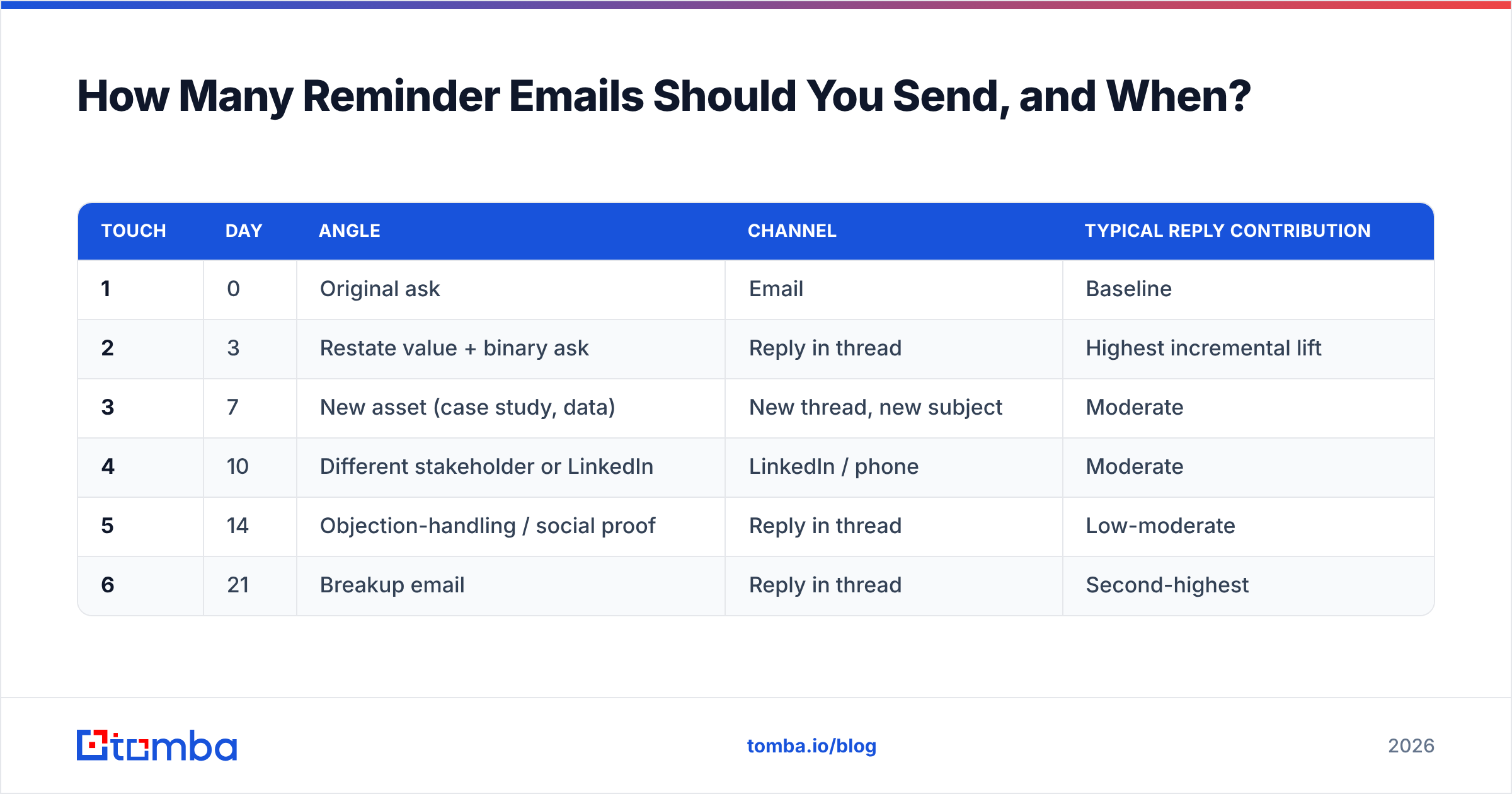
Cadence is where most reminder sequences actually fail — not wording. The two common failure modes are sending four emails in five days (annoying, gets you marked as spam) and sending one follow-up and quitting (leaves most of your pipeline on the table).
| Touch | Day | Angle | Channel | Typical reply contribution |
|---|---|---|---|---|
| 1 | 0 | Original ask | Baseline | |
| 2 | 3 | Restate value + binary ask | Reply in thread | Highest incremental lift |
| 3 | 7 | New asset (case study, data) | New thread, new subject | Moderate |
| 4 | 10 | Different stakeholder or LinkedIn | LinkedIn / phone | Moderate |
| 5 | 14 | Objection-handling / social proof | Reply in thread | Low-moderate |
| 6 | 21 | Breakup email | Reply in thread | Second-highest |
Rules that hold across most B2B sequences:
- Space widens as the sequence progresses. 3 days, then 4, then 3, then 4, then 7. Tight early spacing catches people who were genuinely busy; wide late spacing avoids looking desperate.
- Change the subject line at touch 3. If two reminders in the same thread didn't work, the thread is dead. Start a new one.
- Switch channels at least once. A LinkedIn note or a call after two unanswered emails changes the medium, and medium-switching is why multi-channel sequences beat email-only ones. If you need B2B phone numbers to make that switch, pull them before the sequence starts, not mid-flight.
- Cap it. Six touches, then stop. Past that, you are training a domain's spam filter on your sending patterns, and your sender reputation is a shared resource across every campaign you run.
For a benchmark on what "normal" looks like before you panic about your numbers, HubSpot's sales email research is a reasonable public reference point.
Why Do Reminder Emails Get No Reply Even When the Copy Is Good?#
Because a meaningful share of "no reply" is not a copy problem at all. It's a delivery problem wearing a copy problem's clothes.
Work through these in order before you rewrite a single sentence:
- The address is wrong. Role changes, company migrations to a new domain, and format changes (first.last@ → flast@) silently break addresses. The email hard-bounces, your sequencer logs it, and nobody looks. Run the list through an email verifier before the first touch and you stop chasing ghosts.
- The domain is catch-all. Catch-all servers accept everything, so a standard verification returns "unknown" and your tool marks it deliverable. You send six reminders into a black hole that never had a mailbox behind it. A catch-all verifier is the only way to separate real mailboxes from accept-all noise on those domains.
- You landed in Promotions or spam. Five links, a tracking pixel, an image signature, and a "quick reminder" subject line is a textbook Promotions-tab profile. Strip tracking from reminder emails specifically — they're the touch most likely to get filtered.
- Your authentication is incomplete. Missing or misconfigured SPF, DKIM, or DMARC records will get you throttled quietly. Check your SPF record and your DMARC policy before assuming the prospect is ignoring you.
- You're emailing the wrong person. The individual contributor who took the demo may have no budget authority. The reminder isn't failing; it's reaching someone who cannot say yes. Map a second contact at the account and run touch 4 there.
- The timing is genuinely bad. Quarter-end, fiscal-year planning, and the two weeks around major industry conferences kill reply rates for reasons that have nothing to do with you. Note it, and re-approach on a calendar trigger.
The practical takeaway: instrument before you iterate. If you can't separate bounces from opens from genuine silence, every wording change you make is a guess. Most teams find that cleaning the list moves reply rate more than any subject-line test they've ever run.
How Do You Scale Reminder Sequences Without Sounding Robotic?#
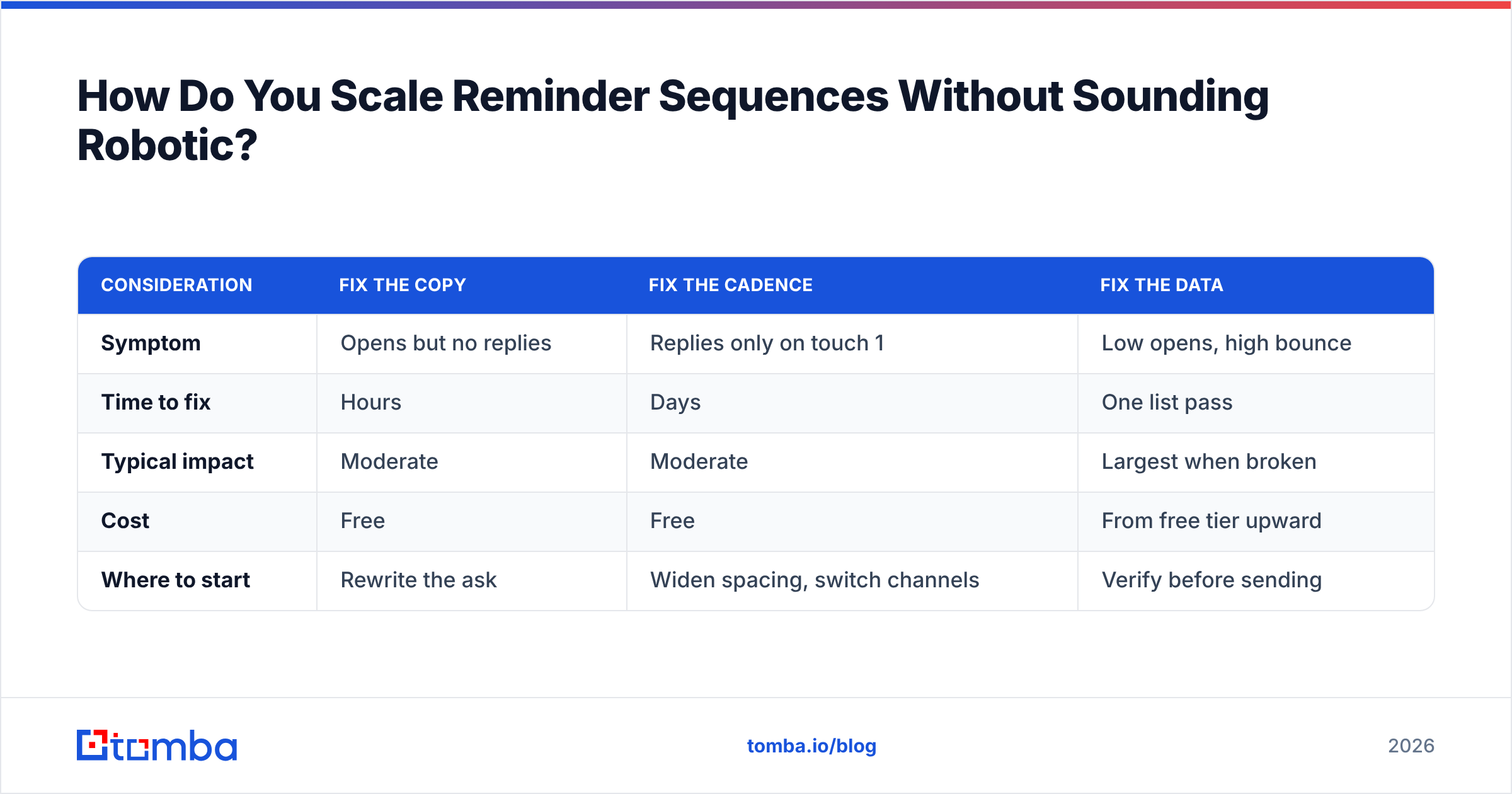
Personalization at scale is mostly a data problem, not a writing problem. The variable you insert is only as good as the record behind it.
Three things separate sequences that feel human from sequences that feel merged:
Use a fact, not a field. "I saw you're hiring three SDRs" is a fact. "I saw you work at {{company}}" is a field. Facts come from enrichment — funding events, headcount changes, tech-stack shifts, new leadership. A data enrichment pass over your list gives you fact-shaped variables instead of mail-merge-shaped ones.
Write the sequence for one person, then parameterize. Draft the whole six-touch sequence addressed to a single real prospect you know well. Then go back and replace only the parts that genuinely vary. If you start from a template, you end with a template. If you start from a person, you end with something that reads like one.
Separate the reminder cadence from the list build. The most common scaling mistake is finding contacts and emailing them in the same motion. Build and verify the list first — with a bulk email finder or via the Tomba API if you're wiring it into your own stack — then load a clean, deduplicated, verified list into the sequencer. Mid-sequence list additions wreck your cohort reporting and make it impossible to tell whether touch 3 is working.
On tooling, a quick note on honesty: plenty of good options exist here. Broad platforms like Apollo or Outreach bundle sequencing with data. Specialists like BookYourData sell verified contact lists directly, which suits teams that would rather buy a clean list than build one. Tomba sits in the find-and-verify layer — the part that determines whether your reminders reach a real inbox. Pick based on which layer is actually broken for you. If your copy is fine and your cadence is fine, the broken layer is almost always data.
| Consideration | Fix the copy | Fix the cadence | Fix the data |
|---|---|---|---|
| Symptom | Opens but no replies | Replies only on touch 1 | Low opens, high bounce |
| Time to fix | Hours | Days | One list pass |
| Typical impact | Moderate | Moderate | Largest when broken |
| Cost | Free | Free | From free tier upward |
| Where to start | Rewrite the ask | Widen spacing, switch channels | Verify before sending |
What's the Fastest Way to Fix Your Reminder Emails This Week?#
Do these four things in order:
- Search your sent folder for "kindly reminder," "gentle reminder," and "just checking in." Every hit is a template to rewrite. Replace each opener with a concrete noun and a date.
- Add a new thing to every touch. Audit your current sequence. Any touch that contains no information the prospect didn't already have gets deleted or rewritten.
- Verify the list. Run your active sequences' contact lists through verification and see what percentage was never deliverable. That number usually surprises people.
- Add a breakup email at day 21. If your sequence currently ends with silence, you're leaving the single highest-reply-rate touch unsent.
The wording change costs you an afternoon. The data check costs you a few minutes and typically explains more of the gap.
Start with the layer that actually blocks replies. Before you rewrite another reminder, make sure it's going somewhere real. The Tomba Email Finder locates verified professional addresses by name, domain, or company, with verification built into the same call — so your day-3 follow-up reaches an inbox instead of a bounce log. The free tier covers 25 searches a month, Starter runs $49/mo, and Growth is $99/mo; full Tomba pricing is public if you want to size it against your list volume. Clean the data first, then let your rewritten reminders do their job.
Related guides#
// get started
Find, verify and enrich your first contacts today
Start on the free plan with 25 searches a month, then scale when your team is ready.
Free plan · No credit card required · GDPR & CCPA
// about the author