Kipplo Alternatives: 9 Email Finders Compared for 2026
Kipplo covers the basics, but credit limits, catch-all handling, and API depth are where teams outgrow it. Here are nine alternatives compared on accuracy, pricing, and the workflows they actually fit.
TL;DR
- Most teams leave Kipplo for one of three reasons: credit ceilings on the cheap plans, weak catch-all handling, or an API that does not fit their stack.
- The best replacement depends on your job-to-be-done: single-contact lookups, domain-wide sweeps, bulk enrichment, or an all-in-one prospecting suite.
- Tomba is the strongest fit if you want a dedicated email finder plus a verifier, domain search, and catch-all checks under one API. Free tier is 25 searches/mo, Starter is $49/mo.
- Apollo and Snov.io bundle sequencing; Findymail and Dropcontact focus on data hygiene; BookYourData sells verified contacts as credit packs with no subscription.
- Whatever you pick, verify before you send. A tool's "found" rate means nothing if a third of those addresses bounce.
What is Kipplo, and why do people look for alternatives?#
Kipplo sits in the lightweight end of the email-finding market: you give it a name and a domain, it returns a likely work email, and it layers some outreach tooling on top. That is a reasonable starting point for a founder sending 50 emails a week.
The friction shows up later. Once your list-building moves from "a few contacts a day" to "2,000 rows before Monday," three things start to hurt:
- Credit math. Entry plans on lightweight tools burn credits on failed lookups or on verification passes you assumed were included. Check whether a failed search costs you anything — that single line item changes the real cost per valid email more than the headline price does.
- Catch-all domains. Roughly a fifth of B2B domains accept everything at the SMTP layer, so a naive verifier returns "valid" for addresses that will silently vanish. Tools without a dedicated catch-all check hand you a clean-looking list that bounces.
- API and workflow depth. Sooner or later someone wants the data inside HubSpot, a Google Sheet, or a nightly enrichment job. If the vendor's API is thin, rate-limited, or subscription-gated, your ops team routes around the tool entirely.
None of that makes Kipplo a bad product. It makes it a product with a ceiling. The question is which ceiling you are about to hit, because that determines which of the alternatives below is actually the right swap.

What should you actually compare in an email finder?#
Ignore the feature grids on vendor homepages. Six criteria decide whether a tool earns its seat:
- Verified accuracy, not "found" rate. A finder that returns an address for 90% of inputs but only 60% of those deliver is worse than one that returns 70% with a 95% hit rate. Ask for the bounce rate, not the coverage rate.
- Catch-all handling. Does the tool flag catch-all domains explicitly, and does it offer a deeper probe for them? "Accept-all" dumped into the "valid" bucket is the single biggest source of surprise bounces.
- Credit policy on failures. Some vendors charge for every query; others only charge when they return a result. Over 10,000 lookups that difference can be several hundred dollars.
- Coverage by region and company size. US enterprise data is commoditized. EU mid-market, LATAM, and APAC coverage is where databases genuinely diverge — test your own ICP, not a sample list of Fortune 500 names.
- API, CLI, and spreadsheet access. If enrichment cannot run without a human clicking, it will not run at scale. Check whether the API is on every plan or gated behind the top tier.
- Compliance posture. GDPR/CCPA documentation, opt-out handling, and stated data sources matter if you sell into Europe. Ask where the data comes from before you ask what it costs.
Score any candidate against those six and most shortlists collapse to two or three real options.
Which Kipplo alternatives are worth testing in 2026?#
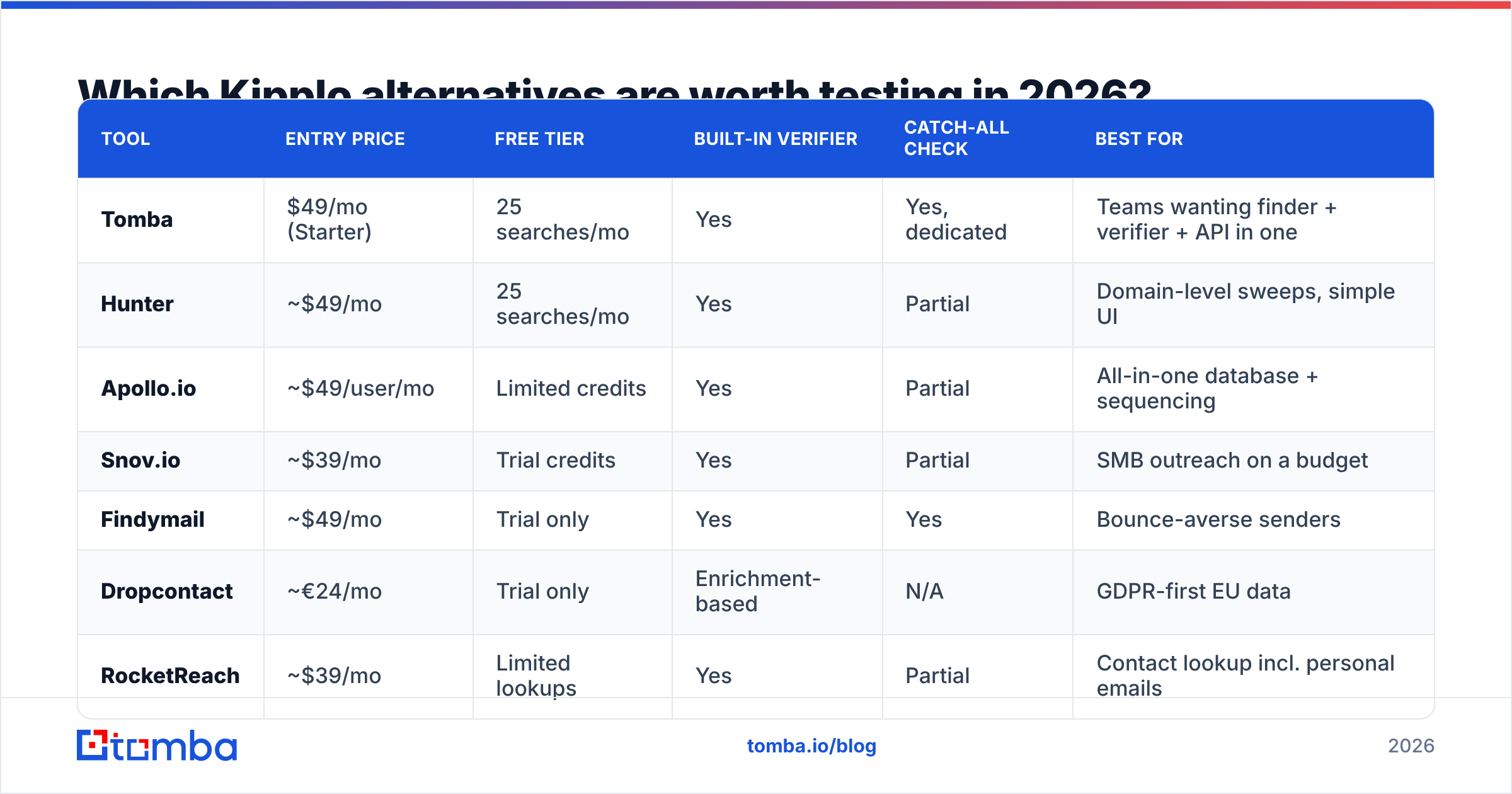
Here is the head-to-head. Prices are entry-level monthly rates at the time of writing — vendors change them, so confirm on the vendor page before you commit.
| Tool | Entry price | Free tier | Built-in verifier | Catch-all check | Best for |
|---|---|---|---|---|---|
| Tomba | $49/mo (Starter) | 25 searches/mo | Yes | Yes, dedicated | Teams wanting finder + verifier + API in one |
| Hunter | ~$49/mo | 25 searches/mo | Yes | Partial | Domain-level sweeps, simple UI |
| Apollo.io | ~$49/user/mo | Limited credits | Yes | Partial | All-in-one database + sequencing |
| Snov.io | ~$39/mo | Trial credits | Yes | Partial | SMB outreach on a budget |
| Findymail | ~$49/mo | Trial only | Yes | Yes | Bounce-averse senders |
| Dropcontact | ~€24/mo | Trial only | Enrichment-based | N/A | GDPR-first EU data |
| RocketReach | ~$39/mo | Limited lookups | Yes | Partial | Contact lookup incl. personal emails |
| BookYourData | Credit packs, no subscription | Sample credits | Yes | Yes | Buying verified lists outright |
| Kipplo | See vendor pricing | Varies | Basic | Limited | Light, low-volume prospecting |
Tomba#
Tomba is the closest thing to a like-for-like upgrade if what you liked about Kipplo was the simplicity and what you disliked was the ceiling. The email finder is the core product, but the email verifier, domain search, catch-all verifier, phone finder, and enrichment all run off the same key. Pricing is Free (25 searches/mo), Starter $49/mo, Growth $99/mo, Pro $249/mo, and Enterprise custom — see the full Tomba pricing breakdown for credit allocations.
The practical argument for Tomba is consolidation. Finder and verifier from two different vendors means two credit pools, two accuracy claims, and no shared logic on catch-all domains. One vendor that does both can reject a guessed address before it ever costs you a verification credit.
Watch out for: if you want sequencing and a dialer in the same tab, Tomba is deliberately not that — it is a data layer you plug into your sender.
Hunter#
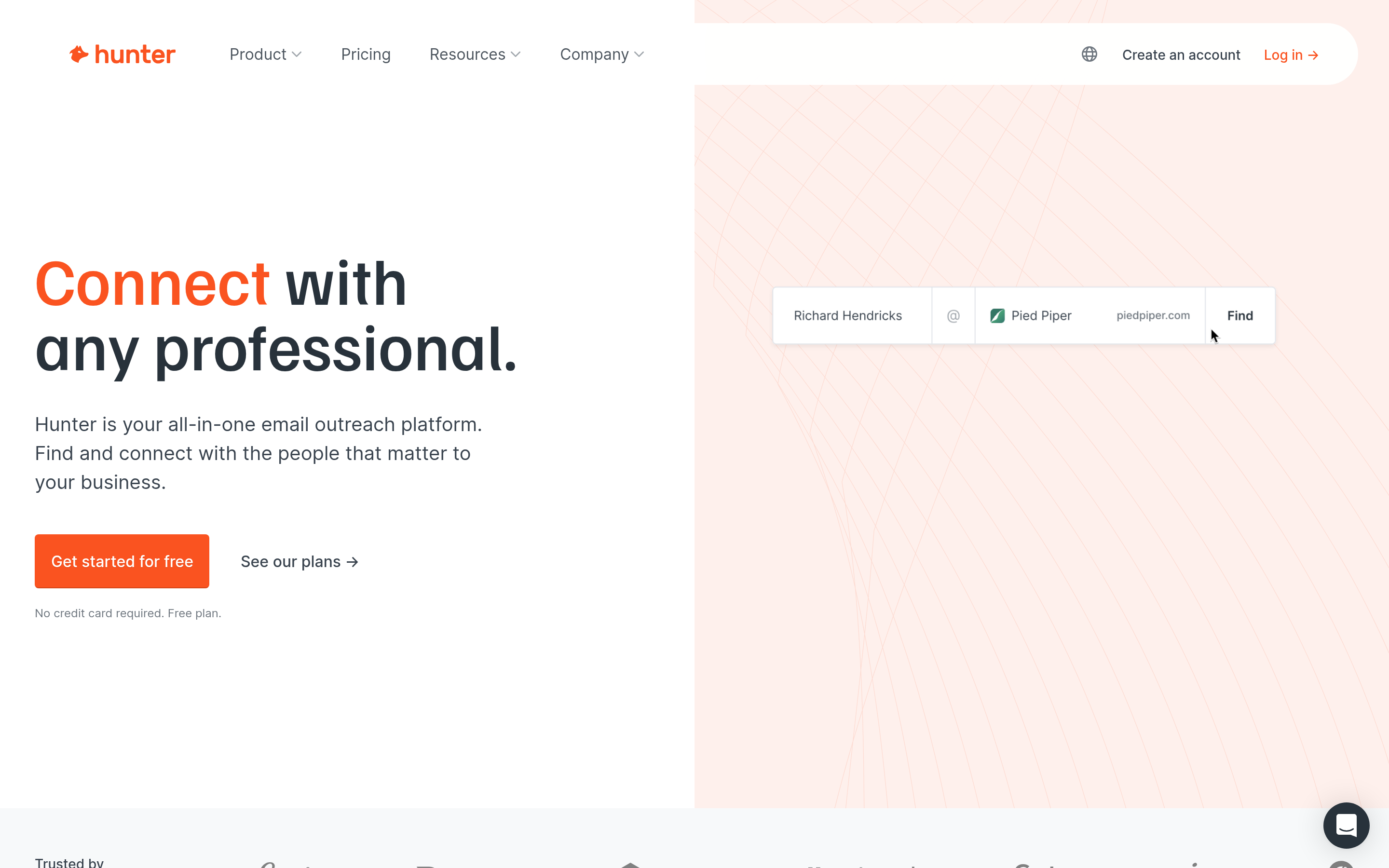
The category's best-known name, and still excellent at the specific job of "show me every public email on this domain." Clean interface, good documentation, generous free tier. Where it gets expensive is bulk: heavy list-building on Hunter's mid-tiers costs more per valid contact than several competitors, and catch-all resolution is thinner than a dedicated catch-all verifier.
Apollo.io#

Apollo is a different product class — a 200M+ contact database with sequencing, dialing, and basic CRM bolted on. If you are replacing Kipplo and your outreach tool, Apollo is the obvious candidate. The trade-off is data freshness on smaller companies and per-seat pricing that scales awkwardly for a two-person team that just wants emails. Teams that find it heavy often look at an Apollo alternative that handles data only.
Snov.io#
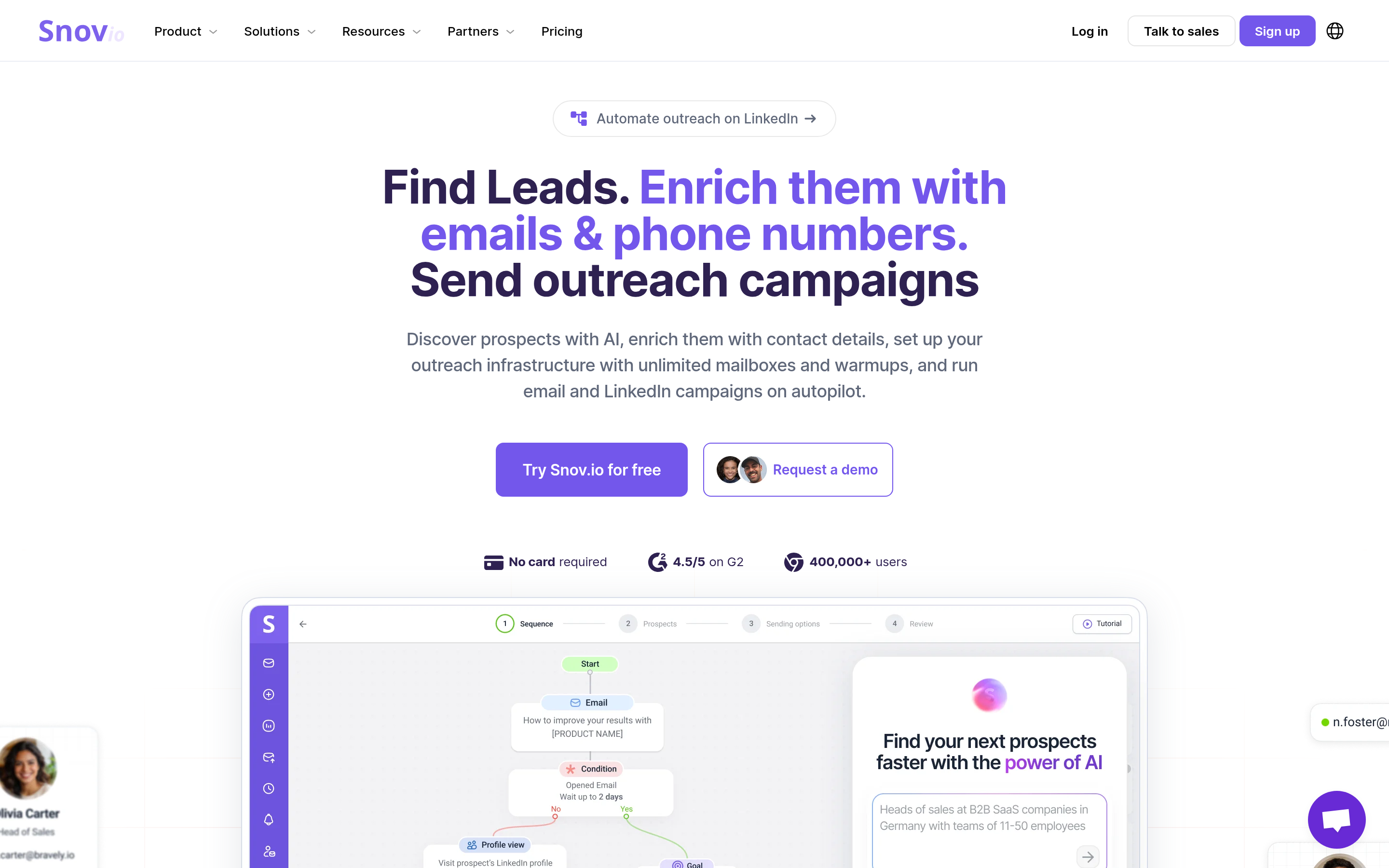
Strong value at the low end, with finder, verifier, drip campaigns, and a Chrome extension in one subscription. Accuracy is middling on European mid-market domains in our experience, and the UI carries a lot of surface area for what most users need. Good first paid tool; less compelling at 50k-contact volumes.
Findymail#
Findymail built its positioning on bounce rates: it would rather return nothing than return a guess. If your sending domain is fragile or you have already been burned by a blacklisting incident, that conservatism is worth paying for. Coverage is correspondingly lower — you will get fewer contacts per list, and you should plan for that.
Dropcontact#
The EU-native option. Dropcontact does not resell a scraped database; it derives and verifies contacts algorithmically, which gives it a cleaner GDPR story than most of this list. Best used as an enrichment layer on accounts you already know, not as a discovery engine.
RocketReach#
Broad coverage including personal emails and phone numbers, which matters for recruiters and for exec-level outreach where the work address is gatekept. Credit costs add up fast, and the interface pushes you toward higher tiers. Worth a look as a RocketReach alternative comparison if coverage is your only concern.
BookYourData#
A different model worth taking seriously: instead of a subscription, you buy verified contact credits outright, filter by industry, title, geography, and company size, and export. Accuracy guarantees are published up front and credits do not expire on the same clock as a monthly plan. For a team that needs 5,000 verified contacts once a quarter rather than a trickle every day, that pay-as-you-go structure is often cheaper and simpler than any SaaS tier here. It pairs well with a finder for the accounts the database does not cover.
How accurate are these tools really?#
Accuracy claims in this market are close to meaningless without a shared test. Every vendor computes "accuracy" differently: some measure against their own verifier, some exclude catch-alls from the denominator, some quietly count "accept-all" as a win.

Run your own benchmark before you sign anything. It takes an afternoon:
- Pull 100 contacts you already have confirmed emails for — past customers, webinar registrants, anyone who has replied to you.
- Strip the emails, keep name + company domain.
- Run the list through each tool's free tier or trial.
- Score three numbers per tool: found rate, exact-match rate against your known-good emails, and catch-all share.
- Multiply found rate by exact-match rate. That product — not the headline coverage number — is what you are actually buying.
The tools cluster differently depending on whose ICP you test. A US-SaaS list and a German-manufacturing list will rank the same eight vendors in a different order. That is exactly why vendor-published benchmarks should not decide this for you.
Which alternative fits your specific use case?#
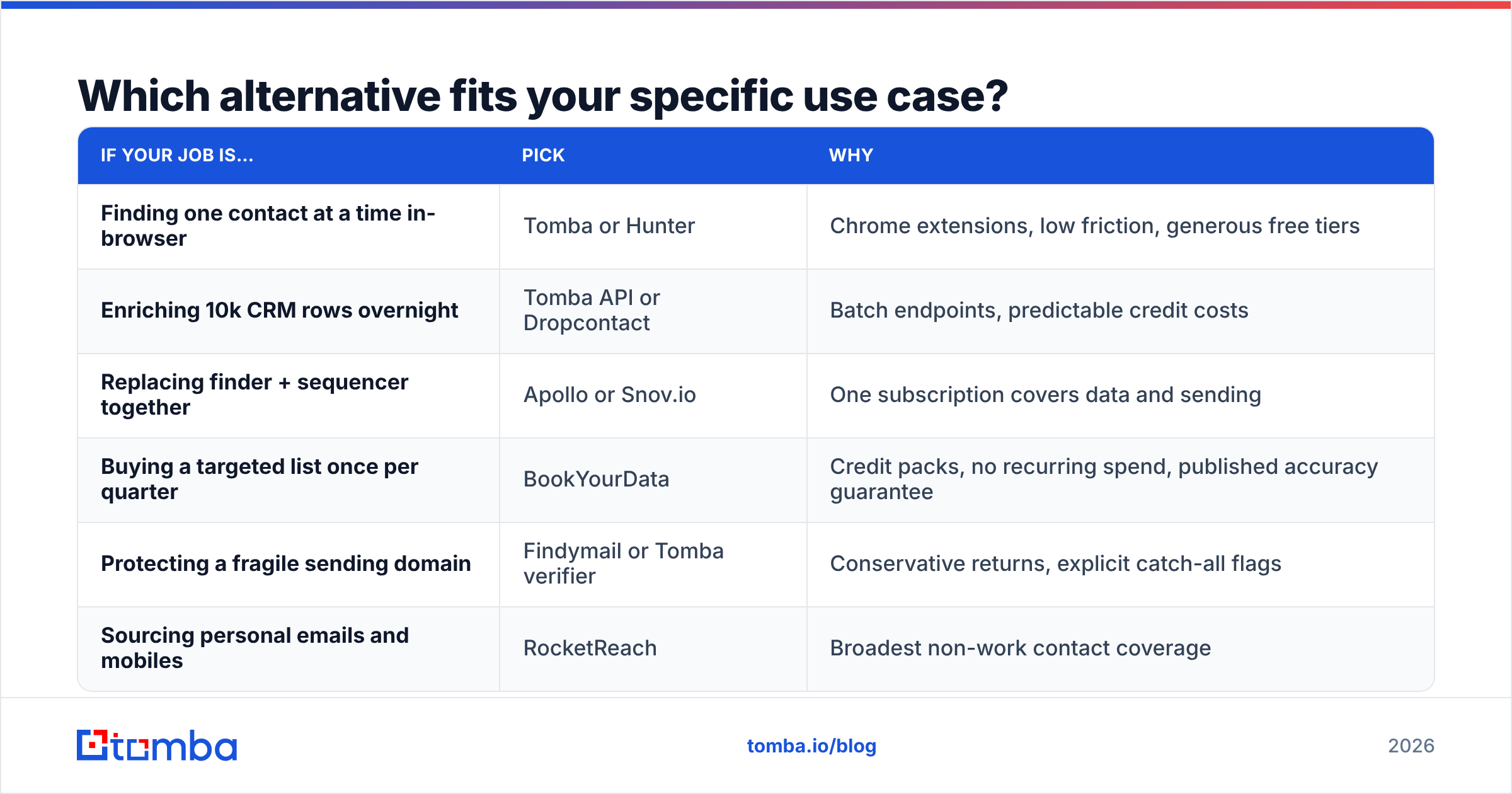
| If your job is… | Pick | Why |
|---|---|---|
| Finding one contact at a time in-browser | Tomba or Hunter | Chrome extensions, low friction, generous free tiers |
| Enriching 10k CRM rows overnight | Tomba API or Dropcontact | Batch endpoints, predictable credit costs |
| Replacing finder + sequencer together | Apollo or Snov.io | One subscription covers data and sending |
| Buying a targeted list once per quarter | BookYourData | Credit packs, no recurring spend, published accuracy guarantee |
| Protecting a fragile sending domain | Findymail or Tomba verifier | Conservative returns, explicit catch-all flags |
| Sourcing personal emails and mobiles | RocketReach | Broadest non-work contact coverage |

Notice that two of these rows are not really "Kipplo alternatives" at all — they are different products that happen to solve the same business problem. If what you need is 5,000 pre-verified contacts in a defined segment, a list vendor beats a finder on both cost and time. If you need to resolve contacts at named target accounts, only a finder will do. Being honest about which problem you have saves a subscription.
How do you switch without breaking your outbound?#
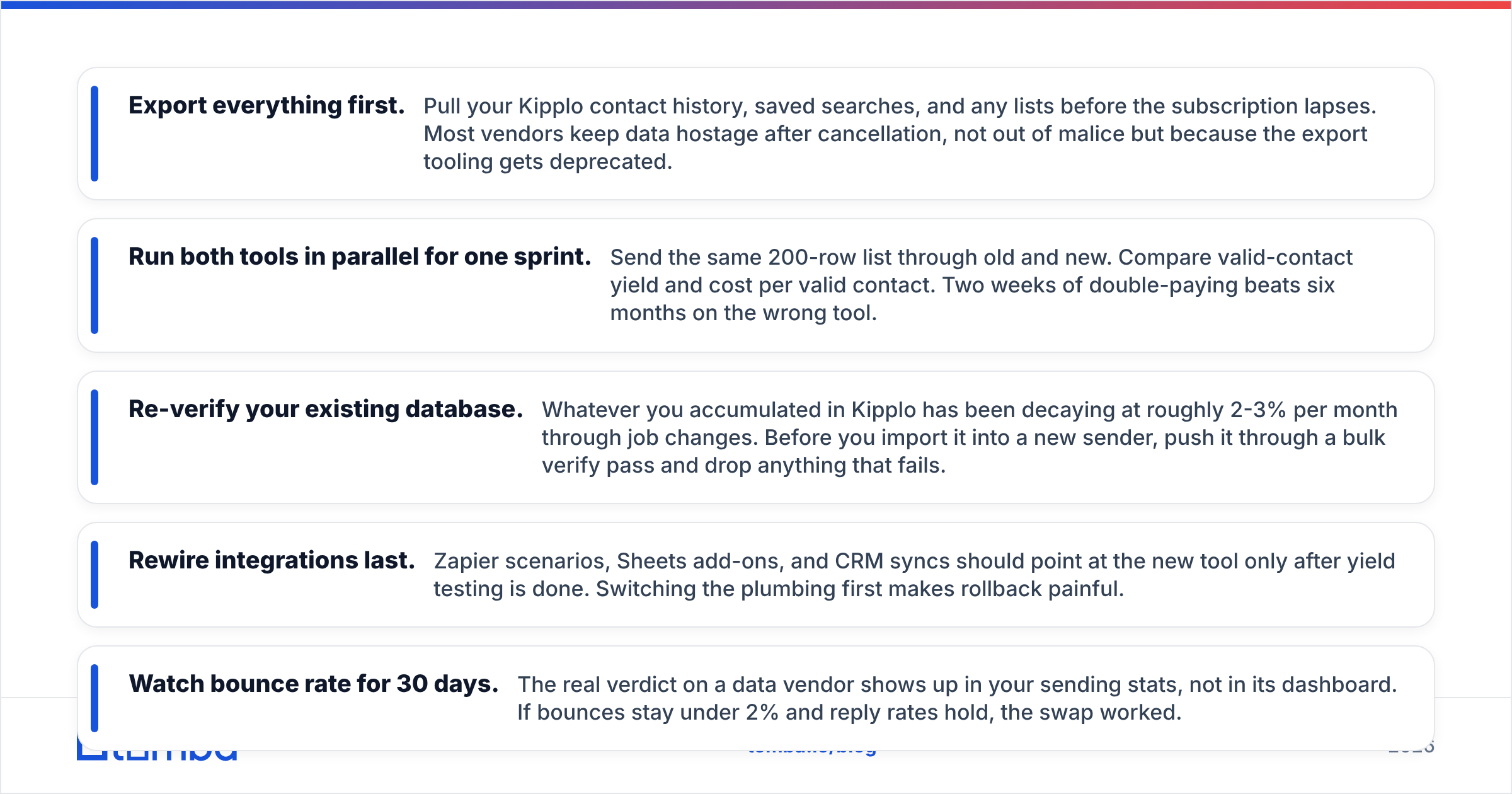
Migration is where teams lose a month. Keep it to a week:
- Export everything first. Pull your Kipplo contact history, saved searches, and any lists before the subscription lapses. Most vendors keep data hostage after cancellation, not out of malice but because the export tooling gets deprecated.
- Run both tools in parallel for one sprint. Send the same 200-row list through old and new. Compare valid-contact yield and cost per valid contact. Two weeks of double-paying beats six months on the wrong tool.
- Re-verify your existing database. Whatever you accumulated in Kipplo has been decaying at roughly 2-3% per month through job changes. Before you import it into a new sender, push it through a bulk verify pass and drop anything that fails.
- Rewire integrations last. Zapier scenarios, Sheets add-ons, and CRM syncs should point at the new tool only after yield testing is done. Switching the plumbing first makes rollback painful.
- Watch bounce rate for 30 days. The real verdict on a data vendor shows up in your sending stats, not in its dashboard. If bounces stay under 2% and reply rates hold, the swap worked.
One more thing worth checking: whether the tool has a maintained API. Cross-referencing vendor reviews on G2 is useful for support responsiveness, which is invisible until you need it at 11pm before a campaign goes out.
What does this all come down to?#
Kipplo is fine at the volume it was designed for. The moment your list-building becomes a repeatable process rather than an occasional task, you need three things it does not fully deliver: verified accuracy you can audit, explicit catch-all handling, and an API that ops can build on without a plan upgrade.
If you want those three in one place, start with the free tier. Tomba's Email Finder gives you 25 searches a month at no cost — enough to run the 100-contact benchmark described above against your own ICP and see the exact-match rate for yourself before you spend anything. If the numbers beat what you are getting today, Starter is $49/mo and includes the verifier, domain search, and catch-all checks on the same key. If they do not, you will have learned that in an afternoon instead of a quarter.
Related guides#
// get started
Find, verify and enrich your first contacts today
Start on the free plan with 25 searches a month, then scale when your team is ready.
Free plan · No credit card required · GDPR & CCPA
// about the author