Kipplo vs Minelead: Which Email Finder Wins in 2026?
Kipplo and Minelead both promise cheap email discovery, but they solve different problems. Here is an honest breakdown of accuracy, pricing, API depth, and where each one quietly falls short.
TL;DR
- Kipplo is a lightweight, low-cost email finder aimed at solo founders and small agencies who need a few hundred addresses a month without a contract.
- Minelead is a freemium domain-search tool with a generous free tier and a simple API, popular with developers who want to script lookups cheaply.
- Neither tool publishes independently audited accuracy rates, and both lean heavily on pattern inference rather than deep verification — which is where bounce rates come from.
- If you send under ~200 emails a month, either free tier is fine. Above that, the cost of a 6-8% bounce rate exceeds the money you saved on the tool.
- For teams that need verified deliverability, catch-all handling, and a documented API, a mid-market option like Tomba is the more defensible choice at $49/mo.
What are Kipplo and Minelead?#
Both tools answer the same question — "what is this person's work email?" — but they arrived from different directions.
Minelead (minelead.io) started as a domain-search utility. You paste a company domain, it returns the email addresses it has associated with that domain, along with a guessed pattern (first.last@, finitial.last@, and so on). It has a public API, a Chrome extension, and a free tier that most competitors do not match. Developers like it because you can wire it into a script in about ten minutes.
Kipplo is the newer, more sales-facing of the two. It positions itself as an affordable prospecting layer: find emails, run a basic verification pass, export a CSV. The interface is simpler, the onboarding is faster, and the pricing is aimed squarely at people who found Apollo and ZoomInfo too expensive.
The honest framing: these are both budget-tier tools. That is not an insult. A budget tool that does one job cleanly beats an enterprise platform you never fully configure. But you should buy them knowing what the budget tier costs you downstream.

How do Kipplo and Minelead actually find emails?#
Every email finder uses some blend of four techniques. The mix determines your bounce rate.
- Pattern inference — The tool knows that
acme.comusesfirst.last@acme.com, so given "Dana Whitfield" it constructsdana.whitfield@acme.com. Cheap, fast, and wrong maybe 15-25% of the time on its own. - Web crawling — Scraping public pages, press releases, GitHub commits, and PDFs for literal email strings. High confidence when it hits, but coverage skews toward technical and marketing roles.
- SMTP validation — Opening a conversation with the receiving mail server and asking whether the mailbox exists, without sending anything. This is what separates a guess from a verified address.
- Contributed and licensed data — Pooled data from extension users, partners, and licensed B2B databases, continuously re-checked.
Minelead is strongest on (1) and (2). Its domain search is genuinely useful for getting a fast read on a company's email format, and its free tier makes it painless to test. Kipplo adds a lightweight pass at (3), which is why its results tend to feel a bit more trustworthy on first use — though it does not expose confidence scoring in the detail that enterprise buyers expect.
Where both tools thin out is (4). Neither publishes a data-sourcing page comparable to what larger vendors maintain, and neither documents how often records are re-verified. If you want to see what that disclosure looks like when a vendor does it, compare against a published data sources page — the level of detail is the tell.

Above: relative accuracy across common email-finding approaches. Pattern-only tools cluster at the low end.
Kipplo vs Minelead: how do they compare head to head?#
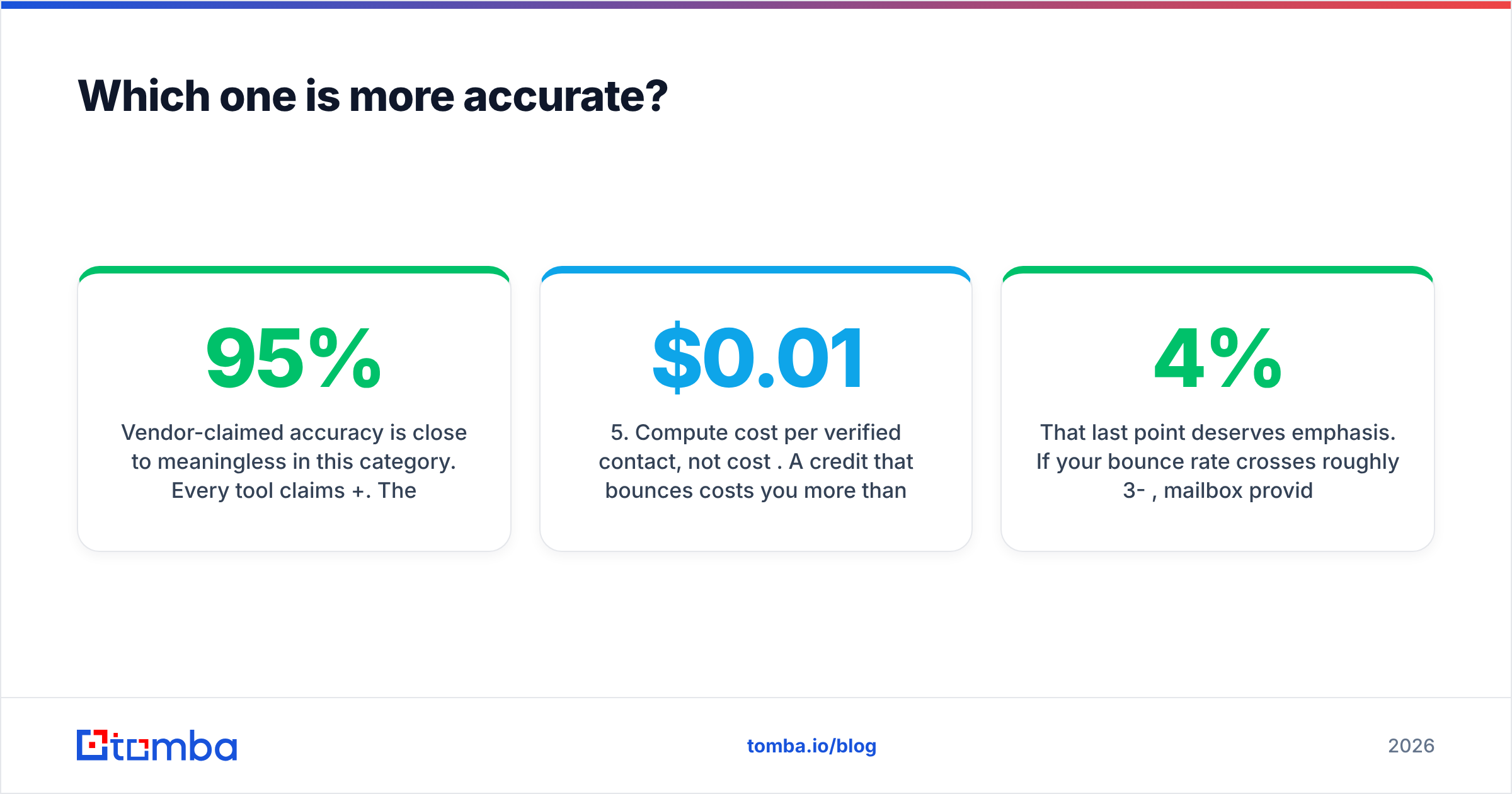
Here is the practical comparison. Pricing for Kipplo and Minelead moves frequently at this tier, so treat the figures as indicative and confirm on their sites before you buy.
| Attribute | Kipplo | Minelead | Tomba |
|---|---|---|---|
| Primary strength | Simple prospecting UI | Domain search + free API | Verified finding at scale |
| Free tier | Limited trial credits | Generous free lookups | 25 searches/mo |
| Entry paid plan | Low-cost monthly tier | Low-cost monthly tier | $49/mo (Starter) |
| Mid plan | Not clearly tiered | Volume-based | $99/mo (Growth) |
| SMTP verification | Basic pass | Limited | Full verifier, separate product |
| Catch-all handling | Not documented | Not documented | Dedicated catch-all verifier |
| Bulk CSV enrichment | Yes | Yes | Yes, with bulk API |
| Public REST API | Limited | Yes, developer-friendly | Documented, versioned |
| Chrome extension | Yes | Yes | Yes |
| Phone numbers | No | No | Yes |
| Native CRM integrations | Minimal | Minimal | HubSpot, Salesforce, Pipedrive, Zapier |
| Best for | Solo founders, light use | Developers scripting lookups | Teams sending 1k+/mo |

Read that table as three lanes rather than a ranking. Minelead wins on "let me test this in an afternoon for free." Kipplo wins on "I want a clean UI and I do not want to think about API keys." Tomba wins when the cost of a bad address starts to exceed the cost of the tool.
Which one is more accurate?#
Short answer: neither publishes numbers you can audit, and that itself is the finding.
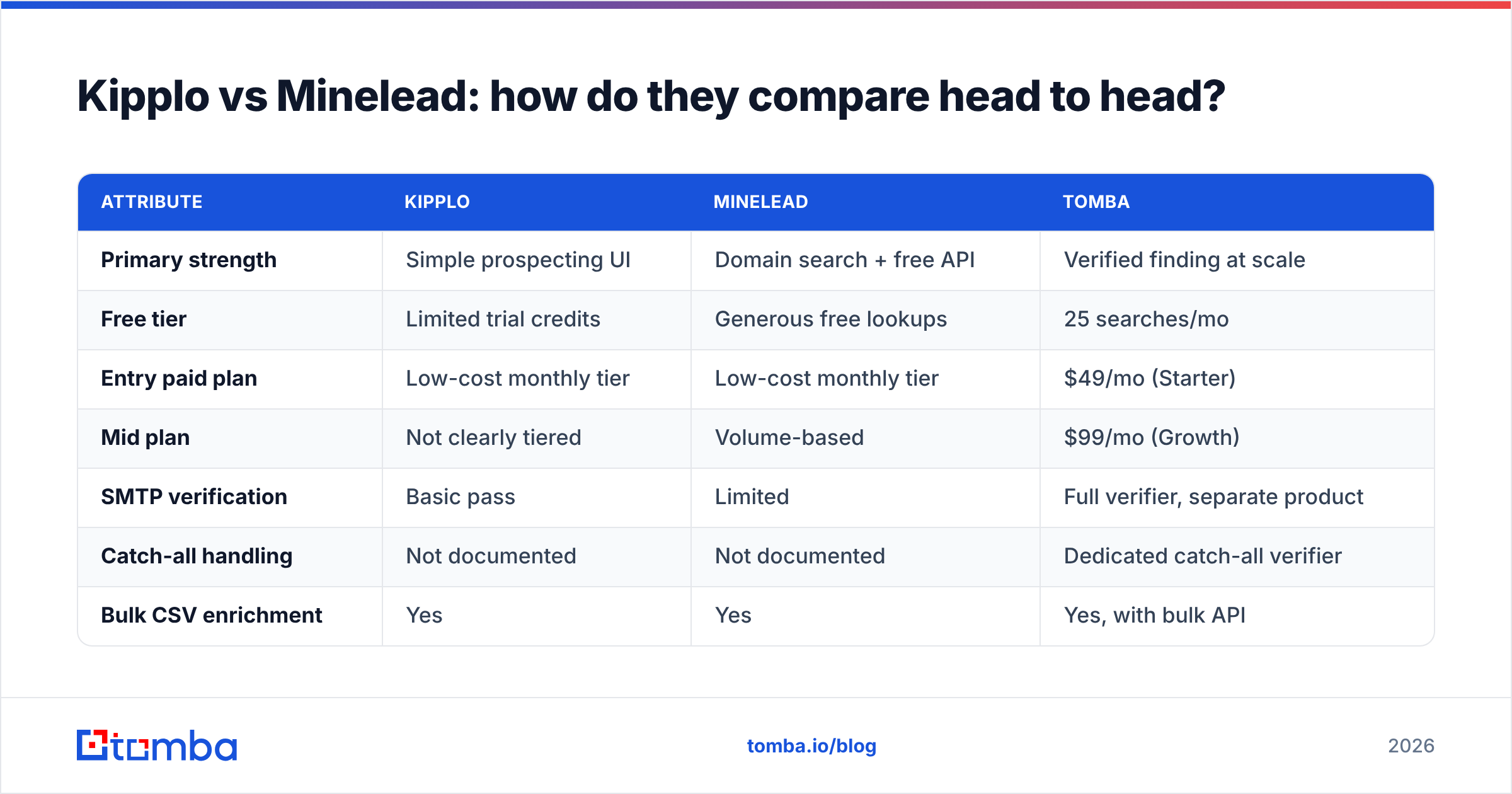
Vendor-claimed accuracy is close to meaningless in this category. Every tool claims 95%+. The claims are not comparable because vendors define the denominator differently — some count only "found" results, excluding the searches that returned nothing. A tool that returns an address 40% of the time with 97% accuracy is worse for your pipeline than one that returns 75% of the time at 92%.
Run your own test instead. It takes an hour:
- Build a 100-row control list. Pull names and companies you can independently verify — customers, past colleagues, people whose emails are already in your CRM.
- Run the same list through each tool. Record both the hit rate (how many returned anything) and the accuracy (how many matched the known address).
- Send a small verification batch. Use a warmed inbox, 20 addresses, and measure hard bounces. This catches the addresses that are syntactically fine but dead.
- Score the catch-all results separately. Catch-all domains accept everything at the SMTP layer, so most tools mark them "valid" or "unknown." How a vendor handles them is the single biggest differentiator in real bounce rates.
- Compute cost per verified contact, not cost per credit. A $0.01 credit that bounces costs you more than a $0.04 credit that lands.
That last point deserves emphasis. If your bounce rate crosses roughly 3-4%, mailbox providers start throttling you, and sender reputation damage takes weeks to repair. Google and Yahoo's bulk sender requirements formalized this — the current guidance from Google's sender guidelines puts a hard ceiling on spam complaints and expects clean lists as a baseline, not a nice-to-have.
What does the API story look like for each?#
If you are embedding email lookup into a product or an internal workflow, the API matters more than the UI.
Minelead's API is the reason many developers find it. It is straightforward: authenticate, pass a domain or a name-plus-domain, get JSON back. Rate limits on the free tier are real but workable for prototyping. Documentation is adequate rather than exhaustive — you will figure out edge cases by experimenting.
Kipplo's API is less central to the product. It exists, but the tool's center of gravity is the web app and the extension. If your plan is "script 10,000 lookups overnight," verify the rate limits with their support before you commit.
For comparison, a production-grade API in this category should give you: versioned endpoints, per-result confidence scores, separate finder and verifier calls, bulk submission with webhooks, and SDKs in at least three languages. The Tomba API and its companion bulk email finder are built around that shape, and there is a Tomba CLI for people who would rather stay in a terminal.
One practical warning that applies to every tool here: never ship an email finder into production without a separate verification step. Finding and verifying are different operations with different failure modes. Running found addresses through a dedicated email verifier before they hit your sequencer is the single highest-ROI habit in outbound.

Who should choose Kipplo, and who should choose Minelead?#
Choose Minelead if:
- You are a developer who wants to test email lookup logic without a credit card.
- Your use case is domain-level research — "what format does this company use?" — more than person-level targeting.
- Volume is low and irregular, so a free tier beats a subscription.
- You are comfortable building your own verification layer on top.
Choose Kipplo if:
- You want a UI you can hand to a non-technical teammate.
- You prospect in small, deliberate batches rather than running thousands of lookups.
- You value speed of setup over depth of features.
- Your list quality requirements are forgiving — warm intros, partner outreach, recruiting.
Choose neither if:
- You send more than 1,000 cold emails a month. At that volume, a 7% bounce rate is 70 damaging sends, and no free tier compensates for a throttled domain.
- You need phone numbers alongside emails. Neither tool covers this; a phone finder is a separate purchase.
- Your CRM is the system of record and you need native sync rather than CSV round-trips.
- Compliance matters. Enterprise buyers will ask where the data came from, and "we scrape the web" is not a sufficient answer for a GDPR review. Vendor evaluation checklists from sources like G2 and Capterra now weight data provenance heavily.
How do these compare to the broader market?#
Worth zooming out. The email-finding market has roughly four tiers in 2026:
- Free and freemium utilities — Minelead, Kipplo, and a long tail of Chrome extensions. Good for testing, weak on verification depth and support.
- Focused mid-market finders — Tomba, Findymail, Hunter. Real verification, documented APIs, $40-150/mo. This is where most outbound teams land.
- Verified B2B databases — BookYourData and similar providers sell pre-verified, downloadable lists with accuracy guarantees, which is a genuinely different purchase from a per-lookup finder. If your workflow is "buy a list, load it, send," that model can beat lookup tools on time-to-first-send.
- Full GTM platforms — Apollo, ZoomInfo, Clay. Sequencing, intent data, enrichment, and a price tag to match.
Most teams over-buy at tier four and under-buy at tier one. The mid-market exists because it solves the actual constraint: you need addresses that land, at a price that survives a CFO conversation. If you are currently evaluating an Apollo alternative or shopping a Findymail alternative, you are already in that lane.
What should you actually do next?#
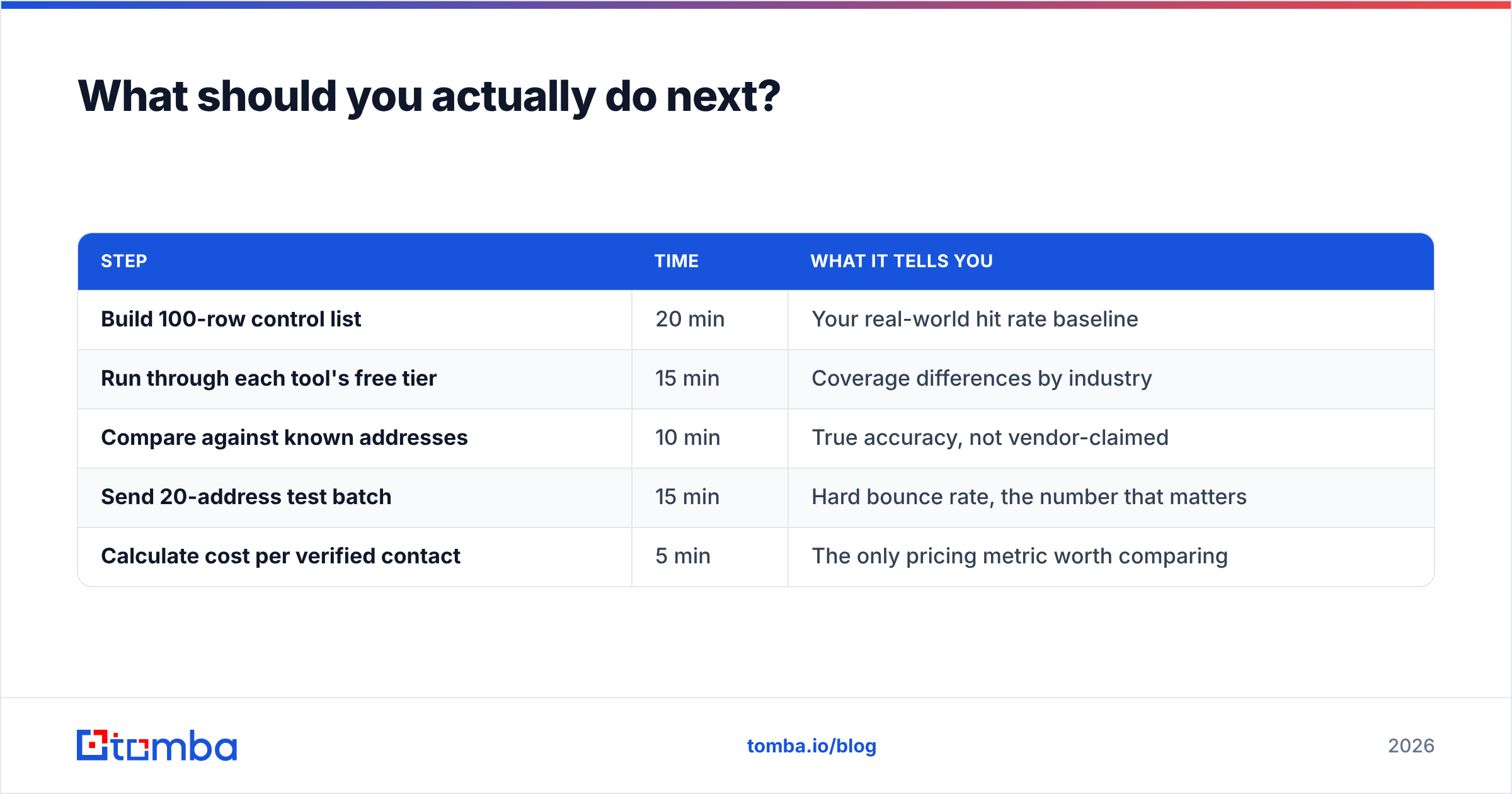
Run the hour-long bake-off described above before you pay anyone. Concretely:
| Step | Time | What it tells you |
|---|---|---|
| Build 100-row control list | 20 min | Your real-world hit rate baseline |
| Run through each tool's free tier | 15 min | Coverage differences by industry |
| Compare against known addresses | 10 min | True accuracy, not vendor-claimed |
| Send 20-address test batch | 15 min | Hard bounce rate, the number that matters |
| Calculate cost per verified contact | 5 min | The only pricing metric worth comparing |
If Minelead's free tier covers your volume, use it and move on — there is no prize for paying more. If you are scaling past a few hundred lookups a month, price the bounce risk into your decision rather than treating it as a rounding error.
The verdict#
Minelead edges Kipplo for developers; Kipplo edges Minelead for non-technical users; both are outgrown quickly. That is the honest read. Minelead's free API and domain search make it the better sandbox. Kipplo's cleaner interface makes it the better first tool for someone who has never done outbound. Neither is built for the moment your outbound program becomes a real channel with a real number attached to it.
When that moment comes, what you need is not a cheaper lookup — it is a verified one, with catch-all handling, a documented API, and a domain search that returns full org charts rather than three scraped addresses.
Ready to test the difference? Start with the Tomba Email Finder free tier — 25 searches a month, no card required — and run it against the same control list you use for Kipplo and Minelead. Compare hit rate, accuracy, and bounce rate side by side. If the numbers justify it, the Starter plan is $49/mo; full Tomba pricing scales to Growth at $99/mo and Pro at $249/mo. Let the control list decide, not the marketing page.
Related guides#
// get started
Find, verify and enrich your first contacts today
Start on the free plan with 25 searches a month, then scale when your team is ready.
Free plan · No credit card required · GDPR & CCPA
// about the author