Klenty Chrome Extension: Honest 2026 Review and Setup Guide
The Klenty Chrome extension pulls prospects from LinkedIn into cadences in two clicks — but credits, data accuracy, and plan gates decide whether it actually saves you time. Here's the full breakdown.
TL;DR
- The Klenty Chrome extension is a sidebar that sits on LinkedIn, Gmail, and your CRM, letting you push a prospect into a Klenty cadence without leaving the tab.
- Its strongest job is workflow — one-click add-to-cadence, template insertion in Gmail, and CRM context lookups. Its weakest job is data: email discovery is bundled and credit-metered, not best-in-class.
- You need a paid Klenty seat to get real value. The extension is not a standalone email finder and has no meaningful free mode.
- Most teams that run it well pair it with a dedicated email finder for sourcing and let Klenty handle sequencing and replies.
- If you mostly need accurate emails at volume, a finder-first stack (Tomba + your sequencer of choice) costs less and verifies better than buying seats for data you already have.
What is the Klenty Chrome extension?#
Klenty is a sales engagement platform — cadences, multichannel steps, reply detection, CRM sync. The Klenty Chrome extension is the browser-side arm of that platform. Install it, sign in with your Klenty account, and a panel appears on top of the pages where prospecting actually happens.
Think of it like the card reader at a restaurant. The kitchen (Klenty's cadence engine) does the real work; the reader just lets you take payment at the table instead of walking to the counter. The extension doesn't add new capability so much as remove trips.
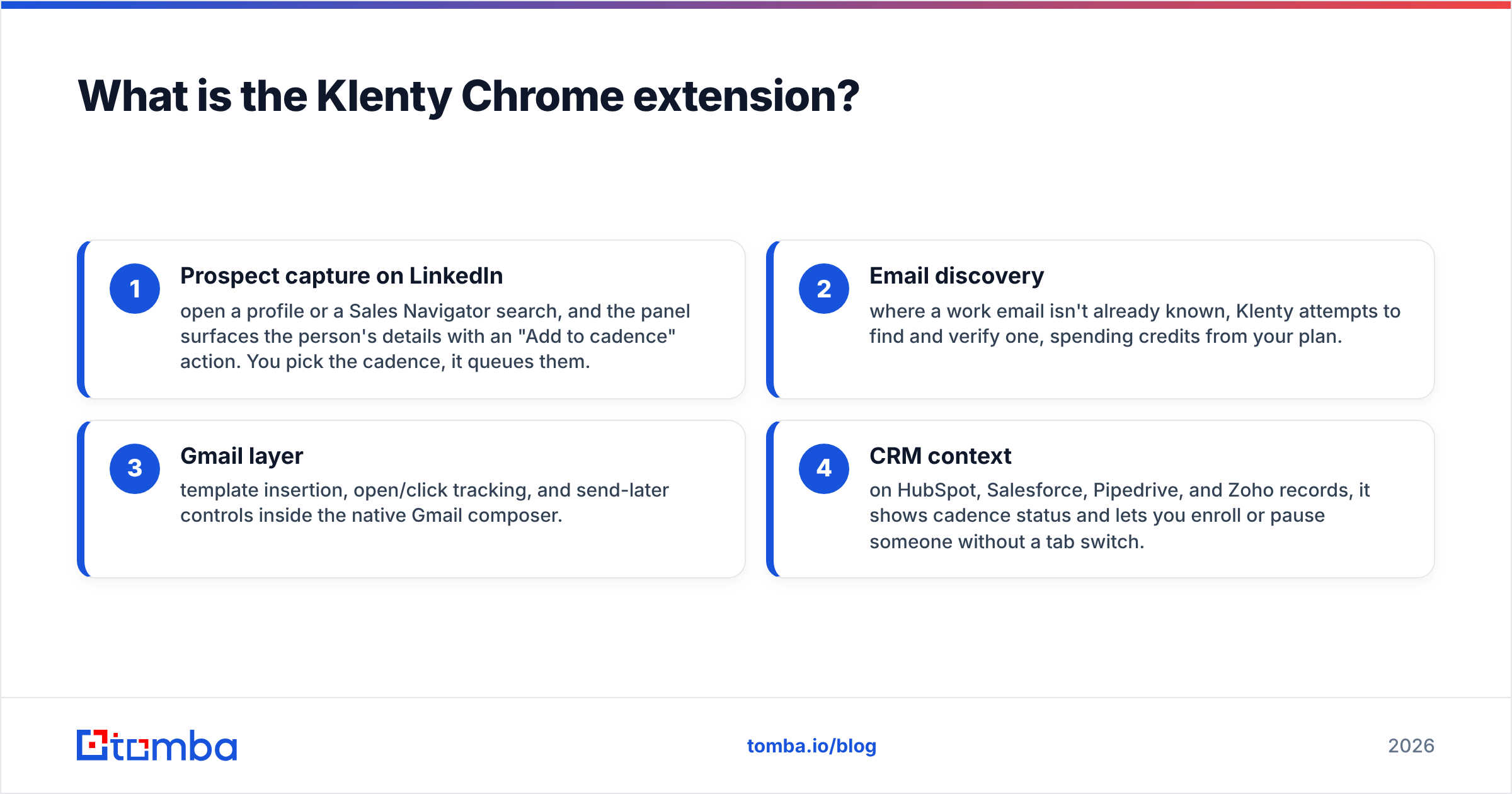
Concretely, it does four things:
- Prospect capture on LinkedIn — open a profile or a Sales Navigator search, and the panel surfaces the person's details with an "Add to cadence" action. You pick the cadence, it queues them.
- Email discovery — where a work email isn't already known, Klenty attempts to find and verify one, spending credits from your plan.
- Gmail layer — template insertion, open/click tracking, and send-later controls inside the native Gmail composer.
- CRM context — on HubSpot, Salesforce, Pipedrive, and Zoho records, it shows cadence status and lets you enroll or pause someone without a tab switch.
That's the whole surface area. It is deliberately narrow, and knowing that up front saves you from expecting a data platform.
How does the Klenty Chrome extension actually work?#
The mechanic is simple: the extension reads the page you're on, matches it to a person or company record, and talks to Klenty's API on your behalf.
On a LinkedIn profile. It parses the visible name, title, and company, then queries Klenty's data layer for a matching work email. If it finds one, the panel shows it with a confidence indicator. You choose a cadence and the prospect lands in Klenty with the scraped fields mapped to merge tags — first name, company, title, and whatever custom fields you've configured.
On a Sales Navigator list. You can select multiple results and push them in a batch. This is where most of the time savings live. A rep working a 25-result search page can queue the whole page in under a minute, versus exporting to CSV, cleaning it, enriching it, and re-uploading.
In Gmail. The extension injects controls into the composer. You insert a Klenty template, it renders your merge fields against the contact record, and the send is logged back to the cadence so reply detection doesn't double-send.
On a CRM record. It reads the contact's email, checks whether that address is already in a Klenty cadence, and shows the current step and last activity.
Two failure modes matter here. First, LinkedIn changes its DOM regularly, and every LinkedIn-scraping extension — Klenty's included — breaks periodically until a patch ships. Second, batch actions on Sales Navigator are the kind of thing LinkedIn's automated-activity detection watches. Klenty is more conservative than the aggressive LinkedIn automation tools, but "conservative" is not "zero risk." Keep your daily view-and-capture volume in a range a human could plausibly hit.
What does the Klenty Chrome extension cost?#
Nothing on its own, and that's the trap in the question. The extension is free to install and useless without a Klenty seat. The real question is what a seat costs and which features are gated.
Klenty publishes seat-based tiers. Broadly: an entry tier covering core email cadences, a mid tier that adds multichannel steps and CRM sync depth, and a top tier for teams that need advanced routing, conversation intelligence, and stricter admin controls. Data credits are metered on top, and email-finding through the extension draws from that meter.
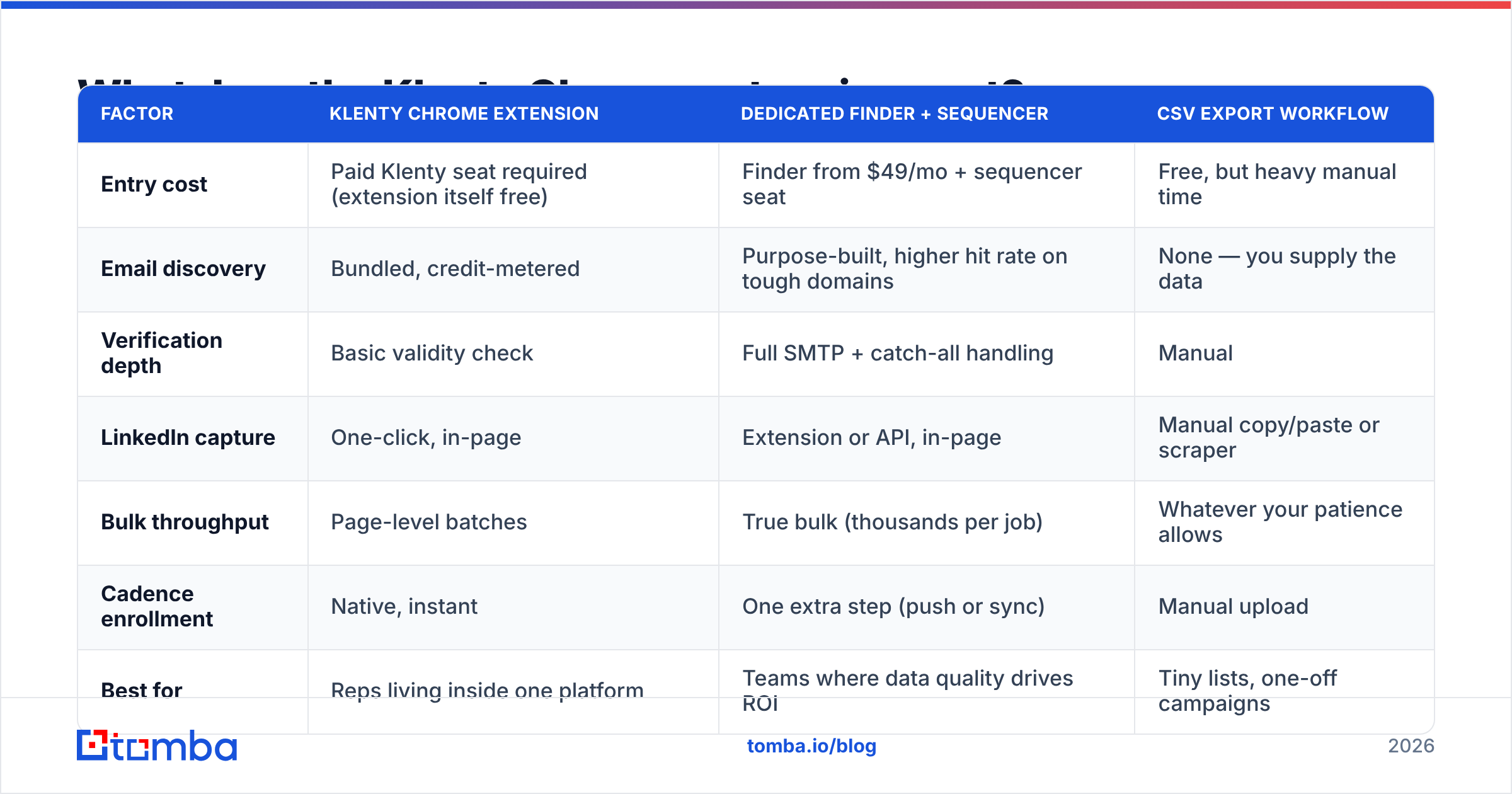
Here is how the extension's role compares against the two other common ways to get prospects from LinkedIn into an outbound sequence.
| Factor | Klenty Chrome extension | Dedicated finder + sequencer | CSV export workflow |
|---|---|---|---|
| Entry cost | Paid Klenty seat required (extension itself free) | Finder from $49/mo + sequencer seat | Free, but heavy manual time |
| Email discovery | Bundled, credit-metered | Purpose-built, higher hit rate on tough domains | None — you supply the data |
| Verification depth | Basic validity check | Full SMTP + catch-all handling | Manual |
| LinkedIn capture | One-click, in-page | Extension or API, in-page | Manual copy/paste or scraper |
| Bulk throughput | Page-level batches | True bulk (thousands per job) | Whatever your patience allows |
| Cadence enrollment | Native, instant | One extra step (push or sync) | Manual upload |
| Best for | Reps living inside one platform | Teams where data quality drives ROI | Tiny lists, one-off campaigns |
The pattern most teams land on: the extension is excellent at enrollment and merely adequate at discovery. If your list-building is the bottleneck, buying more Klenty seats is an expensive way to buy data.
Is the Klenty extension better than using a dedicated email finder?#
For the job of "get this person into a cadence right now," yes. For the job of "build me 3,000 verified contacts for a segment," no — and it isn't designed for that.
Sales engagement platforms treat data as a convenience feature. Their pricing model is seats, so data credits are a bundled sweetener, and the underlying match rates reflect that. Dedicated finders make data the product, which changes the engineering priorities: pattern detection across millions of domains, SMTP verification depth, catch-all handling, and source transparency.
The difference shows up on the hard cases. Common consumer-facing domains resolve fine anywhere. What separates tools is the long tail — European mid-market companies, agencies on custom domains, firms running catch-all servers that accept every address and tell you nothing.
That last category is where most cold email lists quietly die. A catch-all domain returns "valid" for asdfgh@company.com just as readily as for the real CEO. If your verification layer can't distinguish those, you're loading garbage into a cadence and paying for it with sender reputation. A catch-all verifier exists precisely because the naive SMTP check is insufficient.

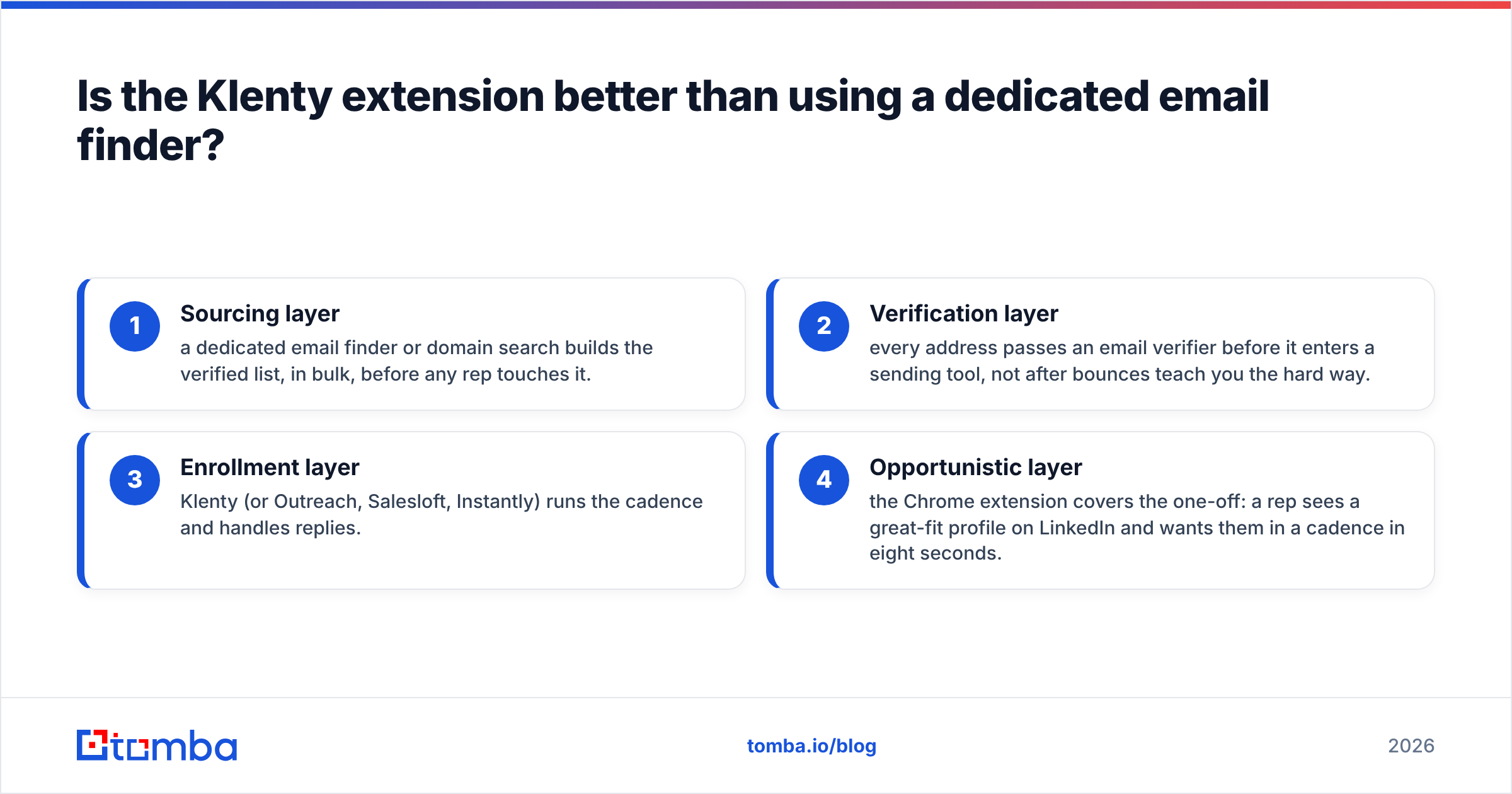
The practical split most mature teams run:
- Sourcing layer — a dedicated email finder or domain search builds the verified list, in bulk, before any rep touches it.
- Verification layer — every address passes an email verifier before it enters a sending tool, not after bounces teach you the hard way.
- Enrollment layer — Klenty (or Outreach, Salesloft, Instantly) runs the cadence and handles replies.
- Opportunistic layer — the Chrome extension covers the one-off: a rep sees a great-fit profile on LinkedIn and wants them in a cadence in eight seconds.
Each layer does one thing well. Collapsing sourcing into your sequencer feels tidy, but you pay for it in match rate.
How do you set up the Klenty Chrome extension properly?#
Most of the complaints about the extension trace back to setup, not the software. Do these in order.
Step 1 — Install and authenticate. Add it from the Chrome Web Store, sign in with the same account tied to your Klenty seat. If your org uses SSO, complete the SSO flow in a normal tab first so the extension inherits the session.
Step 2 — Map your merge fields before your first capture. This is the step people skip. Decide now which LinkedIn fields map to which Klenty custom fields. If {{company}} is going to pull LinkedIn's raw company string, you'll get "Acme Corporation Inc. | Series B" in your subject lines. Clean the mapping once, or clean 400 records later.
Step 3 — Set a daily capture ceiling. Pick a number you'd be comfortable defending as human activity. Many teams cap LinkedIn-sourced adds around 40–60 per rep per day.
Step 4 — Route captures into a staging cadence, not a live one. Have the extension drop new prospects into a paused or review cadence. A human (or an automation) checks email validity and fit, then promotes them. This single habit prevents the most common disaster: a mistyped capture emailing the wrong person from your primary domain.
Step 5 — Verify before the first send. Run the batch through a verifier. Klenty's inline check catches obvious invalids; it will not reliably resolve catch-alls. If bounce rate creeps above roughly 2%, your email deliverability is already being taxed.
Step 6 — Audit weekly. Check captured-vs-enrolled counts, bounce rate by source, and reply rate on extension-sourced prospects versus bulk-imported ones. If extension-sourced prospects bounce meaningfully more, your discovery layer is the problem, not your copy.

What do users actually complain about?#
Reading across G2 and Capterra reviews, the same themes repeat for Klenty and, honestly, for every tool in this category:
- Credit burn is faster than expected. Every profile view that triggers a lookup spends something, whether or not you enroll the person. Reps browsing casually with the panel open can chew through a month's allocation in a week.
- LinkedIn breakage. Periodic multi-day windows where capture silently fails or returns partial fields after a LinkedIn UI change.
- Match rate on non-US companies. Strong on large US tech, noticeably weaker on European SMBs and non-English-domain companies.
- Field mapping quirks. Titles and company names come in with LinkedIn's formatting noise unless you normalize them.
- It's a seat, not a tool. Teams that wanted "an email finder in my browser" find they've bought a sales engagement platform.
None of these are disqualifying. They're the predictable consequences of a bundled-data model. The fix is architectural: stop asking your sequencer to be your data vendor.
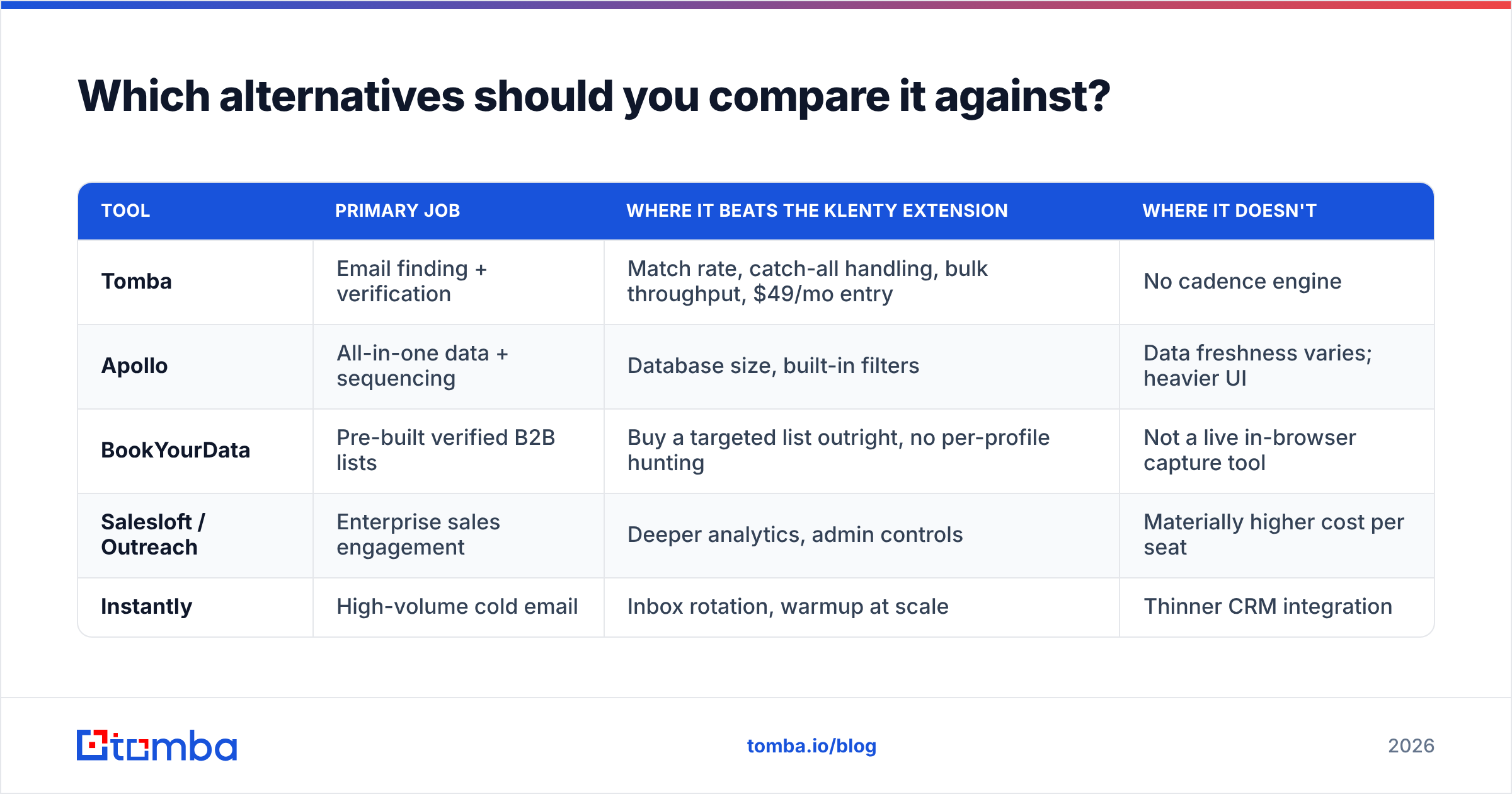
Which alternatives should you compare it against?#
Depends entirely on which job you're hiring for.
| Tool | Primary job | Where it beats the Klenty extension | Where it doesn't |
|---|---|---|---|
| Tomba | Email finding + verification | Match rate, catch-all handling, bulk throughput, $49/mo entry | No cadence engine |
| Apollo | All-in-one data + sequencing | Database size, built-in filters | Data freshness varies; heavier UI |
| BookYourData | Pre-built verified B2B lists | Buy a targeted list outright, no per-profile hunting | Not a live in-browser capture tool |
| Salesloft / Outreach | Enterprise sales engagement | Deeper analytics, admin controls | Materially higher cost per seat |
| Instantly | High-volume cold email | Inbox rotation, warmup at scale | Thinner CRM integration |
For most mid-market teams, the honest answer is that Klenty's extension and a dedicated finder aren't competitors — they occupy different slots. The competition is between which data source feeds the cadence.
If you're specifically evaluating who replaces the data slot, the usual short list is Tomba, an Apollo alternative setup, or buying curated lists from BookYourData, which does the list-building well when you know your ICP precisely and want it delivered rather than hunted.

Who should actually use the Klenty Chrome extension?#
Use it if:
- You already pay for Klenty seats and your reps live in cadences all day.
- Your prospecting is opportunistic and profile-by-profile rather than list-driven.
- Your ICP skews US, mid-to-large company, common tech stack — the sweet spot for bundled data.
- CRM hygiene matters and you want enrollment state visible on the record.
Skip it if:
- You need thousands of verified contacts per month. Use a bulk email finder and import.
- Your targets are European SMBs, agencies, or catch-all-heavy domains.
- You want a browser email finder without committing to a platform seat.
- Your bounce rate is already above 3% — fix the data layer first; a faster path to bad addresses makes things worse, not better.
How do you build the stack that actually works?#
The version that holds up at scale looks like this:
- Define the segment precisely. Industry, size, geo, tech signals, role. Vagueness here multiplies every downstream cost.
- Source in bulk, not one by one. Run domain search across your target account list to pull every reachable contact, then filter by role.
- Verify everything, including catch-alls. Non-negotiable. Anything ambiguous goes to a LinkedIn-only or phone-only track instead of email.
- Enrich for personalization. Titles, seniority, company signals — the fields your merge tags actually need. Data enrichment fills the gaps LinkedIn scraping leaves.
- Load into Klenty and let it run. Cadences, reply detection, CRM sync — this is what you pay seats for.
- Use the extension for the exceptions. The great-fit profile a rep stumbles onto. That's a real use case, and the extension nails it.
Step 6 is worth about five hours a month per rep. Steps 1–4 are worth your entire campaign outcome. Budget accordingly.
Final verdict#
The Klenty Chrome extension is a good workflow tool attached to a decent sales engagement platform. It saves real time on enrollment and CRM context, and it's genuinely pleasant on Sales Navigator. What it isn't — and never claimed to be — is a competitive email data source. Judging it by that standard is a category error; buying it as that is an expensive mistake.
Split the jobs. Let Klenty sequence. Let a purpose-built finder feed it.
If the data layer is where your outbound is leaking, start there. The Tomba Email Finder resolves work emails by name, company, or domain with SMTP-level verification and explicit catch-all handling, starting free at 25 searches a month and $49/mo on Starter — see Tomba pricing for the full breakdown. Build a clean list first, then let your cadence tool do the only job it was ever good at.
Related guides#
// get started
Find, verify and enrich your first contacts today
Start on the free plan with 25 searches a month, then scale when your team is ready.
Free plan · No credit card required · GDPR & CCPA
Get the Tomba newsletter
Product and data updates
// about the author