Klyck Pricing, Reviews, Pros and Cons: 2026 Buyer Guide
Klyck doesn't publish a price list, which turns budgeting into guesswork. Here's how Klyck pricing is actually structured, what buyers report paying, the honest pros and cons from reviews, and when a lighter stack wins.
TL;DR
- Klyck is a sales enablement and content management platform — it organizes collateral, builds guided playbooks, and tracks what buyers actually open. It is not a prospecting or contact-data tool.
- Klyck pricing is quote-only. There is no public price list, no self-serve checkout, and no published free tier. Every number you find online is a buyer-reported estimate, not a rate card.
- Expect the real cost to be per-seat licensing plus onboarding, content migration, and an annual commitment — the license line is rarely the whole bill.
- Reviews consistently praise content organization, search, and buyer-facing pages. The recurring complaints are admin effort during setup, analytics depth, and the opacity of pricing itself.
- Klyck makes sense once you have a content library and a rep team big enough to lose things in it. If your bottleneck is finding people to talk to, enablement software solves the wrong problem.
What is Klyck and who is it actually for?#
Klyck (klyck.io) sits in the sales enablement category: software that takes the sprawl of decks, one-pagers, case studies, pricing sheets, and battlecards a company accumulates, and turns it into something a rep can find in ten seconds and send to a buyer in one click.
Think of it like the difference between a garage with tools in piles and a garage with a pegboard. The tools are identical. The time-to-wrench is not.
Here's what the platform is built around:
- Content hub — a single indexed library for sales and marketing assets, with tagging, versioning, and permissions so reps stop emailing "is this deck still current?" to marketing.
- Guided playbooks — structured paths that surface the right asset for a given persona, industry, or deal stage, rather than making a new rep guess.
- Buyer-facing pages — shareable microsites or content pages you send instead of attachments, so the recipient gets a branded experience and you get visibility.
- Engagement analytics — who opened what, how long they spent, what they forwarded internally. This is the data that turns "I sent the deck" into "three people at the account read the pricing page twice."
- Integrations — CRM and communication tooling so activity lands where your pipeline already lives, instead of in a separate silo nobody checks.
The honest positioning: Klyck competes with Highspot, Seismic, Showpad, and Mediafly, but tends to be evaluated by mid-market teams who find those platforms heavier and more expensive than the problem warrants. It is a bottom-of-funnel tool. It helps you sell better to people you already know. It does not help you find them.
How does Klyck pricing actually work?#
Klyck does not publish a public pricing page with tiers and dollar figures. That is the single most important fact for anyone budgeting around it, and it's worth stating plainly rather than filling the gap with invented numbers.
What you can verify about the pricing model:
- It's quote-based. You book a demo, describe your team size and use case, and receive a proposal. There is no credit-card signup path.
- It's seat-driven. Like nearly every enablement platform, the primary variable is how many licensed users you need, usually split between full seats (reps, managers) and lighter admin or viewer roles.
- It's annual by default. Enablement vendors as a category price for annual commitments; monthly billing, where offered, carries a premium.
- Onboarding is a separate line. Content migration, taxonomy design, and template building are real work, and vendors in this space commonly charge for them as a one-time implementation fee.
So when someone asks "what does Klyck cost?", the accurate answer is: it depends on seats, term, and how much of your content library you want the vendor to move for you — and you will not know until you're on a call.
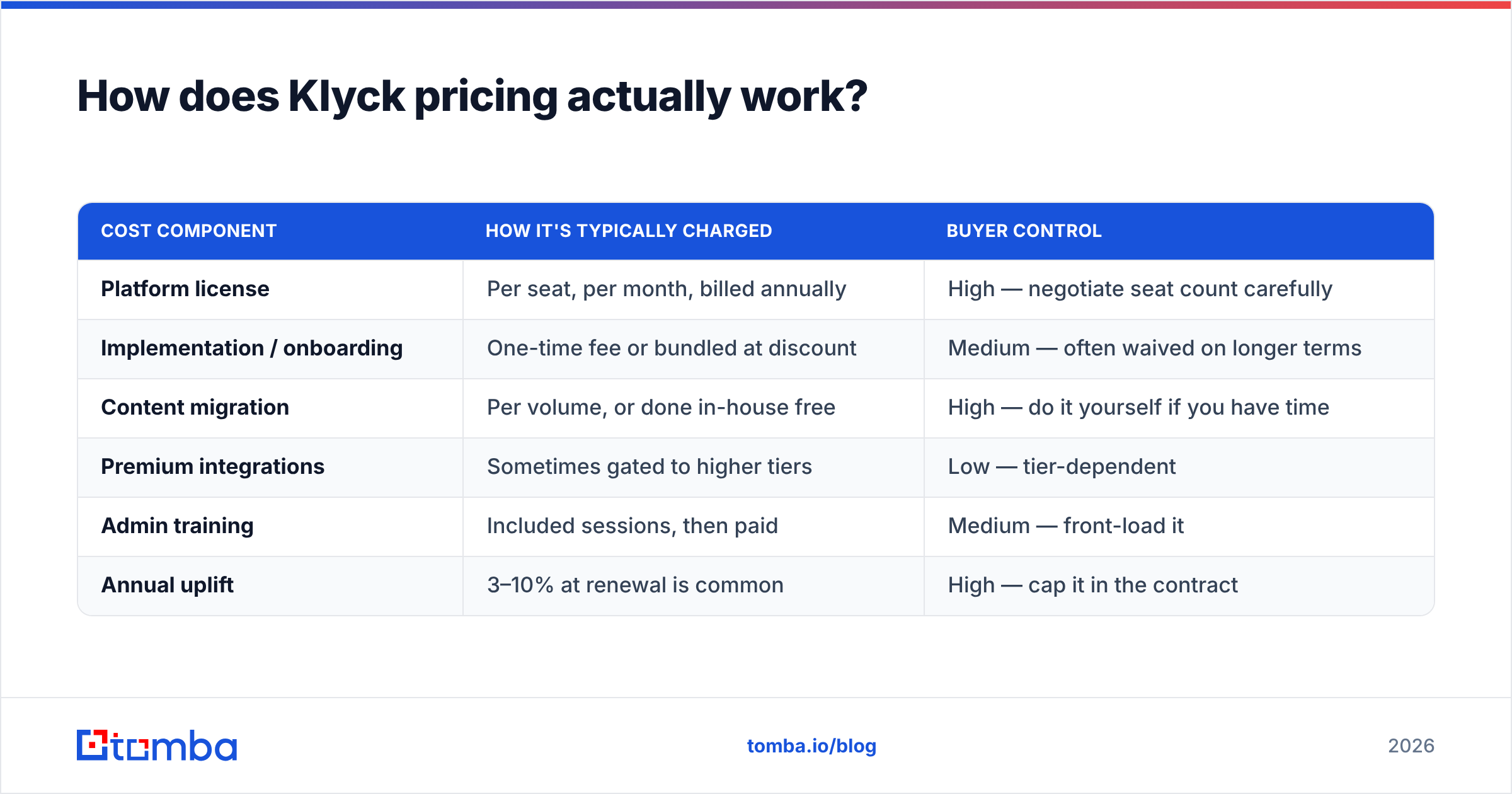
| Cost component | How it's typically charged | Buyer control |
|---|---|---|
| Platform license | Per seat, per month, billed annually | High — negotiate seat count carefully |
| Implementation / onboarding | One-time fee or bundled at discount | Medium — often waived on longer terms |
| Content migration | Per volume, or done in-house free | High — do it yourself if you have time |
| Premium integrations | Sometimes gated to higher tiers | Low — tier-dependent |
| Admin training | Included sessions, then paid | Medium — front-load it |
| Annual uplift | 3–10% at renewal is common | High — cap it in the contract |

The quote-only model is not inherently predatory — enterprise software genuinely varies by deployment. But it does shift work onto you. Budget owners should assume a discovery call, a proposal, a negotiation round, and security review before a number is final. If you need a figure for a Q4 plan next week, that timeline is the hidden cost nobody puts in the table.
What should you budget for in year one?#
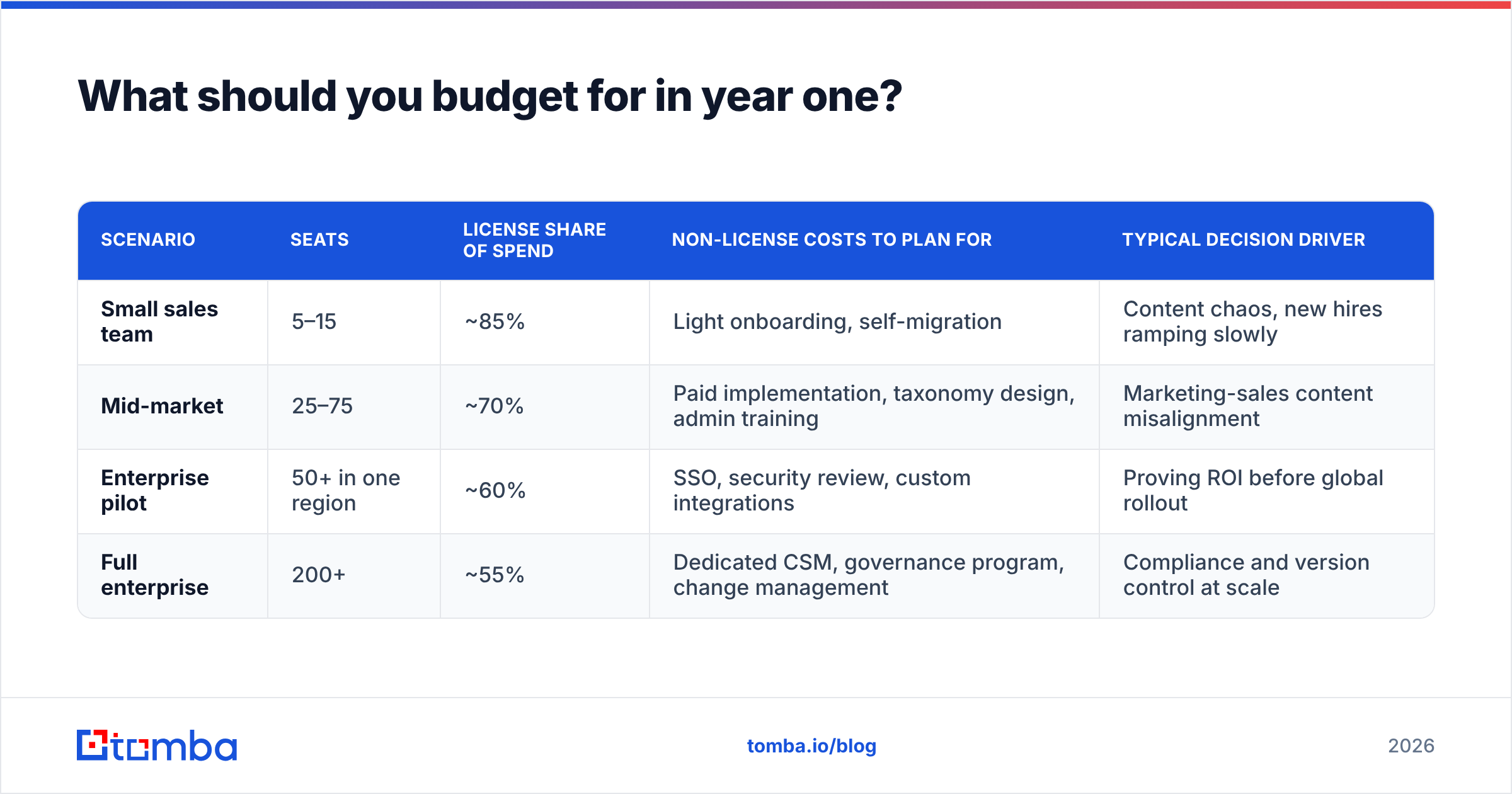
Since the license number is private, the useful exercise is modeling total cost of ownership by team size. Treat the ranges below as planning scaffolding, not quotes — they reflect how mid-market enablement platforms generally price, and you should replace every figure with the vendor's own proposal the moment you have it.
| Scenario | Seats | License share of spend | Non-license costs to plan for | Typical decision driver |
|---|---|---|---|---|
| Small sales team | 5–15 | ~85% | Light onboarding, self-migration | Content chaos, new hires ramping slowly |
| Mid-market | 25–75 | ~70% | Paid implementation, taxonomy design, admin training | Marketing-sales content misalignment |
| Enterprise pilot | 50+ in one region | ~60% | SSO, security review, custom integrations | Proving ROI before global rollout |
| Full enterprise | 200+ | ~55% | Dedicated CSM, governance program, change management | Compliance and version control at scale |
Two budgeting rules that apply regardless of vendor:
- Never buy seats for the org chart you want next year. Buy for the reps who will log in this quarter. True-up clauses are easier to negotiate than shelfware refunds.
- Price the admin. Every enablement platform needs an owner — someone who maintains taxonomy, retires stale assets, and answers "where is the X deck?" Budget a fraction of a headcount for this or the tool decays into an expensive Dropbox within two quarters.
What do Klyck reviews actually say?#
Review coverage for Klyck is thinner than for the category giants — it's a smaller vendor, so you'll find dozens of reviews rather than thousands. Check the live listings on G2's sales enablement category and Capterra's sales enablement directory before you commit, because sentiment shifts release to release.
The patterns that show up consistently across public feedback:
What reviewers like
- Content findability. The most repeated positive: reps stop hunting through shared drives. Search and tagging do the job they're supposed to do.
- Buyer-facing pages. Sending a branded page instead of a 40 MB attachment is a genuine experience upgrade, and the tracking that comes with it is the part sales managers notice.
- Responsive support. Smaller vendor, smaller queue. Reviewers frequently mention getting a human quickly — an underrated advantage over platforms where you're account number 9,000.
- Reasonable learning curve for reps. The end-user experience is generally described as intuitive; the complexity lives on the admin side.
What reviewers flag
- Admin setup is real work. Taxonomy, permissions, and migration take weeks, not afternoons. This is true of every platform in the category, but it surprises buyers who expected plug-and-play.
- Analytics depth. Engagement tracking is solid at the asset level; teams wanting deep attribution modeling tied to revenue sometimes want more.
- Pricing opacity. Buyers say it directly: not being able to self-qualify on budget before a sales call is friction.
- Smaller ecosystem. Fewer native integrations than the largest competitors, which matters if your stack is unusual.
None of these are disqualifying. They are the normal trade-offs of buying from a focused mid-market vendor rather than a platform behemoth — you get attention and agility, you give up breadth and a marketplace.
How does Klyck compare to other sales enablement platforms?#
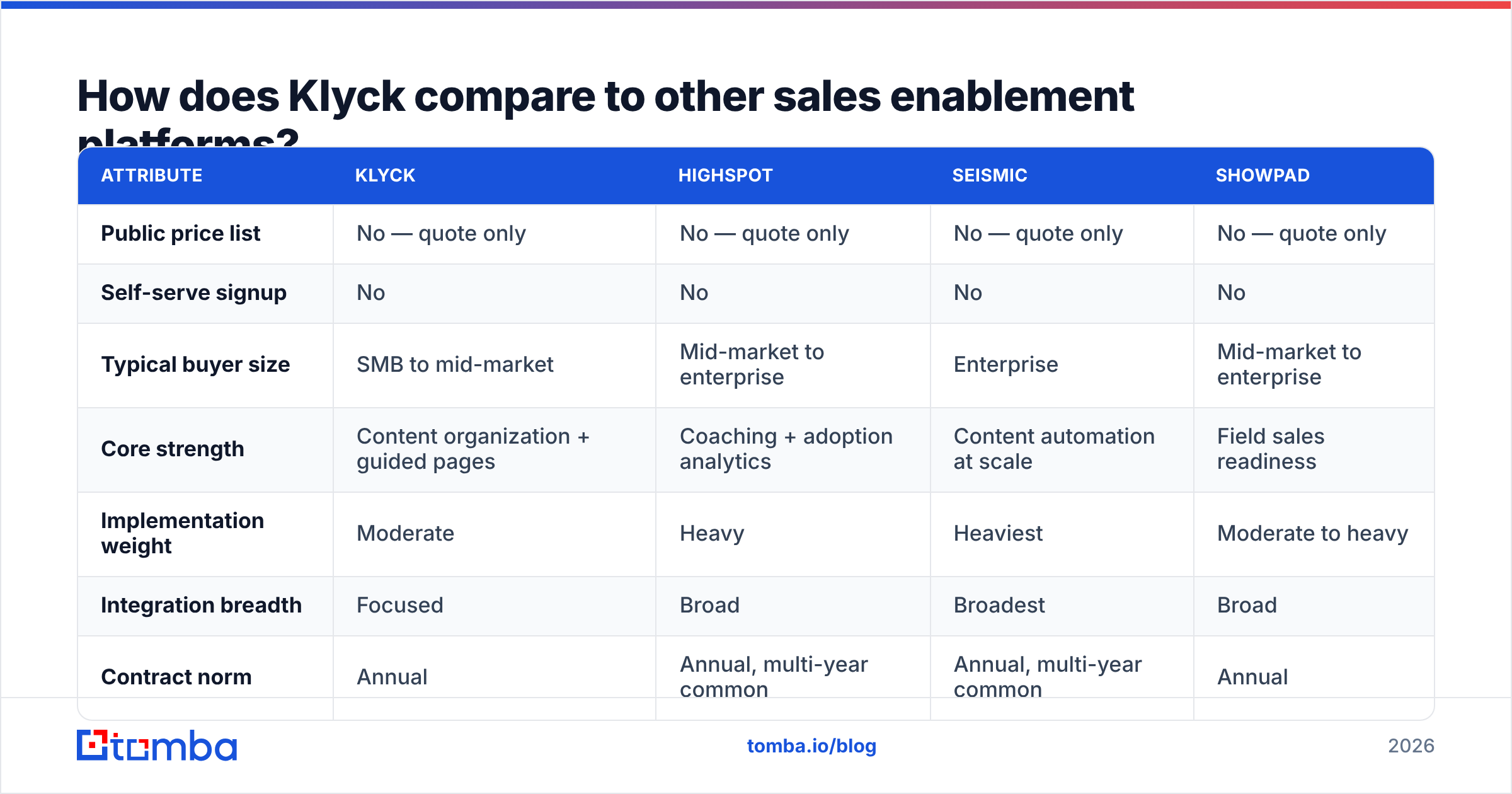
| Attribute | Klyck | Highspot | Seismic | Showpad |
|---|---|---|---|---|
| Public price list | No — quote only | No — quote only | No — quote only | No — quote only |
| Self-serve signup | No | No | No | No |
| Typical buyer size | SMB to mid-market | Mid-market to enterprise | Enterprise | Mid-market to enterprise |
| Core strength | Content organization + guided pages | Coaching + adoption analytics | Content automation at scale | Field sales readiness |
| Implementation weight | Moderate | Heavy | Heaviest | Moderate to heavy |
| Integration breadth | Focused | Broad | Broadest | Broad |
| Contract norm | Annual | Annual, multi-year common | Annual, multi-year common | Annual |
| Best fit signal | Library is a mess, team under ~100 | Ramp time is the bottleneck | Global compliance and localization | Reps sell in person |
The category-wide takeaway: nobody publishes pricing. If quote-only pricing is a dealbreaker for you, it rules out the entire enablement category, not just one vendor. That's a useful realization, because it means the real comparison is on fit and implementation burden, not on a rate card you're never going to see.
Is Klyck worth it in 2026?#
Short answer: yes, if your problem is content chaos and your team is between roughly 10 and 150 sellers. No, if your pipeline is thin.
Buy it when:
- Reps are recreating collateral because they can't find the approved version.
- Marketing has no idea which assets influence deals.
- New hires take a full quarter to ramp because tribal knowledge lives in Slack threads.
- You've outgrown a shared drive but the enterprise platforms quoted three times your budget.
Skip it when:
- Your team is under ten people and a well-organized drive plus a naming convention still works.
- Your close rates are fine and your problem is volume at the top of the funnel.
- Nobody will own administration. An unowned enablement platform is a subscription to entropy.
That third bullet under "skip it" deserves emphasis, because it's the most common misdiagnosis in B2B stack buying. Enablement software improves the efficiency of conversations you're already having. If you're having too few conversations, a better content hub multiplies zero. The fix upstream is accurate contact data, clean data enrichment, and disciplined outbound — not another layer of polish on the deck.
What should you check before signing a Klyck contract?#
Run this list on Klyck or any quote-only enablement vendor:
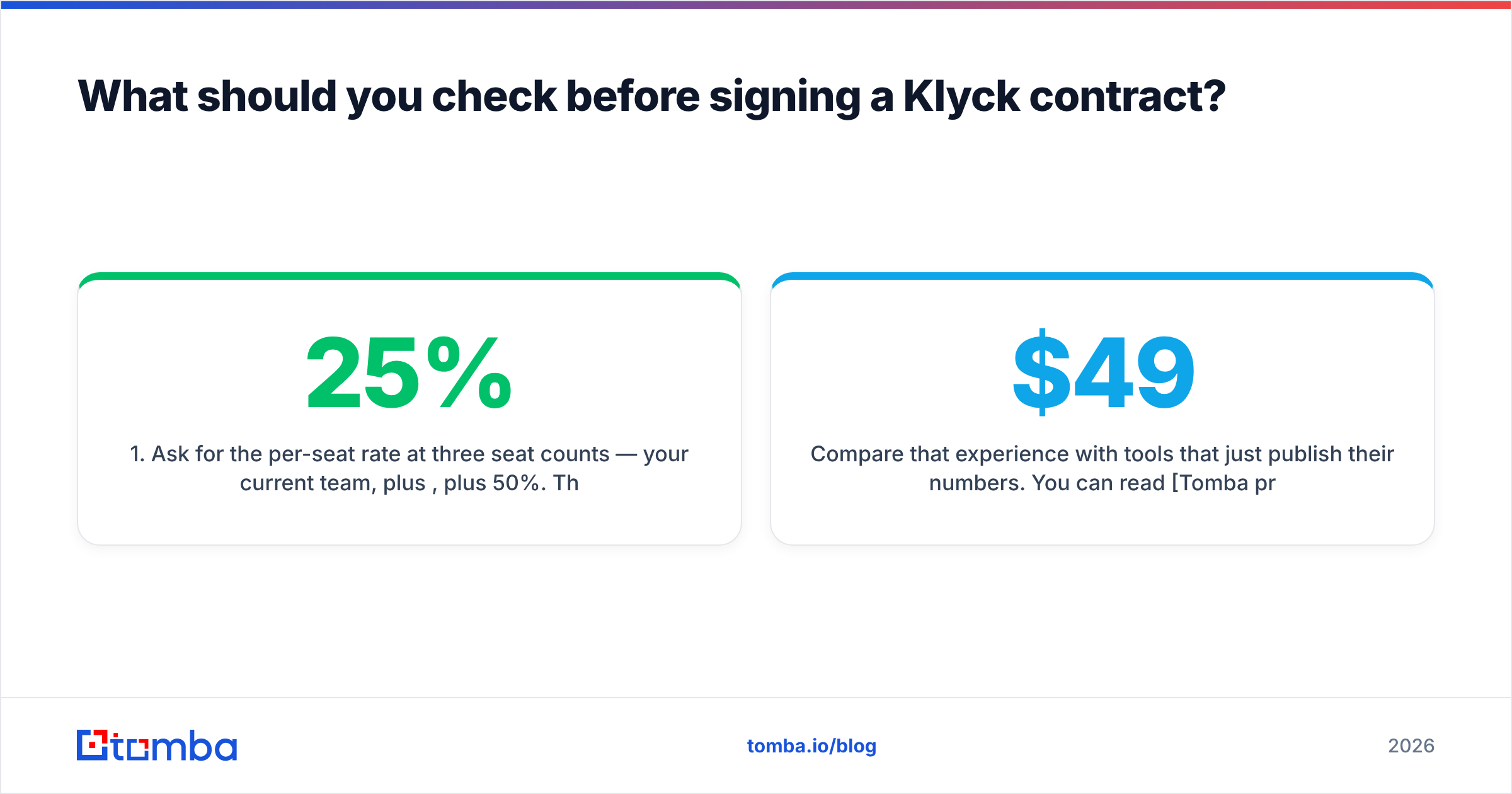
- Ask for the per-seat rate at three seat counts — your current team, plus 25%, plus 50%. This exposes the volume breaks and tells you whether growth is punished.
- Get implementation quoted separately. A "bundled" price hides whether onboarding is worth what you're paying for it.
- Cap the renewal uplift in writing. Uncapped annual increases are how a reasonable year-one price becomes an unreasonable year-three price.
- Demand a named migration scope. How many assets, in what formats, by what date, and who does the tagging.
- Run a real pilot with real reps. Not a demo — a two-week trial where five sellers use it on live deals. Adoption is the only metric that matters.
- Confirm export rights. You should be able to pull your content and your engagement data out in a usable format if you leave.
Compare that experience with tools that just publish their numbers. You can read Tomba pricing in fifteen seconds — Free at 25 searches a month, Starter at $49/mo, Growth at $99/mo, Pro at $249/mo, Enterprise on request — and decide without booking anything. Different category, different economics, but transparency is a choice a vendor makes, and it's fair to weigh it.
How does enablement fit with the rest of your GTM stack?#
Sales enablement is one layer of three, and buying them out of order is the most expensive sequencing mistake in B2B.
- Layer 1 — Data. Who are you selling to, what are their verified emails and phone numbers, and is the record accurate enough to act on? Broken here, everything downstream is noise.
- Layer 2 — Engagement. Sequencing, sales automation, calling, and the follow-up discipline that turns a list into conversations.
- Layer 3 — Enablement. Klyck and its peers. This is where content, coaching, and buyer experience live — and it only pays off when layers one and two are producing meetings.
Teams that buy layer three first end up with a beautifully organized library that eight reps use twice a month. Teams that fix layer one first often discover their "content problem" was a targeting problem wearing a disguise.
The bottom line on Klyck pricing#
Klyck is a credible, mid-market-friendly enablement platform with genuine strengths in content organization and buyer-facing pages, a responsive support reputation, and the same quote-only pricing model as every serious competitor in its category. The pros are real. The cons — setup effort, analytics depth, pricing opacity — are the standard cost of doing business in enablement software, not unique flaws. Budget for the license and the admin, negotiate the renewal cap, and pilot with live deals before you sign.
But before you spend a dollar making your collateral easier to find, make sure there are enough buyers on the other end to read it. If your reps are spending more time hunting for verified contact details than they are presenting, start there: the Tomba Email Finder gets you accurate, verified professional emails by name and domain — with public pricing, a free tier to test it, and no demo call required. Fill the top of the funnel first, then buy the pegboard for the garage.
Related guides#
// get started
Find, verify and enrich your first contacts today
Start on the free plan with 25 searches a month, then scale when your team is ready.
Free plan · No credit card required · GDPR & CCPA
// about the author