Labnify vs ListKit (2026): Which Cold Email Stack Wins?
Labnify sends the email. ListKit supplies the contacts. Most teams compare them as rivals and end up buying the wrong half of the stack. Here is the honest breakdown of pricing, data quality, deliverability and which one you actually need first.
TL;DR
- Labnify and ListKit are not really competitors. Labnify lives on the sending and deliverability side of cold email; ListKit lives on the data and list-building side. Comparing them head-to-head is like comparing a truck to the freight it carries.
- If your reply rate is dying from bounces and spam placement, Labnify-style infrastructure is the fix. If your reps are spending three hours a day scraping LinkedIn, ListKit-style data is the fix.
- ListKit's pitch is verified B2B contacts plus intent signals, sold on credits. Labnify's pitch is high-volume sending with its own warmup, rotation and deliverability tooling, usually sold on seats or volume rather than per-contact.
- Neither product removes the need for an independent verification layer. Every data vendor's "verified" label decays 2-3% per month, and every sending platform will happily send to a dead mailbox.
- The cheapest working stack for most sub-20-person teams: one data source, one verifier you control, one sending platform. Run a 300-contact bake-off before you sign anything annual.
What are Labnify and ListKit, exactly?#
Start here, because half the confusion in the Labnify vs ListKit debate comes from category mismatch.
Labnify (labnify.com) sits on the delivery side. Its core product is a mailer/SMTP layer built for outbound volume — the plumbing that gets a message from your sequence into a prospect's inbox without tripping filters. That means sending accounts, domain and inbox rotation, warmup, throttling, and reporting on what actually landed. It assumes you already have a list.
ListKit (listkit.io) sits on the data side. It's a B2B contact database with filtering by title, headcount, tech stack and geography, and it markets its contacts as multi-pass verified. It has expanded toward the sending end of the funnel over time, but its centre of gravity is still "give me 5,000 qualified contacts I can email tomorrow."
So the honest framing is:
- Labnify answers "will it land?" — infrastructure, reputation, throughput, inbox placement.
- ListKit answers "who do I email?" — firmographics, titles, contact records, intent.
- Both leak at the seam. Data goes stale between export and send; infrastructure gets punished for bad data.
- Your bottleneck decides the purchase. Diagnose before you shop.
- Most teams eventually own both functions — just rarely from one vendor.
If you're not sure which side is broken, check your last 1,000 sends. A bounce rate over 3% is a data problem. A bounce rate under 2% with a sub-20% open rate is a deliverability problem. They have completely different price tags.
How do Labnify and ListKit compare head-to-head?#
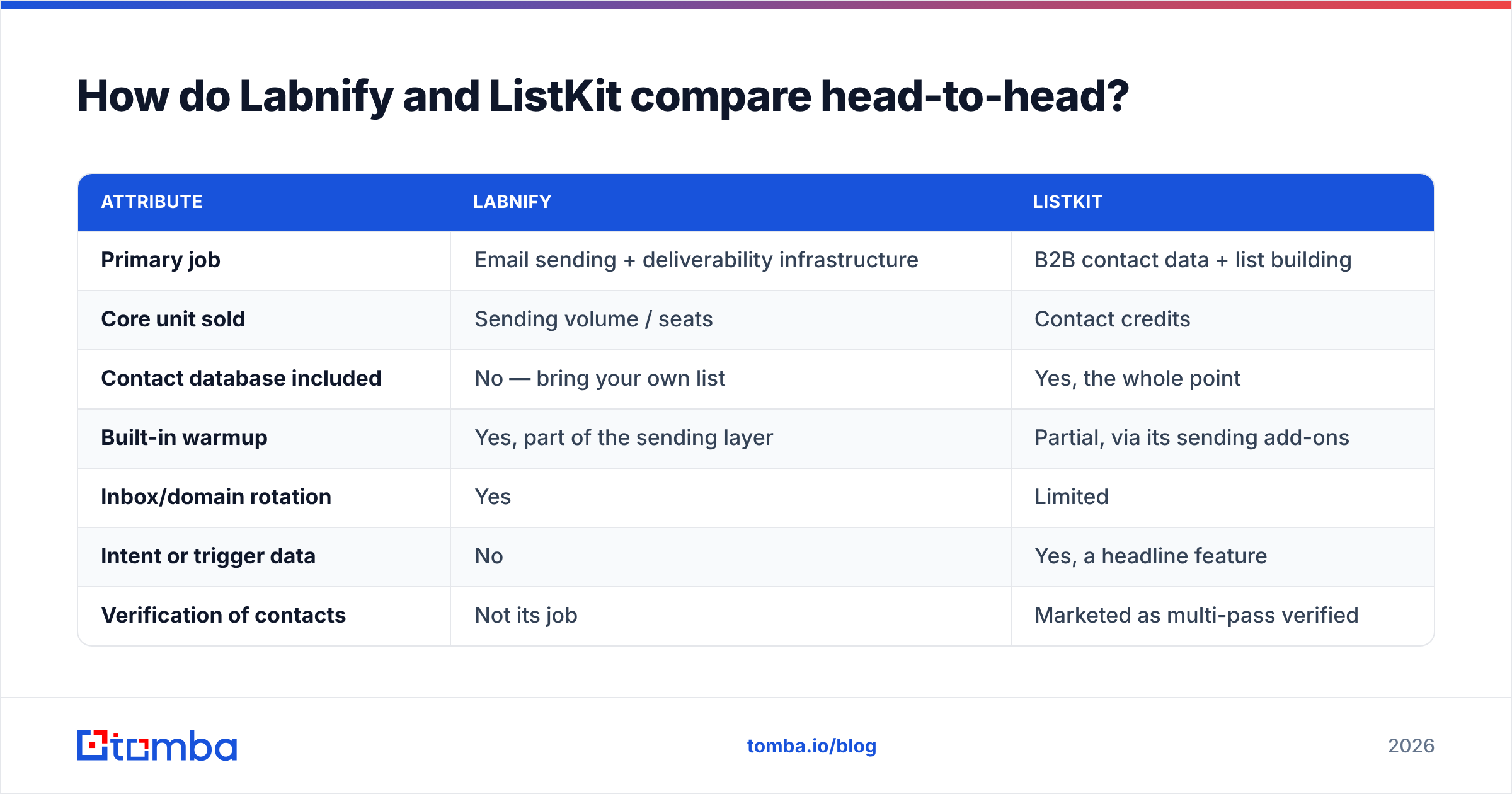
Here's the side-by-side on the attributes that actually change your outcome. Pricing and feature sets move quickly in this category, so treat the figures as directional and confirm on each vendor's own page before you commit.
| Attribute | Labnify | ListKit |
|---|---|---|
| Primary job | Email sending + deliverability infrastructure | B2B contact data + list building |
| Core unit sold | Sending volume / seats | Contact credits |
| Contact database included | No — bring your own list | Yes, the whole point |
| Built-in warmup | Yes, part of the sending layer | Partial, via its sending add-ons |
| Inbox/domain rotation | Yes | Limited |
| Intent or trigger data | No | Yes, a headline feature |
| Verification of contacts | Not its job | Marketed as multi-pass verified |
| Typical entry price | Roughly $50-$100/mo tier, volume-dependent | Roughly $90-$100/mo entry tier |
| Best for | Agencies and teams sending 20k+/mo | SDR teams who need lists, fast |
| Weakest point | Useless without a good list | Data decays; sending is not the core competency |
Two things jump out of that table.
First, the overlap is thin. There are maybe two rows where the products genuinely compete. If a sales rep tells you one replaces the other, push back.
Second, the failure modes are opposite. Labnify fails quietly — you send, nothing bounces, and nothing lands in a primary inbox either. ListKit fails loudly — you get a 7% bounce rate on a fresh export and your domain reputation takes the hit within a week.
What does Labnify actually do well?#
Sending at volume without cooking your domains. That's the value.
If you run an agency, a recruiting firm, or any outbound motion that needs 30,000+ sends a month across multiple client domains, you cannot do that from a single Google Workspace tenant. You need dedicated sending accounts, staggered ramp schedules, rotation logic, and reporting that tells you where the message landed, not just whether it left.
Labnify's positioning targets exactly that. The features worth paying for on the infrastructure side are:
- Per-inbox throttling so no single mailbox exceeds a safe daily ceiling.
- Warmup that runs continuously, not just for the first 14 days.
- Placement reporting — primary vs promotions vs spam, not just "delivered."
- Fast domain provisioning so you can retire a burned domain without a week of downtime.
- SPF/DKIM/DMARC validation at setup, because most "deliverability problems" are actually a missing SPF record.
Where it doesn't help: none of that fixes a bad list. Sending infrastructure is a multiplier on list quality. Multiply zero by a great mailer and you still get zero. If you want the fundamentals of why placement and list hygiene are joined at the hip, our primer on email deliverability covers the mechanics.
What does ListKit actually do well?#
Speed from filter to CSV. ListKit's real product is time saved.
Building a 2,000-contact list manually — LinkedIn Sales Navigator, company sites, pattern guessing — costs an SDR roughly a week. A database with decent filters compresses that to an afternoon. That's the trade you're buying, and it's a good trade when the data holds up.
ListKit's differentiators, as marketed:
- Multi-pass verification before contacts land in your export, which reduces (but does not eliminate) bounces.
- Intent and trigger filters — hiring signals, tech adoption, funding — that let you time outreach rather than blast it.
- A guided list-building flow that's noticeably friendlier than enterprise tools like ZoomInfo or Apollo for a first-time user.
- Credit-based pricing that scales down for small teams instead of forcing an annual enterprise contract.
The caveat is the one every database vendor shares: B2B contact data decays at roughly 2-3% per month. Job changes, restructures, domain migrations, mailbox retirements. A contact verified in January is measurably less reliable in April. That's not a knock on ListKit specifically — it's physics for the category. Vendor review data on G2 for this whole segment reflects the same pattern: strong ratings for coverage and UI, softer ratings for data freshness after a few months.
Which is why the smartest buyers treat vendor verification as a first pass, not a final answer.
How do pricing and real cost-per-lead compare?#
List price is the wrong number. Cost per usable contact is the right one.
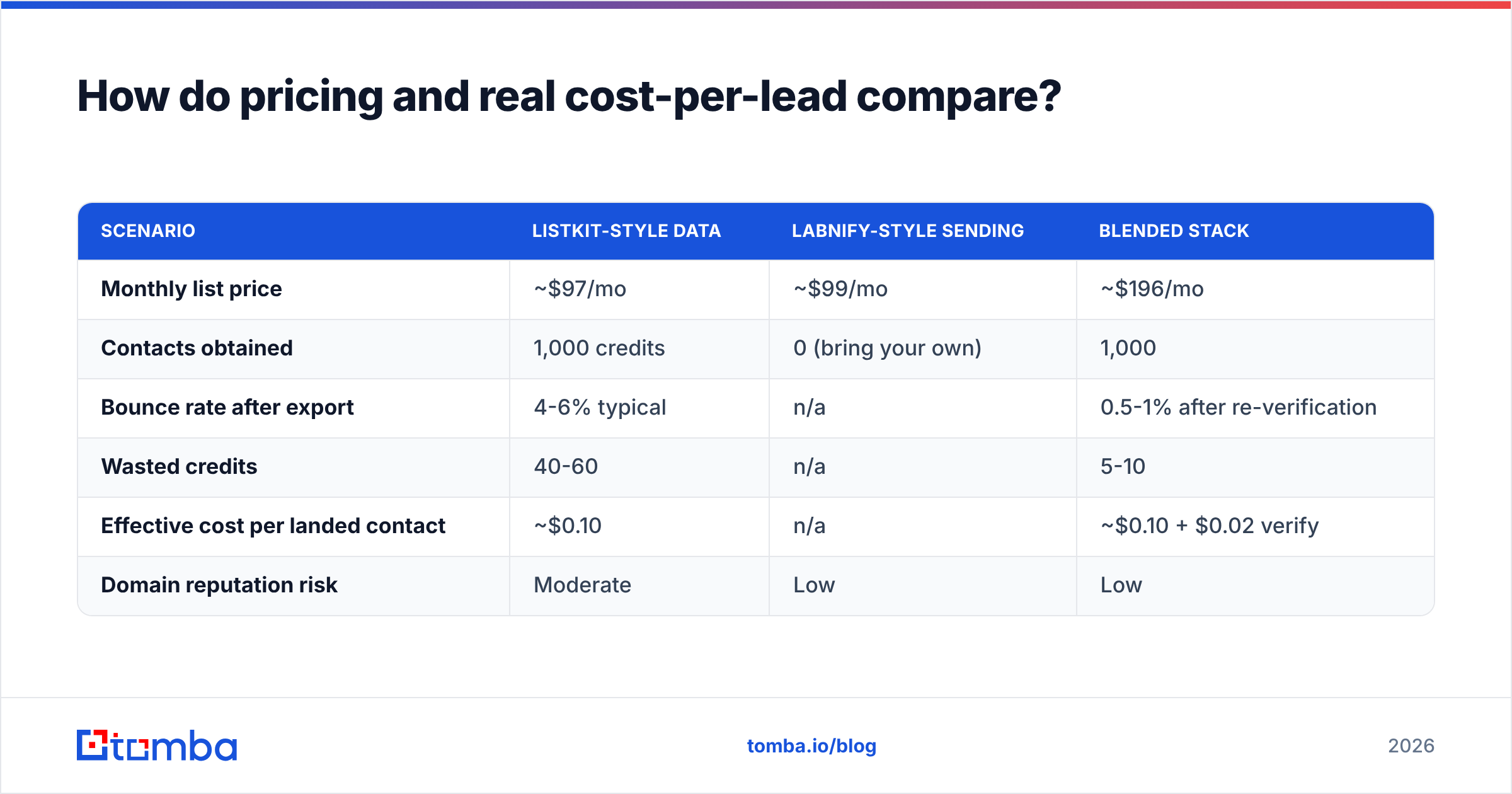
Run the math the way your CFO would:
| Scenario | ListKit-style data | Labnify-style sending | Blended stack |
|---|---|---|---|
| Monthly list price | ~$97/mo | ~$99/mo | ~$196/mo |
| Contacts obtained | 1,000 credits | 0 (bring your own) | 1,000 |
| Bounce rate after export | 4-6% typical | n/a | 0.5-1% after re-verification |
| Wasted credits | 40-60 | n/a | 5-10 |
| Effective cost per landed contact | ~$0.10 | n/a | ~$0.10 + $0.02 verify |
| Domain reputation risk | Moderate | Low | Low |
The blended row is the one that matters. Adding a $20-$49 verification step to a $97 data subscription doesn't raise your cost per contact in any meaningful way — it lowers your cost per reply, because a 1% bounce rate keeps your sender reputation intact and your placement rate high. A 6% bounce rate on a new domain can cost you the domain.
For reference on where an independent verification layer prices in, Tomba pricing starts at a free tier of 25 searches a month, then $49/mo for Starter, $99/mo Growth, and $249/mo Pro. The point isn't the specific vendor — it's that the verification line item is small relative to what it protects.

Which one should you buy first?#
Buy the one that fixes your current bottleneck. In order of how common the situation is:
- You have a list but poor open rates → buy sending infrastructure (Labnify's lane). Your data is fine; your placement isn't. Symptoms: bounce rate under 2%, open rate under 20%, replies clustering from one domain only.
- You have great infrastructure but no pipeline of contacts → buy data (ListKit's lane). Symptoms: reps manually researching, sending volume far below your inbox capacity, long gaps between campaigns.
- You're starting from zero with under $300/mo → buy data plus a verifier, and send from 2-3 warmed Google Workspace inboxes until volume justifies dedicated infrastructure. Don't over-build the plumbing before you have water.
- You're an agency running 5+ client domains → you need both, and you'll want them decoupled so you can swap either vendor without rebuilding the other half.
- You're enriching an existing CRM, not prospecting cold → neither is the right first purchase. You need data enrichment against records you already own.
The decoupling point in #4 is worth dwelling on. Bundled "all-in-one" outbound suites look cheaper on the invoice and cost more in switching friction. When your data vendor has a bad quarter, you want to replace the data vendor — not migrate your entire sending stack.
Do you still need a separate email finder and verifier?#
Yes, for two specific jobs neither platform covers well.
Job one: targeted finds. Databases are built for filters, not for named people. When your AE says "get me the VP of Engineering at these 40 accounts," a filter-first tool is the wrong shape. You need a targeted lookup by name and domain. That's what an email finder does, and it's why most teams keep one alongside a database subscription. A domain search does the same thing in reverse — hand it a company domain, get back the mapped contacts and the company's email pattern.
Job two: independent verification at send time. Every vendor verifies at ingestion. Almost none re-verify at export. Running your list through your own email verifier the day before a campaign catches the decay that happened between the vendor's check and your send. On catch-all domains — which are 20-30% of B2B in some segments — you also want a dedicated catch-all verifier, since standard SMTP checks return "accept-all" and tell you nothing.
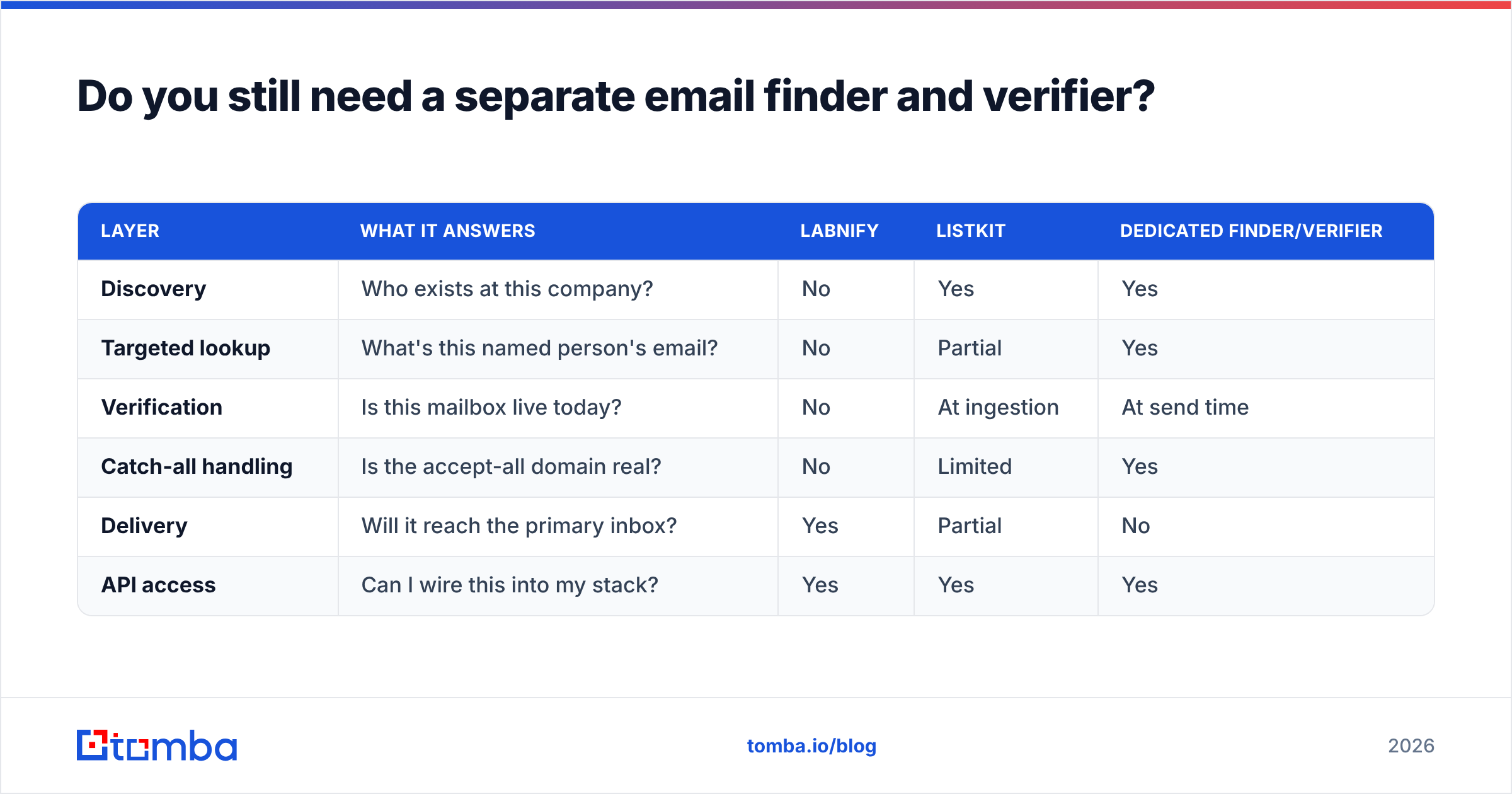
Here's how the three layers divide up:
| Layer | What it answers | Labnify | ListKit | Dedicated finder/verifier |
|---|---|---|---|---|
| Discovery | Who exists at this company? | No | Yes | Yes |
| Targeted lookup | What's this named person's email? | No | Partial | Yes |
| Verification | Is this mailbox live today? | No | At ingestion | At send time |
| Catch-all handling | Is the accept-all domain real? | No | Limited | Yes |
| Delivery | Will it reach the primary inbox? | Yes | Partial | No |
| API access | Can I wire this into my stack? | Yes | Yes | Yes |
Nobody wins every row. That's the honest answer, and it's why "which one is better" is the wrong question.
What are the alternatives to Labnify and ListKit?#
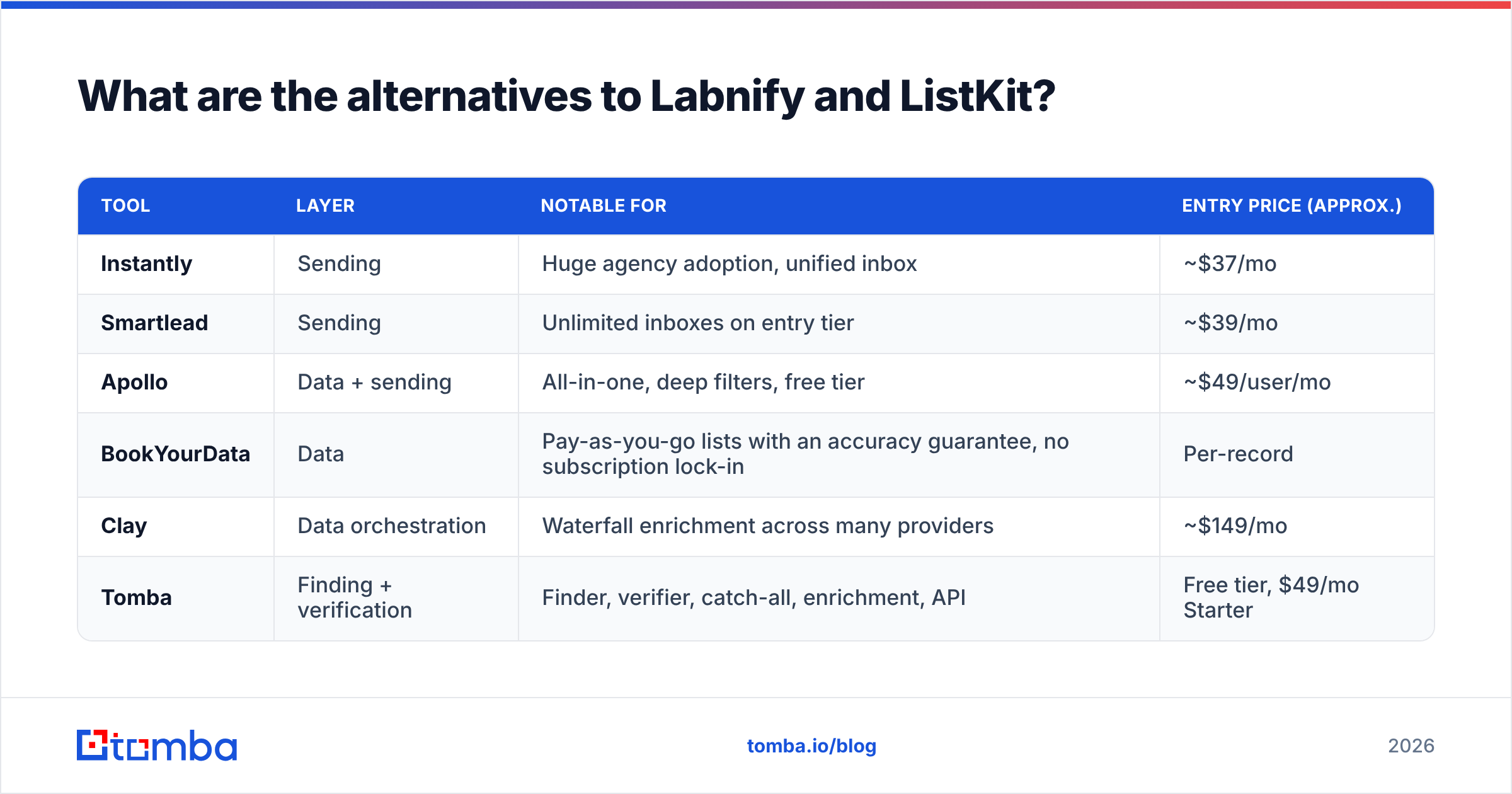
If either side of the stack doesn't fit, the field is deep.
| Tool | Layer | Notable for | Entry price (approx.) |
|---|---|---|---|
| Instantly | Sending | Huge agency adoption, unified inbox | ~$37/mo |
| Smartlead | Sending | Unlimited inboxes on entry tier | ~$39/mo |
| Apollo | Data + sending | All-in-one, deep filters, free tier | ~$49/user/mo |
| BookYourData | Data | Pay-as-you-go lists with an accuracy guarantee, no subscription lock-in | Per-record |
| Clay | Data orchestration | Waterfall enrichment across many providers | ~$149/mo |
| Tomba | Finding + verification | Finder, verifier, catch-all, enrichment, API | Free tier, $49/mo Starter |
Two worth calling out. BookYourData is a strong pick if you hate subscriptions — it sells lists on a pay-as-you-go basis with an accuracy commitment, which suits campaign-based teams who buy in bursts rather than monthly. And if your objection to ListKit is the credit model rather than the data, an Apollo alternative comparison is a better starting point than a Labnify comparison, since Apollo overlaps ListKit far more directly.
Is Labnify better than ListKit?#
No, and the reverse isn't true either. Here's the verdict in plain terms:
- Choose Labnify if inbox placement is your constraint and you already have a repeatable source of contacts.
- Choose ListKit if list building is eating your reps' week and your current sending setup is stable.
- Choose both once you're past roughly 20,000 sends a month across multiple domains — at that point the two problems are simultaneous.
- Choose neither yet if you haven't run a 300-contact bake-off. Export 300 contacts from any source, verify them independently, send from a warmed inbox, and measure bounce rate, placement, and reply rate. That single test tells you more than any comparison post — including this one.
Whichever path you take, the one component you should own rather than rent from a bundle is the contact layer. It's the input to everything downstream, it's the cheapest thing to get right, and it's the most expensive thing to get wrong.
Start there: run your next list — whether it came from ListKit, a scraper, or a conference badge scan — through the Tomba Email Finder to fill the gaps and confirm the patterns, then verify the whole file before it touches your sending platform. The free tier covers 25 searches a month, which is enough to test the bake-off above without a credit card. If the results hold up, $49/mo Starter covers most single-SDR motions, and the Tomba API handles it at scale when you're ready to automate the whole pipeline.
Related guides#
// get started
Find, verify and enrich your first contacts today
Start on the free plan with 25 searches a month, then scale when your team is ready.
Free plan · No credit card required · GDPR & CCPA
// about the author