Labnify vs Nymeria 2026: Sending Power vs Contact Data
Labnify and Nymeria get compared constantly, but they solve different halves of the same problem: one moves email, the other finds the people. Here is where each one wins, what they cost, and how to combine them.
TL;DR
- They are not really competitors. Labnify is sending infrastructure — an SMTP/mailer layer built to push high volumes of email. Nymeria is a contact data source — a browser extension and API that surfaces emails and phone numbers from profiles.
- Pick Labnify if your bottleneck is throughput: you already have a clean list and need somewhere to send from that does not choke at 50k sends.
- Pick Nymeria if your bottleneck is contacts: you are scrolling LinkedIn and need a work email attached to a name.
- Most teams need both halves, plus a verification step between them — sending unverified data through any provider is how domains get burned.
- Cost check: data tools are priced per credit, sending tools are priced per volume. Compare them on cost-per-delivered-reply, not per seat.
Two tools land in the same shortlist for one reason: both show up when you Google "cold email tool." Then you buy one, discover it does not do the thing you actually needed, and buy the other anyway. This breakdown is about avoiding that sequence.
What is Labnify?#
Labnify (labnify.com) sits in the sending layer. Its pitch is volume email delivery — an SMTP relay and mailer built for teams pushing transactional blasts, newsletters, or outbound sequences at counts where a single Google Workspace inbox falls apart.
What that means in practice:
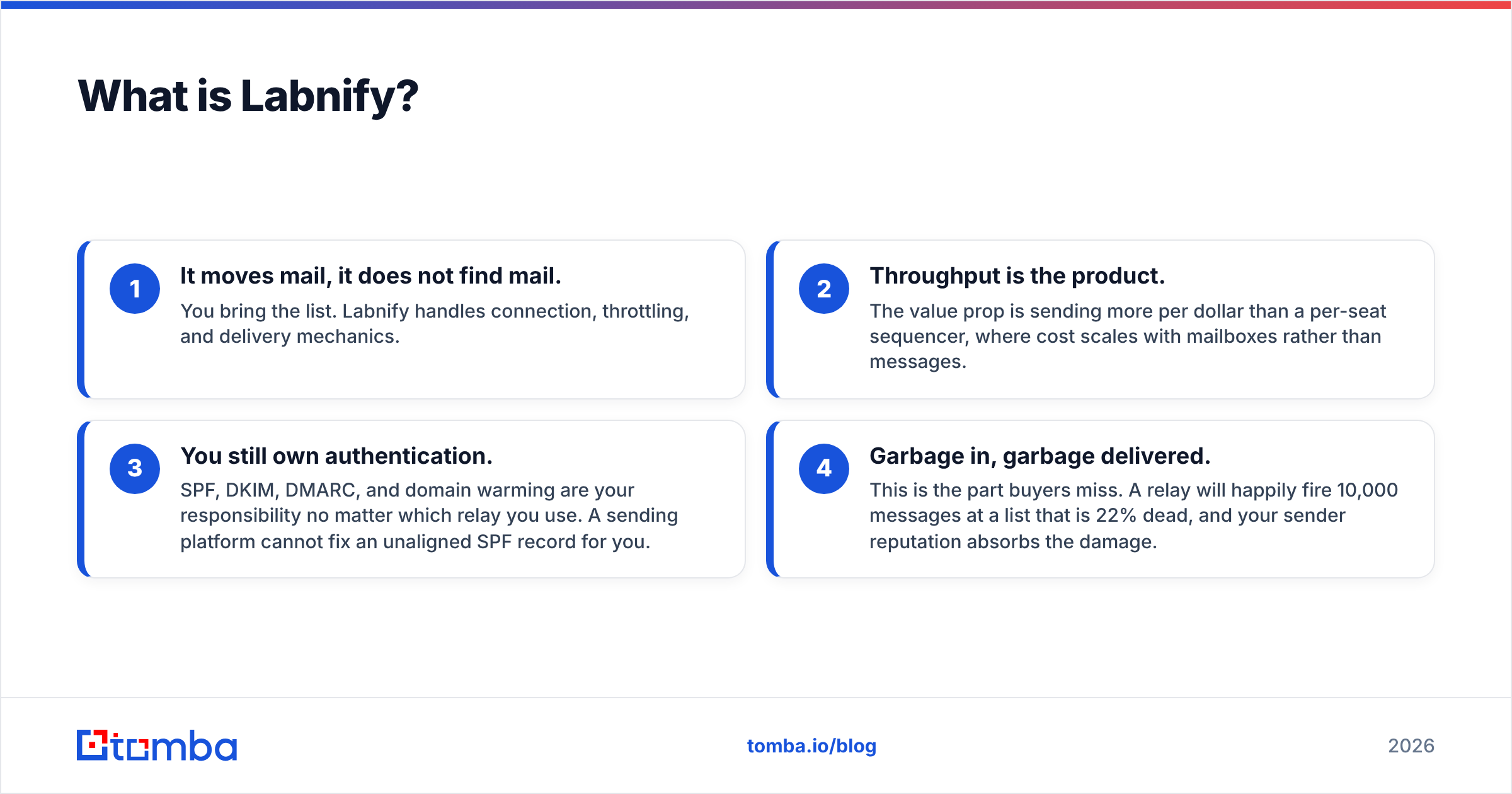
- It moves mail, it does not find mail. You bring the list. Labnify handles connection, throttling, and delivery mechanics.
- Throughput is the product. The value prop is sending more per dollar than a per-seat sequencer, where cost scales with mailboxes rather than messages.
- You still own authentication. SPF, DKIM, DMARC, and domain warming are your responsibility no matter which relay you use. A sending platform cannot fix an unaligned SPF record for you.
- Garbage in, garbage delivered. This is the part buyers miss. A relay will happily fire 10,000 messages at a list that is 22% dead, and your sender reputation absorbs the damage.
Labnify's category peers are SendGrid, Mailgun, Amazon SES, and Postmark — not data vendors. If you are comparing it against Nymeria, you are comparing a pipe against a well.
What is Nymeria?#
Nymeria (nymeria.io) sits in the data layer. It is best known as a browser extension that reveals contact details — work email, personal email, phone — while you browse professional profiles, with an API and bulk enrichment behind it.
Its core jobs:
- Profile-to-contact reveal. You are on a prospect's profile; the extension attaches an email address.
- Bulk enrichment. Feed it a list of names, domains, or profile URLs and get contact records back.
- API access for teams wiring enrichment into a CRM or internal tool rather than clicking through a UI.
- Personal-email coverage — Nymeria has historically leaned harder into personal/consumer emails than most B2B-only vendors, which recruiters like and sales teams should think twice about under GDPR and CAN-SPAM.
Nymeria's real peers are Apollo, RocketReach, ContactOut, Lusha, and Tomba. Whether you also need a bulk mailer is a separate purchase decision.
How do Labnify and Nymeria compare head-to-head?#
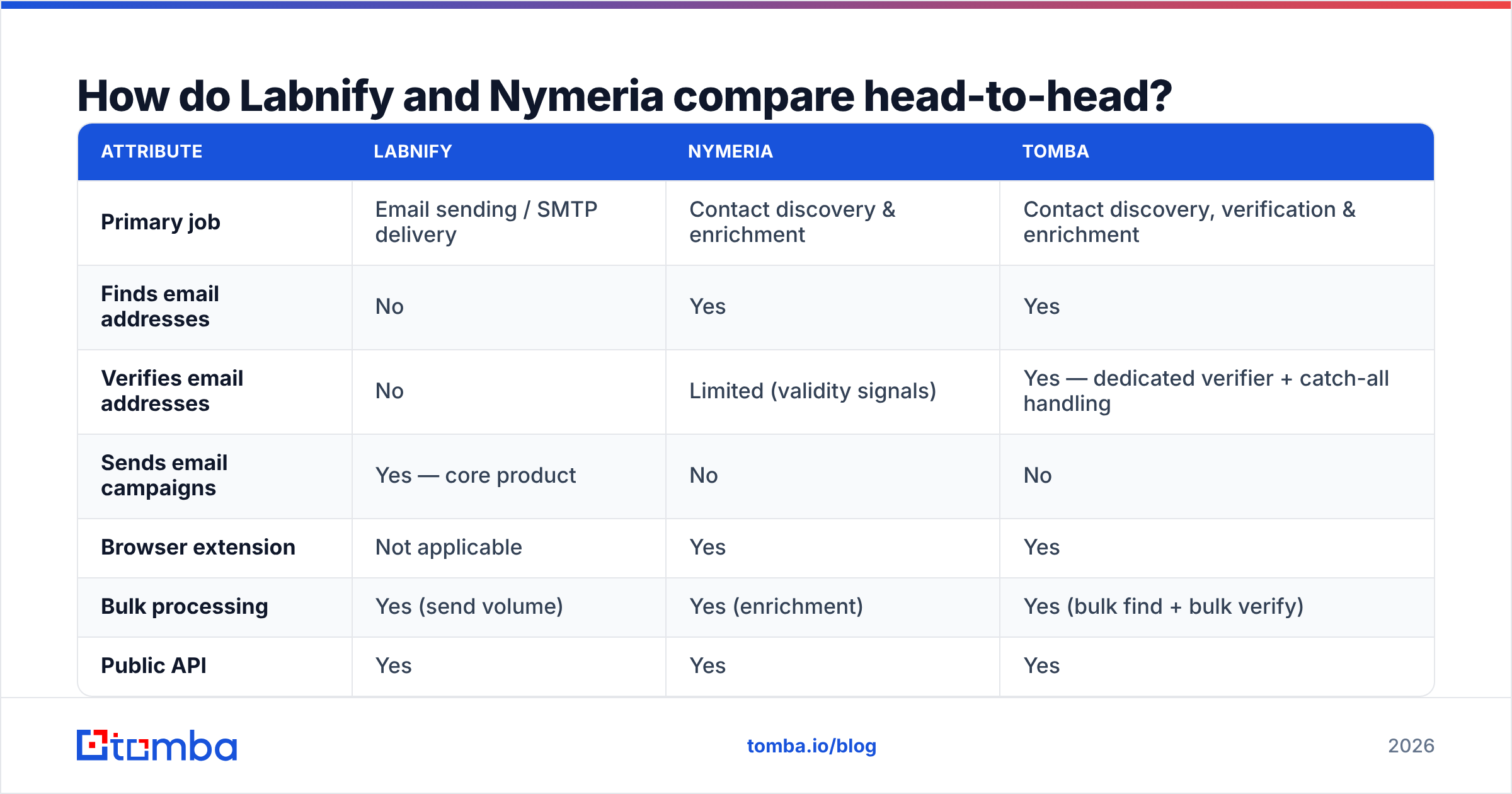
Here is the honest side-by-side, with Tomba included as a third column because most readers arriving at this comparison are really trying to solve the data half.
| Attribute | Labnify | Nymeria | Tomba |
|---|---|---|---|
| Primary job | Email sending / SMTP delivery | Contact discovery & enrichment | Contact discovery, verification & enrichment |
| Finds email addresses | No | Yes | Yes |
| Verifies email addresses | No | Limited (validity signals) | Yes — dedicated verifier + catch-all handling |
| Sends email campaigns | Yes — core product | No | No |
| Browser extension | Not applicable | Yes | Yes |
| Bulk processing | Yes (send volume) | Yes (enrichment) | Yes (bulk find + bulk verify) |
| Public API | Yes | Yes | Yes |
| Phone numbers | No | Yes | Yes |
| Personal vs work email focus | Neutral (you supply data) | Strong personal-email coverage | Work/B2B-first |
| Free entry point | Trial-based — confirm on vendor site | Limited free credits | 25 searches/mo, free forever |
| Pricing model | Volume/sending tiers | Credit tiers, entry plan around $39/mo | $49 Starter, $99 Growth, $249 Pro |
Vendor pricing and packaging change frequently. Treat the figures above as a starting point and confirm on each vendor's pricing page before you buy — and check recent reviews on G2 for how each one behaves after the trial ends.
Is Labnify better than Nymeria?#
Only if your problem is delivery. That is the entire answer.
The question is malformed in the same way "is a truck better than a warehouse" is malformed. A useful reframe: walk the outbound pipeline and find where you are actually leaking.
- Stage 1 — Targeting. You do not know who to contact. Neither tool fixes this; you need an ICP and a list-building source.
- Stage 2 — Contact discovery. You know the company and the person, not the address. Nymeria's stage. Also Tomba's, Apollo's, RocketReach's.
- Stage 3 — Verification. You have addresses of unknown quality. Neither tool's stage — Nymeria returns validity signals, but a dedicated email verifier is a separate discipline, especially for catch-all domains.
- Stage 4 — Sending. You have a clean list and need throughput. Labnify's stage.
- Stage 5 — Reply handling. Inbox, CRM, follow-up cadence. Neither tool.
If you buy the wrong stage, the tool works perfectly and your numbers do not move. Teams with a 4% reply rate and a bounce problem do not need a faster pipe — they need better data. Teams with clean data stuck behind Gmail's daily caps do not need another enrichment seat.
Which one has better data quality?#
This only applies to Nymeria, because Labnify does not supply data. And it is the question worth spending time on, because data quality is where cold email economics are decided.
Three things matter more than headline "accuracy %" claims:
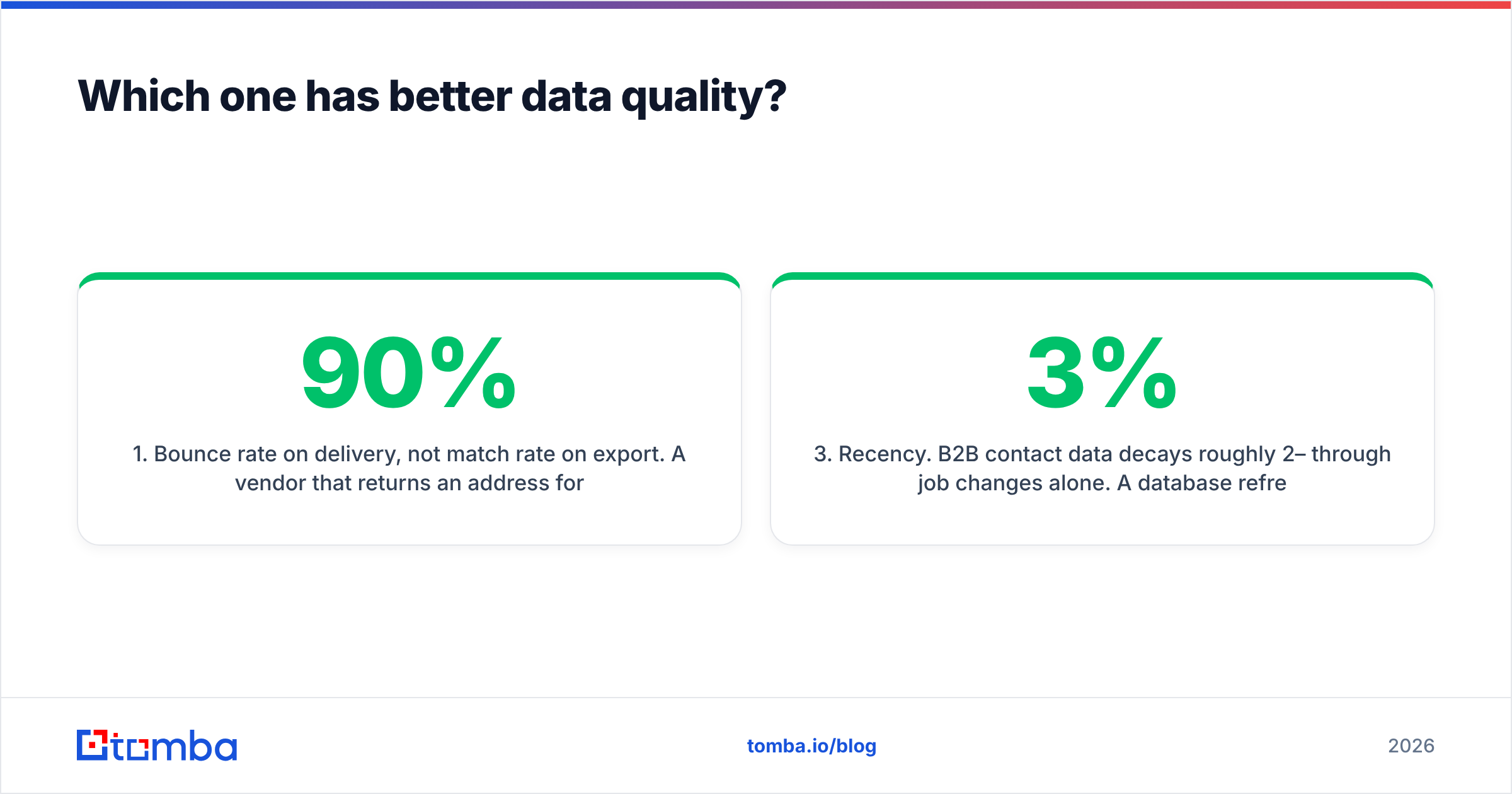
- Bounce rate on delivery, not match rate on export. A vendor that returns an address for 90% of your list but bounces 12% of them is worse than one that returns 60% with a 1% bounce rate. Mailbox providers judge you on bounces.
- Catch-all handling. Roughly a third of B2B domains accept everything at the SMTP layer, so a naive verifier marks them "valid" and you find out the truth on send day. Ask any vendor specifically how they resolve catch-alls — a real catch-all verifier applies additional signal beyond the SMTP handshake.
- Recency. B2B contact data decays roughly 2–3% per month through job changes alone. A database refreshed quarterly is meaningfully worse than one refreshed continuously, regardless of size claims.
Nymeria's strength is breadth of identity coverage, including personal emails — genuinely useful for recruiting, and a compliance question mark for cold B2B sales in the EU. If your outbound is work-email-only, a B2B-first source like Tomba's email finder matches the use case more cleanly, with published data sources you can actually audit.
What does each one cost in practice?#
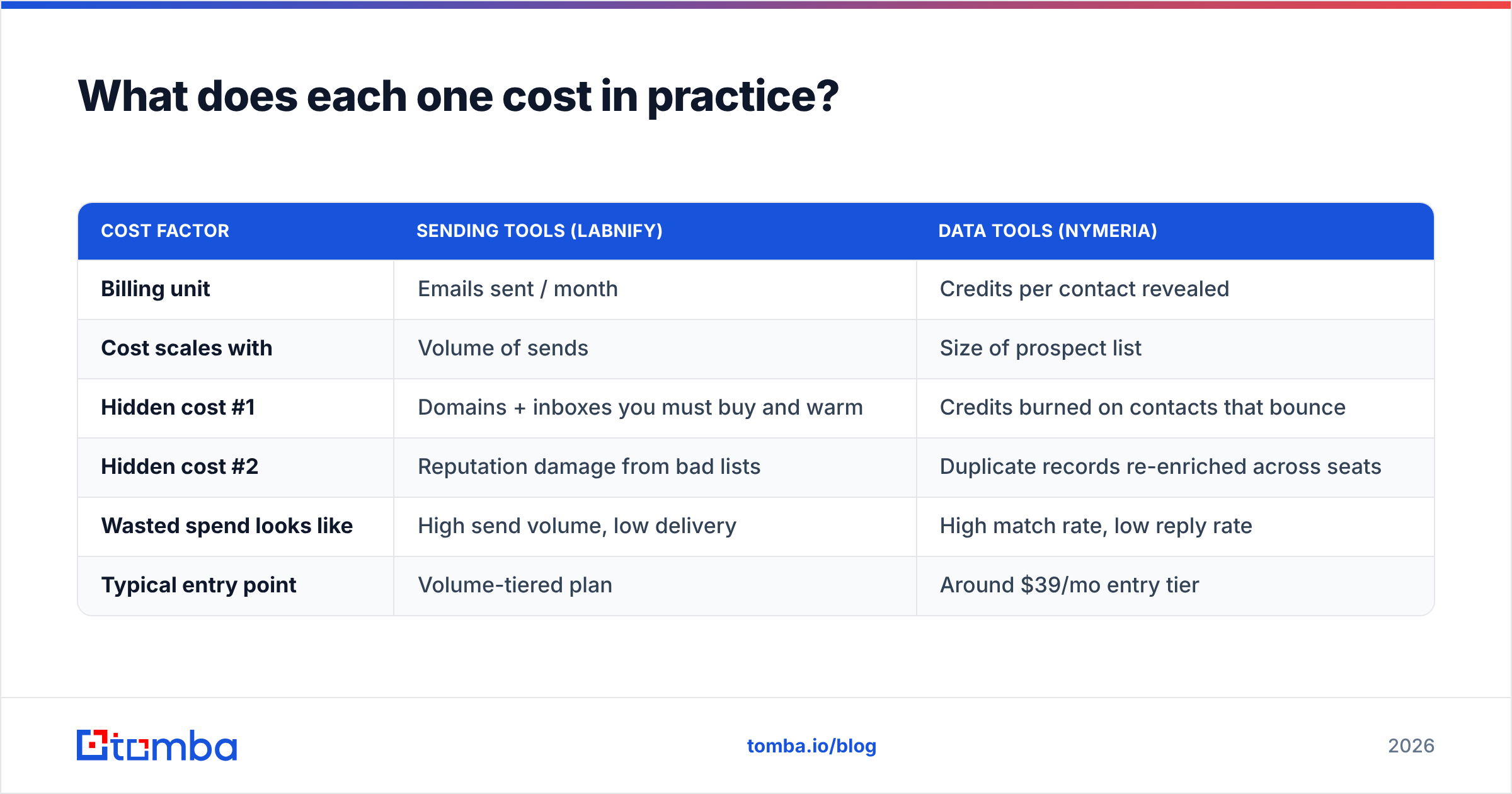
Compare on cost per usable, delivered contact, not sticker price.
| Cost factor | Sending tools (Labnify) | Data tools (Nymeria) |
|---|---|---|
| Billing unit | Emails sent / month | Credits per contact revealed |
| Cost scales with | Volume of sends | Size of prospect list |
| Hidden cost #1 | Domains + inboxes you must buy and warm | Credits burned on contacts that bounce |
| Hidden cost #2 | Reputation damage from bad lists | Duplicate records re-enriched across seats |
| Wasted spend looks like | High send volume, low delivery | High match rate, low reply rate |
| Typical entry point | Volume-tiered plan | Around $39/mo entry tier |
The math that matters: if you pay for 1,000 contact credits and 15% of those addresses are undeliverable, your effective cost per usable contact is 18% higher than advertised — before counting the reputation hit from 150 bounces. Running a verification pass before send is almost always cheaper than the alternative. Run your list through a bulk verify step and the bad rows cost you nothing but a few cents each.

Which should you choose for your use case?#
- High-volume newsletter or transactional sending — Labnify or a comparable relay. Nymeria contributes nothing here; you already have opted-in addresses.
- Founder-led outbound, under 100 emails/day — Neither, yet. Use your existing mailbox plus a data source. A relay is overkill below the daily caps of a normal Workspace account.
- Recruiting and candidate sourcing — Nymeria. Personal-email coverage is the differentiator, and you rarely need volume sending.
- B2B sales team scaling from 500 to 5,000 prospects/month — A B2B-first data source plus verification, then a sending layer. This is the both-halves case, and where most teams over-buy on one side and under-buy on the other.
- Developers building enrichment into a product — Compare APIs, not UIs. Check rate limits, response schema, and per-call pricing; the Tomba API and Nymeria's API both serve this, while Labnify's API is a sending endpoint.
- Agencies running client campaigns — You need both plus sub-account separation. Ask every vendor how billing and data isolation work across clients before signing.
What are people getting wrong about this comparison?#
Mistake 1: assuming a better sender fixes deliverability. Infrastructure is maybe a third of the equation. Authentication, list hygiene, content, engagement history, and warm-up carry the rest. Check your setup with a spam checker before blaming the relay.
Mistake 2: skipping warm-up. New domains and new IPs need a ramp, and no relay exempts you from it. A warmup calculator gives you a realistic schedule instead of guessing.
Mistake 3: buying enrichment credits for contacts you will never email. Enrich in waves tied to actual campaign slots. Credits do not usually roll over forever.
Mistake 4: treating "verified" as one thing. Syntax-valid, MX-valid, SMTP-accepted, and actually-monitored are four different claims. Vendors are frequently vague about which one they mean.
Mistake 5: ignoring compliance. Personal email addresses and EU data subjects carry obligations that a tool's UI will not remind you about. Know your legal basis before you send.
Frequently asked questions#
Can Labnify replace Nymeria?#
No. Labnify has no contact database. You would still need a data source to populate lists.
Can Nymeria replace Labnify?#
No. Nymeria surfaces and enriches contacts; it is not a bulk sending platform. You would connect its output to a sequencer or relay.
Do I need a separate verifier if my data tool already validates?#
Usually yes — particularly for catch-all domains and for lists older than about 60 days. A dedicated verification pass before each campaign is cheap insurance.
Which is better for LinkedIn prospecting?#
Both Nymeria and Tomba work from profile data; test both on a sample of 100 real prospects from your ICP and compare bounce rates, not match rates. A LinkedIn email finder should be judged on delivered addresses.
What is the cheapest way to test this properly?#
Take 100 accounts you genuinely want to reach, run them through each vendor's free or entry tier, then verify all outputs against a single verifier. Compare deliverable contacts per dollar. Vendor benchmark pages will not match what you see on your own ICP.
Where should you start?#
Start with the half that is actually blocking you, and be honest about which one that is. If your sends are bouncing, throughput is not your problem — data is. If your data is clean and your caps are the ceiling, buy sending capacity and leave enrichment alone.
For the data half, Tomba's Email Finder covers discovery, verification, and catch-all handling in one place, with a free tier of 25 searches per month so you can benchmark it against Nymeria on your own list before spending anything. Paid plans start at $49/month; the full breakdown is on the Tomba pricing page. Run 100 real prospects through it, verify everything, and let the bounce rate decide.
Related guides#
// get started
Find, verify and enrich your first contacts today
Start on the free plan with 25 searches a month, then scale when your team is ready.
Free plan · No credit card required · GDPR & CCPA
// about the author