Launch Email Sequence: The 7-Email Framework That Converts
Most product launches die in the inbox, not the market. Here is the 7-email launch sequence structure, timing, and copy logic that turns a waitlist into paying customers.
TL;DR
- A launch email sequence is a fixed-length, time-boxed series of emails built around a single event — a product going live, a cohort opening, a price changing. It is not a newsletter and it is not a drip.
- Seven emails over 10-14 days consistently outperforms the three-email "announce, remind, last chance" pattern most teams default to. The extra sends carry objection handling, proof, and use-case framing.
- Segment before you send. Waitlist, existing customers, cold prospects, and churned users need different first emails — same offer, different entry point.
- Your close rate is capped by list quality. A sequence that lands in spam or bounces at 12% will underperform bad copy sent to a clean list.
- Track reply rate and click-to-purchase, not open rate. Apple Mail Privacy Protection made opens directionally useless in 2021 and they have not recovered.
What is a launch email sequence?#
A launch email sequence is a finite set of emails sent around a specific commercial event, with a defined start, a defined end, and a single desired action.
That definition matters because teams keep confusing three different things:
- Newsletter — recurring, no deadline, relationship-building. Success metric: sustained engagement.
- Drip / nurture sequence — triggered by behavior, runs indefinitely, moves people down a funnel. Success metric: pipeline created.
- Launch sequence — time-boxed, deadline-driven, one offer. Success metric: revenue in a window.
- Onboarding sequence — post-purchase, activation-focused. Success metric: time-to-value.
Mixing them is the most common failure. A launch sequence that reads like a newsletter has no urgency. A launch sequence that reads like a drip has no narrative arc. The whole point is that everyone on the list is moving through the same story at the same time, toward the same door that closes on the same date.
The second thing that makes launch sequences distinct: you are allowed to email more often. A three-email-per-week cadence that would burn a newsletter list is normal during a launch window, because subscribers understand a temporary event is happening. The unsubscribe spike you see during launch week is not a failure signal — it is list hygiene happening for free.
Why do most launch sequences underperform?#
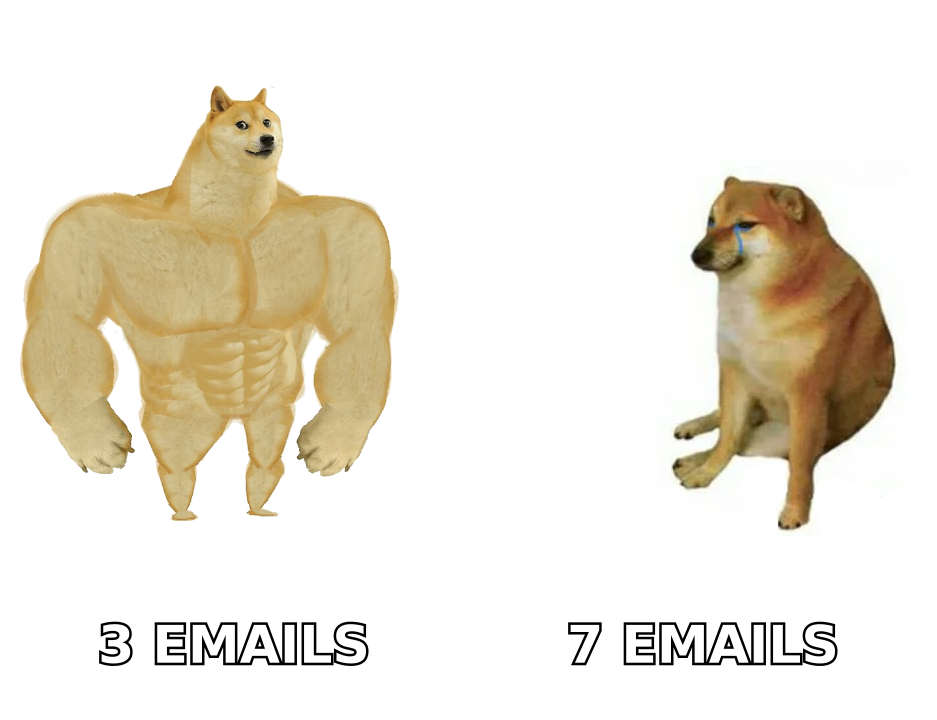
Because they compress the entire buying decision into three sends, and a buying decision does not fit in three sends.
Here is what actually happens inside a prospect's head between "this exists" and "I paid":
- Do I understand what this is?
- Do I believe it works?
- Do I believe it works for someone like me?
- Is the price defensible internally?
- What happens if it does not work?
- Why now and not next quarter?
Six questions. Three emails. You can see the arithmetic problem. When you cut the sequence short, you are choosing which objections go unanswered — and you rarely choose well, because the objections you find obvious are the ones your buyer finds hardest.
The other failure mode is more boring and more expensive: the list is bad. HubSpot's research on email marketing benchmarks consistently shows deliverability and list quality dominating creative quality in outcome variance. If 15% of your addresses are dead, you are not running a launch — you are running a bounce test that also damages sender reputation right before your highest-stakes send week.
Run the list through an email verifier before the sequence starts, not after the first send bounces. This is a 20-minute task that protects the entire campaign.
What does the 7-email launch framework look like?#
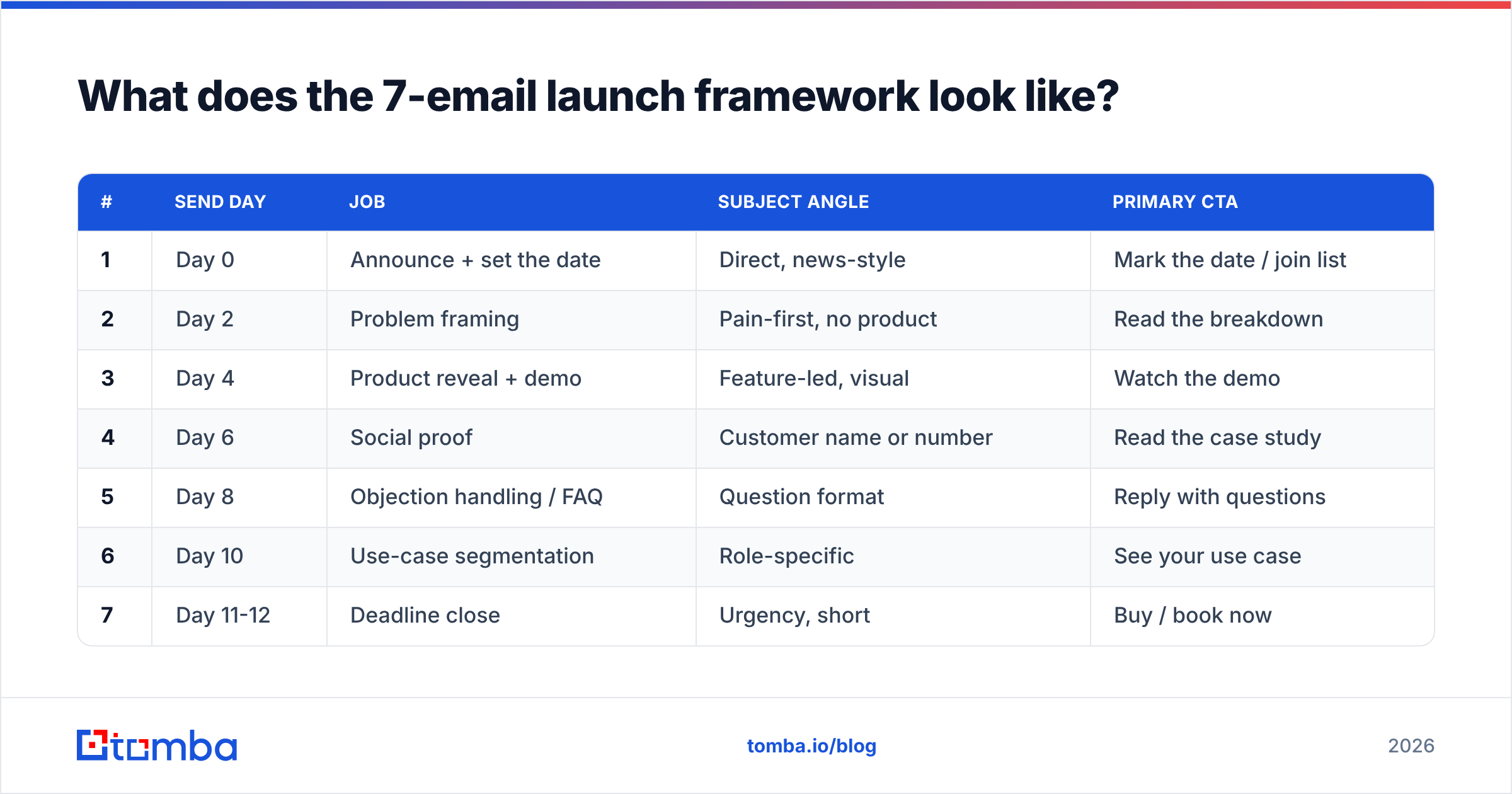
Each email owns one job. No email does two jobs. That constraint is what makes the sequence work.
| # | Send day | Job | Subject angle | Primary CTA |
|---|---|---|---|---|
| 1 | Day 0 | Announce + set the date | Direct, news-style | Mark the date / join list |
| 2 | Day 2 | Problem framing | Pain-first, no product | Read the breakdown |
| 3 | Day 4 | Product reveal + demo | Feature-led, visual | Watch the demo |
| 4 | Day 6 | Social proof | Customer name or number | Read the case study |
| 5 | Day 8 | Objection handling / FAQ | Question format | Reply with questions |
| 6 | Day 10 | Use-case segmentation | Role-specific | See your use case |
| 7 | Day 11-12 | Deadline close | Urgency, short | Buy / book now |
A few notes on the structure.
Email 2 should not mention your product. It earns the right to sell by demonstrating you understand the problem better than the reader has articulated it. If you can describe their situation more precisely than they can, credibility transfers automatically.
Email 5 is the highest-leverage send and the one most often skipped. Ask for replies. Actual replies from actual humans are the strongest deliverability signal available to you, and the questions you collect will rewrite your landing page for free.
Email 7 should be under 80 words. By day 11 nobody needs more information. They need a deadline and a link.
How should you segment the list before sending?#
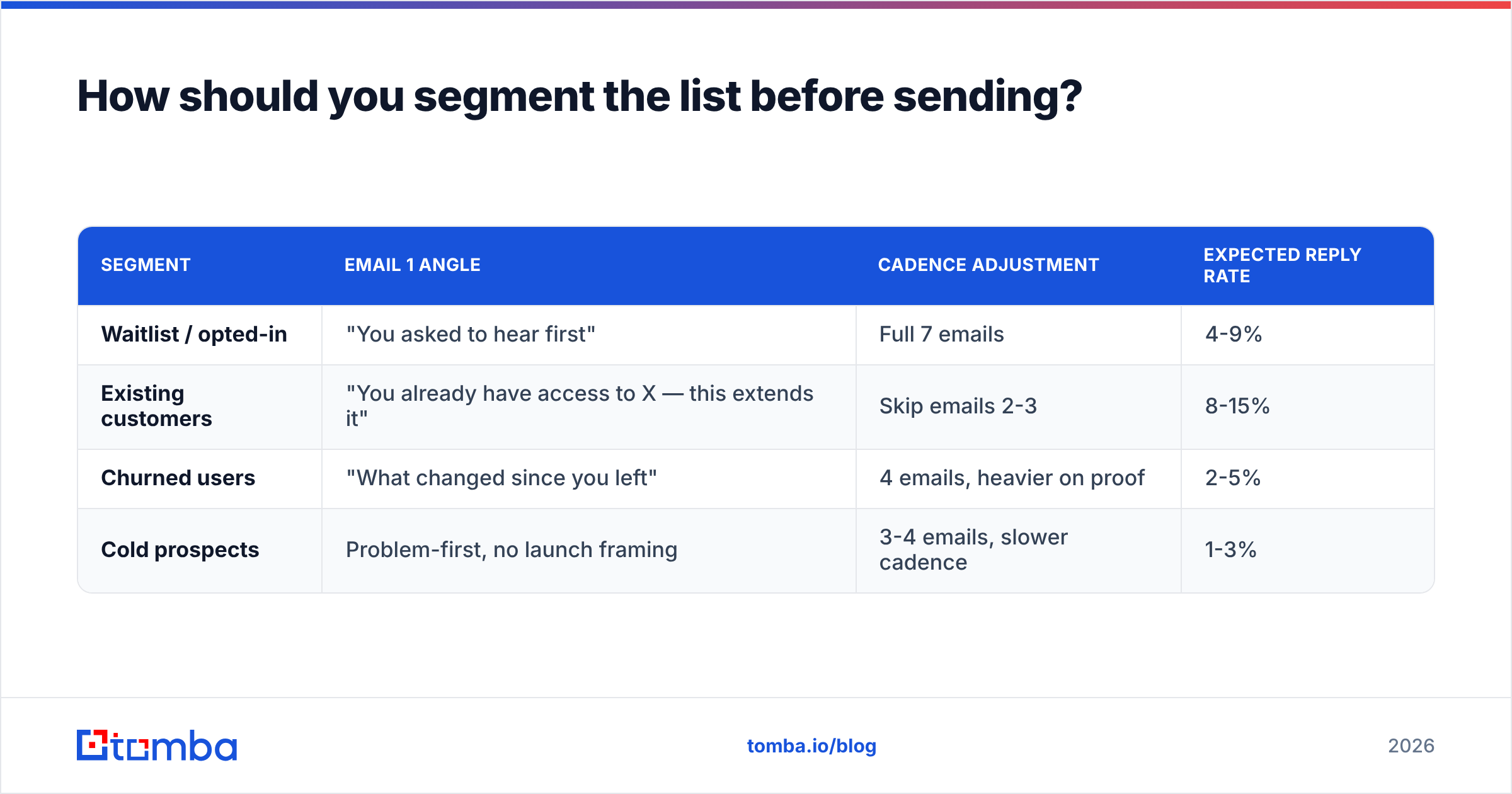
Same offer, four entry points. The middle of the sequence can converge; the first email cannot.
| Segment | Email 1 angle | Cadence adjustment | Expected reply rate |
|---|---|---|---|
| Waitlist / opted-in | "You asked to hear first" | Full 7 emails | 4-9% |
| Existing customers | "You already have access to X — this extends it" | Skip emails 2-3 | 8-15% |
| Churned users | "What changed since you left" | 4 emails, heavier on proof | 2-5% |
| Cold prospects | Problem-first, no launch framing | 3-4 emails, slower cadence | 1-3% |
Cold prospects are a different animal and deserve a warning: do not blast a launch sequence to a cold list from your primary sending domain. Use a separate domain, warm it properly, and keep volume low. Gartner's guidance on B2B buying behavior shows buyers spend roughly 17% of their time with any single supplier — meaning your launch is competing with five other evaluations, not sitting alone in their attention.
Building that cold segment cleanly matters more than size. Pulling verified role-based contacts via domain search beats scraping a conference attendee list, because you are targeting the job function that owns the problem rather than whoever happened to register.
What should each email actually say?#
Structure per email, in order:
- Subject line — 30-50 characters, one idea, no colons stacked two deep. Test with a subject line tester before the send, not after.
- First line — must survive the preview pane. Never open with "Hope you're well" or restate the subject.
- One idea, 120-250 words — launch emails are not long-form. The landing page is long-form.
- One CTA, repeated at most twice — two different CTAs halves both.
- Plain-text-weighted formatting — heavy HTML templates during launch week increase spam-folder risk for no conversion benefit.
- A P.S. that carries the deadline — it is the second-most-read element after the subject line.
On subject lines specifically: the biggest measurable gap in launch sequences is between subject lines that promise information and subject lines that promise a decision. "New feature: bulk export" underperforms "Bulk export is live — closes Friday" reliably, because the second one contains a reason to open now.
How do you measure a launch sequence in 2026?#
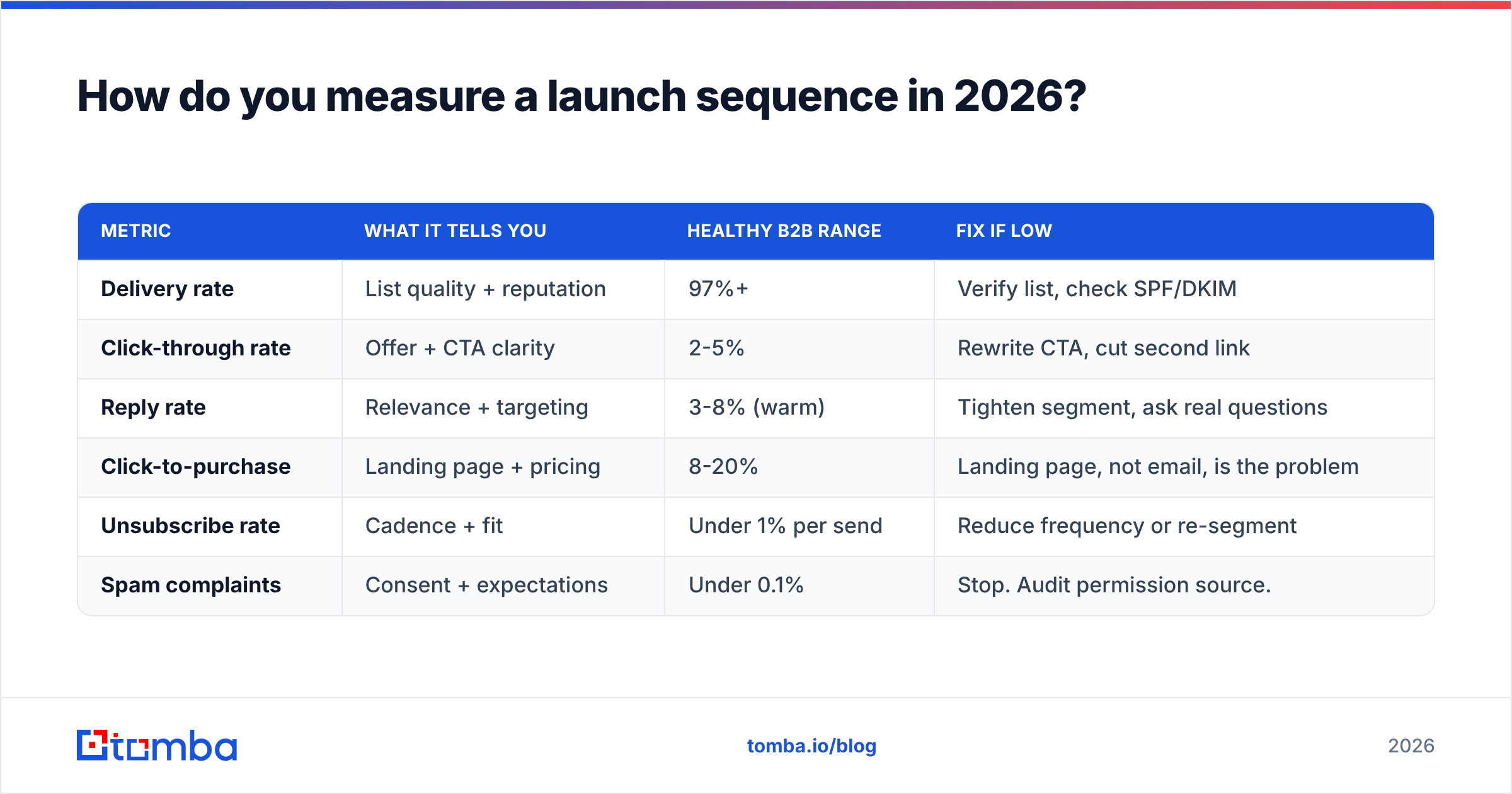
Stop reporting open rate as a primary metric. Apple's Mail Privacy Protection pre-loads images, which inflates opens for a large and unknowable share of your list. Directional use only.
| Metric | What it tells you | Healthy B2B range | Fix if low |
|---|---|---|---|
| Delivery rate | List quality + reputation | 97%+ | Verify list, check SPF/DKIM |
| Click-through rate | Offer + CTA clarity | 2-5% | Rewrite CTA, cut second link |
| Reply rate | Relevance + targeting | 3-8% (warm) | Tighten segment, ask real questions |
| Click-to-purchase | Landing page + pricing | 8-20% | Landing page, not email, is the problem |
| Unsubscribe rate | Cadence + fit | Under 1% per send | Reduce frequency or re-segment |
| Spam complaints | Consent + expectations | Under 0.1% | Stop. Audit permission source. |
That last row is not negotiable. Google and Yahoo's bulk sender requirements put the complaint threshold at 0.3%, with 0.1% as the operating target. Cross it during a launch and you will spend the following quarter rebuilding email deliverability instead of shipping.
The diagnostic logic is simple: if clicks are fine and purchases are not, the email did its job and the landing page did not. If clicks are bad but delivery is fine, the offer or the CTA is wrong. If delivery is bad, nothing else on the list matters yet.
What tools do you need to run this?#
Fewer than vendors would like you to believe. Four categories:
- Contact sourcing — finding and verifying the addresses. Tools like Tomba, Hunter, and BookYourData occupy this layer, with BookYourData leaning toward pre-built list purchase and Tomba toward on-demand search plus verification via API.
- Sending — your ESP for warm lists (Mailchimp, Customer.io) or a cold-email platform with rotation and warmup for prospect segments.
- Verification — run before the launch and again on anything older than 90 days. Decay is roughly 22-30% annually on B2B addresses.
- Analytics — UTM discipline plus CRM attribution. If you cannot tie an email to a closed deal, you cannot defend the channel's budget next year.
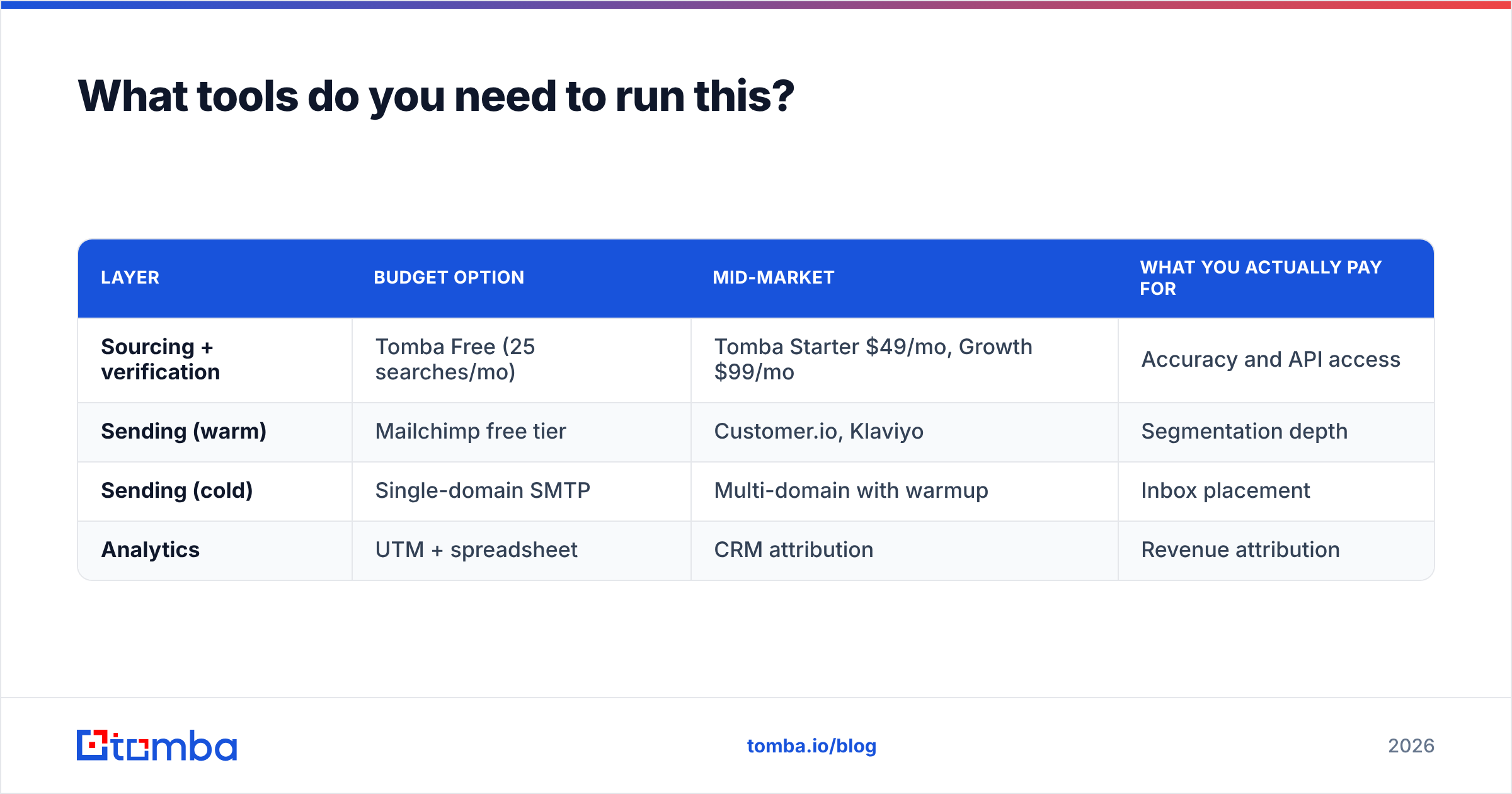
| Layer | Budget option | Mid-market | What you actually pay for |
|---|---|---|---|
| Sourcing + verification | Tomba Free (25 searches/mo) | Tomba Starter $49/mo, Growth $99/mo | Accuracy and API access |
| Sending (warm) | Mailchimp free tier | Customer.io, Klaviyo | Segmentation depth |
| Sending (cold) | Single-domain SMTP | Multi-domain with warmup | Inbox placement |
| Analytics | UTM + spreadsheet | CRM attribution | Revenue attribution |
Compare tiers directly on the Tomba pricing page — the relevant question for a launch is whether you need bulk throughput in one week, which pushes most teams to Growth rather than Starter. For a broader vendor landscape, G2's email marketing category is more useful than any single vendor's comparison page, including this one.
What should you do in the 14 days before launch?#
The sequence is the easy part. The preparation determines whether it lands.
- Day -14: Freeze the list. Export it, verify it, remove duplicates and role accounts you do not want (info@, sales@) unless they are your ICP.
- Day -10: Authenticate. SPF, DKIM, and DMARC all passing on the sending domain. Check with an SPF checker — a misconfigured record discovered on day 0 costs you the launch.
- Day -7: Warm up any new sending domain. Volume ramps take days, not hours.
- Day -5: Write all seven emails at once. Writing them sequentially during the launch produces a sequence with no arc, because each email reacts to the last one's metrics instead of following the plan.
- Day -2: Send the full sequence to a seed list across Gmail, Outlook, and one corporate Exchange tenant. Check rendering and folder placement.
- Day -1: Confirm the landing page, checkout, and confirmation email work. Test the actual purchase flow with a real card.
The single most skipped step here is the seed-list test. Teams that do it catch broken links, dark-mode rendering failures, and spam-folder placement while there is still time to fix them.
Common questions#
How long should the whole window be? Ten to fourteen days for most B2B software. Shorter than seven days and half your list never opens anything during their travel week. Longer than three weeks and urgency evaporates.
Can you re-send to non-openers? Yes, once, with a different subject line, 48 hours after the original — but only for email 1 and email 7. Re-sending the middle of the sequence creates a confusing timeline for anyone who did read it.
What if the launch is a pure price change? Compress to four emails: announce, justify, remind, close. Price-change sequences do not need product-education emails.
Should email 7 go to people who already bought? No. Suppress purchasers after every send. Getting a "last chance to buy" email the day after paying is the fastest way to trigger a refund request.
Where to start#
Build the list before you write a single subject line. A seven-email sequence to 400 verified, correctly-segmented contacts will out-earn the same sequence to 4,000 scraped addresses, and it will not cost you your sending domain in the process.
Tomba Email Finder handles the part most teams get wrong: finding the right person at the right company with a verified address, by domain or by name, with a free tier of 25 searches a month to test accuracy on companies you already know. Run 50 known contacts through it, check the hit rate yourself, then decide whether to build your launch list on it. That is the only vendor evaluation that means anything.
Related guides#
// get started
Find, verify and enrich your first contacts today
Start on the free plan with 25 searches a month, then scale when your team is ready.
Free plan · No credit card required · GDPR & CCPA
// about the author