Lead Builder: How to Build a B2B Lead List That Converts
A lead builder turns a vague ICP into a contactable list. Here's how the main approaches compare on data accuracy, pricing, export limits, and what actually happens when your list hits the inbox.

TL;DR
- A lead builder is any tool or workflow that turns a target profile ("Series B fintechs in the EU, Head of Growth") into a list of real, contactable people. The category spans static databases, live search engines, scrapers, and API-first finders.
- The differences that matter are not feature counts. They are data freshness, verification method, export/credit rules, and whether you own the data after you export it.
- A 50,000-row list with a 22% bounce rate is worth less than a 1,200-row list at 97% deliverable. Volume is a vanity metric in list building.
- Most teams end up combining two tools: one for discovery (who to target) and one for contact data plus verification (how to reach them).
- Budget realistically: usable lead-building stacks start around $49–$99/month for a single SDR and scale by credits, not seats.
What is a lead builder?#
A lead builder is a tool that converts an ideal customer profile into a list of named people with working contact details. Think of it like a library catalogue versus a bookshelf. The catalogue tells you a book exists and roughly where it lives; the shelf hands you the actual book. A lead builder has to do both — identify the right companies and people, then produce a contact record you can actually use today.
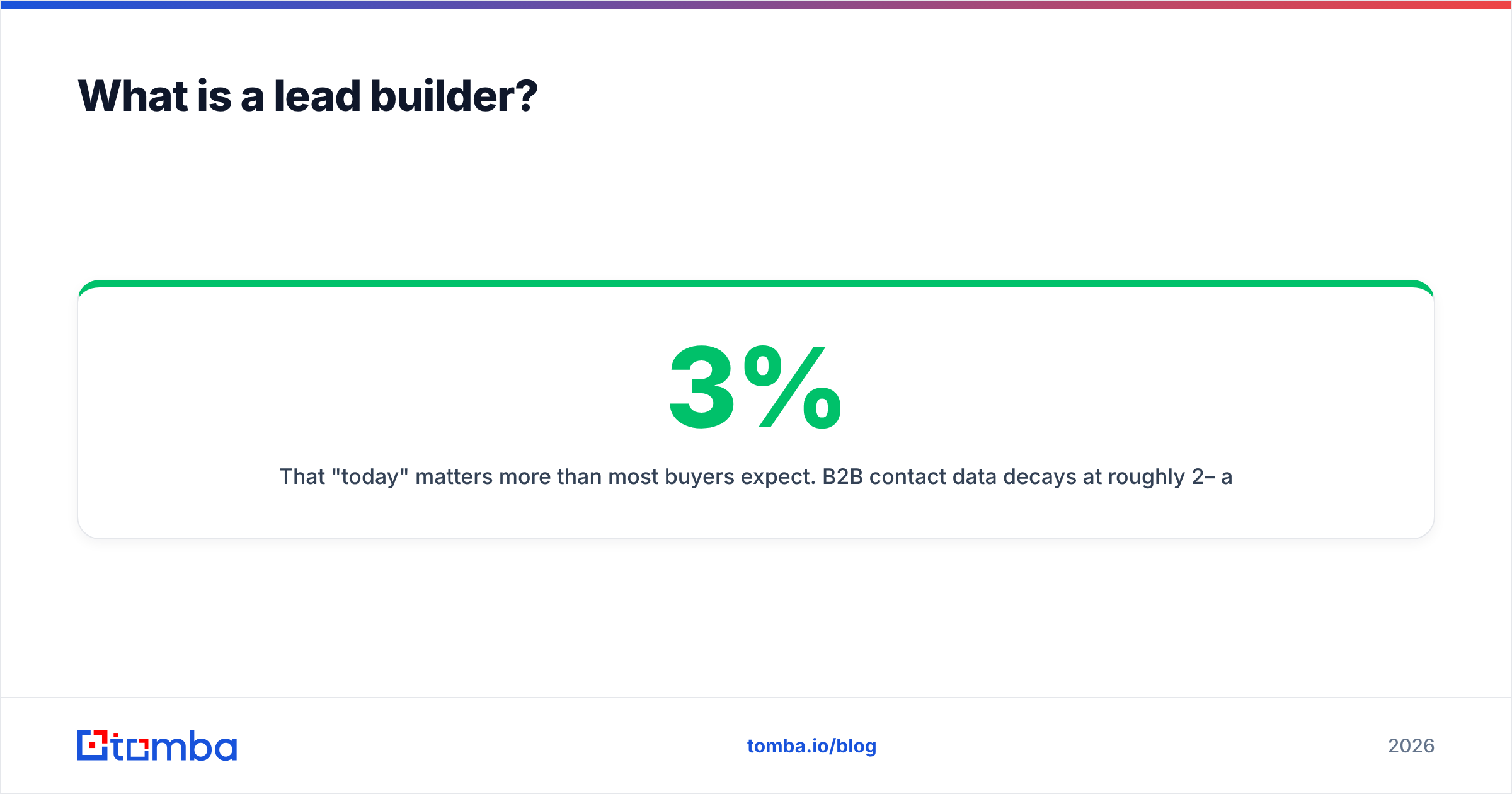
That "today" matters more than most buyers expect. B2B contact data decays at roughly 2–3% per month as people change jobs, companies rebrand, and mail servers get reconfigured. A database that was 95% accurate when it was compiled 18 months ago is not 95% accurate now. This is the single biggest gap between how lead builders are marketed and how they perform.
Four things a credible lead builder should do:
- Filter by real firmographics — industry, headcount, revenue band, tech stack, geography, funding stage. If the filters are shallow, you will pay for rows you will never contact.
- Resolve people, not just companies — a company record with no named contact is a research task, not a lead.
- Verify contact data at retrieval time — not "we verified this at some point." SMTP-level or pattern-plus-confidence verification should run when you pull the record.
- Export cleanly — CSV, CRM push, or API. If exports are throttled or the data is licensed rather than owned, that changes the economics completely.

What are the different types of lead builder?#
There is no single architecture behind the label. The four common models behave very differently once you start running campaigns, and each one fails in its own predictable way.
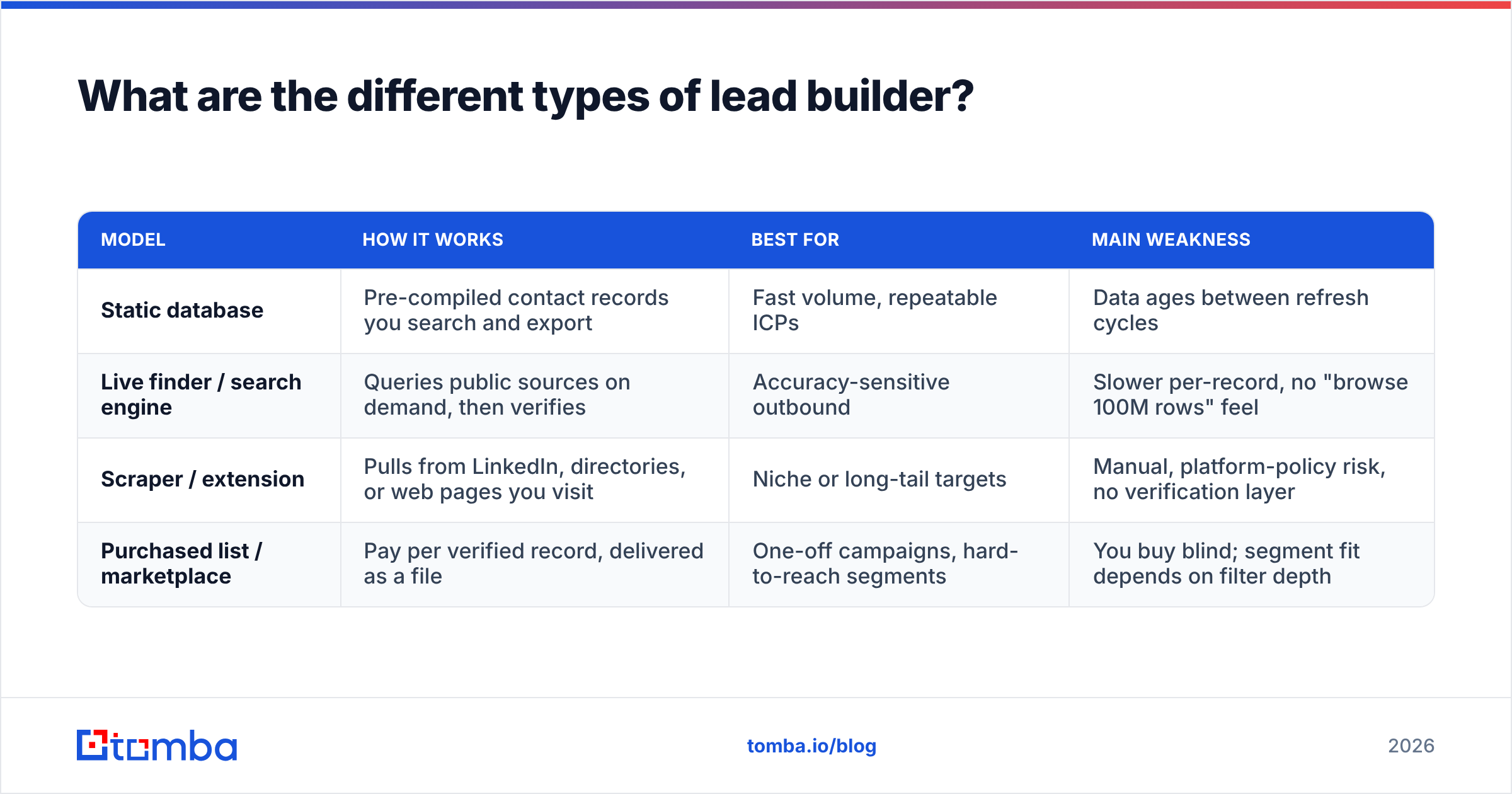
| Model | How it works | Best for | Main weakness |
|---|---|---|---|
| Static database | Pre-compiled contact records you search and export | Fast volume, repeatable ICPs | Data ages between refresh cycles |
| Live finder / search engine | Queries public sources on demand, then verifies | Accuracy-sensitive outbound | Slower per-record, no "browse 100M rows" feel |
| Scraper / extension | Pulls from LinkedIn, directories, or web pages you visit | Niche or long-tail targets | Manual, platform-policy risk, no verification layer |
| Purchased list / marketplace | Pay per verified record, delivered as a file | One-off campaigns, hard-to-reach segments | You buy blind; segment fit depends on filter depth |
Most teams that have been doing outbound for more than a year run a hybrid. They use a database or scraper for discovery — finding who exists in a segment — then route those names through a dedicated email finder and email verifier before anything reaches a sending tool. The split exists because discovery and contact accuracy are genuinely different engineering problems, and very few vendors are excellent at both.
How do you build a lead list that actually converts?#
Start narrow and expand. The most common mistake is building the biggest list your credits allow, then discovering after 2,000 sends that the segment was wrong.
- Define the segment in a single sentence. "VP Marketing at 50–200 person B2B SaaS companies in North America that run HubSpot." If you cannot write it in one sentence, your filters will be guesswork.
- Build a 50-lead pilot first. Run it, measure reply rate and bounce rate, then scale. A pilot costs almost nothing and kills bad segments before they cost you domain reputation.
- Source companies before people. Company-level targeting (funding, tech stack, hiring signals) is more stable than title-level targeting, because titles vary wildly between orgs.
- Resolve contacts by domain, not by name guess. A domain search returns the real email pattern a company uses, which is far more reliable than permutating
first.last@and hoping. - Verify before every send, not once per quarter. Verification is cheap. A blocked sending domain is not. If you are working with catch-all domains, handle them explicitly with a catch-all verifier rather than assuming they are valid.
- Enrich only what you will use. Phone numbers, LinkedIn URLs, and firmographic fields cost credits. Pull them for the segment you are actively working, not the whole database.
The teams with the best reply rates are almost never the ones with the biggest lists. HubSpot's sales research has made the same point for years: segment precision beats volume on nearly every downstream metric, from open rate to meeting-booked rate.
Which lead builder tools compare best in 2026?#
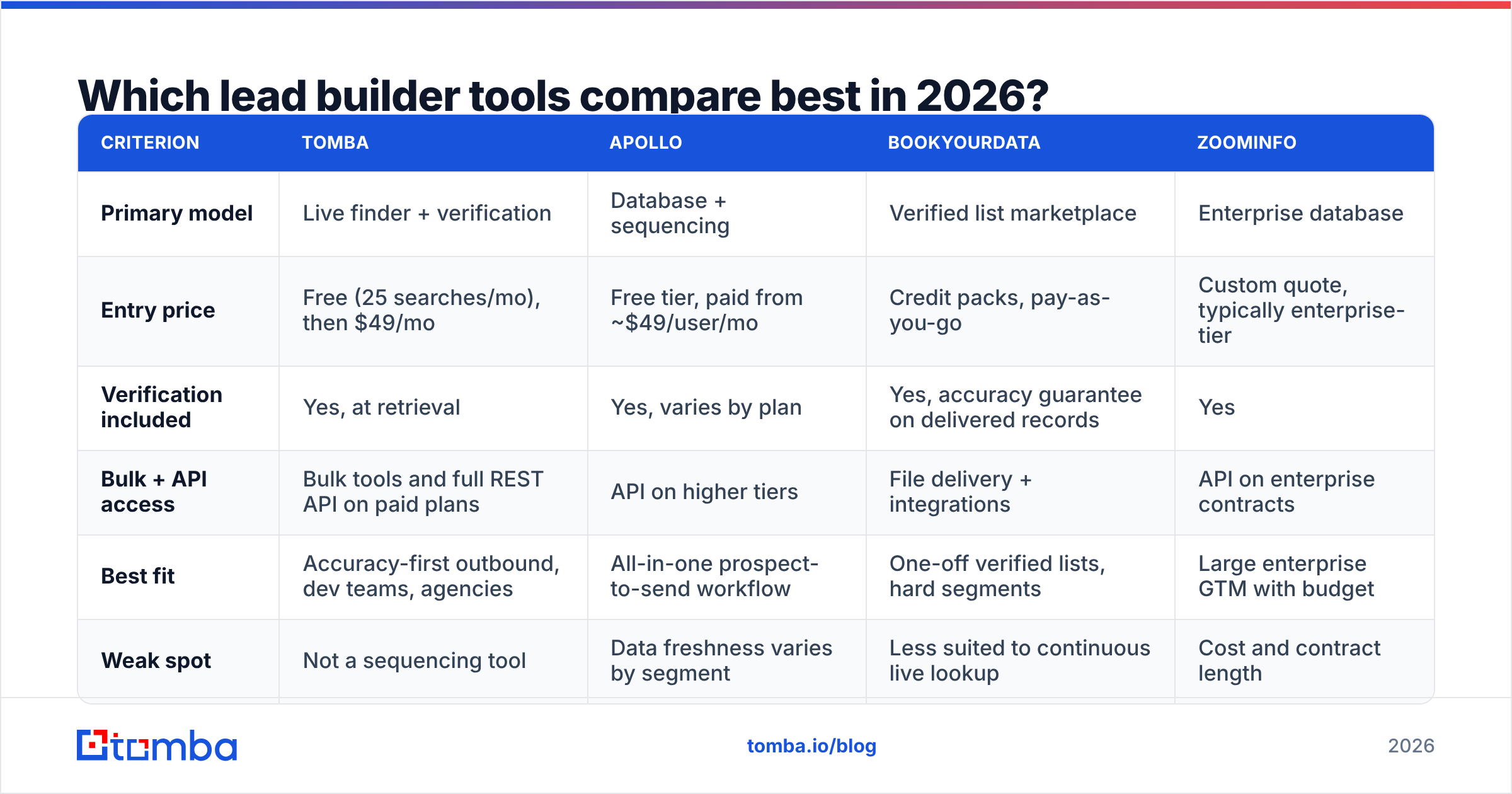
The honest answer is that they win on different axes. Here is how the main options line up on the criteria that actually change campaign outcomes. Prices are list prices checked in September 2026 — verify on each vendor's site, since credit packaging changes often.
| Criterion | Tomba | Apollo | BookYourData | ZoomInfo |
|---|---|---|---|---|
| Primary model | Live finder + verification | Database + sequencing | Verified list marketplace | Enterprise database |
| Entry price | Free (25 searches/mo), then $49/mo | Free tier, paid from ~$49/user/mo | Credit packs, pay-as-you-go | Custom quote, typically enterprise-tier |
| Verification included | Yes, at retrieval | Yes, varies by plan | Yes, accuracy guarantee on delivered records | Yes |
| Bulk + API access | Bulk tools and full REST API on paid plans | API on higher tiers | File delivery + integrations | API on enterprise contracts |
| Best fit | Accuracy-first outbound, dev teams, agencies | All-in-one prospect-to-send workflow | One-off verified lists, hard segments | Large enterprise GTM with budget |
| Weak spot | Not a sequencing tool | Data freshness varies by segment | Less suited to continuous live lookup | Cost and contract length |
A few notes that the feature grid hides.
Apollo is the default for teams that want discovery, enrichment, and sequencing in one place. That consolidation is real value. The trade-off is that data quality varies a lot by region and segment — strong in US tech, thinner elsewhere. If you want to keep the workflow but improve the data layer, an Apollo alternative used just for contact resolution is a common pattern.
BookYourData takes a different and quite defensible position: you buy verified records on a pay-as-you-go basis with an accuracy guarantee, rather than renting access to a database. For teams that run a few large campaigns per year instead of continuous outbound, that model is often cheaper and simpler than a subscription. It is genuinely good at hard-to-reach segments where live lookup struggles. Check their filter depth against your ICP before committing to a large pack — that is the variable that decides whether the model works for you.
ZoomInfo remains the most complete enterprise dataset, with intent data and org charts that smaller vendors do not attempt. It is also priced and contracted accordingly. If your ACV is under roughly $10k, the maths rarely works.
Tomba is built around resolution and verification rather than browsing. You give it a domain, a name, or a LinkedIn profile and it returns a verified address with a confidence score and sources. It is not a sequencer and does not pretend to be. Teams typically pair it with whatever sending tool they already own. Full Tomba pricing runs Free (25 searches/mo), Starter $49/mo, Growth $99/mo, Pro $249/mo, and Enterprise on request.
For an independent read on where each tool sits, G2's sales intelligence category aggregates enough reviews to be useful for spotting patterns, though treat individual scores with the usual scepticism about review incentives.

How do you judge lead builder data accuracy?#
Ignore the headline percentage on the pricing page. Every vendor claims 95%+ and they are measuring different things — some count "syntactically valid," some count "mailbox exists," some count "did not bounce in our internal test."
Run your own test instead. It takes about twenty minutes:
- Pick 100 records from a segment you know well, ideally one where you can verify a handful of addresses by hand.
- Send a small warm-up-safe batch or run the list through a third-party verifier you did not buy from.
- Measure three numbers: hard bounce rate, catch-all rate, and role-account rate (
info@,sales@,contact@). Role accounts inflate "valid" counts while producing almost no replies. - Check recency, not just validity. An address can be technically deliverable and belong to someone who left the company eight months ago.
A practical benchmark from running this test across vendors: anything under 3% hard bounce is good, 3–5% is workable, and above 5% will start damaging your sending domain within a few thousand emails. Catch-all rates above 30% mean you need a dedicated catch-all strategy rather than a bigger list.
If you want to see where the underlying records come from before you test, most credible vendors publish this. Tomba documents its data sources publicly, which is a reasonable thing to demand from anyone selling you contact data.
What does a lead builder actually cost?#
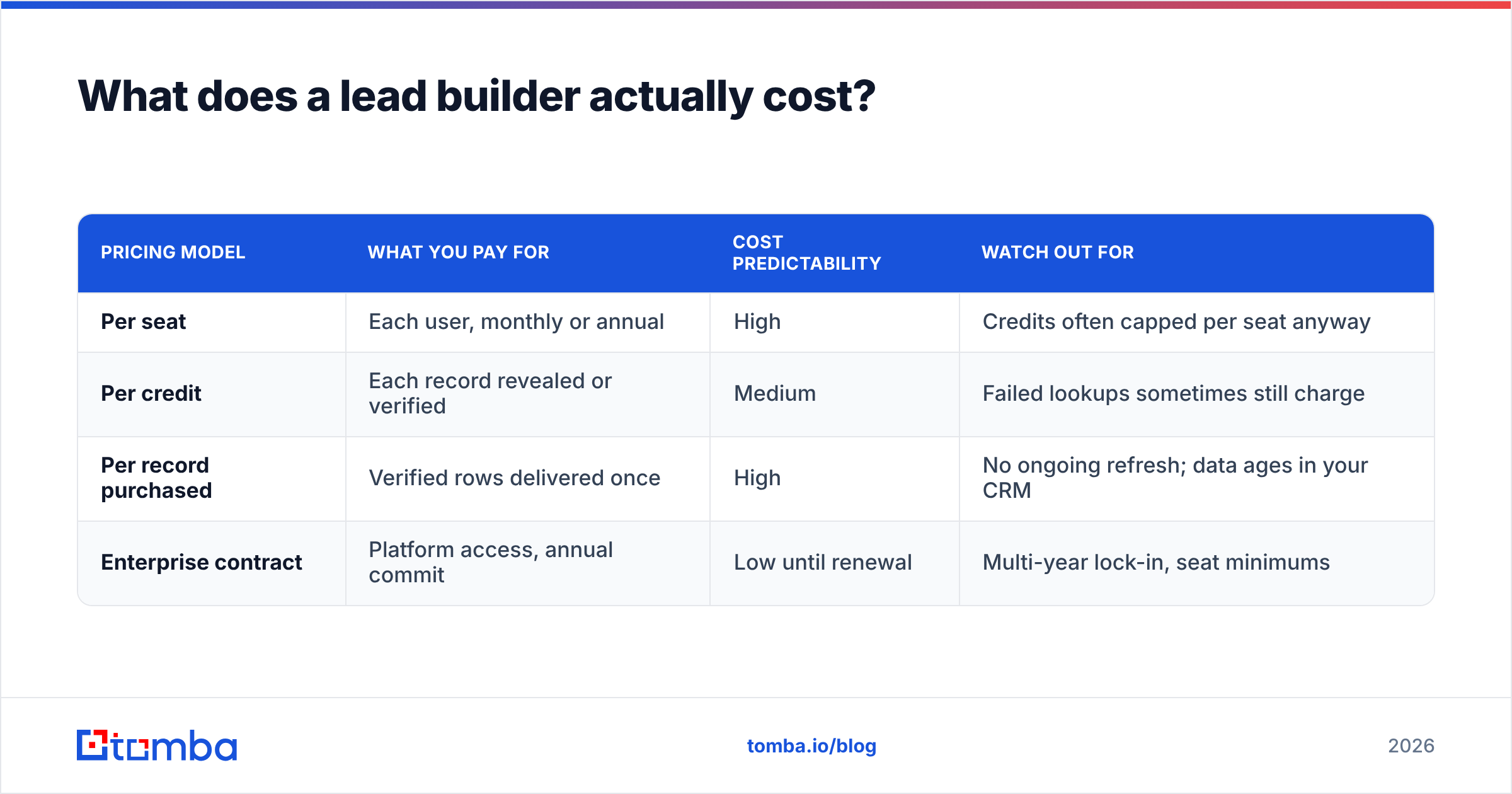
The sticker price is rarely the real price. Three cost structures dominate, and they behave very differently at scale.
| Pricing model | What you pay for | Cost predictability | Watch out for |
|---|---|---|---|
| Per seat | Each user, monthly or annual | High | Credits often capped per seat anyway |
| Per credit | Each record revealed or verified | Medium | Failed lookups sometimes still charge |
| Per record purchased | Verified rows delivered once | High | No ongoing refresh; data ages in your CRM |
| Enterprise contract | Platform access, annual commit | Low until renewal | Multi-year lock-in, seat minimums |
Two questions to ask any vendor before signing:
- Do failed lookups consume credits? Some charge for every attempt, including ones that return nothing. Over a 10,000-row list, that difference is material.
- Do credits roll over? Most do not. If your outbound is seasonal, a smaller plan plus overage is usually cheaper than a large plan you underuse for four months a year.
For teams processing lists in batches rather than one at a time, per-credit pricing with a bulk email finder workflow is almost always cheaper than per-seat pricing, because you are not paying for idle seats during quiet weeks.
What mistakes kill lead lists before they send?#
Four patterns account for most failed campaigns.
Building before defining. Filters are seductive. It is easy to spend an hour adding criteria and end up with a list nobody on the team can describe. Write the one-sentence ICP first.
Skipping verification because the vendor "already verified." Vendor verification happened at compile time. Yours happens at send time. Those are different moments, and the gap between them is where bounces live.
Treating role accounts as leads. info@company.com is a contact record, not a person. If 30% of your list is role accounts, your reply rate will look catastrophic even if the segment was right.
Sending the whole list on day one. New domain, 5,000 emails, cold list — that is how sending reputation dies. Ramp volume, and track email deliverability as its own metric rather than assuming delivery.
Should you build or buy your lead list?#
Build if your ICP is narrow, changes often, or depends on signals no database tracks well — hiring patterns, specific tech installs, recent funding in a niche vertical. Live lookup plus verification gives you fresher data and you only pay for what you use.
Buy if your ICP is broad, stable, and well-represented in existing datasets — a marketplace like BookYourData delivering verified records against clear filters will be faster and often cheaper than assembling the same list yourself.
Most teams do both, and the split usually lands around 70/30: bought lists for volume plays into established segments, built lists for the accounts that actually matter. The one thing you should not do is treat either as a one-time purchase. Whatever lands in your CRM starts decaying the moment it arrives, which is why continuous data enrichment beats an annual list refresh in almost every case.
FAQ#
Is a lead builder the same as a CRM? No. A lead builder creates records; a CRM stores and manages them through the pipeline. They connect, but replacing one with the other does not work.
How many leads do I need per month? For one SDR sending 40–60 personalised emails a day, roughly 800–1,200 verified contacts per month is typical. If you are sending more than that per rep, you are probably not personalising.
Can I build a lead list for free? Partly. Free tiers — including Tomba's 25 searches/month — are enough to validate a segment and test data quality before you commit. They are not enough to run sustained outbound.
What bounce rate is acceptable? Under 3% hard bounces. Above 5%, mailbox providers start treating your domain as a risk, and recovery takes weeks.
Start with the contact layer#
If your lists are bouncing, the fix is almost never a bigger database — it is a better resolution and verification step between discovery and send. Run your next 100 contacts through the Tomba Email Finder and compare the bounce rate against whatever you are using now. The free tier covers 25 searches a month, which is enough to see the difference before you pay for anything. If the numbers hold up, Starter at $49/mo and Growth at $99/mo cover most single-rep and small-team volumes, with a full API if you would rather wire it into your own stack.
Related guides#
// get started
Find, verify and enrich your first contacts today
Start on the free plan with 25 searches a month, then scale when your team is ready.
Free plan · No credit card required · GDPR & CCPA
// about the author