9 Best Lead Carrot Alternatives for B2B Prospecting in 2026
Lead Carrot bundles scraping, enrichment and sending into one agency-friendly plan. Here are nine alternatives that beat it on data accuracy, verification depth or raw cost per verified contact.
TL;DR
- Lead Carrot is an all-in-one scrape-enrich-send tool aimed at agencies and solo operators who want lead lists and sequencing under one login. Its appeal is bundling, not data depth.
- Most teams start hunting for Lead Carrot alternatives for three reasons: unverified emails burning sender reputation, credits that get consumed on failed lookups, and no usable API for automation.
- If accuracy per credit is what you care about, a dedicated finder plus verifier stack (Tomba, Hunter, Findymail) beats a bundled tool almost every time.
- If you want a sales engine with a built-in database, Apollo.io is the obvious swap. If you want pre-verified contacts with a money-back guarantee instead of credits, BookYourData is a strong fit.
- Budget reality check: a solid two-tool stack lands between $49 and $120/month for most small teams, which is close to what bundled platforms charge for weaker data.
What is Lead Carrot and who actually uses it?#
Lead Carrot (leadcarrot.io) is a lead generation platform built around local and SMB prospecting. You search by niche and geography, it pulls business records with contact details and website signals, and you can push those contacts into an email sequence without leaving the tool. It also surfaces technology and website-quality flags, which is why it became popular with web design and marketing agencies pitching "your site is broken" offers.
That is the niche it serves well: an agency owner who needs 500 local businesses with a decoded pain point and an email address, this week, without stitching five tools together.
The problem starts when you scale, or when your ICP moves upmarket. Local-business databases are shallow on enterprise org charts. Bundled sending means your deliverability lives or dies by someone else's infrastructure. And single-vendor data means you have no second source when a record comes back empty.

Why do teams look for Lead Carrot alternatives?#
Five patterns come up repeatedly in review threads on G2 and in agency communities:
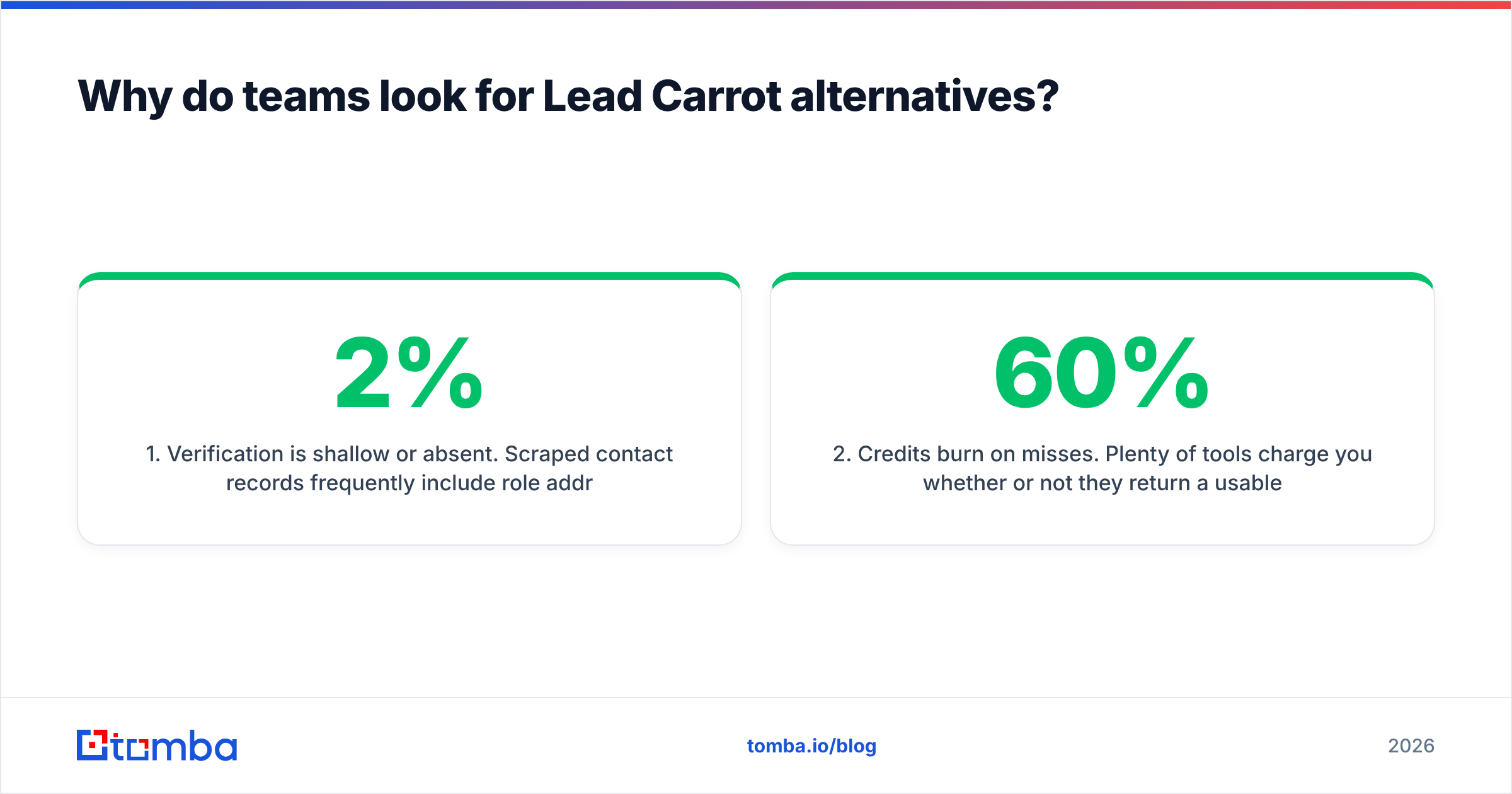
- Verification is shallow or absent. Scraped contact records frequently include role addresses (info@, contact@) and stale personal addresses. Sending to them without a verification pass drives bounce rates past the 2% line where Google and Microsoft start throttling you.
- Credits burn on misses. Plenty of tools charge you whether or not they return a usable address. Over a 10,000-contact month, a 60% hit rate versus an 85% hit rate is the difference between paying for 4,000 wasted lookups and paying for 1,500.
- No real API. Once your outbound motion is working, you want enrichment to run on signup, on form fill, on CRM record creation. A UI-only tool caps you at manual exports forever.
- Narrow geography and vertical coverage. SMB-and-local databases thin out fast outside North America and for anything above a 200-person company.
- All-in-one sending is a liability. Shared sending infrastructure means your reputation is pooled with everyone else on the platform. Most serious senders now separate data from delivery on purpose.
What should you compare in a Lead Carrot alternative?#
Before you look at logos, decide which of these six dimensions actually costs you money:
- Verified hit rate, not database size. "200M contacts" is a vanity number. The only figure that matters is what percentage of your target list comes back with a deliverable address. Run the same 100 names through every trial you take.
- Credit accounting rules. Ask one question: do you charge for a search that returns nothing? Vendors that only charge on success are structurally cheaper even at a higher list price.
- Verification depth. Syntax and MX checks are table stakes. What separates tools is SMTP-level checking and catch-all handling — the domains that accept everything at the gateway and bounce later.
- Automation surface. API, CLI, spreadsheet add-ons, MCP server, native CRM sync. If enrichment can't run without a human clicking export, it won't survive your next headcount change.
- Compliance posture. GDPR and CCPA documentation, opt-out handling, and clear sourcing. Ask where the data comes from and get an answer in writing.
- Exit cost. Can you export everything you've enriched, in full, at any time? Bundled platforms are the worst offenders here.
How accurate are the leading email data providers?#
Accuracy is where bundled prospecting tools lose to specialists. A dedicated finder runs multiple discovery methods per lookup: pattern inference from known company addresses, public source matching, and live SMTP validation before it returns a result. A scraper that harvests whatever was on a directory listing does one.

Two practical notes on reading any accuracy claim, including vendor-published ones:
- Hit rate and accuracy are different metrics. Hit rate is "did you return something." Accuracy is "did it land." A tool with a 90% hit rate and a 70% accuracy rate is worse than one that returns nothing 30% of the time and is right the rest.
- Catch-all domains distort everything. Roughly a fifth of B2B domains accept all mail at the gateway. If a vendor marks every catch-all as "valid," their accuracy number is fiction. Tools with a dedicated catch-all verifier give you a confidence score instead of a coin flip.
Whatever you pick, run a final pass through an email verifier before your sequence goes live. Even a great finder benefits from a second opinion on a list that's more than a few weeks old.
Which are the best Lead Carrot alternatives in 2026?#

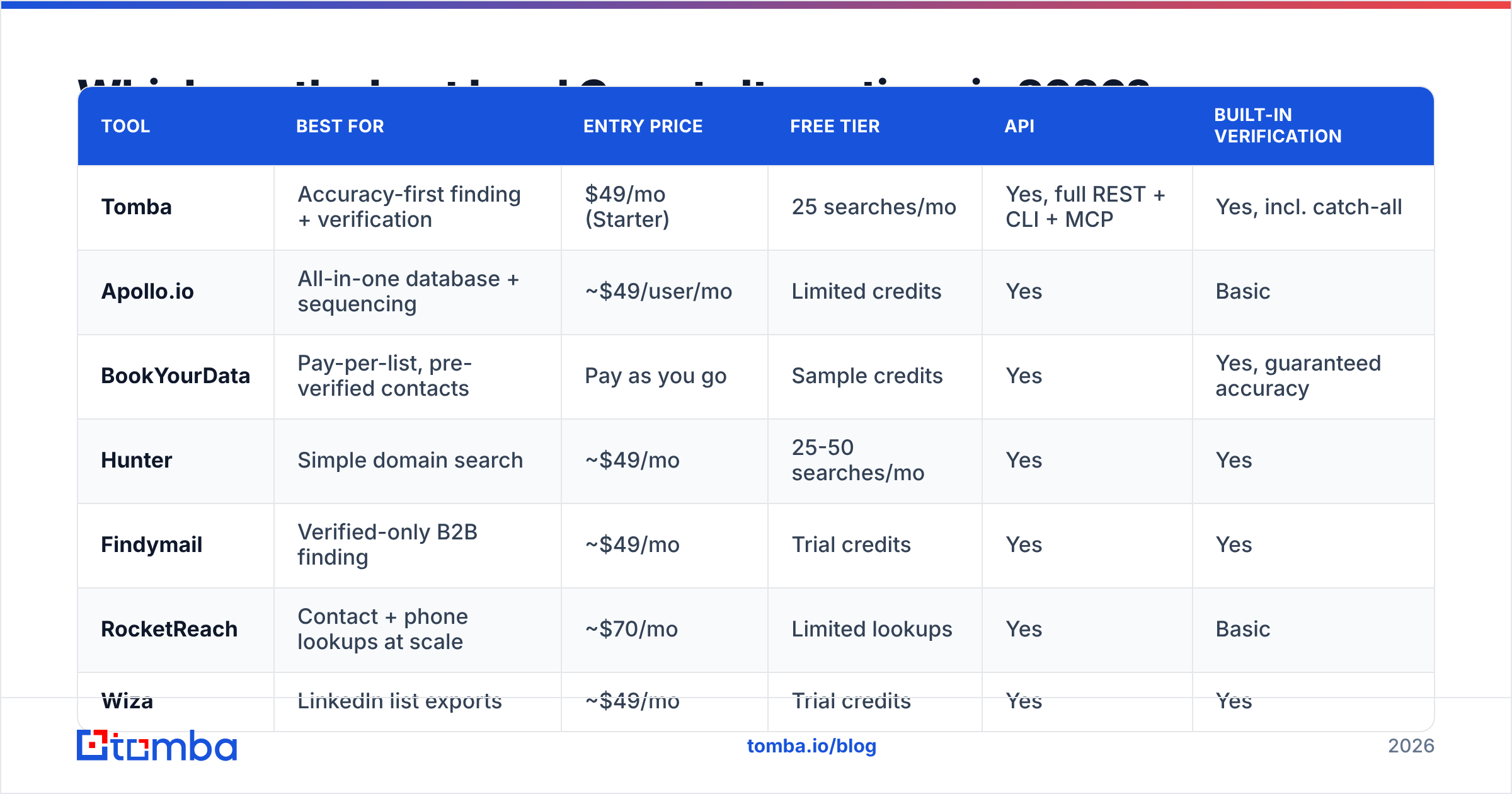
| Tool | Best for | Entry price | Free tier | API | Built-in verification |
|---|---|---|---|---|---|
| Tomba | Accuracy-first finding + verification | $49/mo (Starter) | 25 searches/mo | Yes, full REST + CLI + MCP | Yes, incl. catch-all |
| Apollo.io | All-in-one database + sequencing | ~$49/user/mo | Limited credits | Yes | Basic |
| BookYourData | Pay-per-list, pre-verified contacts | Pay as you go | Sample credits | Yes | Yes, guaranteed accuracy |
| Hunter | Simple domain search | ~$49/mo | 25-50 searches/mo | Yes | Yes |
| Findymail | Verified-only B2B finding | ~$49/mo | Trial credits | Yes | Yes |
| RocketReach | Contact + phone lookups at scale | ~$70/mo | Limited lookups | Yes | Basic |
| Wiza | LinkedIn list exports | ~$49/mo | Trial credits | Yes | Yes |
| Clay | Waterfall enrichment across vendors | ~$149/mo | Limited credits | Yes | Depends on providers |
| Seamless.AI | High-volume US SMB coverage | Custom | Limited | Yes | Basic |
Prices are list prices at the time of writing and change often; confirm on each vendor's own pricing page before you commit.
Tomba — best for accuracy per credit#
Tomba is a specialist rather than a suite. The email finder resolves an address from a name and domain, domain search returns every known address at a company plus the detected pattern, and verification runs on the same platform, so you're not exporting a CSV to a second vendor between steps.
The practical case for it as a Lead Carrot alternative: it's built for automation. There's a full REST API, a CLI, an MCP server for agent workflows, plus Sheets, Excel and Airtable add-ons. Pricing is transparent — free tier at 25 searches/month, Starter $49/mo, Growth $99/mo, Pro $249/mo, with enterprise quoted — and you can check the current Tomba pricing tiers without a sales call.
Trade-off: no built-in email sending. You pair it with Instantly, Smartlead or your ESP of choice. Most teams now consider that a feature.
Apollo.io — best all-in-one replacement#

If what you liked about Lead Carrot was having everything in one tab, Apollo is the direct upgrade. Large contact database, filtering by intent and technographics, sequences, dialer, and a Chrome extension. It's the default for SDR teams that want one seat covering data and outreach.
Trade-offs: data quality varies sharply by segment, per-seat pricing scales fast, and exports are credit-metered in ways that surprise people. If you evaluate it, read the credit terms carefully, and see how it stacks up as an Apollo alternative for data-only use cases.
BookYourData — best for buying lists outright#
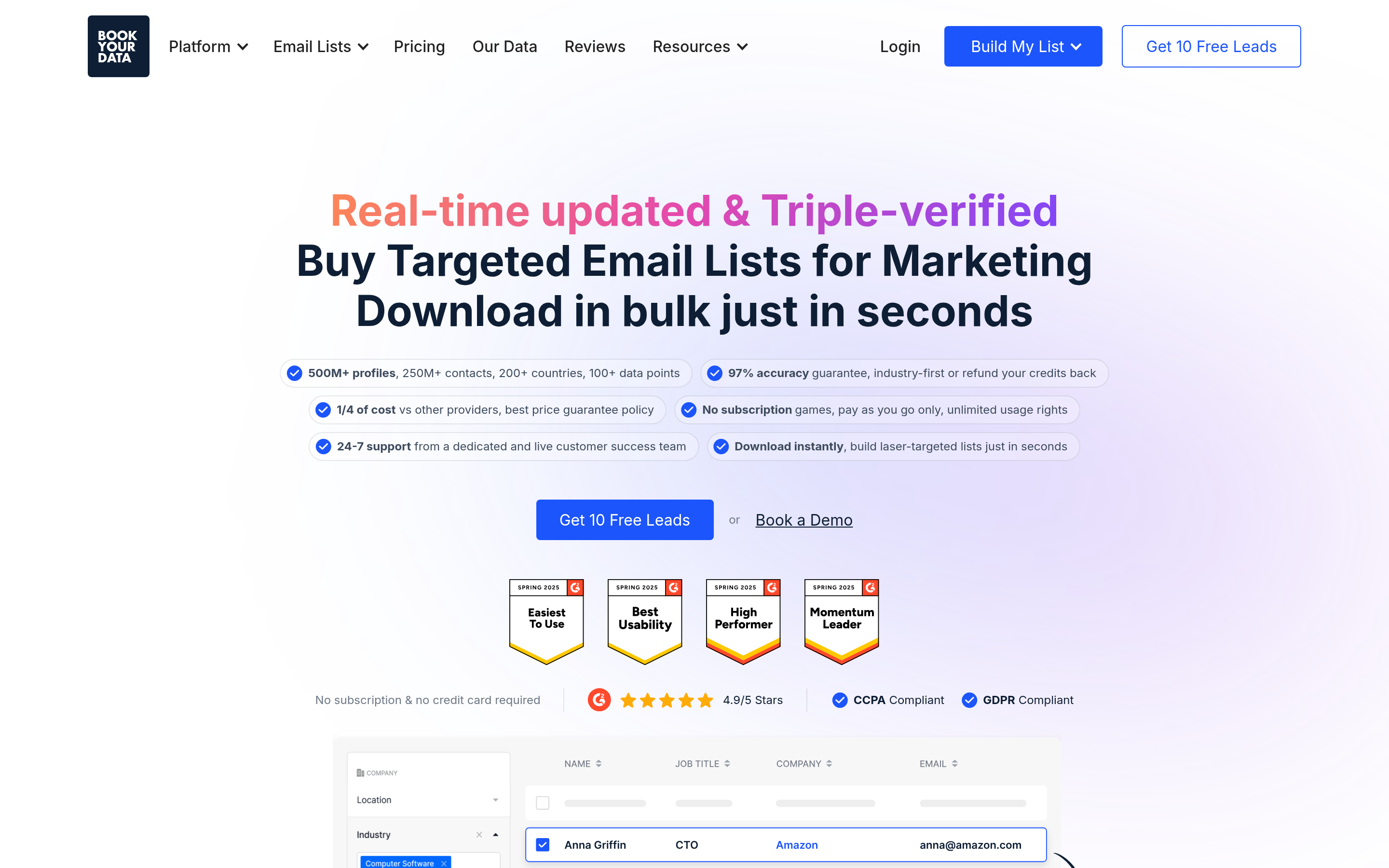
BookYourData takes a different approach: instead of metering searches, you build and buy a targeted contact list with an accuracy guarantee attached. For agencies that need a clean 5,000-record list once a quarter rather than a continuous enrichment pipeline, that model is genuinely simpler and easier to budget. Filtering is granular (industry, title, seniority, location, company size), and contacts come pre-verified.
It's a good fit when your motion is campaign-based. It's a weaker fit when you need real-time enrichment on inbound signups.
Hunter — best for straightforward domain lookups#
Hunter is the tool most people learn on. Type a domain, get the addresses and the pattern. The interface is clean, the free tier is usable, and the API is well documented. Where it falls short against Lead Carrot is breadth: it doesn't give you firmographic filtering or list-building from scratch, so you need a source of target companies first.
Findymail, RocketReach, Wiza, Clay and Seamless.AI#
- Findymail focuses on returning only verified addresses and integrates tightly with Lemlist and Instantly. Good for deliverability-obsessed senders.
- RocketReach is strongest when you need phone numbers alongside emails. Pair it with a phone validator before your dialer touches the list.
- Wiza converts LinkedIn Sales Navigator searches into enriched exports. If LinkedIn is your sourcing layer, it removes a lot of manual work.
- Clay is the power-user option: it waterfalls a lookup across many providers until one hits, which produces excellent coverage at a higher price and a real learning curve.
- Seamless.AI has deep US SMB coverage but a sales-led buying process and mixed reviews on contract flexibility.

Is a two-tool stack cheaper than an all-in-one?#
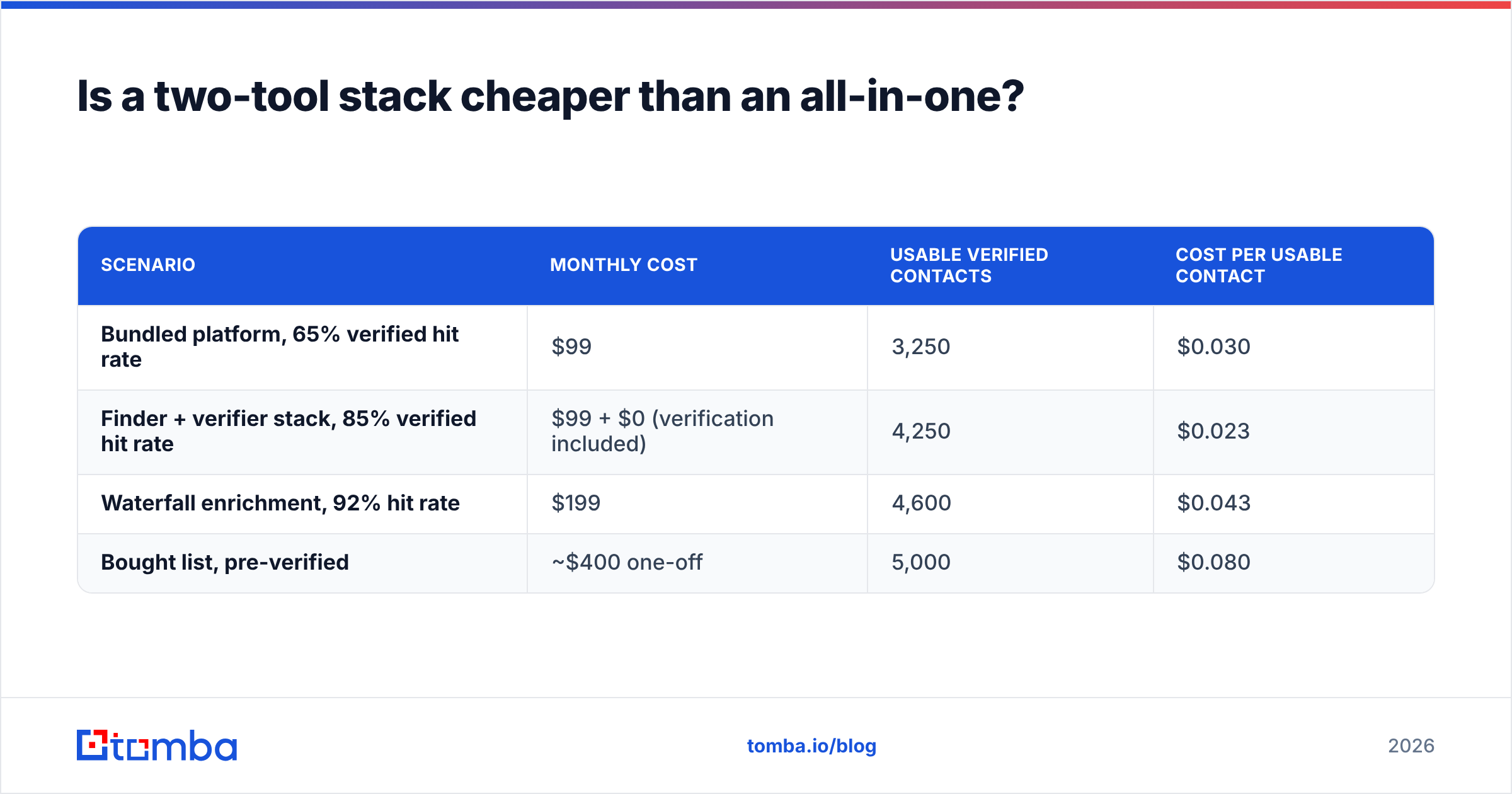
Usually yes, once you count wasted credits. Here's the arithmetic for a team enriching 5,000 contacts a month:
| Scenario | Monthly cost | Usable verified contacts | Cost per usable contact |
|---|---|---|---|
| Bundled platform, 65% verified hit rate | $99 | 3,250 | $0.030 |
| Finder + verifier stack, 85% verified hit rate | $99 + $0 (verification included) | 4,250 | $0.023 |
| Waterfall enrichment, 92% hit rate | $199 | 4,600 | $0.043 |
| Bought list, pre-verified | ~$400 one-off | 5,000 | $0.080 |
The bundled platform isn't outrageous. It's just that the same budget buys roughly 1,000 more usable contacts when verification is part of the finding process rather than an afterthought. And a bought list, while the most expensive per record, requires zero operational effort — which is the right trade for some teams.
If you're running volume, bulk email finder workflows matter more than the headline price: upload a CSV of companies and names, get back verified addresses with confidence scores, no per-row clicking.
Which Lead Carrot alternative is right for your team?#
- Agency doing local/SMB outreach: stay on a list-building tool, but add a verification step. Lead Carrot plus a standalone verifier fixes most of the bounce problem without switching platforms.
- SDR team with a defined enterprise ICP: Apollo.io or Clay. You need firmographic depth Lead Carrot doesn't have.
- Solo founder or consultant: a finder with a real free tier. Start at 25 searches a month, upgrade when the pipeline justifies it.
- Developer or RevOps building automation: pick on API quality first. A clean email finder API with predictable credit rules beats a prettier UI every time.
- Campaign-based, buy-once workflow: a pre-verified list purchase is less operational overhead than any subscription.
How do you migrate without losing your data?#
Three steps, in this order. First, export everything from your current tool before you cancel — full CSV, all fields, including notes and tags. Second, deduplicate and re-verify the export; contact data decays at roughly 2 to 3 percent per month, so a 12-month-old list is meaningfully stale. Third, run a 100-record side-by-side test against your new tool on names you already know, and measure hit rate and accuracy separately. Only then move the whole motion.
Keep your sending platform separate from your data platform during the switch. Changing both at once makes it impossible to attribute a deliverability change to the right cause.
Ready to test a more accurate stack?#
If your reason for leaving Lead Carrot is bounce rates, start with the data layer. The Tomba Email Finder returns verified addresses with confidence scoring, charges predictably, and gives you an API, a CLI and spreadsheet add-ons so enrichment runs without anyone exporting a file. The free tier covers 25 searches a month — enough to run the 100-name side-by-side test above before you spend anything. Run it against your current provider on the same list and let the hit rate decide.
Related guides#
// get started
Find, verify and enrich your first contacts today
Start on the free plan with 25 searches a month, then scale when your team is ready.
Free plan · No credit card required · GDPR & CCPA
// about the author