Lead Data Enrichment Tools: 9 Best Platforms for 2026
Most enrichment vendors quote coverage, not usable coverage. Here is how the major lead data enrichment tools actually compare on match rate, freshness, pricing model, and the fields that move pipeline.
TL;DR
- Enrichment vendors quote database size. What you actually pay for is match rate on your ICP — the percentage of your specific list that comes back with a usable, deliverable field. The two numbers are rarely within 30 points of each other.
- There are three architectures: single-source providers, waterfall orchestrators, and API-first primitives. Picking the wrong one is what causes the "we bought enrichment and nothing changed" outcome.
- Run a 200-record blind test before you sign anything. Same list, same fields, every vendor, measured on bounce rate — not on "rows returned."
- Budget the real unit: cost per usable record. A $0.02 credit with a 38% match rate is more expensive than a $0.08 credit at 91%.
- API-first tools like Tomba (free tier, then $49/mo) fit teams that want enrichment inside their own workflow. Seat-based suites fit teams who want a UI and a rep-facing database.
What is lead data enrichment, actually?#
Enrichment is the plumbing under your CRM. Think of your lead list as a stack of business cards where someone has smudged half the ink: you have a name and a company, but no email, no job title, no headcount, no phone. Enrichment is the process of matching each smudged card against external data sources and filling the gaps automatically.
Technically: you send one or more identifiers (email, domain, LinkedIn URL, full name + company) and the provider returns attributes (verified email, direct dial, title, seniority, company size, tech stack, funding, location). That's it. Everything else — scoring, routing, sequencing — is downstream of whether those attributes are correct.
The reason this matters more in 2026 than it did in 2021 is that outbound volume no longer works. Inbox providers throttle hard, and a 6% bounce rate is enough to torch a sending domain. When you can only send a third as many emails, every record has to be right. Enrichment moved from "nice-to-have data hygiene" to the thing that decides whether your email deliverability survives the quarter.

Which data points are actually worth enriching?#
Most teams buy 40 fields and use four. Here's the honest priority order, based on what changes a rep's behavior:
- Verified work email — the only field with a binary, measurable failure mode. If it bounces, everything downstream is wasted. Pair enrichment with an email verifier rather than trusting a provider's internal "valid" flag.
- Job title and seniority — drives segmentation and personalization. Titles rot fast; a record enriched 14 months ago is roughly 30% likely to be wrong at the individual level in high-churn functions like sales and marketing.
- Company headcount and revenue band — your routing and qualification logic runs on this. Errors here are silent: you don't find out until the deal dies in procurement.
- Direct phone number — high value, low coverage. Every vendor's mobile coverage is dramatically lower than their email coverage, regardless of what the pricing page implies.
- Technographics and intent signals — genuinely useful for targeting, genuinely the noisiest category on the market. Treat as a prioritization tiebreaker, not a trigger.
- Company identifiers (domain, LinkedIn URL, country) — boring, cheap, and the foundation every other field joins on. Get these right first.
If you're only going to fix one thing this quarter, fix the first item on that list.
How do the different types of lead data enrichment tools compare?#
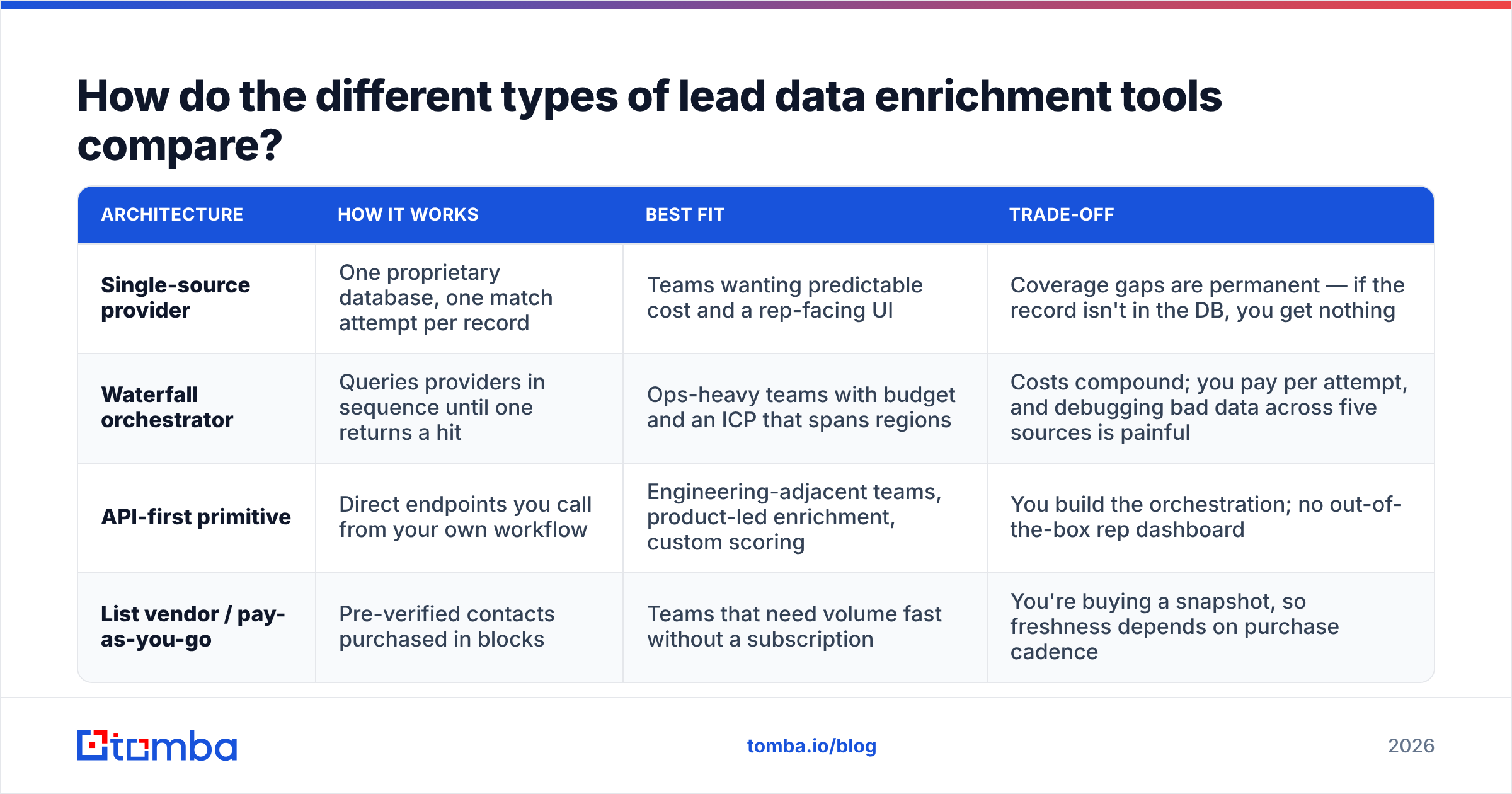
There are three real architectures, and vendors blur the lines in their marketing. Knowing which one you're buying explains almost every cost surprise.
| Architecture | How it works | Best fit | Trade-off |
|---|---|---|---|
| Single-source provider | One proprietary database, one match attempt per record | Teams wanting predictable cost and a rep-facing UI | Coverage gaps are permanent — if the record isn't in the DB, you get nothing |
| Waterfall orchestrator | Queries providers in sequence until one returns a hit | Ops-heavy teams with budget and an ICP that spans regions | Costs compound; you pay per attempt, and debugging bad data across five sources is painful |
| API-first primitive | Direct endpoints you call from your own workflow | Engineering-adjacent teams, product-led enrichment, custom scoring | You build the orchestration; no out-of-the-box rep dashboard |
| List vendor / pay-as-you-go | Pre-verified contacts purchased in blocks | Teams that need volume fast without a subscription | You're buying a snapshot, so freshness depends on purchase cadence |
Most mid-market teams end up with a hybrid: an API-first primitive for the high-volume, low-cost base layer, plus one specialist for a hard segment (EU contacts, direct dials, or a niche vertical).
Which lead data enrichment tools are worth evaluating in 2026?#
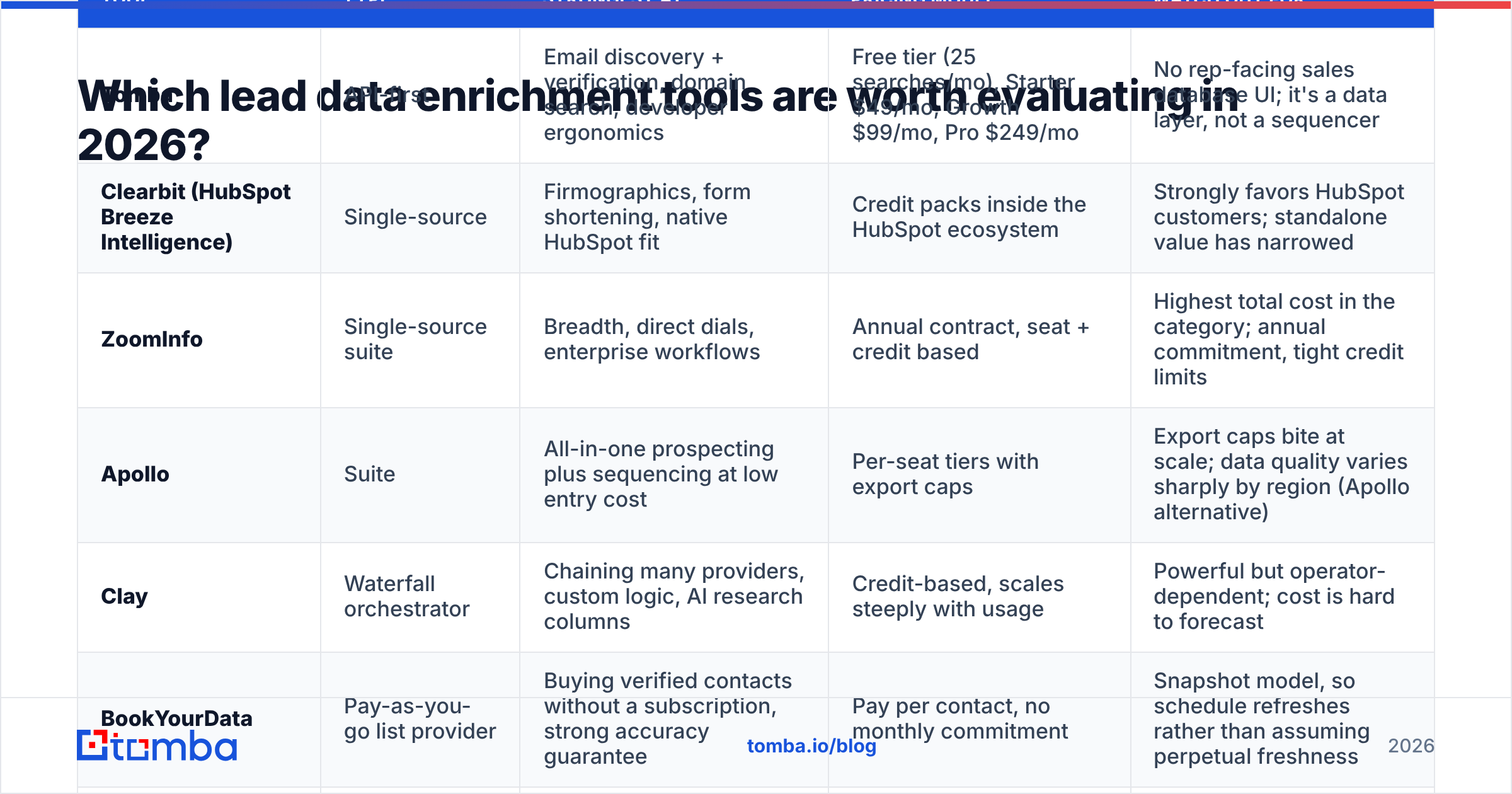
Nine platforms that consistently show up on real shortlists. Pricing models are summarized as published at the time of writing — verify current numbers on each vendor's own page, because this category re-prices constantly.
| Tool | Type | Strongest at | Pricing model | Watch out for |
|---|---|---|---|---|
| Tomba | API-first | Email discovery + verification, domain search, developer ergonomics | Free tier (25 searches/mo), Starter $49/mo, Growth $99/mo, Pro $249/mo | No rep-facing sales database UI; it's a data layer, not a sequencer |
| Clearbit (HubSpot Breeze Intelligence) | Single-source | Firmographics, form shortening, native HubSpot fit | Credit packs inside the HubSpot ecosystem | Strongly favors HubSpot customers; standalone value has narrowed |
| ZoomInfo | Single-source suite | Breadth, direct dials, enterprise workflows | Annual contract, seat + credit based | Highest total cost in the category; annual commitment, tight credit limits |
| Apollo | Suite | All-in-one prospecting plus sequencing at low entry cost | Per-seat tiers with export caps | Export caps bite at scale; data quality varies sharply by region (Apollo alternative) |
| Clay | Waterfall orchestrator | Chaining many providers, custom logic, AI research columns | Credit-based, scales steeply with usage | Powerful but operator-dependent; cost is hard to forecast |
| BookYourData | Pay-as-you-go list provider | Buying verified contacts without a subscription, strong accuracy guarantee | Pay per contact, no monthly commitment | Snapshot model, so schedule refreshes rather than assuming perpetual freshness |
| Cognism | Single-source | EU/UK coverage and compliance posture, mobile numbers | Annual, quote-based | Enterprise sales cycle; limited self-serve entry |
| FullContact | Identity resolution | Person-level identity stitching across identifiers | API, volume-tiered | Aimed at identity/martech use cases more than outbound prospecting |
| RocketReach | Single-source | Quick individual lookups, broad title coverage | Self-serve monthly tiers | Bulk economics weaken fast at higher volumes |
Two honest notes. First, no vendor wins every segment — EU mid-market, US SMB, and APAC enterprise have completely different coverage leaders, and a vendor that dominates one can be near-useless in another. Second, the independent review aggregators are more useful for spotting support and billing complaints than for judging data quality; browse the sales intelligence category on G2 with that lens.
How do you test match rate without getting fooled?#
Every vendor demo is run on records the vendor knows it can hit. Run your own test instead. It takes an afternoon.
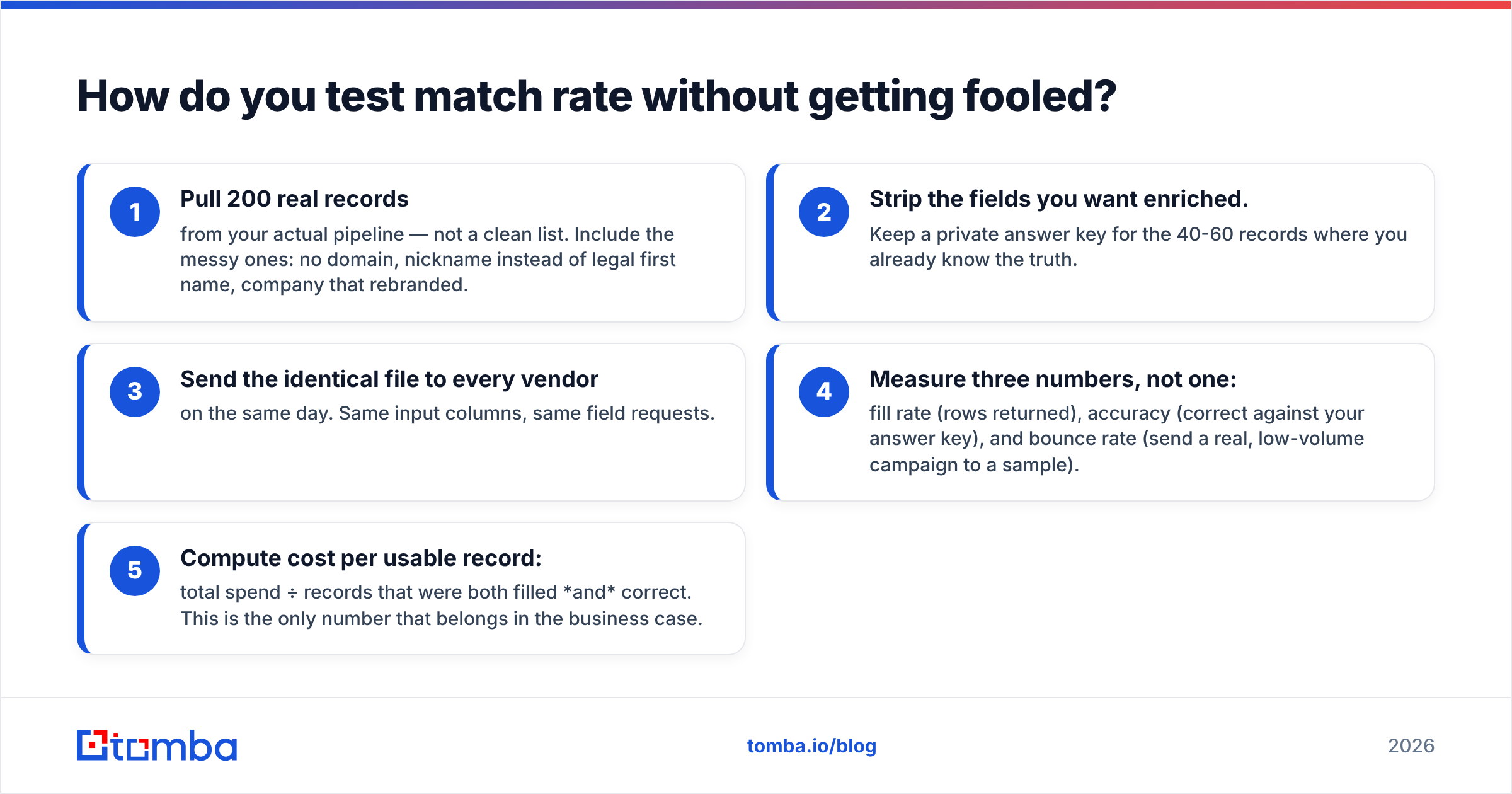
- Pull 200 real records from your actual pipeline — not a clean list. Include the messy ones: no domain, nickname instead of legal first name, company that rebranded.
- Strip the fields you want enriched. Keep a private answer key for the 40-60 records where you already know the truth.
- Send the identical file to every vendor on the same day. Same input columns, same field requests.
- Measure three numbers, not one: fill rate (rows returned), accuracy (correct against your answer key), and bounce rate (send a real, low-volume campaign to a sample).
- Compute cost per usable record: total spend ÷ records that were both filled and correct. This is the only number that belongs in the business case.
The results are usually uncomfortable. A vendor claiming "98% accuracy" is typically reporting accuracy of records it chose to return — which says nothing about the 55% it silently skipped. Fill rate and accuracy are always in tension, and any vendor that won't discuss that tradeoff is selling you the marketing number.
Also test catch-all domains explicitly. A large share of B2B domains accept all mail, which makes standard verification return "unknown." How a vendor handles those — guess, skip, or actually probe — changes your bounce rate materially. A dedicated catch-all verifier exists precisely because generic verification punts on this case.

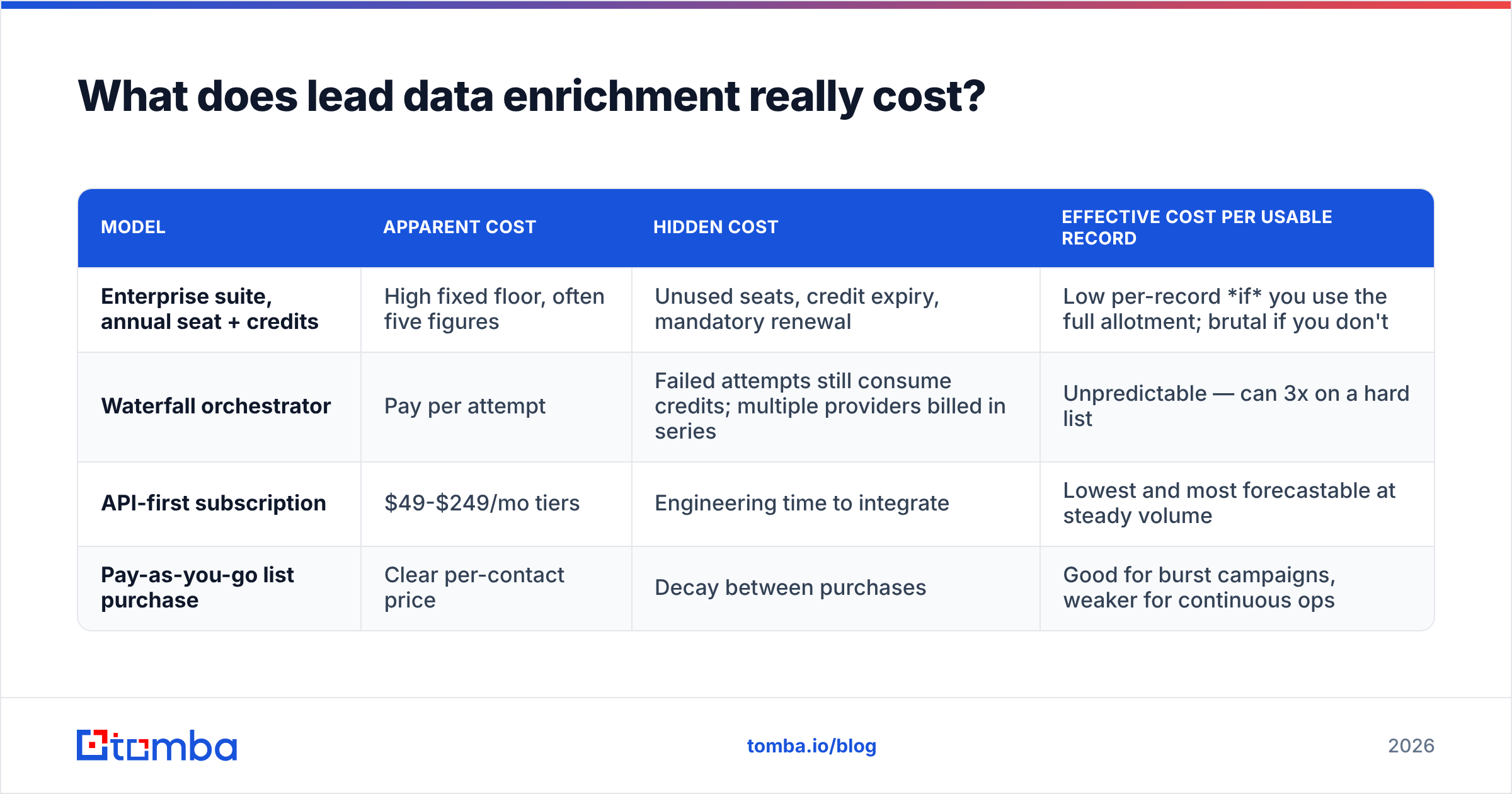
What does lead data enrichment really cost?#
The sticker price is the smallest part. Here's how the same 10,000-record enrichment job prices out across models:
| Model | Apparent cost | Hidden cost | Effective cost per usable record |
|---|---|---|---|
| Enterprise suite, annual seat + credits | High fixed floor, often five figures | Unused seats, credit expiry, mandatory renewal | Low per-record if you use the full allotment; brutal if you don't |
| Waterfall orchestrator | Pay per attempt | Failed attempts still consume credits; multiple providers billed in series | Unpredictable — can 3x on a hard list |
| API-first subscription | $49-$249/mo tiers | Engineering time to integrate | Lowest and most forecastable at steady volume |
| Pay-as-you-go list purchase | Clear per-contact price | Decay between purchases | Good for burst campaigns, weaker for continuous ops |
A worked example. Suppose you enrich 10,000 records a month. Vendor A charges $0.02/credit with a 38% usable rate: $200 spent, 3,800 usable records, $0.053 each. Vendor B charges $0.08/credit with a 91% usable rate: $800 spent, 9,100 usable, $0.088 each — but you got 2.4x more pipeline-ready contacts and a fraction of the bounces. Whether B is worth it depends entirely on what a usable record is worth to you, which is exactly the calculation most teams skip.
For high-volume workflows, check whether the vendor charges for misses. Not charging for unmatched lookups is the single most customer-friendly pricing detail in this category, and it's worth asking about directly. If you're running large jobs, compare Tomba pricing tiers against per-credit competitors on the same test list rather than on list price.
How do you wire enrichment into your stack without breaking things?#
Enrichment fails in production for boring reasons. Four rules that prevent most of them:
- Enrich at the point of entry, not in batch. A nightly batch job means reps work stale records all day. Trigger enrichment on form submit, on CRM object creation, on list import.
- Never overwrite a human-entered field. Write enrichment output to dedicated fields (
enriched_title,enriched_headcount) and let your CRM logic decide precedence. Overwriting a rep's manual correction with a stale API value destroys trust in the data permanently. - Log the source and timestamp on every field. When a field is wrong six months later, you need to know which provider said it and when. This is the single highest-ROI piece of RevOps hygiene in the whole category.
- Re-enrich on a decay schedule. B2B contact data degrades roughly 2-3% per month through job changes alone. A 12-month-old record is not the record you bought.
If you're operating through a CRM, use a native path rather than CSV round-trips — a HubSpot integration or direct email finder API call keeps enrichment inside the system of record instead of in someone's downloads folder.
Which tool should you actually pick?#
Short version, by situation:
- You have engineers and want a data layer. API-first. Tomba, or a primitive you orchestrate yourself.
- You have a RevOps operator and a complex ICP. Waterfall orchestration like Clay, budgeted generously.
- You live inside HubSpot. Breeze Intelligence, because the native integration beats a marginally better external dataset.
- You need EU mobile coverage and airtight compliance. Cognism or a regional specialist; the US-first suites will disappoint you.
- You need 5,000 verified contacts this week with no subscription. A pay-as-you-go provider such as BookYourData, then refresh on a schedule.
- You're under $2K/mo total data budget. API-first plus rigorous verification beats a discounted enterprise seat every time.
Whatever you choose, the decision should be made on your 200-record test file, not on a feature matrix — including this one.
Start with the layer everything else depends on. Before you evaluate orchestration, scoring, or intent, make sure the email addresses in your CRM actually deliver. The Tomba Email Finder gives you verified professional emails by domain, name, or company, with a free tier at 25 searches a month to run your own blind test and paid plans from $49/mo when the numbers hold up. Run your worst 200 records through it, measure the bounce rate, and let the data pick your vendor.
Related guides#
// get started
Find, verify and enrich your first contacts today
Start on the free plan with 25 searches a month, then scale when your team is ready.
Free plan · No credit card required · GDPR & CCPA
// about the author