Lead Distribution Software: How to Route Leads in 2026
Most lead distribution software fails for the same reason: it routes bad records fast. Here is how routing models, SLAs, and data quality actually decide your win rate.
TL;DR
- Lead distribution software assigns inbound and outbound leads to the right rep automatically, using rules like territory, round robin, account ownership, or capacity — instead of a manager dragging rows in a spreadsheet.
- The measurable win is speed-to-lead. Routing that cuts first-touch time from hours to minutes moves connect rates far more than any new email template.
- Routing models are not interchangeable. Pure round robin is fair but dumb; account-based matching protects revenue but needs clean firmographic data.
- Every routing engine inherits the quality of the record it receives. Missing company domain, wrong job title, or an undeliverable email quietly sends good leads to the wrong queue — or to nobody.
- Budget for three layers, not one: the router (Chili Piper, LeanData, HubSpot, Salesforce), the CRM it writes to, and the enrichment/verification layer that makes the rules resolvable.
What is lead distribution software?#
Lead distribution software is the layer between "a lead exists" and "a human owns it." It reads attributes on the incoming record — country, company size, industry, source, deal size, account ownership — and assigns that record to a specific rep, queue, or partner, then starts a clock on the response.
Think of it like a hospital triage desk. Patients do not walk in and pick their own surgeon. A triage nurse reads a few signals, decides urgency, and routes to the right specialist with the right availability. Lead routing does the same job for pipeline: read the signals, apply the rule, hand off in seconds, log who owns what.
Technically, most tools do five things:
- Ingest — capture the lead from a form, chat, calendar booking, enrichment webhook, list import, or CRM object change.
- Normalize and match — resolve the record against existing accounts and contacts so you do not assign a Fortune 500 subsidiary to an SMB rep.
- Apply rules — evaluate a rule tree (territory, segment, product line, language, capacity) to pick an owner.
- Assign and notify — write ownership to the CRM and ping the rep in Slack, email, or mobile with an SLA timer.
- Escalate and report — reassign on timeout, and report on time-to-first-touch, distribution fairness, and conversion by route.
If a vendor only does steps 3 and 4, you are buying a rules engine, not a distribution system. The matching step in the middle is where most implementations quietly break.

Why does speed-to-lead decide who wins the deal?#
Because response time compounds. The classic research from Harvard Business Review on the short life of online sales leads found that firms responding within an hour were dramatically more likely to qualify the lead than those responding even one hour later — and most companies were not close to that window. Nothing since 2011 has made buyers more patient.
Manual distribution is where the minutes go. A form fills at 4:47 p.m., sits in an unassigned queue, gets reviewed at the 9 a.m. pipeline meeting, and reaches a rep 16 hours after peak intent. The rep is not slow. The routing is.
Three practical thresholds worth instrumenting:
- Under 5 minutes — the target for demo requests, pricing-page forms, and "contact sales" submissions.
- Under 1 hour — acceptable for content downloads, webinar registrations, and mid-funnel activity.
- Same business day — the floor for anything else. Past 24 hours, treat the lead as a nurture record, not a live opportunity.
If your current median first-touch is measured in hours, routing software will pay for itself before you finish optimizing your sequences.
Which routing model should you use?#
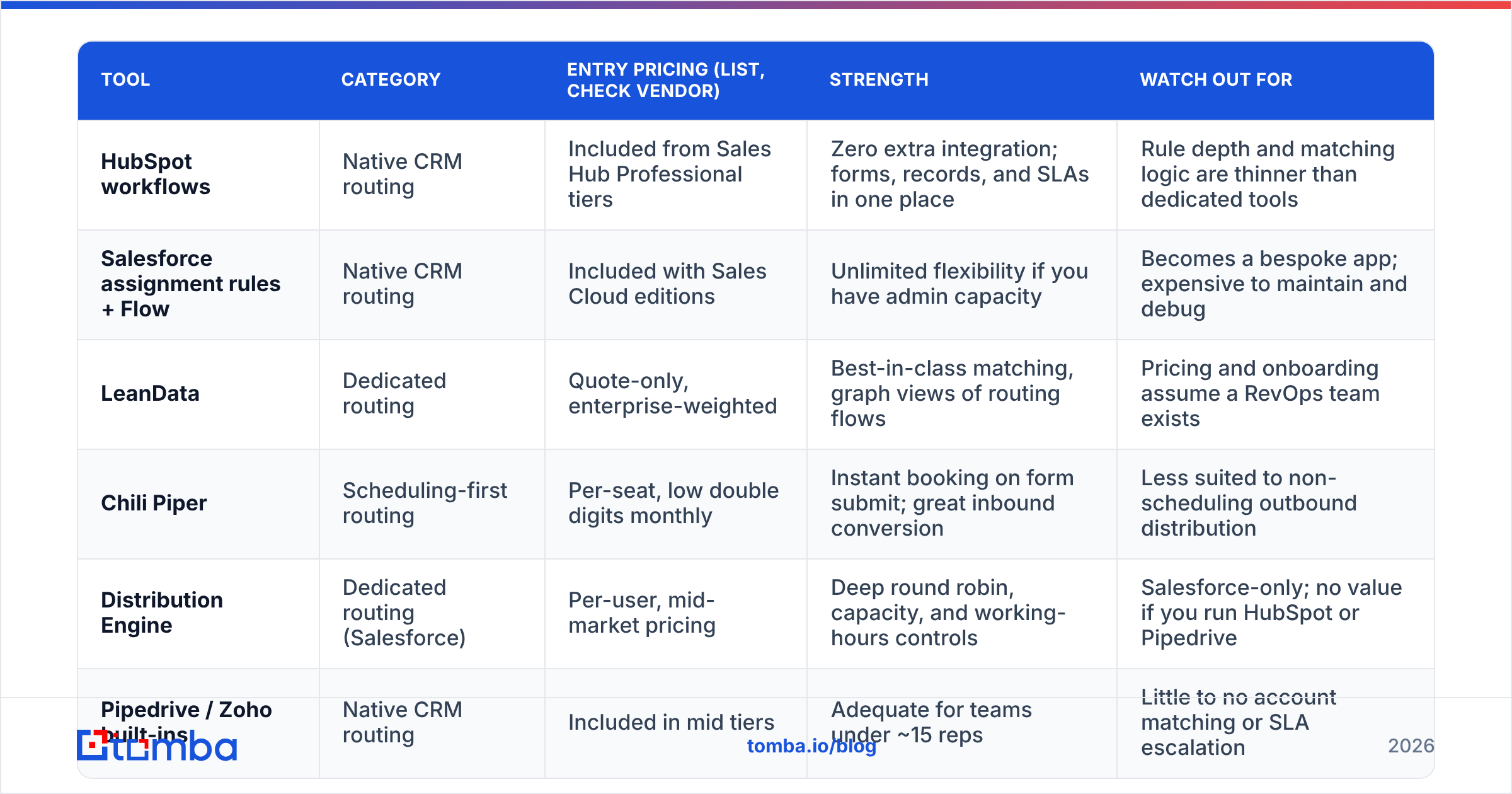
There is no universally correct model. There is a correct model for your segment, team size, and data maturity. Here is how the common ones compare on the dimensions that actually matter.
| Routing model | How it assigns | Best fit | Main failure mode |
|---|---|---|---|
| Round robin | Next rep in a rotating list | SMB inbound, uniform product, new teams | Ignores rep skill, language, and current load |
| Weighted round robin | Rotation biased by quota, tenure, or capacity | Mixed-seniority teams ramping new hires | Weight tables go stale after every org change |
| Territory / geo | Country, state, or region on the record | Field sales, regional partners, resellers | Breaks when country field is blank or free-text |
| Account-based | Matches lead to existing account owner | ABM motions, expansion, enterprise | Requires reliable domain-to-account matching |
| Attribute / scoring | Rules on firmographics, intent, or lead score | PLG plus sales-assist, multi-product | Rule sprawl; nobody knows why a lead landed where |
| Capacity-based | Live open-opportunity or task load per rep | High-volume inside sales, BDR pods | Needs real-time CRM data or it lags reality |
| Shark tank / claim | Pooled queue, first rep to claim wins | Small, hungry teams; overflow handling | Cherry-picking; unfair distribution over time |
Most healthy setups are hybrids: account-based matching first (protect named accounts), then territory, then weighted round robin as the fallback. Build the fallback before you build the clever part — an unmatched lead must always land somewhere with an owner, never in a void.
How do the main lead distribution tools compare in 2026?#
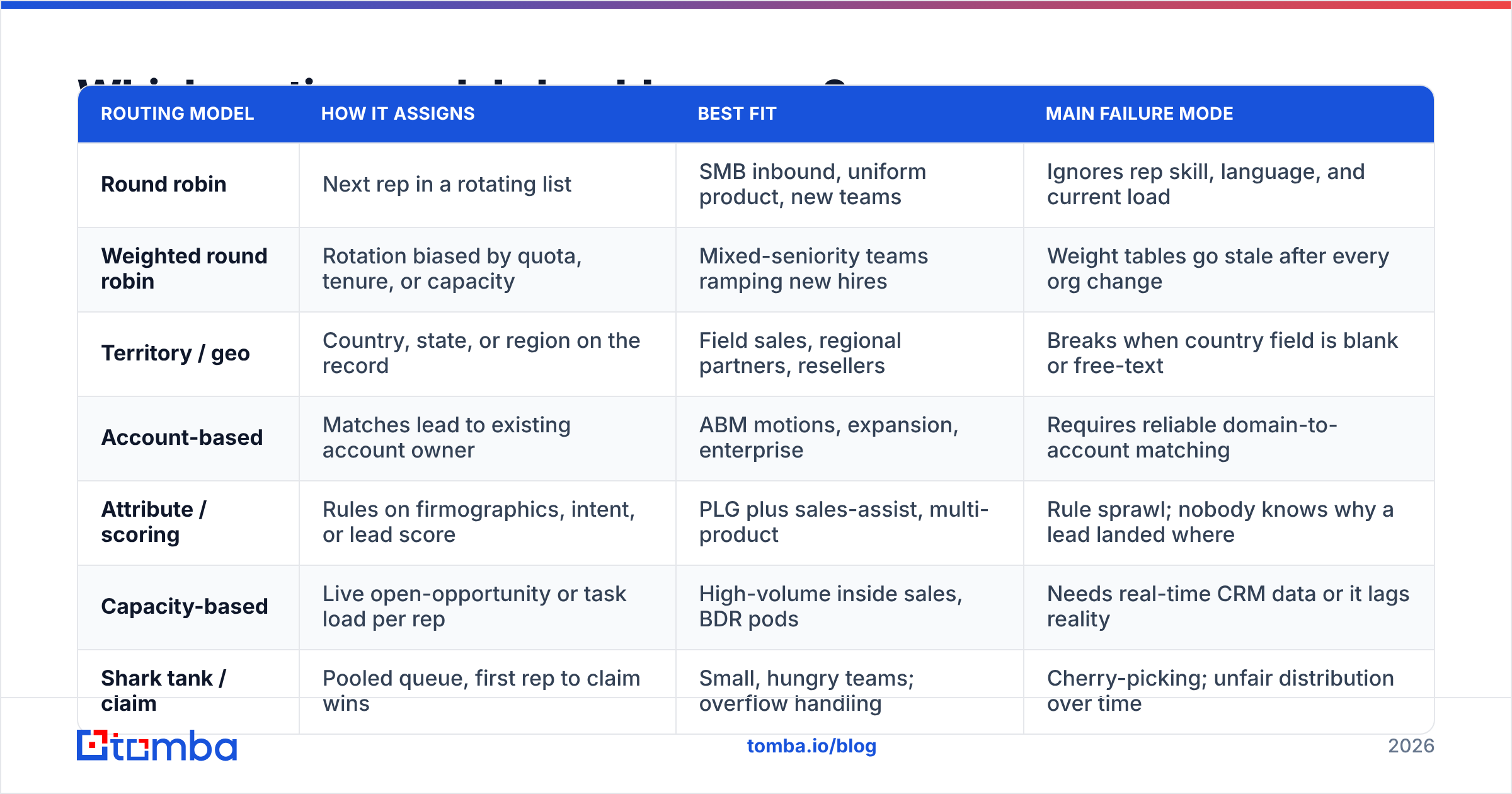
The market splits into three buckets: native CRM routing (free-ish, limited), dedicated routing platforms (powerful, expensive), and scheduling-first tools that route as a side effect of booking.
| Tool | Category | Entry pricing (list, check vendor) | Strength | Watch out for |
|---|---|---|---|---|
| HubSpot workflows | Native CRM routing | Included from Sales Hub Professional tiers | Zero extra integration; forms, records, and SLAs in one place | Rule depth and matching logic are thinner than dedicated tools |
| Salesforce assignment rules + Flow | Native CRM routing | Included with Sales Cloud editions | Unlimited flexibility if you have admin capacity | Becomes a bespoke app; expensive to maintain and debug |
| LeanData | Dedicated routing | Quote-only, enterprise-weighted | Best-in-class matching, graph views of routing flows | Pricing and onboarding assume a RevOps team exists |
| Chili Piper | Scheduling-first routing | Per-seat, low double digits monthly | Instant booking on form submit; great inbound conversion | Less suited to non-scheduling outbound distribution |
| Distribution Engine | Dedicated routing (Salesforce) | Per-user, mid-market pricing | Deep round robin, capacity, and working-hours controls | Salesforce-only; no value if you run HubSpot or Pipedrive |
| Pipedrive / Zoho built-ins | Native CRM routing | Included in mid tiers | Adequate for teams under ~15 reps | Little to no account matching or SLA escalation |
Prices move. Verify current list pricing on each vendor's own page and cross-check user reports on G2 before you commit to an annual contract — routing tools are notorious for per-seat pricing that scales faster than your team does.
A blunt recommendation: if you have fewer than 20 reps and one CRM, start with native routing. Dedicated platforms earn their cost when you have multiple products, overlapping territories, partner channels, or a genuine account-matching problem.
What actually breaks lead distribution?#
Not the rules. The record.
Every routing condition you write is a question asked of a field. "Is company size above 500?" "Is country in EMEA?" "Does this domain match an existing account?" If the field is empty, wrong, or free-text garbage, the rule cannot answer, and the lead falls to whatever your default branch is — usually a queue nobody watches.
The four data failures that sabotage routing most often:
- Missing or personal email domain. A lead who signs up with a Gmail address has no domain to match against an account. Without enrichment, account-based routing is blind.
- Free-text country and job title. "USA", "U.S.", "United States", and "us" are four different values to a rule engine. Normalize on ingest or your territory rules leak.
- Undeliverable addresses. Routing a bounced address to a rep burns the SLA clock and the rep's trust in the queue. Validate before assignment, not after the first bounce.
- Duplicate records. Two records for one buyer means two owners, two sequences, and one annoyed prospect. Dedupe at the matching step.
This is why enrichment sits upstream of routing in any serious stack. Feeding the router a fuller record — verified work email, company domain, headcount band, industry, direct phone — turns vague fallback rules into precise ones. Tomba's data enrichment and email verifier exist for exactly this slot in the pipeline: resolve and validate the record before the assignment rule reads it. If you are routing on personal-email signups, a reverse email lookup can recover the company context the form never captured.

How do you implement lead distribution without breaking pipeline?#
Roll it out in stages. A big-bang routing migration on a Monday morning is how teams lose a week of inbound.
Step 1 — Instrument before you change anything. Measure current median and 90th-percentile time-to-first-touch by source. You cannot prove ROI without a baseline, and you will need it when finance asks about the renewal.
Step 2 — Write the fallback rule first. Decide where an unmatched lead goes. A named owner, a monitored queue, and an escalation timer. Everything else is optimization on top of this safety net.
Step 3 — Fix the fields your rules depend on. List every attribute your rule tree reads. For each one, check fill rate and value consistency across the last 90 days of leads. Anything under roughly 80% fill needs enrichment before it can carry a routing decision.
Step 4 — Build account matching next. Domain-to-account matching protects existing relationships and prevents the worst routing error: sending an expansion opportunity to a cold-calling BDR. Normalize domains (strip subdomains, handle aliases) before matching.
Step 5 — Layer territory and round robin as fallbacks. Now add the fairness logic. Weight by capacity, respect working hours and time zones, and pause reps on PTO automatically rather than through a Slack message someone forgets.
Step 6 — Attach SLAs and escalation. Every assignment gets a clock. On timeout, reassign and notify the manager. An SLA without automatic reassignment is a suggestion.
Step 7 — Review distribution fairness monthly. Pull assignments per rep, conversion by route, and SLA breach rate. Rotation drift is normal; unexplained concentration on two reps is a rule bug.
If you run HubSpot, the HubSpot integration lets you push enriched, verified contact data into the same objects your workflows route on, so the enrichment and the assignment stay in one system of record. For custom stacks, the Tomba API handles the enrich-then-route sequence inside your own ingestion service.
What should you ask vendors before buying?#
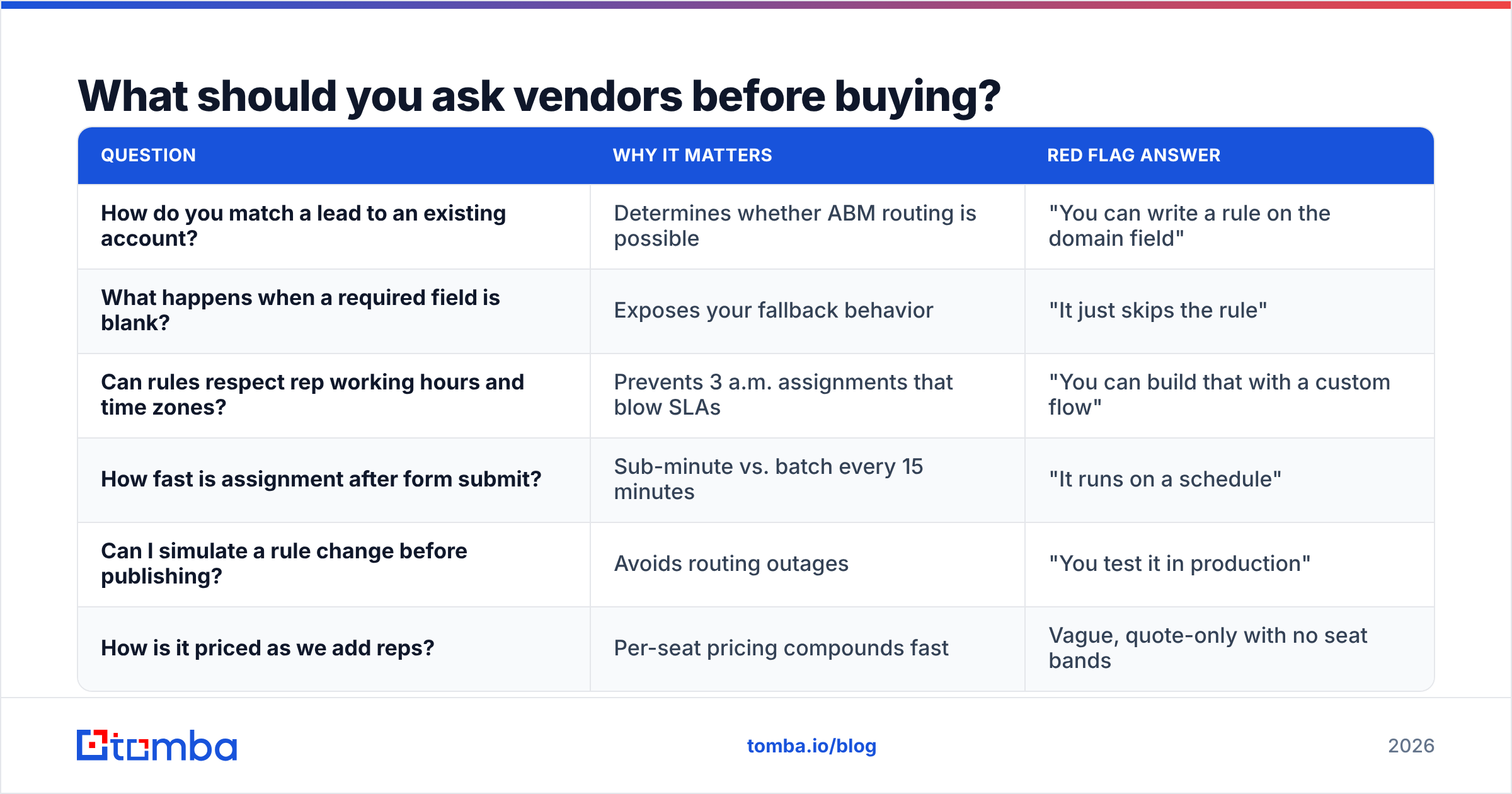
Run every shortlisted tool against this checklist. Most demos will look identical until you ask these.
| Question | Why it matters | Red flag answer |
|---|---|---|
| How do you match a lead to an existing account? | Determines whether ABM routing is possible | "You can write a rule on the domain field" |
| What happens when a required field is blank? | Exposes your fallback behavior | "It just skips the rule" |
| Can rules respect rep working hours and time zones? | Prevents 3 a.m. assignments that blow SLAs | "You can build that with a custom flow" |
| How fast is assignment after form submit? | Sub-minute vs. batch every 15 minutes | "It runs on a schedule" |
| Can I simulate a rule change before publishing? | Avoids routing outages | "You test it in production" |
| How is it priced as we add reps? | Per-seat pricing compounds fast | Vague, quote-only with no seat bands |
One more, often skipped: ask what the audit trail looks like. When a rep claims they never got a lead, you need a timestamped record of what the router decided and why.
Do you need dedicated software, or is your CRM enough?#
Use this rough test. You probably need dedicated lead distribution software if three or more of these are true:
- More than 20 reps consuming inbound leads.
- Two or more products or segments with different owners.
- Named-account or territory ownership that must be respected.
- Inbound volume above a few hundred leads per month.
- A partner or reseller channel that receives routed leads.
- Active RevOps ownership for rules and maintenance.
Fewer than three? Native CRM routing plus a disciplined enrichment step will outperform an expensive platform nobody has time to configure. The most common wasted spend in this category is a mid-market team buying enterprise routing to solve what was actually a data-completeness problem.
Where should your budget actually go?#
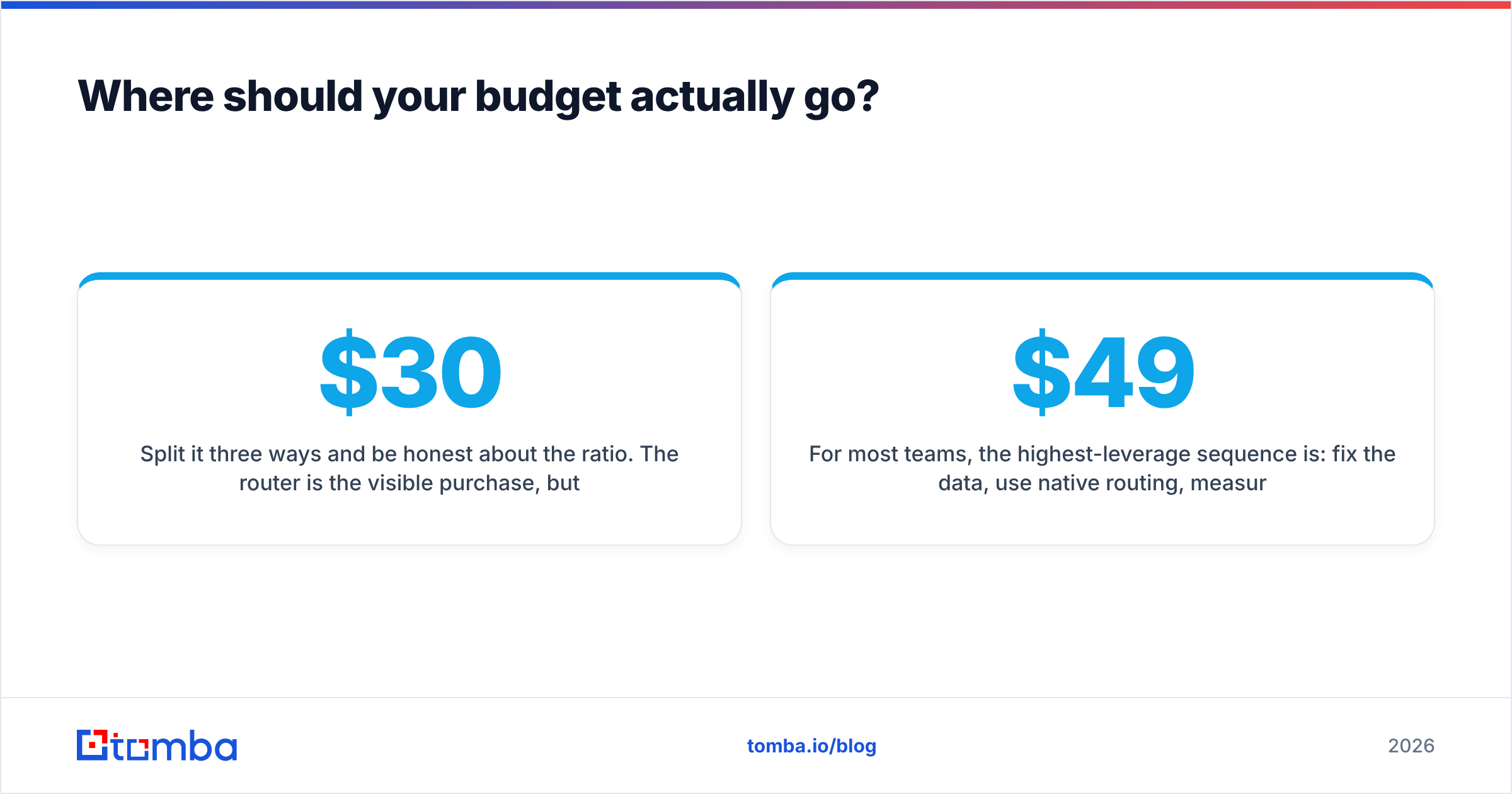
Split it three ways and be honest about the ratio. The router is the visible purchase, but routing quality is bounded by input quality. A $30,000 routing platform reading 40%-complete records produces confident, fast, wrong assignments.
For most teams, the highest-leverage sequence is: fix the data, use native routing, measure, then upgrade the router only when rule complexity genuinely exceeds what the CRM can express. Compare that path against Tomba pricing — a Free tier with 25 searches a month for testing, Starter at $49/mo, Growth at $99/mo — and the enrichment layer usually costs a fraction of the routing platform it makes work.
Get the record right before you route it#
Lead distribution software only ever moves what you give it. If the record arriving at your rule tree has a verified work email, a resolved company domain, and reliable firmographics, even basic round robin performs well. If it does not, no routing graph will save you.
Start upstream. Use the Tomba Email Finder to resolve the work email behind every inbound signup and outbound target, so your routing rules read a complete, deliverable record instead of guessing. Test it on your last 100 unrouted leads — the fill-rate difference will tell you whether your routing problem was ever a routing problem.
Related guides#
// get started
Find, verify and enrich your first contacts today
Start on the free plan with 25 searches a month, then scale when your team is ready.
Free plan · No credit card required · GDPR & CCPA
// about the author