Lead Enrich in 2026: How to Enrich B2B Leads That Convert
Lead enrichment vendors sell 100+ data points. Only about six of them change a rep's behavior. Here's what to enrich, what to skip, what it actually costs in 2026, and how to stop your records from rotting.
TL;DR
- "Lead enrich" means adding missing context to a record you already have — email, phone, title, company size, tech stack — so a rep or a workflow can act on it.
- Coverage rates on vendor marketing pages (95%+) are measured on easy records. On real mid-market lists you should expect 55–75% match rates on email and 25–45% on direct dial.
- Enrichment that isn't verified is worse than no enrichment: a stale email costs you a bounce, a domain reputation hit, and a rep's trust in the CRM.
- Price per enriched record ranges from roughly $0.01 to $0.60 depending on whether you buy credits, a seat, or a platform. Budget on usable records, not attempted ones.
- Enrich six fields well instead of sixty badly. Every field you add that nobody filters on is pure storage cost.
What does "lead enrich" actually mean?#
Lead enrichment is the process of taking a thin record — a form fill with just an email, a LinkedIn URL, a company name scraped from a list — and filling in the attributes that let you route, score, personalise, or contact it.
Think of it like a passport control queue. The traveller in front of you handed over a name and nothing else. Enrichment is the officer scanning the document and pulling up nationality, travel history, and whether the visa is still valid. The record didn't change; what you know about it did.
Technically, enrichment is a join. You take an identifier you trust (a work email, a domain, a full name + company) and use it as a key against one or more databases. The quality of the output depends on three things in this order: the quality of your input key, the freshness of the source data, and whether the vendor verifies the match before returning it.
Most teams get the second and third right and completely ignore the first. If you feed a lead enrich API a personal Gmail address and a company called "Acme", you will get garbage back, and no vendor SLA will save you.
What data should you actually enrich?#
Here's the uncomfortable part: most enrichment spend goes to fields that never appear in a filter, a sequence variable, or a scoring rule.
Audit your last 90 days of outbound. Count how many fields were referenced in your ICP filter, your routing rules, and your email templates. For most B2B teams it's between four and eight. Everything else is decoration.
The fields that consistently earn their cost:
- Verified work email — the single field that converts a record from "list row" to "contactable lead." Nothing downstream works without it.
- Job title + seniority band — not the raw title string, the normalised band. "VP of Revenue Operations" and "Head of RevOps" must land in the same bucket or your filters lie to you.
- Company headcount and growth trend — headcount alone is a snapshot; the 12-month trend tells you whether they're hiring for the pain you solve.
- Domain and confirmed company match — surprisingly often wrong. Multi-brand parents, acquired subsidiaries, and regional domains break naive matching.
- Tech stack signals — only if your pitch depends on it. If you sell a Salesforce-adjacent tool, knowing they run HubSpot changes the entire email.
- Direct phone (optional) — expensive, lower match rates, but worth it for deals above roughly $25K ACV where a call beats a fourth email.
Fields to deprioritise unless you have a specific, written use for them: personal social profiles, funding data older than 18 months, "intent scores" you can't trace back to a source, and any demographic field you can't act on.

How much does lead enrichment cost in 2026?#
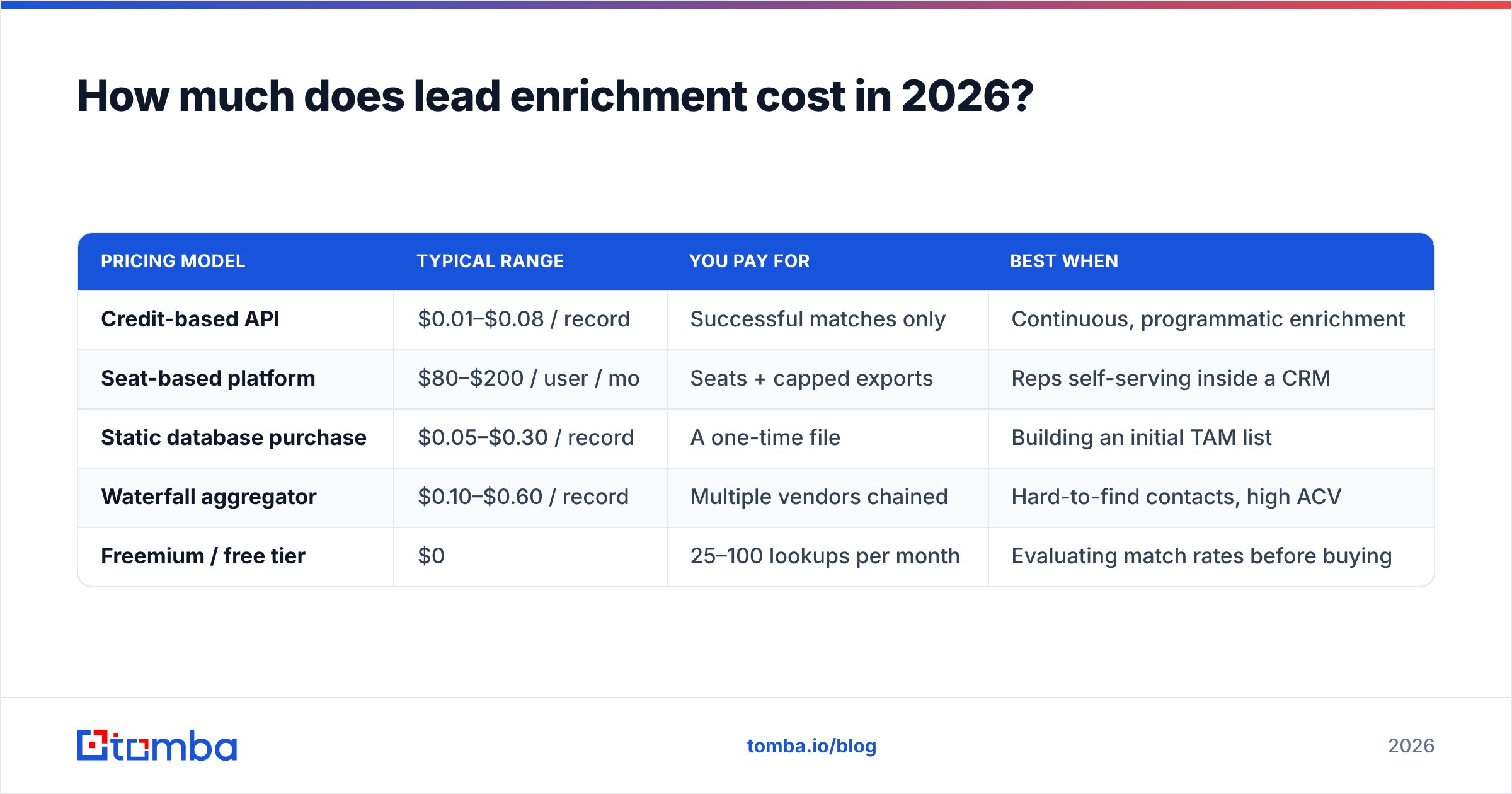
Pricing models differ enough that a straight per-record comparison is misleading. Credit-based tools charge per lookup (often per successful lookup, sometimes per attempt). Platform tools bundle enrichment into a seat licence. Database vendors sell you a static file.
| Pricing model | Typical range | You pay for | Best when |
|---|---|---|---|
| Credit-based API | $0.01–$0.08 / record | Successful matches only | Continuous, programmatic enrichment |
| Seat-based platform | $80–$200 / user / mo | Seats + capped exports | Reps self-serving inside a CRM |
| Static database purchase | $0.05–$0.30 / record | A one-time file | Building an initial TAM list |
| Waterfall aggregator | $0.10–$0.60 / record | Multiple vendors chained | Hard-to-find contacts, high ACV |
| Freemium / free tier | $0 | 25–100 lookups per month | Evaluating match rates before buying |
The number that matters is cost per usable record, not cost per credit. A $0.02 provider with a 45% verified match rate costs you $0.044 per usable record. A $0.05 provider at 80% costs $0.0625. Close enough that the cheaper tool wins — until you add the cost of the bounces the first one sent you.
For reference, Tomba pricing runs a free tier at 25 searches a month, Starter at $49/mo, Growth at $99/mo, and Pro at $249/mo, with enrichment, verification, and finding drawn from the same credit pool. That matters more than the headline number: tools that bill finding and verifying separately roughly double your effective per-record cost.
Which lead enrich approach fits your team?#
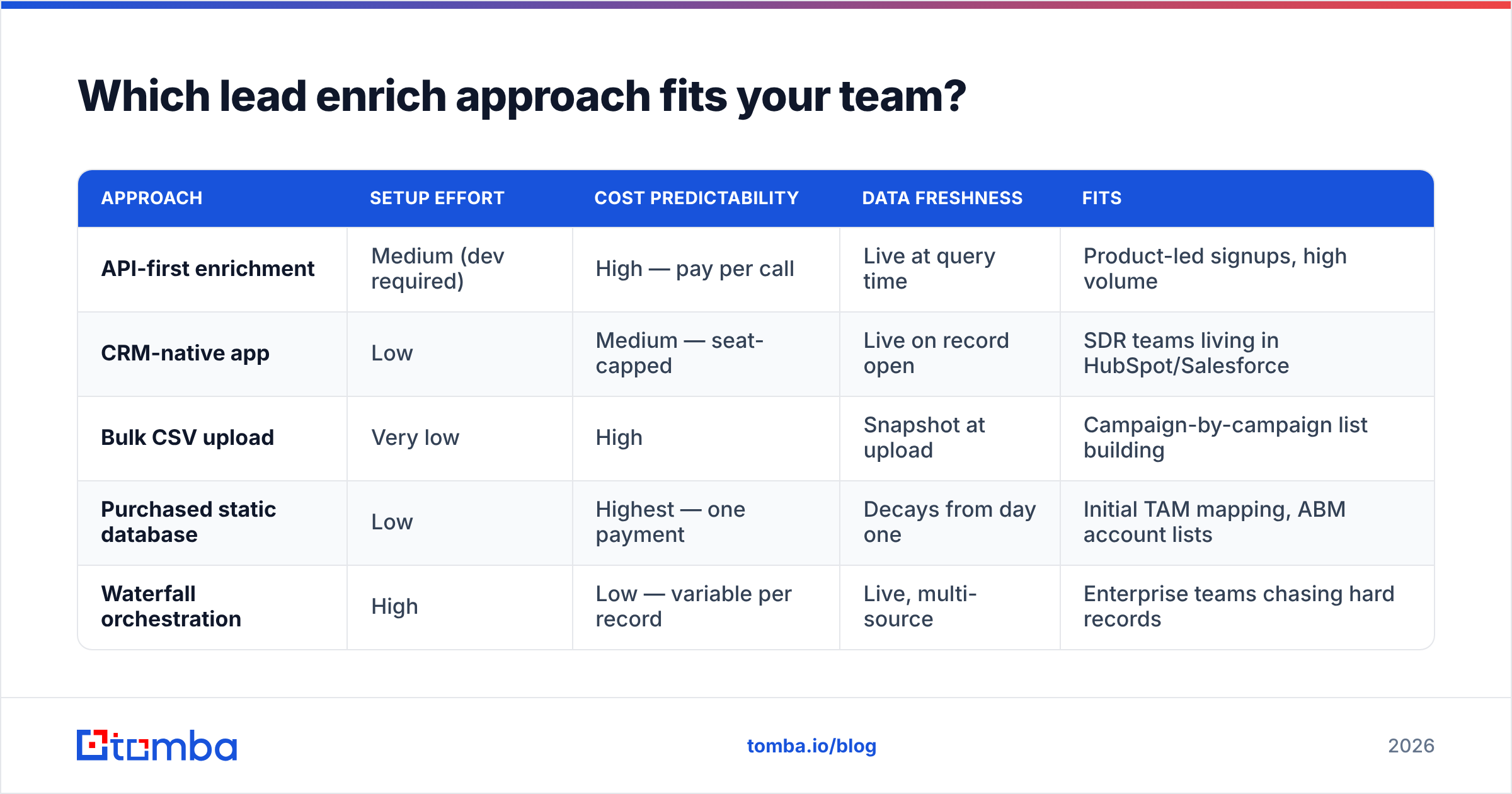
There is no universal winner here. The right architecture depends on volume, where the data has to land, and whether you have an engineer.
| Approach | Setup effort | Cost predictability | Data freshness | Fits |
|---|---|---|---|---|
| API-first enrichment | Medium (dev required) | High — pay per call | Live at query time | Product-led signups, high volume |
| CRM-native app | Low | Medium — seat-capped | Live on record open | SDR teams living in HubSpot/Salesforce |
| Bulk CSV upload | Very low | High | Snapshot at upload | Campaign-by-campaign list building |
| Purchased static database | Low | Highest — one payment | Decays from day one | Initial TAM mapping, ABM account lists |
| Waterfall orchestration | High | Low — variable per record | Live, multi-source | Enterprise teams chasing hard records |
A few honest notes on the vendor landscape. Apollo and ZoomInfo dominate the seat-based platform category and are genuinely good if your reps live inside one UI all day — you're paying for the workflow, not the data. Clearbit-style enrichment (now folded into HubSpot) is strongest at inbound form enrichment specifically. BookYourData is a solid pick when you want a purchased, pre-verified list with a pay-as-you-go structure rather than a subscription — particularly for niche geographies where API coverage thins out. And credit-based API providers like Tomba fit teams that want enrichment running as infrastructure rather than as a seat.
If you're currently on a seat-based platform and only using it for data, run the math on a credit-based data enrichment endpoint before your renewal. Teams enriching under 5,000 records a month are usually overpaying by 3–5x for seats they barely open. Our breakdown of Apollo alternatives walks through that swap in detail.
Why does enriched data go stale so fast?#
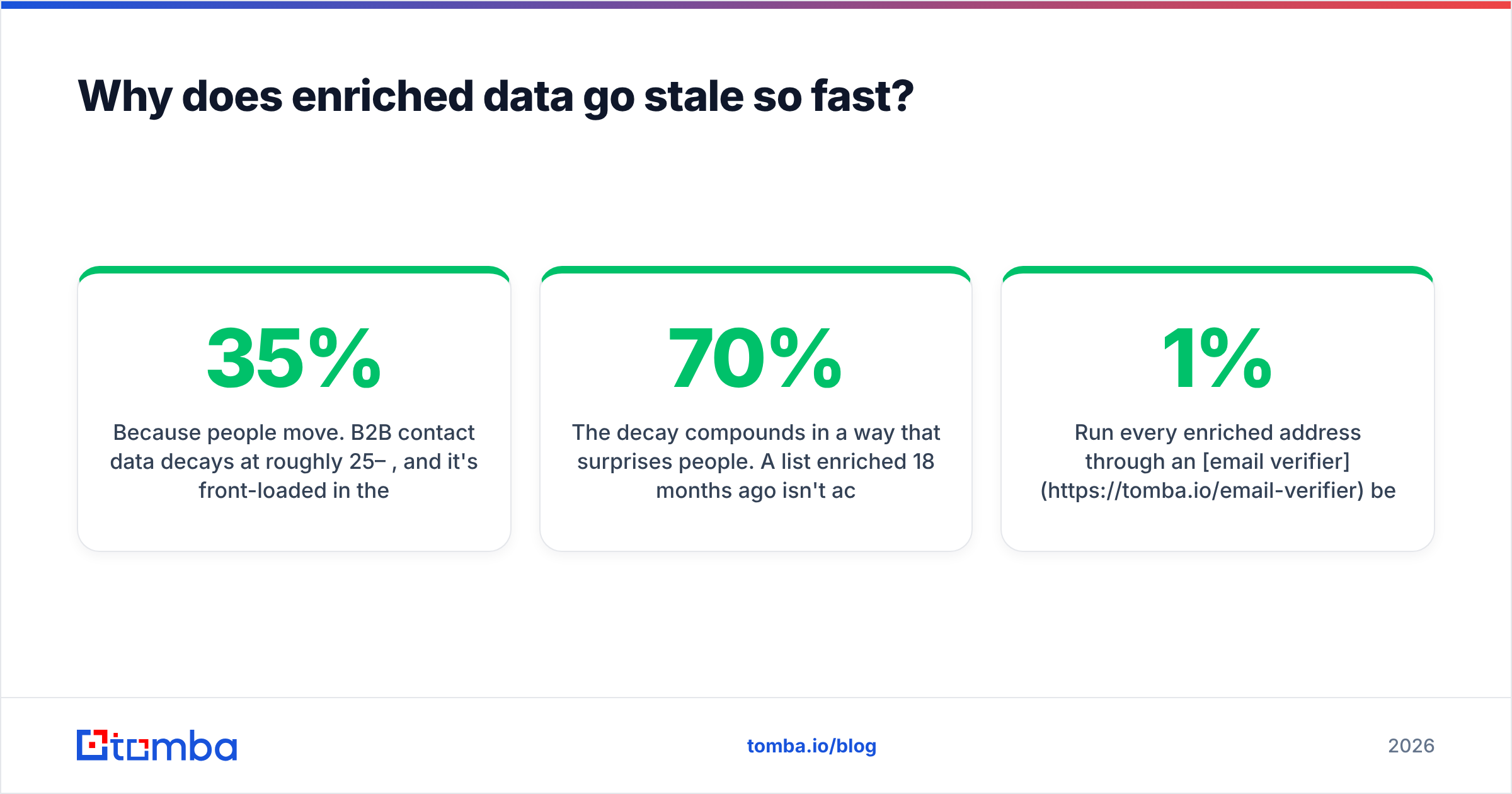
Because people move. B2B contact data decays at roughly 25–35% per year, and it's front-loaded in the fields you care about most — job title and email — because those are the two things that change when someone switches employers.
The decay compounds in a way that surprises people. A list enriched 18 months ago isn't 70% accurate across the board; it's closer to 90% accurate on company data, 65% on titles, and 55% on emails. Your bounce rate doesn't track the average, it tracks the worst field.
This is why "we bought a database last year" is not a data strategy. Data quality degrades whether or not you use the records, and the only defence is a re-verification cadence.
A workable policy:
- Re-verify before every send, not on a schedule. Verification is cheap; a blocklisting is not.
- Re-enrich titles quarterly for anything in an open opportunity.
- Re-enrich company firmographics annually — headcount and funding move slower than people do.
- Drop records that fail verification twice. Keeping them inflates your database metrics and nothing else.
Run every enriched address through an email verifier before it enters a sequence. The step takes milliseconds per record and is the difference between a 1% bounce rate and a 7% one — and email deliverability damage from the latter takes weeks to repair.

How do you build a lead enrich workflow that holds up?#
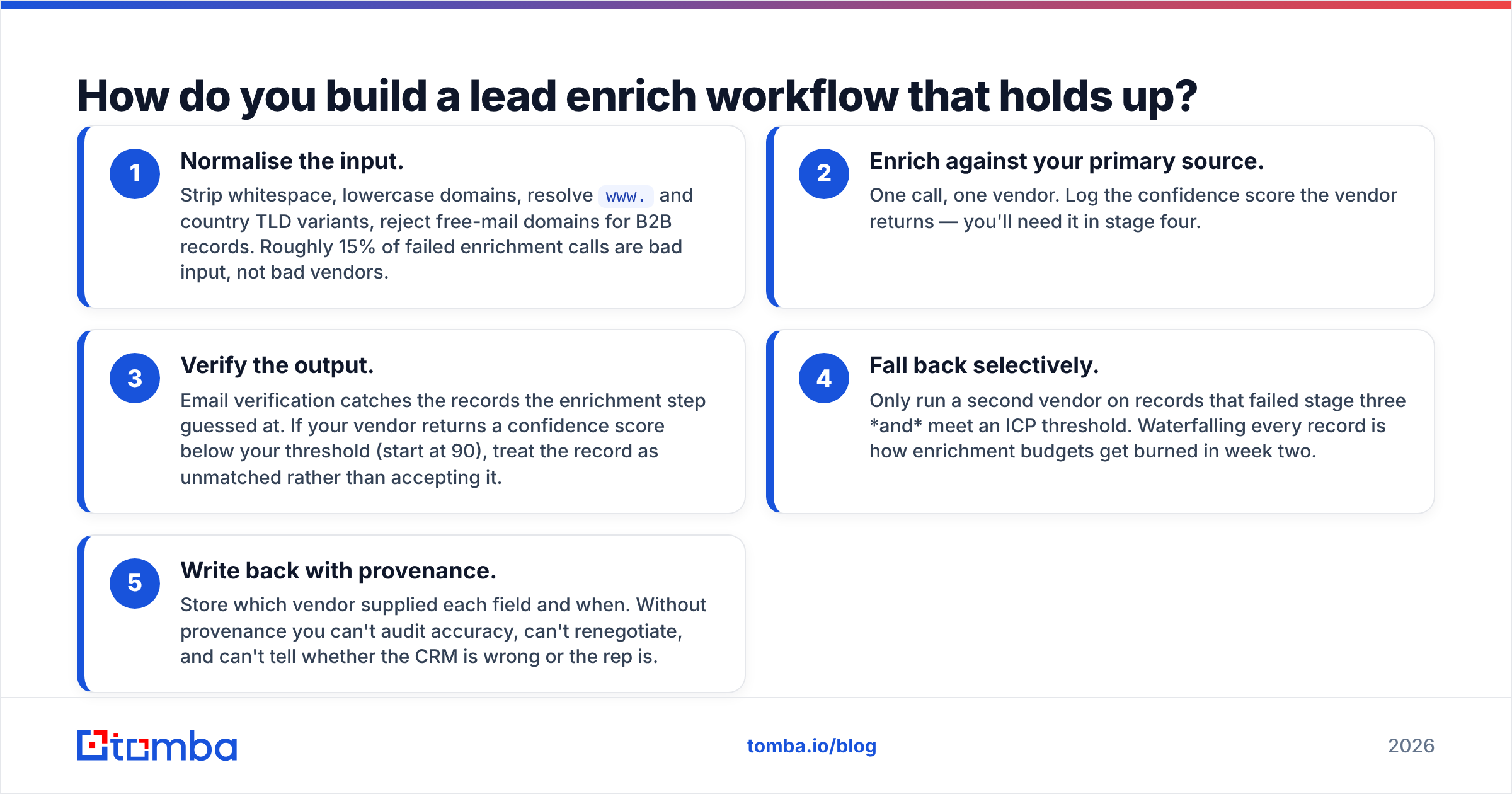
Treat enrichment as a pipeline with gates, not a one-time button. Five stages, in order:
- Normalise the input. Strip whitespace, lowercase domains, resolve
www.and country TLD variants, reject free-mail domains for B2B records. Roughly 15% of failed enrichment calls are bad input, not bad vendors. - Enrich against your primary source. One call, one vendor. Log the confidence score the vendor returns — you'll need it in stage four.
- Verify the output. Email verification catches the records the enrichment step guessed at. If your vendor returns a confidence score below your threshold (start at 90), treat the record as unmatched rather than accepting it.
- Fall back selectively. Only run a second vendor on records that failed stage three and meet an ICP threshold. Waterfalling every record is how enrichment budgets get burned in week two.
- Write back with provenance. Store which vendor supplied each field and when. Without provenance you can't audit accuracy, can't renegotiate, and can't tell whether the CRM is wrong or the rep is.
For bulk work, a bulk email finder handles stages two and three in one pass on a CSV. For continuous enrichment on signup, the Tomba API is the cleaner path — one endpoint, credits deducted only on successful matches, and a confidence score you can gate on in your own code.
If your enriched records live in HubSpot, define the target properties before you turn on any sync. HubSpot's CRM property model will happily accept whatever the vendor sends, which is how teams end up with four competing "Company Size" fields and no idea which one the workflow reads.
What are the most common lead enrichment mistakes?#
Enriching before qualifying. Enriching a list of 50,000 records to discover 3,000 fit your ICP means you paid for 47,000 useless lookups. Filter on firmographics first — which usually only needs a domain — then enrich contacts inside the survivors.
Trusting match rate as a quality metric. A vendor that returns a plausible-looking email for every input has a 100% match rate and a catastrophic bounce rate. Ask for verified match rate, and test it on your own 200-record sample before signing anything. Vendor-supplied benchmarks are measured on vendor-selected lists.
Ignoring catch-all domains. Roughly 15–20% of B2B domains accept everything, so standard verification returns "unknown." That's not a failure — it's a different workflow. A dedicated catch-all verifier resolves a meaningful share of them; the rest should go into a lower-volume, higher-personalisation track rather than a bulk sequence.
No write-back discipline. Enrichment that doesn't reach the system reps actually use is a spreadsheet exercise. If it isn't in the CRM with a timestamp, it doesn't exist.
Buying intent data before fixing contact data. Intent signals on records you can't email are an expensive way to feel informed. Peer reviews on G2's sales intelligence category show this pattern repeatedly — teams rating the intent module highly while complaining that half the contacts bounced.
Is lead enrichment worth it for small teams?#
Yes, but the shape changes. Under about 500 records a month, skip the platform entirely. Use a free tier or a Starter plan, enrich in bulk before each campaign, verify everything, and write back manually or through a simple Sheets sync. The overhead of a seat-based tool exceeds its value at that volume.
Between 500 and 10,000 records a month, a credit-based API with a scheduled job is the sweet spot — predictable cost, no seats, and enrichment runs whether or not anyone opens a dashboard.
Above that, waterfalls and orchestration start paying for themselves, because at enterprise volume a five-point improvement in match rate is worth more than the orchestration cost.
Where should you start?#
Pick your six fields. Write down exactly which filter, routing rule, or template variable consumes each one. Then find a provider whose verified match rate on your sample — not their demo list — clears 70% on those six fields at a cost per usable record you can defend in a budget review.
Start with the field that gates everything else: the verified work email. The Tomba Email Finder finds and verifies in a single call, returns a confidence score you can gate on, and only spends a credit when it matches — so your cost per usable record is the number you actually see on the invoice. The free tier gives you 25 searches a month, which is enough to benchmark it against whatever you're paying for today before you commit a dollar.
Related guides#
// get started
Find, verify and enrich your first contacts today
Start on the free plan with 25 searches a month, then scale when your team is ready.
Free plan · No credit card required · GDPR & CCPA
// about the author