Lead Enrichment for Sales: The 2026 Playbook That Works
Most enrichment stacks waste money filling fields nobody uses. Here's how to score vendors, build a waterfall, and measure whether enrichment actually moves pipeline.
Lead enrichment for sales fills a thin lead record with the data your reps need to sell. Done well, it lifts reply rates. Done badly, it just raises your data bill. Here is how to tell the two apart.
TL;DR
- Lead enrichment for sales pays off in one case: it fills fields your reps use in a message or a routing rule. The rest is storage cost.
- No single vendor covers 90% of firmographics, emails, phones, and intent. So waterfall enrichment is now the default. You chain providers until one returns a verified hit.
- Judge lead enrichment for sales on three numbers: match rate, verified accuracy, and cost per usable record. Vendors quote the first. They hide the second. They never mention the third.
- Enrich at three moments: form submit (under 300ms), list build (batch), and a pre-outreach refresh (30–90 days).
- Start with contact accuracy. A perfect company profile on a dead email is worth zero.
What is lead enrichment for sales, really?#
Lead enrichment for sales takes a thin lead record and fills it out. The input is usually an email, a name, or a company domain. The output is the set of fields your team needs to qualify, route, and personalize.
Think of it like a passport desk. Someone hands you a name on a slip of paper. The desk looks up who they are, where they work, and how big that company is. It also checks that the details on the slip still hold. Without that desk, your rep is a guard guessing.
In practice the term covers four data layers. Vendors bundle them. They behave very differently.
- Contact data — work email, direct dial, mobile, LinkedIn URL. It decays fast. About 2.5% of B2B contacts change jobs each month. It also drives the most revenue.
- Firmographics — headcount, revenue band, industry, HQ, funding stage. Slow to change, cheap, and easy to over-buy.
- Technographics — installed tools, CRM, hosting, payment processor. Useful only if tooling defines your ICP.
- Intent and behavior — site visits, content reads, third-party topic spikes. The priciest layer, and the hardest to check.
Most RevOps teams buy all four on day one. Then they learn that reps quote two fields in real emails. Audit what your best reps already use. Do that before you sign anything.

Why does enrichment break down between the demo and production?#
Vendors quote match rate. You need verified accuracy. These are not the same number. The gap between them is where budget dies.
A 92% match rate means the vendor returned something for 92 records in 100. It says nothing about whether that something is right. A tool can guess firstname.lastname@domain.com every time. It can claim a 99% match rate and still bounce 40% of your sends.
Here is the chain of numbers to demand in a trial:
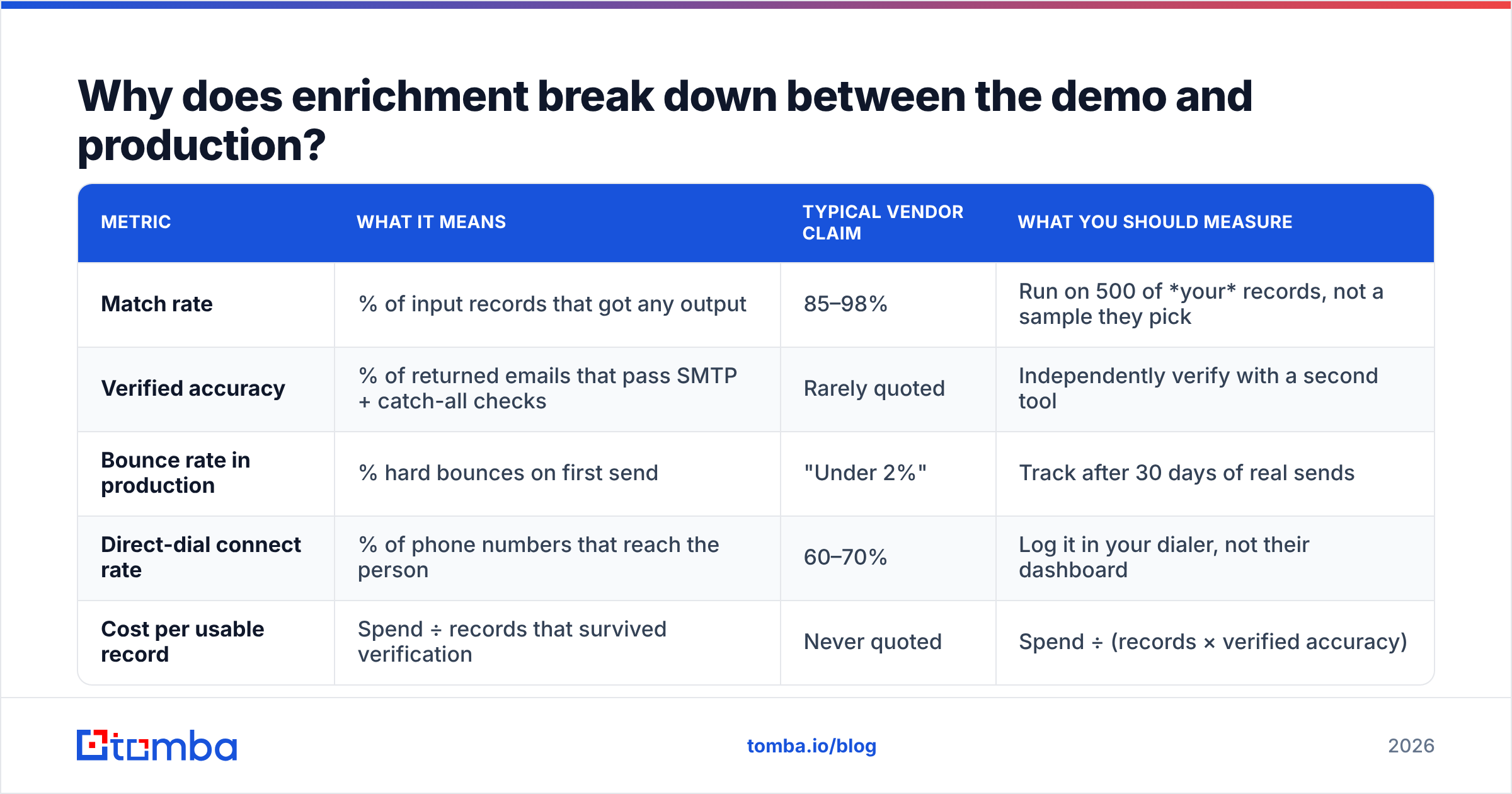
| Metric | What it means | Typical vendor claim | What you should measure |
|---|---|---|---|
| Match rate | % of inputs that got any output | 85–98% | Run 500 of your records, not their sample |
| Verified accuracy | % of emails that pass SMTP and catch-all checks | Rarely quoted | Check with a second tool |
| Bounce rate in production | % hard bounces on first send | "Under 2%" | Track 30 days of real sends |
| Direct-dial connect rate | % of numbers that reach the person | 60–70% | Log it in your dialer, not their dashboard |
| Cost per usable record | Spend ÷ records that survived checks | Never quoted | Spend ÷ (records × verified accuracy) |
The last row is the only one for a budget talk. Say a vendor charges $0.08 per record. Say verified accuracy is 55%. Your real cost is $0.145 per usable record. That is nearly double the sticker price. It is also worse than a "pricier" vendor that runs at 90%.
Run every trial the same way. Take 500 records from your own ICP, not the demo list. Push them through. Then run the returned emails through an independent email verifier before you read a single field.
Catch-all domains need extra care. They accept every address at the SMTP layer, so they tell you nothing. A catch-all verifier is the only way to split real mailboxes from black holes.
How do you build a waterfall enrichment stack?#
Stop hunting for one perfect vendor. Chain several of them by cost and hit rate.
A lead enrichment for sales waterfall works like triage at a clinic. The cheapest, fastest check runs first. What it cannot solve moves to the next station. Only the hard cases reach the costly specialist. You pay top rates for the records nobody else could crack.
Here is a working order for a mid-market B2B team:
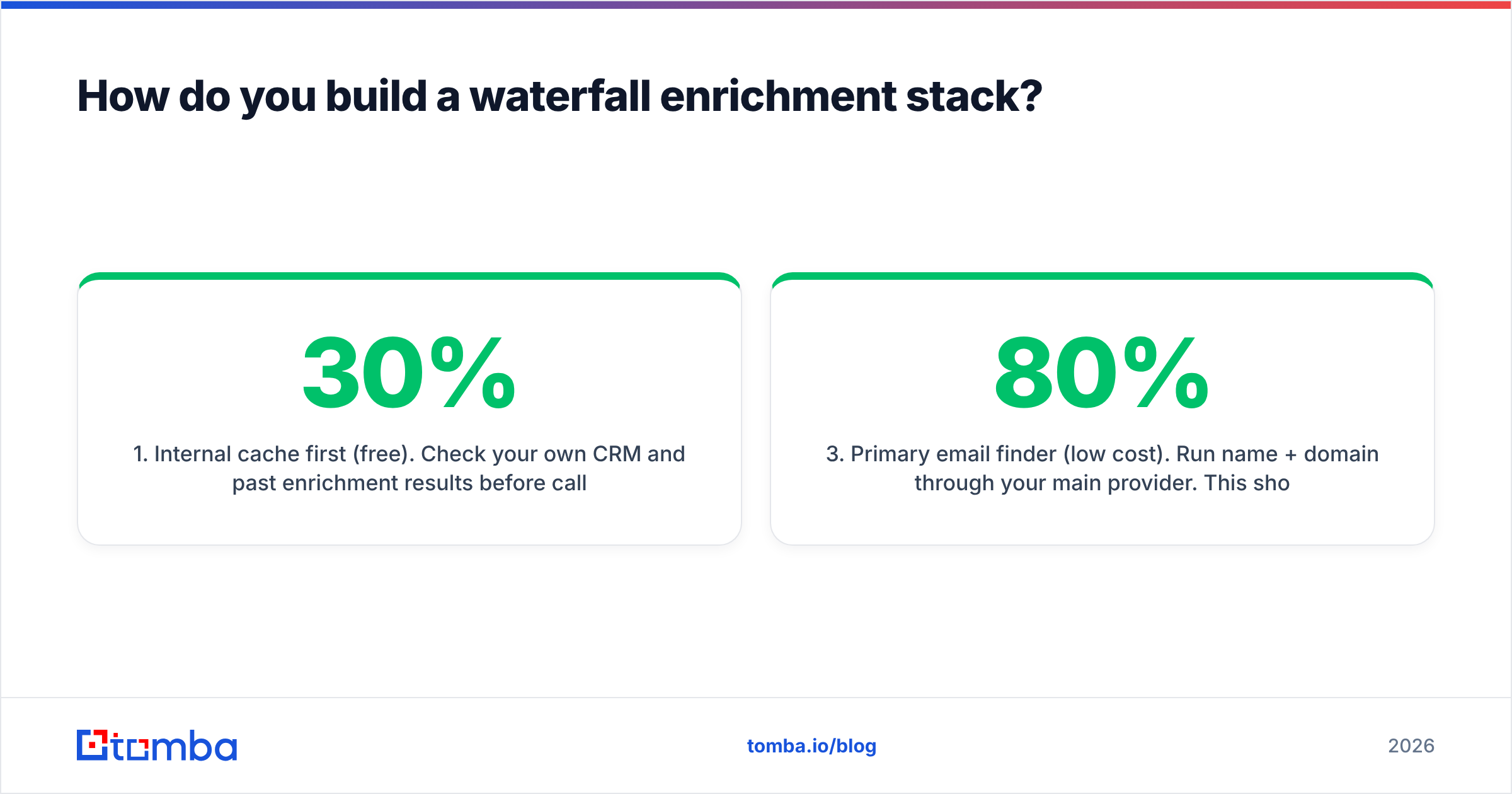
- Internal cache first (free). Check your CRM and past results before you call an API. Teams re-buy 20–30% of records they already own. A remove duplicates pass before each batch pays for itself.
- Pattern inference (near-free). If you know a firm's email format, you can build the address and verify it. No lookup credit needed. A company email pattern check clears a good share of records at no extra cost.
- Primary email finder (low cost). Run name plus domain through your main provider. Expect it to solve 60–80% of what is left.
- Second provider (medium cost). Catch the misses. Sources differ. One tool may be strong on European SMBs. Another may own US enterprise.
- Phone and social (high cost). Use it only for accounts that passed qualification. Direct dials cost 5–10x what emails cost. Never buy them for raw leads.
- Verification pass (required). Everything that survives gets verified before it enters a sequence.
The order matters more than the vendor list. Most teams invert it. They hit the priciest tool first, because it has the nicest UI. Then they wonder why costs rise in step with list size.
Which enrichment tools fit which job?#
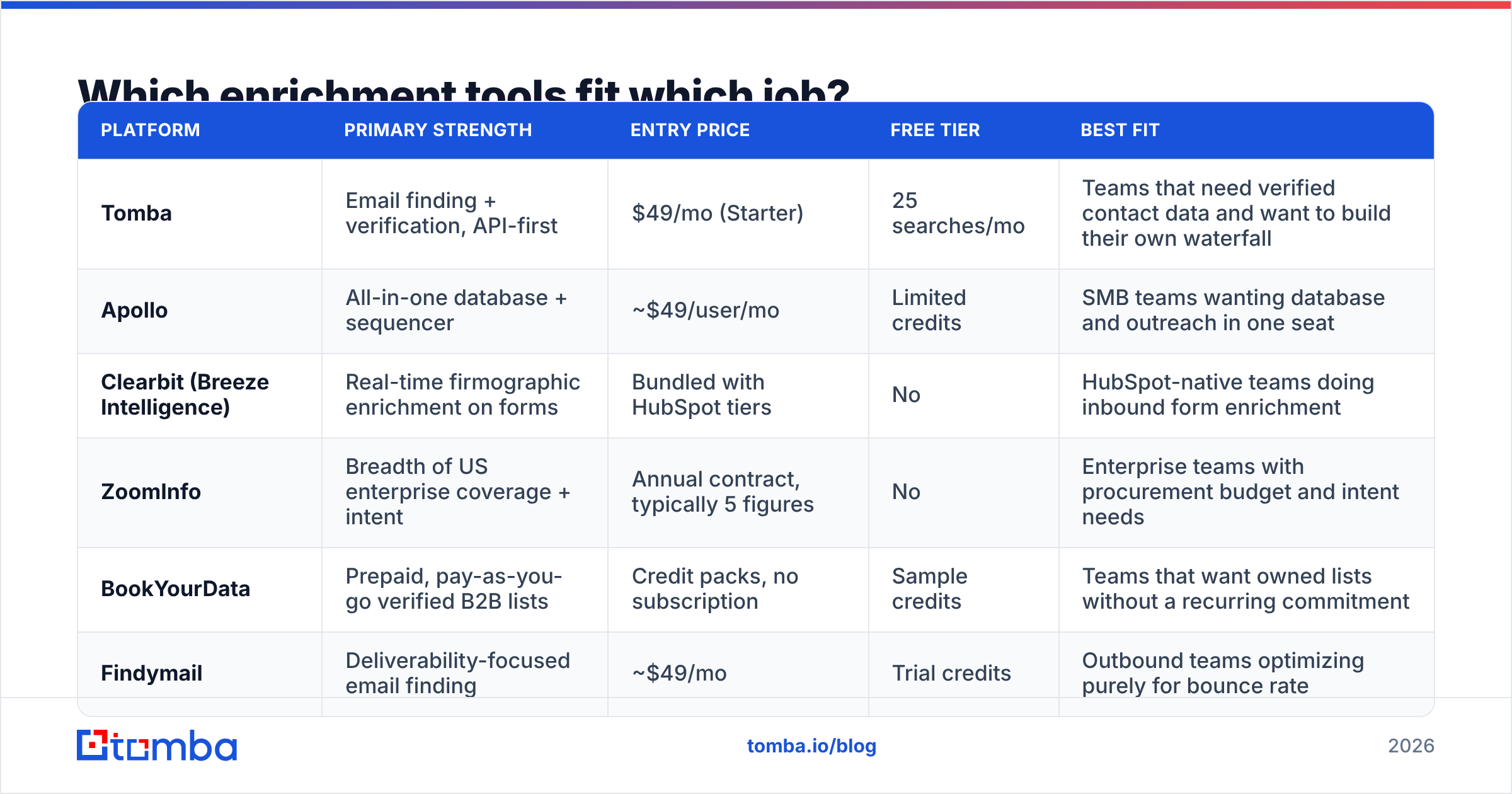
Category leaders win on different axes. The best tool for lead enrichment for sales depends on your bottleneck: coverage, accuracy, or a budget you can predict.
| Platform | Primary strength | Entry price | Free tier | Best fit |
|---|---|---|---|---|
| Tomba | Email finding and verification, API-first | $49/mo (Starter) | 25 searches/mo | Teams that want verified contacts and their own waterfall |
| Apollo | All-in-one database and sequencer | ~$49/user/mo | Limited credits | SMB teams that want data and outreach in one seat |
| Clearbit (Breeze Intelligence) | Real-time firmographics on forms | Bundled with HubSpot tiers | No | HubSpot-native teams enriching inbound forms |
| ZoomInfo | Breadth of US enterprise data and intent | Annual contract, 5 figures | No | Enterprise teams with budget and intent needs |
| BookYourData | Prepaid, pay-as-you-go B2B lists | Credit packs, no plan | Sample credits | Teams that want owned lists with no monthly fee |
| Findymail | Email finding tuned for deliverability | ~$49/mo | Trial credits | Outbound teams chasing a low bounce rate |
Two structural choices matter more than feature lists.
Subscription vs. prepaid credits. Subscriptions (Apollo, ZoomInfo, Tomba) suit steady outbound with volume you can forecast. Prepaid packs like BookYourData suit campaign teams. They build a list, work it for a quarter, and skip the idle monthly fee.
Neither model wins on merit. They match different cash-flow shapes. If your outbound runs in bursts, prepaid genuinely wins.
Bundled platform vs. composable API. A bundled tool gives you database, enrichment, and sending in one login. A composable stack lets you swap one layer without a rebuild.
Bundles launch faster and are harder to leave. Teams that outgrow them usually leave over one weak layer, and data accuracy is the usual culprit. There is no way to replace just that piece. If you like your sequencer, plug in a focused email finder by API and keep your options open.
Want vendor-by-vendor contact accuracy? G2's sales intelligence category collects verified reviews with segment filters. It beats any vendor's own benchmark page.
When should enrichment actually fire?#
Lead enrichment for sales should fire at three moments. Each one has its own budget for speed and cost. Mixing them up is why bills balloon.
At form submit (real-time, under 300ms). Someone types a work email on your demo form. Enrichment adds company size and industry. Your routing rule then sends an enterprise lead to an AE, not a nurture track. Speed is the limit here. Anything past 500ms hurts conversion. Add two or three routing fields, and stop there.
At list build (batch, slow is fine). You are building a list of 3,000 accounts. Run domain search across them. Then enrich the contacts overnight. Cost per record matters. Speed does not. This is where a waterfall earns the most.
Before outreach (refresh, 30–90 days). Data you bought in January is wrong by April. A contact who moved jobs is worse than a bounce. That bounce lands on your sending domain. It then hurts sender reputation for every campaign in that mailbox. Re-verify anything older than 60 days.
There is a fourth moment teams forget: the CRM write-back. Enrichment that never syncs to the CRM creates two versions of the truth. Six months on, nobody knows which headcount field to trust. Pick a system of record before your first batch run.
How do you prove enrichment is working?#
Tie lead enrichment for sales to pipeline, not to fields filled.
Most dashboards report vanity stats: records enriched, fields filled, coverage percent. None of that shows a return. Build a simple before-and-after test instead.
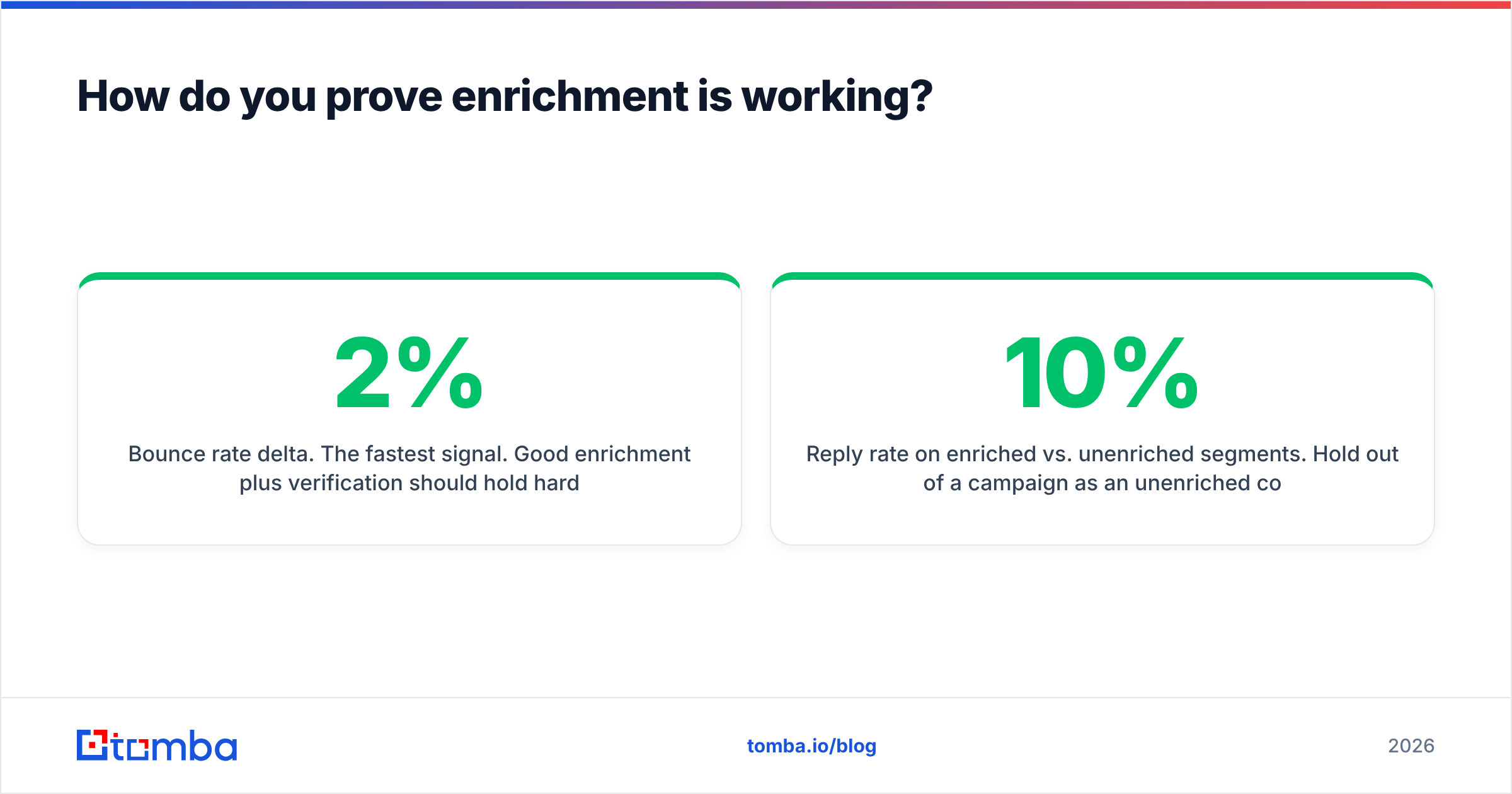
- Bounce rate delta. The fastest signal. Good data plus verification holds hard bounces under 2%. Over 4% means your verify step is for show.
- Reply rate, enriched vs. not. Hold back 10% of a campaign as a control. If the enriched half does not win, your reps are not using the fields.
- Routing accuracy. How many inbound leads reach the right owner on the first pass? Firmographics either fix this or they do not.
- Time to first touch. If a rep still has to research by hand, you saved nothing. Measure lead creation to first outbound touch.
- Cost per meeting booked. The only number a CFO will engage with. Spend ÷ meetings from enriched records.
Give it two quarters. If cost per meeting has not dropped, the fault is usually field choice, not vendor choice. HubSpot's sales statistics roundup points the same way. Bad data costs reps more hours than any missing feature. Those hours are what enrichment is meant to win back.
What are the compliance constraints you can't ignore?#
Lead enrichment for sales touches personal data. What is legal depends on where the person lives.
Under GDPR, a work email tied to a named person is personal data. Legitimate interest can support B2B outreach in the EU. But you need a written balancing test. You need a clear opt-out in every message. And you must honor deletion across your enrichment cache, not just your CRM. If a vendor cannot say where a record came from, you cannot document a lawful basis for it.
Ask every vendor three questions before you sign:
- Where does the data come from? Web crawling, user contributions, partner licences, and scraper extensions carry very different risk. Vendors that publish their data sources make your review much shorter.
- How do you handle suppression? You need a way to block a record for good. Re-enrichment must not revive a contact who asked to be deleted.
- What is your deletion SLA? Thirty days is standard. Anything vaguer than a number is a red flag.
The ICO's guidance on lawful basis is the clearest free read on legitimate interest. Spend twenty minutes there before your team builds a European list.
What does a lean, working stack look like in 2026?#
Small and measured beats big and broad. A lean lead enrichment for sales stack covers most B2B outbound with no enterprise contract:
- Account source — your CRM, plus a targeted B2B database query for net-new accounts that match your ICP.
- Contact discovery — domain search to map the company, then name lookup for the roles you sell to.
- Verification — runs on 100% of records, catch-all domains included.
- Phone layer — only for accounts that passed qualification, never the full list.
- Refresh — auto re-verify every 60 days for anything in a live sequence.
- Write-back — one system of record, synced by native integration or API.
A team of five running 3,000–5,000 enriched contacts a month usually spends $150 to $400. A bundled enterprise platform at the same volume starts near $2,000. The gap is not feature parity. Bundles do more. Most teams just use a sliver of it.
Check Tomba pricing against your real monthly volume, not your target volume. Enrichment plans are the easiest place to over-buy. The pitch is always framed around growth you have not hit yet.
Where should you start this week?#
Pick one campaign, not your whole database.
Take the next 500-contact list your team builds. Run it through your current process. Then run the same list through a second provider. Verify both outputs yourself. Compare verified accuracy and cost per usable record. That one test teaches you more about lead enrichment for sales than three vendor demos.
Is contact accuracy your bottleneck? The signs are bounces, dead direct dials, and weak replies despite good copy. If so, fix the data layer first. Leave intent and technographics for later.
The Tomba Email Finder resolves work emails from a name and domain, with verification built in. The free tier gives you 25 searches a month, so you can benchmark it against your current tool at zero cost. The API lets you wire it into a waterfall instead of logging into one more dashboard. Test it on your own list. Measure the verified accuracy yourself. Let the numbers decide.
Related guides#
// get started
Find, verify and enrich your first contacts today
Start on the free plan with 25 searches a month, then scale when your team is ready.
Free plan · No credit card required · GDPR & CCPA
// about the author