Lead Finder Reviews 2026: 8 Tools Tested on Accuracy & Price
We ran eight lead finders against the same test list — Tomba, Apollo, ZoomInfo, Hunter, BookYourData and more — then checked what the bills actually looked like. Here are the honest verdicts.
TL;DR
- Most lead finder reviews compare feature checklists. That's the wrong test. The only numbers that matter are match rate, bounce rate, and cost per usable contact.
- Accuracy spreads are smaller than vendors claim (roughly 88-96% valid on clean B2B domains) but cost-per-contact spreads are enormous — from under $0.02 to over $0.40.
- Tomba and Hunter win on cost-efficiency for email-first workflows; ZoomInfo and Apollo win on breadth of firmographic and intent data; BookYourData wins if you want prepaid, pre-verified lists without a subscription.
- Credit rollover, seat minimums, and annual-only contracts cost more teams more money than bad data does.
- Pick based on your actual motion: domain-based prospecting, list buying, or full sales engagement. Almost nobody needs all three from one vendor.
What counts as a "lead finder" in 2026?#
"Lead finder" has become a catch-all for four fairly different product categories, and that's why most lead finder reviews read like apples-to-oranges comparisons.
- Email finders — you supply a name and domain (or just a domain) and get back verified work emails. Tomba, Hunter, Findymail. Cheap, narrow, high hit rates on the contacts they do cover.
- Contact databases — a prebuilt index of tens or hundreds of millions of people you filter by title, industry, headcount, and tech stack. ZoomInfo, Apollo, Lusha, Cognism.
- List marketplaces — you build a filtered list, pay once, download it. No subscription, no credit expiry. BookYourData is the best-known example.
- Engagement platforms with data attached — Apollo, Outreach, Salesloft. The data is a bundled feature, not the product.
You are almost never choosing between all four. You're choosing inside one lane, and then deciding whether a second tool is worth stacking on top. A rep doing account-based outbound into 200 named accounts needs a different tool than a founder scraping a conference attendee list.

How should you evaluate a lead finder?#
Here's the evaluation framework we used, and the one you should reuse when you run your own trial. Six criteria, in order of how much they actually affect pipeline:
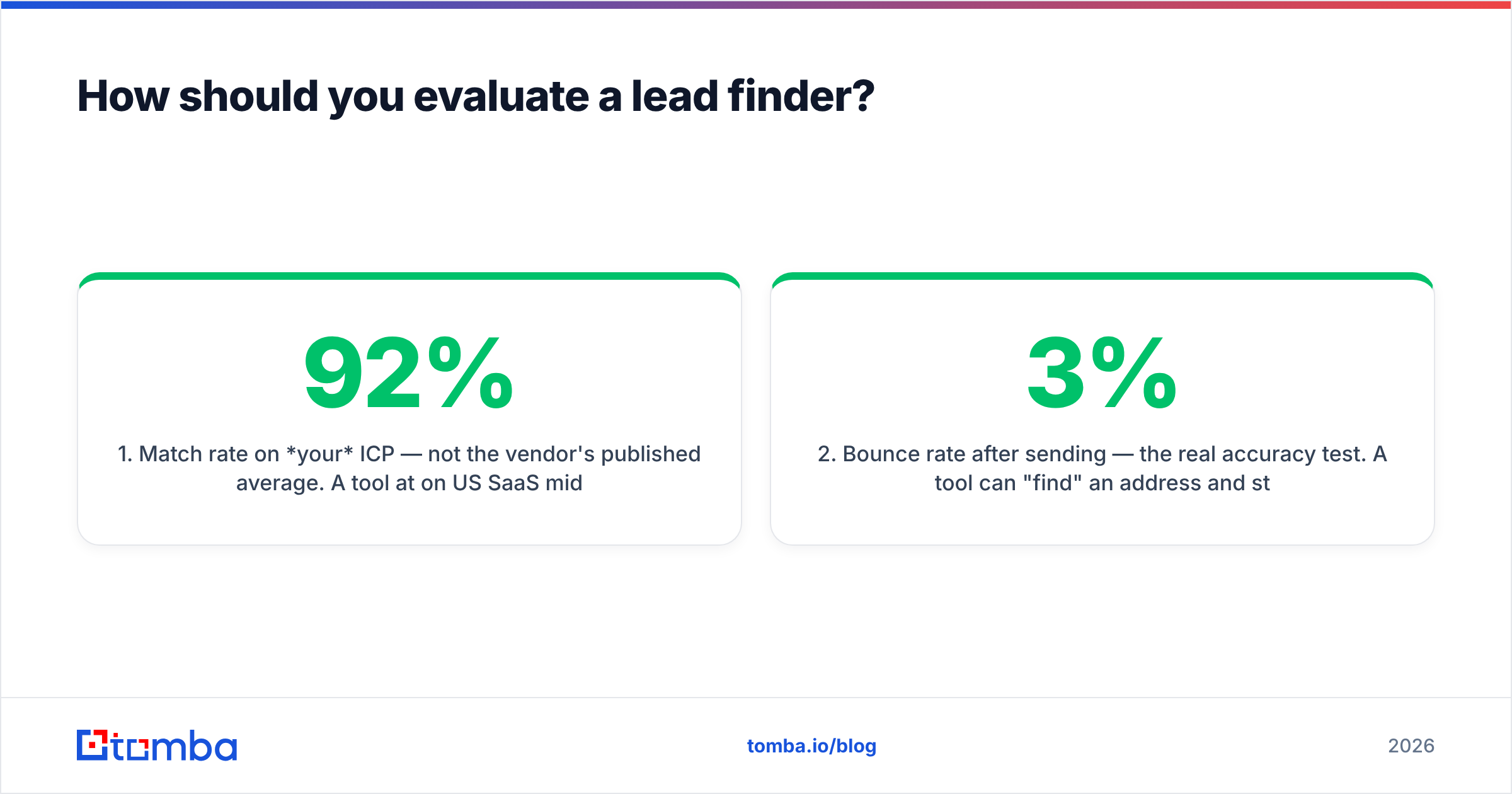
- Match rate on your ICP — not the vendor's published average. A tool at 92% on US SaaS mid-market can drop to 45% on German manufacturing SMBs. Always test with 100 of your own accounts.
- Bounce rate after sending — the real accuracy test. A tool can "find" an address and still hand you a dead mailbox. Anything over 3% bounce puts your domain reputation at risk.
- Cost per usable contact — total monthly spend divided by contacts that were both found and deliverable. This is the number vendors never publish.
- Credit mechanics — do credits roll over? Does a failed search burn one? Does verification cost a separate credit? Three vendors in this test charge separately for find and verify.
- Contract friction — seat minimums, annual-only terms, mandatory demos before pricing. A tool you can't cancel in a bad quarter is a liability.
- Workflow fit — API, CSV bulk upload, Chrome extension, CRM sync. If your reps have to leave the CRM, adoption drops fast.
We scored each tool against a 500-contact test list spread across SaaS, agencies, logistics, and professional services in North America and the EU, then sent a small verification campaign to measure real bounces.
Which lead finders are most accurate?#
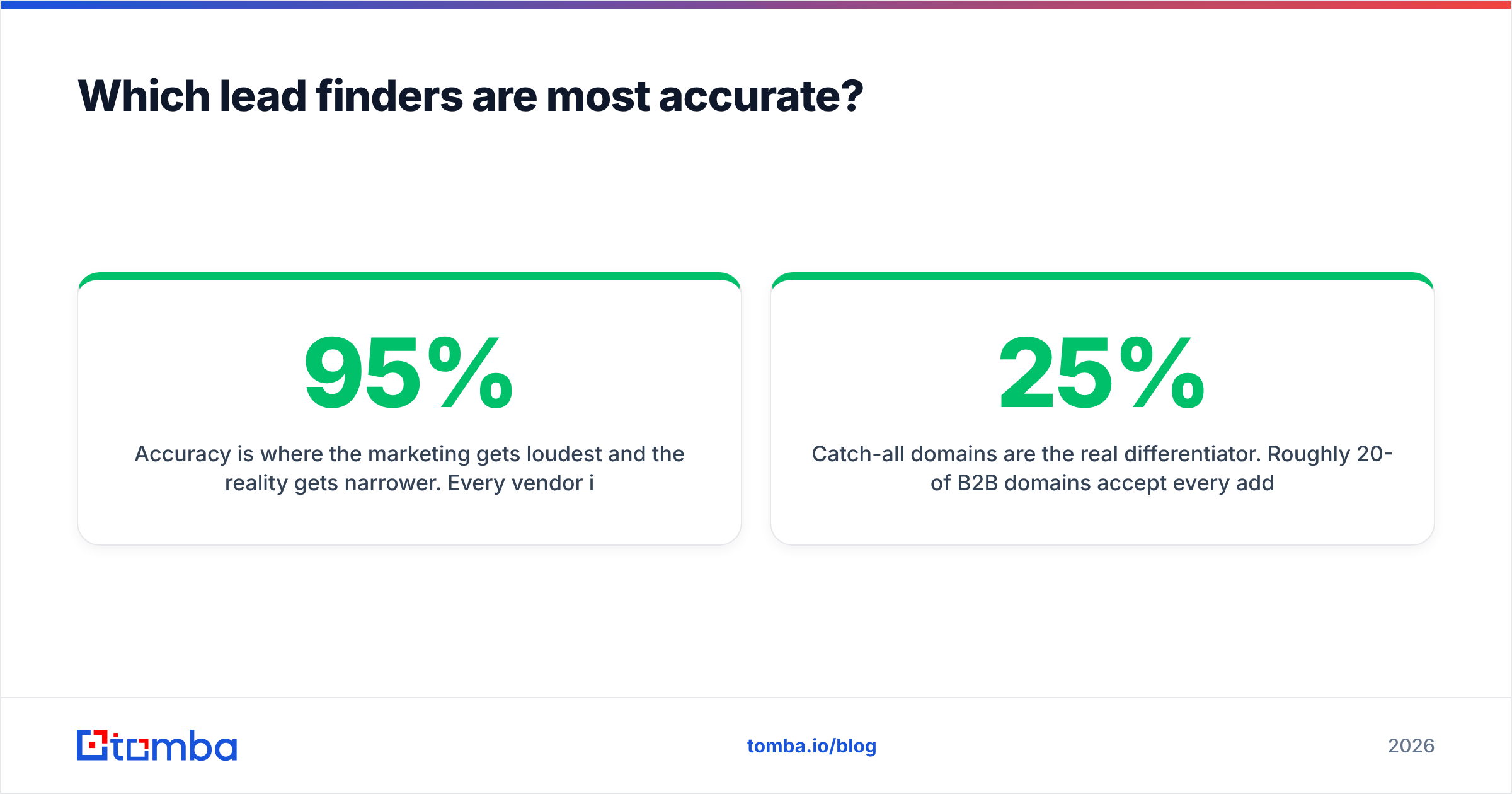
Accuracy is where the marketing gets loudest and the reality gets narrower. Every vendor in this category claims 95%+. In practice, on clean B2B domains with a known contact name, the credible tools cluster between 88% and 96% valid, and the differences show up mostly at the edges: catch-all domains, small companies with no web footprint, and non-English markets.

Three findings worth flagging:
Catch-all domains are the real differentiator. Roughly 20-25% of B2B domains accept every address at the SMTP layer, which makes standard verification useless. Tools that just mark these "risky" and move on are handing you a coin flip. A dedicated catch-all verifier that uses pattern confidence and historical send data recovers a meaningful slice of those contacts instead of discarding them.
Database tools degrade quietly. A contact database is a snapshot. When someone changes jobs, the record stays valid-looking until you send to it. The 2026 job-change rate in tech is still high enough that a list bought in January is materially stale by June. Live-lookup tools re-resolve at request time and don't have this problem in the same way.
"Verified" means different things. Some vendors mean syntax + MX record. Others mean full SMTP handshake. Ask which one, in writing. Then re-verify anything you didn't personally check with an independent email verifier before it hits your sequencer.
How do the top lead finders compare on price and features?#
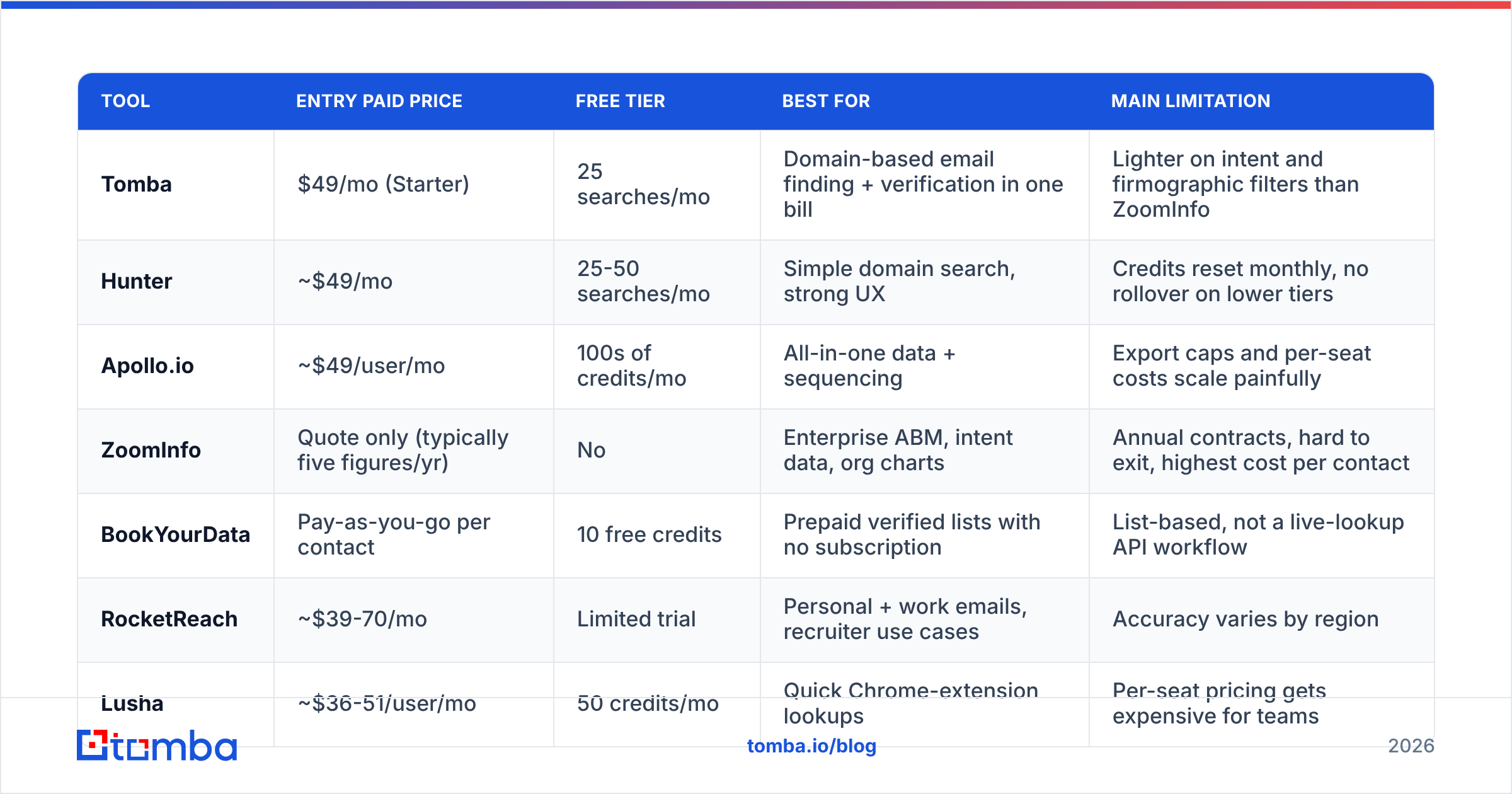
Below is the head-to-head. Prices are entry paid tiers as published at the time of writing; database vendors that require a sales call before quoting are marked accordingly.

| Tool | Entry paid price | Free tier | Best for | Main limitation |
|---|---|---|---|---|
| Tomba | $49/mo (Starter) | 25 searches/mo | Domain-based email finding + verification in one bill | Lighter on intent and firmographic filters than ZoomInfo |
| Hunter | ~$49/mo | 25-50 searches/mo | Simple domain search, strong UX | Credits reset monthly, no rollover on lower tiers |
| Apollo.io | ~$49/user/mo | 100s of credits/mo | All-in-one data + sequencing | Export caps and per-seat costs scale painfully |
| ZoomInfo | Quote only (typically five figures/yr) | No | Enterprise ABM, intent data, org charts | Annual contracts, hard to exit, highest cost per contact |
| BookYourData | Pay-as-you-go per contact | 10 free credits | Prepaid verified lists with no subscription | List-based, not a live-lookup API workflow |
| RocketReach | ~$39-70/mo | Limited trial | Personal + work emails, recruiter use cases | Accuracy varies by region |
| Lusha | ~$36-51/user/mo | 50 credits/mo | Quick Chrome-extension lookups | Per-seat pricing gets expensive for teams |
| Seamless.AI | Quote-led | Limited trial | High-volume US SMB prospecting | Mixed bounce-rate reports from users |
The pattern is clear: the gap between a $49/mo email finder and a five-figure database is not accuracy. It's coverage breadth, filtering depth, and intent signals. If you don't use intent data, you're paying tens of thousands of dollars a year for filters you'll never open.
Which lead finder is right for each use case?#
Tomba — best for email-first outbound on a predictable budget#
Strong match rates on domain-based lookups, verification bundled into the same workflow, and no seat minimum. The email finder handles name + domain and domain-only discovery, and the same credits cover verification, so you're not paying two vendors to do one job. Tomba pricing runs Free (25 searches/mo), Starter $49/mo, Growth $99/mo, Pro $249/mo, and Enterprise on request — all published, no demo gate.
Weakness to know: it's a data-accuracy tool, not a sequencer. You'll pair it with Instantly, Smartlead, or your CRM's native sending. Firmographic filtering is narrower than a full database platform.
Hunter — best for the simplest possible domain search#
Hunter is the reference product in this category and still has the cleanest interface. If one person needs to look up a handful of emails per week, it's hard to fault. The official Hunter site publishes pricing openly, which is more than most of this list does.
Weakness to know: credits don't roll over on entry tiers, and bulk workflows feel bolted on compared to purpose-built bulk email finder tooling.
Apollo.io — best all-in-one for a small team that wants one login#
Apollo bundles a large contact database with sequencing, dialing, and basic CRM. For a two-to-five person sales team with no existing stack, that consolidation is genuinely valuable.
Weakness to know: the pricing is per-seat, export limits bite earlier than you expect, and data quality on non-US records is inconsistent. Plenty of teams start on Apollo and later split it into a cheaper data source plus a dedicated sequencer — which is why Apollo alternatives is one of the highest-volume searches in this category.
ZoomInfo — best for enterprise ABM, if you have the budget#
Nothing else matches ZoomInfo's org charts, intent signals, and technographic depth. If you're running account-based motions into the Fortune 5000 and you actually operationalize intent data, it earns its cost.
Weakness to know: annual contracts, auto-renewal terms that have generated a long tail of complaints on G2 and Capterra, and a cost per contact that's an order of magnitude above the email-finder tier. Do not buy it for email addresses alone.
BookYourData — best for prepaid lists with no subscription#
BookYourData takes a different and honestly underrated approach: build a filtered list in the browser, see the count and price before you pay, download it. No monthly commitment, no expiring credits, and a published accuracy guarantee with credit refunds on bounces. For agencies running one-off campaigns or teams with irregular list needs, that model removes the biggest frustration in this whole category — paying every month for capacity you don't use.
Where it fits vs. a live-lookup tool: it's a list product, not an API you call from your enrichment pipeline. If you need to resolve contacts on demand as they enter your CRM, you'll want a lookup API alongside it. Many teams run both.
RocketReach and Lusha — best for extension-driven, person-level lookups#
Both are built around the browser extension: land on a LinkedIn profile, click, get contact details. RocketReach leans toward personal emails and recruiting; Lusha leans toward phone numbers and sales. Both are per-seat, which is fine for two reps and painful for twelve.
What do real user reviews say about lead finders?#
Pull the review sites and the same four complaints appear across nearly every vendor. Knowing them in advance is worth more than any feature matrix:
- "The credits expired." Monthly-reset credits are the single most common billing complaint. If your volume is lumpy, prioritize rollover or pay-as-you-go.
- "Bounce rate was higher than promised." Usually a catch-all handling problem, occasionally stale database records. Always run a 100-contact pilot before committing.
- "I couldn't cancel." Concentrated in the enterprise, annual-contract tier. Read the auto-renewal clause.
- "Coverage was thin outside the US." Nearly universal. EU, LATAM, and APAC coverage is 20-40% weaker across the board. Test your actual geography.
Notably absent from the complaint list: "the interface was confusing." Everyone has solved UI. Nobody has solved billing fairness or non-US coverage.
How do you run your own lead finder test in an afternoon?#
Don't take anyone's word for it, including ours. Here's a test you can finish today:
- Build a 100-row control list from accounts you already know — ideally ones where you already have a confirmed contact email in your CRM. This gives you ground truth.
- Run the same list through two or three free tiers. Tomba, Hunter, and Apollo all offer free credits; BookYourData gives 10 free. That's enough for a signal.
- Score three numbers per tool: match rate (found / attempted), agreement rate (matches your known-good address), and coverage on your weakest segment.
- Send a 50-contact validation campaign from a warmed secondary domain and record hard bounces.
- Divide monthly cost by deliverable contacts. That's your real price. Compare that, not the sticker.
- Check the API and CSV path before you commit. A tool that can't reach your CRM without manual exports will quietly die of neglect. Look for a documented email finder API or a native integration, not a "coming soon" roadmap item.
Teams that run this test almost always end up spending less than they planned, because the expensive tier rarely wins on cost per usable contact — it wins on filters most teams never use.
The verdict#
There is no single best lead finder, but there is a clear best-value structure for most B2B teams in 2026: a cheap, accurate email finder with bundled verification as the daily driver, plus a pay-as-you-go list source when you need volume, and a database platform only if intent data is genuinely part of your motion.
If your bottleneck is "I know which companies to target, I just need deliverable addresses," start with the cheapest tool that clears 90% on your own test list — not the one with the longest feature page.
Ready to run your own test? Start with the Tomba Email Finder free tier — 25 searches a month, no card, no demo call. Put your own 25 hardest accounts through it, check the results against what you already know, and decide from evidence instead of a comparison table. If it clears your bar, Starter is $49/mo with verification included in the same credits.
Related guides#
// get started
Find, verify and enrich your first contacts today
Start on the free plan with 25 searches a month, then scale when your team is ready.
Free plan · No credit card required · GDPR & CCPA
// about the author