Lead Generation Automation: A Practical 2026 Playbook
Most lead generation automation stacks fail because teams automate outreach before they automate data quality. Here's the build order that actually works, with tool costs and a stage-by-stage breakdown.
TL;DR
- Lead generation automation is a pipeline, not a tool. It has five stages — source, enrich, verify, route, engage — and skipping any one of them creates downstream failure you'll blame on the wrong layer.
- Teams almost always automate the engage stage first (sequencers, AI writers) and the verify stage last. That order is backwards and it's the single biggest cause of burned domains.
- A functional automated stack for a small team costs roughly $250–$600/month. Enterprise "all-in-one" platforms start at $15k–$50k/year and mostly resell the same underlying data.
- Automate the repeatable and deterministic parts: list building, enrichment, verification, routing, logging. Keep the judgment parts — offer, segment definition, first-line personalization review — human.
- Measure the pipeline stage by stage. A 4% reply rate with 12% bounces is not a copy problem, it's a data problem, and no amount of subject-line testing will fix it.
What is lead generation automation, actually?#
Lead generation automation is the use of software to move a prospect from "unknown" to "qualified and contacted" without a human doing the repetitive steps in between.
Think of it like a coffee roastery. The beans have to be sourced, sorted for defects, roasted, ground, and packaged. You can automate every one of those steps, but if you skip the defect-sorting stage, you've built a very fast machine for producing bad coffee. Most lead gen stacks are exactly that machine — extremely efficient at delivering unusable contacts into a sequencer.
Technically, the pipeline has five distinct stages, each with its own tooling category and its own failure mode:
- Source — Where raw prospect records come from. Job boards, LinkedIn exports, company lists, website visitor identification, form fills, intent providers, scraped directories. Failure mode: sourcing on the wrong ICP signal, which poisons everything downstream.
- Enrich — Turning a thin record ("Acme Corp, Jane Doe") into an actionable one (work email, direct dial, headcount, tech stack, funding). Failure mode: over-enriching fields nobody uses while missing the one field the sequence needs.
- Verify — Confirming the contact data is deliverable and current. Failure mode: skipping it entirely, or trusting a provider's own confidence score as if it were verification.
- Route — Deciding who owns the lead, which segment it belongs to, and which sequence it enters. Failure mode: round-robin assignment with no scoring, so your best leads land with whoever's next in line.
- Engage — The actual outreach: email, LinkedIn, phone, ads. Failure mode: volume without segmentation, which is how a domain gets flagged.
The stages are sequential for a reason. Data quality problems compound as they move right. A 15% bad-email rate at the source stage becomes a 15% bounce rate at the engage stage, and by then it's no longer a data problem — it's a sender reputation problem that takes weeks to unwind.
Which parts should you automate and which should stay human?#
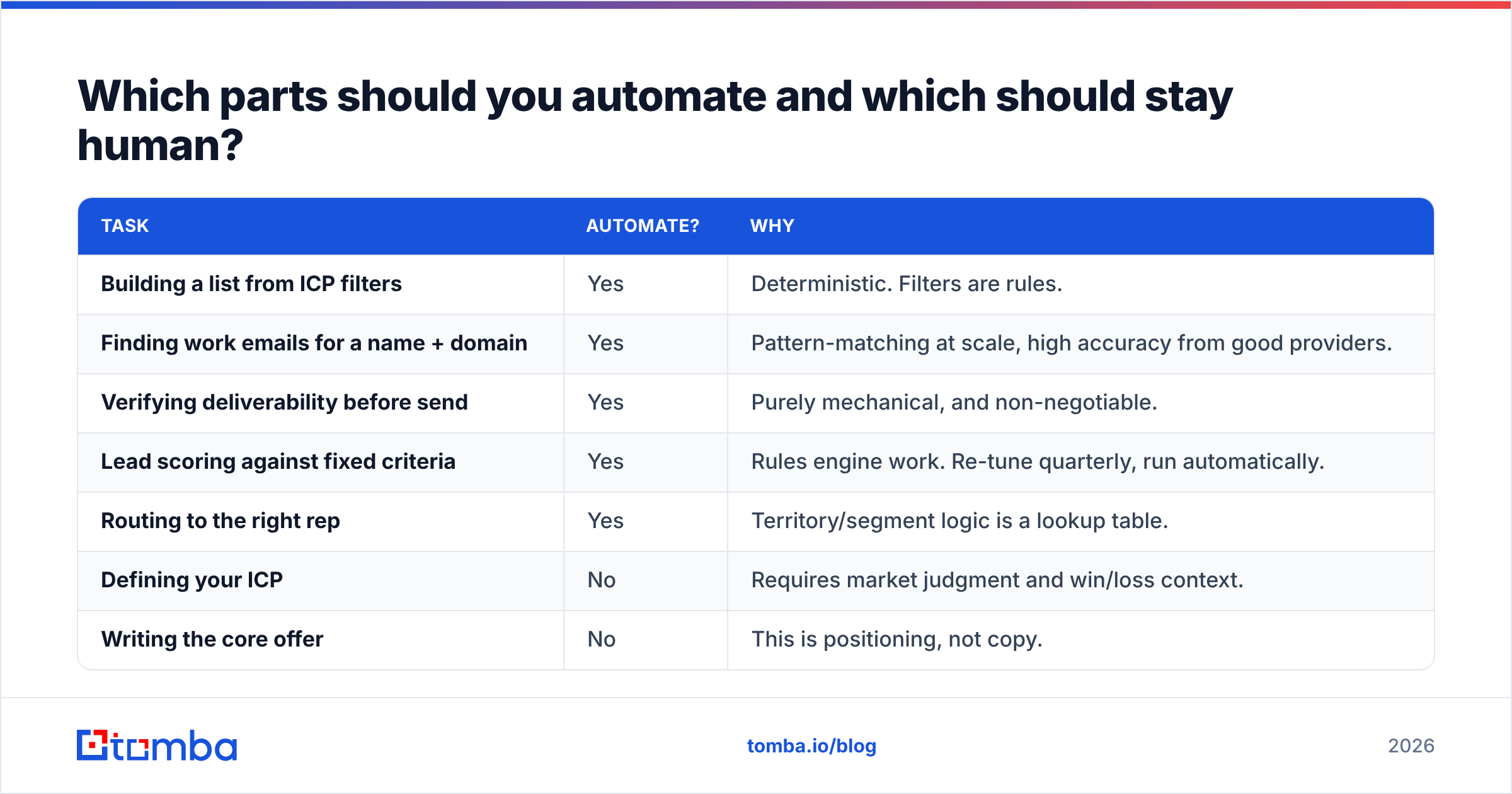
Automate anything deterministic and repeatable. Keep anything that requires judgment about a specific company.
The test is simple: if you can write down the rule, a machine should run it. If the rule is "it depends on what they said in their last funding announcement," a human should read it.
| Task | Automate? | Why |
|---|---|---|
| Building a list from ICP filters | Yes | Deterministic. Filters are rules. |
| Finding work emails for a name + domain | Yes | Pattern-matching at scale, high accuracy from good providers. |
| Verifying deliverability before send | Yes | Purely mechanical, and non-negotiable. |
| Lead scoring against fixed criteria | Yes | Rules engine work. Re-tune quarterly, run automatically. |
| Routing to the right rep | Yes | Territory/segment logic is a lookup table. |
| Defining your ICP | No | Requires market judgment and win/loss context. |
| Writing the core offer | No | This is positioning, not copy. |
| First-line personalization for tier-1 accounts | Partly | AI drafts, human edits. Unreviewed AI first lines are obvious. |
| Deciding when to break sequence and call | No | Requires reading the signal, not the score. |
| Handling a reply | No | Automated reply handling is how you lose deals. |
The seductive mistake in 2026 is assuming AI moved the line. It moved it a little — AI is now genuinely good at summarizing a company's positioning from its homepage and drafting a relevant opener. It is still bad at knowing whether that opener is the right thing to say to this buyer right now. Treat AI as an enrichment layer, not a judgment layer.
How do you build the data layer first?#
Start at verify and work backwards. This is counterintuitive but it's the fastest path to a working stack.
Here's why: you can run a manual, spreadsheet-driven outreach motion on 200 verified contacts and learn whether your offer works. You cannot learn anything from 5,000 unverified contacts, because every negative signal is ambiguous — was the message wrong, or did it never arrive?
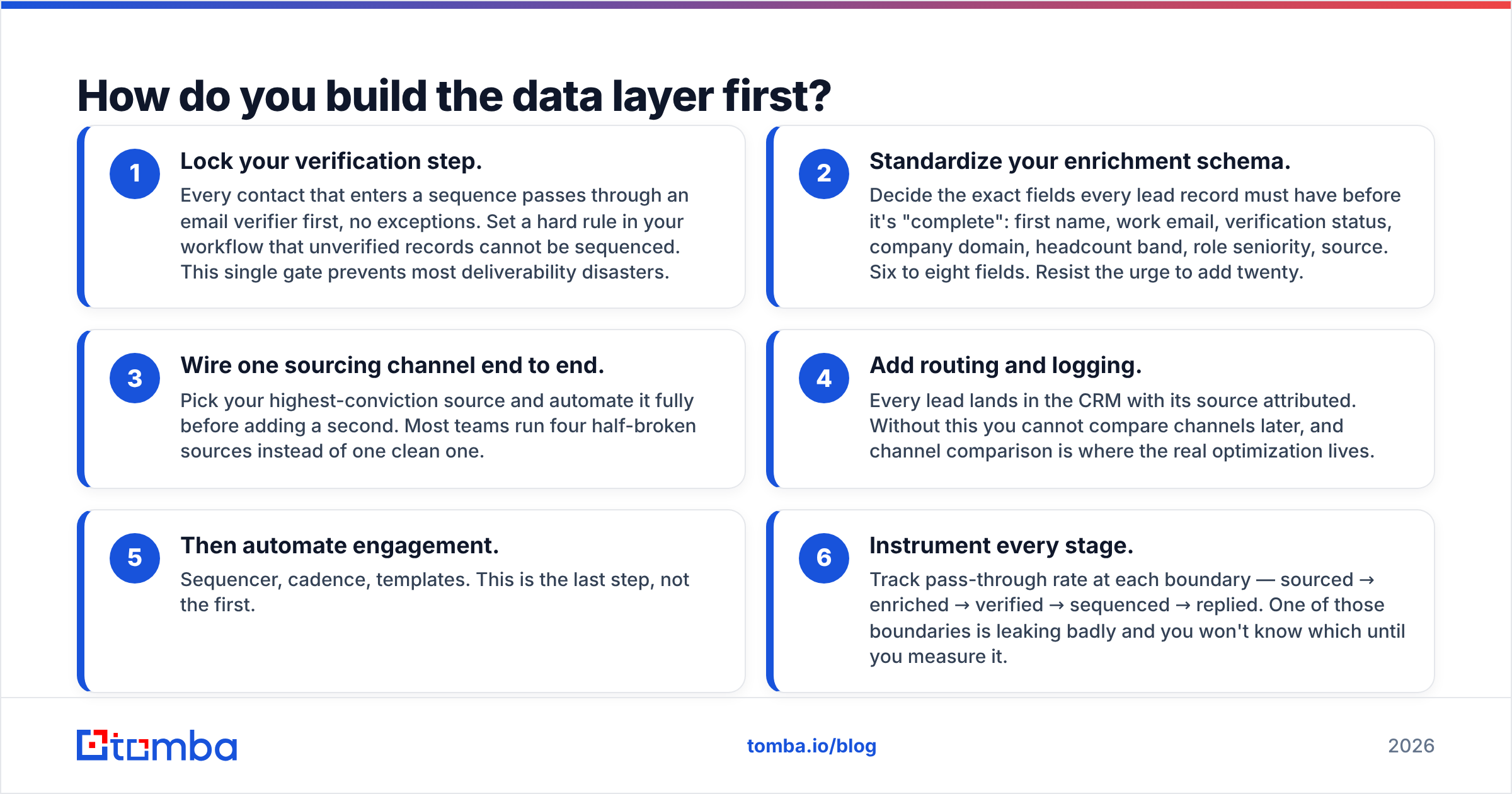
The build order that works:
- Lock your verification step. Every contact that enters a sequence passes through an email verifier first, no exceptions. Set a hard rule in your workflow that unverified records cannot be sequenced. This single gate prevents most deliverability disasters.
- Standardize your enrichment schema. Decide the exact fields every lead record must have before it's "complete": first name, work email, verification status, company domain, headcount band, role seniority, source. Six to eight fields. Resist the urge to add twenty.
- Wire one sourcing channel end to end. Pick your highest-conviction source and automate it fully before adding a second. Most teams run four half-broken sources instead of one clean one.
- Add routing and logging. Every lead lands in the CRM with its source attributed. Without this you cannot compare channels later, and channel comparison is where the real optimization lives.
- Then automate engagement. Sequencer, cadence, templates. This is the last step, not the first.
- Instrument every stage. Track pass-through rate at each boundary — sourced → enriched → verified → sequenced → replied. One of those boundaries is leaking badly and you won't know which until you measure it.
Catch-all domains deserve a specific mention because they break naive automation. A catch-all server accepts mail for any address at the domain, so a standard SMTP check returns "valid" for addresses that don't exist. If a meaningful share of your ICP sits on catch-all domains — common in enterprise and in Microsoft 365 environments — you need a catch-all verifier that uses pattern confidence and secondary signals rather than SMTP alone. Otherwise your verified list contains a hidden tranche of hard bounces.
What does an automated lead gen stack cost in 2026?#
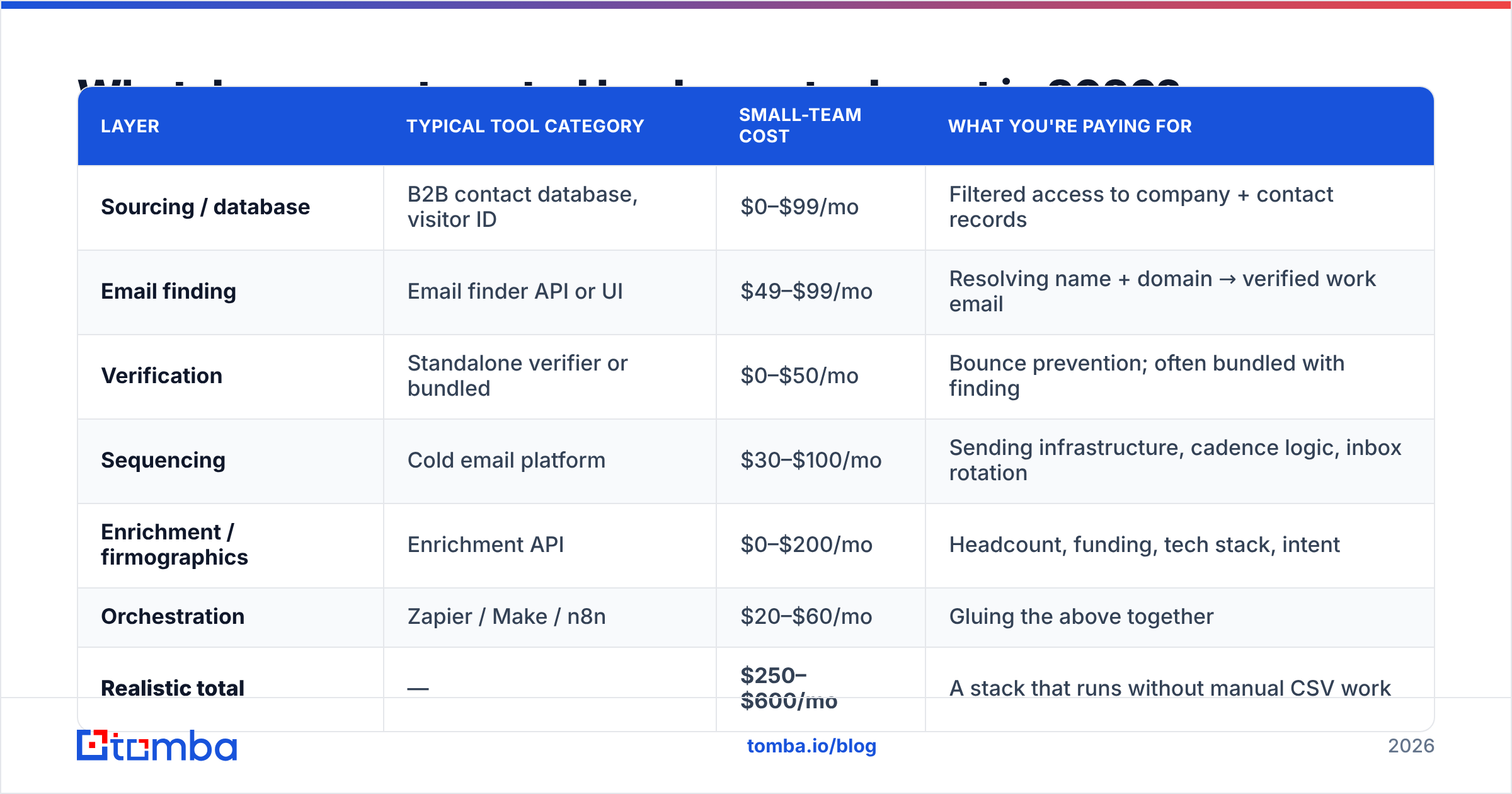
Between $250 and $600 a month for a two-to-five-person team running real volume. The "all-in-one" enterprise platforms are 10–20x that and mostly bundle the same data layers with a heavier UI.
Here's how the layers price out. These are list prices for the tier most small teams actually land on, not the loss-leader entry tier:
| Layer | Typical tool category | Small-team cost | What you're paying for |
|---|---|---|---|
| Sourcing / database | B2B contact database, visitor ID | $0–$99/mo | Filtered access to company + contact records |
| Email finding | Email finder API or UI | $49–$99/mo | Resolving name + domain → verified work email |
| Verification | Standalone verifier or bundled | $0–$50/mo | Bounce prevention; often bundled with finding |
| Sequencing | Cold email platform | $30–$100/mo | Sending infrastructure, cadence logic, inbox rotation |
| Enrichment / firmographics | Enrichment API | $0–$200/mo | Headcount, funding, tech stack, intent |
| Orchestration | Zapier / Make / n8n | $20–$60/mo | Gluing the above together |
| Realistic total | — | $250–$600/mo | A stack that runs without manual CSV work |
For comparison, the consolidated platforms — Apollo, ZoomInfo, Outreach, and the enterprise tier of the data providers — bundle several of these layers. That's genuinely convenient if you want one vendor and one invoice. It's expensive if you only need two of the six layers, and the bundled verification is often the weakest component. G2's sales intelligence category is a reasonable place to sanity-check current pricing claims across vendors, since vendor pages rarely publish enterprise numbers.
On the email-finding layer specifically, Tomba pricing runs a free tier at 25 searches/month, Starter at $49/mo, Growth at $99/mo, and Pro at $249/mo, with verification and domain search included rather than metered separately. Peers like BookYourData take a different and equally valid approach — prepaid credits against a pre-built database, which suits teams that want a large list once rather than continuous API calls. Match the pricing model to your motion: continuous inbound-triggered enrichment wants a subscription and an API; a quarterly outbound push wants credits.
How do you connect the pieces without writing much code?#
Three integration patterns cover almost every stack. Pick one based on how much engineering time you have.
Pattern 1 — Spreadsheet-centric. Your list lives in Google Sheets. An add-on resolves and verifies emails in-sheet, then a Zapier trigger pushes completed rows to the sequencer. Zero code. Breaks at roughly 5,000 rows and gets slow before that. Fine for a founder-led motion or a first campaign. A Sheets email finder add-on plus a single Zap is a genuinely functional stack for months.
Pattern 2 — CRM-centric. The CRM is the system of record. New records trigger an enrichment call, results write back to the contact object, and a workflow rule moves qualified contacts into a sequence. This is the right pattern once you have more than three people touching leads, because it solves ownership and attribution at the same time. Both HubSpot's workflow engine and Salesforce Flow handle this natively; the enrichment call is just a webhook. A HubSpot integration or the equivalent for your CRM removes the middleware layer entirely.
Pattern 3 — API-first. A small service you own calls the sourcing, enrichment, and verification APIs on a schedule, writes to your own database, and pushes to the CRM. Requires an engineer but costs the least per record at volume and gives you full control over logic and retry behavior. Most teams over 20 reps end up here eventually. An email finder API with predictable rate limits and a documented response schema matters far more than UI polish at this tier.
How do you know if the automation is working?#
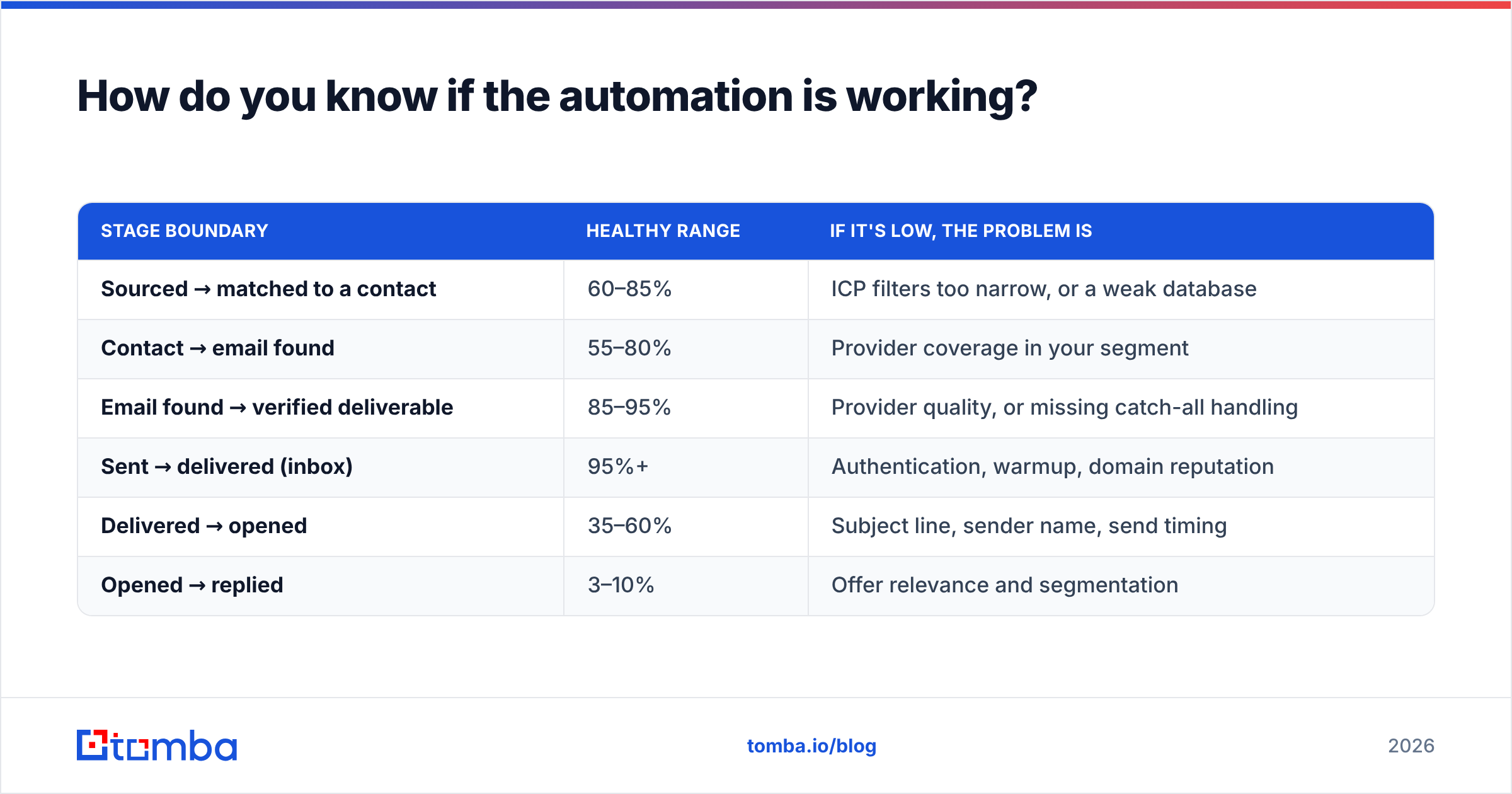
Measure pass-through rate at each stage boundary, not just the final reply rate. The final number tells you something is wrong; the stage numbers tell you what.
Healthy benchmarks for a cold outbound motion in 2026, roughly:
| Stage boundary | Healthy range | If it's low, the problem is |
|---|---|---|
| Sourced → matched to a contact | 60–85% | ICP filters too narrow, or a weak database |
| Contact → email found | 55–80% | Provider coverage in your segment |
| Email found → verified deliverable | 85–95% | Provider quality, or missing catch-all handling |
| Sent → delivered (inbox) | 95%+ | Authentication, warmup, domain reputation |
| Delivered → opened | 35–60% | Subject line, sender name, send timing |
| Opened → replied | 3–10% | Offer relevance and segmentation |
The diagnostic value is in the sequence. If contact → email found sits at 40%, you have a coverage problem and switching sequencers will not help. If email found → verified sits at 60%, your provider is returning guesses as results and you need a real verification gate. If everything upstream is green but opened → replied is at 1%, the automation is fine and the offer is the problem.
One more measurement discipline: segment your reply-rate reporting by source. Aggregate reply rate hides the fact that one channel is at 9% and three are at 0.5%. Teams routinely kill an entire outbound program because the blended number looked bad, when the honest move was to kill three channels and triple down on the fourth. This only works if you attributed source at the routing stage — which is why step 4 of the build order matters more than it looks.
What breaks most often, and how do you prevent it?#
Four failure modes account for most broken automated pipelines.
- Deliverability collapse from unverified sends. The most common and most expensive. Bounce rates above 3% start damaging email deliverability within days, and recovery takes weeks of reduced volume. Prevention is entirely mechanical: a hard verification gate before the sequencer, plus SPF, DKIM, and DMARC configured correctly. Check your SPF record with an SPF checker before you scale volume, not after something breaks.
- Data decay nobody accounts for. B2B contact data degrades at roughly 25–30% annually — people change jobs, companies get acquired, domains consolidate. A list you enriched in January is meaningfully stale by September. Schedule re-verification of any list older than 90 days as a recurring job, not a manual chore. Bulk verification makes this cheap enough to do on a schedule.
- Duplicate and conflicting records. Two sources produce the same person with different emails, and your sequencer messages both. Deduplicate at the routing stage on normalized domain plus normalized name, and pick a precedence rule for which source wins on conflict. Write the rule down; the default "last write wins" behavior in most CRMs is almost never what you want.
- Over-personalization theater. Automated personalization that references something trivially scraped — a job title, a city, a headline — reads worse than no personalization at all, because it signals a template. If the personalization token doesn't change what you're offering, remove it. A clean, direct, short message outperforms a badly personalized one consistently.
There's a fifth failure mode that's harder to name: automating a motion that was never working manually. Automation multiplies whatever you feed it. If 50 hand-sent emails produced zero meetings, 5,000 automated ones will produce zero meetings faster and cost you a domain. Prove the offer at small scale before you build the machine.
Where should you start this week?#
Pick the single stage in your current pipeline with the worst pass-through rate and fix only that. Not the whole stack.
For most teams reading this, that stage is contact resolution — you have a list of target companies and people but no reliable way to get correct work emails at scale. That's the layer where accuracy differences between providers are largest and where the cost of being wrong is highest, because it's the last stage before you start damaging a sending domain.
Run a real test rather than trusting a comparison chart: take 100 contacts from your actual ICP, run them through two or three providers, and measure both coverage (what percentage returned an address) and accuracy (what percentage survived verification and didn't bounce). Providers perform very differently by geography and company size, and your segment's numbers are the only ones that matter.
If that's your bottleneck, start with the Tomba Email Finder — the free tier gives you 25 searches a month, which is enough to run exactly the accuracy test described above against your own list before committing to anything. Verification is built in, so you're measuring deliverable addresses rather than guesses, and the same API powers the bulk and CRM-integration patterns when you're ready to scale the rest of the pipeline.
Related guides#
// get started
Find, verify and enrich your first contacts today
Start on the free plan with 25 searches a month, then scale when your team is ready.
Free plan · No credit card required · GDPR & CCPA
// about the author