Lead Generation Chrome Extension: The 2026 Buyer's Guide
A browser extension can cut prospecting time from minutes to seconds per contact - or quietly fill your CRM with bounces. Here is how the 2026 options compare on accuracy, credits, price and workflow fit.
TL;DR
- A lead generation Chrome extension pulls contact data from the page you are already looking at - a LinkedIn profile, a company site, a directory listing - and pushes it into your CRM or a CSV without tab-switching.
- The differences that matter are not features. They are hit rate on your ICP, verification depth, credit mechanics, and whether exports are actually yours to keep.
- Most extensions claim 95%+ accuracy. Real-world valid-send rates on cold B2B lists usually land between 70% and 93% depending on region and company size.
- Per-seat pricing punishes teams; credit-pooled pricing punishes nobody. Check which model you are buying before you scale from 1 rep to 6.
- Extensions are for depth (one prospect at a time, in context). Bulk enrichment and prebuilt lists are a different job - do not force one tool to do both.
What is a lead generation Chrome extension?#
Think of it as a business-card scanner welded to your browser. You are on a prospect's LinkedIn profile or a company's About page; you click the toolbar icon; the extension reads the page, matches the person or domain against a contact database, and hands back a work email, sometimes a phone number, sometimes firmographics - then offers to save it somewhere useful.
Technically, it is a thin client over three systems: a page parser (to extract name, company, domain), a lookup API (to resolve that to a contact record), and an export layer (CRM push, CSV, Sheets, webhook). The extension itself is the least interesting part. The database and verification behind it decide whether your sequence lands or bounces.
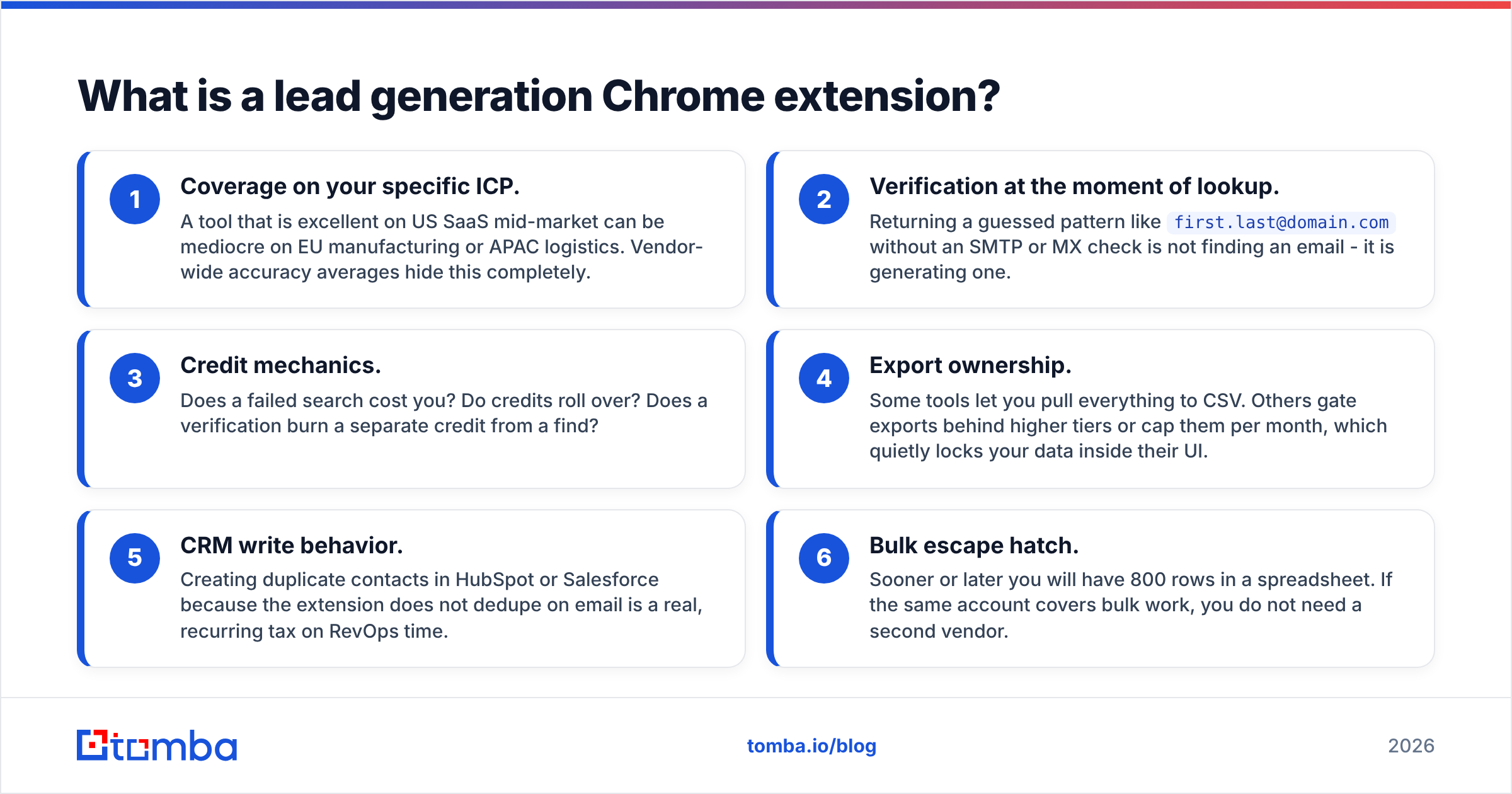
Here is what separates a tool you keep from one you uninstall in week two:
- Coverage on your specific ICP. A tool that is excellent on US SaaS mid-market can be mediocre on EU manufacturing or APAC logistics. Vendor-wide accuracy averages hide this completely.
- Verification at the moment of lookup. Returning a guessed pattern like
first.last@domain.comwithout an SMTP or MX check is not finding an email - it is generating one. - Credit mechanics. Does a failed search cost you? Do credits roll over? Does a verification burn a separate credit from a find?
- Export ownership. Some tools let you pull everything to CSV. Others gate exports behind higher tiers or cap them per month, which quietly locks your data inside their UI.
- CRM write behavior. Creating duplicate contacts in HubSpot or Salesforce because the extension does not dedupe on email is a real, recurring tax on RevOps time.
- Bulk escape hatch. Sooner or later you will have 800 rows in a spreadsheet. If the same account covers bulk work, you do not need a second vendor.

How do lead generation Chrome extensions actually work?#
The parsing step is simpler than vendors imply. On a LinkedIn profile, the extension reads the visible name, headline, and current company. On a company website, it reads the domain. That is usually the entire input: person + domain, or just domain.
What happens next is where tools diverge:
- Database lookup. The tool checks whether it already holds a verified record for that person at that domain. Fastest path, highest confidence, and the reason database size matters - though coverage of your segment matters far more than headline record counts.
- Pattern inference. If there is no stored record, the tool infers the company's email format from known addresses at that domain (
j.smith@,jsmith@,john@) and constructs a candidate. You can see this logic yourself with a company email pattern check. - Verification. The candidate gets tested: syntax, MX records, disposable-domain check, then an SMTP handshake where the server allows it. A tool that skips this step will hand you plausible-looking garbage.
- Catch-all handling. Roughly a third of B2B domains accept every address, so SMTP tells you nothing. Good tools label these honestly as "accept-all" and let you decide; weak tools mark them "valid" and let your bounce rate explain it later.
That last point is the single most common source of disappointment. If your extension never returns an "uncertain" status, it is not being generous - it is hiding risk. A dedicated catch-all verifier exists precisely because this category needs its own treatment.
Which lead generation Chrome extension should you install in 2026?#
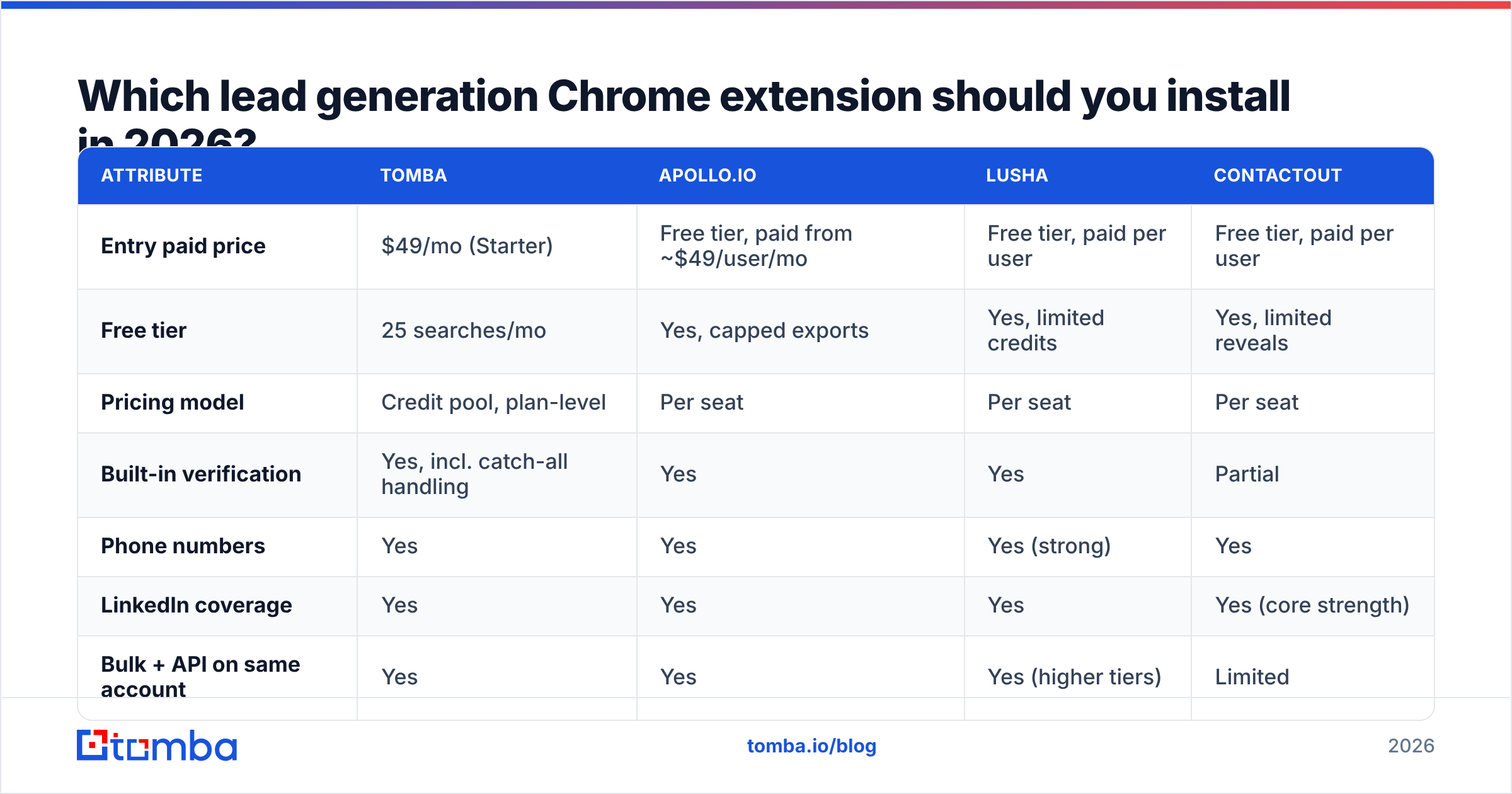
The honest answer depends on whether you are one person doing founder-led sales, a five-rep SDR pod, or a RevOps team enriching at scale. Here is how the main options line up on the attributes that actually change your workflow. Pricing reflects publicly listed entry plans at the time of writing - always confirm on the vendor's own page, since list prices move.
| Attribute | Tomba | Apollo.io | Lusha | ContactOut |
|---|---|---|---|---|
| Entry paid price | $49/mo (Starter) | Free tier, paid from ~$49/user/mo | Free tier, paid per user | Free tier, paid per user |
| Free tier | 25 searches/mo | Yes, capped exports | Yes, limited credits | Yes, limited reveals |
| Pricing model | Credit pool, plan-level | Per seat | Per seat | Per seat |
| Built-in verification | Yes, incl. catch-all handling | Yes | Yes | Partial |
| Phone numbers | Yes | Yes | Yes (strong) | Yes |
| LinkedIn coverage | Yes | Yes | Yes | Yes (core strength) |
| Bulk + API on same account | Yes | Yes | Yes (higher tiers) | Limited |
| Best fit | Accuracy-first email sourcing, dev-friendly | All-in-one prospecting + sequencing | Phone-heavy outbound | Recruiting and LinkedIn-native sourcing |

A few reads on that table.
If you want one platform for everything, Apollo is the default answer and has been for years - database, extension, sequencer, dialer. The tradeoff is that you are buying a suite, and the suite prices per seat. Teams that only need the finding half often end up paying for the sequencing half twice, since they already run Instantly or Smartlead. If that describes you, an Apollo alternative that charges for data rather than seats is worth pricing out.
If phone numbers are the point, Lusha has historically been the strongest mobile-number source in this group, and buyers consistently rate it that way on G2. Email-only teams tend to find it expensive for what they use.
If you are sourcing from LinkedIn all day - recruiters especially - ContactOut is purpose-built for that surface and its extension is the whole product rather than a companion to one.
If accuracy and unit economics are your constraint, the credit-pool model matters more than any single feature. Tomba's Chrome extension runs off the same plan credits as the API, bulk tools, and Sheets add-on, so a two-person team does not pay twice for the same database access. Starter is $49/mo, Growth $99/mo, Pro $249/mo, with a free tier at 25 searches per month to test coverage on your own accounts before paying anything - full Tomba pricing is public.
If you need 5,000 contacts by Friday, no extension is the right tool. That is a list-purchase or bulk-enrichment job. A prebuilt-list provider like BookYourData solves it in one transaction, and a bulk email finder solves it if you already have company and name columns. Clicking an extension 5,000 times is not a strategy.
How accurate is the data these extensions return?#
Treat every published accuracy number as a ceiling measured under favorable conditions, not a promise about your list.

Three things move real-world accuracy more than vendor choice:
- Company size. Sub-20-person companies have thin public email footprints, so pattern inference has less to work from. Hit rates commonly drop 15-25 points versus enterprise targets.
- Region. North American and Western European coverage is dense. LATAM, MENA, and parts of APAC are noticeably thinner across every vendor in this category.
- Role seniority. VP and C-level addresses are better represented than individual contributors, partly because they appear more often in public sources like press releases and conference sites.
The practical defense is to treat "found" and "safe to send" as two separate states. Run anything you are unsure about through an email verifier before it enters a sequence, and hold accept-all domains in a separate segment with a lower send volume. Google and Microsoft both tightened bulk-sender requirements in recent years - Google's sender guidelines now expect spam complaint rates under 0.3% - and a 6% bounce list is the fastest way to lose a sending domain you spent three months warming.
What does a lead generation Chrome extension really cost?#
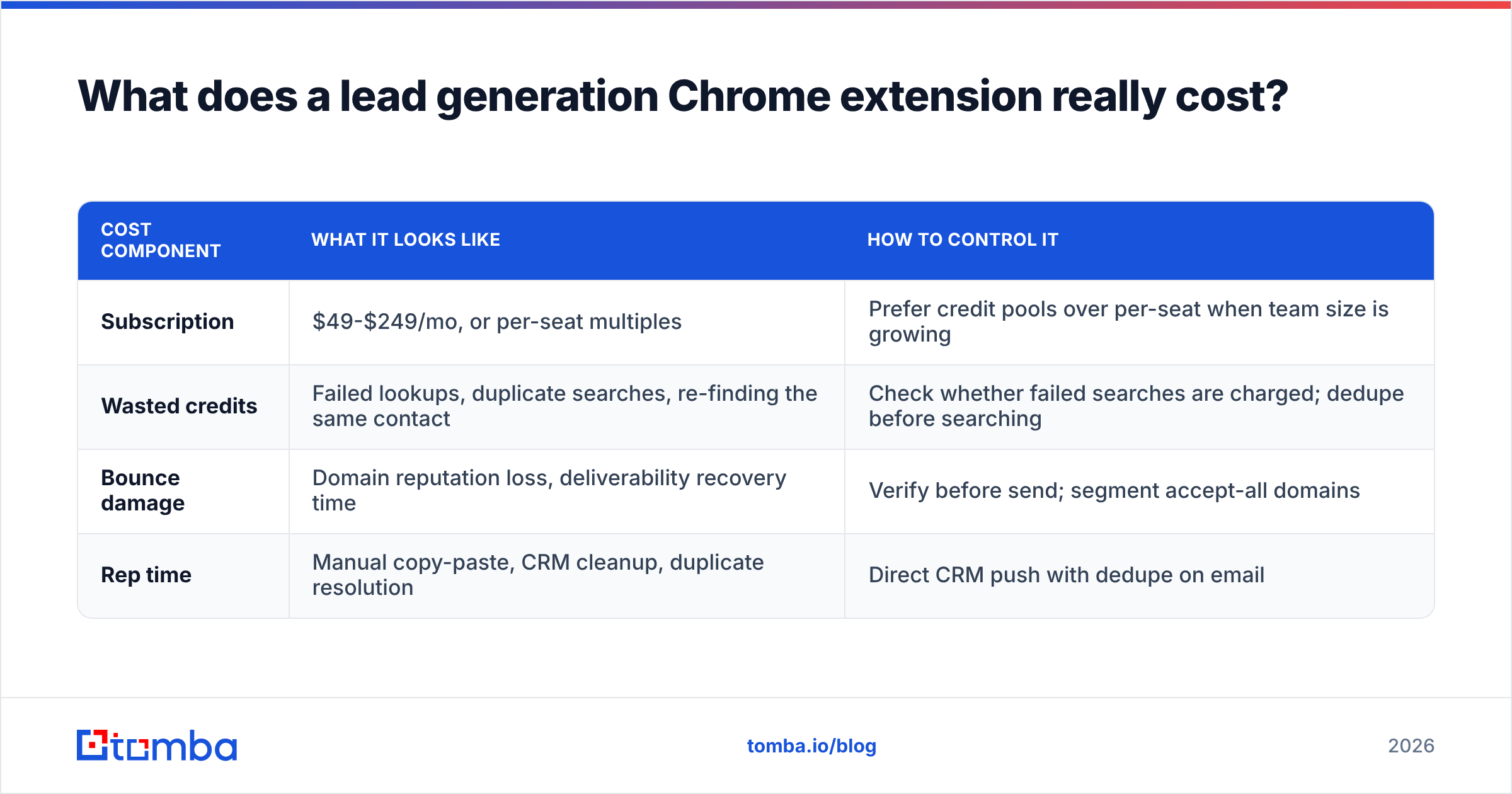
Sticker price is the smallest line item. The real cost has four parts:
| Cost component | What it looks like | How to control it |
|---|---|---|
| Subscription | $49-$249/mo, or per-seat multiples | Prefer credit pools over per-seat when team size is growing |
| Wasted credits | Failed lookups, duplicate searches, re-finding the same contact | Check whether failed searches are charged; dedupe before searching |
| Bounce damage | Domain reputation loss, deliverability recovery time | Verify before send; segment accept-all domains |
| Rep time | Manual copy-paste, CRM cleanup, duplicate resolution | Direct CRM push with dedupe on email |
Per-seat pricing is the one to model carefully. At one rep, a $49/user tool and a $49 credit-pool tool cost the same. At six reps, one is $294/mo and the other is still whatever the pool tier costs. If your headcount plan is flat, ignore this. If you are hiring, it compounds fast.

The second trap is export gating. Read the plan page for phrases like "export limit" or "CSV available on Pro." Data you cannot export is data you are renting.
How do you test one in 20 minutes?#
Vendor demos are optimized. Your test should not be. Run this before you pay anyone:
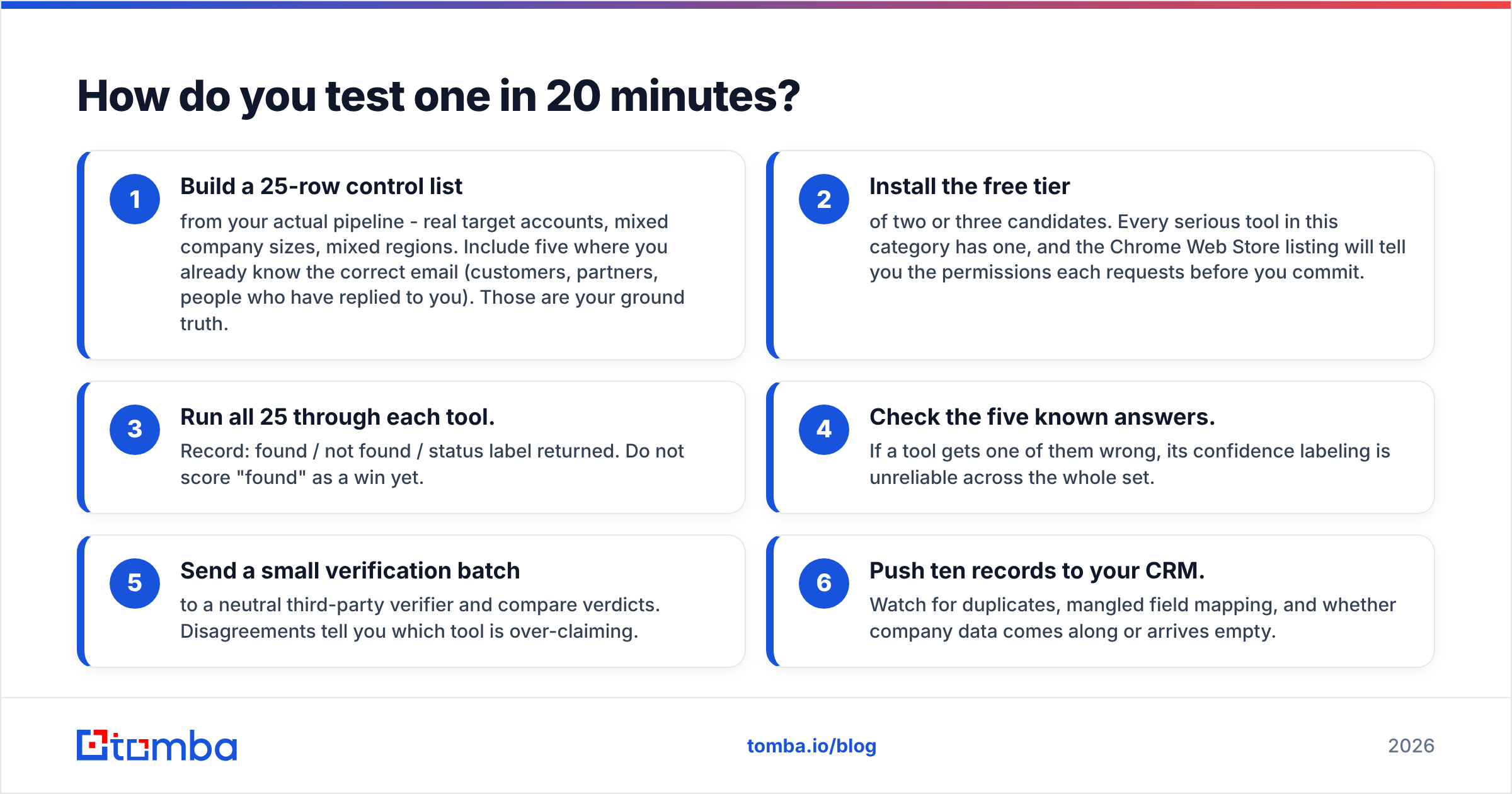
- Build a 25-row control list from your actual pipeline - real target accounts, mixed company sizes, mixed regions. Include five where you already know the correct email (customers, partners, people who have replied to you). Those are your ground truth.
- Install the free tier of two or three candidates. Every serious tool in this category has one, and the Chrome Web Store listing will tell you the permissions each requests before you commit.
- Run all 25 through each tool. Record: found / not found / status label returned. Do not score "found" as a win yet.
- Check the five known answers. If a tool gets one of them wrong, its confidence labeling is unreliable across the whole set.
- Send a small verification batch to a neutral third-party verifier and compare verdicts. Disagreements tell you which tool is over-claiming.
- Push ten records to your CRM. Watch for duplicates, mangled field mapping, and whether company data comes along or arrives empty.
Twenty minutes of this beats twenty reviews. Coverage is segment-specific, and your segment is the only one that matters.
When should you skip the extension entirely?#
Three cases:
You need volume, not depth. If the job is "enrich 3,000 rows from a conference attendee list," use bulk upload or an API loop. The Tomba API handles this in a script; the extension handles it in an afternoon of clicking.
Your prospects are not on the pages the extension reads. If your ICP lives in trade directories, government registries, or niche marketplaces rather than LinkedIn, a LinkedIn-first extension will underperform badly regardless of its overall rating.
You have not fixed deliverability yet. More contacts into a domain that lands in spam produces more spam, faster. Authenticate first - SPF, DKIM, DMARC - warm the domain, then add volume. A free email checker and an SPF lookup cost nothing and surface most of the common misconfigurations in a few minutes.
What should you actually do next?#
Pick based on the constraint you feel most: suite consolidation (Apollo), phone coverage (Lusha), LinkedIn-native sourcing (ContactOut), prebuilt lists (BookYourData), or accuracy and credit efficiency across email workflows (Tomba). Then test on 25 of your own records before a card touches the checkout page.
If your bottleneck is finding correct, verified work emails without paying per seat for features you will never open, start with the Tomba Email Finder. The free tier gives you 25 searches a month - enough to run the 25-row control test above against your real pipeline and see the hit rate on your segment, not someone else's benchmark. If it wins your test, Starter is $49/mo and the same credits work in the browser extension, the API, bulk uploads, and Google Sheets. If it does not, you have lost twenty minutes and learned something useful about your own data.
Related guides#
// get started
Find, verify and enrich your first contacts today
Start on the free plan with 25 searches a month, then scale when your team is ready.
Free plan · No credit card required · GDPR & CCPA
// about the author