Lead Generation Email: How to Write Ones That Get Replies
Most lead generation emails fail before the first line is read. Here's the structure, data, and sequencing that actually produces booked meetings in 2026.
TL;DR
- A lead generation email is a cold, one-to-one message whose only job is to earn a reply — not a sale, not a demo booking, just a reply.
- Reply rate is governed more by list quality and targeting than by copy. A brilliant email to a wrong-fit contact still fails.
- The winning structure is four blocks: a specific trigger, a one-sentence relevance claim, a proof line, and a low-friction ask under 15 words.
- Sequences beat single sends. Roughly half of all replies in a well-run cadence arrive on message two through four.
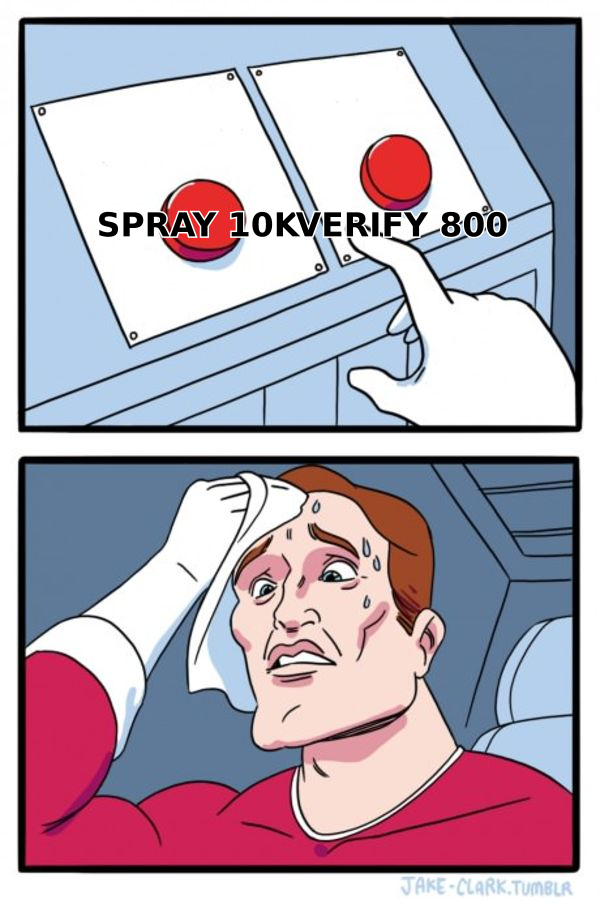
- Bounce rate above 3% will suppress everything downstream. Verify before you send, every time.
What is a lead generation email?#
A lead generation email is a cold outbound message sent to a prospect who has never interacted with you, designed to open a conversation that can become a qualified opportunity. It sits at the top of the funnel, before any relationship exists.
That definition matters because it rules out a lot of things people mislabel. A newsletter is not a lead generation email — the recipient opted in. A nurture drip to a downloaded-the-ebook contact is not one either. A renewal reminder, a webinar invite to your own list, a product announcement — none of those qualify. Those messages inherit permission. A lead generation email has none, and everything about how you write it should reflect that deficit.
Think of it like knocking on a stranger's door versus walking into your own kitchen. In your kitchen you can rummage around and take your time. At a stranger's door you have about four seconds to explain who you are and why they should not close it. Most people write door-knocking emails as if they were already in the kitchen.
The practical consequence: the goal of a lead generation email is a reply, not a conversion. Asking for a 30-minute demo in the first message is asking a stranger to hand you a chunk of their calendar on the strength of one paragraph. Asking "is reducing onboarding drop-off a priority this quarter?" costs them eight seconds. One of those gets answered.
Why do most lead generation emails fail?#
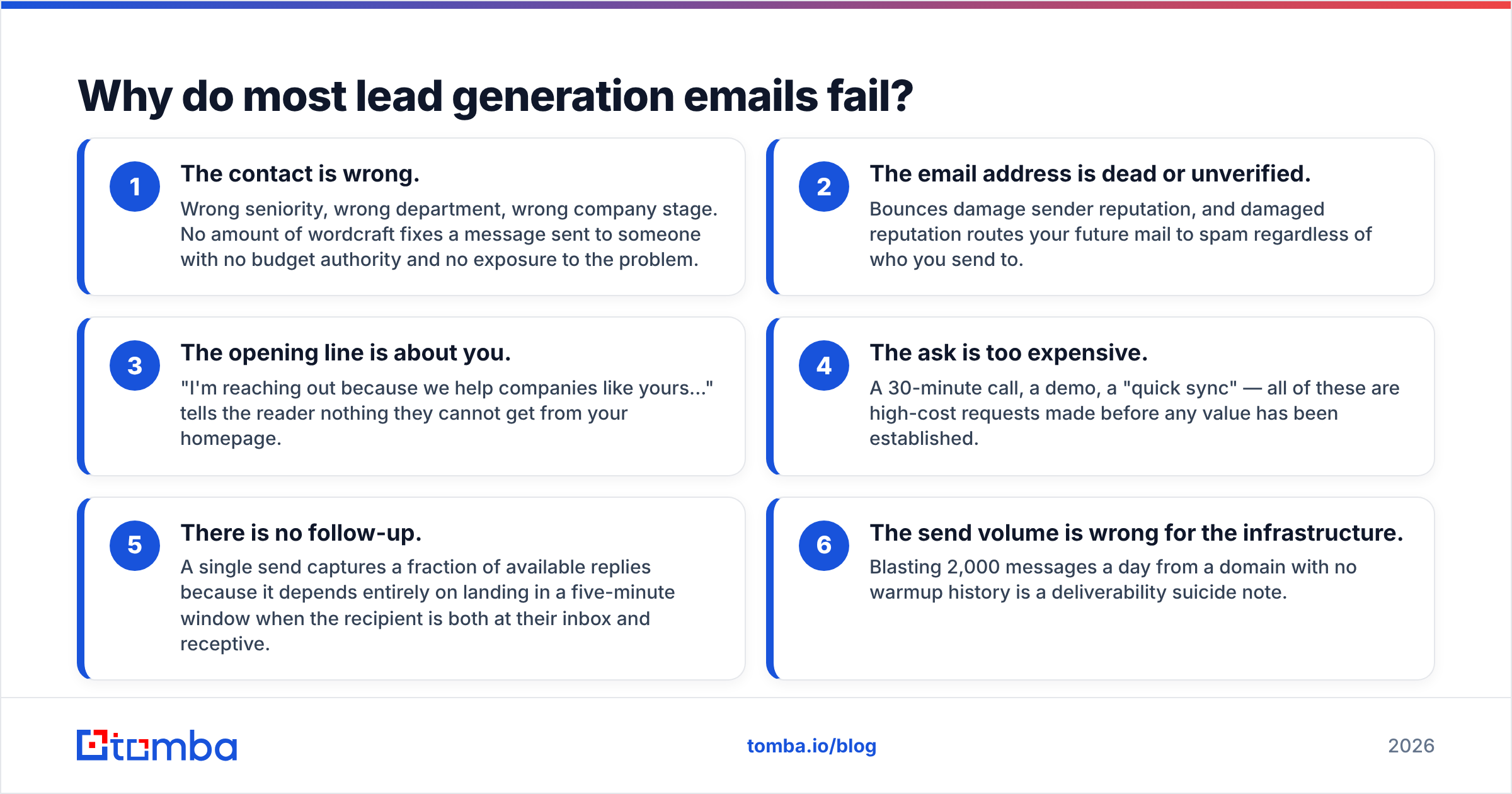
They fail in a predictable order, and copy is rarely the first cause.
- The contact is wrong. Wrong seniority, wrong department, wrong company stage. No amount of wordcraft fixes a message sent to someone with no budget authority and no exposure to the problem.
- The email address is dead or unverified. Bounces damage sender reputation, and damaged reputation routes your future mail to spam regardless of who you send to.
- The opening line is about you. "I'm reaching out because we help companies like yours..." tells the reader nothing they cannot get from your homepage.
- The ask is too expensive. A 30-minute call, a demo, a "quick sync" — all of these are high-cost requests made before any value has been established.
- There is no follow-up. A single send captures a fraction of available replies because it depends entirely on landing in a five-minute window when the recipient is both at their inbox and receptive.
- The send volume is wrong for the infrastructure. Blasting 2,000 messages a day from a domain with no warmup history is a deliverability suicide note.
Notice that items one, two, and six are data and infrastructure problems. Items three through five are copy problems. In our experience reviewing outbound programs, the data side accounts for the larger share of underperformance — but it gets a fraction of the attention because copy is more fun to argue about.
What does a high-performing lead generation email look like?#
Four blocks. Under 120 words total. Here is the anatomy, and then a worked example.
- Trigger line (1 sentence) — the specific, checkable reason you are writing to this person right now. A funding round, a job posting, a product launch, a conference talk, a LinkedIn post. If you cannot name one, you are not ready to send.
- Relevance claim (1–2 sentences) — how the trigger connects to a problem you solve. Not a feature list. A hypothesis about their situation, stated with appropriate humility.
- Proof line (1 sentence) — a named customer, a specific number, or a concrete outcome. "We cut onboarding time for Acme from 14 days to 4" beats "we help companies scale."
- Low-friction ask (under 15 words) — a question that can be answered yes or no, or with a single sentence. Not a calendar link.
A worked example for a hypothetical prospect:
Subject: your Series B + the support queue
Hi Dana — saw the Series B announcement last week, congratulations. Teams usually hit a support-volume wall about two quarters after a raise like that, when the new logos land but headcount hasn't caught up.
We built the triage layer that took Northwind's first-response time from 9 hours to 40 minutes without adding reps.
Is queue volume something your team is already planning around for Q1?
— Sam
That is 74 words. It names a checkable fact, states a hypothesis rather than a claim about them, offers one specific proof point, and ends with a question that costs almost nothing to answer. If Dana says "no, we're fine," that is still a win — you learned something and the thread is open.
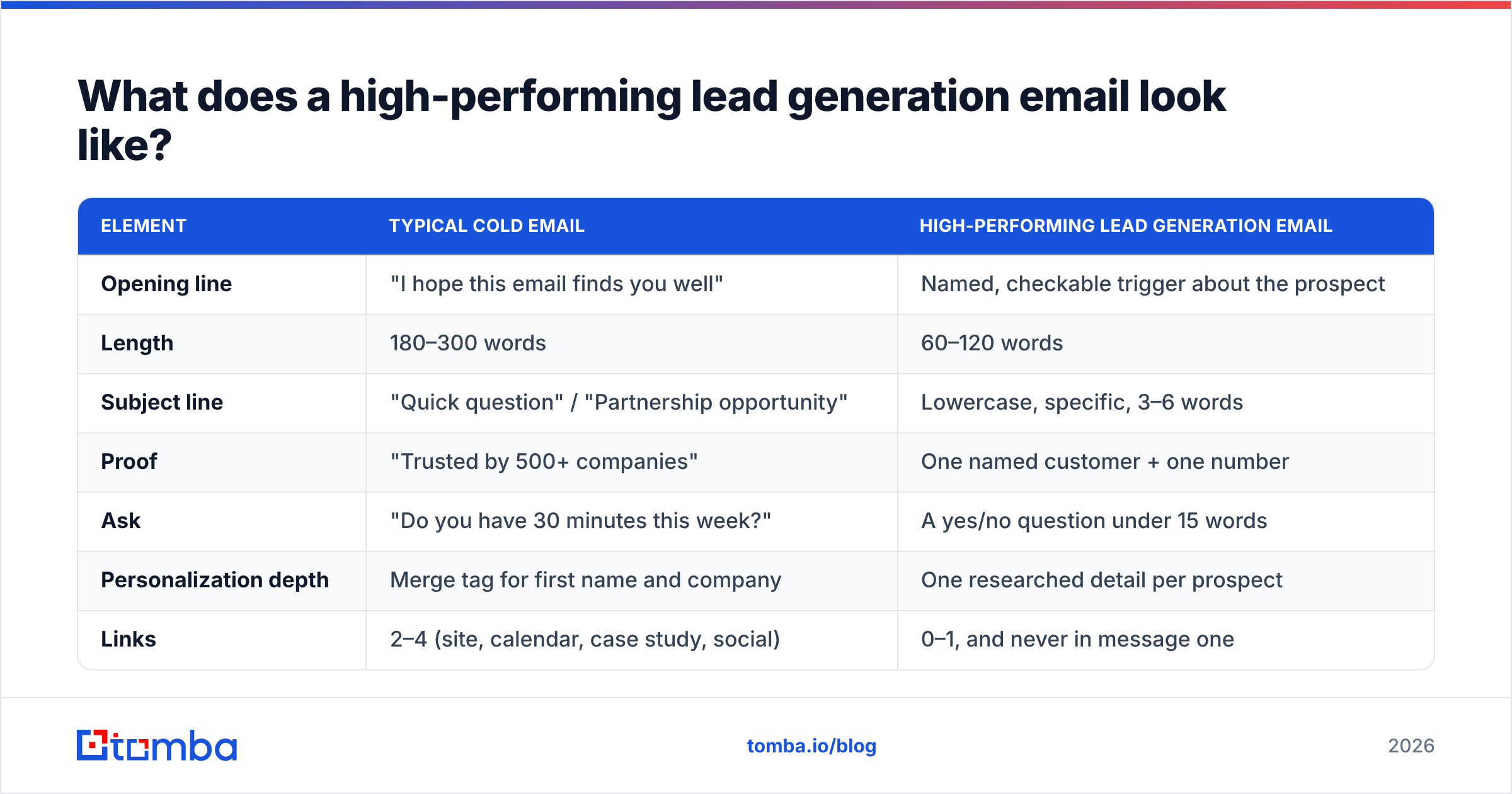
Compare the structural choices against what most teams actually send:
| Element | Typical cold email | High-performing lead generation email |
|---|---|---|
| Opening line | "I hope this email finds you well" | Named, checkable trigger about the prospect |
| Length | 180–300 words | 60–120 words |
| Subject line | "Quick question" / "Partnership opportunity" | Lowercase, specific, 3–6 words |
| Proof | "Trusted by 500+ companies" | One named customer + one number |
| Ask | "Do you have 30 minutes this week?" | A yes/no question under 15 words |
| Personalization depth | Merge tag for first name and company | One researched detail per prospect |
| Links | 2–4 (site, calendar, case study, social) | 0–1, and never in message one |
| Follow-up plan | One send, maybe two | 4–5 touches over 18–21 days |
How do you build the list behind the email?#
Before any of the copy advice matters, you need contacts who are (a) real, (b) reachable, and (c) plausibly in-market. Three steps.
Step one: define the account shape, not just the persona. Most teams start with "VP of Engineering" and skip the account filter. Reverse it. Define company size, tech stack, funding stage, hiring signals, and geography first. Then find the persona inside those accounts. A weak persona at a perfect-fit account converts better than a perfect persona at a wrong-fit account, because the internal referral is cheap and the budget conversation is already live.
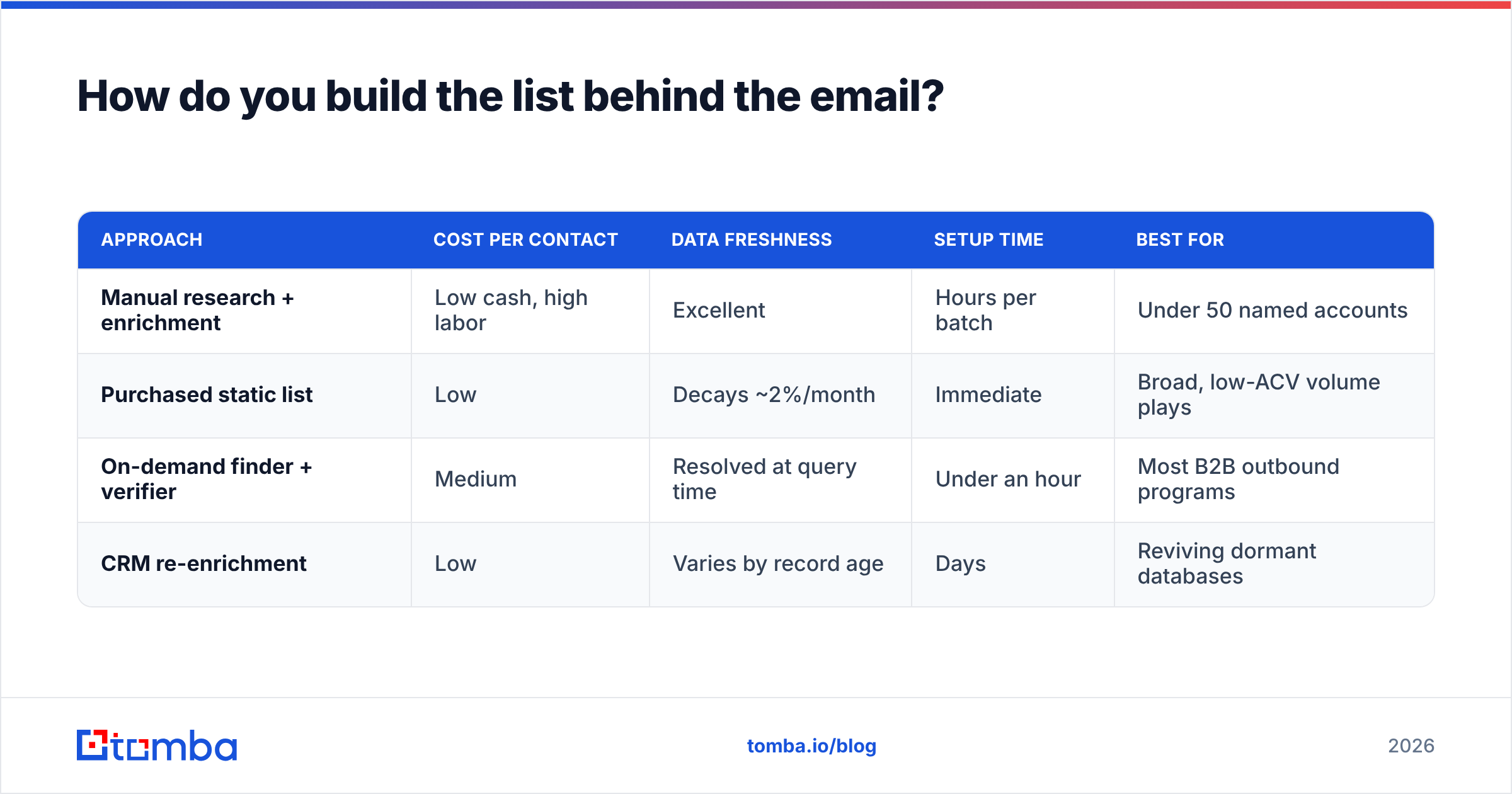
Step two: source the contacts. You have three realistic paths — scrape and enrich manually, buy a static list, or use an on-demand lookup tool. Manual scraping is the cheapest per record and the most expensive per hour. Static lists decay at roughly 2–2.5% per month as people change jobs, which means a list bought in January is meaningfully stale by summer. On-demand lookup — running a domain search against target companies and resolving individual contacts with an email finder — sits in between on cost and wins on freshness because records are resolved at the moment you need them.
Step three: verify before every campaign, not once at acquisition. This is the step that gets skipped. A verified list is verified as of the day it was checked. Re-run an email verifier pass immediately before send, and handle catch-all domains separately — they accept everything at the SMTP layer and tell you nothing, which is why a dedicated catch-all verifier matters for enterprise targets where catch-all configurations are common.
Here is how the three sourcing approaches compare in practice:
| Approach | Cost per contact | Data freshness | Setup time | Best for |
|---|---|---|---|---|
| Manual research + enrichment | Low cash, high labor | Excellent | Hours per batch | Under 50 named accounts |
| Purchased static list | Low | Decays ~2%/month | Immediate | Broad, low-ACV volume plays |
| On-demand finder + verifier | Medium | Resolved at query time | Under an hour | Most B2B outbound programs |
| CRM re-enrichment | Low | Varies by record age | Days | Reviving dormant databases |
Vendors worth evaluating here span a wide range. Tomba pricing starts with a free tier at 25 searches/month, then Starter at $49/mo, Growth at $99/mo, and Pro at $249/mo. BookYourData takes a different and well-executed approach with pay-as-you-go prebuilt B2B lists and a bounce guarantee, which suits teams that want volume without running their own enrichment workflow. Apollo and ZoomInfo bundle data with a sequencer, which is convenient but couples your data quality to your sending platform — a tradeoff worth thinking about before you sign. Read independent reviews on G2 before committing to an annual contract; the gap between demo-day accuracy and production accuracy is real and shows up in user reviews long before it shows up in vendor marketing.
How many follow-ups should a lead generation email sequence have?#
Four to five touches over 18–21 days, then stop.
The reasoning is arithmetic, not folklore. Any single email has to land in a narrow window where the recipient is at their inbox, not in a meeting, and mentally available. Miss the window and the message is buried under 40 others by lunch. Additional touches buy additional windows. Past roughly the fifth touch, incremental reply rate collapses while the probability of a spam complaint keeps climbing — a bad trade.
A cadence that works:
- Day 1 — the main email. The four-block structure above. No links.
- Day 3 — the one-line bump. Reply in-thread. "Dana — worth a conversation, or is this the wrong quarter?" Fifteen words maximum.
- Day 7 — the new angle. New thread, different problem framing, different proof point. Do not reference the earlier emails.
- Day 12 — the asset. Share something genuinely useful with no ask attached. A benchmark, a teardown, a short piece of relevant analysis.
- Day 18 — the close-out. "I'll stop here — if this becomes relevant later, my door's open." This message reliably produces replies, often from people who intended to answer and forgot.
Skip the "breakup email" that guilt-trips. "I guess you're not interested" reads as passive-aggressive and gets forwarded to colleagues as a joke. The neutral close-out does the same job without the cost.
What deliverability setup does lead generation email require?#
Copy and cadence are irrelevant if the message lands in spam. The non-negotiable baseline:
- Separate sending domain. Never send cold outbound from your primary corporate domain. Use a lookalike (getcompany.com, trycompany.com) so reputation damage stays contained.
- SPF, DKIM, and DMARC configured and passing. Google and Microsoft both enforce authentication for bulk senders. Unauthenticated mail from a new domain is effectively pre-filtered. Verify your setup with an SPF checker before your first send.
- Warmup for 3–4 weeks minimum. Start at 5–10 messages per day per mailbox and ramp gradually. A new domain sending 500 messages on day one is the clearest spam signal there is.
- Volume ceiling of 30–50 per mailbox per day. Scale by adding mailboxes, not by raising per-mailbox volume.
- Bounce rate under 3%, ideally under 1%. This is entirely controllable through verification and is the single metric most correlated with long-term email deliverability.
- Monitor sender reputation continuously. Google Postmaster Tools is free and shows you domain reputation, spam rate, and authentication pass rates directly from the receiving side.
Google's bulk sender guidelines are the authoritative reference here and get updated; read the current version rather than a blog summary of it, including this one.
What metrics tell you if it's working?#
Track four numbers, in this order of diagnostic value.
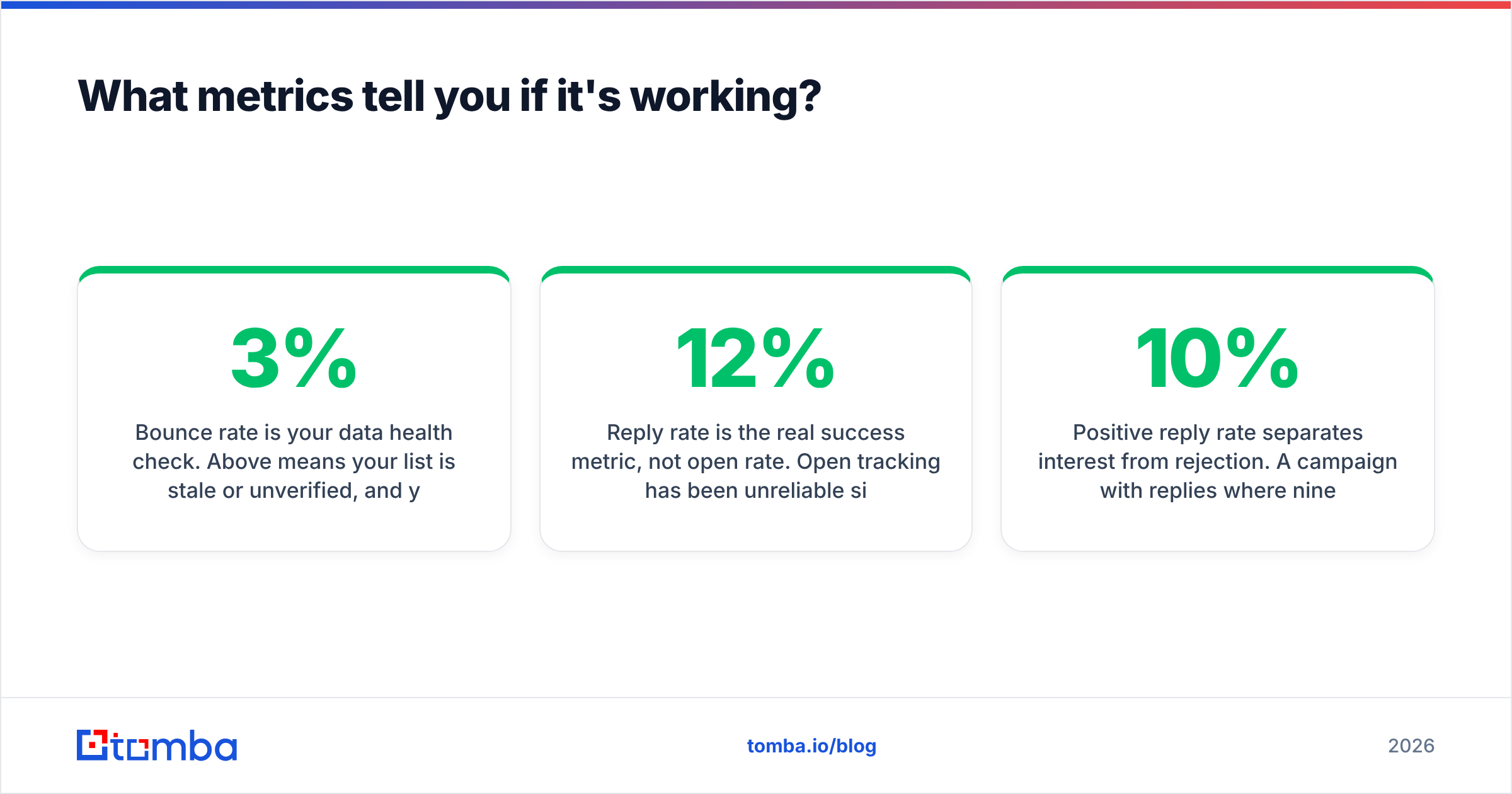
Bounce rate is your data health check. Above 3% means your list is stale or unverified, and you should pause the campaign rather than push through. Fix this first — everything downstream is unreliable while it is broken.
Reply rate is the real success metric, not open rate. Open tracking has been unreliable since Apple Mail Privacy Protection started prefetching images, and inflated open numbers have misled a lot of teams into thinking a dead campaign was alive. A healthy cold response rate for a well-targeted B2B campaign sits in the 5–12% range. Under 3% points at targeting or offer, not at your subject line.
Positive reply rate separates interest from rejection. A campaign with 10% replies where nine of ten are "please remove me" is worse than one with 5% replies that are all questions. Tag replies as positive, neutral, or negative from day one — retrofitting this later is painful.
Meetings booked per 100 contacted is the only number your CFO cares about. Two to four is respectable for mid-market outbound. Under one means something upstream is broken, and the bounce and reply numbers will tell you which.
One caution on benchmarks generally: published figures vary enormously by industry, deal size, and how the reporting vendor defines each term. Use them as a rough sanity check on your own trend line, not as a target to hit.
Frequently asked questions#
Is cold lead generation email legal? In most B2B contexts in the US, yes, under CAN-SPAM, provided you identify yourself, include a physical address, and honor opt-outs promptly. The EU under GDPR and Canada under CASL are stricter and generally require a legitimate-interest basis or prior consent. Get actual legal advice for your jurisdiction and target markets — this is not it.
Should I use AI to write lead generation emails? For drafting variants and compressing your own writing, yes. For generating the personalization, no. AI-written "personalization" derived from a company's About page reads exactly like what it is, and prospects have gotten very good at spotting it. Use AI on the structure, do the research yourself.
How long should a lead generation email be? Sixty to 120 words for the first touch. If it does not fit on one mobile screen without scrolling, cut it.
Does personalization actually move the number? Specific personalization does. Merge-tag personalization does not — "Hi {FirstName}, I noticed {Company} is in the {Industry} space" is worse than no personalization, because it advertises automation.
Where to start#
Pick 50 accounts that match your best closed-won customers. Find the right contact at each one, verify every address before you send, write the four-block email, and run the five-touch cadence. Fifty well-researched contacts will outperform 5,000 scraped ones, and you will learn more from the replies.
When you are ready to build that list, the Tomba Email Finder resolves professional addresses by name and domain with source attribution on every result, so you can see where a record came from before you stake your sender reputation on it. The free tier gives you 25 searches a month — enough to validate your targeting hypothesis before you spend anything.
Related guides#
// get started
Find, verify and enrich your first contacts today
Start on the free plan with 25 searches a month, then scale when your team is ready.
Free plan · No credit card required · GDPR & CCPA
// about the author