Lead Generation Outreach Tools in 2026: The Complete Stack Guide
Most teams buy five outreach tools and still miss quota. Here's how the lead generation outreach tools market actually splits — data, sending, sequencing, AI — and what each layer should really cost you.
TL;DR
- Lead generation outreach tools split into four layers: data, sending infrastructure, sequencing, and signals/AI. Most teams overspend on layer 3 and underinvest in layer 1.
- A functional two-rep stack costs roughly $150–$400/month. The $1,500/month "all-in-one" bundles rarely outperform it on booked meetings.
- Contact data quality drives more pipeline variance than sequencing software. A 12% bounce rate kills a domain faster than bad copy kills a reply rate.
- All-in-one platforms (Apollo, Outreach, Salesloft) trade data freshness for convenience; best-of-breed stacks trade convenience for margin.
- Pick by constraint: if your bottleneck is finding people, buy data. If it's landing in the inbox, buy deliverability. If it's follow-up discipline, buy sequencing.
What are lead generation outreach tools?#
"Lead generation outreach tools" is a category label that covers four genuinely different jobs, sold by vendors who all claim to do everything. Untangling them is the whole exercise.
Think of it like a restaurant. The data layer is your supplier — bad produce, and nothing downstream saves the dish. Sending infrastructure is the kitchen equipment. Sequencing is the service flow. AI and intent signals are the menu strategy. You can have a beautiful front of house and still fail on rotten ingredients.
The four layers, concretely:
- Data and enrichment — finding the right people and getting a valid, current work email or phone. Tools: Tomba, Apollo's database, Clearbit, ZoomInfo, BookYourData, Cognism.
- Sending infrastructure — domains, mailboxes, SPF/DKIM/DMARC, warmup, inbox rotation. Tools: Google Workspace or Microsoft 365, Instantly, Smartlead, Mailreach.
- Sequencing and cadence — multi-step, multi-channel follow-up with reply detection and CRM sync. Tools: Outreach, Salesloft, Reply.io, Lemlist, Saleshandy, Smartlead.
- Signals, scoring, and AI — who to contact now and what to say. Tools: 6sense, Demandbase, Clay, website visitor reveal, LLM copy assistants.
- CRM and reporting — where the outcome gets recorded and measured. Tools: HubSpot, Salesforce, Pipedrive, Attio.
Every vendor in this market tries to expand into the adjacent layer, which is why the pricing pages are so confusing. An email finder adds sequencing. A sequencer adds a contact database. The bundled version of the adjacent layer is almost always the weaker one.
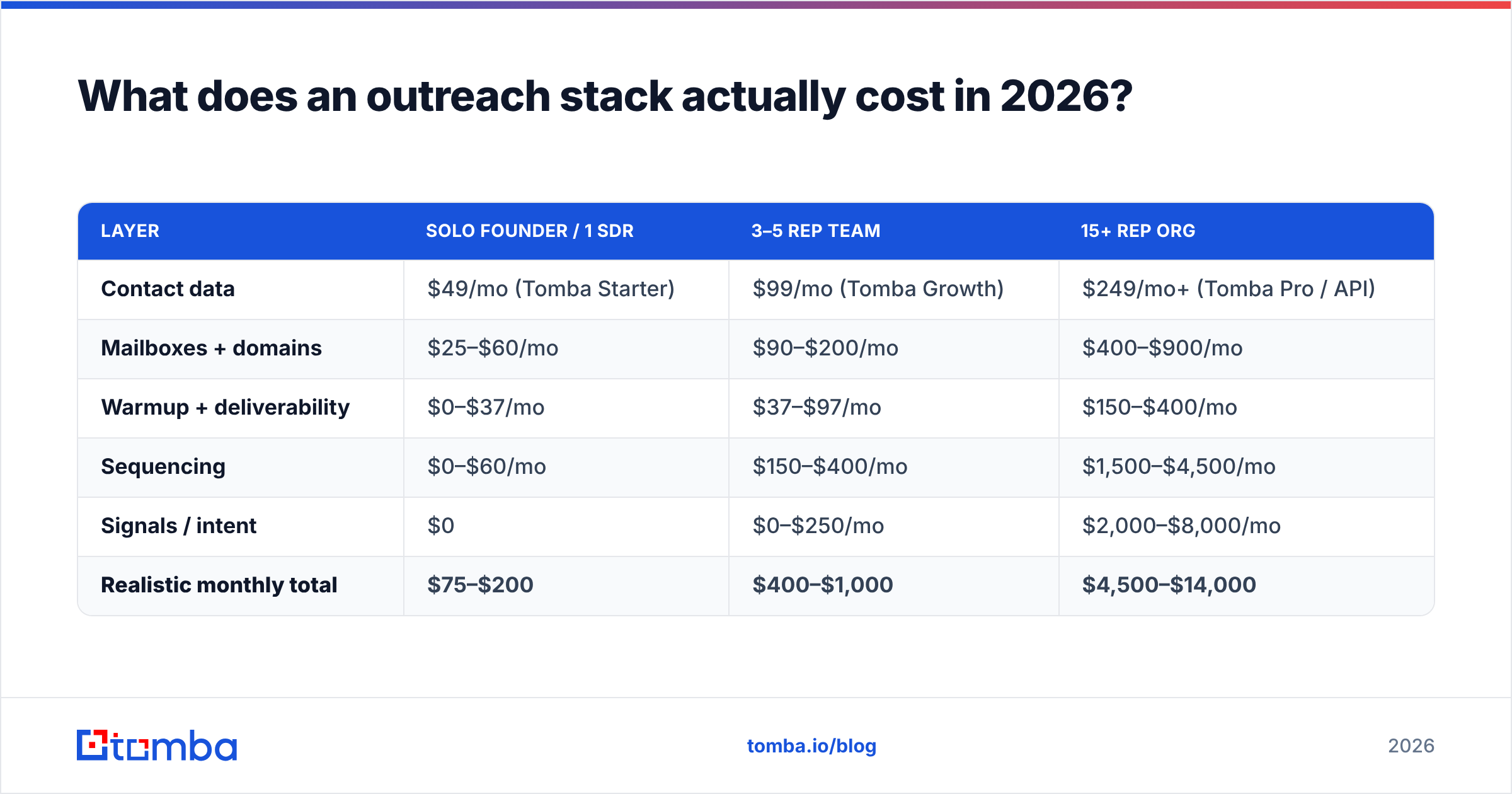
What does an outreach stack actually cost in 2026?#
Here is what real stacks cost at three common team sizes. These are list prices for typical usage, not negotiated enterprise rates.
| Layer | Solo founder / 1 SDR | 3–5 rep team | 15+ rep org |
|---|---|---|---|
| Contact data | $49/mo (Tomba Starter) | $99/mo (Tomba Growth) | $249/mo+ (Tomba Pro / API) |
| Mailboxes + domains | $25–$60/mo | $90–$200/mo | $400–$900/mo |
| Warmup + deliverability | $0–$37/mo | $37–$97/mo | $150–$400/mo |
| Sequencing | $0–$60/mo | $150–$400/mo | $1,500–$4,500/mo |
| Signals / intent | $0 | $0–$250/mo | $2,000–$8,000/mo |
| Realistic monthly total | $75–$200 | $400–$1,000 | $4,500–$14,000 |
Two things jump out. First, the data layer barely scales in cost compared with sequencing — going from one rep to fifteen might multiply your seat costs by 15x while credits scale linearly and far cheaper. Second, the "intent" layer is where enterprise budgets disappear, and it is the hardest layer to attribute revenue to.
If you are in the first column, resist the urge to buy the third column's tooling early. Teams under five reps almost never get ROI from a platform priced per seat with an annual commitment.
Which layer should you buy first?#
Buy the layer that is currently your binding constraint. Diagnose it with three numbers from your last 1,000 sends:
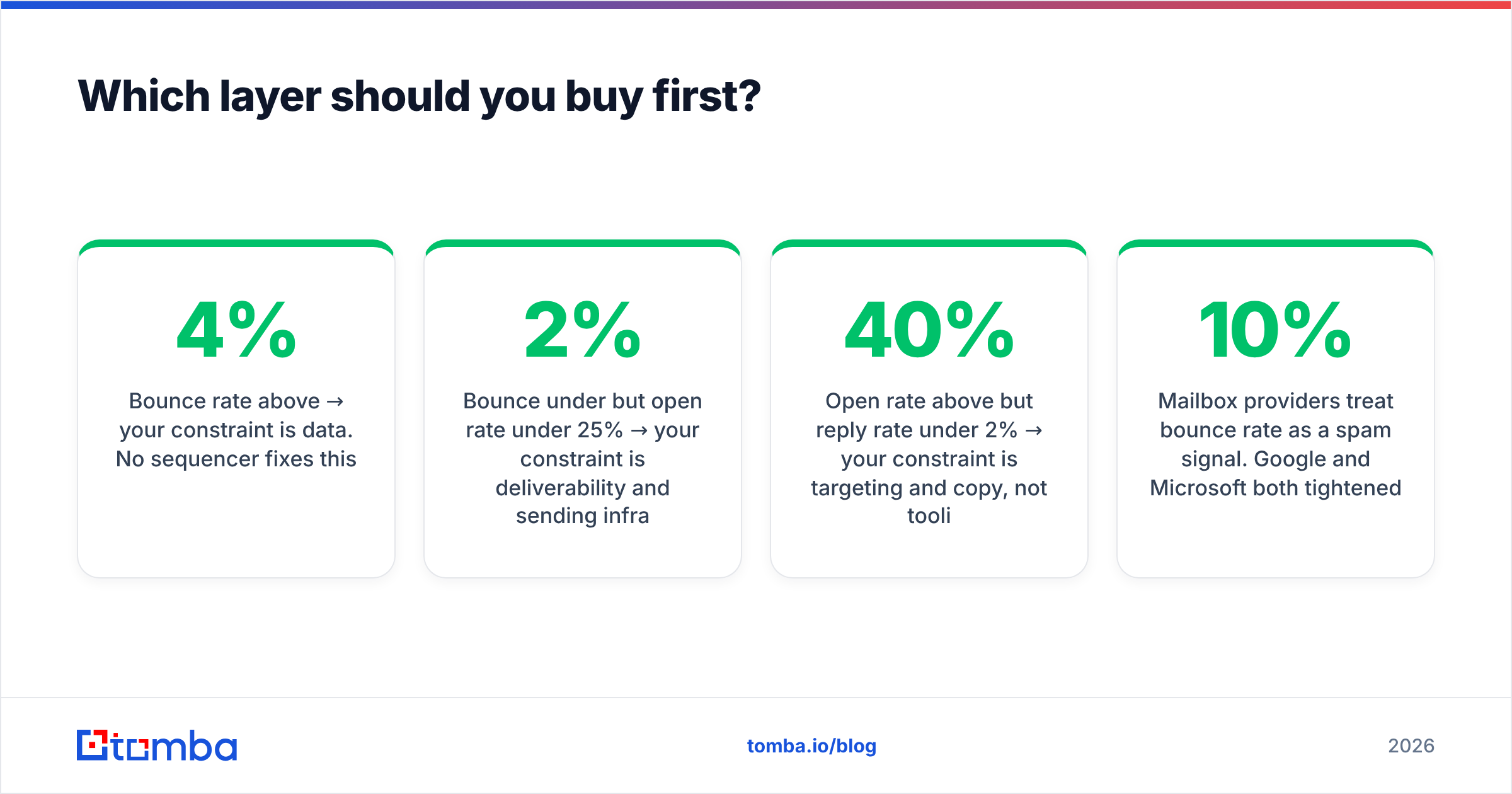
- Bounce rate above 4% → your constraint is data. No sequencer fixes this.
- Bounce under 2% but open rate under 25% → your constraint is deliverability and sending infrastructure.
- Open rate above 40% but reply rate under 2% → your constraint is targeting and copy, not tooling.
- Good replies but nothing in the CRM → your constraint is process, and you need sequencing plus discipline, not more contacts.
That diagnostic beats any vendor comparison chart, because it tells you which comparison chart to even read. Most teams I see running poorly have bought a sequencing platform to solve what is unambiguously a data problem.
Why does data quality dominate?#
Because the failure compounds. An invalid address does three bad things at once: it wastes a send, it damages your sender reputation, and it corrupts your reply-rate math so you optimize the wrong variable.
Mailbox providers treat bounce rate as a spam signal. Google and Microsoft both tightened bulk sender enforcement over the last two years, and DMARC alignment is now effectively mandatory for anyone sending at volume. A list with 10% dead addresses will degrade your domain within two weeks, and recovery takes months.
Practical standard: verify everything before it enters a sequence, not after. A real-time email verifier in the pipeline — as an API step or a bulk pass — should hold bounce rates under 2%. Catch-all domains need separate handling; a dedicated catch-all verifier gives you a confidence score rather than a binary "unknown," which is the difference between skipping 30% of your enterprise accounts and actually reaching them.
How do the major outreach platforms compare?#
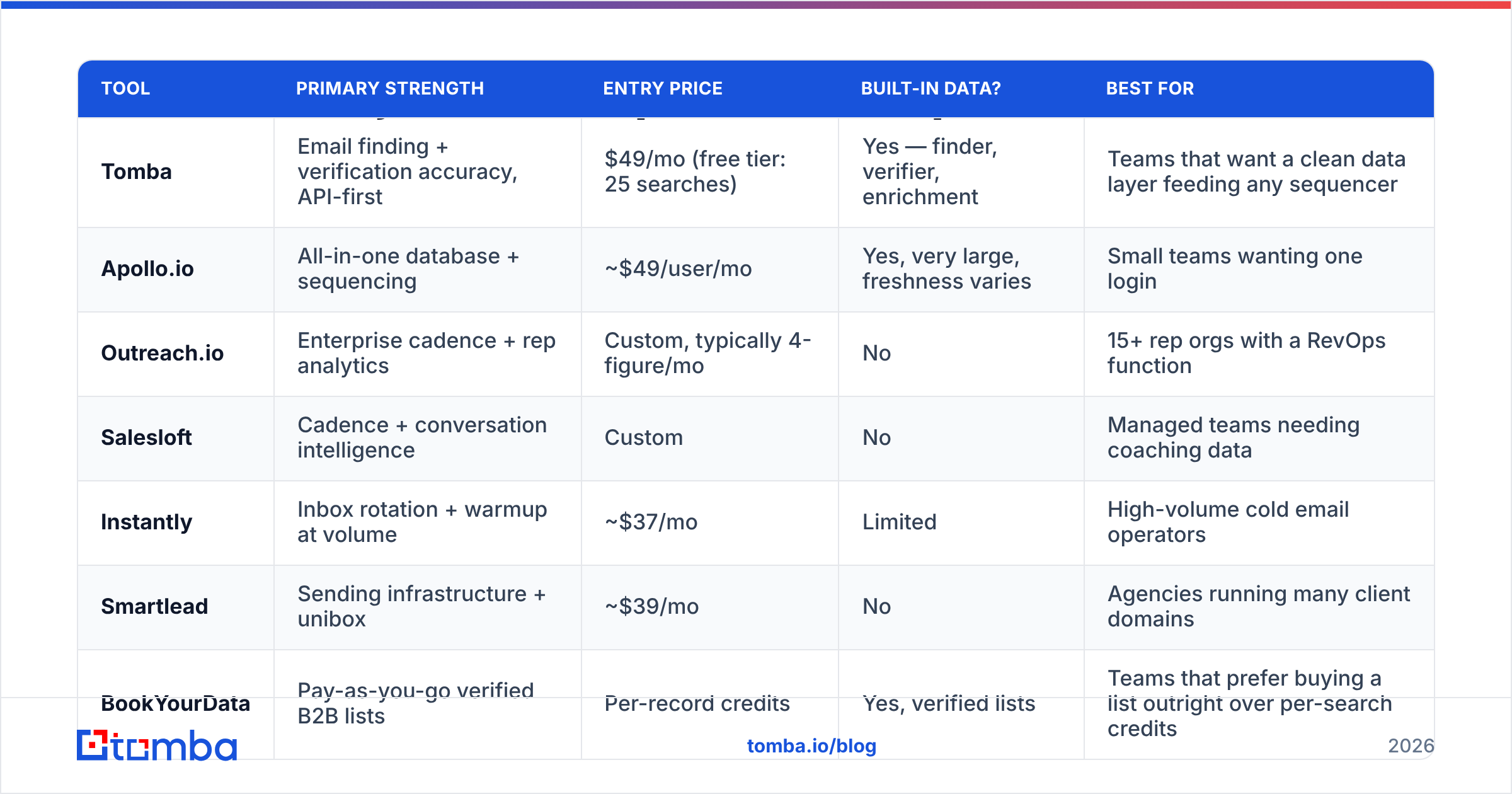
Here is an honest side-by-side of the platforms teams most often shortlist. Prices are entry-tier list prices as published by each vendor.
| Tool | Primary strength | Entry price | Built-in data? | Best for |
|---|---|---|---|---|
| Tomba | Email finding + verification accuracy, API-first | $49/mo (free tier: 25 searches) | Yes — finder, verifier, enrichment | Teams that want a clean data layer feeding any sequencer |
| Apollo.io | All-in-one database + sequencing | ~$49/user/mo | Yes, very large, freshness varies | Small teams wanting one login |
| Outreach.io | Enterprise cadence + rep analytics | Custom, typically 4-figure/mo | No | 15+ rep orgs with a RevOps function |
| Salesloft | Cadence + conversation intelligence | Custom | No | Managed teams needing coaching data |
| Instantly | Inbox rotation + warmup at volume | ~$37/mo | Limited | High-volume cold email operators |
| Smartlead | Sending infrastructure + unibox | ~$39/mo | No | Agencies running many client domains |
| BookYourData | Pay-as-you-go verified B2B lists | Per-record credits | Yes, verified lists | Teams that prefer buying a list outright over per-search credits |
| Clay | Waterfall enrichment + workflow logic | ~$149/mo | Aggregates many providers | RevOps teams building custom enrichment flows |
A few notes that the chart cannot carry.
All-in-ones are convenience purchases. Apollo's appeal is the single login, and for a two-person startup that matters more than a few points of accuracy. Once you are sending 5,000+ emails a month, the bundled database's staleness starts showing up as bounce rate, and you end up layering a dedicated finder on top anyway.
Enterprise cadence tools do not include data. Outreach and Salesloft are execution and management layers. Budgeting for them without a separate data line item is the most common planning error in outbound. If you are evaluating either, read the seat math carefully — their value is rep coaching and forecasting, not prospecting. Both are well covered on G2's sales engagement category if you want peer reviews at scale.
Waterfall enrichment is now table stakes for mid-market. Clay popularized the pattern: try provider A, fall back to B, then C, pay only for hits. It works. It also means your underlying providers still matter — a waterfall over three mediocre sources returns mediocre data, just more expensively.
List purchase versus per-search. BookYourData and similar providers sell verified records outright, which suits teams that want a defined TAM slice delivered once rather than a credit meter running all quarter. Per-search tools suit continuous, account-triggered prospecting. Many teams run both: a bought list for the core ICP, a finder for the long tail and for net-new accounts that appear mid-quarter.
What should a modern sending setup look like?#
The sending layer is where cheap mistakes get expensive. The current working configuration for cold outbound:
- Separate sending domains. Never send cold volume from your primary corporate domain. Use lookalikes (
getcompany.com,company-hq.com) so a reputation hit never touches your billing and support mail. - 2–3 mailboxes per domain, 25–40 sends per mailbox per day. Volume comes from mailbox count, not from pushing any single inbox harder.
- Full authentication. SPF, DKIM, and DMARC on every sending domain, checked before the first send. A quick SPF checker pass takes thirty seconds and prevents a month of silent failures.
- 2–3 weeks of warmup before real volume, then keep warmup running at a low level permanently.
- Weekly blacklist and reputation monitoring. Catching a listing in week one is a fix; catching it in week six is a domain migration.
- Plain-text style emails. No tracking pixels on the first touch, no images, minimal links. Open-rate tracking costs you more in deliverability than the data is worth.
This is the layer where teams argue hardest with each other, usually because one side is optimizing for volume and the other for reputation.

Do AI outreach tools actually help?#
Selectively. Three uses hold up under measurement, and one does not.
Works: research summarization. Pulling a 10-K, a recent funding round, a job posting, and a podcast appearance into three usable facts per account is genuinely faster with an LLM. That research is what makes personalization land.
Works: list reasoning. "Does this company sell to hospitals?" applied across 5,000 rows is a classification task that used to cost you an intern. Now it costs cents.
Works: variant generation. Producing eight subject-line options to test beats agonizing over one. Test them, don't trust them — a subject line tester filters the obviously spammy ones before they reach a sequence.
Doesn't work: fully autonomous first-touch writing. AI-written cold emails at scale converge on the same register, and prospects have learned to spot it. HubSpot's sales research has been consistent on this: response rates track relevance and brevity, not polish. Use AI for the research, write the last two sentences yourself.
The honest summary is that AI moved the cost of preparation down sharply and left the cost of judgment unchanged. Gartner's ongoing coverage of sales technology makes a similar point — tooling consolidation has outpaced measurable productivity gains in most B2B orgs.
What's the minimum viable outreach stack?#
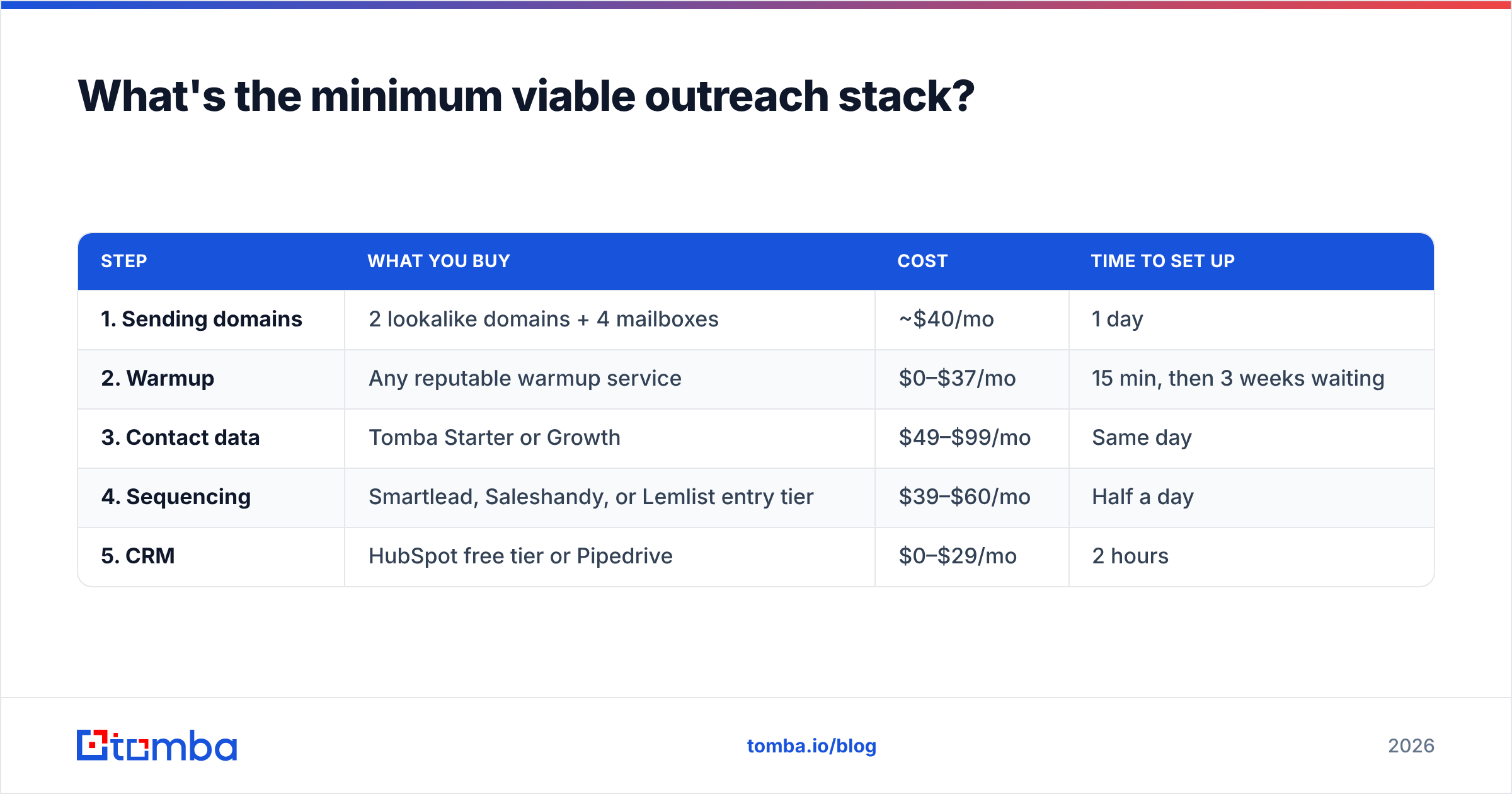
If you are starting from zero this quarter, this is the shortest path to a working system:
| Step | What you buy | Cost | Time to set up |
|---|---|---|---|
| 1. Sending domains | 2 lookalike domains + 4 mailboxes | ~$40/mo | 1 day |
| 2. Warmup | Any reputable warmup service | $0–$37/mo | 15 min, then 3 weeks waiting |
| 3. Contact data | Tomba Starter or Growth | $49–$99/mo | Same day |
| 4. Sequencing | Smartlead, Saleshandy, or Lemlist entry tier | $39–$60/mo | Half a day |
| 5. CRM | HubSpot free tier or Pipedrive | $0–$29/mo | 2 hours |
Total: under $250/month, live in about three weeks (the warmup wait is the long pole). That stack will support two reps sending 2,000–3,000 well-targeted emails a month at a bounce rate under 2%.
Add layers only when a number forces you to. Intent data when you have more accounts than capacity. Conversation intelligence when you have enough reps that coaching is a bottleneck. Waterfall enrichment when a single provider's coverage genuinely caps you — measure it before you assume it.
How do you measure whether the stack is working?#
Four metrics, checked weekly, in this order:
- Bounce rate — target under 2%. This is a data-layer health check, not a copy metric.
- Reply rate — target 4–8% for a well-targeted list. Below 2% means targeting, not tooling.
- Positive reply rate — target 25–40% of replies. Low positive rate with high total replies usually means you are reaching the right title at the wrong company.
- Meetings per 1,000 sends — the only number that connects to revenue. Ten per thousand is strong; three is workable; one means something upstream is broken.
Track these per sending domain and per list source. The single most useful diagnostic habit is segmenting reply rate by where the contact data came from — it surfaces a bad source within two weeks instead of two quarters.
Where should you start?#
Start with the layer you can fix this week. For most teams reading this, that is the data layer, because it is the cheapest to improve and has the largest downstream effect on every other metric in the funnel.
Tomba's Email Finder gives you verified work emails by name, domain, or company, with verification built into the same pipeline so nothing unverified reaches your sequencer. The free tier covers 25 searches a month if you want to test accuracy against your own known-good list before paying anything, and Starter runs $49/month when you're ready to scale. If you're wiring it into an existing stack, the Tomba API and native integrations with HubSpot, Salesforce, and Zapier mean you don't have to rebuild your workflow around a new vendor.
Fix the supplier first. The rest of the kitchen gets a lot easier.
Related guides#
// get started
Find, verify and enrich your first contacts today
Start on the free plan with 25 searches a month, then scale when your team is ready.
Free plan · No credit card required · GDPR & CCPA
// about the author