What Is a Lead Generation Platform? 2026 Buyer's Guide
Most teams buy a lead generation platform for the database and end up paying for seats they never use. Here is what each layer actually does, what it costs in 2026, and how to test a vendor before the contract locks you in.
TL;DR
- A lead generation platform is really five separate jobs bundled together: data, enrichment, verification, outreach, and routing. Most vendors are strong at two of them and mediocre at the rest.
- All-in-one suites price on seats and annual contracts. Best-of-breed stacks price on credits and usage. The crossover point is usually around 6-8 outbound reps.
- The expensive part is rarely the subscription — it is the 20-35% of contacts that are stale, which burns sending reputation and rep hours.
- Verified contact data is the only layer where accuracy is measurable before you buy. Test it with 100 known contacts, not with a vendor demo.
- If you need accurate B2B emails without a five-figure annual commitment, a credit-based finder like Tomba ($49/mo Starter, free tier at 25 searches) covers the data layer for a fraction of suite pricing.
What is a lead generation platform?#
A lead generation platform is software that finds, enriches, qualifies, and delivers potential buyers into your pipeline — usually combining a contact database, enrichment APIs, outreach tooling, and CRM sync in one subscription.
Think of it like a restaurant supply chain. The database is the farm, enrichment is the prep kitchen, verification is quality control, outreach is the line cook, and your CRM is the pass. Vendors sell you the whole restaurant, but you usually only need one or two stations rebuilt.
Here is what sits inside the category:
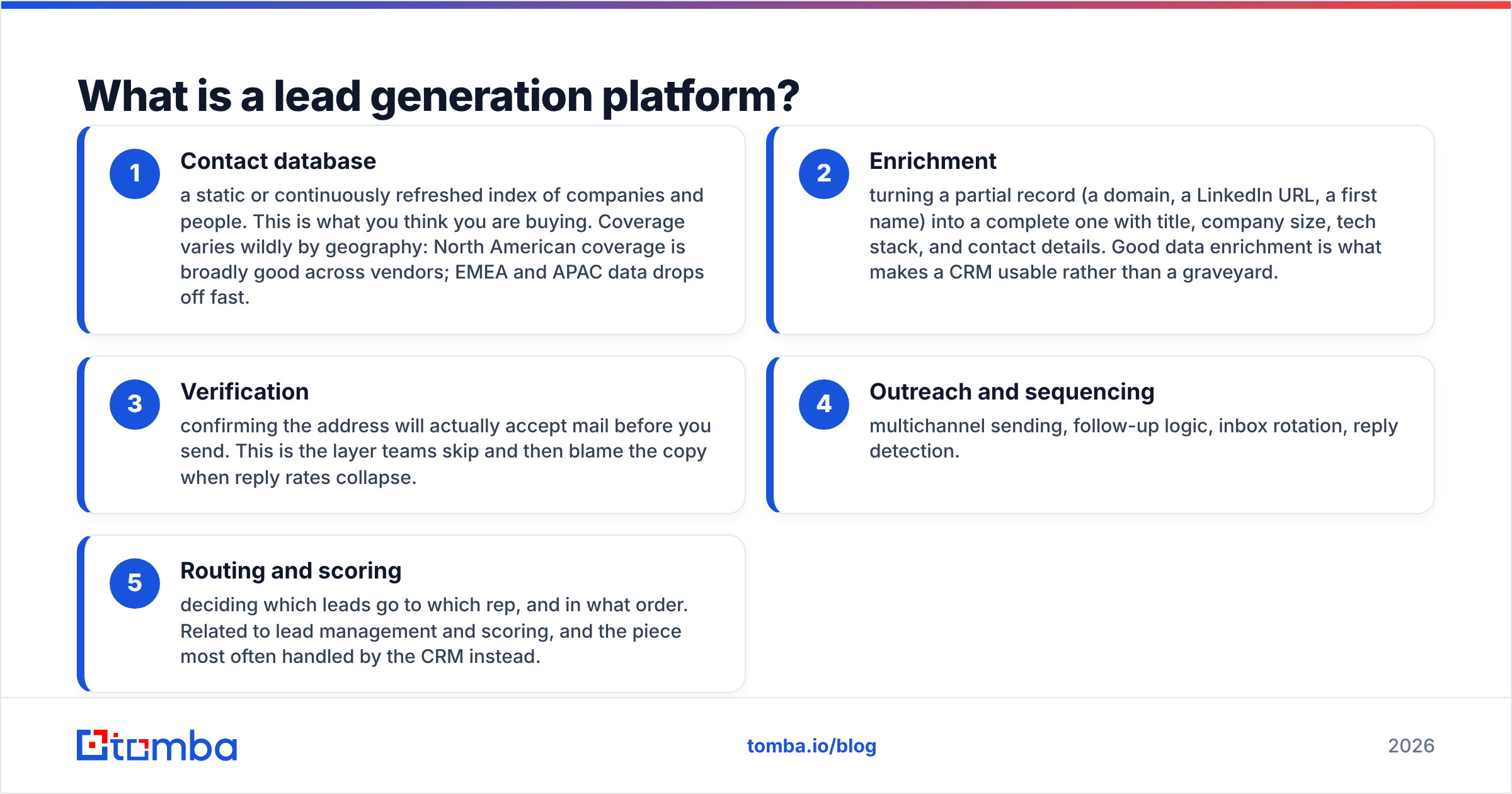
- Contact database — a static or continuously refreshed index of companies and people. This is what you think you are buying. Coverage varies wildly by geography: North American coverage is broadly good across vendors; EMEA and APAC data drops off fast.
- Enrichment — turning a partial record (a domain, a LinkedIn URL, a first name) into a complete one with title, company size, tech stack, and contact details. Good data enrichment is what makes a CRM usable rather than a graveyard.
- Verification — confirming the address will actually accept mail before you send. This is the layer teams skip and then blame the copy when reply rates collapse.
- Outreach and sequencing — multichannel sending, follow-up logic, inbox rotation, reply detection.
- Routing and scoring — deciding which leads go to which rep, and in what order. Related to lead management and scoring, and the piece most often handled by the CRM instead.
The category is broad enough that two products both called "lead generation platforms" can share almost no functionality. Lead generation as a discipline predates the software by decades — the platform is just the delivery mechanism.
Why do lead generation platforms get expensive so fast?#
Because the pricing model almost never matches how you actually use the product.
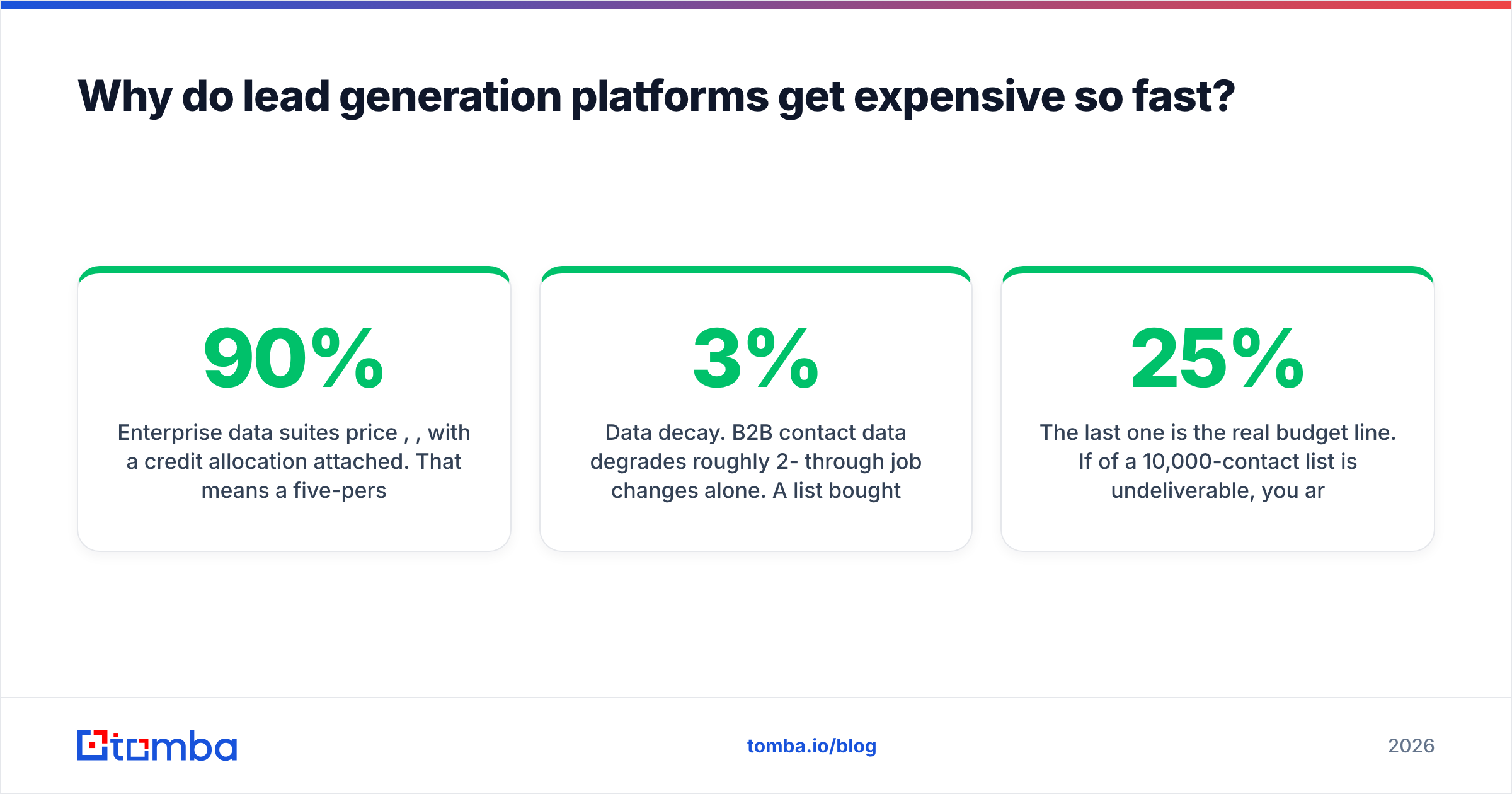
Enterprise data suites price per seat, per year, with a credit allocation attached. That means a five-person SDR team pays for five seats even though one ops person pulls 90% of the lists. Publicly reported annual spend for full-suite intelligence platforms commonly lands in the five figures, and multi-year terms are standard. Apollo publishes per-user pricing on its pricing page, which is comparatively transparent for the category — many competitors quote only on a call.

Three costs are invisible at signup:
- Credit expiry. Monthly credits that do not roll over mean you either over-buy or under-use. Annual credit pools are meaningfully better value if the vendor offers one.
- Export limits. Some platforms cap how many records you can export per month regardless of credits — fine for in-app prospecting, painful if you run your own sequencing stack.
- Data decay. B2B contact data degrades roughly 2-3% per month through job changes alone. A list bought in January is materially worse by June, and re-enrichment is another credit spend.
The last one is the real budget line. If 25% of a 10,000-contact list is undeliverable, you are not just wasting 2,500 credits — you are feeding bounces to your sending domain and degrading sender reputation for every campaign that follows.
All-in-one platform or best-of-breed stack?#
The honest answer depends on headcount and how much control you want over sending.
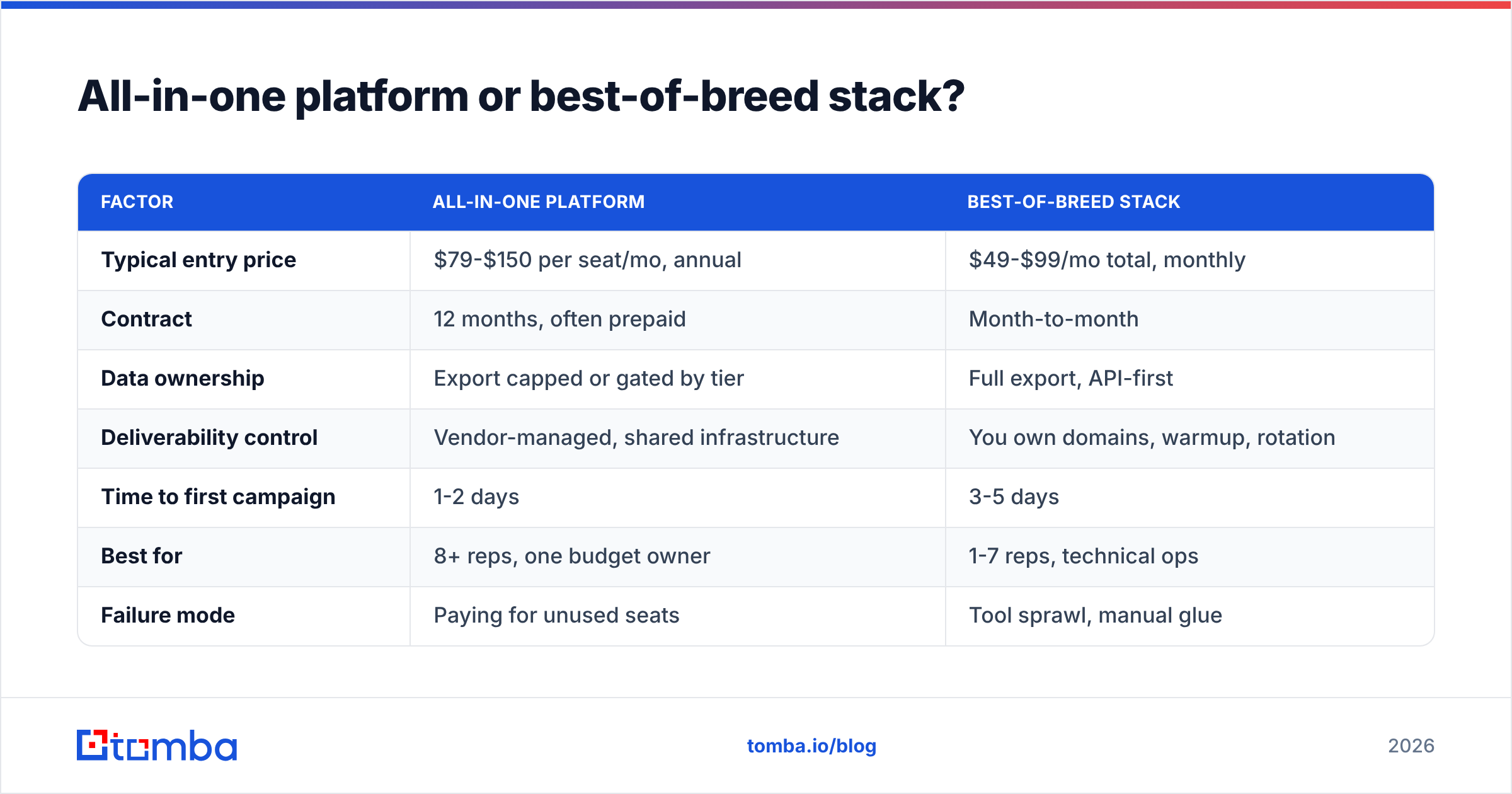
| Factor | All-in-one platform | Best-of-breed stack |
|---|---|---|
| Typical entry price | $79-$150 per seat/mo, annual | $49-$99/mo total, monthly |
| Contract | 12 months, often prepaid | Month-to-month |
| Data ownership | Export capped or gated by tier | Full export, API-first |
| Deliverability control | Vendor-managed, shared infrastructure | You own domains, warmup, rotation |
| Time to first campaign | 1-2 days | 3-5 days |
| Best for | 8+ reps, one budget owner | 1-7 reps, technical ops |
| Failure mode | Paying for unused seats | Tool sprawl, manual glue |
Two heuristics that hold up in practice:
Under seven reps, buy layers. A credit-based finder plus a sequencer plus your existing CRM will cost less than one suite seat tier and give you cleaner data ownership. You can swap any layer without renegotiating a contract.
Above seven reps, buy the suite — but not for the data. At that size you are paying for admin controls, shared list governance, and territory routing. The database becomes a convenience, and most teams still supplement it with a dedicated finder for the accounts that matter.
There is a third pattern worth naming: pay-as-you-go list purchase. Vendors like BookYourData sell verified contacts without a subscription, which fits teams running a small number of large, targeted campaigns per year rather than continuous outbound. If your prospecting is campaign-shaped instead of always-on, a per-record model can be cheaper than any seat.
How do you judge data accuracy before you buy?#
Run a 100-contact known-answer test. It takes an afternoon and it is the only evaluation that survives contact with reality.
- Build a control list. Pick 100 contacts you already have verified addresses for — past customers, partners, your own team at previous companies. Strip the emails out.
- Submit the name + domain pairs to each vendor. Same input, same day, no cherry-picking.
- Score three numbers, not one. Coverage (how many returned any result), accuracy (how many matched your known-good address), and confidence calibration (did the vendor's "high confidence" label actually correlate with correctness).
- Check the catch-all handling. Roughly a fifth of B2B domains accept everything at the SMTP layer. A vendor that returns "valid" for every address on a catch-all domain is guessing. Test with a catch-all verifier to see how each one behaves.
- Re-run 30 days later. Freshness is the differentiator nobody demos. A vendor whose accuracy holds after a month is worth more than one that wins on day one.
Vendors will quote 95%+ accuracy. Every one of them. The number is meaningless without knowing the denominator — accuracy on returned results is not the same as accuracy across your target list, and a platform that returns nothing for 40% of your ICP has a coverage problem no accuracy figure will reveal.
For the verification step specifically, keep it separate from the finder where you can. An independent email verifier has no incentive to mark its own guesses as valid.
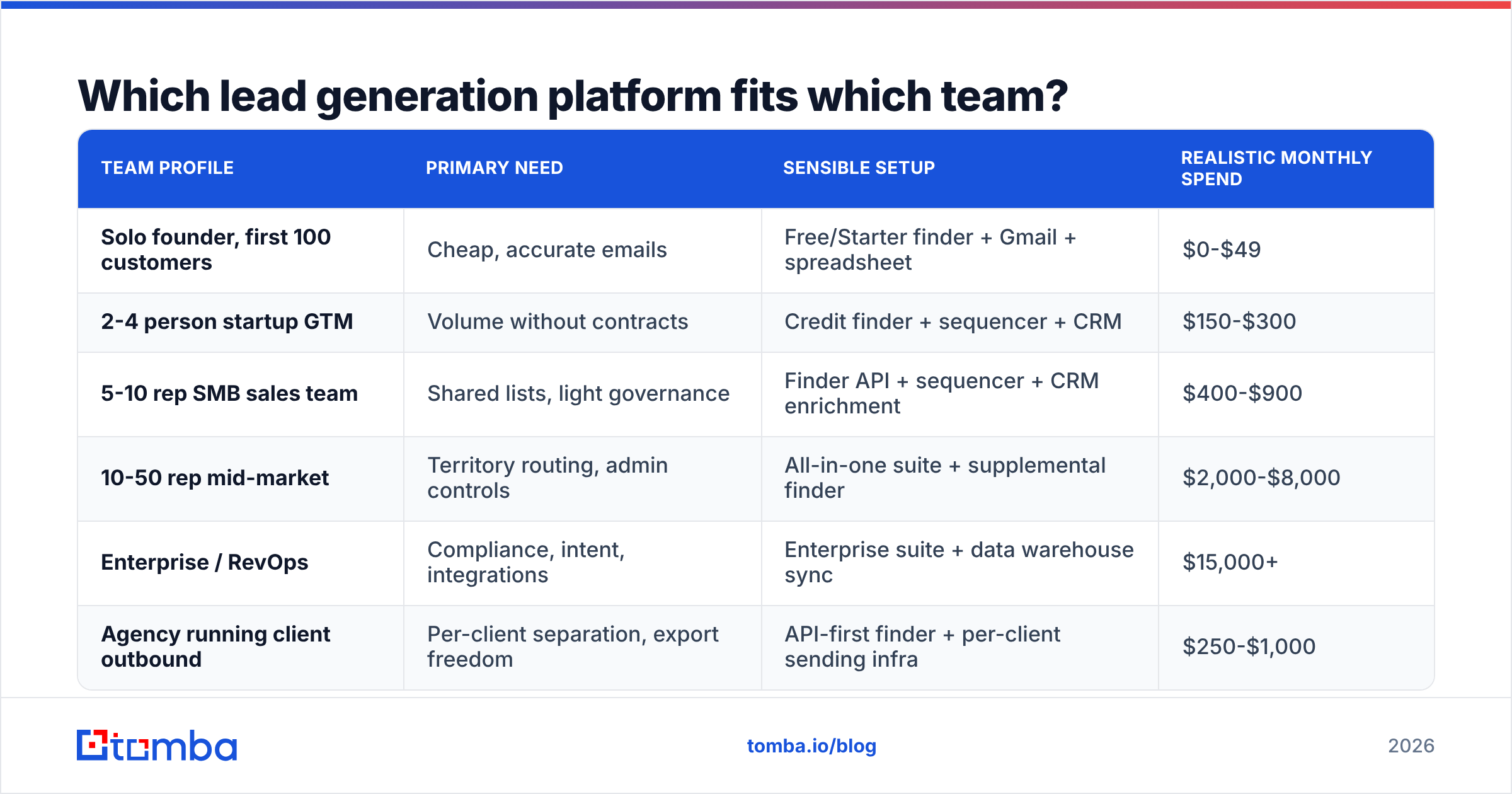
Which lead generation platform fits which team?#
| Team profile | Primary need | Sensible setup | Realistic monthly spend |
|---|---|---|---|
| Solo founder, first 100 customers | Cheap, accurate emails | Free/Starter finder + Gmail + spreadsheet | $0-$49 |
| 2-4 person startup GTM | Volume without contracts | Credit finder + sequencer + CRM | $150-$300 |
| 5-10 rep SMB sales team | Shared lists, light governance | Finder API + sequencer + CRM enrichment | $400-$900 |
| 10-50 rep mid-market | Territory routing, admin controls | All-in-one suite + supplemental finder | $2,000-$8,000 |
| Enterprise / RevOps | Compliance, intent, integrations | Enterprise suite + data warehouse sync | $15,000+ |
| Agency running client outbound | Per-client separation, export freedom | API-first finder + per-client sending infra | $250-$1,000 |
The row most teams get wrong is the third. A 5-10 rep team gets pitched enterprise suites constantly, buys one, and discovers that the thing actually bottlenecking pipeline was inbox capacity, not database size.

What does a lead generation platform not solve?#
Four things, and each one is a more common failure than bad data:
- Deliverability. No platform fixes an unauthenticated domain. SPF, DKIM, and DMARC are yours to configure, and both Google and Microsoft now enforce bulk-sender requirements that no vendor can waive on your behalf. Start with an SPF checker before you blame the list.
- Offer-market fit. A 3% reply rate on a weak offer with perfect data is still a 3% reply rate. HubSpot's ongoing lead generation research is consistent on this: message relevance moves conversion further than volume does.
- Follow-up discipline. Most closed deals come from touch three onward. Platforms automate the sending, not the persistence.
- ICP definition. Filters are only as good as the segment you point them at. "Companies with 50-200 employees in SaaS" is not an ICP, it is a firmographic slice.
Buying a platform to fix any of these is a category error that costs a year of contract.
How should you run the evaluation?#
Compress it into two weeks and make the vendor work inside your process, not their demo script.
Week one — data only. Run the 100-contact known-answer test against every shortlisted vendor. Pull one real target list of 500 accounts and measure coverage against your actual ICP, not a generic industry. Export the results and check the file format works with your CRM without manual cleanup.
Week two — workflow. Connect the platform to your CRM with a live sync, not a CSV. Watch what happens to duplicates. Run 200 real sends through it and measure bounce rate — anything above 2-3% means the verification layer is not doing its job. Check whether the API exposes everything the UI does, because the moment you want automation, UI-only features become dead ends.
Before you sign: get the renewal price in writing, confirm whether credits roll over, and confirm you can export your own data on cancellation. The third one has ended more renewals than price ever has.
What is the cheapest way to start?#
Start with the data layer and add tooling only when a specific bottleneck appears.
Almost every early outbound program is limited by two things: knowing who to contact and having an address that works. Both are solved by a finder plus a verifier, which costs an order of magnitude less than a suite. You can run domain search against target accounts, verify what comes back, and be sending inside a day — no procurement, no annual commitment, no seat math.
When you genuinely outgrow that — shared list governance, territory routing, intent signals, multi-team reporting — the suite conversation makes sense, and you will negotiate it far better having already measured what good data looks like.
Ready to test the data layer first? Tomba's Email Finder gives you 25 free searches per month to run your own accuracy test before spending anything, with paid plans starting at $49/mo and a full API when you are ready to automate. Compare it against whatever suite is in your shortlist — see Tomba pricing for the full tier breakdown — and let the 100-contact test decide instead of the demo.
Related guides#
// get started
Find, verify and enrich your first contacts today
Start on the free plan with 25 searches a month, then scale when your team is ready.
Free plan · No credit card required · GDPR & CCPA
// about the author