Lead Generation Technology in 2026: What Actually Works
Most lead gen stacks are five tools doing the same job badly. Here's how the six layers of lead generation technology actually fit together — and what to cut.
TL;DR
- Lead generation technology in 2026 is six layers: data sourcing, identity resolution, enrichment, verification, activation, and measurement. Most teams over-buy layers 1 and 5 and under-buy layers 3 and 4.
- The average B2B stack carries three tools that do the same job. Auditing for overlap usually frees 30-40% of tooling spend before you add anything new.
- Verification is the highest-ROI layer per dollar. A 12% bounce rate does not just waste sends — it degrades your sending domain for months.
- All-in-one platforms (Apollo, ZoomInfo, Seamless.AI) trade accuracy for convenience. Specialist tools plus an API layer usually win on cost-per-valid-contact.
- Budget rule of thumb: a functional two-person outbound stack costs $150-$400/month in 2026, not $2,000. Anything above that needs a revenue number attached to it.
What is lead generation technology, really?#
Lead generation technology is the set of software that takes you from "we sell to mid-market fintech CFOs" to "here is a verified email address for Sarah Chen, CFO at a 200-person fintech, and she opened your last email twice."
That sounds simple. It isn't, because no single product does the whole chain well. The category has fragmented into six distinct jobs, and vendors market themselves as if they cover all six while genuinely covering two.
Here is the honest layer map:
- Data sourcing — where raw company and person records come from. Public web crawling, contributed contact databases, firmographic providers, government registries, job boards.
- Identity resolution — matching a name plus a company to a real, current, unique person. This is where most "bad data" complaints actually originate, not in sourcing.
- Enrichment — attaching the fields you need to act: email, phone, title, seniority, tech stack, headcount, funding stage.
- Verification — proving the contact point works before you use it. SMTP checks, catch-all handling, phone line validation, role-account detection.
- Activation — sequencers, dialers, LinkedIn automation, ad audience sync, CRM writeback.
- Measurement — attribution, pipeline reporting, deliverability monitoring, cost-per-qualified-lead math.
A tool that claims to own all six is usually strong at one and acceptable at two. That's not a scandal; it's how the economics work. Sourcing and verification require completely different infrastructure, and sequencing requires neither.
Which layer actually breaks first?#
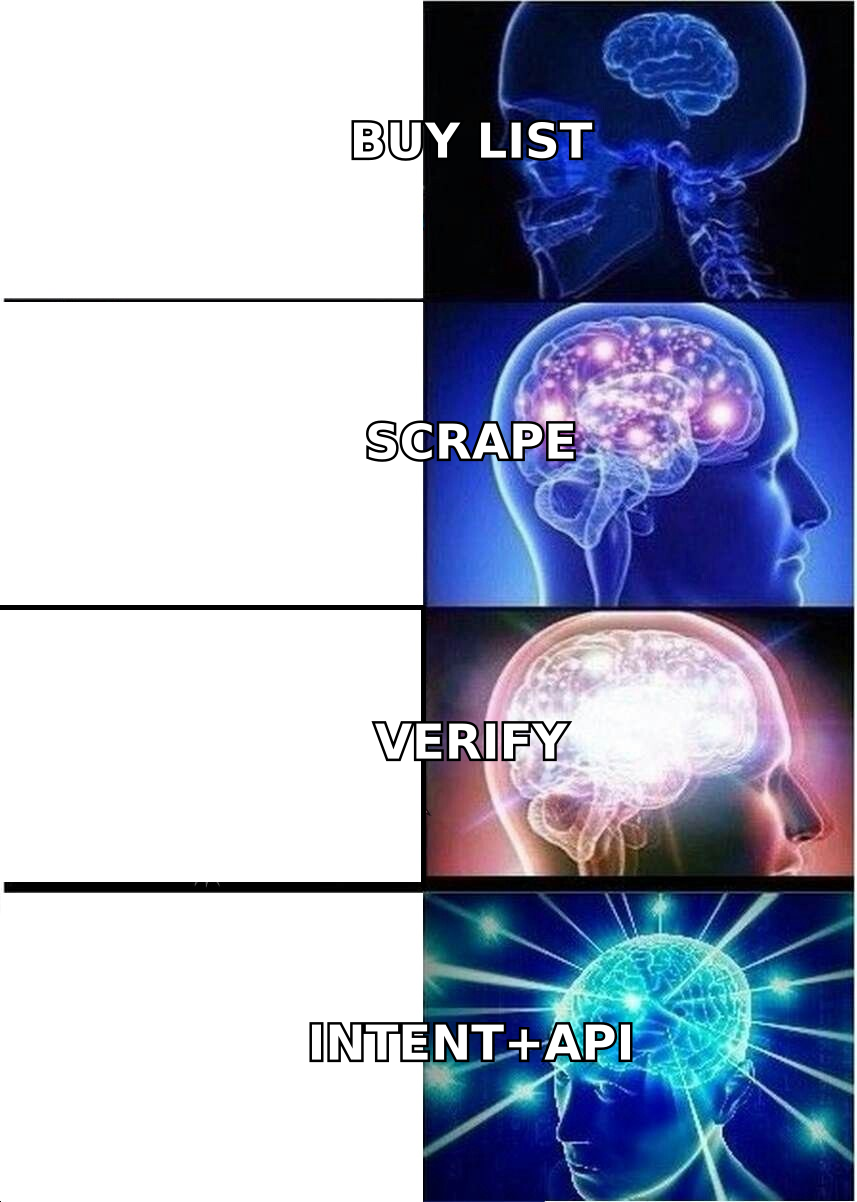
Layer 4, almost every time. Verification is the cheapest layer and the one teams skip.
Here's the chain reaction. You pull 5,000 contacts from a database. Fifteen percent of them are stale — people who changed jobs, domains that migrated, mailboxes that were deactivated. You send anyway. Your bounce rate hits 12%. Google and Yahoo's bulk sender requirements, tightened in 2024 and enforced harder since, push you toward spam placement across the whole domain. Now your good contacts stop seeing your mail too.
The fix costs a fraction of what the database costs. Running a list through an email verifier before the first send typically cuts bounce rate from double digits to under 2%. On a 5,000-contact list at typical verification pricing, that's a few dollars to protect a sending domain you spent a year warming.
The second-most-common break is layer 2, identity resolution, and it shows up as a symptom people misdiagnose. "The data is wrong" usually means "the tool matched the right name to the wrong company," or "it returned a personal Gmail instead of a work address." Tools with strong domain search — pattern detection across a company's actual verified addresses — resolve identity far more reliably than tools that guess from a first-name/last-name template.
How do the main categories of lead generation tools compare?#
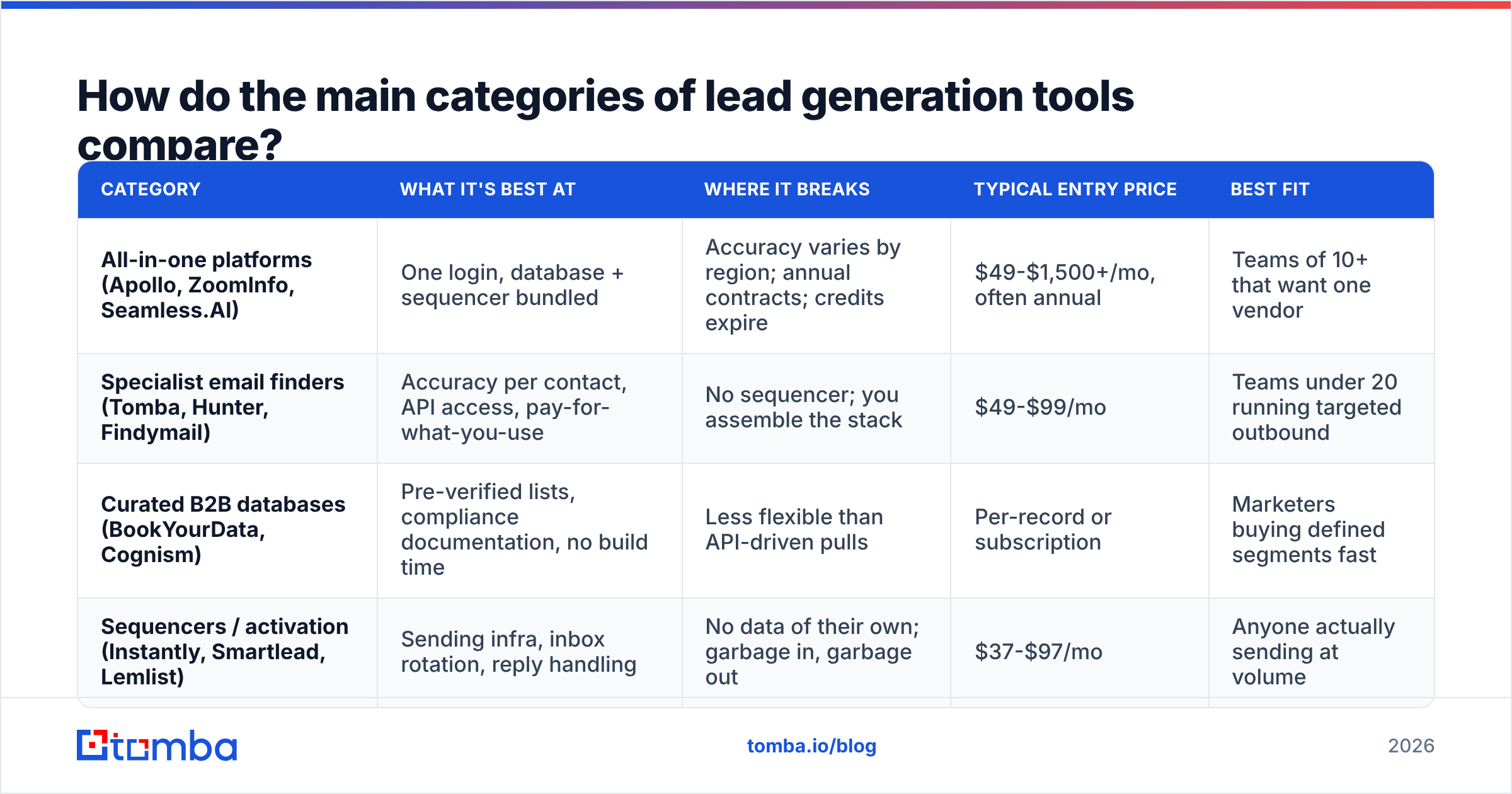
Four distinct product shapes dominate the market in 2026. They're priced differently, they fail differently, and mixing them badly is how you end up paying twice for the same record.
| Category | What it's best at | Where it breaks | Typical entry price | Best fit |
|---|---|---|---|---|
| All-in-one platforms (Apollo, ZoomInfo, Seamless.AI) | One login, database + sequencer bundled | Accuracy varies by region; annual contracts; credits expire | $49-$1,500+/mo, often annual | Teams of 10+ that want one vendor |
| Specialist email finders (Tomba, Hunter, Findymail) | Accuracy per contact, API access, pay-for-what-you-use | No sequencer; you assemble the stack | $49-$99/mo | Teams under 20 running targeted outbound |
| Curated B2B databases (BookYourData, Cognism) | Pre-verified lists, compliance documentation, no build time | Less flexible than API-driven pulls | Per-record or subscription | Marketers buying defined segments fast |
| Sequencers / activation (Instantly, Smartlead, Lemlist) | Sending infra, inbox rotation, reply handling | No data of their own; garbage in, garbage out | $37-$97/mo | Anyone actually sending at volume |
The pattern worth noticing: these four categories are complements, not substitutes, except in one direction. An all-in-one replaces a specialist finder and a sequencer, at the cost of accuracy on both. A specialist finder plus a sequencer beats an all-in-one on quality but requires you to own the integration.
Most teams under 20 people should run the second shape. The savings are real: a specialist finder at $99/month plus a sequencer at $67/month is $166/month, versus $800-2,000/month for a comparable all-in-one seat count — and the contact data is usually better, because that vendor's entire business depends on it rather than being one of nine bundled features.

Reference: independent accuracy benchmarks across major email-finding tools, 2026.
What changed in lead generation technology between 2024 and 2026?#
Four shifts matter, and only two of them are about AI.
Inbox authentication got teeth. The 2024 Google/Yahoo requirements — SPF, DKIM, DMARC, one-click unsubscribe, spam complaint rate under 0.3% — are no longer a grace-period thing. Stacks built before 2024 that never touched authentication are the ones quietly dying now. Check your SPF record before you blame your copy.
Credit models replaced seat models. Three years ago you bought seats. Now most data vendors bill per lookup or per verified record. This is better for buyers under 20 people and worse for large teams. It also means overlapping tools waste money twice: you pay Tool A a credit to find an email and Tool B a credit to verify a contact Tool A already verified.
AI moved into research, not writing. The AI-written-sequence wave peaked and underperformed — reply rates on obviously-generated copy dropped as buyers learned the tells. Where AI genuinely helps now is pre-send research: summarizing a prospect's recent funding round, identifying which of 40 accounts just hired a VP of Engineering, classifying inbound. That's a real gain, and it's why MCP-style integrations — connecting an email finder API directly to an AI agent — became a normal way to build in 2026 rather than a novelty.
Intent data commoditized. Six-figure intent contracts are much harder to justify when website visitor identification and technographic signals are available at a tenth of the price. If you're renewing a large intent contract, price the alternatives first.
How do you audit a lead gen stack you already have?#
Run this in one sitting. It takes about 90 minutes and usually finds money.
- List every tool and its annual cost. Include the ones expensed on someone's personal card. There are always two.
- Map each tool to the six layers. Write the layer number next to each line item. Any layer with three tools is an overlap. Any layer with zero tools is a gap — and the empty one is usually verification or measurement.
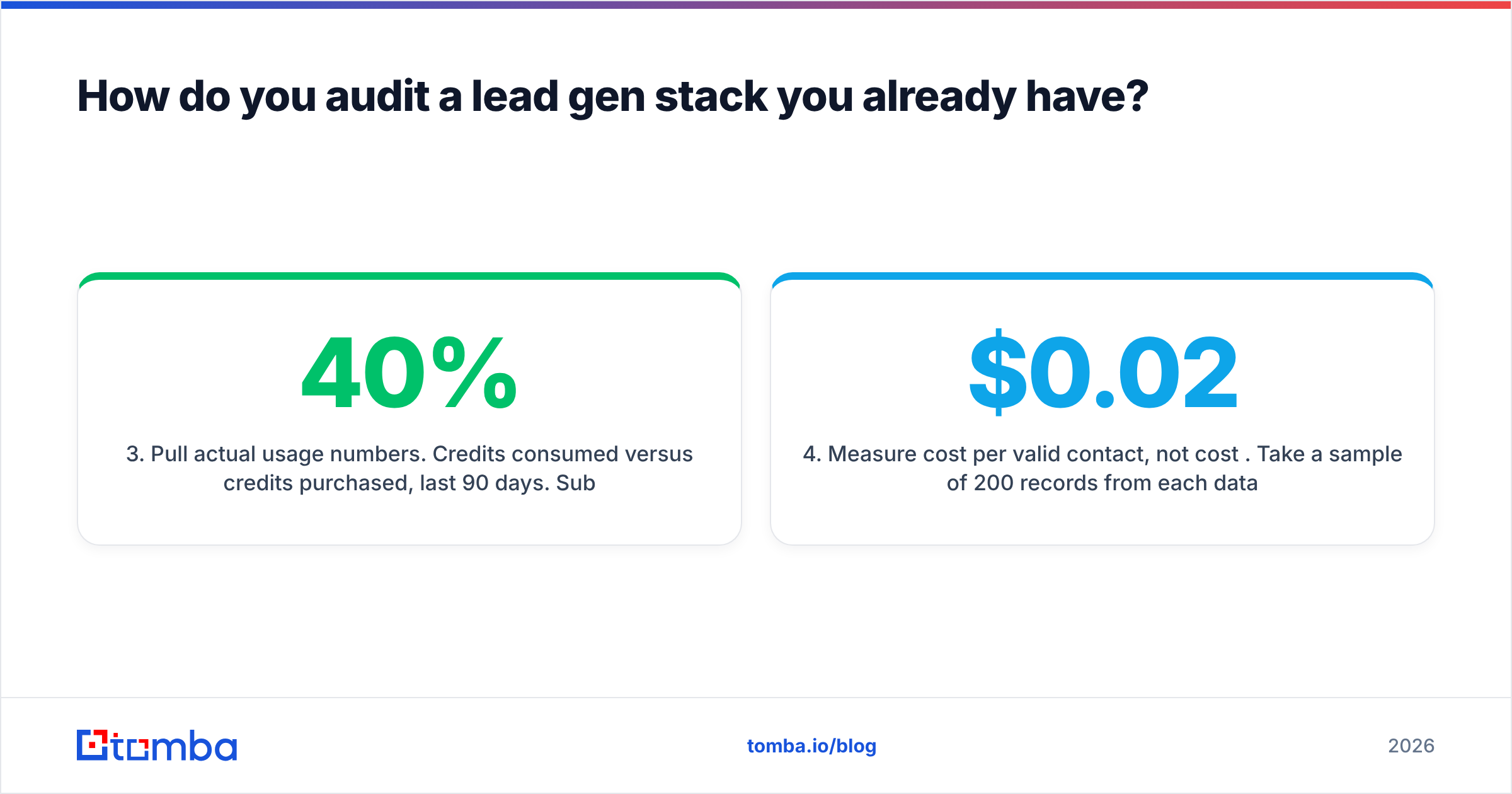
- Pull actual usage numbers. Credits consumed versus credits purchased, last 90 days. Sub-40% utilization means you're on the wrong tier, not that you need a different tool.
- Measure cost per valid contact, not cost per credit. Take a sample of 200 records from each data source, verify them independently, and divide total spend by the count that passed. A "cheap" $0.02 record with 70% validity costs more than a $0.05 record at 97%.
- Check contract end dates. Annual auto-renew is where stacks calcify. Note every renewal date in a shared calendar with a 45-day reminder.
- Kill one tool. Not zero. There is always one, and the exercise fails if you finish it having changed nothing.
Step 4 is the one that changes decisions. Teams consistently pick data vendors on list price and then discover the effective cost is three times higher after invalid records are discounted. G2's category data is useful for shortlisting, but it won't tell you validity rate on your ICP — only a sample test will.

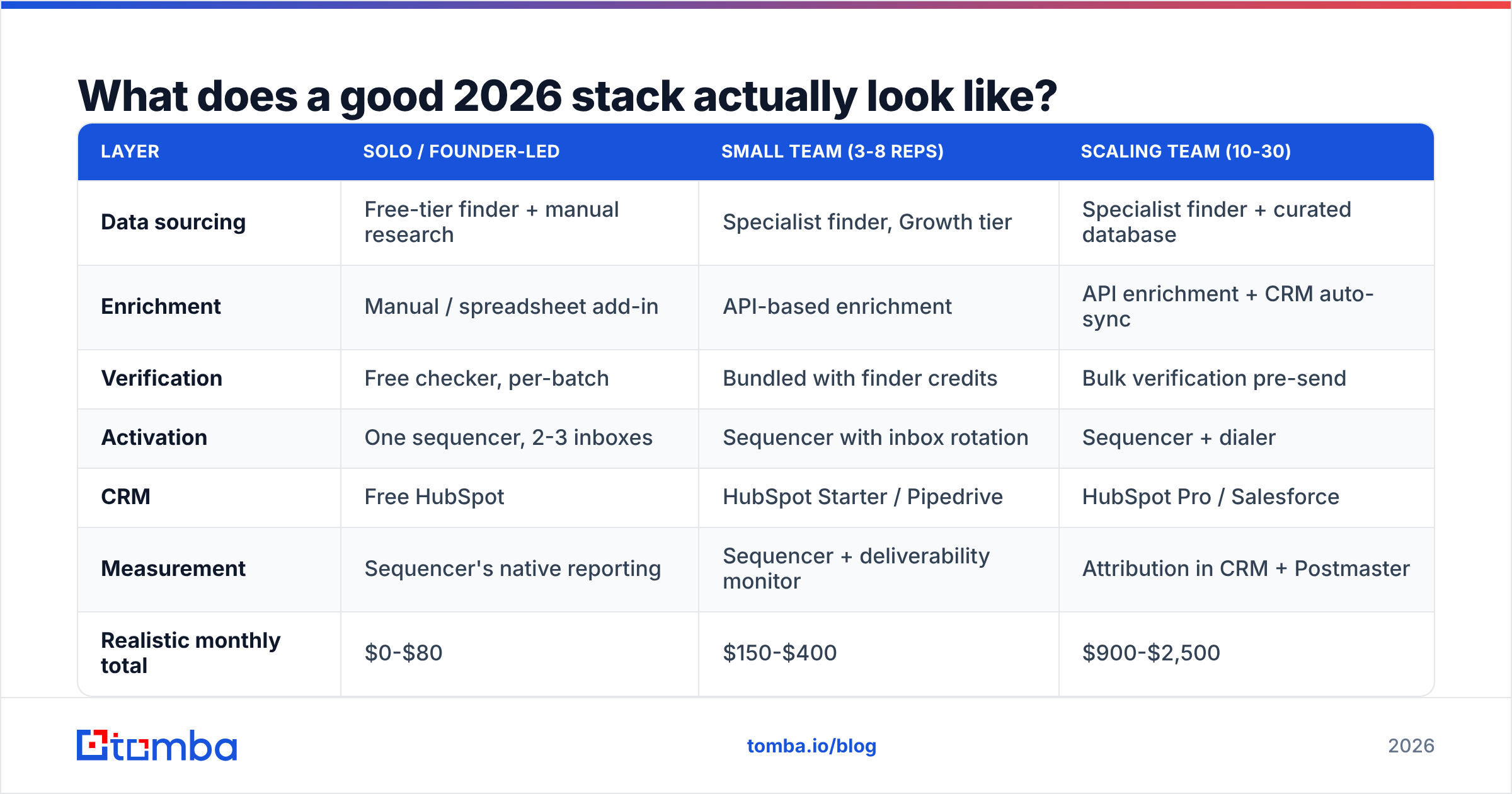
What does a good 2026 stack actually look like?#
Three reference builds, by team size. Prices are current list prices as of 2026 and assume monthly billing.
| Layer | Solo / founder-led | Small team (3-8 reps) | Scaling team (10-30) |
|---|---|---|---|
| Data sourcing | Free-tier finder + manual research | Specialist finder, Growth tier | Specialist finder + curated database |
| Enrichment | Manual / spreadsheet add-in | API-based enrichment | API enrichment + CRM auto-sync |
| Verification | Free checker, per-batch | Bundled with finder credits | Bulk verification pre-send |
| Activation | One sequencer, 2-3 inboxes | Sequencer with inbox rotation | Sequencer + dialer |
| CRM | Free HubSpot | HubSpot Starter / Pipedrive | HubSpot Pro / Salesforce |
| Measurement | Sequencer's native reporting | Sequencer + deliverability monitor | Attribution in CRM + Postmaster |
| Realistic monthly total | $0-$80 | $150-$400 | $900-$2,500 |
The jump people get wrong is from column two to column three. Scaling teams add an all-in-one platform on top of the specialist stack rather than replacing anything, and monthly spend triples while cost-per-meeting stays flat. If the new tool doesn't let you cancel an old one, it's an addition to the budget, not an upgrade to the stack.
A few build notes that save pain:
- Put verification before the sequencer, not after. Bounces are a deliverability event, not a reporting metric. Once they happen, the damage is already booked.
- Prefer tools with a real API. Spreadsheet add-ins and Chrome extensions are fine for discovery, but anything you'll run weekly should be scriptable. A Google Sheets add-on for ad-hoc work plus an API for recurring jobs covers both.
- Handle catch-all domains explicitly. Roughly a fifth of B2B domains accept all mail, which makes standard verification return "unknown." A dedicated catch-all verifier turns those from a coin flip into a decision.
- Keep phone as a second channel, not a replacement. Connect rates recovered somewhat in 2025-2026, and a validated mobile number alongside an email roughly doubles the chance of reaching someone in a two-week window.
Is an all-in-one platform worth it in 2026?#
Sometimes — and the deciding variable isn't size, it's how standardized your motion is.
An all-in-one earns its price when your ICP is broad, your sequences are templated, and you value one procurement conversation over data precision. Enterprise teams with a dedicated RevOps function often fit this.
It stops earning its price when any of these are true:
- Your ICP is narrow or non-US, where bundled databases thin out fast.
- You need contacts in regions where one vendor's coverage is weak — verify with a sample before signing, not after.
- You're paying for a sequencer you don't use because your team lives in the CRM.
- Your cost-per-valid-contact is above $0.10 and you haven't tested a specialist alternative.
If you're evaluating a switch, the comparison pages worth reading are the ones that name specific gaps rather than listing features — an Apollo alternative breakdown or a Seamless.AI alternative comparison will tell you more about coverage trade-offs than a vendor's own matrix. And for teams that want a defined, compliance-documented list rather than a self-serve build, curated providers like BookYourData remain a legitimate path — different shape, different trade-offs, not a worse one.

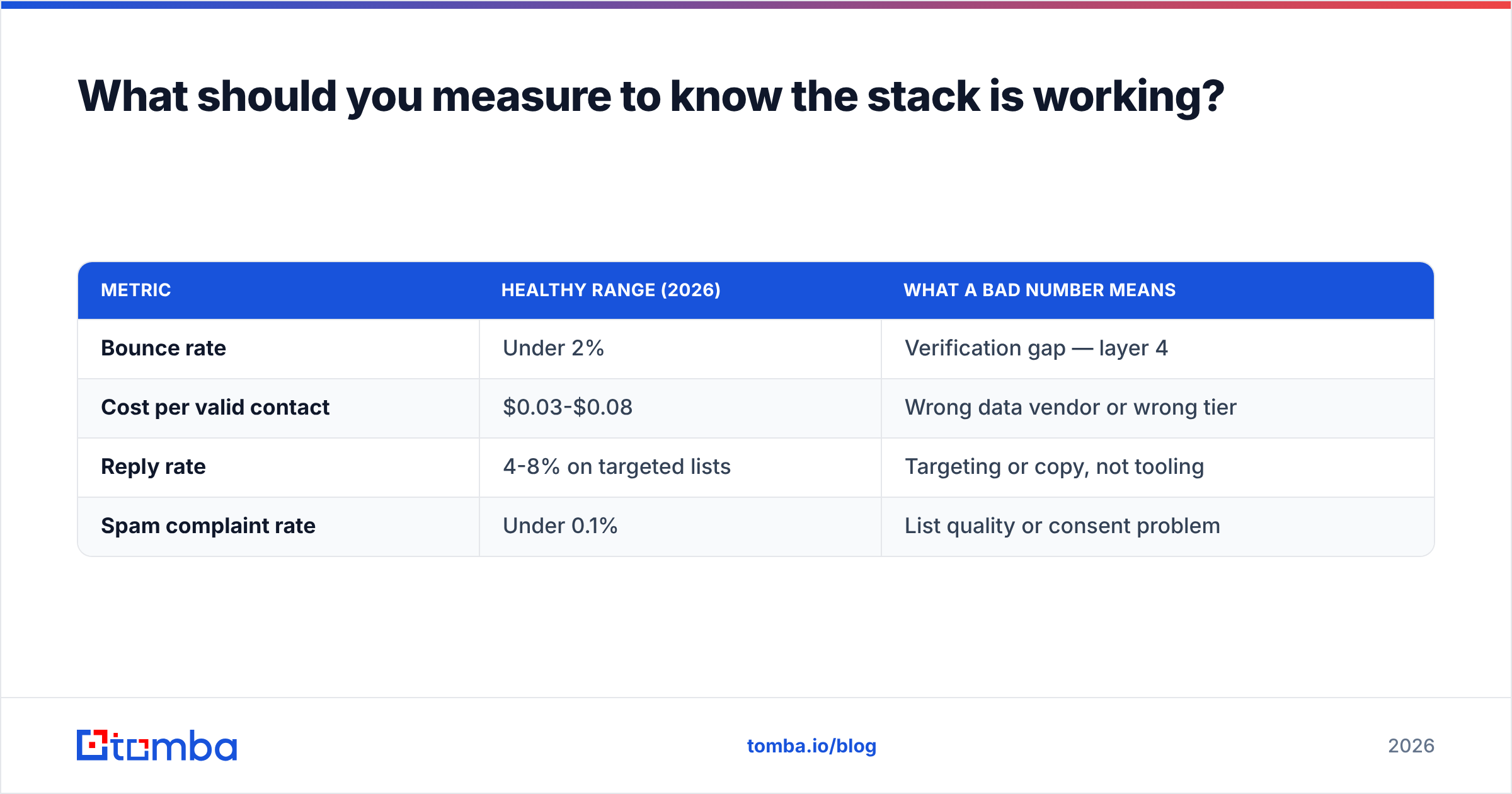
What should you measure to know the stack is working?#
Four numbers, checked monthly. Everything else is decoration.
| Metric | Healthy range (2026) | What a bad number means |
|---|---|---|
| Bounce rate | Under 2% | Verification gap — layer 4 |
| Cost per valid contact | $0.03-$0.08 | Wrong data vendor or wrong tier |
| Reply rate | 4-8% on targeted lists | Targeting or copy, not tooling |
| Spam complaint rate | Under 0.1% | List quality or consent problem |
Bounce rate and cost-per-valid-contact are tooling problems, solvable by changing vendors. Reply rate and complaint rate are almost never tooling problems — no data vendor will fix a message nobody wants. Diagnosing them as a software issue is the most common and most expensive mistake in this category, because it leads to buying a seventh tool to solve a positioning problem.
Track sender reputation alongside these using free tooling from your mailbox provider. Google Postmaster Tools costs nothing and tells you more about deliverability than most paid monitors.
How do you choose without a three-month evaluation?#
Compress it to two weeks with a structured bake-off:
- Week 1 — pick 200 accounts from your real ICP. Run the same list through two or three candidate tools on free or trial tiers. Do not use the vendor's sample data.
- Week 2 — verify all outputs through a single independent verifier so the scoring is consistent. Calculate match rate, validity rate, and effective cost per valid contact for each.
Whichever tool wins on effective cost per valid contact for your segment is the right answer, regardless of what the review sites say. Coverage varies enormously by geography, company size, and industry — a tool that's best-in-class for US SaaS may be mediocre for European manufacturing, and no aggregate rating captures that.
Free tiers make this cheap: most specialist tools offer 25-100 free lookups per month, which is enough to score a 200-account sample across two or three vendors with a bit of batching. Compare Tomba pricing and equivalents on effective cost, not headline cost, once you have the validity numbers in hand.
Where to start#
If you take one thing from this: audit before you buy. Most stacks have more redundancy than gaps, and the gap that does exist is usually verification.
Start by testing the data layer against your actual ICP rather than a vendor demo list. The Tomba Email Finder runs on a free tier with 25 searches per month — enough to score a sample and see real match rates on your segment before spending anything. Paid plans start at $49/month (Starter), $99/month (Growth), and $249/month (Pro), with verification, domain search, catch-all handling, and API access included rather than sold as separate credit pools. Run it head-to-head against whatever you use now on the same 200 accounts, compare cost per valid contact, and let the number decide.
Related guides#
// get started
Find, verify and enrich your first contacts today
Start on the free plan with 25 searches a month, then scale when your team is ready.
Free plan · No credit card required · GDPR & CCPA
// about the author