Lead Generation Tools for Sales: 2026 Stack Guide
Most sales teams buy five lead gen tools and use two. Here's how the seven categories actually fit together, what each layer should cost, and where to start if you're building from zero.
TL;DR
- A sales lead gen stack has seven functional layers, but most teams under 20 reps only need three of them: contact data, verification, and sending.
- Buying a bundled "all-in-one" platform usually means paying premium rates for a data layer you'd get cheaper standalone, and a sequencer you'd get better standalone.
- Budget realistically: a working two-to-five-rep stack runs $150–$400/month. Suite pricing for the same job starts around $1,200/month.
- Verification is the highest-ROI line item in the whole stack. Skipping it burns your sending domain, which costs weeks to repair.
- Start with data + verification, add a sequencer, and only then consider intent, enrichment automation, and visitor identification.
What counts as a lead generation tool for sales?#
A lead generation tool is anything that moves a stranger one step closer to a booked meeting. That definition is wide on purpose, because the category is wide — vendors selling wildly different things all file themselves under "lead generation," and that's why stacks end up bloated.
Think of it like a kitchen. You need ingredients (contact data), quality control (verification), a stove (sending), and a place to plate it (CRM). Everything else — intent signals, visitor identification, AI research agents — is a nice knife set. Useful, but nobody starved for lack of a mandoline.
Here are the seven layers, in the order they matter:
- Contact data — where names, emails, and phone numbers come from. Either a static database you search, or a finder that resolves contacts on demand from a domain or LinkedIn profile.
- Verification — confirms the address accepts mail before you send. Protects your sender reputation and keeps bounce rates under the 2% threshold most inbox providers tolerate.
- Enrichment — fills in the gaps: job title, company size, tech stack, funding stage. Turns a bare email into something you can personalize against.
- Sequencing and sending — the outbound engine. Multi-step cadences, inbox rotation, reply detection, A/B testing.
- Intent and signals — identifies accounts showing buying behavior right now: hiring for a relevant role, visiting pricing pages, researching competitors.
- Visitor identification — de-anonymizes traffic already hitting your site. Warmest source in the stack, smallest volume.
- CRM and routing — where everything lands, gets scored, and gets assigned.
Most teams buy layers 1, 4, 5, and 7, skip 2, and then wonder why deliverability collapsed in month three.
How do the main tool categories actually compare?#
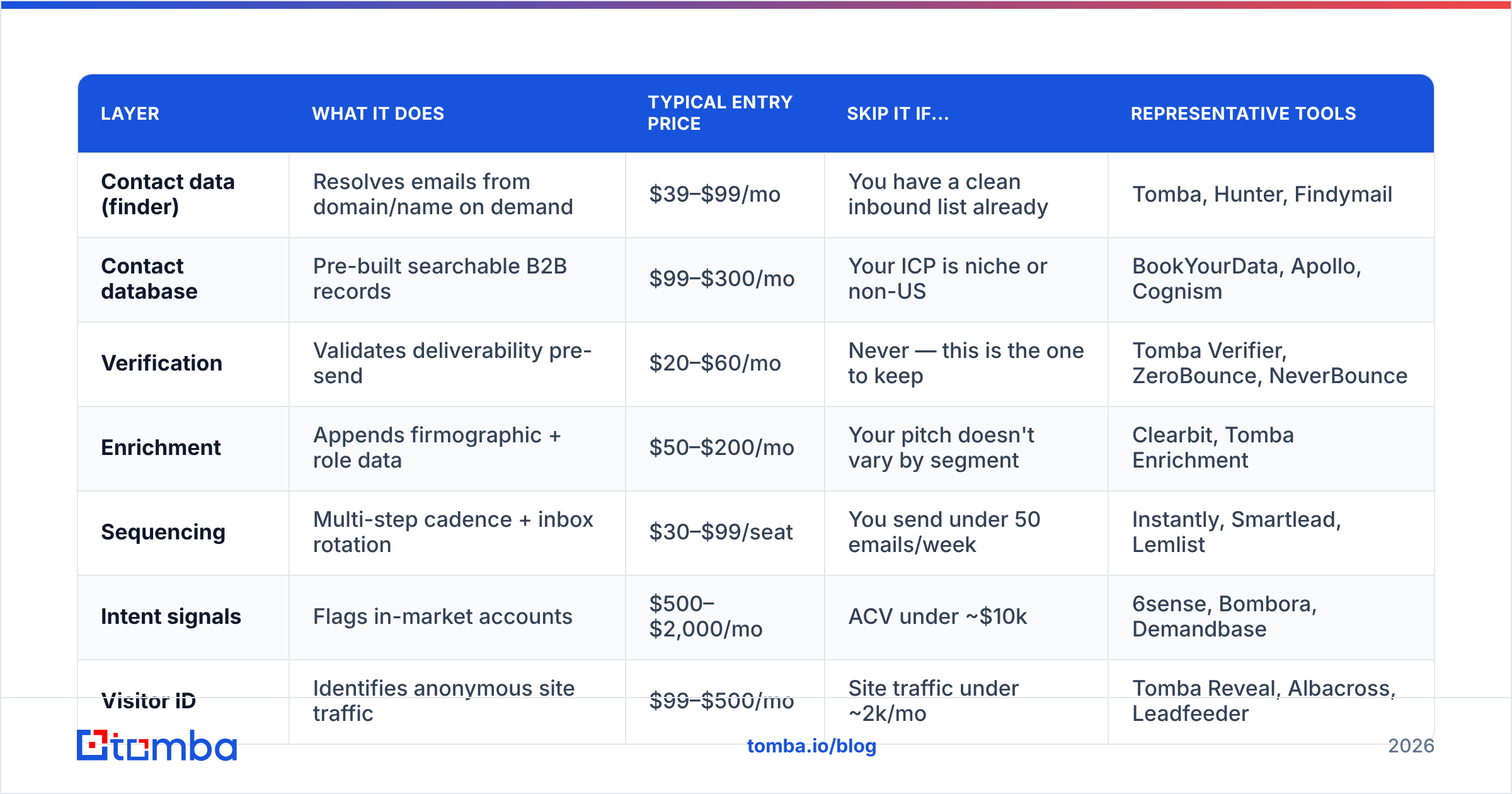
The table below is the honest version of the category map. Prices are entry-tier list prices as of 2026 and move often — check the vendor before you budget.
| Layer | What it does | Typical entry price | Skip it if... | Representative tools |
|---|---|---|---|---|
| Contact data (finder) | Resolves emails from domain/name on demand | $39–$99/mo | You have a clean inbound list already | Tomba, Hunter, Findymail |
| Contact database | Pre-built searchable B2B records | $99–$300/mo | Your ICP is niche or non-US | BookYourData, Apollo, Cognism |
| Verification | Validates deliverability pre-send | $20–$60/mo | Never — this is the one to keep | Tomba Verifier, ZeroBounce, NeverBounce |
| Enrichment | Appends firmographic + role data | $50–$200/mo | Your pitch doesn't vary by segment | Clearbit, Tomba Enrichment |
| Sequencing | Multi-step cadence + inbox rotation | $30–$99/seat | You send under 50 emails/week | Instantly, Smartlead, Lemlist |
| Intent signals | Flags in-market accounts | $500–$2,000/mo | ACV under ~$10k | 6sense, Bombora, Demandbase |
| Visitor ID | Identifies anonymous site traffic | $99–$500/mo | Site traffic under ~2k/mo | Tomba Reveal, Albacross, Leadfeeder |
Two things jump out. First, the intent layer costs more than everything else combined and is the one most teams buy earliest because it demos beautifully. Second, verification is the cheapest line and the one most frequently cut.
The build-vs-buy question inside the stack#
Contact data is where the build-vs-buy tension is sharpest. A static database gives you volume and filters — search for every VP of Engineering at a Series B SaaS company with 50–200 employees, export 800 rows, done. A finder-style tool gives you precision — you already know who you want, you need their address.
Teams doing account-based outbound to a defined list of 300 target companies get more from a finder plus a domain search than from a database subscription they'll query twice a month. Teams doing volume prospecting into a broad segment get more from a B2B database. The mistake is paying for both without noticing the overlap.
BookYourData is worth a look if you specifically want pay-as-you-go database credits rather than a subscription — the model suits teams with lumpy, campaign-driven demand rather than steady daily prospecting.
Why does verification matter more than the tool you send with?#
Because bounce rate is the input that everything downstream depends on, and you cannot fix it after the fact.
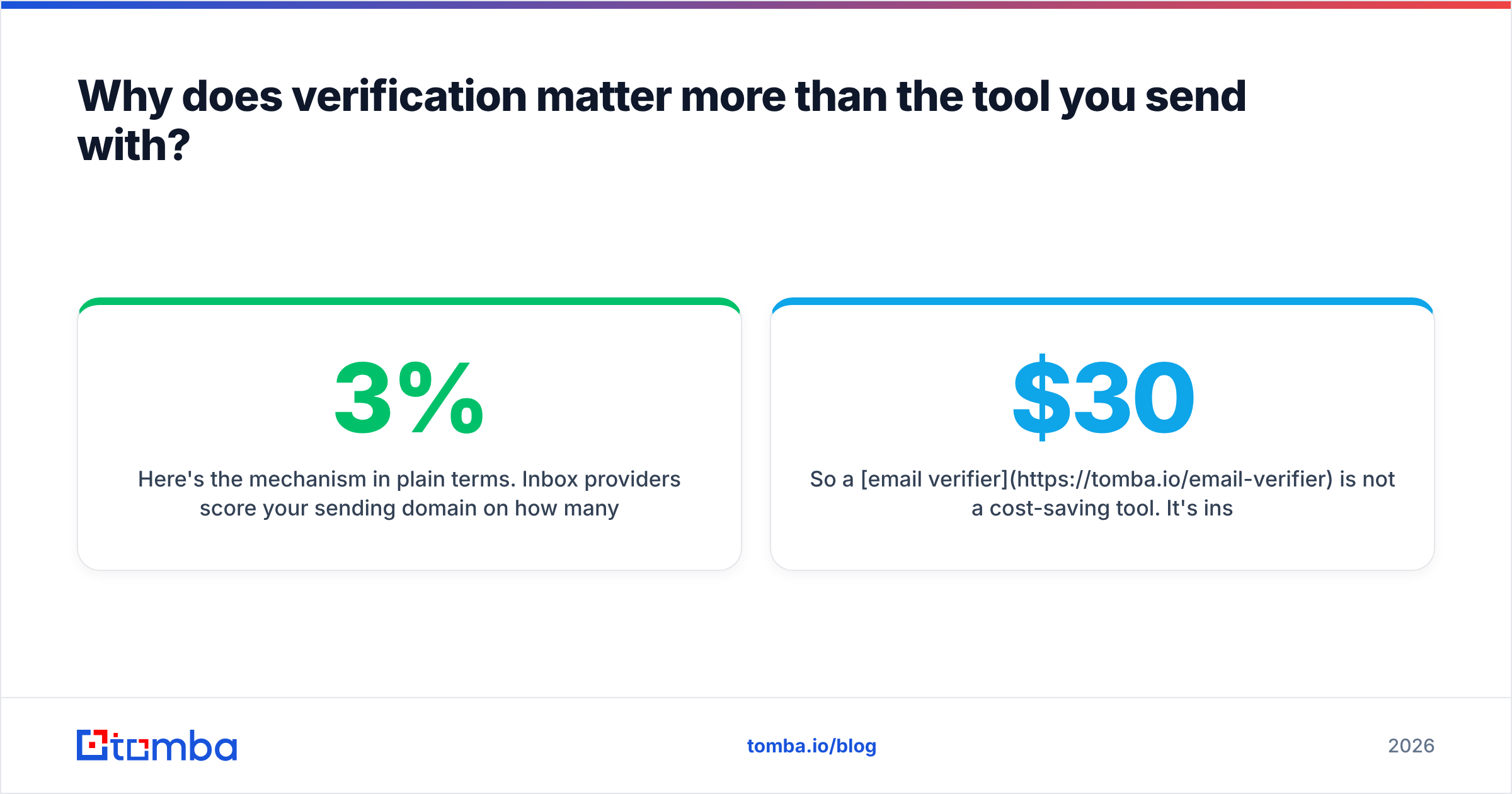
Here's the mechanism in plain terms. Inbox providers score your sending domain on how many of your messages hit real, active mailboxes. Bounce past roughly 2–3% and the score drops. Drop the score and your good emails start landing in spam — including the ones to prospects who were going to reply. A damaged domain takes four to eight weeks of reduced volume and warmup to recover, during which your pipeline produces nothing.
So a $30/month email verifier is not a cost-saving tool. It's insurance on the $400/month sequencer and the three months of prospecting work sitting behind it.
The nuance that trips people up: catch-all domains. A catch-all server accepts mail addressed to anything@domain.com, so standard SMTP verification returns "valid" for addresses that don't exist. If you're selling into mid-market and enterprise, a meaningful slice of your list will be catch-all. You need a catch-all verifier that uses pattern confidence and secondary signals rather than raw SMTP response, or you're flying blind on a third of your list.
Google's own bulk sender guidelines spell out the spam-rate thresholds directly — worth reading once before you configure anything else. Broader context on how email deliverability is scored helps too.

Screenshot placeholder: Google Postmaster Tools domain reputation graph showing a drop after a high-bounce campaign, then recovery over six weeks.
How much should a sales lead gen stack actually cost?#
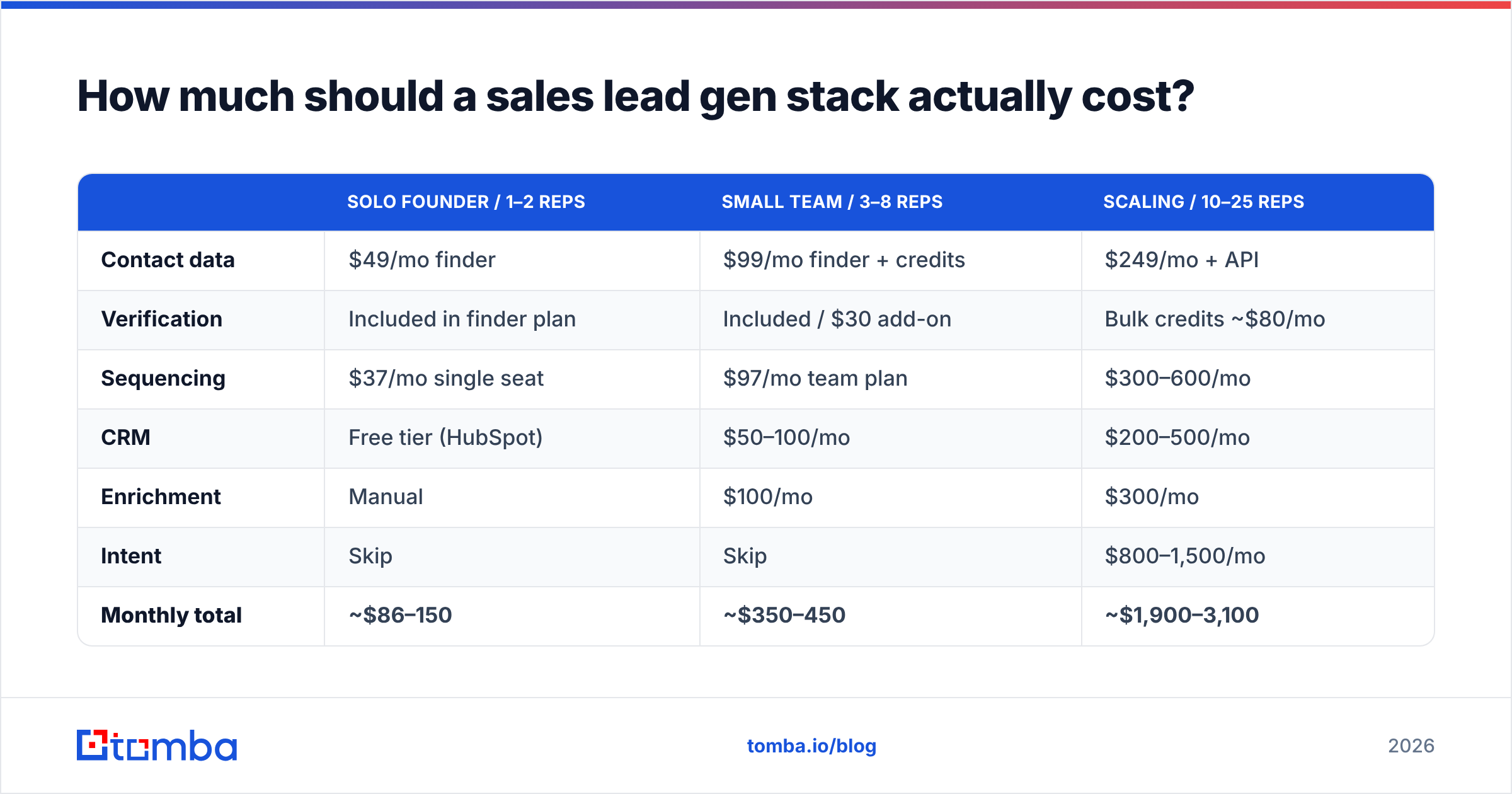
Depends entirely on team size and motion. Here are three realistic configurations.
| Solo founder / 1–2 reps | Small team / 3–8 reps | Scaling / 10–25 reps | |
|---|---|---|---|
| Contact data | $49/mo finder | $99/mo finder + credits | $249/mo + API |
| Verification | Included in finder plan | Included / $30 add-on | Bulk credits ~$80/mo |
| Sequencing | $37/mo single seat | $97/mo team plan | $300–600/mo |
| CRM | Free tier (HubSpot) | $50–100/mo | $200–500/mo |
| Enrichment | Manual | $100/mo | $300/mo |
| Intent | Skip | Skip | $800–1,500/mo |
| Monthly total | ~$86–150 | ~$350–450 | ~$1,900–3,100 |
The jump from column two to column three is mostly the intent layer. Before you make that jump, calculate whether your average contract value justifies it. Intent data earns its keep when a single extra closed deal pays for a year of subscription. At a $6,000 ACV with a 20% close rate, it usually doesn't.
For reference on what a finder-plus-verification layer costs in practice, Tomba pricing runs a free tier at 25 searches/month, Starter at $49/month, Growth at $99/month, and Pro at $249/month — with verification bundled rather than metered separately, which is the part that changes the math against verification-only vendors.

Which tools can you honestly skip in year one?#
Four of the seven layers.
Intent data. It's the most oversold category in B2B. The signal is real, but it's probabilistic, and it's only actionable if you have enough rep capacity to work the flagged accounts fast. A two-person team getting 40 intent alerts a week will work six of them. You bought 34 alerts worth of nothing. Revisit at 10+ reps.
Conversation intelligence. Call recording and AI coaching tools are excellent — for teams with enough call volume to find patterns and a manager with time to review. Below eight reps, listen to the calls yourself.
Dedicated enrichment platforms. Most finders now return title, company, LinkedIn, and location alongside the email. A separate data enrichment subscription earns its place when you're enriching at CRM scale — tens of thousands of records — not when you're personalizing 200 emails a week.
Visitor identification. Genuinely great when it works, but the math needs traffic. At 1,500 monthly visitors, identification rates of 20–30% on company-level matching give you maybe 300 companies, most of which are competitors, job seekers, and your own team. Wait until traffic justifies it.
What you shouldn't skip: data, verification, a sequencer, and a CRM you actually update. That's it.
What should you look for when evaluating a data provider?#
Five criteria, in priority order. Most vendor comparison pages rank on database size, which is the least predictive of the five.
- Accuracy on your ICP specifically, not in aggregate. A provider claiming 95% accuracy might be 97% on US tech and 70% on European manufacturing. Run a 50-contact test against companies you actually target and measure bounce rate yourself. This is non-negotiable and takes an afternoon.
- Verification model transparency. Ask how they handle catch-all and role-based addresses. Vendors that return a binary valid/invalid with no confidence score are hiding something.
- Credit mechanics. Do failed lookups consume credits? Do credits roll over? Does a "search" mean one contact or one query returning fifty? These details can triple your effective cost.
- Coverage depth by region and seniority. Most providers are strongest on US-based, mid-seniority, tech-adjacent roles. Test the edges of your ICP, not the middle.
- Integration and API quality. If your workflow lives in a CRM or a spreadsheet, the tool needs to meet you there. A Tomba API, Google Sheets add-on, or native HubSpot integration saves more hours than a slightly better UI.
Peer review sites help for the coarse filter — G2's lead intelligence category is reasonable for spotting which vendors have real customer bases versus paid placement — but never substitute reviews for your own 50-contact test.

Screenshot placeholder: Side-by-side bounce-rate results from a 50-contact test list run through three different data providers.
How do you sequence the build if you're starting from zero?#
Four phases, roughly one month each.
Phase 1 — Data and verification. Pick one contact source and one verification path. Build a target list of 200–300 accounts manually before you automate anything, because the manual work is how you learn what your ICP actually looks like. Use a bulk email finder once the list is defined.
Phase 2 — Sending infrastructure. Separate sending domain, SPF/DKIM/DMARC configured, two to three weeks of warmup before real volume. Verify your SPF record and run a spam checker on your templates before the first send. Do not send from your primary domain.
Phase 3 — Sequencer and measurement. Add the cadence tool. Track reply rate, not open rate — open tracking has been unreliable since Apple Mail Privacy Protection, and most teams are still reporting numbers that mean nothing. Baseline a healthy cold response rate at 3–8% for a well-targeted list.
Phase 4 — Layer additions. Only now consider enrichment automation, intent, or visitor ID — and add one at a time, with a defined metric each is supposed to move. If you can't name the metric, you don't need the tool.
The failure mode is doing phase 4 first. It's the most fun phase, the demos are the best, and it produces nothing without phases 1 through 3 underneath it.
What's actually changing in 2026?#
Three shifts worth planning around.
AI research agents are collapsing the enrichment layer. Tools that read a prospect's site, recent posts, and job listings to draft context are getting good enough to replace a manual research step. This mostly kills the standalone "personalization data" category — the capability is becoming a feature of the sequencer.
Inbox providers keep tightening. Bulk sender requirements have ratcheted every year since 2024. The practical effect: volume-first outbound keeps getting more expensive and precision-first outbound keeps getting relatively cheaper. Verification and list quality move from "good practice" to "cost of entry."
Bundling pressure is real but uneven. Suites want to sell you all seven layers. They tend to be genuinely strong at two or three and mediocre at the rest, while charging suite prices across the board. The unbundled stack is still cheaper and better for most teams under 25 reps — it just requires you to own the integration work.
Where to start#
If you're building a lead gen stack from scratch, start at the data layer and get it right before anything else — every downstream tool inherits the quality of what you put in.
The Tomba Email Finder handles the first two layers in one place: find verified professional email addresses by domain, name, or company, with verification built in rather than billed as a separate subscription. The free tier gives you 25 searches a month, which is enough to run the 50-contact accuracy test on your own ICP before you commit a dollar. Run that test against two other providers at the same time — whichever wins on your list is the right answer, regardless of what any comparison post says.
Related guides#
// get started
Find, verify and enrich your first contacts today
Start on the free plan with 25 searches a month, then scale when your team is ready.
Free plan · No credit card required · GDPR & CCPA
// about the author