Lead Generation Tools for Small Businesses: The 2026 Stack
Most small teams overspend on lead gen software and still email bad addresses. Here's an honest breakdown of what a five-person company actually needs, what each layer costs, and which tools you can skip entirely in 2026.
TL;DR
- A small business does not need ten lead generation tools. It needs four layers: a source of contacts, a verification step, a CRM, and a sending tool. Everything else is optional.
- Budget reality for a 2–10 person team in 2026: roughly $100–$300/month total. Anything above that usually means you are paying enterprise seat pricing for features you will never open.
- The most common failure is not tool choice — it is skipping verification. Unverified lists produce 8–15% bounce rates, which wrecks your sending domain within two weeks.
- All-in-one platforms (data + sequencing + dialer) look cheaper on the invoice but lock your data behind seat minimums. Unbundled stacks cost less and travel with you.
- Buy-a-list vendors like BookYourData and search-based finders like Tomba solve different problems: bulk static lists versus on-demand, per-prospect lookups. Many teams use both.
What counts as a lead generation tool for a small business?#
"Lead generation tool" has become a catch-all label that covers products with almost nothing in common. A chatbot on your pricing page and a 200-million-record contact database are both sold under the same category on G2, and that is why small teams end up with overlapping subscriptions.
Here is the honest taxonomy. Every lead gen tool does exactly one of these five jobs:
- Find contacts — you know the company or the person, and you need a work email or phone number. This is the email finder and domain-search layer.
- Buy contacts in bulk — you want a static list filtered by industry, headcount, and geography, delivered as a CSV. This is the database/list-vendor layer.
- Capture inbound — forms, chat widgets, lead magnets, and website visitor reveal that turns anonymous traffic into named accounts.
- Clean and enrich — verification, deduplication, and appending job titles, company size, or tech stack to records you already have.
- Engage and track — cold email sequencers, LinkedIn automation, dialers, and the CRM that stores the outcome.
If a tool claims to do all five, it is doing three of them badly. That is not a slogan — it is what you will find when you export the data and check it. The lead capture category on G2 alone lists hundreds of products, and the review volume skews heavily toward the engagement layer because that is where vendors spend marketing budget.
A small business should pick the cheapest competent option in each layer and refuse to pay for bundling it does not use.

What does a lean lead gen stack actually need?#
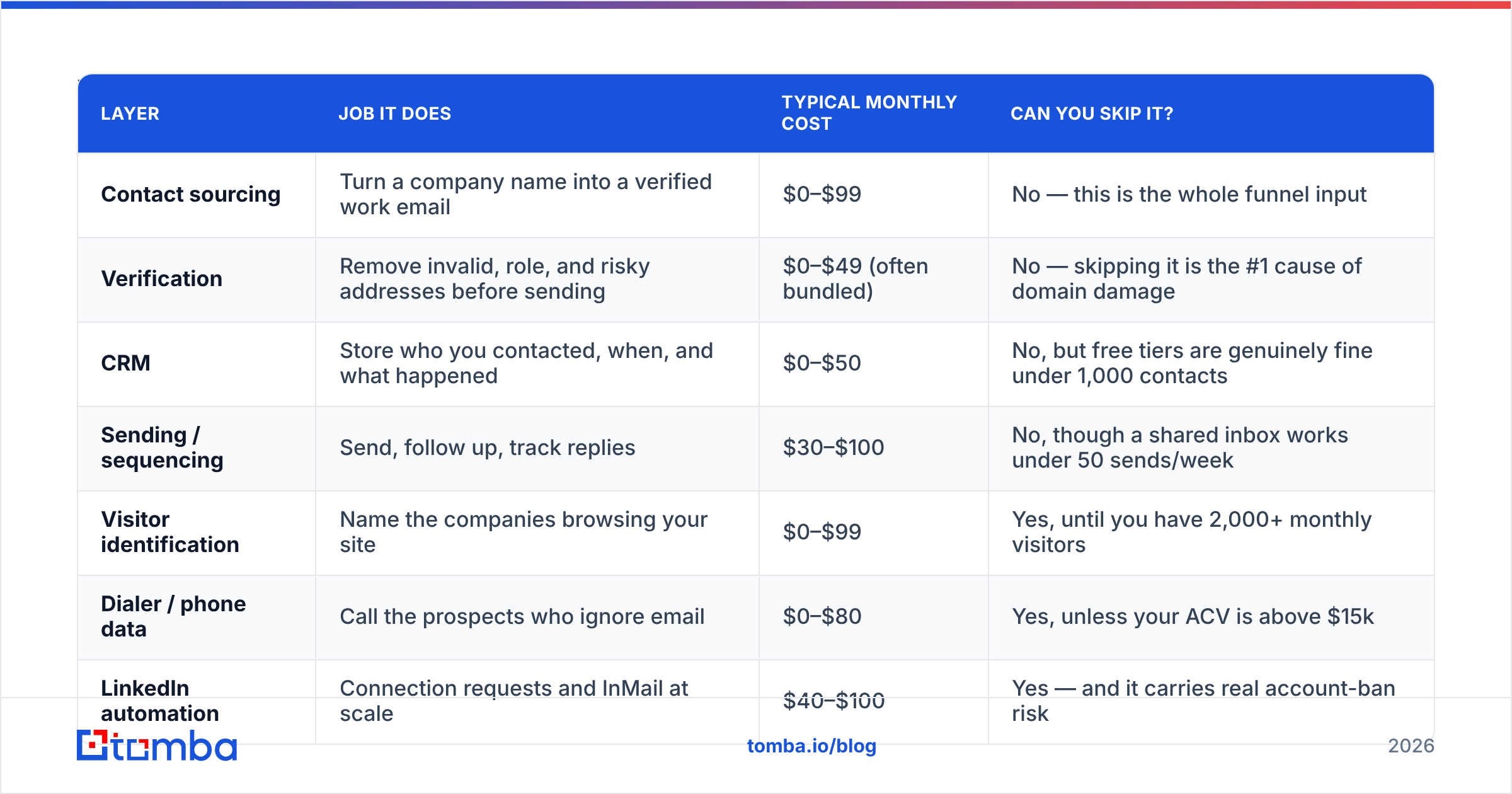
Four things. The table below is the shape most 2–10 person B2B teams converge on after about six months of trial and error.
| Layer | Job it does | Typical monthly cost | Can you skip it? |
|---|---|---|---|
| Contact sourcing | Turn a company name into a verified work email | $0–$99 | No — this is the whole funnel input |
| Verification | Remove invalid, role, and risky addresses before sending | $0–$49 (often bundled) | No — skipping it is the #1 cause of domain damage |
| CRM | Store who you contacted, when, and what happened | $0–$50 | No, but free tiers are genuinely fine under 1,000 contacts |
| Sending / sequencing | Send, follow up, track replies | $30–$100 | No, though a shared inbox works under 50 sends/week |
| Visitor identification | Name the companies browsing your site | $0–$99 | Yes, until you have 2,000+ monthly visitors |
| Dialer / phone data | Call the prospects who ignore email | $0–$80 | Yes, unless your ACV is above $15k |
| LinkedIn automation | Connection requests and InMail at scale | $40–$100 | Yes — and it carries real account-ban risk |
Notice that only the first four rows are mandatory. A team spending $600/month on lead gen software is almost always paying for rows five through seven before rows one through four are working properly.
Which lead generation tools are worth paying for in 2026?#
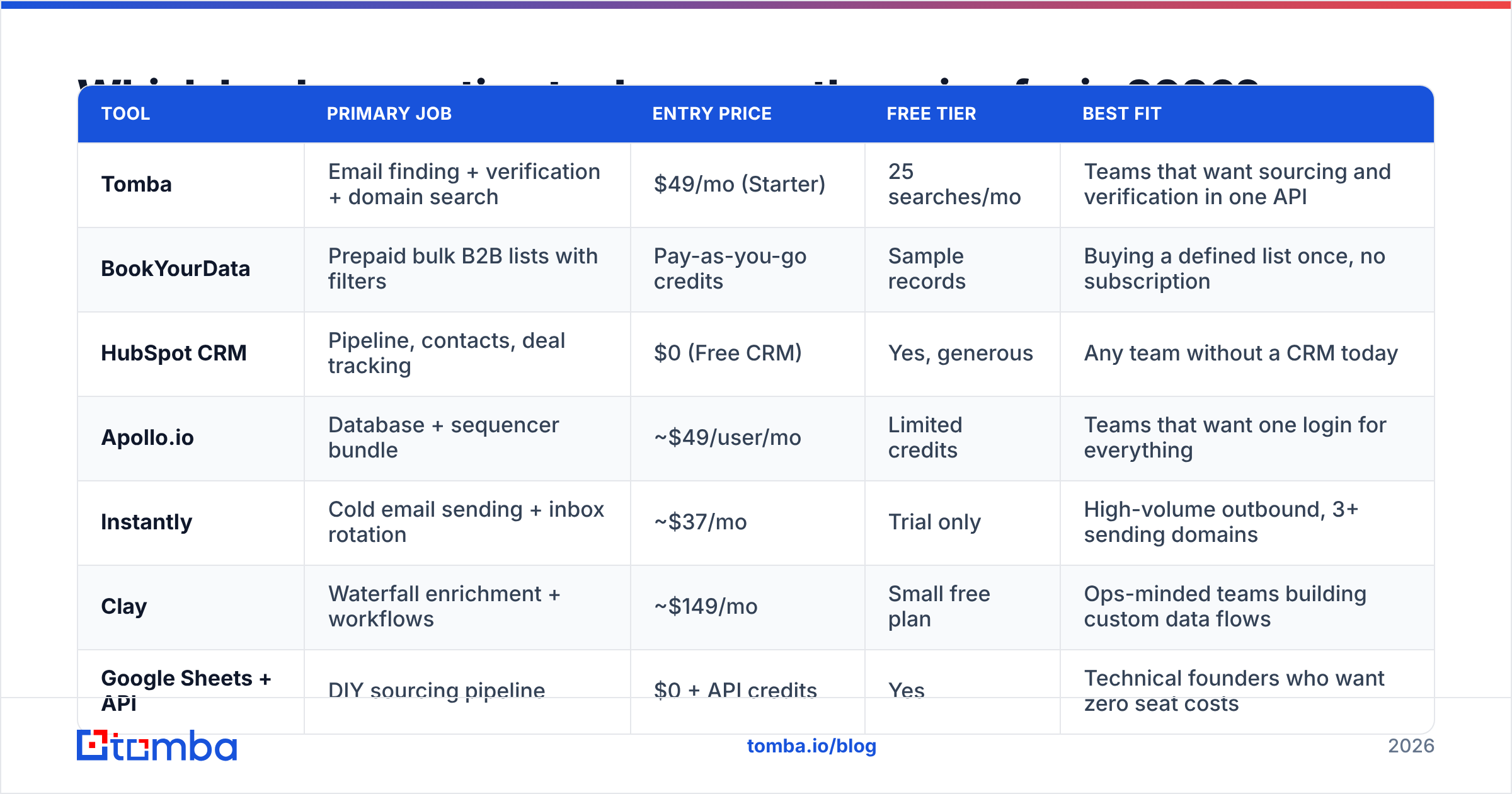
The comparison below covers the tools small teams actually shortlist, grouped by the job they do rather than by vendor marketing category. Prices are list prices for the entry paid tier as published by each vendor.
| Tool | Primary job | Entry price | Free tier | Best fit |
|---|---|---|---|---|
| Tomba | Email finding + verification + domain search | $49/mo (Starter) | 25 searches/mo | Teams that want sourcing and verification in one API |
| BookYourData | Prepaid bulk B2B lists with filters | Pay-as-you-go credits | Sample records | Buying a defined list once, no subscription |
| HubSpot CRM | Pipeline, contacts, deal tracking | $0 (Free CRM) | Yes, generous | Any team without a CRM today |
| Apollo.io | Database + sequencer bundle | ~$49/user/mo | Limited credits | Teams that want one login for everything |
| Instantly | Cold email sending + inbox rotation | ~$37/mo | Trial only | High-volume outbound, 3+ sending domains |
| Clay | Waterfall enrichment + workflows | ~$149/mo | Small free plan | Ops-minded teams building custom data flows |
| Google Sheets + API | DIY sourcing pipeline | $0 + API credits | Yes | Technical founders who want zero seat costs |
Two honest notes on this table.
First, Tomba and BookYourData are not really competitors, even though they show up on the same shortlists. BookYourData sells you a static, pre-filtered list — you pick the filters, pay per record, and get a CSV you own outright. That is excellent when you know exactly which 3,000 companies you want and you do not want a recurring bill. Tomba is built for the opposite motion: you have a name or a domain in hand right now, and you need the email in under a second, ideally through an API inside your own workflow. Teams doing account-based outbound frequently run both — buy the list, then use per-prospect lookups to fill the gaps the list left blank.
Second, bundled platforms are not automatically cheaper. A $49/user/month all-in-one across four seats is $196/month. An unbundled stack of a $49 finder plan, a free CRM, and a $37 sender is $86/month for the same four people, because sourcing tools price on credits rather than seats. Seat-based pricing punishes growth; credit-based pricing punishes waste. Small teams have more people than they have wasted credits.
How accurate is the data, and how do you check?#
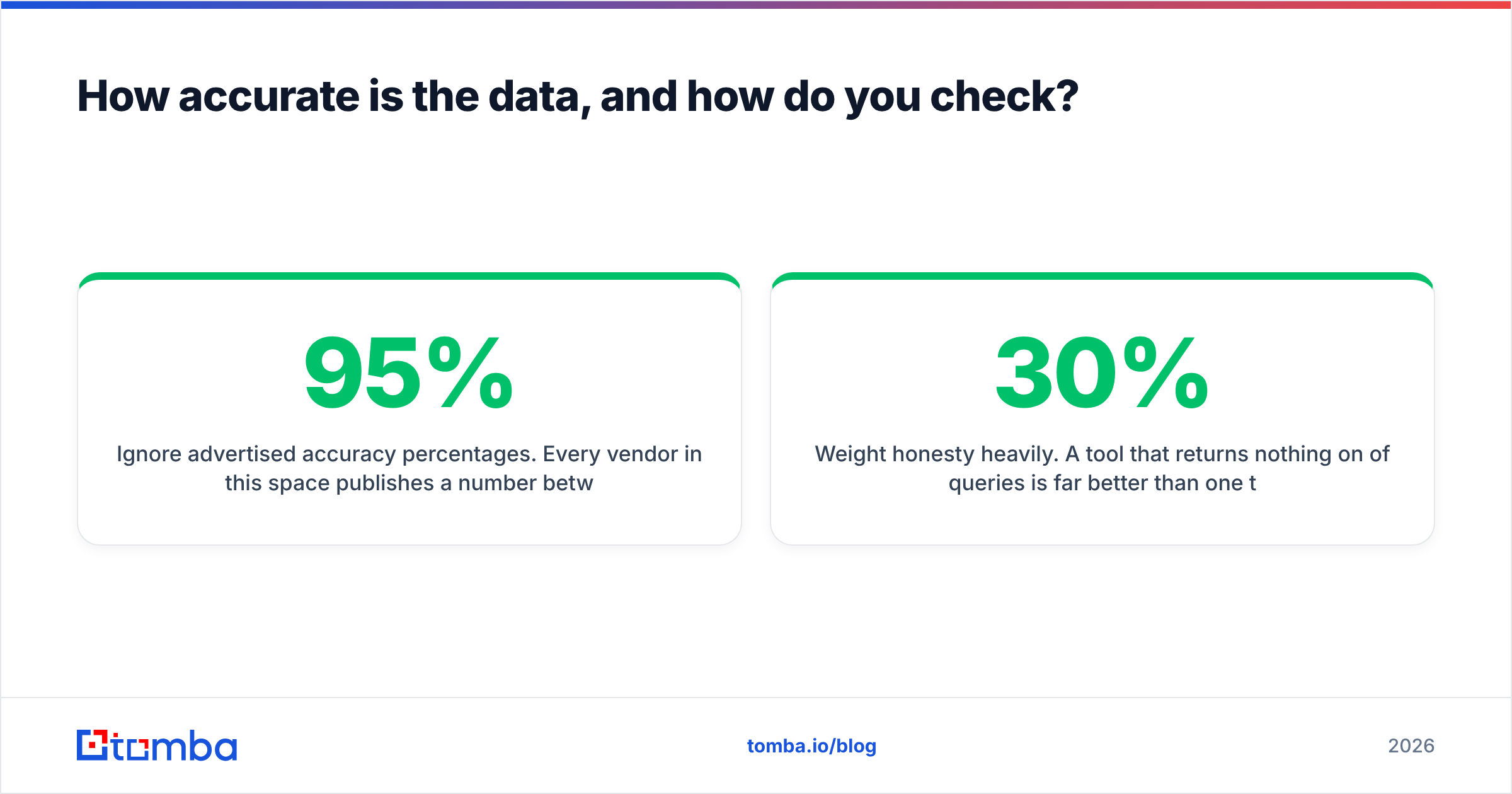
Ignore advertised accuracy percentages. Every vendor in this space publishes a number between 95% and 99%, and those numbers are measured against different definitions of "valid."
Run your own test instead. It takes twenty minutes:
- Build a control list of 50 contacts you can independently confirm — people whose emails appear on their company's team page, in a press release, or in your own inbox history.
- Run the same 50 through each tool's free tier. Tomba's free plan gives 25 searches a month, most competitors offer something similar, so this usually costs nothing.
- Score three things separately: hit rate (did it return anything?), accuracy (was it right?), and honesty (did it flag uncertain results as risky, or return a guess with full confidence?).
- Weight honesty heavily. A tool that returns nothing on 30% of queries is far better than one that returns a plausible-looking guess on 100% of them. Guesses become bounces, and bounces become a damaged sending domain.
- Re-run the losers on catch-all domains. Roughly a third of B2B domains accept all mail, which makes standard SMTP verification useless. A dedicated catch-all verifier is the difference between a usable list and a coin flip.
That last point is where most cheap tools fall apart. Anyone can verify a Gmail address. Confirming a mailbox on a catch-all corporate domain requires pattern data and historical sending signals, and it is the single most useful thing to test before you commit budget.
Is buying a list better than building one?#
It depends entirely on how well-defined your ICP is.
Buy a list when your targeting is firmographic and stable: "HR directors at US manufacturing companies with 200–1,000 employees." That is a filter query, and a list vendor will fill it faster and cheaper than you can. BookYourData is a solid choice here because the pay-as-you-go model means no subscription overhang after the campaign ends, and the records are yours permanently.
Build a list when your targeting is behavioral or event-driven: companies that just posted a specific job, sites running a particular technology, authors who published on a topic last month. No static database contains that, because the signal did not exist when the database was compiled. You need a live lookup — feed the domain in, get the contact out. That is what a domain search or API-driven workflow is for.
Do both when you are running account-based outbound. Start with a purchased list of accounts, then enrich per-contact as you identify the actual decision-maker on each one. Buying 5,000 records to use 400 of them is a bad trade; buying 400 accounts and looking up the right three people at each is a good one.
What should you stop paying for?#
Three categories consistently show up as dead weight in small-business stacks.
LinkedIn automation tools. They work until they don't. LinkedIn's detection has improved steadily, and a restricted account costs you more than any campaign gains. If you want LinkedIn in your process, do it manually for the top 50 accounts and automate email for the rest. The LinkedIn finder approach — pull the email from a profile and move the conversation to a channel you own — carries none of that platform risk.
Intent data under $50k ARR. Intent platforms are genuinely powerful and genuinely expensive. Below a certain deal volume you cannot act on the signal fast enough for it to matter. Your website analytics plus a visitor reveal tool covers 80% of the practical value at 5% of the cost.
Second and third sequencers. Teams accumulate senders — one from a trial, one bundled with a data tool, one the new hire preferred. Consolidate. Multiple sending tools on overlapping domains create reply-tracking chaos and duplicate outreach to the same person, which is the fastest way to get marked as spam.
Also worth auditing: any tool you are paying for annually that you have not logged into in 30 days. The annual discount is not a discount if the usage is zero.
How do you protect deliverability once the tools are running?#
Your data quality and your sender reputation are the same problem viewed from two angles. Mailbox providers infer quality from behavior, and bounces are the loudest negative signal you can send.
Practical guardrails for a small team:
- Verify every list before import, not after. Verification after the first send is damage assessment, not prevention.
- Keep hard bounces under 2%. Above 3% and Google and Microsoft start throttling. Above 5% you are effectively in the spam folder for that domain.
- Warm new sending domains for 3–4 weeks before real volume. A warmup calculator will tell you the ramp schedule; the mistake is impatience, not math.
- Separate your cold domain from your company domain. Use a lookalike domain for outbound so a bad campaign cannot take down your invoicing and support email.
- Suppress aggressively. Anyone who did not open three sequences in a row should be removed, not re-enrolled. Repeated non-engagement teaches filters that your mail is unwanted.
Every one of these is free. They cost discipline, not budget — which is precisely why they get skipped in favor of buying another tool.
What does a realistic 2026 setup look like?#
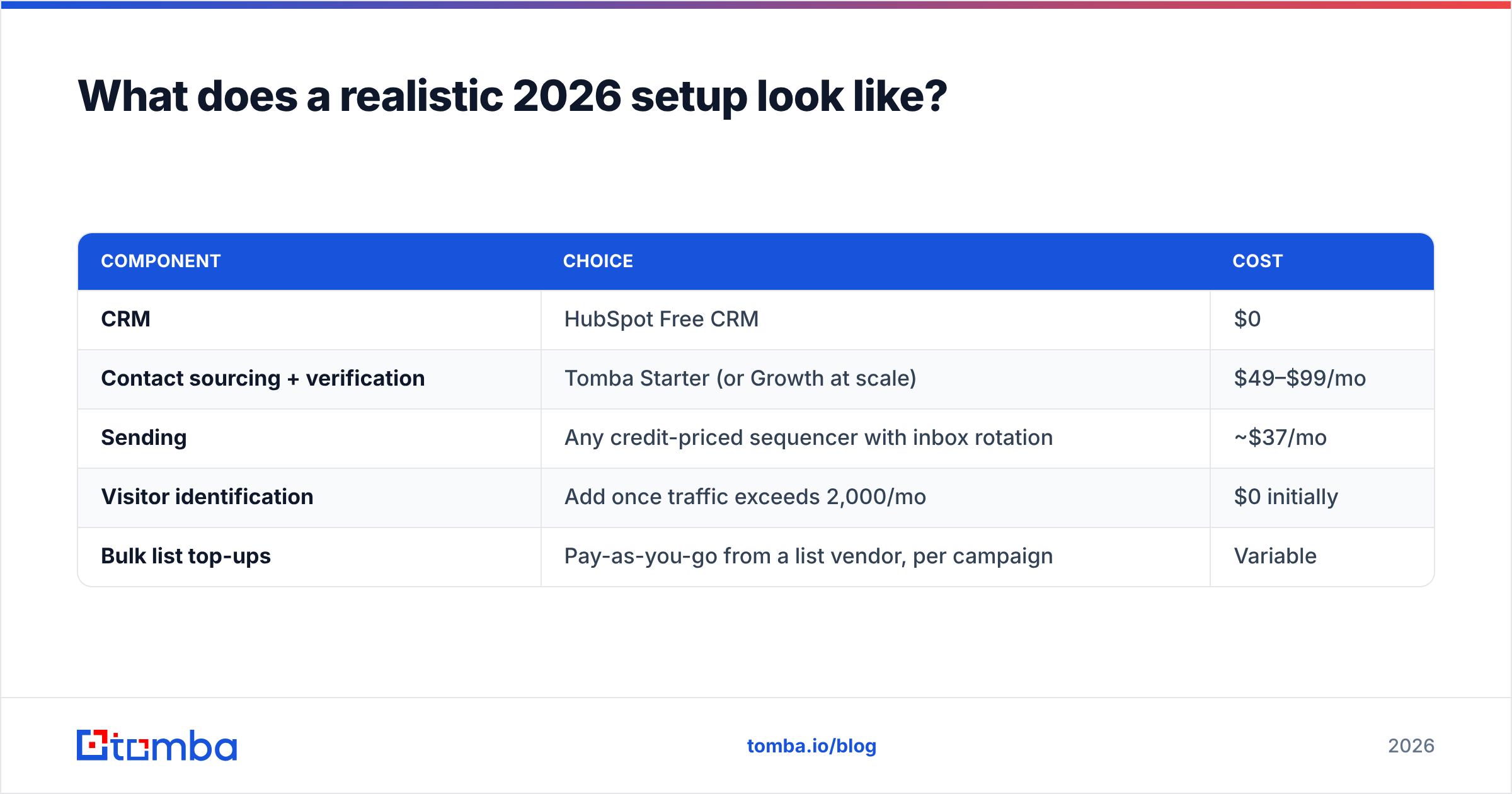
For a five-person B2B company selling a $6k–$20k annual contract, this configuration works and costs under $150/month:
| Component | Choice | Cost |
|---|---|---|
| CRM | HubSpot Free CRM | $0 |
| Contact sourcing + verification | Tomba Starter (or Growth at scale) | $49–$99/mo |
| Sending | Any credit-priced sequencer with inbox rotation | ~$37/mo |
| Visitor identification | Add once traffic exceeds 2,000/mo | $0 initially |
| Bulk list top-ups | Pay-as-you-go from a list vendor, per campaign | Variable |
Total: roughly $86–$136/month plus occasional list purchases. That is less than one seat of most enterprise sales platforms, and it covers every layer that actually touches revenue.
Scale the sourcing tier first when you grow — Tomba's Growth plan at $99/mo and Pro at $249/mo exist for exactly that ramp. Add seats to the CRM second. Add intent and dialers last, or never.
Start with the layer that feeds everything else#
The order matters more than the brand names. A CRM with no contacts in it is a spreadsheet. A sequencer with unverified addresses is a bounce generator. Sourcing and verification are the foundation, and they are also the cheapest layer to get right.
Start with the Tomba Email Finder — 25 free searches a month, no card required, and built-in verification so the addresses you push into your CRM are ones that will actually deliver. Run your 50-contact control test against it, compare the results to whatever you are using now, and let the hit rate decide your budget instead of the other way around.
Related guides#
// get started
Find, verify and enrich your first contacts today
Start on the free plan with 25 searches a month, then scale when your team is ready.
Free plan · No credit card required · GDPR & CCPA
// about the author