Lead Kahuna vs Apollo.io: Which Prospecting Tool Fits You in 2026?
Lead Kahuna is a lightweight LinkedIn contact extractor. Apollo.io is a full sales platform. Here's which one fits your team, what each really costs, and where the data holds up or falls short.
Lead Kahuna vs Apollo.io is a choice between a small tool and a big one. Lead Kahuna finds emails on LinkedIn. Apollo.io runs your whole outbound process. This guide compares the two on data, cost and fit.
TL;DR
- Lead Kahuna is a narrow tool. It's a Chrome extension that pulls emails and phone numbers from LinkedIn and Sales Navigator profiles while you browse. You pay for credits and there isn't much else to learn.
- Apollo.io is a full sales platform: a B2B contact database, email sequencing, a dialer, intent signals and CRM sync. It's billed per seat.
- Pick Lead Kahuna if you already prospect on LinkedIn and only need contact details. Pick Apollo if you want search, outreach and tracking in one place.
- Neither tool removes the need to verify addresses before you send. How good the data is depends on the segment, so test both on your own list.
- If you want finding and verification without paying for a platform per seat, a dedicated email finder like Tomba sits between the two.
What is Lead Kahuna?#
Lead Kahuna is a browser extension for prospecting on LinkedIn. You open a LinkedIn or Sales Navigator profile or search page and click the extension. It then tries to return a work email, a personal email and sometimes a phone number for that person. You can save contacts to lists and export them as CSV for your CRM or sequencing tool.
It's built around one task: turning a LinkedIn profile into an address you can send to. It doesn't do sequencing or deal tracking, and it doesn't offer a large searchable database you can filter by industry or tech stack. If you want to see what's on offer today, the product and current credit bundles are listed on leadkahuna.com.
Here's where it fits well:
- Solo founders and SDRs who already spend their day in Sales Navigator
- Recruiters who need a direct email for a candidate they've already found
- Agencies that build small, hand-picked lists for each client campaign
It struggles when you need volume from firmographic filters, such as "every VP of Finance at US SaaS companies with 200 to 1,000 employees", or when you want outreach and data in the same tool.
What is Apollo.io?#
Apollo.io is an all-in-one sales platform. At its core is a huge B2B database of contacts and companies. You search it with filters: title, seniority, headcount, industry, tech used, funding, hiring signals and more. On top of that, Apollo adds:
- Multi-step email sequences with A/B testing
- A built-in dialer and call recording on higher tiers
- A Chrome extension that works on LinkedIn and in Gmail
- Two-way CRM sync with Salesforce and HubSpot
- Buying-intent data, AI-written email drafts and meeting scheduling
Apollo prices per user. At the time of writing, the Apollo pricing page lists a Free plan and paid Basic, Professional and Organization tiers. Annual billing costs roughly $49 to $119 per user per month. Monthly billing costs a bit more. Each tier comes with a set number of email, mobile and export credits. The Organization tier also needs a minimum number of seats. Credit limits change often, so check the live page before you budget.
Lead Kahuna vs Apollo.io: how do they compare side by side?#
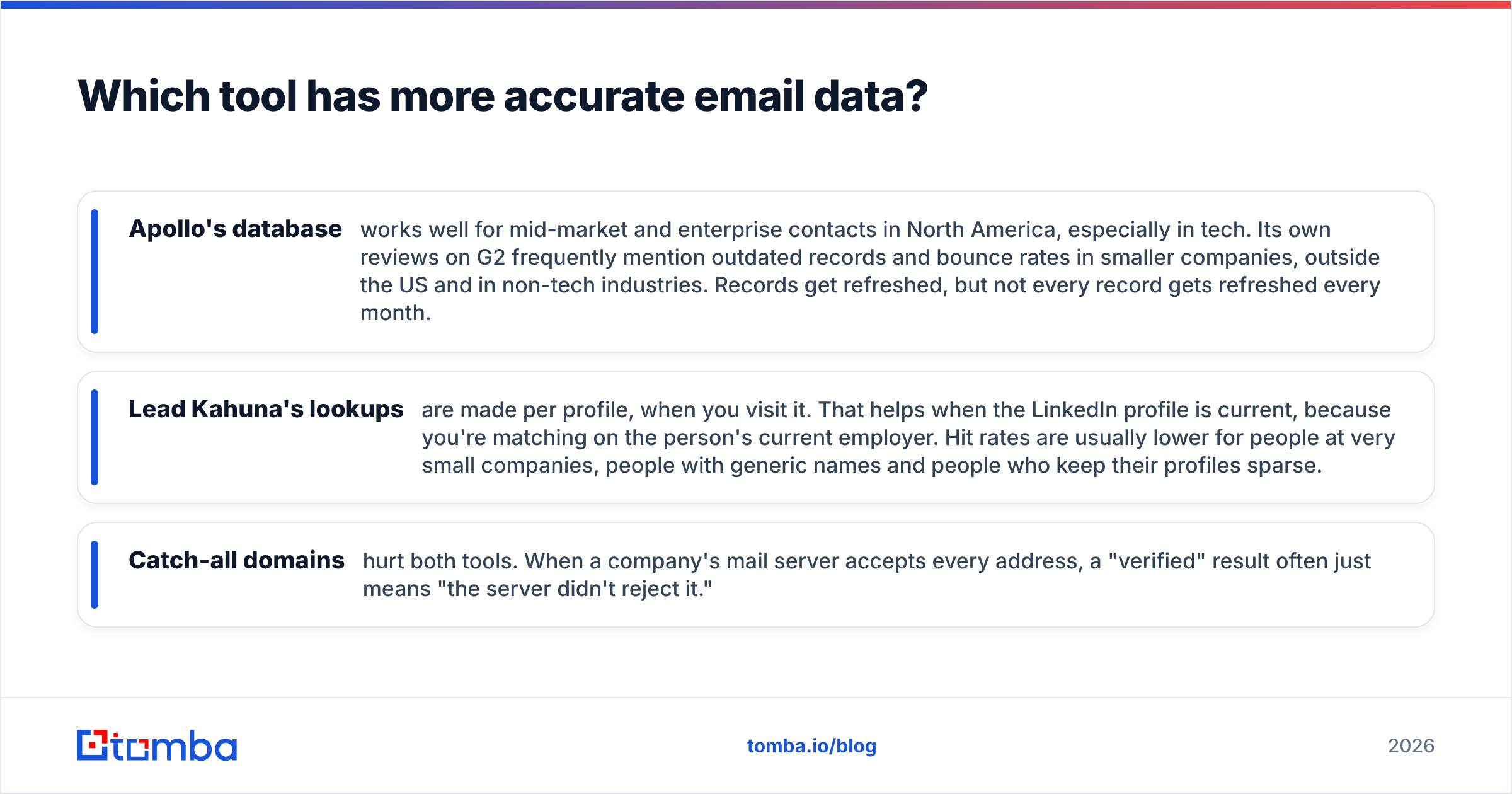
The main difference is scope. Lead Kahuna does one job: getting contact details from LinkedIn. Apollo tries to run your whole outbound motion. The table below compares them on what usually decides a purchase.
| Attribute | Lead Kahuna | Apollo.io |
|---|---|---|
| Product type | Chrome extension (LinkedIn contact extractor) | Full sales platform (database + engagement) |
| Primary data source | LinkedIn / Sales Navigator profiles you visit | Proprietary database with 200M+ contacts, plus extension |
| Prospect search | Relies on LinkedIn's search | Native filters: title, industry, headcount, tech, intent |
| Email sequencing | No | Yes, multi-step with A/B tests |
| Phone numbers | Yes, where available | Yes, mobile credits are limited by tier |
| CRM integration | CSV export | Native Salesforce, HubSpot and others |
| Pricing model | Credit packs / subscription | Per-seat monthly or annual |
| Entry price | Low; free trial credits | Free plan; paid from about $49/user/mo (annual) |
| Learning curve | Minutes | Days to weeks to set up well |
| Best for | LinkedIn-first individual prospectors | Teams running outbound at scale |

The feature gap is obvious. The more useful question is whether you'd use the extra features you pay for. Many teams buy Apollo for its database and extension, keep sending through Instantly, Smartlead or Outreach, and never open the sequencer. If that sounds like your team, most of the per-seat price goes to features you won't use.
Which tool has more accurate email data?#
In the Lead Kahuna vs Apollo.io data debate, neither tool wins everywhere. Be wary of any review that says otherwise. Accuracy varies a lot by region, company size and job function.

Here's what tends to hold up in practice:
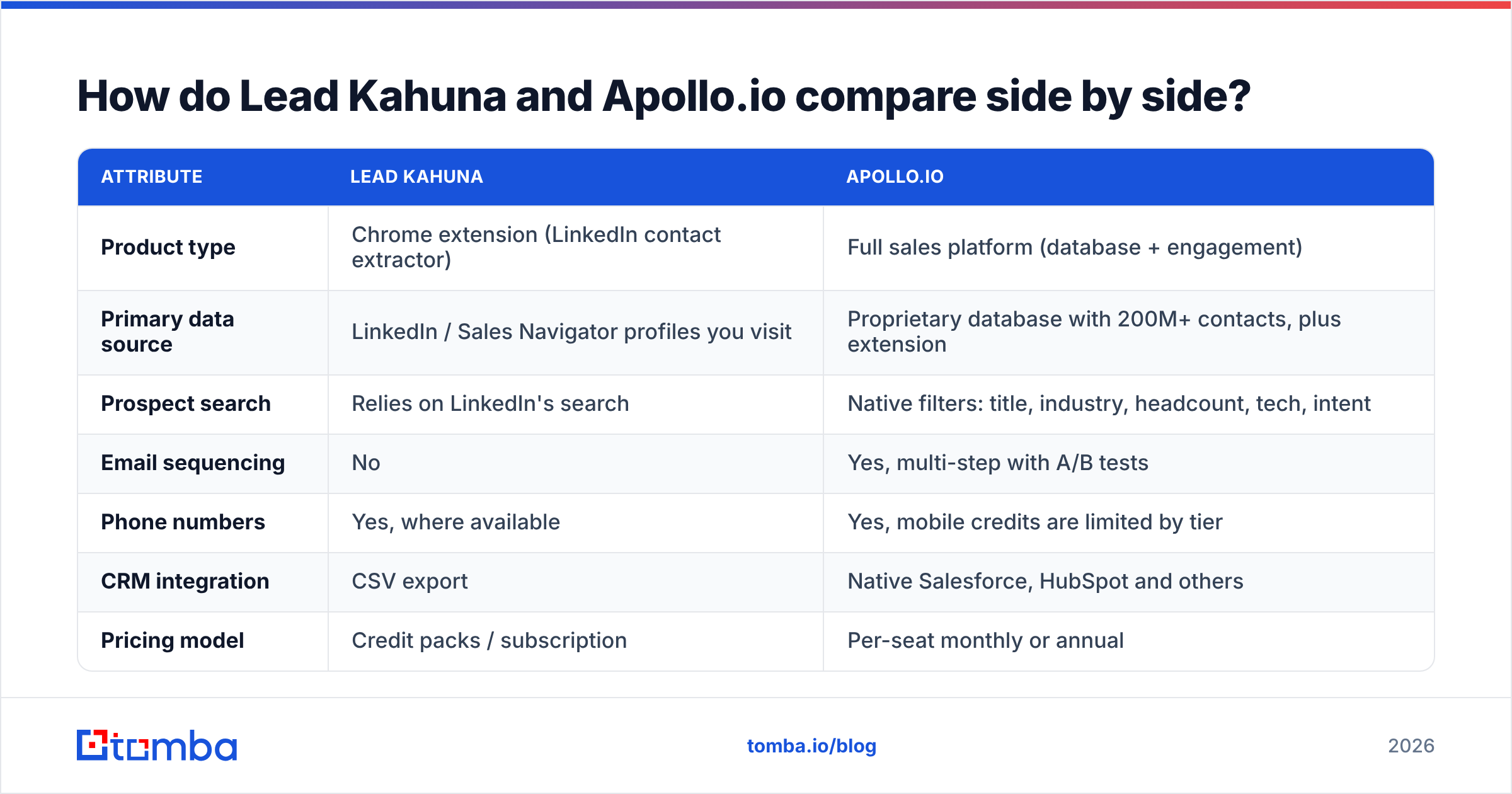
- Apollo's database works well for mid-market and enterprise contacts in North America, especially in tech. Its own reviews on G2 frequently mention outdated records and bounce rates in smaller companies, outside the US and in non-tech industries. Records get refreshed, but not every record gets refreshed every month.
- Lead Kahuna's lookups are made per profile, when you visit it. That helps when the LinkedIn profile is current, because you're matching on the person's current employer. Hit rates are usually lower for people at very small companies, people with generic names and people who keep their profiles sparse.
- Catch-all domains hurt both tools. When a company's mail server accepts every address, a "verified" result often just means "the server didn't reject it."
For either tool, pull 200 contacts from your real ICP, run them through a separate email verifier, and count the valid, risky and invalid results. That 30-minute test tells you more than any vendor's accuracy claim.

How much do Lead Kahuna and Apollo.io really cost?#
This is where the two differ most, and where people often compare the wrong numbers.
Lead Kahuna charges for the contacts you reveal. If you run 150 lookups a month, you pay for 150 lookups. There are no seats to count, which makes it cheap for one person and predictable for small agencies. The cost you don't see is time: each contact means visiting a LinkedIn profile, so building a list of 1,000 contacts is real manual work, and LinkedIn limits how much automated browsing it tolerates.
Apollo charges per seat, and each seat comes with a credit allowance. Three things can raise your total:
- Seat creep. Every SDR, AE and manager who needs access adds a seat, and higher tiers set a minimum number of seats.
- Mobile credits. Phone numbers use a separate, smaller credit pool. Teams that call a lot run out quickly.
- Annual lock-in. The best per-seat prices assume annual billing, so you pay for 12 months even if the fit turns out to be poor.
A rough example: a team of three on Apollo Professional billed annually pays about $2,800 or more a year before extra credits. The same three people using a credit-based finder and their existing sequencer could spend well under half that, if all they need is contact data.
Here's a quick way to decide which cost model suits you:
- Count the people who need access. If it's one or two, credit-based pricing almost always costs less.
- Count the contacts you need each month. Under a few hundred favours per-lookup pricing. Thousands a month favours a database with bulk export.
- Check whether you already own a sequencer. If you do, Apollo's engagement features overlap with something you pay for already.
- Price in verification. Budget separately for verifying every export, whichever source it comes from.
- Price in time. Assign an hourly cost to manual LinkedIn browsing. Cheap credits aren't cheap if a rep spends 10 hours on each list.
Is Lead Kahuna better than Apollo.io for LinkedIn prospecting?#
For pure LinkedIn prospecting done by one person, Lead Kahuna is often the simpler choice. You install it, open a profile, and get an address. You don't need onboarding, set up workspaces or map CRM fields. If you work carefully through a Sales Navigator lead list, it matches how you already work.
Apollo's Chrome extension also works on LinkedIn, and it adds enrichment from Apollo's database, one-click sequence enrolment and CRM sync. For team workflows that makes it more capable. For one person who only wants the email, the extra interface and features can get in the way.
If you prospect on LinkedIn a lot but also need bulk jobs and API access, a LinkedIn finder that belongs to a broader finding and verification toolset lets you mix manual work on single profiles with bulk runs on whole lists.
Is Apollo.io better than Lead Kahuna for scaling outbound?#
Yes, if you're going to use what Apollo includes. Apollo is clearly the better option when:
- You build lists from firmographic filters rather than hand-picked profiles
- You want one system for data, sequences, calls and reporting
- You manage a team and need shared lists, permissions and activity dashboards
- You rely on intent or technographic signals to prioritise accounts
It isn't clearly better when your stack is already set up. Plenty of teams move away from Apollo once they realise they're paying platform prices for a contact database. If that's your situation, it's worth looking at a dedicated Apollo alternative built around finding and verifying data rather than engagement.
What are the pros and cons of each tool?#
Lead Kahuna
- Pros: very quick to learn, pay only for what you use, fits LinkedIn-first workflows, returns both work and personal emails, no seat licences
- Cons: no native prospect database, depends on LinkedIn being available, slow to scale, basic export and integration options, no built-in verification you'd rely on at volume
Apollo.io
- Pros: large searchable database, strong filters, sequencing and dialer included, native CRM sync, generous free plan for testing
- Cons: per-seat pricing adds up, data quality varies outside its strongest segments, mobile credits are limited, the platform can feel heavy for small teams, best prices require annual commitment

Which one should you choose in 2026?#
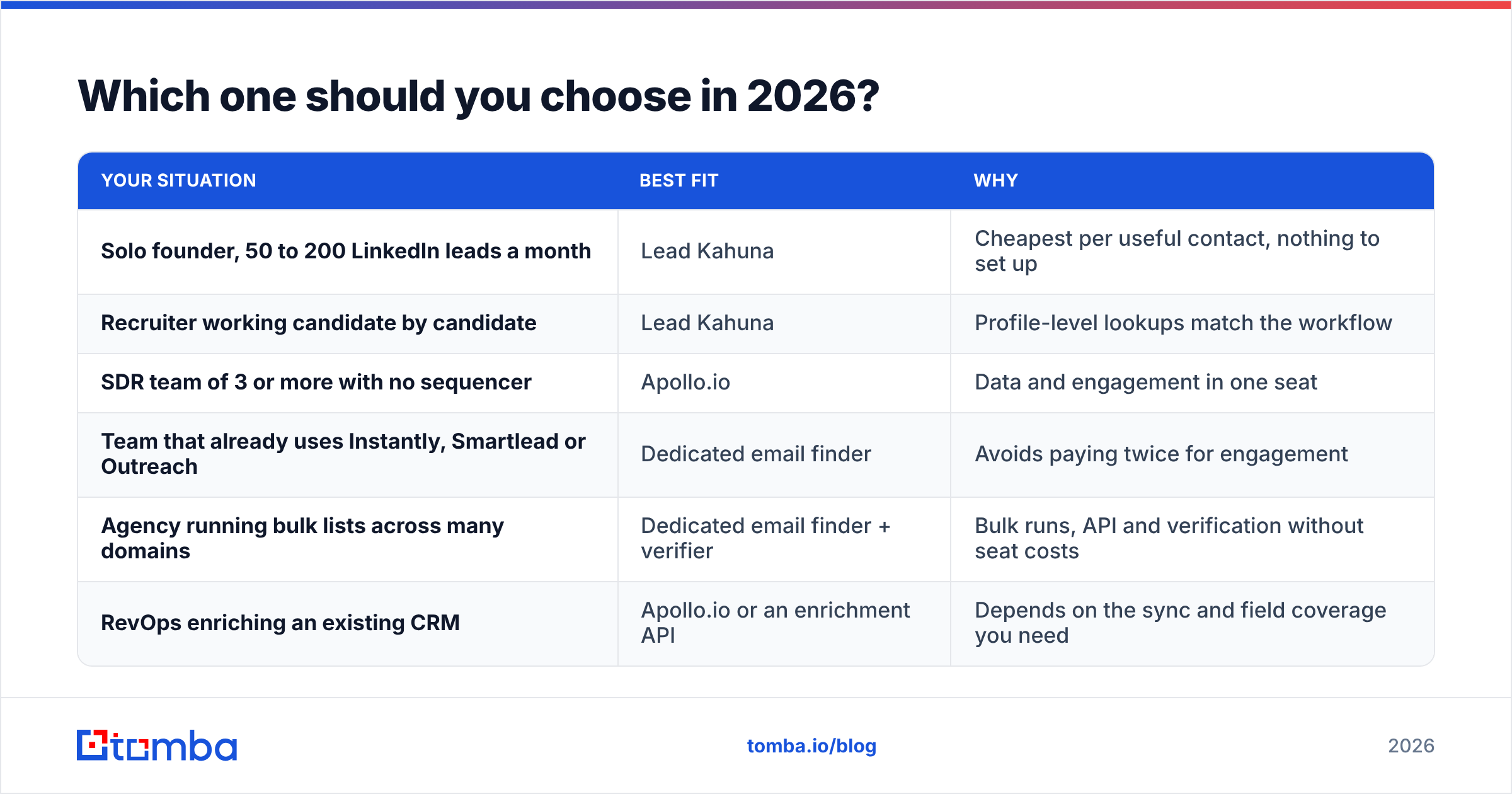
Match the tool to the job you actually do. For most readers, Lead Kahuna vs Apollo.io comes down to team size and how many contacts you need.
| Your situation | Best fit | Why |
|---|---|---|
| Solo founder, 50 to 200 LinkedIn leads a month | Lead Kahuna | Cheapest per useful contact, nothing to set up |
| Recruiter working candidate by candidate | Lead Kahuna | Profile-level lookups match the workflow |
| SDR team of 3 or more with no sequencer | Apollo.io | Data and engagement in one seat |
| Team that already uses Instantly, Smartlead or Outreach | Dedicated email finder | Avoids paying twice for engagement |
| Agency running bulk lists across many domains | Dedicated email finder + verifier | Bulk runs, API and verification without seat costs |
| RevOps enriching an existing CRM | Apollo.io or an enrichment API | Depends on the sync and field coverage you need |
A common setup in 2026 is to keep sequencing in a tool you already like, and pair it with a data layer you can swap out. That setup lets you run a trial of Lead Kahuna, Apollo or anything else against your own ICP without rebuilding your outbound stack each time.
Whatever you choose, keep these habits:
- Verify before every send. Addresses go stale as people change jobs, often within a year.
- Watch bounce rate. Keep hard bounces under 2% or your sender reputation will suffer.
- Re-test your source every quarter. Data quality shifts, and last year's best source may not be this year's.
- Don't store data you don't use. Export only what you'll contact within a few weeks.
Where does Tomba fit between the two?#
Tomba sits in the gap between a single-purpose LinkedIn extension and a full sales platform. It's an email finder first: you can search by domain, by name plus company, or directly from LinkedIn, then verify the results in the same account. It has a Chrome extension, bulk uploads, Google Sheets and Excel add-ins, and an API, so you can use it for one-off lookups and for 10,000-row enrichment jobs.
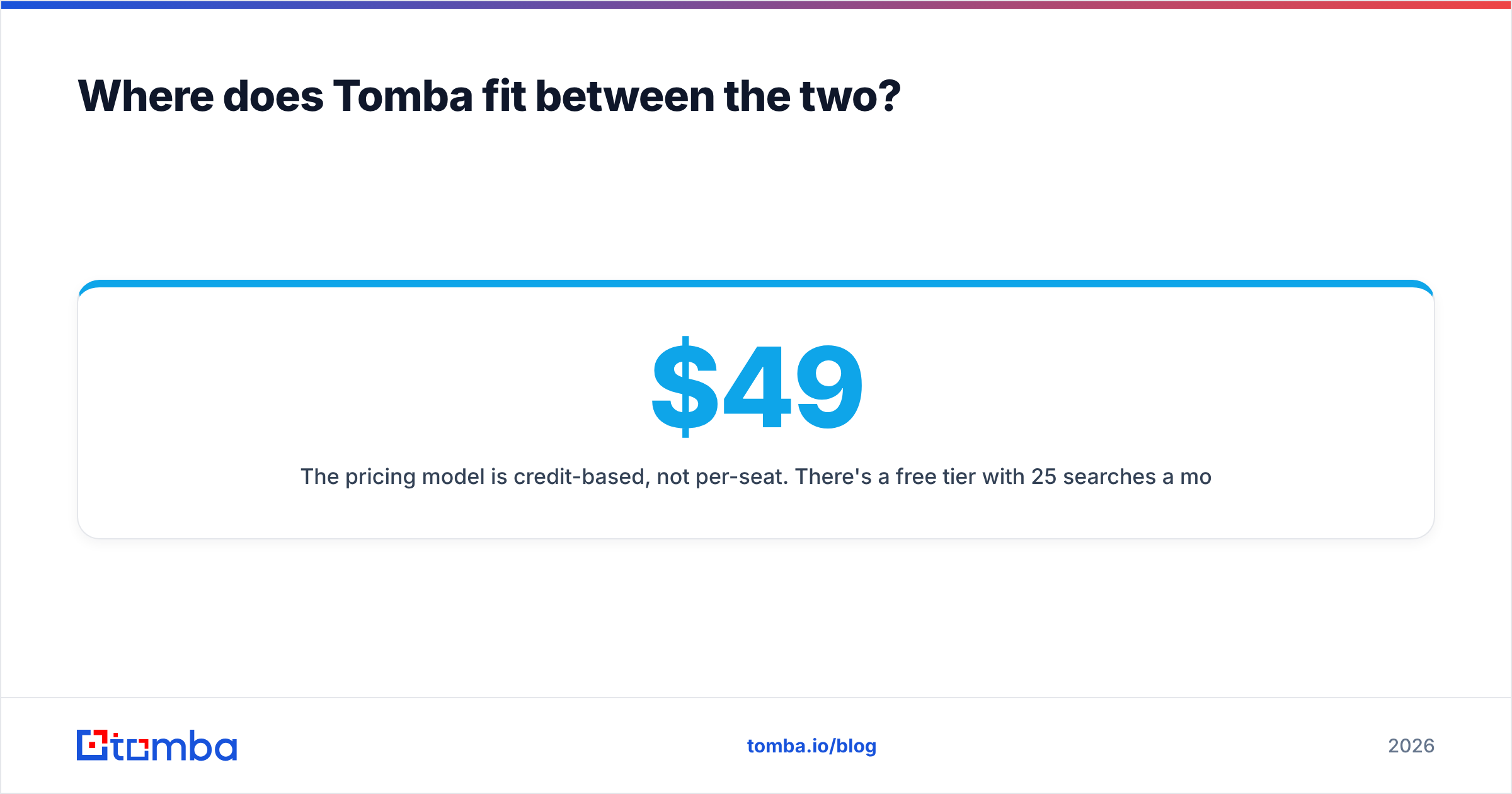
The pricing model is credit-based, not per-seat. There's a free tier with 25 searches a month, then Starter at $49/mo, Growth at $99/mo, Pro at $249/mo, and custom Enterprise plans. That makes it a sensible choice if you've outgrown clicking profiles one at a time but don't want to pay for sequencing features you'll never use.
If you need verified professional email addresses and want to keep the outreach tool you already have, start with the Tomba Email Finder. Run your own ICP sample through the free tier, compare the valid rate with what you get from Lead Kahuna or Apollo, and let those results decide.
Related guides#
// get started
Find, verify and enrich your first contacts today
Start on the free plan with 25 searches a month, then scale when your team is ready.
Free plan · No credit card required · GDPR & CCPA
// about the author