Lead List Providers in 2026: 8 Options Compared on Price & Data
Buying leads is easy. Buying leads that don't bounce is harder. Here's how 8 lead list providers compare on pricing model, data freshness, and coverage, plus the checks to run before you spend a dollar.
TL;DR
- Lead list providers fall into four types: enterprise intelligence platforms, all-in-one prospecting suites, pay-per-contact databases, and on-demand email finders. Your budget and how much outbound you send should decide which type you buy from.
- Before comparing brand names, compare pricing models. An annual contract, a per-seat plan, and pay-as-you-go credits can cost 10x apart for the same 2,000 contacts.
- Data decay is the cost vendors don't mention. B2B contact data goes stale fast, so a list you bought six months ago needs re-verifying before you send to it.
- Ask every vendor the same five questions: verification method, refresh cadence, catch-all handling, compliance posture, and whether credits come back for bounces.
- If you need targeted contacts on demand more than you need a huge static list, an email finder plus a verifier usually beats buying a pre-built list.
What are lead list providers?#
Lead list providers sell you contact and company data for sales and marketing outreach. That means names, job titles, work emails, direct dials, company size, industry, and sometimes technographic or intent signals. You describe your ideal customer ("VP Finance, SaaS, 50–500 employees, North America"), and the provider returns matching records as a CSV, a CRM sync, or an API response.
The category covers very different businesses. Some are enterprise intelligence platforms with intent data and org charts. Some are prospecting suites that bundle the database with sequencing. Some sell records by the contact with no subscription. Some don't sell static lists at all and instead find and verify emails when you ask for them.
That spread is why "which lead list provider is best?" has no single answer. A three-person agency sending 500 emails a week and a 40-rep SDR team running multi-channel outbound should not buy from the same vendor.
What types of lead list providers exist?#
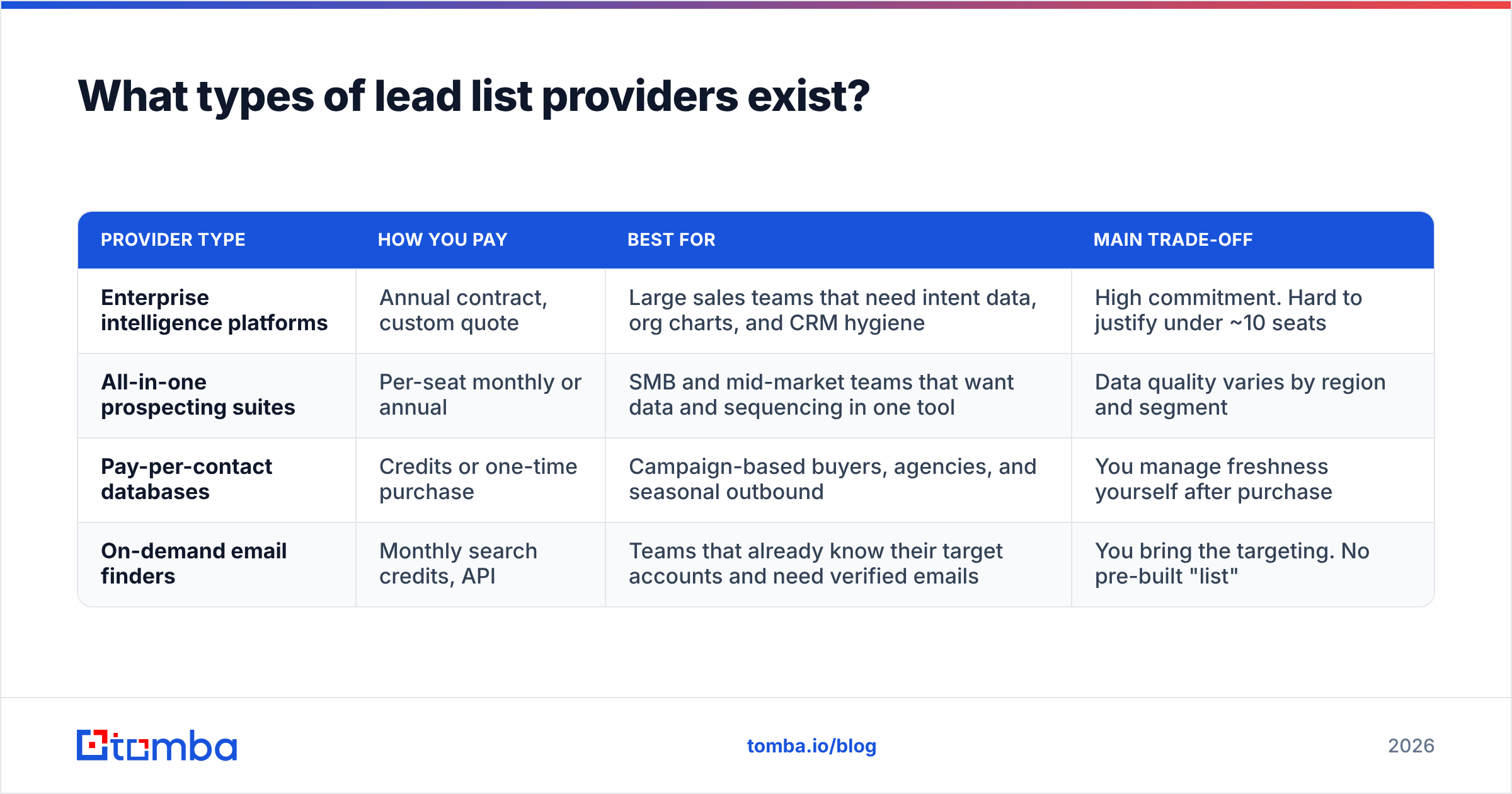
Sort by model first and brand second. Most buying mistakes happen when a team pays for a model it doesn't need, such as an annual enterprise contract for a use case that credits would cover.
| Provider type | How you pay | Best for | Main trade-off |
|---|---|---|---|
| Enterprise intelligence platforms | Annual contract, custom quote | Large sales teams that need intent data, org charts, and CRM hygiene | High commitment. Hard to justify under ~10 seats |
| All-in-one prospecting suites | Per-seat monthly or annual | SMB and mid-market teams that want data and sequencing in one tool | Data quality varies by region and segment |
| Pay-per-contact databases | Credits or one-time purchase | Campaign-based buyers, agencies, and seasonal outbound | You manage freshness yourself after purchase |
| On-demand email finders | Monthly search credits, API | Teams that already know their target accounts and need verified emails | You bring the targeting. No pre-built "list" |
The four models also differ in who does the work:
- Enterprise platforms do the most for you. Filters, intent signals, and enrichment workflows come built in, and the price reflects that.
- Prospecting suites trade depth for convenience. One login covers search, export, and sending, which works well until you need data the suite doesn't cover well.
- Pay-per-contact databases give you control over spend. You buy exactly the segment you need and nothing more.
- Email finders flip the workflow. You start from accounts you already chose, not from a vendor's database. Accuracy usually improves because each email is found and verified close to the moment you send.
Which lead list providers are worth considering in 2026?#
Below are eight providers that come up most often in B2B buying cycles. Each one fits a specific situation. Treat pricing as directional and confirm on the vendor's own page, because plans change often and many vendors quote custom prices.
ZoomInfo#
ZoomInfo is the reference point for enterprise B2B data. It offers deep North American coverage, org charts, intent signals, and strong CRM enrichment. The trade-off is commercial: annual contracts, custom pricing, and a total cost that small teams struggle to justify. Pick it when you have a RevOps function that will actually use the intent and enrichment layers, not just the export button.
Apollo.io#
Apollo combines a large contact database with sequencing, dialing, and a Chrome extension, and it has a usable free plan. For early-stage teams that value one tool over best-in-class parts, it's hard to beat on convenience. Many teams run Apollo exports through a separate verifier before sending, especially outside the US. If you want to see how others handle that gap, our Apollo alternative breakdown covers it.
Cognism#
Cognism is known for European coverage and phone-verified mobile numbers, with a heavy focus on GDPR-aware data handling. If your outbound targets the UK, DACH, or the Nordics and relies on calling, it belongs on your shortlist. Pricing is custom and annual.
UpLead#
UpLead sells on accuracy. It verifies emails in real time at the moment of export and offers a free trial with credit-based plans. It's a clean fit for SMB teams that want a straightforward search-filter-export workflow without an enterprise contract.
Lusha#
Lusha is built around a browser extension and quick contact reveals from LinkedIn and company websites. It works well for account executives who prospect a handful of contacts at a time. It works less well for bulk list building, where per-seat credit limits add up.
Seamless.AI#
Seamless.AI searches for contacts in real time rather than relying only on a stored database. It has a free tier and quoted paid plans. Results can be broad, so plan to verify before sending at volume.
BookYourData#
BookYourData is a pay-per-contact database with self-serve list building. You filter by industry, title, location, and company size, see counts before paying, and buy only the records you need, with no subscription required. It also promotes an accuracy guarantee on delivered contacts. That makes it a strong option for agencies and campaign-based teams that want predictable per-list costs instead of an ongoing seat license.
Tomba#
Tomba approaches the problem from the email-finder side. You don't buy a static list. You look up verified professional emails by name and company, pull every public email on a domain with domain search, or run thousands at once with the bulk email finder. A free tier includes 25 searches a month, and paid plans start at $49/mo. It's the best fit when you already know your target accounts and want each address found and checked close to send time.
How do lead list providers compare side by side?#
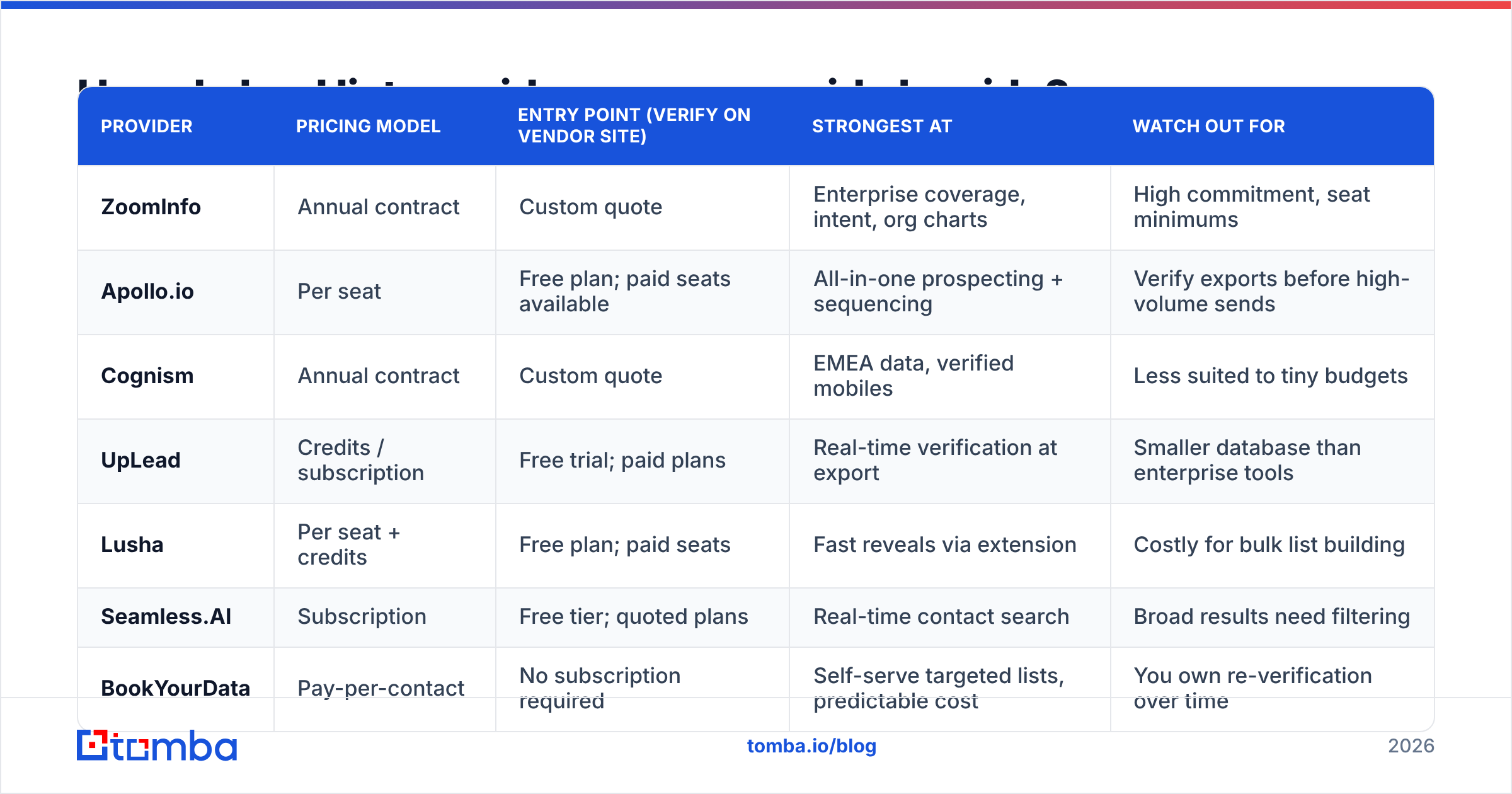
| Provider | Pricing model | Entry point (verify on vendor site) | Strongest at | Watch out for |
|---|---|---|---|---|
| ZoomInfo | Annual contract | Custom quote | Enterprise coverage, intent, org charts | High commitment, seat minimums |
| Apollo.io | Per seat | Free plan; paid seats available | All-in-one prospecting + sequencing | Verify exports before high-volume sends |
| Cognism | Annual contract | Custom quote | EMEA data, verified mobiles | Less suited to tiny budgets |
| UpLead | Credits / subscription | Free trial; paid plans | Real-time verification at export | Smaller database than enterprise tools |
| Lusha | Per seat + credits | Free plan; paid seats | Fast reveals via extension | Costly for bulk list building |
| Seamless.AI | Subscription | Free tier; quoted plans | Real-time contact search | Broad results need filtering |
| BookYourData | Pay-per-contact | No subscription required | Self-serve targeted lists, predictable cost | You own re-verification over time |
| Tomba | Monthly credits + API | Free (25 searches/mo); Starter $49/mo | On-demand email finding + verification | You supply the target accounts |
For third-party user reviews, G2's lead intelligence category is a useful cross-check. Weight recent reviews from companies your size over overall star averages.
Why does data freshness matter more than database size?#
Every provider's homepage leads with a big number: "200M+ contacts," "100M+ emails." That number tells you almost nothing about whether the 2,000 records you export this week will reach an inbox.
B2B contact data decays all the time. People change jobs, get promoted, and leave companies. Companies rebrand, get acquired, and switch email providers. A record that was accurate at collection can be dead a few months later. The real questions are:
- When was this specific record last verified? Ask whether the vendor verifies at export, on a schedule, or only at collection.
- How are catch-all domains handled? Catch-all servers accept every address during an SMTP check, so a "valid" label on a catch-all address is often a guess. Good vendors flag these separately. A catch-all verifier can score them further.
- What happens when an email bounces? Credit refunds for hard bounces show that the vendor stands behind its data.
The practical rule: run every purchased list through an email verifier before the first send, whichever vendor you bought from. It costs little compared with a burned sending domain.

What does a bad lead list actually cost you?#
The invoice is the smallest part of the cost. A list with a high invalid rate does damage in three places.
- Sender reputation. Mailbox providers watch bounce rates closely. A campaign that bounces heavily can push your domain toward spam folders for weeks, which also hurts the good contacts on your list.
- Rep time. Every wrong contact is a researched, personalized email or a dial that goes nowhere. At SDR salary rates, a bad list costs far more in hours than in data fees.
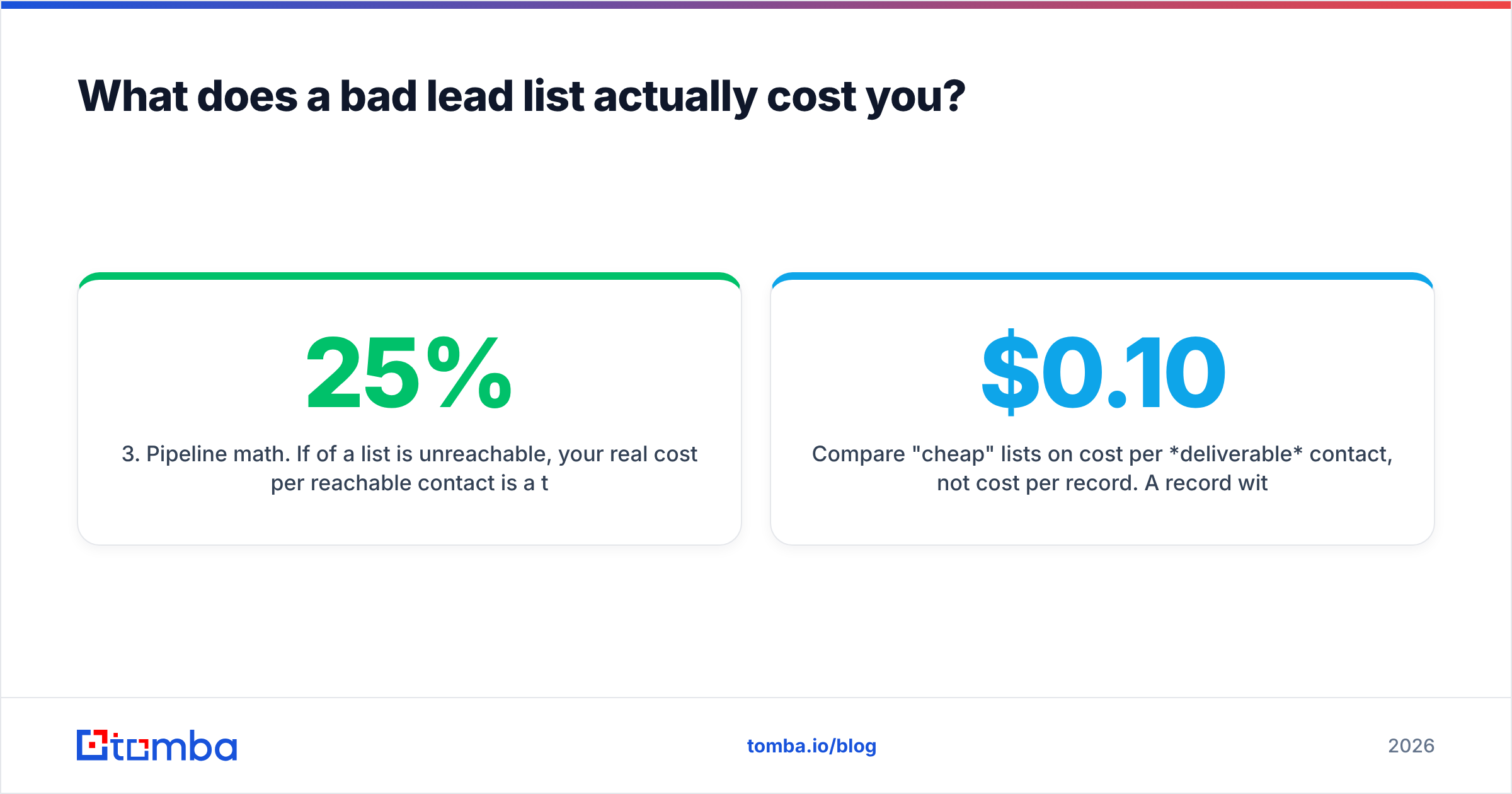
- Pipeline math. If 25% of a list is unreachable, your real cost per reachable contact is a third higher than the sticker price, and your conversion benchmarks are wrong from the start.
Compare "cheap" lists on cost per deliverable contact, not cost per record. A $0.10 record with a 30% bounce rate costs more per reachable person than a $0.25 record with a 3% bounce rate, once you count the reputation damage.
Is buying a lead list legal and compliant?#
Usually yes, if the vendor collects data lawfully and you use it correctly. The rules depend on where your recipients are.
- United States (CAN-SPAM): B2B cold email is allowed if you include a working opt-out, a physical address, and honest subject lines.
- EU and UK (GDPR): B2B outreach typically relies on "legitimate interest." That requires relevant targeting, transparency about where you got the data, and quick opt-out handling. Some countries add stricter e-privacy rules on top.
- Canada (CASL): Stricter than CAN-SPAM, with narrower implied-consent conditions.
Ask each provider how it sources data, whether it honors opt-out and deletion requests across its whole database, and whether it will sign a data processing agreement. A vendor that can't answer clearly is a legal risk, however cheap its records are.
How should you choose a lead list provider?#
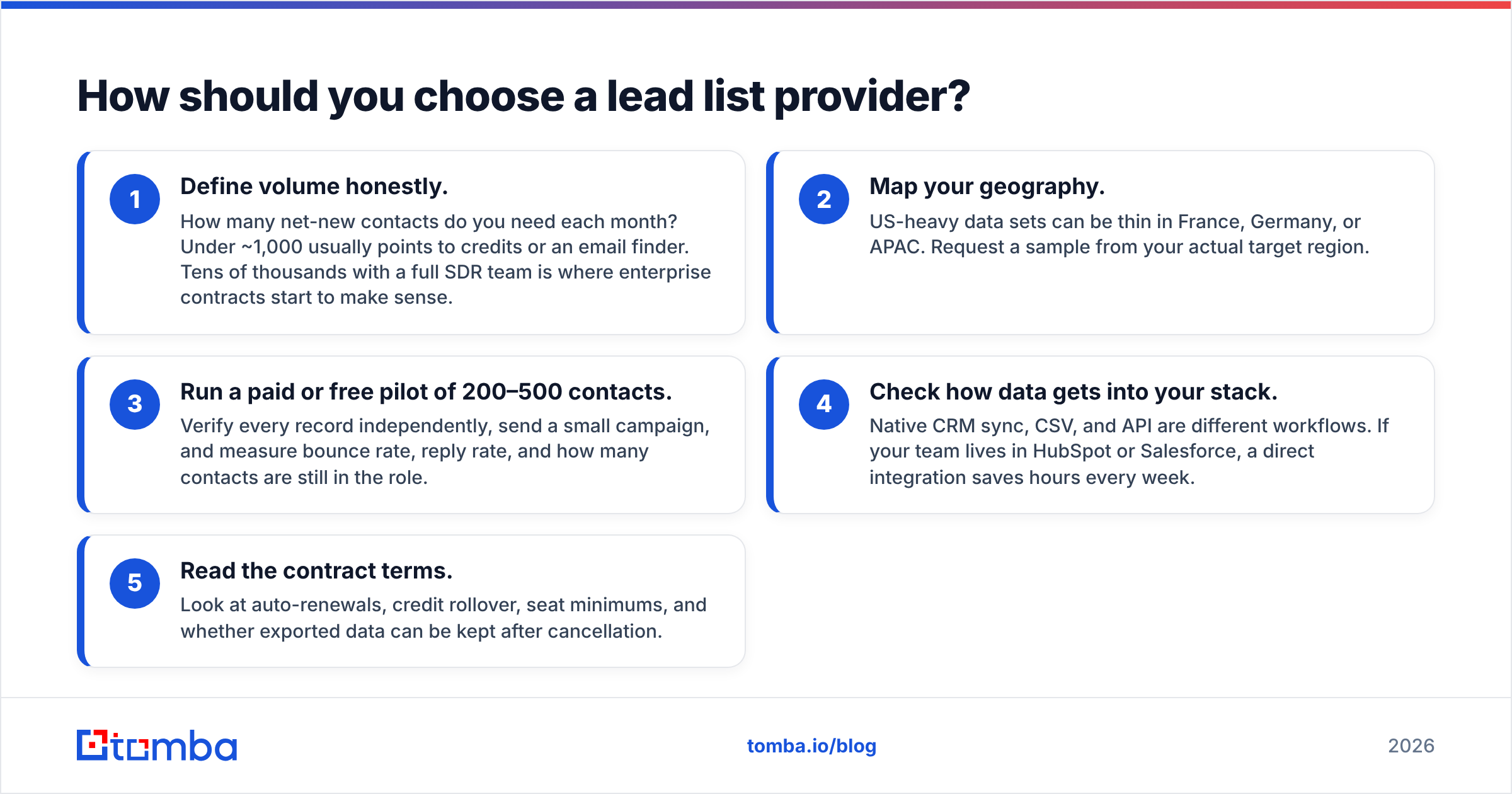
Use this sequence. It filters out most bad fits before you sit through a single demo.
- Define volume honestly. How many net-new contacts do you need each month? Under ~1,000 usually points to credits or an email finder. Tens of thousands with a full SDR team is where enterprise contracts start to make sense.
- Map your geography. US-heavy data sets can be thin in France, Germany, or APAC. Request a sample from your actual target region.
- Run a paid or free pilot of 200–500 contacts. Verify every record independently, send a small campaign, and measure bounce rate, reply rate, and how many contacts are still in the role.
- Check how data gets into your stack. Native CRM sync, CSV, and API are different workflows. If your team lives in HubSpot or Salesforce, a direct integration saves hours every week.
- Read the contract terms. Look at auto-renewals, credit rollover, seat minimums, and whether exported data can be kept after cancellation.
For a neutral view of how analysts frame the wider sales-intelligence market, Gartner's sales technology research is worth skimming before larger purchases.
When should you use an email finder instead of buying a list?#
Buying a list assumes the vendor's database already contains your best prospects. Often that's true. But in many B2B motions, the better approach is account-first:
- You already know your target accounts from CRM data, a closed-lost list, event attendees, or your own research.
- You need the right person at each account, found and verified right before you reach out.
- Your volume is steady, not a one-off blast.
In that setup, an email finder removes most of the decay problem. Each address is looked up and verified close to send time instead of sitting in a CSV for months. Pairing it with data enrichment fills in title, company size, and social profiles, which gives you most of what a purchased list offers with fresher data.
Many teams use both approaches. They buy a targeted segment from a database provider for a campaign, then use an email finder and verifier to fill gaps, replace bounced contacts, and keep the list current.
Which lead list provider is right for you?#
A quick match-up:
- Enterprise team, big budget, intent data needed: ZoomInfo or Cognism (Cognism for EMEA).
- Startup that wants one tool for data and sequencing: Apollo.
- SMB that wants verified exports without a long contract: UpLead.
- Agency or campaign-based buyer who wants predictable per-list costs: BookYourData.
- AE prospecting a few accounts a day from LinkedIn: Lusha.
- Team with defined target accounts that needs fresh, verified emails on demand: Tomba.
Whichever you choose, the same rules apply: pilot before you commit, verify before you send, and measure cost per deliverable contact rather than cost per record.
Ready to build lists that don't bounce?#
If you already know which companies you want to reach, you don't need a stale spreadsheet. Tomba Email Finder finds professional email addresses by name, domain, or company, and verifies them before they reach your sequence. Start with 25 free searches a month, then scale on plans from $49/mo when you're ready. See Tomba pricing to pick the tier that matches your outbound volume.
Related guides#
// get started
Find, verify and enrich your first contacts today
Start on the free plan with 25 searches a month, then scale when your team is ready.
Free plan · No credit card required · GDPR & CCPA
// about the author