Lead Qualification Tools: 9 Options Compared for B2B Teams in 2026
Most lead qualification tools score bad data very confidently. Here is how 9 popular options compare on scoring, intent, routing, and price, and how to build a stack that actually tells reps who to call.
TL;DR
- Lead qualification tools fall into four layers: data and enrichment, scoring, intent signals, and routing or conversational qualification. Most teams need two or three of them. Very few need all four.
- If you already run a CRM, try its native scoring before you buy anything else. HubSpot and Salesforce both include predictive scoring in their higher tiers.
- Intent platforms like 6sense and ZoomInfo are powerful, but they're priced for enterprise. If you're under 20 reps, check whether a five- or six-figure contract actually pays for itself.
- Scoring can't be better than the contact data underneath it. Missing emails, bounced addresses, and empty firmographic fields will quietly break every model on this list.
- Start with clean, enriched records. Next, add scoring. Add intent and routing only once you have more inbound volume than your team can handle.
What are lead qualification tools?#
Lead qualification tools help you decide which prospects deserve a rep's time, and in what order. They take raw leads, such as form fills, list imports, website visitors, or outbound targets, and add a judgment on top: is this a fit, is this person ready to buy, and who should handle them?
"Lead qualification tool" isn't one product category. It's an umbrella over four jobs that different vendors solve:
- Data and enrichment. Fill in the missing fields, like job title, company size, industry, and a working email address. You can't judge fit without these.
- Scoring. Turn those fields plus behavior, like page views and email clicks, into a number or a tier. Lead scoring can be rules-based or predictive.
- Intent signals. Find accounts that are researching your category somewhere else on the web before they ever fill out your form.
- Routing and conversational qualification. Get the qualified lead to the right rep fast, often through a scheduler or chat flow that asks the qualifying questions for you.
When a vendor says it "does lead qualification," first ask which of these four jobs it actually covers. Many tools cover one layer well and simply connect to the others.
Which qualification frameworks should your tool support?#
Software only automates a framework you've already agreed on. Choose the framework first, then check whether your tool can capture the fields it depends on.
| Framework | What it checks | Best for | Fields your tool must capture |
|---|---|---|---|
| BANT | Budget, Authority, Need, Timeline | Transactional or mid-market sales | Company size, job title/seniority, stated timeline |
| CHAMP | Challenges, Authority, Money, Prioritization | Consultative sales that start with pain | Pain-point form fields, seniority, deal priority |
| MEDDIC / MEDDPICC | Metrics, Economic buyer, Decision criteria and process, Pain, Champion | Enterprise, multi-stakeholder deals | Buying committee contacts, org chart, deal notes |
| GPCTBA/C&I | Goals, Plans, Challenges, Timeline, Budget, Authority, Consequences and Implications | Inbound-heavy teams with long nurture cycles | Behavioral data, content engagement, lifecycle stage |
| ICP fit + intent | Firmographic fit multiplied by buying signals | Outbound and ABM teams | Industry, headcount, tech stack, intent topics |
Here's the practical takeaway. BANT and ICP-fit scoring can mostly be automated from enriched data. MEDDIC can't. It needs a rep on a call, so a tool can only give that rep better context before the call. Keep that limit in mind when a vendor promises "automated MEDDIC."
How do the top lead qualification tools compare?#
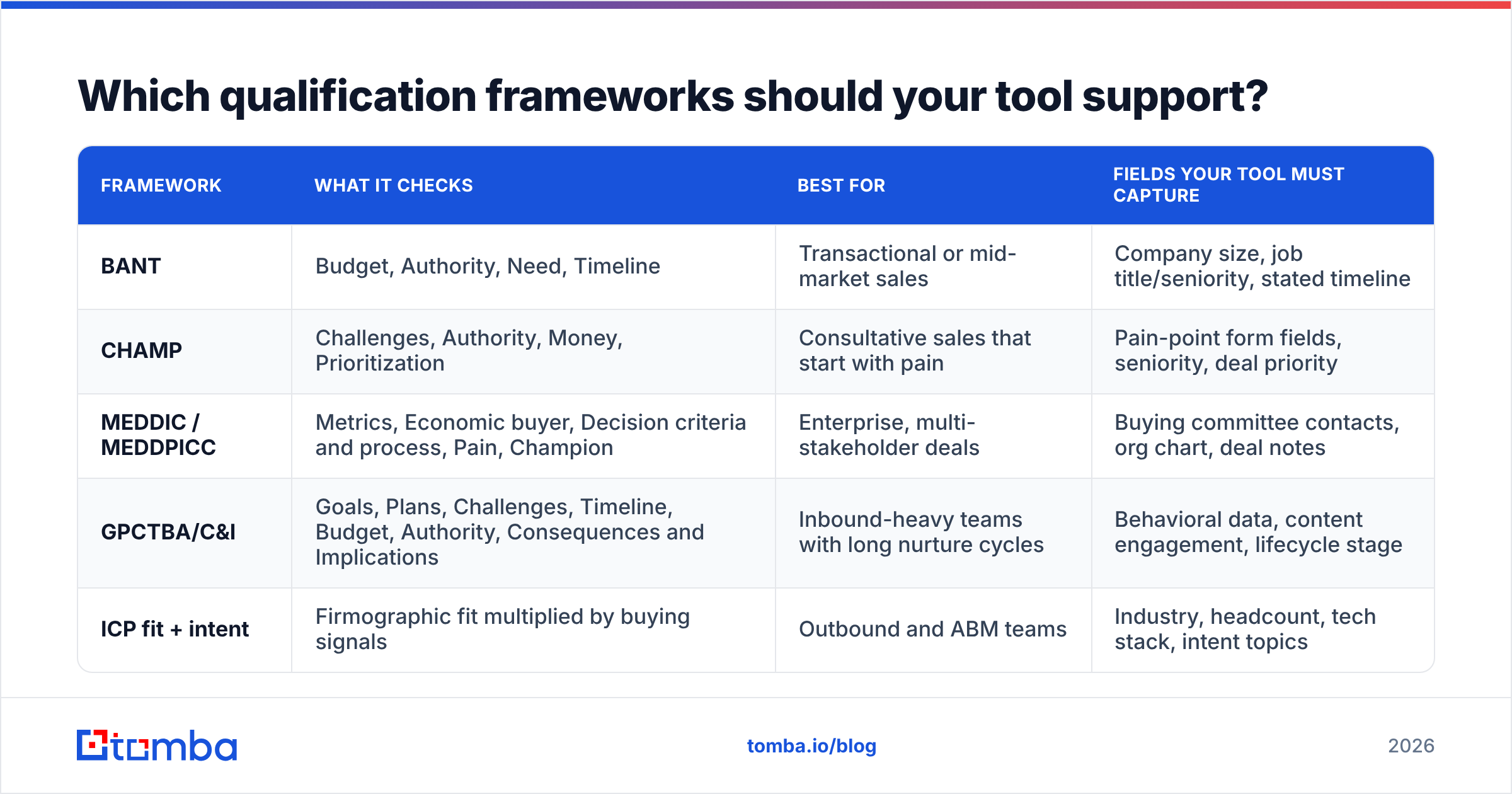
Below are nine tools that B2B teams commonly consider, grouped by the layer they're strongest in. Pricing changes often and many vendors quote custom deals, so treat the figures as directional and confirm them on each vendor's pricing page.
| Tool | Primary layer | Scoring type | Intent data | Starting price (approx.) | Best fit |
|---|---|---|---|---|---|
| HubSpot | CRM + scoring | Rules + predictive (higher tiers) | Limited, plus Breeze Intelligence add-on | Free CRM; scoring in paid Marketing/Sales Hub tiers | SMB and mid-market already on HubSpot |
| Salesforce (Einstein) | CRM + scoring | Predictive | Via partners | Included in higher Sales Cloud editions | Salesforce-native orgs with volume |
| 6sense | Intent + scoring | Predictive account scoring | Yes, core strength | Free tier; paid plans quote-based | ABM teams, enterprise |
| ZoomInfo | Data + intent | Rules-based via workflows | Yes | Quote-based, annual contracts | Large outbound teams |
| Apollo.io | Data + scoring + sequencing | Rules + AI scoring | Basic | Free plan; paid from ~$49/user/mo | Startups and SMB outbound |
| MadKudu | Predictive scoring | Predictive fit + behavior | Via integrations | Quote-based | PLG and high-volume inbound SaaS |
| Chili Piper | Routing + scheduling | Qualification rules on forms | No | Per-seat, published plans | Inbound demo-request teams |
| Qualified | Conversational qualification | Rules + AI agent | Integrates with 6sense and others | Quote-based | Salesforce shops with high web traffic |
| Tomba | Data + enrichment + verification | Not a scoring tool; feeds scoring | No | Free (25 searches/mo); Starter $49/mo | Any team whose CRM has missing or unverified contacts |
A few notes on the table:
- HubSpot is the easiest place to begin. If your contacts already live in HubSpot, its scoring properties let you build fit and engagement scores with no extra vendor. You can see the current tiers at hubspot.com.
- Salesforce Einstein works well when you have enough historical closed-won data to train on. With a thin history, predictive scoring is mostly guessing. Details are on salesforce.com.
- 6sense is the strongest option here for account-level intent and buying-stage prediction. It has the price, setup time, and RevOps workload to match.
- Apollo combines a database, basic scoring, and sequencing, which is why cash-conscious teams like it. The trade-off is data accuracy that varies by region and segment. If you're comparing options, our Apollo alternative breakdown covers that trade-off.
- Tomba belongs on this list as the data layer, not as a scoring engine. It finds and verifies contact emails and enriches records, so the scoring tools above have real fields to work with.

Why do lead qualification tools fail even when the model is good?#
Most failed qualification setups don't fail because of the algorithm. They fail because of the inputs. A predictive model trained on a CRM where 30% of contacts have no job title and 15% of emails bounce will confidently rank the wrong people.
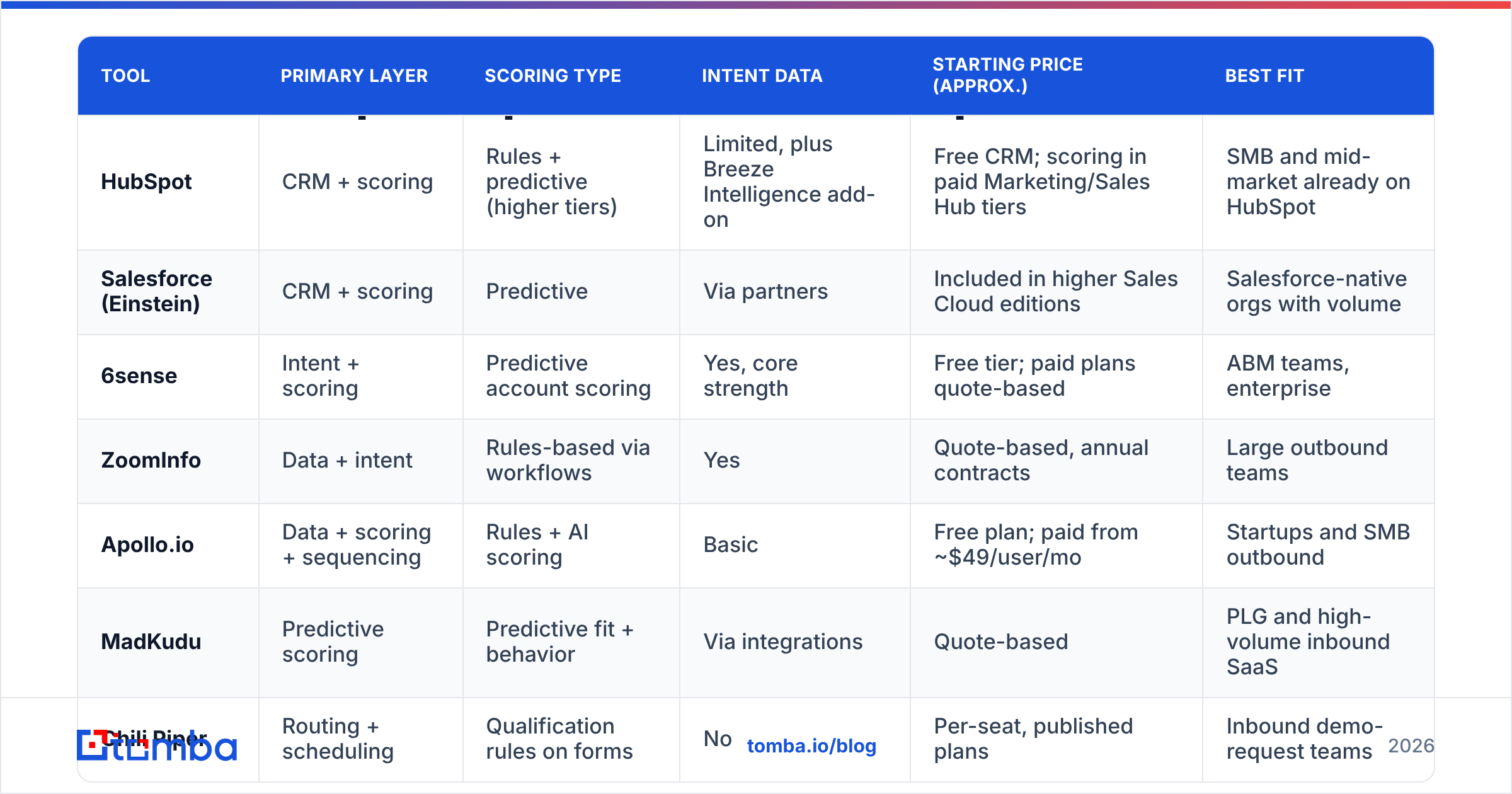
These are the common failure modes, with a fix for each:
- Empty firmographic fields. A lead with no company size or industry falls into a default bucket, which is usually "low fit." You lose good leads without noticing. Fix: run data enrichment at the point of capture, not in a quarterly cleanup.
- Unverified emails inflating engagement scores. Leads with invalid addresses never open anything. Your engagement model then learns that a whole segment "doesn't engage," when really the emails never arrived. Fix: verify before you score. An email verifier step in the workflow removes that noise.
- Personal emails on B2B forms. A Gmail signup can't be matched to a company, so fit scoring can't run on it. Fix: ask for the work email, or run a reverse lookup to find the company behind the person.
- No agreed MQL definition. If marketing and sales disagree on what a marketing qualified lead is, no tool can fix that. Fix: write the definition down, put a threshold on it, and review conversion by score band every month.
- Scoring decay not configured. Someone who downloaded an ebook 14 months ago shouldn't still be marked "hot." Fix: make behavior points expire, usually after 30 to 90 days depending on your sales cycle.
Is a predictive scoring tool better than rules-based scoring?#
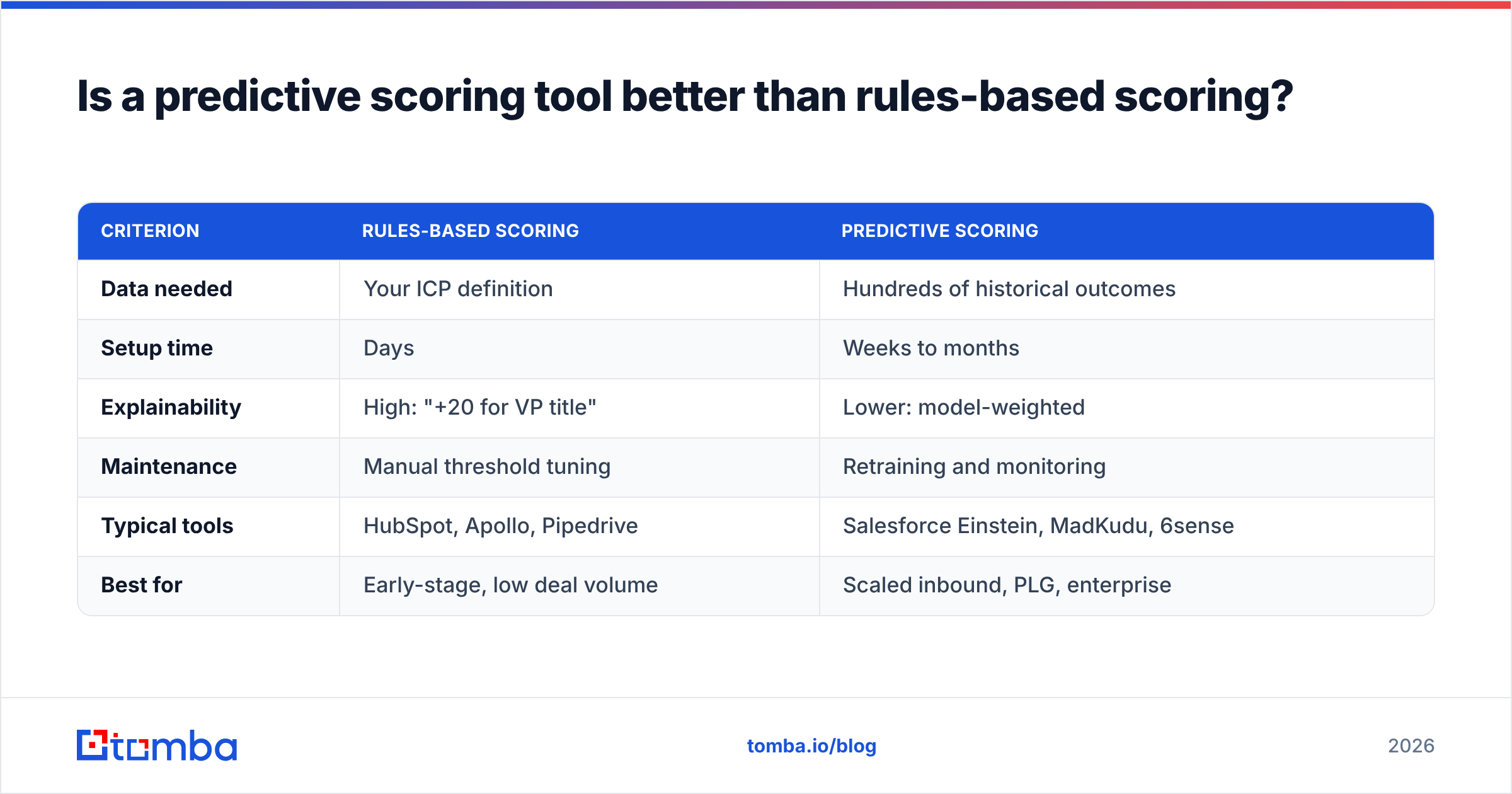
Not automatically. Predictive scoring needs volume: enough closed-won and closed-lost outcomes for the model to learn which patterns matter. As a rough rule, if you close fewer than a few hundred deals a year, a well-maintained rules-based score is often just as accurate. It's also easier for your reps to trust.
| Criterion | Rules-based scoring | Predictive scoring |
|---|---|---|
| Data needed | Your ICP definition | Hundreds of historical outcomes |
| Setup time | Days | Weeks to months |
| Explainability | High: "+20 for VP title" | Lower: model-weighted |
| Maintenance | Manual threshold tuning | Retraining and monitoring |
| Typical tools | HubSpot, Apollo, Pipedrive | Salesforce Einstein, MadKudu, 6sense |
| Best for | Early-stage, low deal volume | Scaled inbound, PLG, enterprise |
Many teams do well with a hybrid. They use a rules-based fit score from firmographics, like industry, headcount, and seniority, and add a predictive or rules-based engagement score on top. The fit score depends entirely on enrichment quality. The engagement score depends on deliverability, which means verified emails.
How much should you spend on lead qualification tools?#
Match your spend to the stage you're at. A rough breakdown:
- Seed to Series A, 1 to 5 reps. Use your CRM's native scoring plus an enrichment and verification tool. Budget: tens to low hundreds of dollars a month. Skip intent platforms for now. You don't have the traffic to make their signals useful.
- Series B, 5 to 25 reps. Add routing, such as Chili Piper or native CRM round-robin, and think about predictive scoring if inbound volume is high. Budget: low thousands a month.
- Scaled or enterprise, 25+ reps. Intent data, ABM platforms, and conversational qualification start to pay for themselves here. Annual contracts in the five- to six-figure range are normal.
Hidden costs matter more than list prices. Count RevOps time to configure and maintain scoring. Count integration work to sync fields both ways with your CRM. And count the cost of data that goes stale and has to be re-enriched. Peer reviews on G2 are a quick way to see how long real customers took to get value, and that timeline is often more telling than the price.
What does a practical lead qualification stack look like?#
This is a sequence that works for most B2B teams from about five reps up:
- Capture. A form, list import, or website visitor identification brings the lead in.
- Enrich. Fill in title, seniority, company size, industry, and a verified work email automatically.
- Verify. Drop or flag invalid and risky addresses before they reach sequences or the scoring model.
- Score. Apply the fit score from enriched fields and the engagement score from behavior. Use a threshold to set MQL status.
- Route. Assign the lead by territory, segment, or round-robin, and book the meeting instantly if the lead is inbound.
- Review. Once a month, compare conversion rates by score band. If "A" leads don't convert better than "C" leads, change the weights.
Steps 2 and 3 are the cheapest, and teams skip them most often. They're also where most scoring problems begin.
Which lead qualification tool should you choose?#
Start with your real bottleneck, not the most impressive demo:
- "We don't know who these leads are." That's a data problem. Fix enrichment and verification first. Tomba, ZoomInfo, and Apollo all live here at very different price points.
- "We have too many leads and can't prioritize." That's a scoring problem. Use native HubSpot or Salesforce scoring, then MadKudu or Einstein if you have the volume.
- "Good accounts never fill out our forms." That's an intent problem. Look at 6sense or ZoomInfo intent, but only if you can act on the signals with outbound.
- "Hot leads wait hours for a reply." That's a routing problem. Chili Piper or Qualified will pay for themselves quickly.
Most teams find they have the first problem hiding under the second. You can't prioritize leads you can't identify or reach.
Ready to give your scoring model real data?#
Any tool on this list gets better when the records it scores are complete and the emails actually reach inboxes. Tomba Email Finder finds professional email addresses by name, domain, or company and verifies them, so your fit scores run on real titles and your engagement scores aren't skewed by bounces. You can start on the free plan with 25 searches a month, or check Tomba pricing to see where the $49/mo Starter plan fits next to your CRM and scoring tools.
Related guides#
// get started
Find, verify and enrich your first contacts today
Start on the free plan with 25 searches a month, then scale when your team is ready.
Free plan · No credit card required · GDPR & CCPA
// about the author