9 Best LeadCRM Alternatives in 2026 (Tested & Compared)
LeadCRM syncs LinkedIn into your CRM, but per-seat billing and uneven data coverage push teams to shop around. Here are 9 LeadCRM alternatives compared on accuracy, CRM sync, and what they actually cost.
TL;DR
- LeadCRM is a LinkedIn-to-CRM bridge, not a data provider. It moves profiles into HubSpot, Salesforce, Pipedrive, or Zoho and bolts an email finder onto the side.
- Most teams switch for one of three reasons: per-seat billing that punishes growth, thin email coverage outside North America and tech, or the need for an API instead of a browser extension.
- If you want data quality and programmatic access, look at Tomba, BookYourData, or ContactOut. If you want the LinkedIn sidebar workflow, look at Surfe or Wiza. If you want everything in one bill, look at Apollo.
- Verification matters more than raw volume. A 40% bounce list will hurt your sender reputation faster than a small list will slow your pipeline.
- Cheapest real entry point with unlimited seats and an API: Tomba at $49/mo, with a free tier to test coverage on your own domains first.
What is LeadCRM and who is it actually for?#
LeadCRM is a Chrome extension that sits on top of LinkedIn and Sales Navigator and pushes what you see there into your CRM. You open a profile, the sidebar shows matching CRM records, and one click creates or updates a contact, logs a note, or adds the person to a sequence. It also surfaces work emails and phone numbers so you do not have to leave the tab.
That is a real job, and LeadCRM does it competently. The product is aimed at AE and SDR teams who live inside Sales Navigator and hate manual CRM hygiene. Its selling point is multi-CRM support — HubSpot, Salesforce, Pipedrive, and Zoho all work from the same extension, which is unusual. You can read the vendor's own framing at leadcrm.io.
The limits show up once your motion gets bigger than one rep browsing profiles:
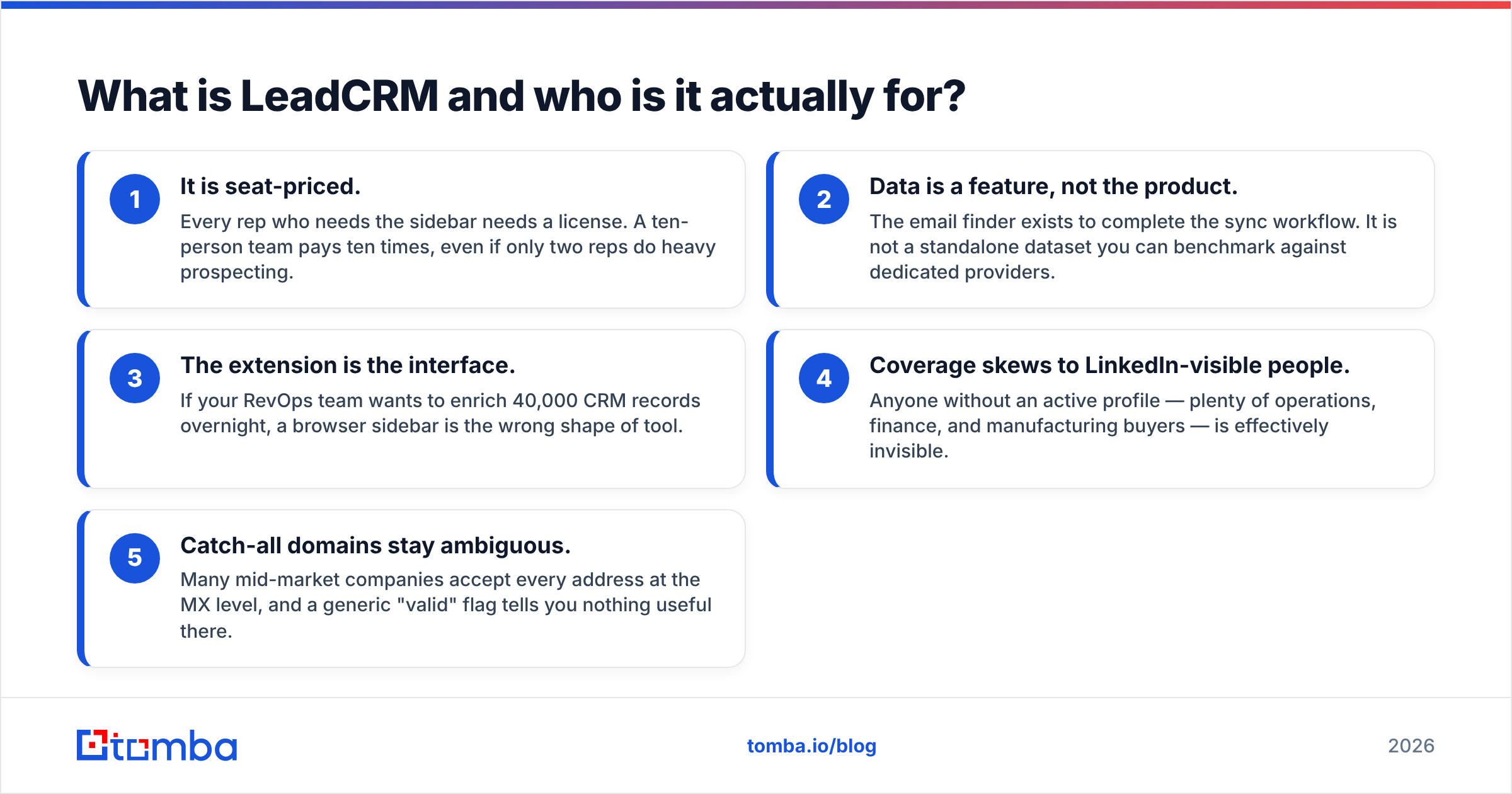
- It is seat-priced. Every rep who needs the sidebar needs a license. A ten-person team pays ten times, even if only two reps do heavy prospecting.
- Data is a feature, not the product. The email finder exists to complete the sync workflow. It is not a standalone dataset you can benchmark against dedicated providers.
- The extension is the interface. If your RevOps team wants to enrich 40,000 CRM records overnight, a browser sidebar is the wrong shape of tool.
- Coverage skews to LinkedIn-visible people. Anyone without an active profile — plenty of operations, finance, and manufacturing buyers — is effectively invisible.
- Catch-all domains stay ambiguous. Many mid-market companies accept every address at the MX level, and a generic "valid" flag tells you nothing useful there.
None of that makes LeadCRM a bad product. It makes it a specific product, and specific products get outgrown.
Why do teams look for LeadCRM alternatives?#
Three patterns come up over and over in G2 reviews and in migration conversations.
Cost per seat versus cost per record. Seat pricing is predictable, which is why vendors like it. But prospecting volume is lumpy. One quarter you build a 15,000-contact ABM list; the next quarter you are heads-down on renewals. Credit-based tools let you pay for the lumpy part. Seat-based tools charge you the same whether the rep sourced 800 contacts or eight.
Verification depth. Finding an address is the easy half. Knowing whether it will bounce is the half that protects your domain. Google and Yahoo's bulk-sender rules made a spam complaint rate above 0.3% an actual deliverability cliff, not a best-practice suggestion. If your tool cannot separate a deliverable mailbox from a catch-all guess, you are gambling with your primary sending domain.
API and automation access. The moment you want enrichment inside a Clay table, an n8n workflow, or your own onboarding flow, an extension stops being enough. You need endpoints, rate limits you can plan against, and a bulk job runner.
If you recognise your team in two of those three, a LeadCRM alternative is worth the migration cost.
What are the 9 best LeadCRM alternatives in 2026?#
Here is the short list, then the detail. Prices were checked in September 2026; every vendor on this list has changed tiers in the last eighteen months, so confirm before you buy.
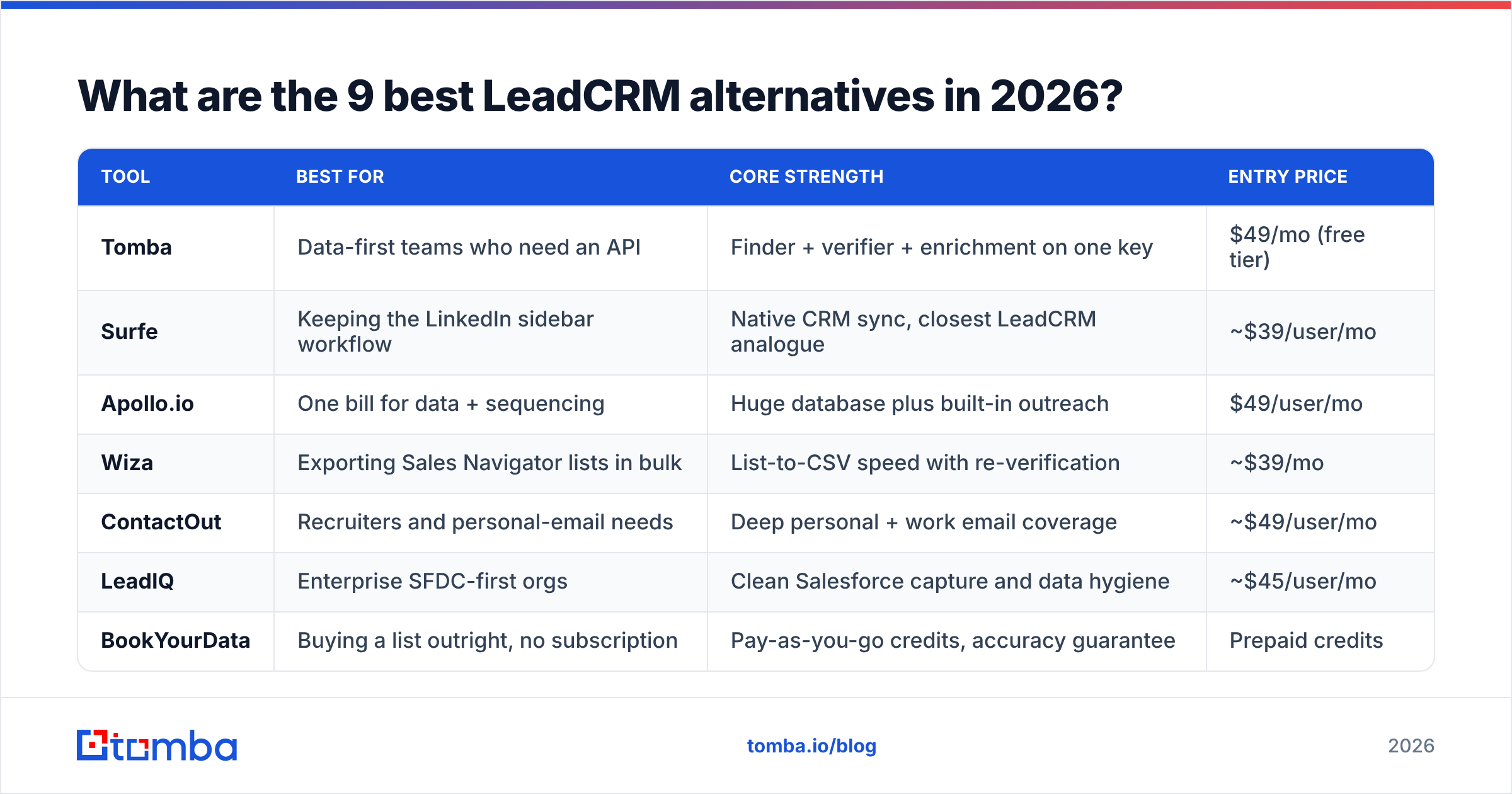
| Tool | Best for | Core strength | Entry price |
|---|---|---|---|
| Tomba | Data-first teams who need an API | Finder + verifier + enrichment on one key | $49/mo (free tier) |
| Surfe | Keeping the LinkedIn sidebar workflow | Native CRM sync, closest LeadCRM analogue | ~$39/user/mo |
| Apollo.io | One bill for data + sequencing | Huge database plus built-in outreach | $49/user/mo |
| Wiza | Exporting Sales Navigator lists in bulk | List-to-CSV speed with re-verification | ~$39/mo |
| ContactOut | Recruiters and personal-email needs | Deep personal + work email coverage | ~$49/user/mo |
| LeadIQ | Enterprise SFDC-first orgs | Clean Salesforce capture and data hygiene | ~$45/user/mo |
| BookYourData | Buying a list outright, no subscription | Pay-as-you-go credits, accuracy guarantee | Prepaid credits |
| Lusha | Phone-heavy outbound | Mobile number coverage | ~$36/user/mo |
| Waalaxy | LinkedIn-first sequencing | Connection + message automation | Free tier available |
Is Tomba a good LeadCRM alternative?#
Yes, if your bottleneck is data rather than CRM logging. Tomba is an email finder first: you give it a domain, a name, or a LinkedIn URL, and it returns an address with a confidence score and the sources it used. The LinkedIn finder covers the same starting point LeadCRM does, but everything is also available through the Tomba API, a CLI, a Chrome extension, Google Sheets, and Excel.
The structural difference is billing. Tomba sells searches, not seats — Free (25 searches/mo), Starter $49/mo, Growth $99/mo, Pro $249/mo, and custom Enterprise. Your whole team can hold logins on a Starter plan; you are paying for the lookups, not the headcount. Full Tomba pricing is public, no demo call required.
Where it wins: verification. The email verifier runs syntax, MX, disposable, role-account, and SMTP checks, and the catch-all verifier goes further on domains that accept everything — the exact case where most tools shrug and return "unknown."
Where it does not win: it is not a CRM sidebar. If the thing you love about LeadCRM is auto-logging notes to Pipedrive, Tomba alone will not replace that. Pair it with your CRM's native LinkedIn integration or a sync tool.
Is Surfe the closest replacement?#
Functionally, yes. Surfe does the same job as LeadCRM — LinkedIn sidebar, CRM enrichment, one-click contact creation — with a polished HubSpot and Salesforce experience. Teams that want a like-for-like swap usually land here, and it is the most common comparison we see against a Surfe alternative search.
The tradeoff is the same one you already have: per-seat pricing, and data quality that is good but not independently auditable. You are changing vendors, not changing the economics.
Is Apollo.io worth it as an alternative?#
Apollo is the "buy everything at once" answer: a large contact database, sequencing, dialer, and basic CRM features in one subscription. For a team of three to fifteen reps with no existing outreach stack, consolidating is genuinely cheaper than five point tools.
The complaints are consistent, though: data accuracy varies sharply by region and seniority, credit limits bite faster than the pricing page implies, and the platform is heavy if all you needed was contact data. Teams that only want the data half often end up on an Apollo alternative within a year.
What about Wiza, ContactOut, and LeadIQ?#
Wiza is built for the export use case. Point it at a Sales Navigator search, let it run, get a verified CSV. It is faster than any sidebar for list building and it re-verifies on export, which keeps bounce rates sane. It does not try to be a CRM companion.
ContactOut has the strongest personal-email coverage on this list, which is why recruiters dominate its user base. For sales use, personal addresses are a tactical asset and a compliance question — check your jurisdiction before you use them at scale.
LeadIQ is the Salesforce-native option. Capture from LinkedIn, dedupe against existing records, push clean data. It is priced for enterprise and its data-hygiene features are the real product. If Salesforce is the system of record and admins care about field-level cleanliness, it earns the premium. Smaller teams usually find it over-specified and check a LeadIQ alternative instead.
When does BookYourData make more sense?#
When you do not want a subscription at all. BookYourData sells prepaid, pay-as-you-go B2B contact credits with an accuracy guarantee and filters for industry, title, geography, and company size. You build a list, you pay once, you own the file.
That model fits three situations well: a one-off market test in a new region, an event follow-up list, and agencies buying data on behalf of a client with a fixed budget. It is a different shape of tool from LeadCRM — static list purchase rather than live workflow enrichment — and for teams whose prospecting is campaign-shaped rather than continuous, that is the better shape. Pair it with a verification pass before your first send, since any static list decays at roughly 2–3% per month as people change jobs.
Where do Lusha and Waalaxy fit?#
Lusha is the pick when phone numbers matter more than email. Mobile coverage is its differentiator, particularly in North America and Western Europe. Email coverage is adequate but not category-leading. If you are running a call-heavy motion, run it alongside a phone finder workflow and compare hit rates on the same 200 accounts before committing.
Waalaxy is not really a data tool — it is LinkedIn sequencing. Connection requests, follow-ups, and multichannel steps. Teams pair it with a separate data source. It belongs on this list because a chunk of LeadCRM users are actually trying to solve "automate my LinkedIn outreach," not "sync my CRM."
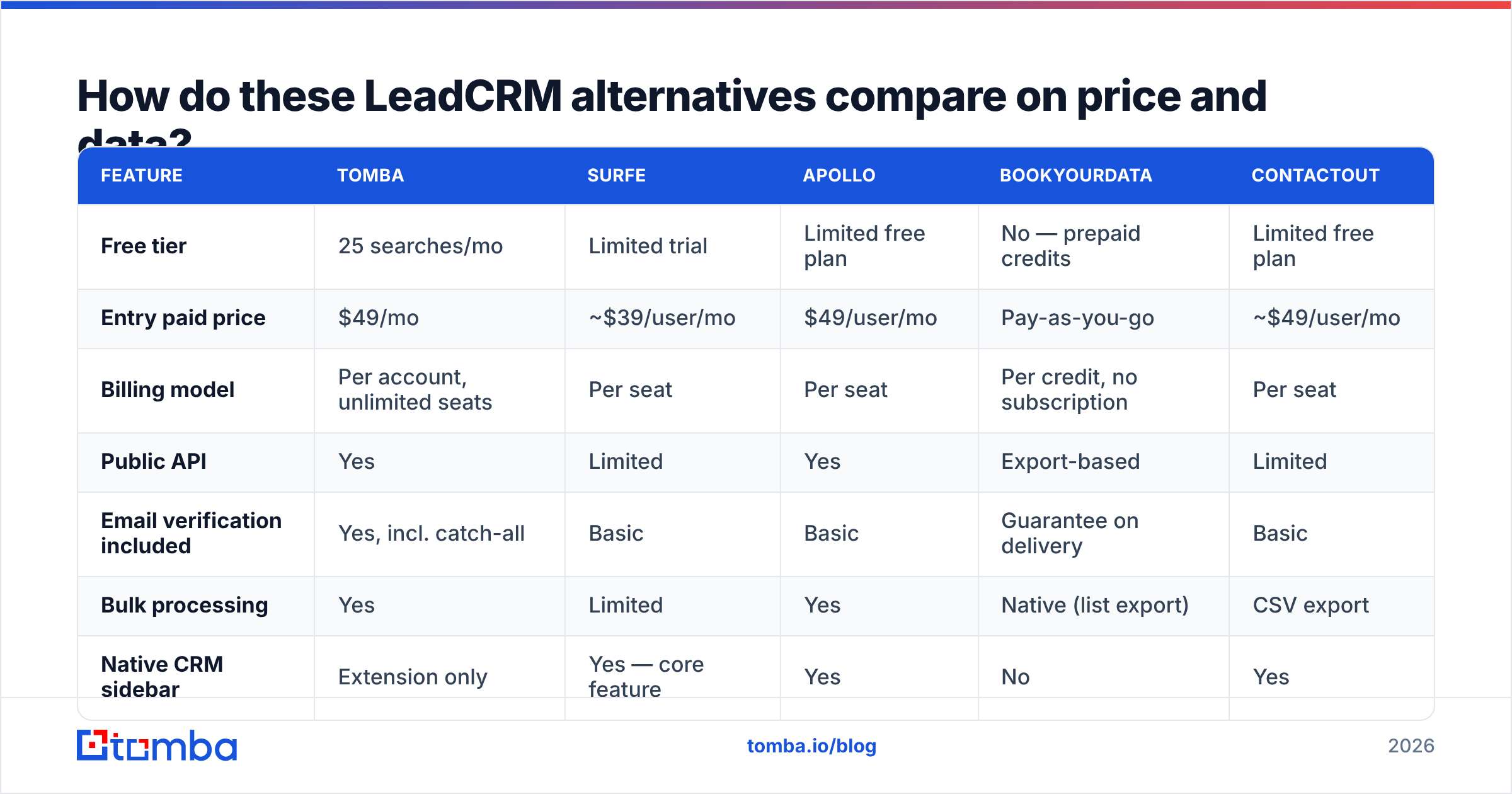
How do these LeadCRM alternatives compare on price and data?#
| Feature | Tomba | Surfe | Apollo | BookYourData | ContactOut |
|---|---|---|---|---|---|
| Free tier | 25 searches/mo | Limited trial | Limited free plan | No — prepaid credits | Limited free plan |
| Entry paid price | $49/mo | ~$39/user/mo | $49/user/mo | Pay-as-you-go | ~$49/user/mo |
| Billing model | Per account, unlimited seats | Per seat | Per seat | Per credit, no subscription | Per seat |
| Public API | Yes | Limited | Yes | Export-based | Limited |
| Email verification included | Yes, incl. catch-all | Basic | Basic | Guarantee on delivery | Basic |
| Bulk processing | Yes | Limited | Yes | Native (list export) | CSV export |
| Native CRM sidebar | Extension only | Yes — core feature | Yes | No | Yes |
| Phone numbers | Yes | Yes | Yes | Yes | Yes |
Two things to read out of that table. First, the billing column is the one that changes your annual number, not the feature checkmarks — a six-seat team at $45/user/mo is $3,240/year before overages. Second, verification depth is where the list splits cleanly: tools that treat it as a checkbox and tools that treat it as a product.

How do you pick the right LeadCRM alternative for your team?#
Run this in order. It takes an afternoon and saves a year of regret.
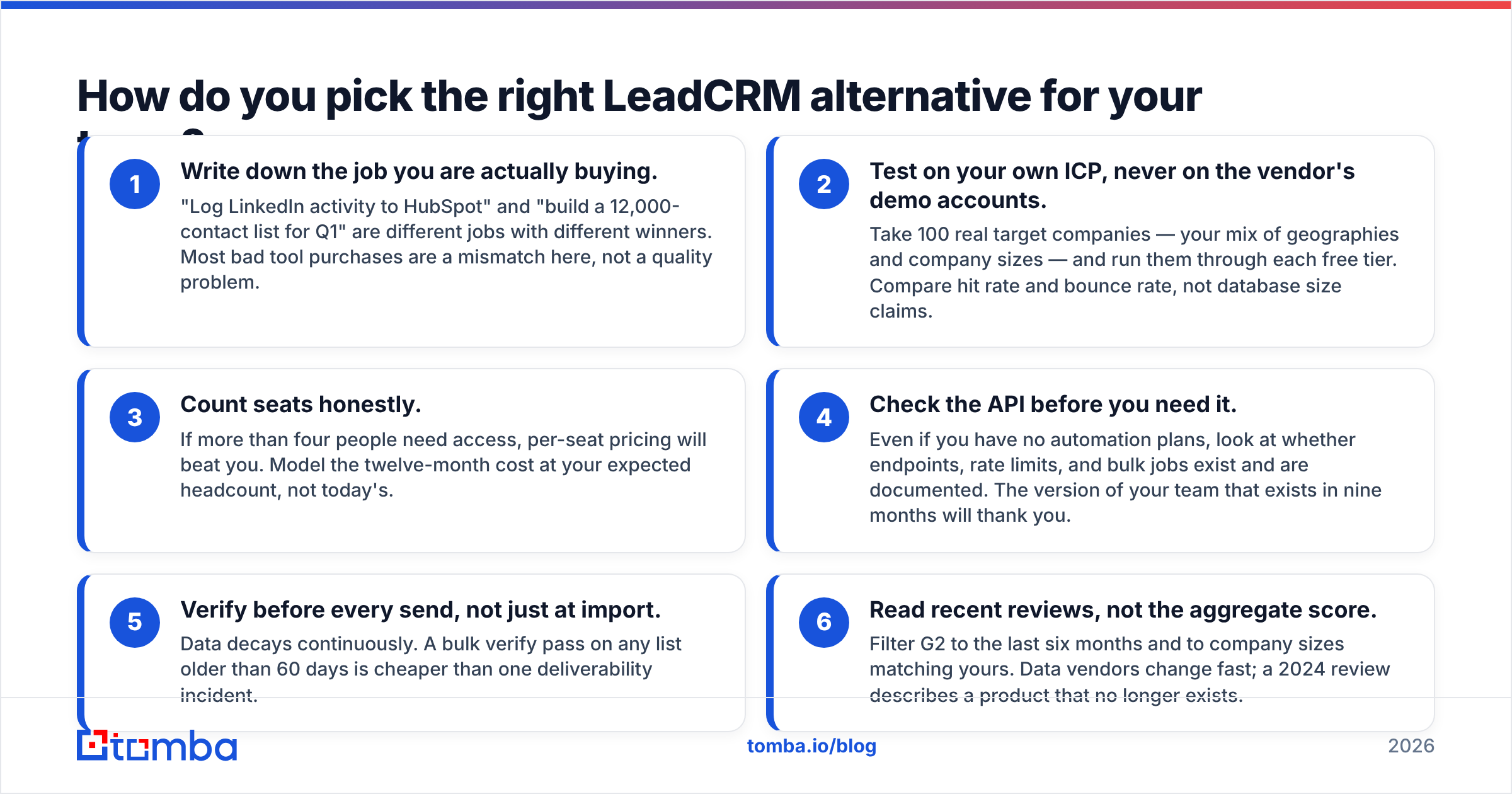
- Write down the job you are actually buying. "Log LinkedIn activity to HubSpot" and "build a 12,000-contact list for Q1" are different jobs with different winners. Most bad tool purchases are a mismatch here, not a quality problem.
- Test on your own ICP, never on the vendor's demo accounts. Take 100 real target companies — your mix of geographies and company sizes — and run them through each free tier. Compare hit rate and bounce rate, not database size claims.
- Count seats honestly. If more than four people need access, per-seat pricing will beat you. Model the twelve-month cost at your expected headcount, not today's.
- Check the API before you need it. Even if you have no automation plans, look at whether endpoints, rate limits, and bulk jobs exist and are documented. The version of your team that exists in nine months will thank you.
- Verify before every send, not just at import. Data decays continuously. A bulk verify pass on any list older than 60 days is cheaper than one deliverability incident.
- Read recent reviews, not the aggregate score. Filter G2 to the last six months and to company sizes matching yours. Data vendors change fast; a 2024 review describes a product that no longer exists.
What is the honest verdict?#
There is no single winner, because LeadCRM does two jobs and the alternatives split along that seam.
If what you value is the sidebar — CRM records surfaced inside LinkedIn, one-click logging, zero context switching — Surfe is the most direct swap and Wiza is the better choice if you export more than you browse. You will keep paying per seat, and that is the price of the workflow.
If what you value is the data, stop buying workflow and start buying accuracy and access. That means a provider with real verification, transparent per-search pricing, and an API you can build on. On that axis, Tomba is the strongest value on this list, with BookYourData as the right call when you want to buy a list outright instead of subscribing to one.
The expensive mistake is buying a seat-priced workflow tool to solve a data problem, then discovering at renewal that you paid for ten licenses to fix a bounce rate.
Start with the data layer. Run your next 25 target accounts through the Tomba Email Finder free tier, compare the hit rate against whatever LeadCRM returns for the same accounts, and check the bounce rate on both before you sign another per-seat contract. If the numbers hold up, Starter is $49/mo for the whole team — no per-rep math, and the same key works in the API, the Chrome extension, and Google Sheets.
Related guides#
// get started
Find, verify and enrich your first contacts today
Start on the free plan with 25 searches a month, then scale when your team is ready.
Free plan · No credit card required · GDPR & CCPA
// about the author