LeadEngineAI Pros and Cons: An Honest 2026 Buyer's Review
An unsponsored breakdown of LeadEngineAI: where the AI lead engine genuinely saves time, where the data and pricing model bite, and which cheaper stack gets you the same pipeline in 2026.
LeadEngineAI promises to replace your whole prospecting stack with one AI tool. This is an unsponsored look at the LeadEngineAI pros and cons: what the tool does well, where it quietly costs you money, and what a cheaper stack looks like in 2026.
TL;DR
- LeadEngineAI sells speed. One AI layer finds accounts, picks contacts, and drafts outreach in a single pass. That part works, and it beats stitching five tools together.
- The cons are built in, not cosmetic. Credits drain in ways you cannot forecast. You still have to verify the contact data. The price only makes sense above a certain team size.
- Treat AI-picked contacts as guesses, not facts. Every serious team we spoke to runs a separate verify pass before the first send.
- Is your real problem finding and checking email addresses rather than writing copy? Then an AI lead engine is the wrong buy. A finder plus a verifier costs a fraction.
- Best fit: outbound teams of 5 or more reps with a RevOps owner. Worst fit: solo founders and small agencies, who pay for glue they do not need.
What is LeadEngineAI, and who is it actually for?#
LeadEngineAI sits in a category that barely existed three years ago: the AI lead engine. Think of it as a sous-chef, not a pantry. Old-school B2B data vendors sell you the ingredients — companies, contacts, emails, phone numbers. You still cook. An AI lead engine reads your ideal customer profile, pulls the ingredients itself, picks the ones that matter, and hands you a finished sequence.
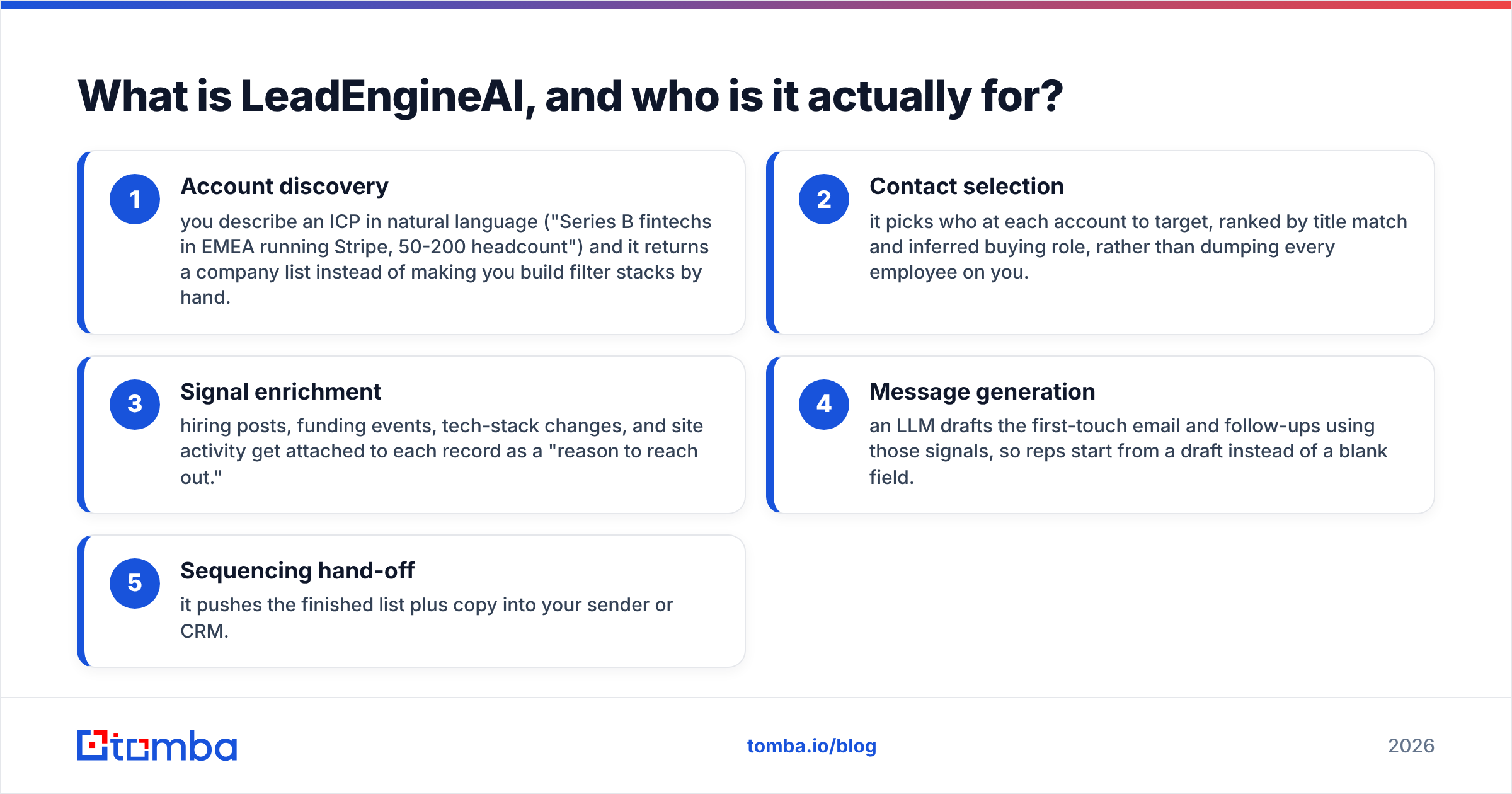
In practice, one subscription bundles five jobs:
- Account discovery — describe your ICP in plain English ("Series B fintechs in EMEA running Stripe, 50-200 staff"). It returns a company list. You build no filter stacks by hand.
- Contact selection — it picks who to target at each account. Names are ranked by job title and likely buying role, so you do not get every employee.
- Signal enrichment — hiring posts, funding news, tech changes, and site visits are attached to each record. Each one is a "reason to reach out."
- Message generation — an AI writes the first email and the follow-ups from those signals. Reps start from a draft, not a blank box.
- Sequencing hand-off — it pushes the finished list plus copy into your sender or CRM.
That bundle is the whole pitch. Already own a good B2B database, a sequencer, and a writer? Then you are paying twice. Own none of them, and want one invoice? Then the pitch lands.
The category is crowded. G2's AI sales assistant category lists well over a hundred products making near-identical claims. That matters for your negotiating position later in this post.
What are the main pros of LeadEngineAI?#
Speed to first list is the real product. The honest strength here is compression. Building a 500-account list by hand takes half a day of RevOps work: filter, export, dedupe, find emails, verify, enrich, segment, write. LeadEngineAI cuts that to about twenty minutes. Run weekly campaigns and those hours add up.
Plain-English targeting beats filter digging. Most data tools hide their power in filter trees you have to learn. Typing one sentence and tweaking the result is a much better way to work. That is doubly true for reps who open the tool once a week and forget where the tech filters live.
Signals arrive attached, not separate. Buying an intent feed and joining it to your contact list is a project on its own. Here, "this company posted three SDR roles last month" sits right on the record. That is the gap between a personal opener and a generic one. Gartner's sales research has said for years that relevance at first touch beats raw volume. Attached signals make that easy to act on.
Draft copy kills the blank page. The emails it writes are not great. They are still better than what a rushed rep types at 4pm on a Thursday. Edit them, and they raise your floor. Send them as-is, and you land in spam.
One vendor, one invoice, one setup. Small ops teams undervalue this. Four contracts folded into one saves real admin time, even when the unit price is worse.


What are the biggest cons of LeadEngineAI?#
This is where the review earns its keep. In any honest list of LeadEngineAI pros and cons, these are not bugs. They come with the bundled model.
Credit burn is hard to predict. Bundled tools charge credits per action, and an AI layer takes more actions than you asked for. One "find me 200 accounts" prompt can fire company lookups, contact lookups, signal pulls, and email reveals. That is four or five charges per record. Teams often burn a month of credits in ten days. Then they read the overage pricing, which is the worst line in the contract. Ask for a written list of which actions spend credits. Ask whether failed lookups are refunded.
You still own deliverability. No AI lead engine can verify its way out of this one. Across the category, bundled email data mixes three things: verified addresses, guessed patterns, and stale records from the last crawl. Send to that mix unchecked and you burn your domain. Budget for a separate email verifier pass, whatever the vendor's accuracy claim says.
Catch-all domains get mishandled. Many B2B domains accept every address at the mail server. A simple checker marks them "valid" and moves on. That is where your bounces hide. A catch-all verifier sorts them out. A bundled "accuracy score" just flags them and hands you the risk.
AI copy starts to sound the same. Say three firms in your market use the same engine on the same signals. Your buyer gets three near-identical emails in one week. Consistency is the model's strength, and at scale it is also the problem. You can already see this in crowded markets like dev tools and HR tech.
Hidden pricing. Like most of the category, LeadEngineAI does not publish a full price list. With quote-based pricing, your cost depends on how well you haggle, not on what you use. Big firms have buyers for that. A two-person startup does not.
Lock-in by workflow, not by contract. Your ICP rules, signal rules, and sequences all live in one tool. Export is possible on paper and painful in practice. Ask about export rights first. You want a raw CSV of everything you enriched, not a filtered view.
How does LeadEngineAI compare to the alternatives?#
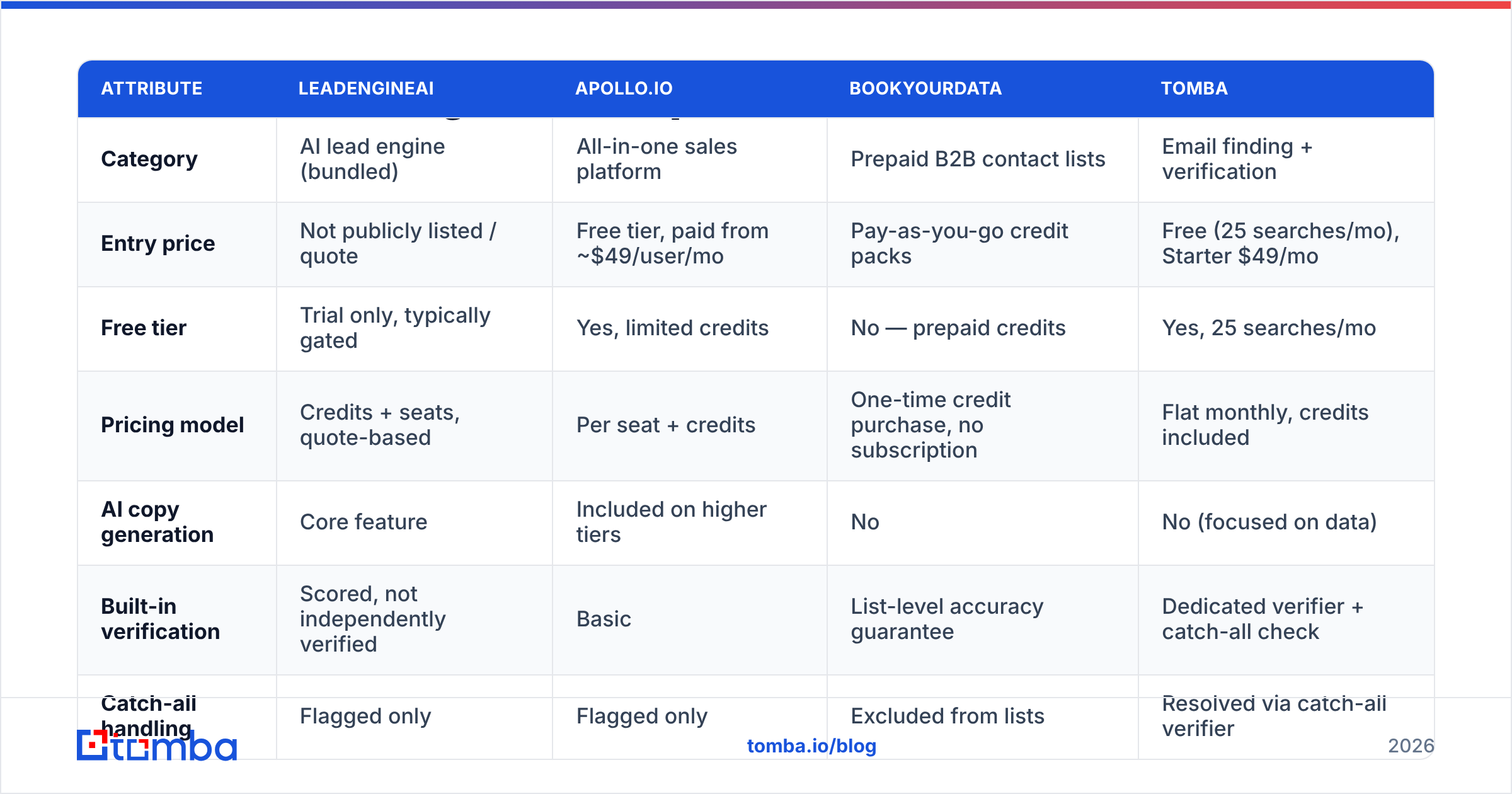
Here is the honest layout. Both sides of the LeadEngineAI pros and cons show up in the grid below. Where a price is not public, we say so instead of making one up. The silence is itself a data point.
| Attribute | LeadEngineAI | Apollo.io | BookYourData | Tomba |
|---|---|---|---|---|
| Category | AI lead engine (bundled) | All-in-one sales platform | Prepaid B2B contact lists | Email finding + verification |
| Entry price | Not publicly listed / quote | Free tier, paid from ~$49/user/mo | Pay-as-you-go credit packs | Free (25 searches/mo), Starter $49/mo |
| Free tier | Trial only, typically gated | Yes, limited credits | No — prepaid credits | Yes, 25 searches/mo |
| Pricing model | Credits + seats, quote-based | Per seat + credits | One-time credit purchase, no subscription | Flat monthly, credits included |
| AI copy generation | Core feature | Included on higher tiers | No | No (focused on data) |
| Built-in verification | Scored, not independently verified | Basic | List-level accuracy guarantee | Dedicated verifier + catch-all check |
| Catch-all handling | Flagged only | Flagged only | Excluded from lists | Resolved via catch-all verifier |
| API access | Higher tiers | Yes | Yes | Yes, all paid plans |
| Best for | 5+ rep teams wanting one vendor | Teams wanting CRM + dialer + data | Buyers who hate subscriptions | Teams who need accurate addresses, cheap |
Two takeaways from that grid. First, LeadEngineAI does not compete with email finders. It competes with Apollo and the other all-in-one platforms, so judge it against those, not against a $49 data tool. Second, strip out the AI glue and the core job is cheap: get a correct, live email address for a named person at a named company. BookYourData's prepaid model suits people who hate recurring contracts and buy lists in bursts. It also skips the credit-forecasting problem.
If you are cross-shopping the bundled platforms, our breakdown of Apollo alternatives covers the same trade-off in more depth.
Is LeadEngineAI's data accurate enough for cold outreach?#
Short answer: accurate enough to prospect with, not accurate enough to send to unverified.
Every vendor quotes an accuracy number. Almost none of them measure it the same way. Some count addresses that merely look valid. Some count "the mail server accepted it," which waves through every catch-all domain. Almost none share the test set. Treat any number on a marketing page as a claim, not a measurement. Capterra's lead generation software listings are full of products quoting 95% or better with no shared method.
What actually protects your domain:
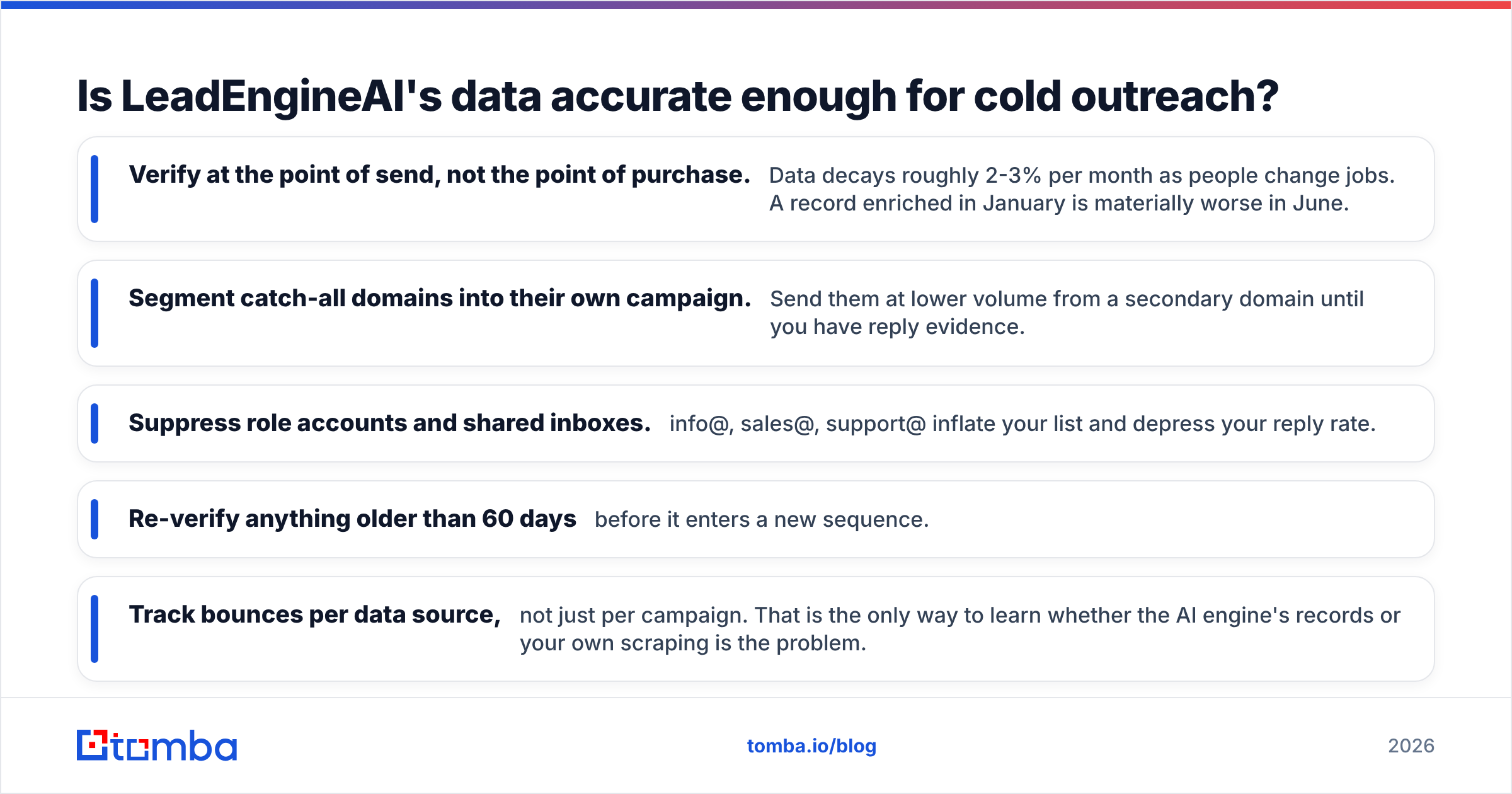
- Verify at the point of send, not the point of purchase. Data decays about 2-3% a month as people change jobs. A record enriched in January is much weaker by June.
- Segment catch-all domains into their own campaign. Send them at lower volume from a second domain until you have replies.
- Suppress role accounts and shared inboxes. info@, sales@, and support@ pad your list and drag down your reply rate.
- Re-verify anything older than 60 days before it enters a new sequence.
- Track bounces per data source, not just per campaign. That is the only way to learn whether the AI engine's records or your own scraping is the problem.
Those five habits matter more than the vendor you pick. A bulk verify pass on a 5,000-record export costs less than one bounced campaign costs your domain.
Who should buy LeadEngineAI, and who should skip it?#
Buy it if: you run 5 or more outbound reps. You have a RevOps owner who watches credit burn. Your ICP is complex, so signals really change who you contact. And you already pay for three or more overlapping tools that together cost more than one bundle.
Skip it if: you are a solo founder or run fewer than three reps. You would pay for glue work you can do by hand in an afternoon. Skip it if your outbound is simple ("every dental practice in Ohio"). AI account picking adds nothing to a list any directory can give you. Skip it if your real pain is bounce rate. An AI layer does not clean data. A verifier does.
Negotiate hard if you buy. A hundred near-identical products plus quote pricing means you have leverage. Ask for four things: a written credit schedule, a cap on overage, full raw export rights, and a 30-day exit if bounce rates pass an agreed line. A vendor who refuses all four is telling you something.
What does a cheaper stack look like in 2026?#
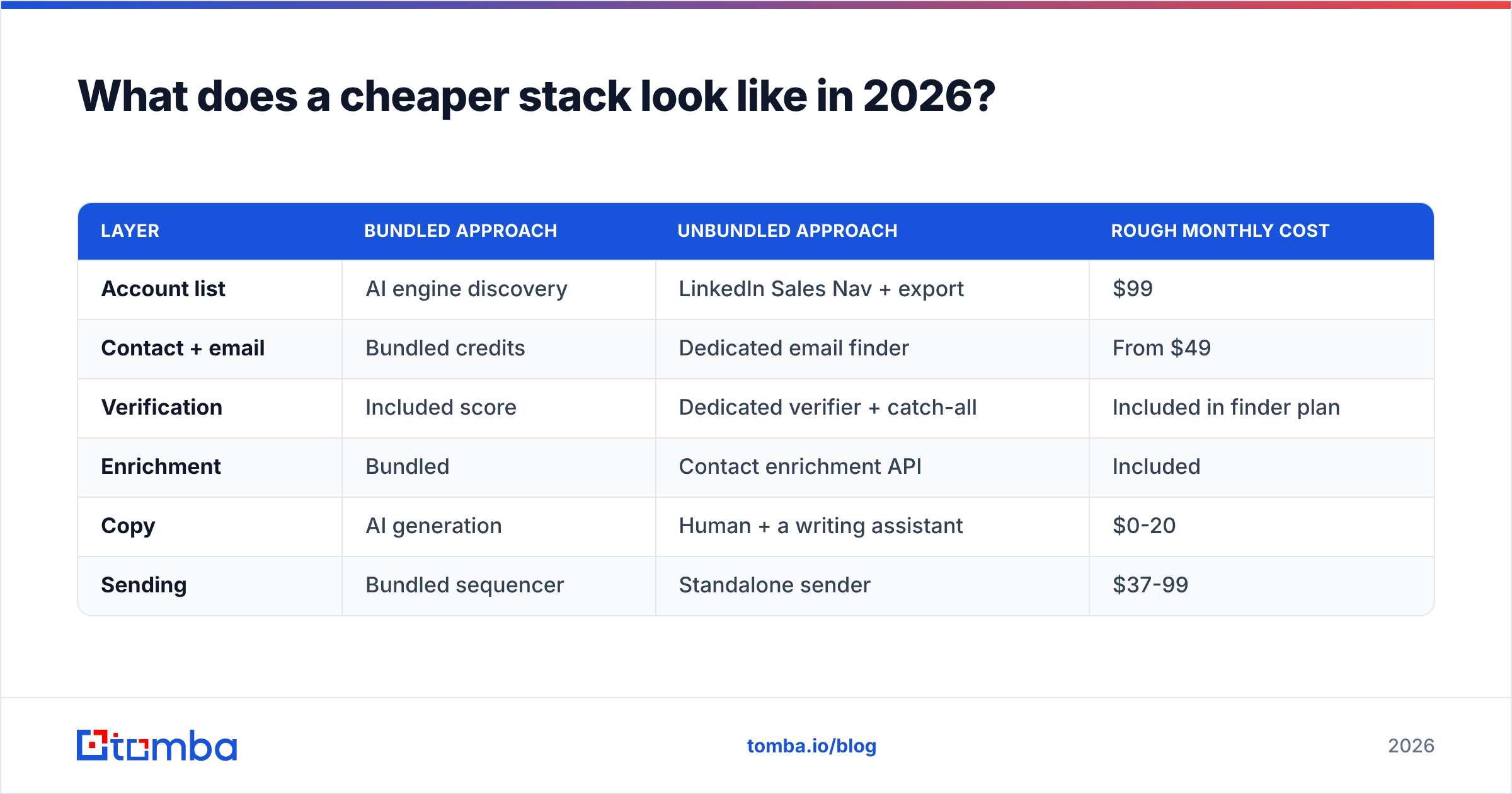
The unbundled alternative, for teams that want control:
| Layer | Bundled approach | Unbundled approach | Rough monthly cost |
|---|---|---|---|
| Account list | AI engine discovery | LinkedIn Sales Nav + export | $99 |
| Contact + email | Bundled credits | Dedicated email finder | From $49 |
| Verification | Included score | Dedicated verifier + catch-all | Included in finder plan |
| Enrichment | Bundled | Contact enrichment API | Included |
| Copy | AI generation | Human + a writing assistant | $0-20 |
| Sending | Bundled sequencer | Standalone sender | $37-99 |
The unbundled stack costs less and lets you swap any layer. You pay for that with more setup and one more browser tab. For most teams under twenty reps, that trade is worth taking. Compare the line items against Tomba pricing before you sign a quote. The gap is usually bigger than teams expect.
The verdict on the LeadEngineAI pros and cons#
LeadEngineAI is a real product that solves a real coordination problem. It is priced for teams larger than the ones it attracts. The pros hold up: speed, plain-English targeting, signals on every record. So do the cons: fuzzy credit math, unverified data, copy that all sounds alike, and a price you have to ask for. The bundled model cannot fix most of them.
The most common buying mistake here is simple. Buyers treat an AI lead engine as a data-quality purchase. It is not. It is a workflow purchase. If your reps move too slowly, it helps. If 14% of your sends bounce, it does not.
Start with the data layer. Before you sign a quote, find out how much of your problem is just missing and stale email addresses. Tomba's Email Finder gives you 25 free searches a month, no card needed. Every address comes with a confidence score and named sources. Catch-all checks are built in. The Starter plan is a flat $49 a month when you outgrow the free tier. Run one campaign on clean data first. Then decide whether you still need the engine on top.
Related guides#
// get started
Find, verify and enrich your first contacts today
Start on the free plan with 25 searches a month, then scale when your team is ready.
Free plan · No credit card required · GDPR & CCPA
// about the author