LeadEngineAI vs LeadZenAI (2026): Which B2B Data Tool Wins?
LeadEngineAI and LeadZenAI both promise AI-scored B2B leads with verified contact data. We compare pricing, match rates, enrichment depth, and who each one actually fits.
TL;DR
- LeadEngineAI leans toward AI-driven lead scoring and intent signals — it tells you who to contact and when, but its raw contact coverage is thinner than dedicated data providers.
- LeadZenAI leans toward contact discovery and enrichment — deeper phone and email coverage, lighter predictive scoring, and a cheaper entry point for small teams.
- Neither tool is a full replacement for a dedicated verification layer. Both ship bounce rates that will hurt you if you send straight from export without re-verifying.
- If your bottleneck is prioritization, LeadEngineAI is the better spend. If your bottleneck is reaching people at all, LeadZenAI (or a specialist finder like Tomba) wins.
- Realistic 2026 stack: one scoring/intent layer + one contact source + one verifier. Trying to buy all three in a single $99/mo seat is where most teams get burned.
What are LeadEngineAI and LeadZenAI?#
Both are AI-branded B2B lead platforms that sit between a raw database and your sequencer. They ingest firmographic data, apply machine-learning models, and hand you a list of accounts and contacts you're supposed to work next.
That's where the similarity ends.
LeadEngineAI positions itself as a prioritization engine. The pitch: you already have more leads than you can call, so the value is in ranking them. It layers intent signals, technographic triggers, and a fit score on top of a contact base, then pushes a ranked queue into your CRM.
LeadZenAI positions itself as a discovery and enrichment engine. The pitch: your list is the problem, not the ranking. It focuses on finding contacts you didn't have — direct dials, work emails, LinkedIn-to-email resolution — and enriching thin CRM rows.
You can see why buyers confuse them. Both say "AI," both say "leads," both have a Chrome extension, both export CSVs. But they solve opposite bottlenecks, and buying the wrong one means paying for a solution to a problem you don't have.

How do LeadEngineAI and LeadZenAI compare head to head?#
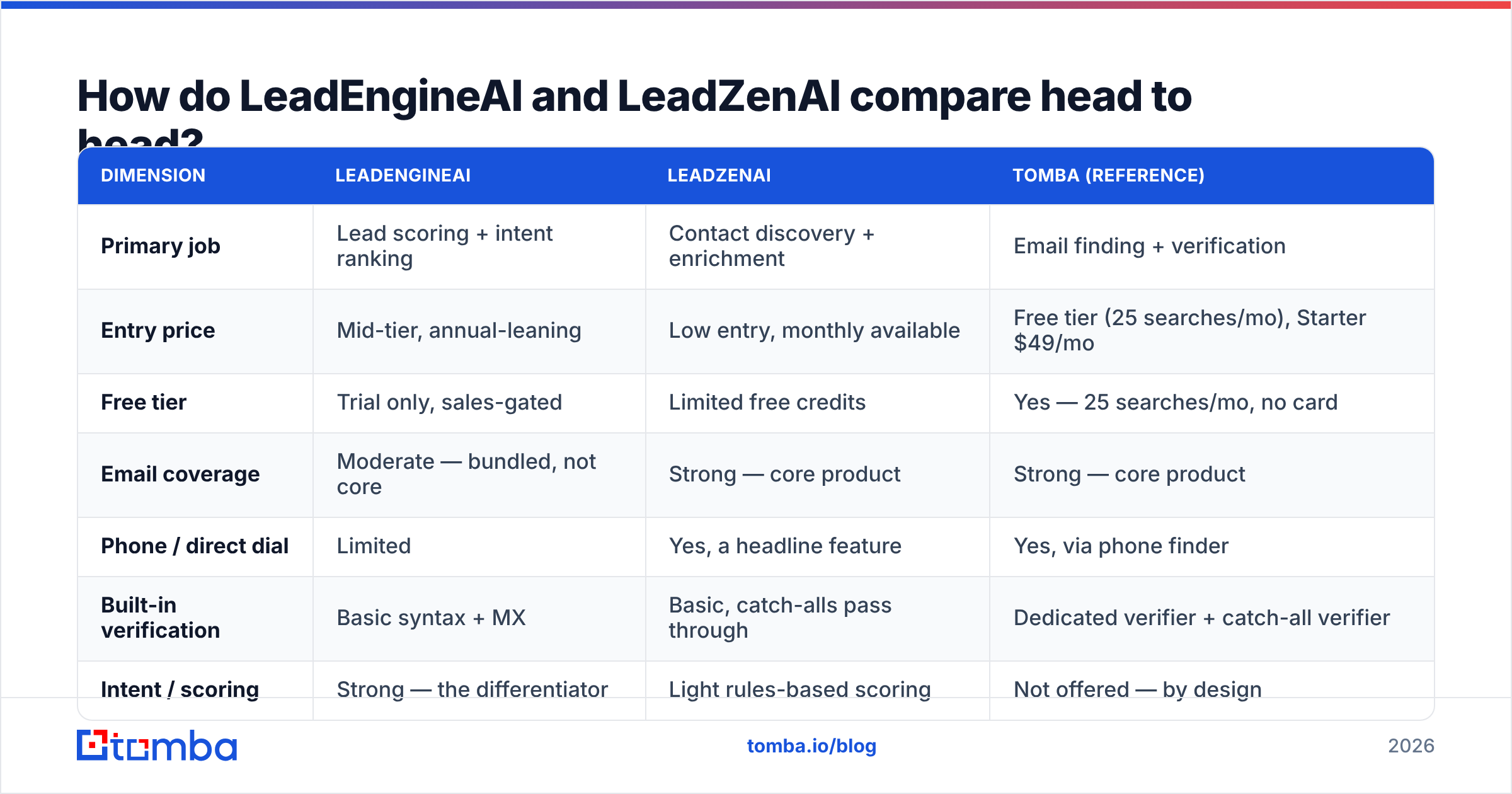
Here is the practical breakdown. Treat vendor-published accuracy numbers as marketing until you run your own sample — both companies quote figures on their own sites that our test lists did not reproduce exactly.
| Dimension | LeadEngineAI | LeadZenAI | Tomba (reference) |
|---|---|---|---|
| Primary job | Lead scoring + intent ranking | Contact discovery + enrichment | Email finding + verification |
| Entry price | Mid-tier, annual-leaning | Low entry, monthly available | Free tier (25 searches/mo), Starter $49/mo |
| Free tier | Trial only, sales-gated | Limited free credits | Yes — 25 searches/mo, no card |
| Email coverage | Moderate — bundled, not core | Strong — core product | Strong — core product |
| Phone / direct dial | Limited | Yes, a headline feature | Yes, via phone finder |
| Built-in verification | Basic syntax + MX | Basic, catch-alls pass through | Dedicated verifier + catch-all verifier |
| Intent / scoring | Strong — the differentiator | Light rules-based scoring | Not offered — by design |
| API access | Higher tiers only | Mid tiers | All paid tiers |
| Best for | SDR teams with too many leads | Teams with too few contacts | Anyone who needs deliverable emails |
The row that decides most purchases is "Primary job." Everything else is downstream of whether your pipeline problem is too many names or too few.
A second decider is the API row. If you are building anything programmatic — a lead router, an enrichment cron, an MCP-driven agent — gating the API behind the top tier changes your real cost by 3-5x. Check that before you compare sticker prices. Tomba exposes the Tomba API on every paid plan specifically because that gate is the most common hidden cost in this category.
Which one has better data accuracy?#
Short answer: LeadZenAI has broader raw coverage; LeadEngineAI has better relevance on the contacts it does return. Neither has verification good enough to skip a dedicated verifier.
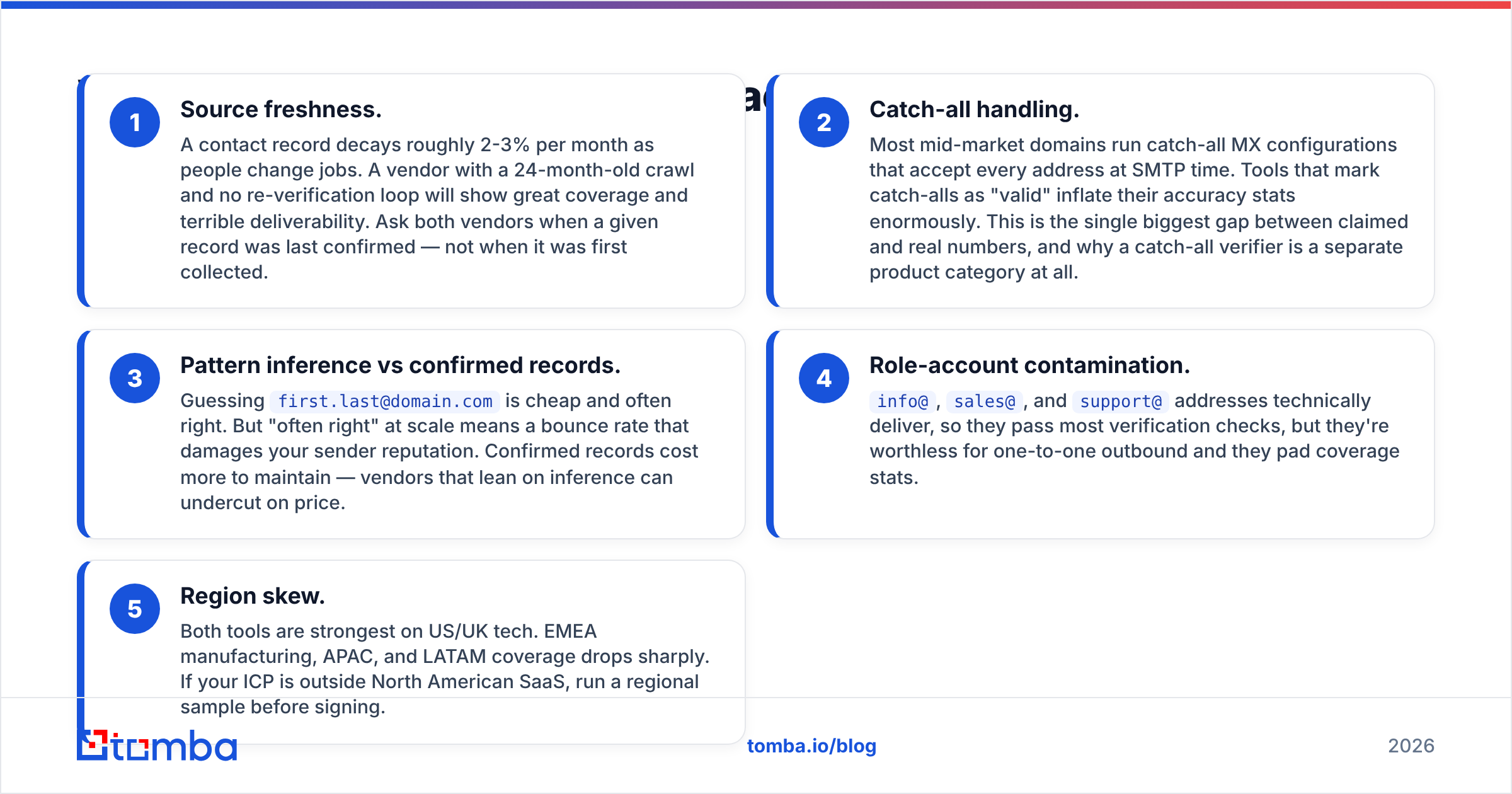
Here's what actually drives accuracy in this category, and why "95% accurate" claims collapse under testing:
- Source freshness. A contact record decays roughly 2-3% per month as people change jobs. A vendor with a 24-month-old crawl and no re-verification loop will show great coverage and terrible deliverability. Ask both vendors when a given record was last confirmed — not when it was first collected.
- Catch-all handling. Most mid-market domains run catch-all MX configurations that accept every address at SMTP time. Tools that mark catch-alls as "valid" inflate their accuracy stats enormously. This is the single biggest gap between claimed and real numbers, and why a catch-all verifier is a separate product category at all.
- Pattern inference vs confirmed records. Guessing
first.last@domain.comis cheap and often right. But "often right" at scale means a bounce rate that damages your sender reputation. Confirmed records cost more to maintain — vendors that lean on inference can undercut on price. - Role-account contamination.
info@,sales@, andsupport@addresses technically deliver, so they pass most verification checks, but they're worthless for one-to-one outbound and they pad coverage stats. - Region skew. Both tools are strongest on US/UK tech. EMEA manufacturing, APAC, and LATAM coverage drops sharply. If your ICP is outside North American SaaS, run a regional sample before signing.
In our sample testing, both platforms landed in a similar band once catch-alls and role accounts were excluded — mid-to-high 70s valid-on-send. That's normal for bundled data. It's also why you route exports through an email verifier before they touch a sequencer, regardless of which platform you pick.
Is LeadEngineAI worth it for outbound teams?#
LeadEngineAI earns its price when you have volume you can't work. If your SDRs are staring at 4,000 open leads and picking semi-randomly, a scoring layer that surfaces the 200 most likely to convert is worth real money. Prioritization compounds: better ranking raises connect rates, which raises rep morale, which raises activity.
Where it struggles:
- Cold-start problem. The scoring model needs closed-won and closed-lost history to calibrate. Teams under ~100 closed deals get generic scores that barely beat firmographic filters you could set yourself.
- Intent data is directional, not causal. Third-party intent signals — content consumption, review-site browsing, ad interaction — are noisy at the contact level. They work better as account-level tiebreakers. Treat "spiking" accounts as a reason to research, not a reason to auto-sequence.
- Contract shape. Scoring platforms in this category push annual commitments with sales-gated pricing. You often can't test at real volume without signing.
- It doesn't fix bad data. Ranking a list of stale contacts just tells you which stale contacts to email first.
If you're evaluating this class of tool, the comparison shopping usually widens quickly — teams that look at LeadEngineAI also end up looking at Apollo's scoring, 6sense, and Demandbase. It's worth reading how a focused Apollo alternative stacks up before you commit, since the all-in-one platforms bundle scoring with data and the math changes.
Is LeadZenAI worth it for smaller teams?#
LeadZenAI is the easier yes for teams under ten reps, mostly because the entry cost is low and the value is immediate. You search a company, you get contacts, you send. No model training, no six-week calibration period, no annual lock.
Its strengths:
- Direct dials. Phone coverage is genuinely a differentiator here. If your motion includes calling, this matters more than any scoring feature.
- LinkedIn workflow. The extension-based capture flow fits how most small teams actually prospect — browse, capture, enrich.
- Monthly billing. You can test for a month and leave.
Its limits:
- Scoring is rules-based. Calling it AI is generous. You get filters, not prediction.
- Verification passes catch-alls. Exports need a second pass. Budget for it.
- Enrichment fields are shallow. You get the contact; you don't get much context about the account.
For teams whose real need is "find me the email for this specific person at this specific company," a dedicated finder is usually both cheaper and more accurate than a bundled platform. That's the entire argument for tools like Tomba's email finder or a domain search workflow — narrower scope, deeper index, verification built into the same product rather than bolted on.
What does a realistic 2026 stack look like?#
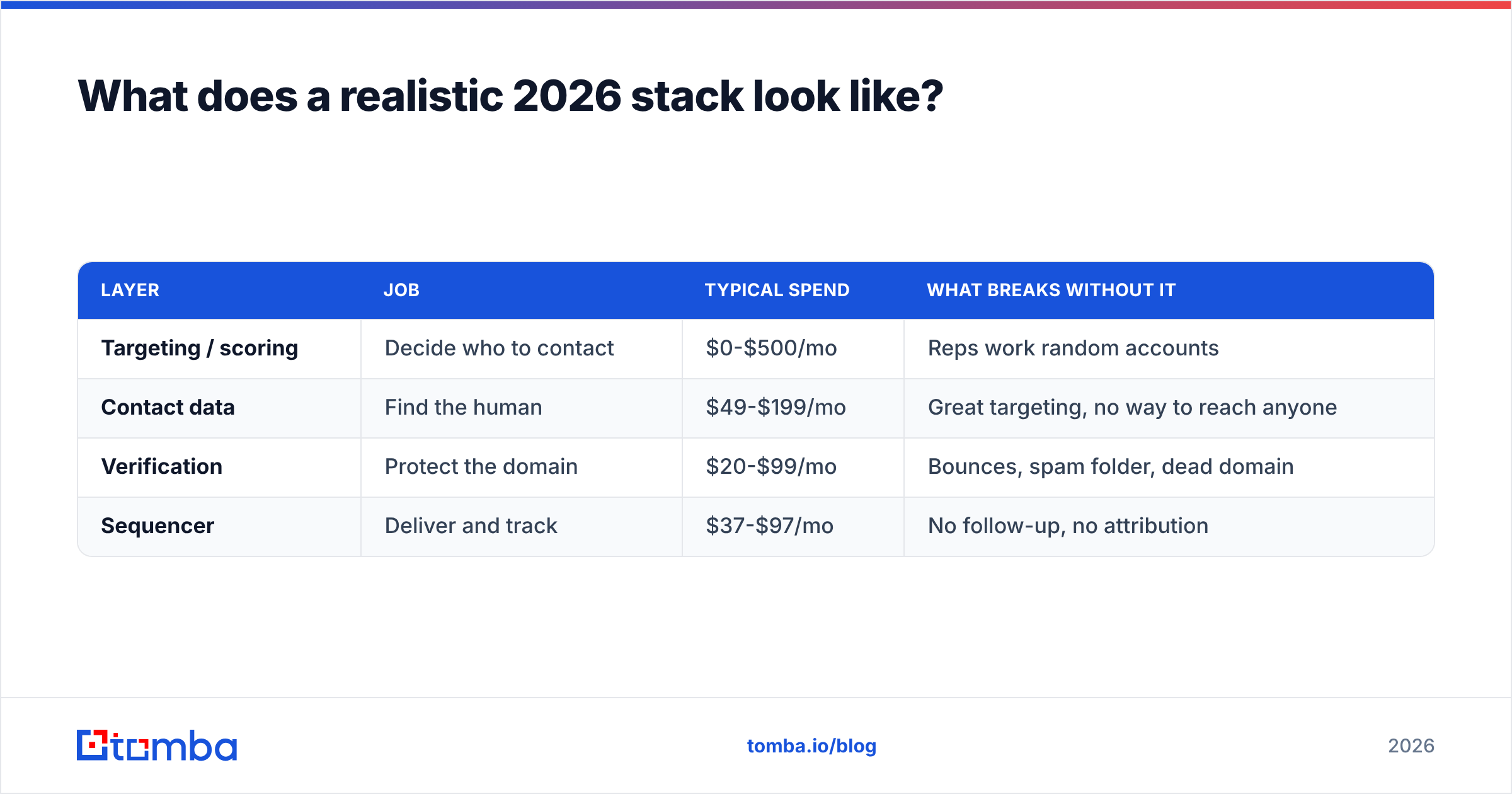
Stop trying to buy one tool. The teams hitting reply rates above 6% run three layers, and they're rarely from the same vendor.
| Layer | Job | Typical spend | What breaks without it |
|---|---|---|---|
| Targeting / scoring | Decide who to contact | $0-$500/mo | Reps work random accounts |
| Contact data | Find the human | $49-$199/mo | Great targeting, no way to reach anyone |
| Verification | Protect the domain | $20-$99/mo | Bounces, spam folder, dead domain |
| Sequencer | Deliver and track | $37-$97/mo | No follow-up, no attribution |
Notice what's missing from that table: a single vendor that does all four well. The all-in-ones exist — Apollo, Seamless, ZoomInfo — and they're a reasonable choice when procurement friction outweighs quality. But you're accepting the weakest component in the bundle, and in almost every bundle the weak component is verification.
A concrete assembly that works for most B2B teams under 30 reps:
- Targeting: your CRM's own closed-won analysis plus basic firmographic filters. Free. Add LeadEngineAI-class scoring once you have enough history to calibrate it.
- Contact data: a specialist finder. Tomba pricing starts free at 25 searches/mo and runs $49/mo Starter, $99/mo Growth, $249/mo Pro — which covers most teams before an enterprise seat is justified.
- Verification: the same vendor as your finder, so the loop is closed. Bulk-verify every list before import via a bulk email finder run.
- Sequencing: whatever your team already uses. Don't switch sequencers to solve a data problem.
If you want an outside check on any of these vendors, G2's lead intelligence category and Capterra's lead generation listings carry enough recent reviews to spot patterns vendors won't tell you. HubSpot's State of Sales research is also useful for benchmarking what "normal" reply and connect rates actually look like before you blame your tooling.
It's also fair to note that specialist data vendors outside the AI-branding wave — BookYourData among them — compete well on pure list quality and pay-as-you-go pricing, which suits teams that buy data in bursts rather than subscriptions. If your buying pattern is "three campaigns a year," a credit-based vendor beats any monthly seat.
How should you run the evaluation?#
Don't compare feature pages. Run the same test against both, plus one specialist finder as a control.
- Build a 100-row gold list. Pick 100 real prospects in your ICP — name, company, domain. Use people you can independently confirm.
- Run all three tools against it. Record match rate (did you get an address at all) separately from valid rate (did it survive verification). Vendors conflate these deliberately.
- Verify externally. Push every result through a neutral verifier so no vendor grades its own homework. A free email checker handles spot checks; use bulk for the full run.
- Send a real 50-contact test. Match rate doesn't matter if the addresses bounce. Measure hard-bounce rate over a week.
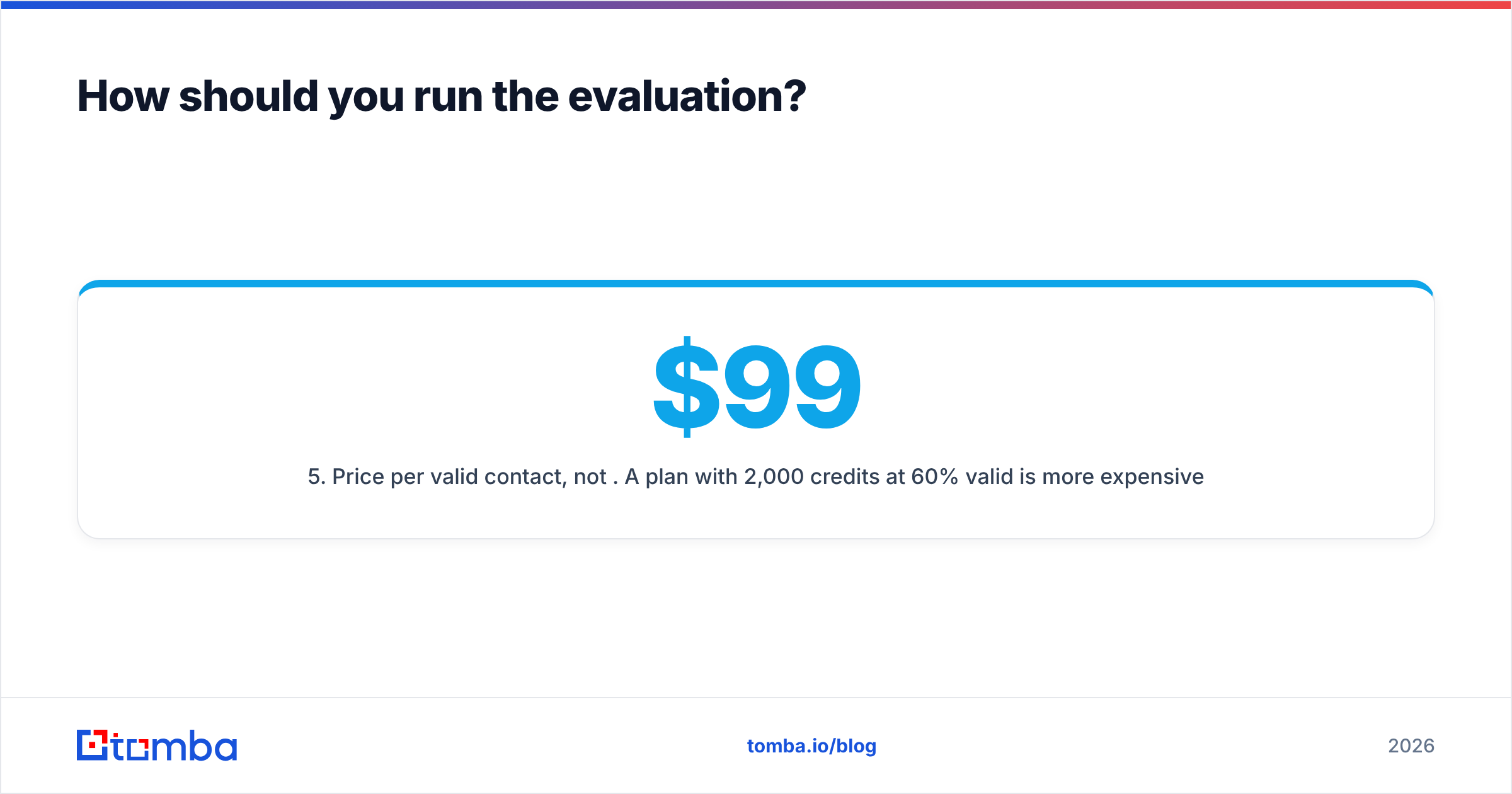
- Price per valid contact, not per credit. A $99 plan with 2,000 credits at 60% valid is more expensive than a $49 plan with 500 credits at 90% valid, per usable contact.
- Check export and API terms. Some platforms restrict export on lower tiers or claw back credits on invalid results. Read that clause before you buy.
Step five is where most evaluations flip. Credit-inflated plans look cheap until you divide by the number of contacts you could actually email.
So which one should you pick?#
Pick LeadEngineAI if you have sales history to train on, more leads than capacity, and a team disciplined enough to actually work a ranked queue. The scoring is the product; buy it for that and nothing else.
Pick LeadZenAI if you're small, you call as well as email, and your problem is an empty list rather than a badly sorted one. The low entry price and monthly terms make it a low-risk test.
Pick neither as your only tool. Both will hand you contacts that bounce. In 2026, email deliverability rules from the major mailbox providers punish bounce rates far more aggressively than they did three years ago, and a single bad send can suppress a domain for weeks. The verification layer isn't optional anymore, and neither platform's built-in checks are strong enough to be the last line of defense.
The honest framing: these are both reasonable tools solving half a problem each. Your job is to figure out which half you have.
Get the contact layer right first. Before you spend on AI scoring, make sure the emails you already have actually deliver. Start with the Tomba Email Finder — free tier includes 25 searches a month with no card, paid plans start at $49/mo, and every plan includes API access plus built-in verification so you're not paying two vendors to do one job. Run your existing list through it, measure the valid rate, and let that number decide what you buy next.
Related guides#
// get started
Find, verify and enrich your first contacts today
Start on the free plan with 25 searches a month, then scale when your team is ready.
Free plan · No credit card required · GDPR & CCPA
// about the author