LeadEngineAI vs Mailarrow (2026): Which Cold Email Tool Wins?
LeadEngineAI and Mailarrow both promise AI-driven cold outreach on autopilot. They solve different halves of the problem — and the half they skip is the one that quietly kills your campaigns.
LeadEngineAI vs Mailarrow comes down to one question. Do you want a tool that writes and sends for you, or a tool that only sends, but sends well? Here is the short answer first.
TL;DR
- LeadEngineAI sells the "AI SDR" promise. It finds accounts, drafts lines, and runs the sequence. You gain speed. You give up control.
- Mailarrow is a lean cold email sender. You get inbox rotation, warmup, sequences, and one shared inbox. It is built to land mail, not to write it.
- Neither tool is a data source. Both are only as good as the list you feed them. That is where most "the tool did not work" stories start.
- Pick LeadEngineAI to research, write, and send in one place. Pick Mailarrow if you have copy and lists, and want cheap, steady sending.
- Check every address before the first send. A 6% bounce rate sinks a campaign that both tools would post just fine.
- Short version of LeadEngineAI vs Mailarrow: one writes and sends, the other just sends better.
LeadEngineAI vs Mailarrow: what are they?#
Two tools that meet in the middle. They start from very different ends.
LeadEngineAI is an "AI sales agent". You describe your ideal buyer. The tool builds a list, drafts a first line from public signals, and starts the sequence. Those signals are site copy, job posts, and funding news. The pitch is headcount: one person doing the work of three reps.
Mailarrow is a cold email sender in the older mould, like Instantly or Smartlead. Its job is smaller and more mechanical. You plug in a pool of mailboxes. It warms them up, spreads sends across them, runs multi-step sequences, and pools replies in one inbox. You can read the current feature list on the official Mailarrow site.
That gap in scope explains most of the trade-offs. LeadEngineAI wants more of your workflow. Mailarrow wants one part of it, done without drama.
Neither tool is a data source. That point matters more than either home page lets on. Both will send to a bad list. Both will let your domain take the hit.

LeadEngineAI vs Mailarrow: the head-to-head table#
Here is the honest side-by-side. Prices move often, so check both vendor sites before you buy. What stays the same is the shape of what you pay for.
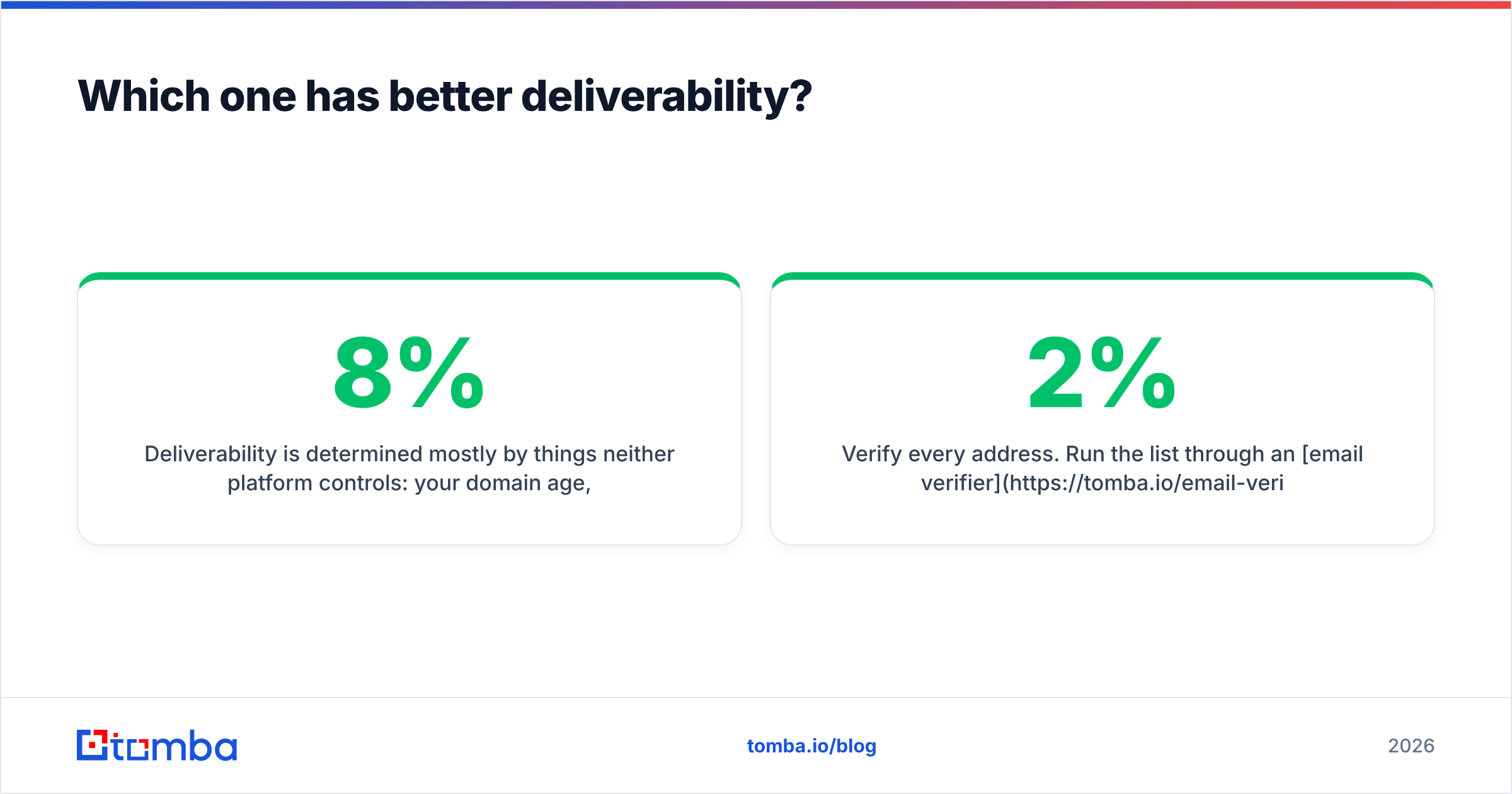
| Dimension | LeadEngineAI | Mailarrow | Why it matters |
|---|---|---|---|
| Main job | Finds leads and sends | Sends and warms up | Sets how much of your stack it takes over. |
| Pricing | By contacts and AI credits | By send volume and mailboxes | Credits spike; mailboxes add up. |
| Built-in data | Yes, lists come with it | No, bring your own | Bundled lists are rarely clean. |
| Inbox rotation | Yes | Yes, more fine-grained | The top lever on send volume. |
| Warmup | Yes | Yes | Neither needs a second warmup tool. |
| AI copy | Core feature | Basic | Handy with no writer; noise if you have one. |
| Shared inbox | Yes | Yes | A must past two mailboxes. |
| CRM sync | Native plus Zapier | Native plus Zapier | Check your own CRM first. |
| Learning curve | Higher | Lower | Sets how fast you can send. |
| Best fit | Solo founders, small teams | Agencies, teams with copy | Fit beats feature count. |
The table hides one thing. These two do not really compete on the axis their home pages imply. LeadEngineAI stands in for a data tool plus a sending tool. Mailarrow stands in for Instantly or Smartlead. Treat them as twins and you will buy the wrong one.
What does each tool do best?#
Five choices decide LeadEngineAI vs Mailarrow, in the order they tend to bite.
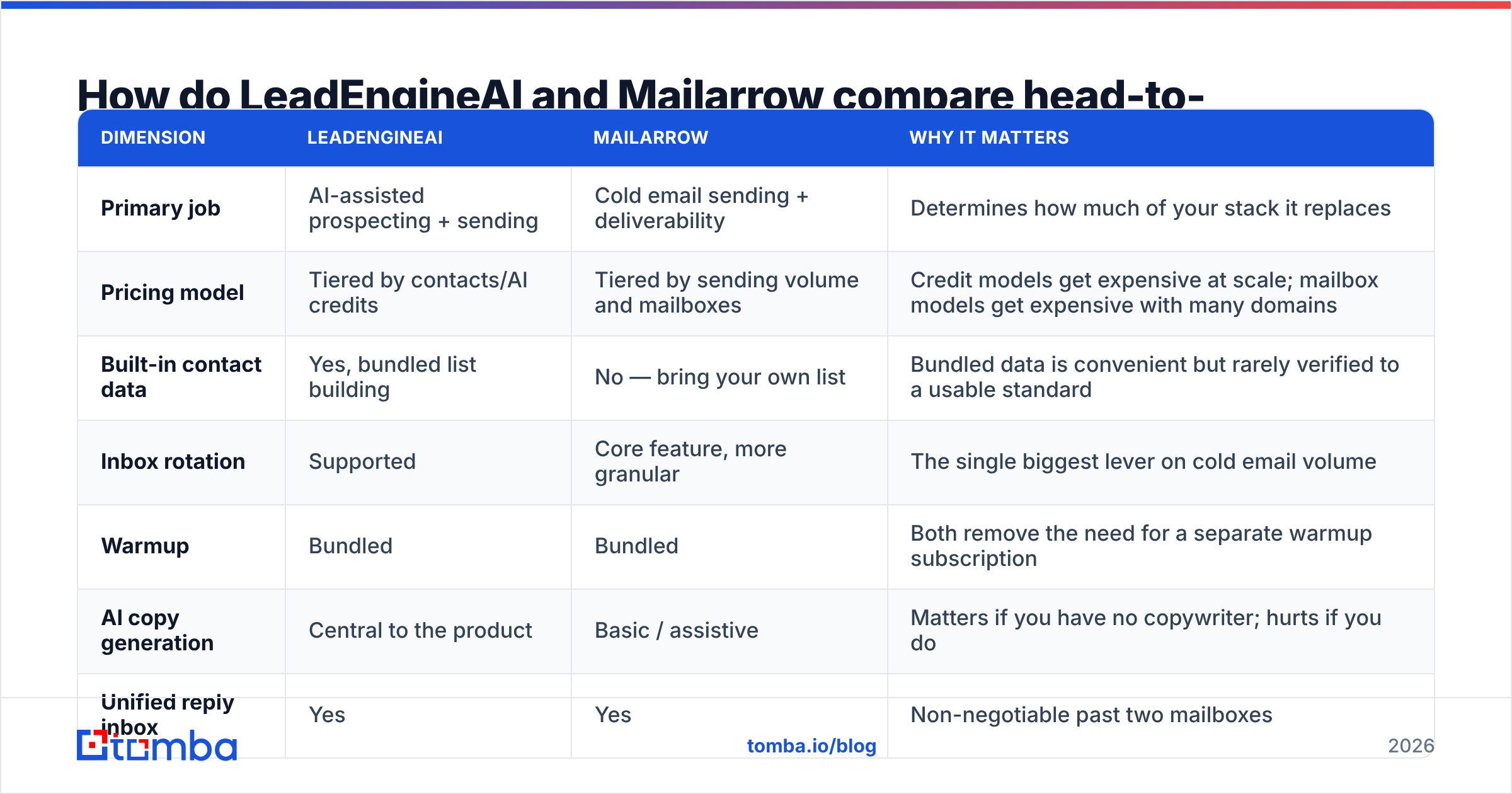
List building. LeadEngineAI has it built in. Mailarrow expects you to bring your own. Bundled data feels like a saving until you count bounces. Most all-in-one tools draw on the same shared pools. They refresh them once a quarter at best. A list that looked fine in January will bounce in May.
Custom first lines. LeadEngineAI wins on raw power. It drafts a line per lead from what it scrapes. Whether those lines earn replies is a second question. Buyers spot AI copy fast, and in crowded markets they have seen thousands of it.
Landing in the inbox. Mailarrow is the more serious tool here. Daily caps per mailbox, ramp plans, rotation rules, and spintax are the dull machine parts that keep a domain alive. A focused tool tends to build them better than one split across research, writing, and sending.
Reply handling. Call it a tie. Both give you one shared inbox and rough sorting. Neither one replaces a human who reads the replies, whatever the AI triage tab claims.
Cost you can predict. Mailarrow is easier to forecast, since you pay per mailbox and per send. Credit plans throw up shock months when someone enriches 40,000 rows on a Tuesday.
Which one lands in more inboxes?#
On inbox placement, LeadEngineAI vs Mailarrow is not a close call. Mailarrow wins on design. But the tool is not what decides your result.
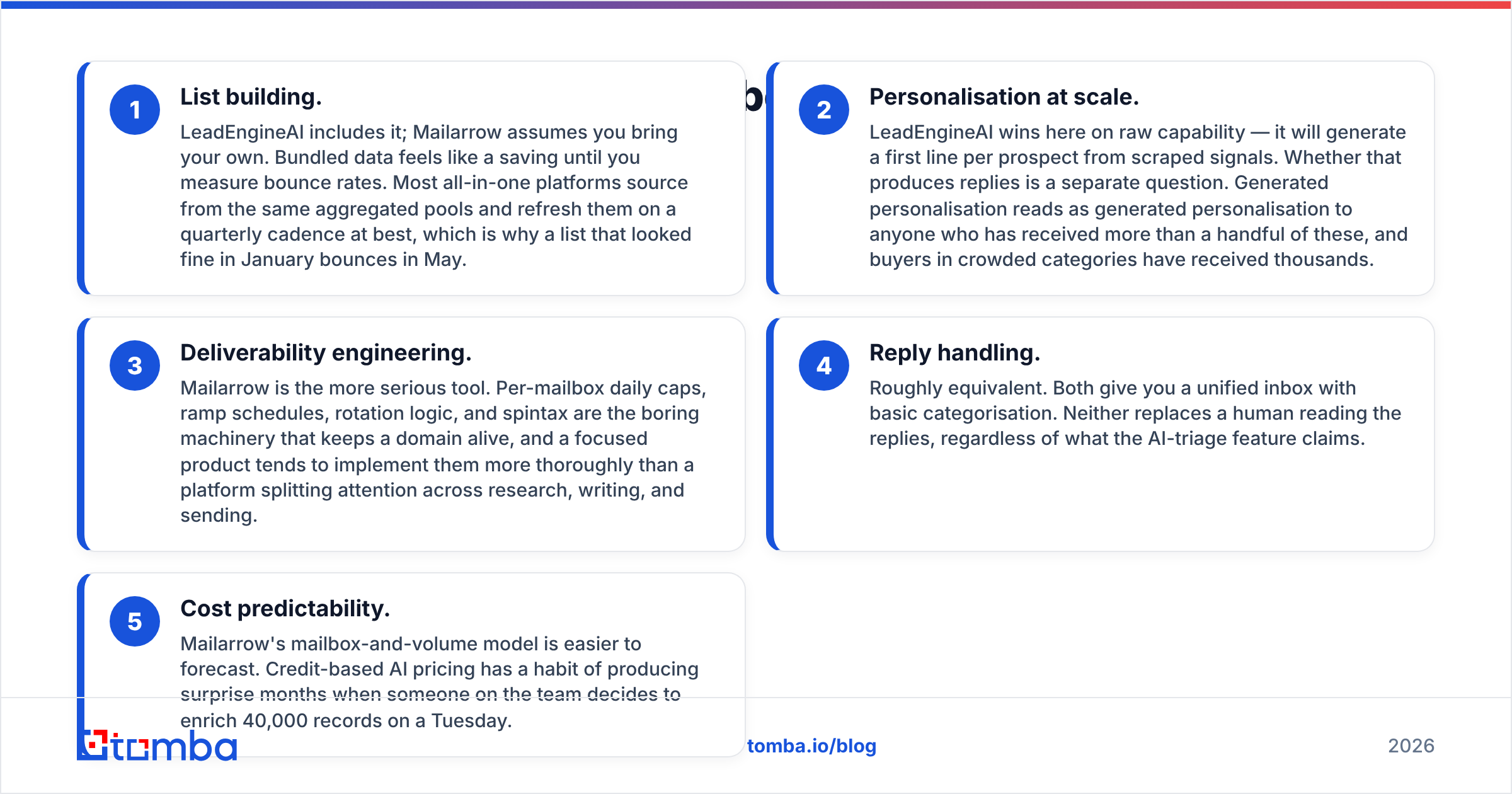
Most of it comes down to things neither tool owns. Domain age. Auth records. Bounce rate. Spam gripes. Whether your copy trips a filter. A sending tool can spread volume and warm mailboxes. It cannot save a blast sent to a list where 8% of the rows are dead.
The order that works:
- Set up auth first. Add SPF, DKIM, and DMARC on every sending domain. The Google and Yahoo bulk sender rules made this table stakes. You can watch the results in Google Postmaster Tools.
- Warm up before you send. Both tools warm mailboxes for you. Give a new domain three or four weeks before real volume. To plan the ramp, a warmup calculator gives you a daily number instead of a guess.
- Check every address. Run the list through an email verifier before import. Aim for a bounce rate under 2%, or under 1% if you can. It costs cents per row and saves an asset that takes months to rebuild.
A few more habits keep the numbers where you want them:
- Cap each mailbox. Thirty to fifty sends per mailbox per day is the range most senders settle on in 2026. Scale by adding mailboxes, not by raising the cap.
- Watch gripes, not opens. Open rates have been shaky since Apple Mail Privacy Protection. Spam gripes and replies are the signals worth tuning.
Do those five things and either tool will post your mail. Skip the third one and neither will. This is the part of email deliverability that no amount of AI copy can fix.
How much do they cost?#
Cost is where LeadEngineAI vs Mailarrow gets slippery. Weigh the whole bill, not the sticker price.
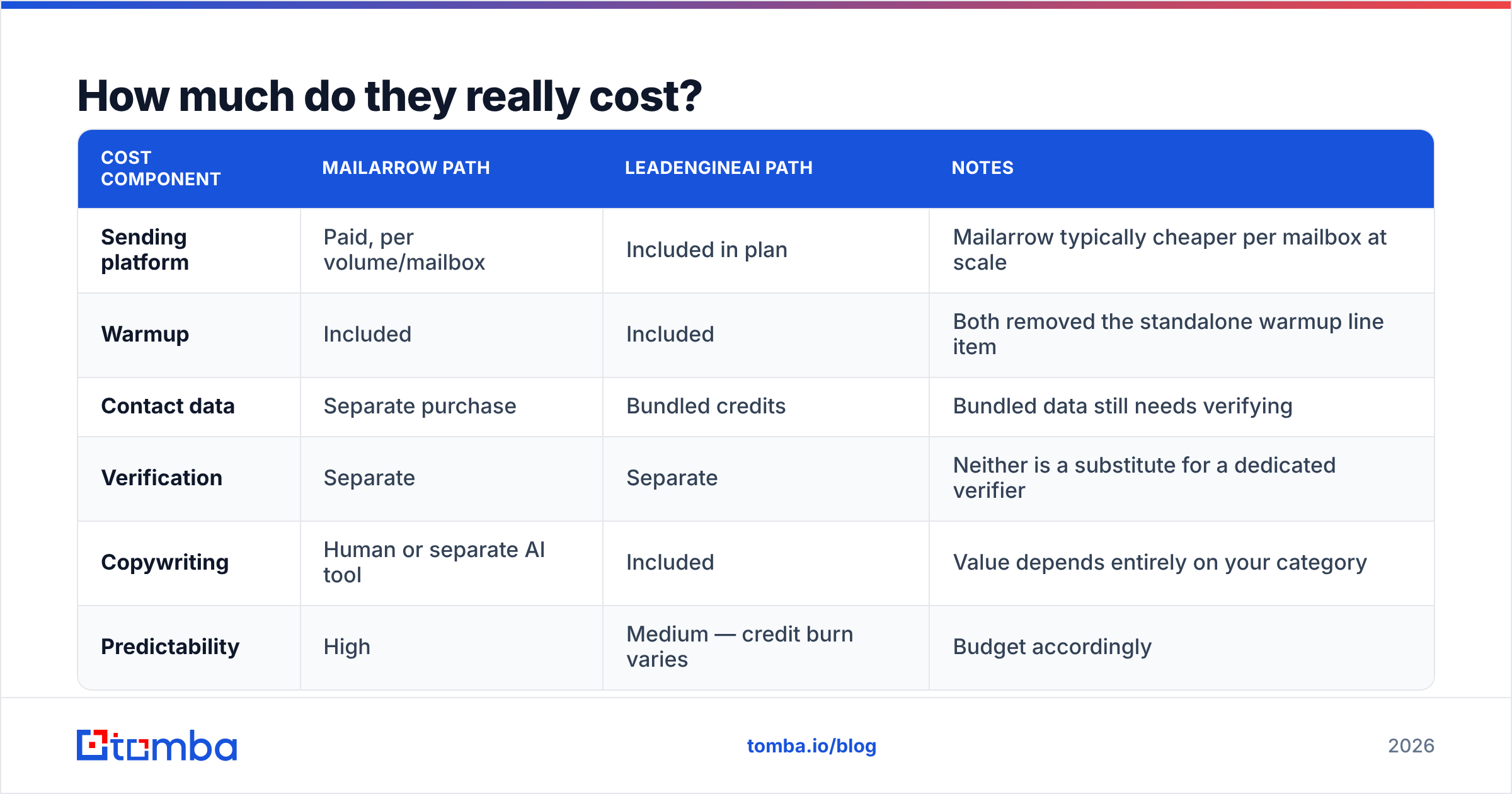
A real cold email stack has three line items: data, sending, and warmup. Mailarrow bundles sending and warmup, so data is a second buy. LeadEngineAI bundles all three. That looks cheaper on paper. It often is not, since you still have to check the data it hands you.
| Cost item | Mailarrow path | LeadEngineAI path | Notes |
|---|---|---|---|
| Sending tool | Paid, per volume or mailbox | In the plan | Mailarrow tends to cost less per mailbox at scale. |
| Warmup | In the plan | In the plan | Both killed the standalone warmup bill. |
| Contact data | Second buy | Credits in the plan | Bundled rows still need a check. |
| Address checks | Second buy | Second buy | Neither one stands in for a real verifier. |
| Copy | Human or another AI tool | In the plan | Worth a lot or nothing, based on your market. |
| Easy to predict | High | Medium, credit burn swings | Budget for the swing. |
What does the data layer cost on its own? Tomba pricing runs a free tier at 25 searches a month, Starter at $49/mo, Growth at $99/mo, and Pro at $249/mo. Enterprise terms are custom. Hold that number in your head when a bundled tool calls its data "free". It is priced into the plan. You are also trusting a vendor whose core skill is sending, not data.
A list shop like BookYourData takes a fair third path. You pay as you go for B2B rows that are checked at the point of sale, with no plan to renew. It suits buying that comes in bursts. Different model, honest trade-offs, and safer than trusting that the rows inside your sending tool are fresh.
Is an AI SDR better than a plain sending tool?#
Not yet, in most markets. The reason is not tech. It is how buyers read mail.
AI SDR tools tune for what they can count: mail sent with a custom-looking line in it. Buyers judge on what the tool cannot see, which is whether the mail was worth reading. In busy markets such as sales tech, HR tech, and agencies who sell to agencies, AI copy now reads as a bad sign. Your buyer knows what "I saw you are hiring a RevOps lead" means.
Where a tool like LeadEngineAI really wins:
- Quiet markets, where a merely decent email still stands out.
- Solo founders with no writer and no time. "Good and sent" beats "great and never".
- Early research, where the list building saves hours even if you rewrite every line.
Where a focused tool like Mailarrow wins:
- Teams with a sequence that already converts, who need to send more without burning domains.
- Agencies with many clients, where cost per mailbox and clean workspaces beat AI copy.
- Anyone stuck on inbox placement, not on what the email says.
Peer reviews help if you read them with care. Filter by company size on G2. Skip any review written in the first 30 days, since cold email trouble shows up in month two.
What should your stack look like?#
The shape that works, whichever of the two you buy:
- Data layer. Use a dedicated tool to find and check addresses. An email finder covers named leads. A domain search maps a whole company. Check it all before it hits a sequence.
- Enrich layer. Firm size, role, and stack data drive real sorting. A line that cites a true fact beats AI flattery every time.
- Sending layer. LeadEngineAI or Mailarrow, based on the fit above.
- CRM layer. Where replies land and deals get tracked.
Most teams who say outbound "does not work" bought layer three and skipped layer one. The sending tool takes the blame for a data problem. They churn to a rival, and the same thing happens under a new logo.
LeadEngineAI vs Mailarrow: which should you pick?#
Pick LeadEngineAI if you are a founder or a one-person sales team. You have no copy and no list. You sell into a market that is not yet flooded with cold mail. Shipping this week is worth more to you than tuning. Just plan to check its bundled rows anyway.
Pick Mailarrow if you have a sequence that already converts. You are scaling past a handful of mailboxes. You run outbound for several clients or brands. Or your block is landing in the inbox, not writing the email. Budget for data on its own and treat that as a plus. You get to pick a vendor whose only job is accuracy.
Pick neither yet if your bounce rate is above 4%. Fix the list first. Every dollar spent on a sending tool before that burns domains you will have to replace.
So the honest summary of LeadEngineAI vs Mailarrow: one is broader, one is sturdier. The gap between a campaign that books meetings and one that books none sits upstream of both.
FAQ#
Can I use both together? You can, but it rarely pays. Use the research and drafts from LeadEngineAI, export them, and send through Mailarrow only if your volume covers two bills.
Do they replace a real email verifier? No. Both may run a light check on import. Neither one handles catch-all domains, role accounts, or SMTP checks the way a dedicated tool does.
How many mailboxes do I need? Divide your target daily sends by 40. Fifteen hundred sends a month is about two mailboxes. Ten thousand is closer to nine or ten, spread over at least three domains.
Does AI copy still work in 2026? It works where buyers have not learned to spot it yet. In busy B2B software markets, they have. Use AI to research and draft. Then have a human write the first line.
Fix the layer that decides the rest. Before you buy either tool, build a list you can trust. The Tomba Email Finder finds work addresses by name, company, or domain. The free tier gives you 25 searches a month, so you can test it against whatever your sending tool bundles. Run the same 100 leads through both, compare bounce rates after one send, and let the numbers pick your stack.
Related guides#
// get started
Find, verify and enrich your first contacts today
Start on the free plan with 25 searches a month, then scale when your team is ready.
Free plan · No credit card required · GDPR & CCPA
// about the author