LeadEngineAI vs OutreachBin: Which Outreach Tool Wins in 2026
LeadEngineAI and OutreachBin solve two different halves of cold outreach — AI-assisted lead sourcing versus sending and inbox warmup. Here's an honest breakdown of where each one earns its seat in your 2026 stack, and where both leave a gap.
TL;DR — LeadEngineAI vs OutreachBin in one minute
- LeadEngineAI vs OutreachBin is a bit of a false matchup. LeadEngineAI works the sourcing and AI-copy side. OutreachBin works the sending, sequencing and inbox-warmup side.
- Got a clean list, but your email lands in spam? OutreachBin is the closer fit. Short on qualified contacts? Neither tool solves that. You need a real data layer.
- Both tools cost less than Apollo or Outreach.io. That helps your budget. It also raises the risk on data depth, support and roadmap.
- List quality still drives cold email results, not the sequencing UI. A 22% bounce rate kills a domain faster than any warmup tool can heal it.
- A simple 2026 stack: verified contact data (Tomba) → sending and warmup (OutreachBin or similar) → CRM. Keep the layers apart. Then you can swap any one of them.
LeadEngineAI vs OutreachBin: what each tool does#
OutreachBin is a cold email platform. It does three things: multi-inbox sending, follow-up sequences, and inbox warmup. The pitch is simple. It costs less than the big sequencers, and warmup comes included instead of as an add-on. You connect Google Workspace or Microsoft 365 mailboxes. You upload a list. You write a sequence. The tool then rotates sends across inboxes. In the background, a warmup network trades messages and pulls them out of spam. Check the current feature set and plans on outreachbin.com. Small vendors move fast, and any blog post ages quickly.
LeadEngineAI sits further upstream. It offers AI-assisted lead sourcing, enrichment and generated outreach copy. That category — "AI SDR" or "AI lead engine" — boomed between 2024 and 2026. The products in it differ a lot. A few own their data. Most resell it. That gap matters more than any feature list. Plenty of AI tools hold no contact database at all. They call someone else's API, wrap it in a chat box, and add a margin.
Here is the caveat, up front. LeadEngineAI is newer and less documented than OutreachBin. Outside proof of its coverage, accuracy and pricing is thin. So check the live pricing page first. Then read recent reviews on G2 instead of trusting a secondhand summary — this one included.

LeadEngineAI vs OutreachBin: head-to-head comparison#
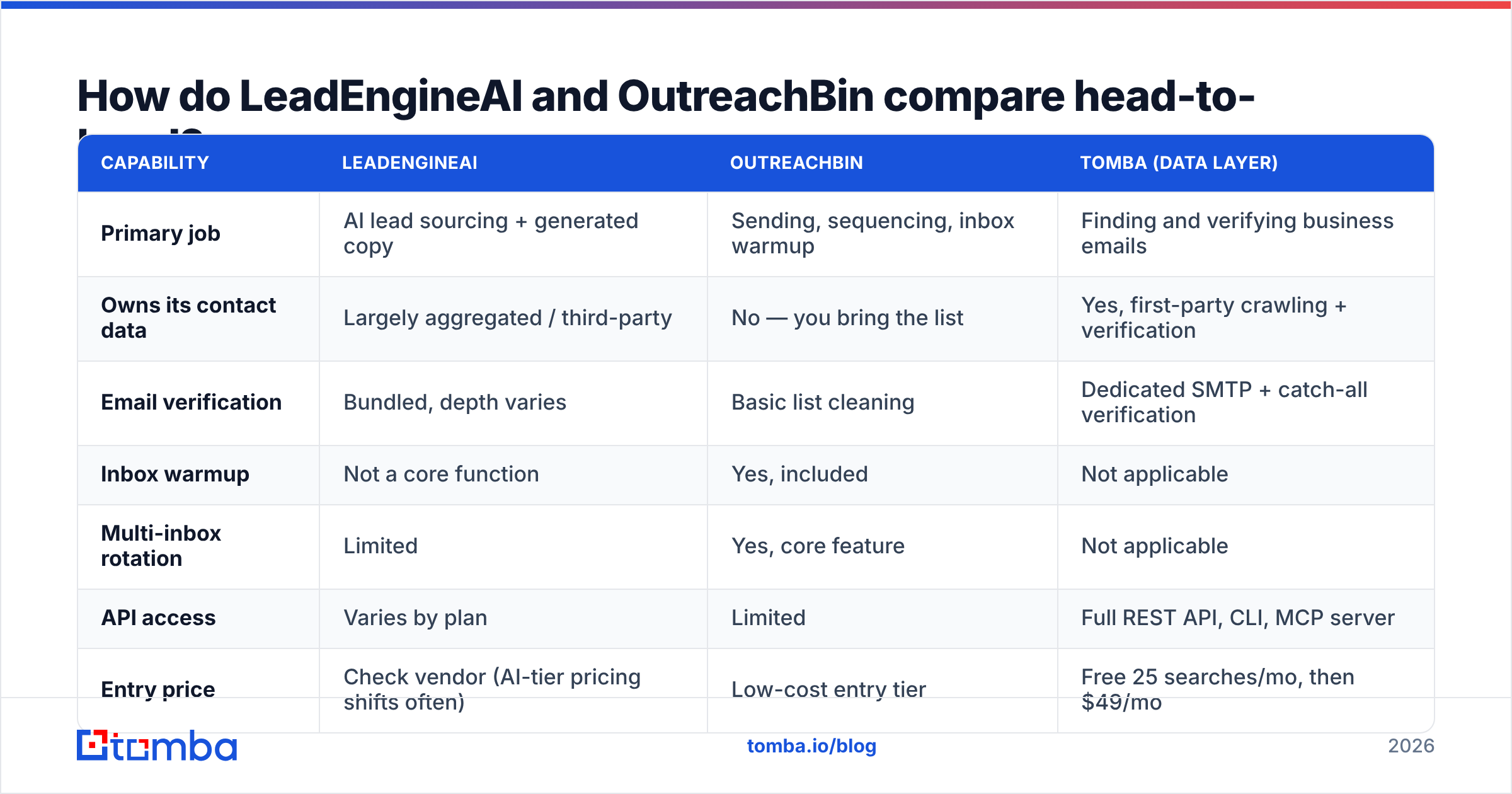
Read this table by layer, not by winner. The third column shows what a dedicated data provider adds. That is the gap most teams hit three weeks after they sign up for either tool.
| Capability | LeadEngineAI | OutreachBin | Tomba (data layer) |
|---|---|---|---|
| Primary job | AI lead sourcing + generated copy | Sending, sequencing, inbox warmup | Finding and verifying business emails |
| Owns its contact data | Largely aggregated / third-party | No — you bring the list | Yes, first-party crawling + verification |
| Email verification | Bundled, depth varies | Basic list cleaning | Dedicated SMTP + catch-all verification |
| Inbox warmup | Not a core function | Yes, included | Not applicable |
| Multi-inbox rotation | Limited | Yes, core feature | Not applicable |
| API access | Varies by plan | Limited | Full REST API, CLI, MCP server |
| Entry price | Check vendor (AI-tier pricing shifts often) | Low-cost entry tier | Free 25 searches/mo, then $49/mo |
| Best for | Teams with no list and no copywriter | Teams with a list and a spam problem | Teams who need accurate contacts at scale |
| Biggest risk | Recycled data, generic AI copy | Garbage-in list quality | Not a sender — pairs with one |
Two things stand out. First, columns one and two barely overlap. So "LeadEngineAI vs OutreachBin" is often the wrong question to ask. Second, both tools lean on contact data being right. Neither one treats verification as its core job.
LeadEngineAI vs OutreachBin: which one gives better lead data?#
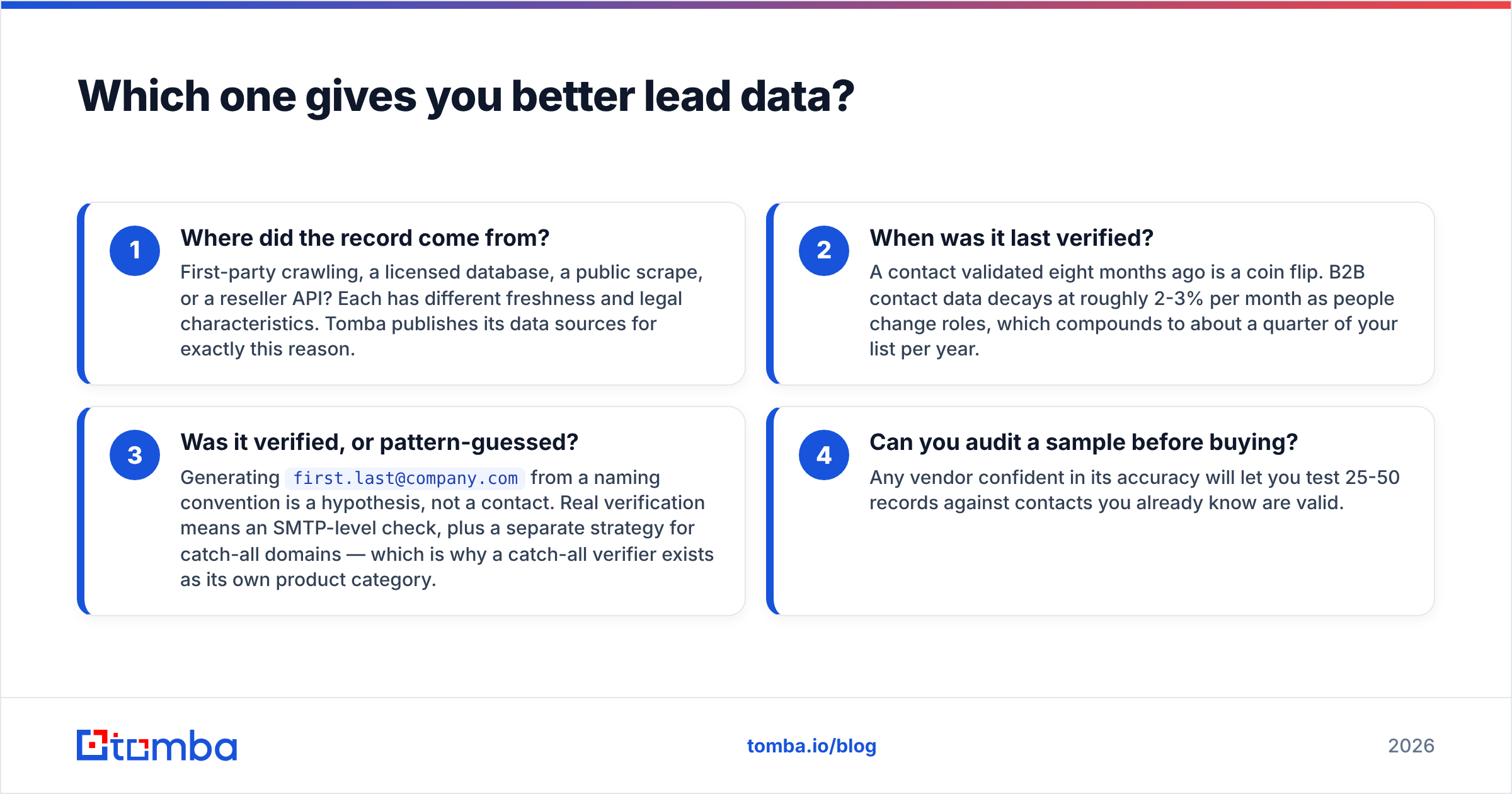
This is where the AI-first category gets uncomfortable. A tool builds leads from a chat prompt. Fine. You should still be able to answer four questions about each record.
- Where did the record come from? First-party crawling, a licensed database, a public scrape, or a reseller API? Each one ages at a different rate and carries different legal risk. Tomba publishes its data sources for that reason.
- When was it last verified? A contact checked eight months ago is a coin flip. B2B contact data decays about 2-3% a month as people switch roles. That adds up to a quarter of your list each year.
- Was it verified, or guessed? Building
first.last@company.comfrom a naming pattern is a guess, not a contact. Real checks happen at the SMTP level. Catch-all domains need their own method, which is why a catch-all verifier exists as its own product. - Can you audit a sample first? Any vendor sure of its accuracy will let you test 25-50 records against contacts you already know.
Run those four questions on LeadEngineAI. Then run them on any enrichment bundled into OutreachBin. The tool that answers all four clearly earns your trust. The tool that answers with "billions of data points" does not.
OutreachBin does not claim to be a data vendor. It expects you to bring a list. That is more honest than an AI wrapper pretending to solve sourcing. It also means your results stop where your list quality stops.
Is inbox warmup enough to fix deliverability?#
No. Warmup helps, but it cannot carry the job alone. Think of it as floss, not a root canal.
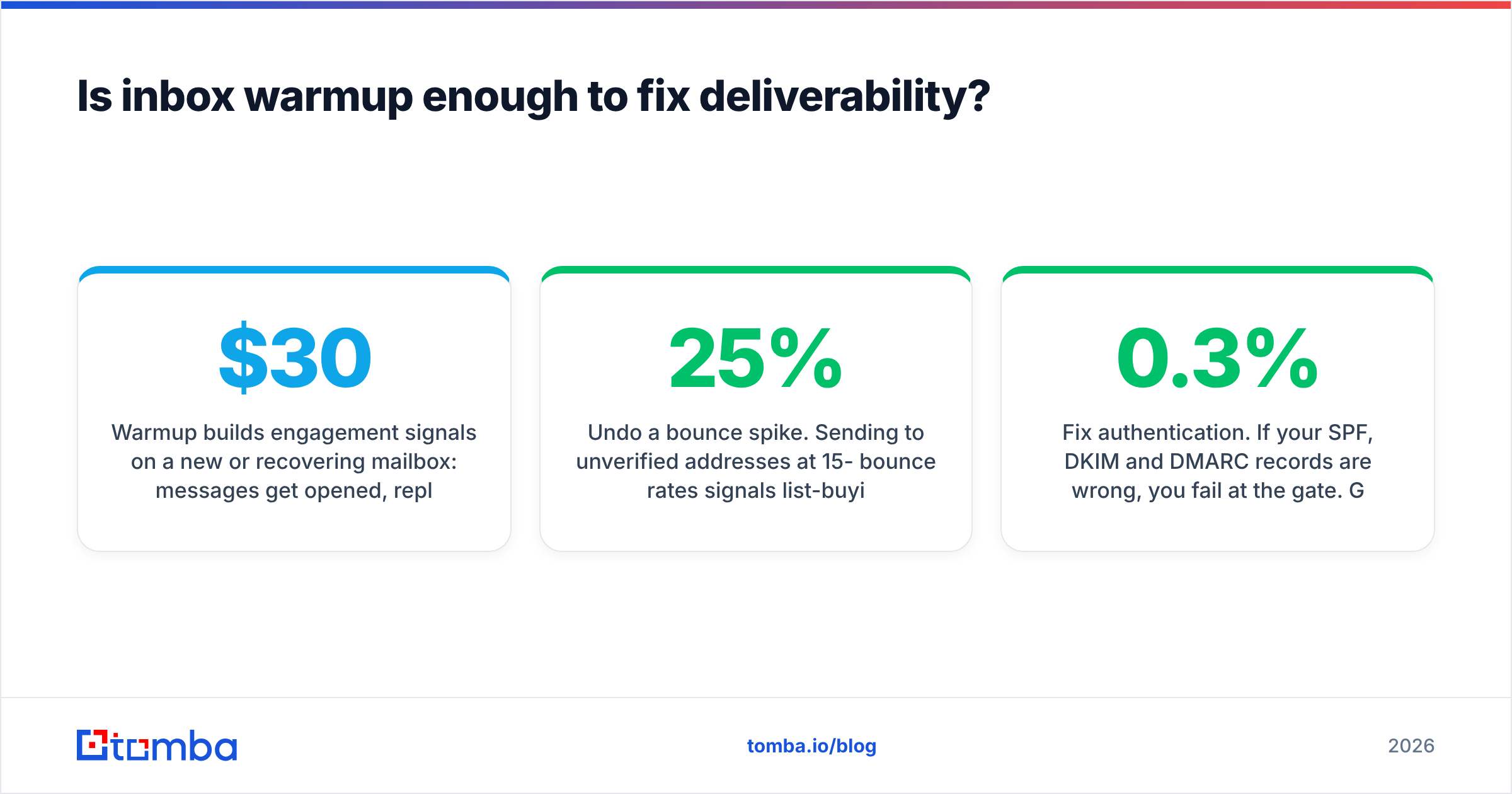
Warmup builds engagement signals on a new or damaged mailbox. Messages get opened, replied to, and dragged out of spam by a shared network. That does help a cold domain build a baseline. OutreachBin puts warmup in the base plan rather than a $30/mo upsell. That is a real edge over several better-known sequencers.
Here is what warmup cannot do:
- Undo a bounce spike. Sending to unverified addresses at 15-25% bounce rates looks like list-buying to mailbox providers. Fake engagement will not offset it.
- Fix authentication. Wrong SPF, DKIM or DMARC records mean you fail at the gate. Google and Yahoo made DMARC all but required for bulk senders. The Gmail sender guidelines spell out the limits, including a spam complaint rate under 0.3%. Run an SPF checker before anything else.
- Rescue bad copy. Complaint rate is a targeting and copy problem. Warmup does not write better email.
- Survive volume abuse. Twelve inboxes sending 1,200 cold emails a day from a three-week-old domain will not last long.
The order that works: authenticate the domain → verify the list → warm the mailbox → send slowly → watch the numbers. Most teams skip step two and lean on step three instead. That is the most common way cold outreach fails. Both tools quietly invite it, because both make sending feel easy. Treat email deliverability as a system, not a feature. That habit splits the teams that scale from the teams that burn domains.
What does each one actually cost?#
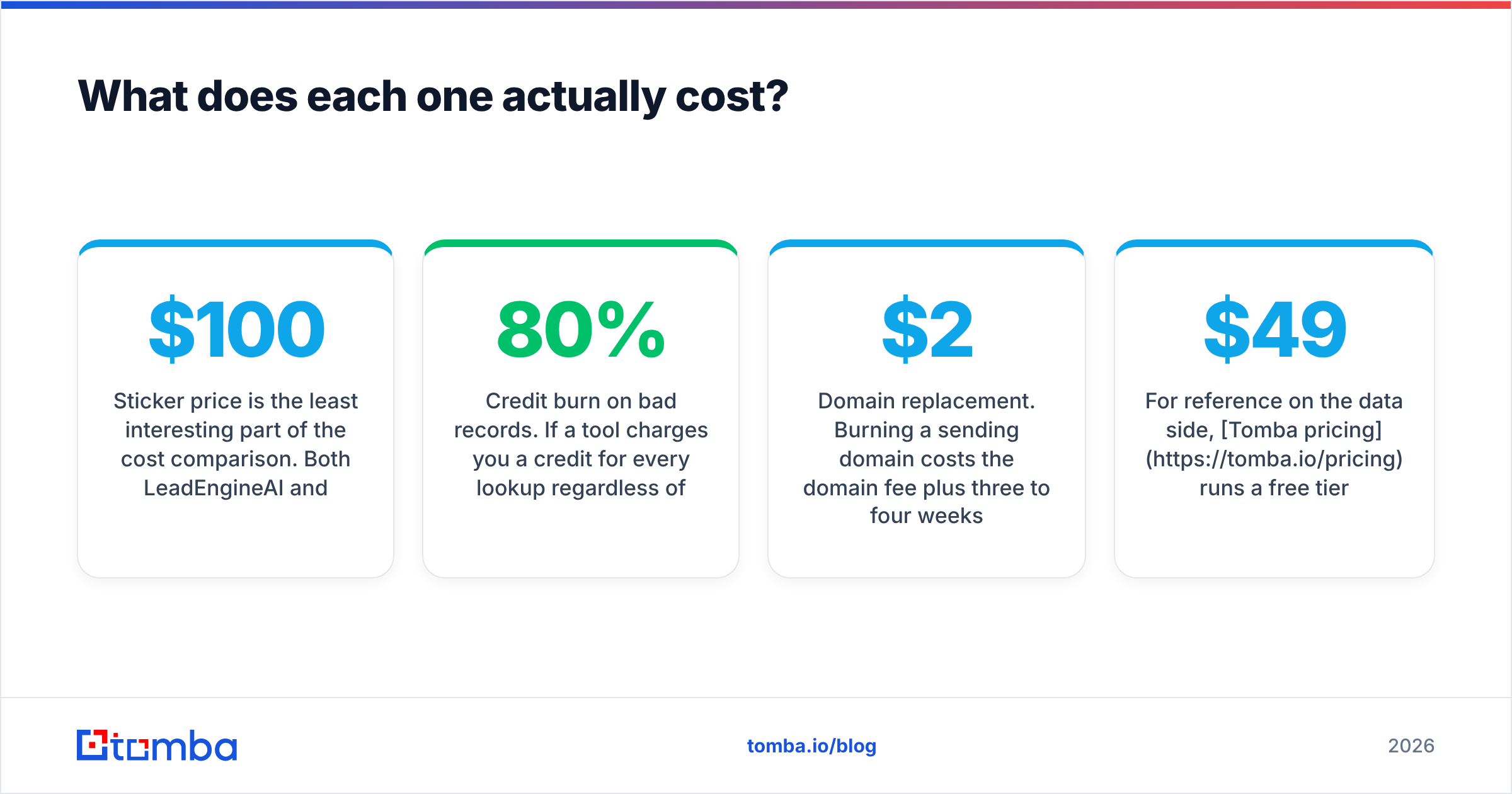
Sticker price is the dull part of this comparison. Both LeadEngineAI and OutreachBin sit well under the $100+/user/month tier of the big sequencers. Both look cheap on a pricing page.
The costs that matter show up later:
- Credit burn on bad records. Some tools charge a credit per lookup, valid result or not. At 80% accuracy, that makes the tool 25% pricier than its list price suggests. Ask whether unverified or catch-all results get billed.
- Domain replacement. Burning a sending domain costs the domain fee, three to four weeks of warmup, and the pipeline you never built. For a two-rep team, call it $2,000-$4,000 per burned domain.
- Seat inflation. Per-user pricing on the sending layer grows with headcount. Per-credit pricing on the data layer grows with volume. Model both against your 12-month plan, not this month.
- Migration tax. All-in-one tools own sourcing and sending. That builds switching costs by design. Separate layers are cheaper to replace one at a time.
On the data side, Tomba pricing starts free at 25 searches a month. Starter is $49/mo, Growth is $99/mo, and Pro is $249/mo, with Enterprise custom. The API comes with every paid tier, not just the top plan. Whatever you pick, price the stack, not the part.

Who should choose which?#
Choose OutreachBin if: you already have a source of qualified contacts. You send cold email from several mailboxes. Your bottleneck is inbox placement or follow-up. Included warmup and a low entry price make it a fair first sequencer for one to five reps. You will still need verification upstream.
Choose LeadEngineAI if: you start from zero — no list, no copywriter, no clear ICP. You want one screen that drafts both. Treat the output as a first guess. Spot-check a sample of records against reality before you scale. Then rewrite the copy in your own voice. Buyers who get forty AI emails a week spot the default tone at once.
Choose neither as your whole stack if: you send more than a few hundred emails a month. Or you sell into crowded markets where contact accuracy drives reply rate. Or you need API access to enrich records inside your own systems. At that point, you want separate layers.
What should a 2026 outreach stack look like?#
- Define the ICP before you buy a tool. Firmographics, trigger events, and the job title that owns the pain. Tools amplify targeting. They do not create it.
- Source and verify contacts in one dedicated layer. Use an email finder with real verification. Run domain search to map whole accounts. Treat catch-all domains as their own workflow, not a rounding error.
- Authenticate and warm the sending setup. Keep sending domains off your main domain. Set up SPF, DKIM and DMARC. Warm the mailboxes for two to four weeks before volume.
- Sequence with restraint. Three or four touches, each one different, each with a reason. OutreachBin handles this tier fine.
- Route replies into the CRM right away. Manual copy-paste is where pipeline dies. Check for a native HubSpot integration or a Zapier path.
- Track bounce rate and reply rate apart. Bounce rate audits your data layer. Reply rate audits your targeting and copy. Mix them up and you will fix the wrong thing for a quarter.
Why keep these layers apart? Because when one fails, you swap one line item. You do not rebuild your whole go-to-market motion. All-in-one is convenient, but it is rented convenience.
The verdict on LeadEngineAI vs OutreachBin#
Forced to pick one today? OutreachBin is the safer buy. Its job is clear: send, follow up, warm up. You can verify it, and the price is sane. LeadEngineAI belongs to a category where the best and worst products sit miles apart, and outside proof is thin. Buy it only after a hands-on data audit.
The honest answer is bigger than that, though. Winning the LeadEngineAI vs OutreachBin debate matters less than the contacts you feed either tool. Bounce rate decides whether your domain survives the quarter. And bounce rate is set upstream of both tools.
So fix that layer first. Tomba's Email Finder returns verified professional email addresses by name, domain or company. SMTP-level checks and catch-all handling come built in. Start free with 25 searches a month, then $49/mo when you scale. Feed clean contacts into whichever sender you pick. Both tools will beat their own reviews.
Related guides#
// get started
Find, verify and enrich your first contacts today
Start on the free plan with 25 searches a month, then scale when your team is ready.
Free plan · No credit card required · GDPR & CCPA
// about the author