LeadEngineAI vs Respona: Which Outreach Tool Wins in 2026?
LeadEngineAI promises AI-generated pipeline. Respona owns outreach and digital PR. We break down data quality, pricing, workflows, and where each one quietly costs you money.
TL;DR
- Respona is an outreach platform, not a database. It is built for link building, digital PR, and blogger outreach, with prospecting and email sending in one loop.
- LeadEngineAI is an AI-first lead generation tool aimed at B2B sales teams that want contact lists and AI-written sequences without stitching five products together.
- They overlap on about 30% of the surface (find contact, write email, send sequence) and diverge sharply on everything else. Pick based on what you are pitching, not on feature counts.
- Neither is a serious data vendor. Both rely on discovery + enrichment layers that behave inconsistently outside their sweet spots. Budget for a dedicated email finder and verification step regardless of which you buy.
- Rough rule: link building, podcasts, guest posts, journalist pitches → Respona. Cold B2B sales sequences at volume → LeadEngineAI (or an established sales engagement tool), plus a separate data source.
What are LeadEngineAI and Respona?#
They solve different problems that happen to share a button labeled "Send."
Respona (respona.com) is an all-in-one outreach platform whose center of gravity is content marketing and SEO. You start from a search — a keyword, a podcast topic, an article URL — and Respona surfaces the pages, shows, or writers worth pitching. It then tries to find the right contact at that site, drafts a personalized email, and runs the follow-up sequence. It is the tool an agency SEO lead opens on Monday morning to build 40 links this quarter.
LeadEngineAI positions itself as an AI lead generation engine for B2B sales: describe your ideal customer, let the system assemble a list, and have AI draft the outreach. It sits in the newer category of "prompt in, pipeline out" tools that emerged as LLM costs collapsed. It is closer in spirit to a lightweight Apollo or Instantly hybrid than to a link-building tool.
The honest framing: Respona is a workflow product with data attached. LeadEngineAI is a data-and-AI product with a workflow attached. That single sentence predicts almost every trade-off below.
One caveat before you read further. Respona publishes its plans openly and has years of third-party reviews on G2. LeadEngineAI is a newer and much smaller vendor, its packaging has changed more than once, and independent review volume is thin. Treat any pricing you see quoted anywhere — including here — as a starting point to verify on the vendor's own site before you sign.

How do LeadEngineAI and Respona compare feature by feature?#
| Dimension | LeadEngineAI | Respona |
|---|---|---|
| Primary use case | B2B cold sales outreach | Link building, digital PR, podcast and blogger outreach |
| Prospect discovery | ICP filters / AI-generated lists | Live search: Google, podcasts, articles, news mentions |
| Contact finding | Built-in enrichment | Built-in finder + verifier per contact |
| Email sending | Native sequences | Native sequences with inbox rotation |
| AI writing | Core selling point; sequence-level generation | Assisted personalization per prospect, template-driven |
| Personalization depth | Variable-based, AI paraphrase | Pulls article context, author name, recent posts |
| CRM integrations | Limited, growing | HubSpot, Pipedrive, Salesforce, Zapier |
| Best team fit | SDR teams, solo founders | SEO agencies, content teams, PR |
| Maturity / review volume | Early-stage, thin | Established, hundreds of public reviews |
| Where it leaks money | Credits burned on unverified contacts | Seat-based pricing scales badly past 2-3 users |
Read that table as two different jobs rather than a scorecard. If you are pitching a guest post to a marketing blog, Respona's discovery step is worth more than every AI feature LeadEngineAI ships. If you are emailing 800 heads of ops at Series B SaaS companies, Respona's search is the wrong shape entirely.
What does each tool actually cost?#
Pricing is the part buyers get wrong most often, because both tools meter something other than "emails sent."
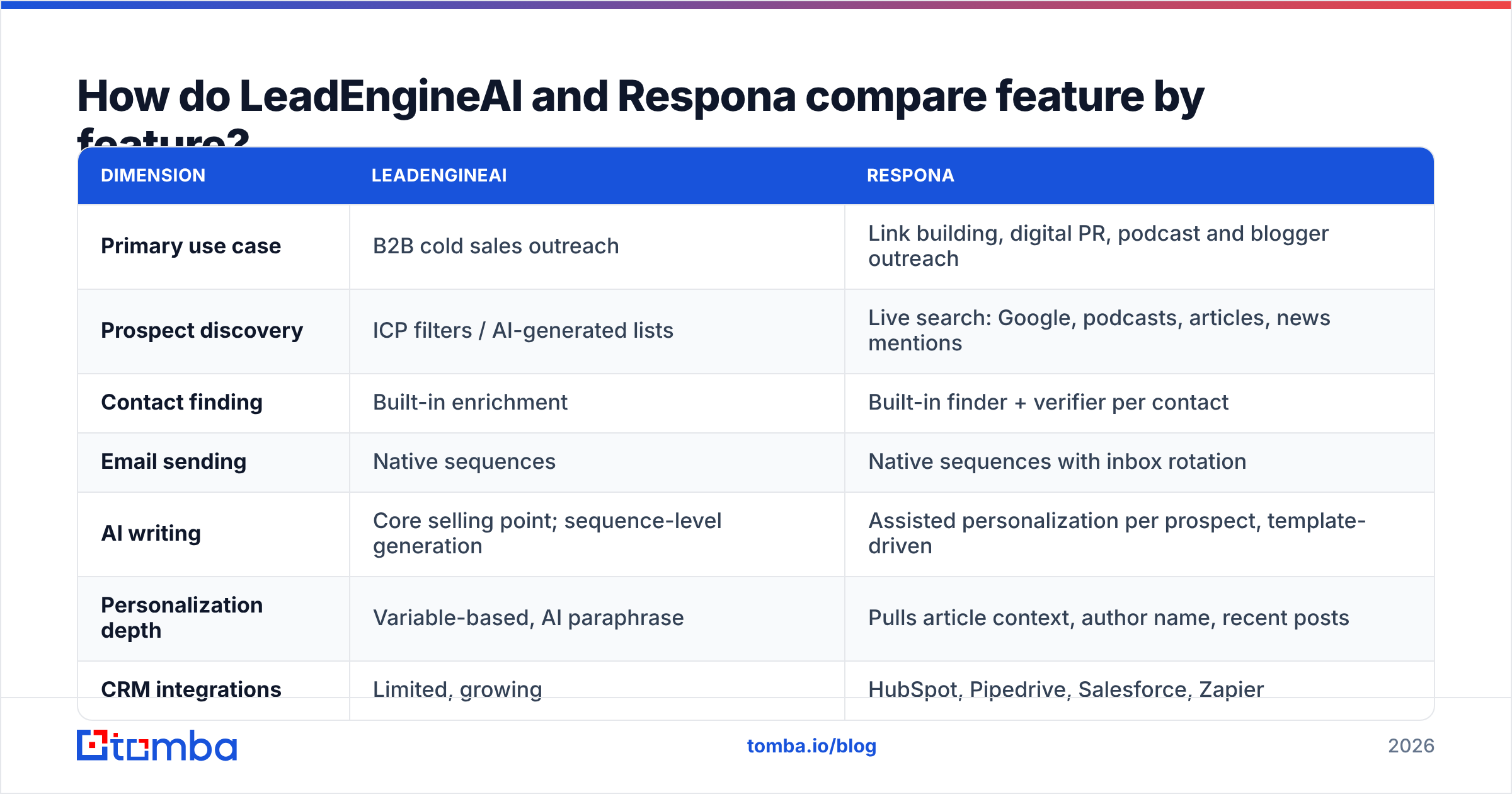
| Plan element | LeadEngineAI | Respona |
|---|---|---|
| Entry price | Varies by packaging; confirm current tier on the vendor site | Published plans start in the low-to-mid hundreds per month for one seat |
| Free option | Trial-based | Free trial, no permanent free tier |
| Metered unit | Contact / enrichment credits | Contacts unlocked + email accounts + seats |
| Extra seats | Usually bundled at higher tiers | Priced per user, and it adds up fast |
| Annual discount | Typically offered | Typically offered |
| Contract friction | Low, month-to-month | Low, but tiers jump in large steps |
Two things matter more than the headline number.
First, seat pricing punishes agencies. Respona's model assumes a small outreach team. The moment you put five account managers in it, the monthly cost stops looking like a tool and starts looking like a salary line.
Second, credit pricing punishes bad targeting. Any tool that charges per revealed contact is charging you for your own list hygiene. If 30% of the contacts you unlock bounce, you paid full price for a 70% list. That is the quiet cost in both products, and it is the reason the data layer deserves its own budget line — Tomba's pricing starts at a free tier with 25 searches a month and $49/mo for Starter, which is usually cheaper than burning platform credits on addresses you never validated.
Which tool finds better contact data?#
Neither vendor is primarily a data company, and it shows in different ways. Here is what actually separates a usable contact from a bounce:
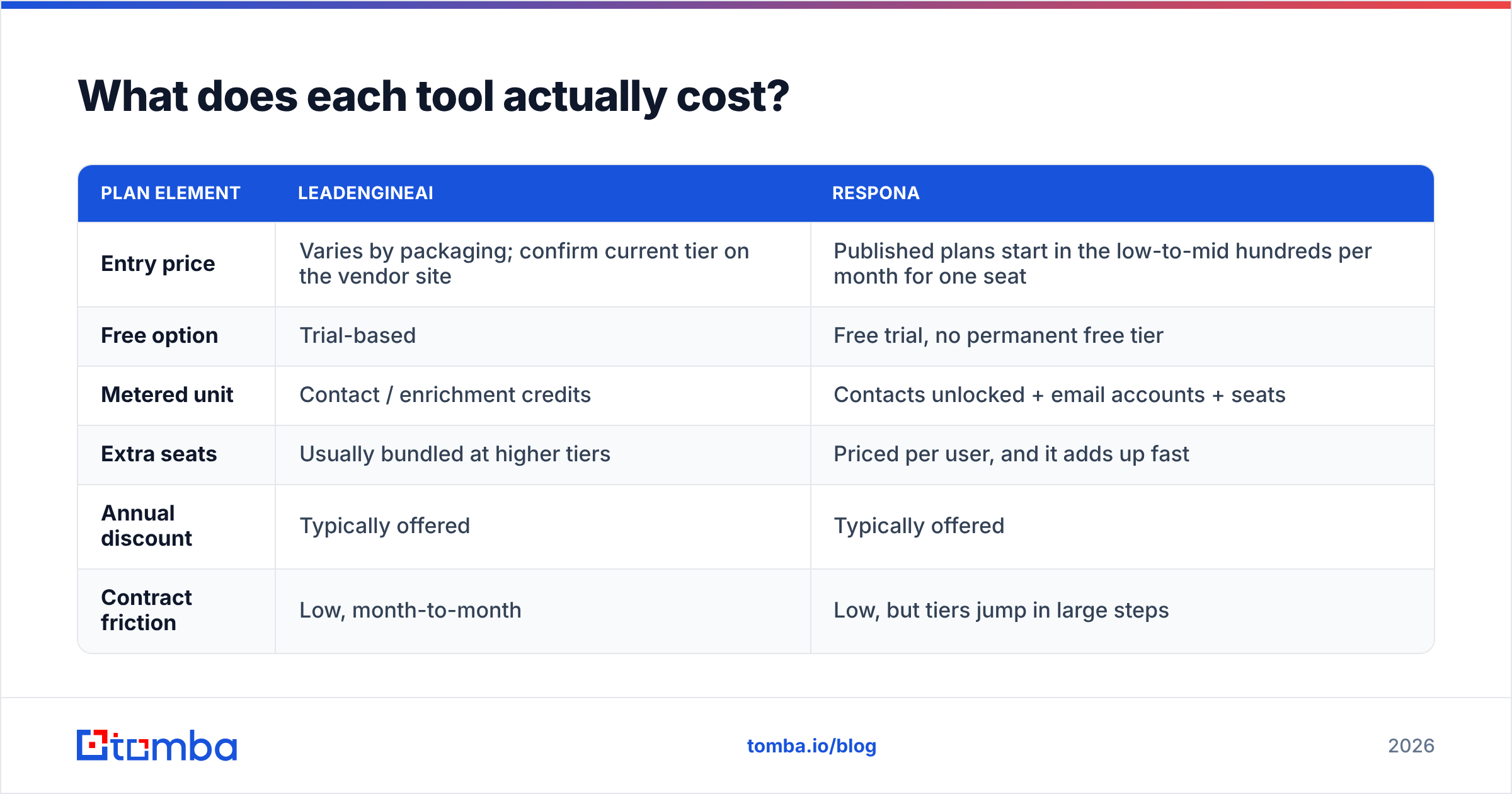
- Source transparency. Does the tool tell you where an address came from — a crawled byline, an SMTP-confirmed pattern, or a statistical guess? Respona is reasonably explicit, flagging confidence on found emails. AI-first tools often are not, which makes debugging a bad list impossible.
- Verification at the point of discovery. Finding and verifying must happen in the same step, not in a cleanup pass two weeks later. An address validated in March and mailed in June is a coin flip; contact data decays roughly 2-3% per month as people change jobs.
- Catch-all handling. Most enterprise domains accept everything at the MX layer. A tool that reports "valid" on a catch-all domain is lying to you politely. A dedicated catch-all verifier grades these instead of guessing.
- Pattern inference vs. confirmation. Generating
first.last@domain.comis trivial. Confirming that the mailbox exists is the whole job. Tools that quietly ship permutations as "found emails" inflate their own accuracy claims. - Role-account filtering.
info@,press@, andhello@are fine for PR pitches and terrible for sales. Respona's use case makes role accounts acceptable; a sales tool that hands youinfo@is padding your list. - Bulk re-verification. Before any send over ~500 contacts, re-run the list. A bulk verify pass costs pennies per contact and protects the domain you spent months warming.
If you only implement one of those six, make it #2. Every deliverability problem I have watched a team debug for three weeks traced back to a list that nobody verified between export and send.
Is Respona better for link building and digital PR?#
Yes, clearly, and it is not close.
Respona's discovery step is the product. You type a target keyword, and it returns ranking pages with domain authority, author names, and contact paths. You can search podcasts by topic and get the host's booking contact. You can monitor unlinked brand mentions and pitch the writer directly. Generic sales tools cannot do any of this because their databases are organized around companies and job titles, not content and authorship.
The personalization follows from the discovery. Because Respona knows which article it found the contact through, the first line of your pitch can reference that article without a human writing it. That single mechanic is why Respona campaigns hold reply rates that cold sales sequences do not.
Where Respona frustrates people:
- Volume ceilings. It is not built to send 5,000 emails a week, and trying will hurt your sender reputation.
- Learning curve. The campaign builder has real depth, which means real onboarding time.
- Sales use is a stretch. Teams that buy it for SDR work usually churn within two quarters. It is a content marketer's tool wearing a sales tool's pricing page.
If your quarterly goal contains the words "referring domains," stop comparing and buy Respona.

Is LeadEngineAI better for AI-driven B2B prospecting?#
For its intended job, it is a better shape than Respona — with an asterisk about maturity.
The pitch is genuine: describe the customer in plain language, get a list, get sequences, hit send. For a founder doing their own outbound, or a two-person SDR team without RevOps support, collapsing four tools into one is worth real money. AI-drafted sequences also clear the blank-page problem, which is the actual reason most outbound programs stall in week two.
The asterisk has three parts.
AI copy is a commodity now. Every sequencing tool ships a generative writer. Claiming it as a differentiator in 2026 is like claiming you support CSV import. The scarce inputs are accurate contact data and a list that matches your ICP — and no amount of generated prose fixes a wrong list.
Small vendors have small datasets. An early-stage AI lead gen tool is usually reselling one or two enrichment APIs with a UI on top. That is fine, but it means coverage varies wildly by geography and company size. Test 100 contacts in your actual target segment before you commit to a year.
Deliverability is your problem, not the tool's. Native sending is convenient, but inbox placement depends on your SPF, DKIM, DMARC, warmup, and list hygiene. Run an SPF checker before your first campaign and treat email deliverability as a discipline, not a feature you bought.
For comparison, established sales engagement tools like those covered in HubSpot's sales software documentation solve the sequencing problem with a decade of deliverability engineering behind them. LeadEngineAI's advantage is price and simplicity, not sophistication — which is a legitimate advantage, as long as you know that is what you are buying.
Which one should you choose?#
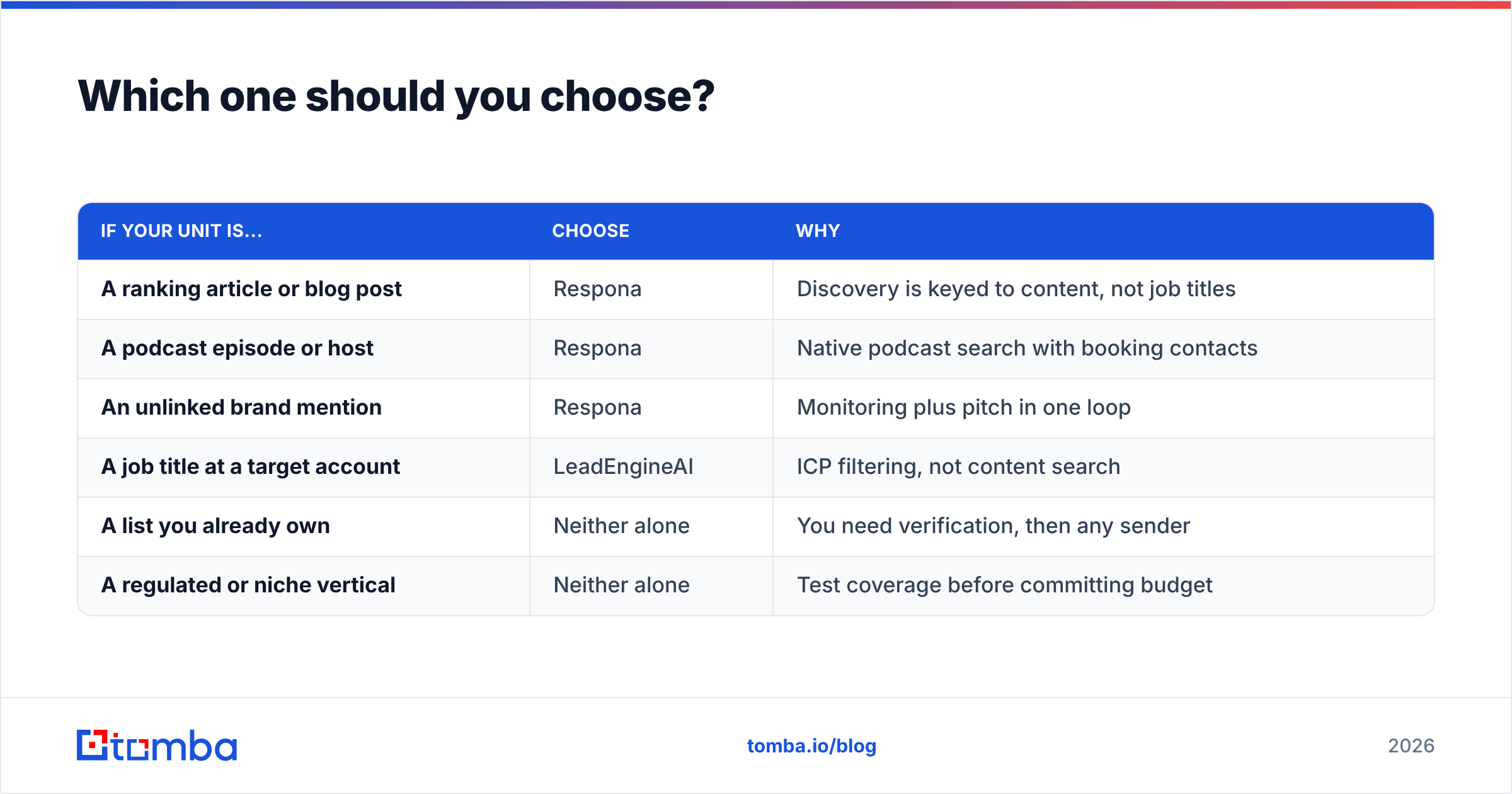
Skip the feature matrix and answer one question: what is the unit of your outreach?
| If your unit is... | Choose | Why |
|---|---|---|
| A ranking article or blog post | Respona | Discovery is keyed to content, not job titles |
| A podcast episode or host | Respona | Native podcast search with booking contacts |
| An unlinked brand mention | Respona | Monitoring plus pitch in one loop |
| A job title at a target account | LeadEngineAI | ICP filtering, not content search |
| A list you already own | Neither alone | You need verification, then any sender |
| A regulated or niche vertical | Neither alone | Test coverage before committing budget |
Two additional filters. If you have more than three people doing outreach, model Respona's seat cost across a full year before you decide — that math has killed more Respona deals than any competitor. And if your bounce rate on a recent send was above 3%, no tool on this page is your bottleneck. Your list is.
It is also worth noting that neither product is your only option. Vetted B2B list vendors such as BookYourData solve the "I need clean contacts now" problem from a completely different angle — pay-as-you-go verified lists with no sequencing attached. If your gap is data rather than workflow, that category deserves a look before you buy another sending tool.
What do most buyers get wrong in this comparison?#
They compare senders when their problem is data.
A tool with perfect AI copy, flawless scheduling, and beautiful analytics still fails if 25% of the addresses are dead. Mailbox providers read bounce rate as a spam signal. Push past roughly 5% and your domain reputation degrades for weeks, which means the next campaign underperforms too — even the good one with the clean list.
The durable setup looks like this, regardless of which platform you pick:
- Source contacts deliberately, by domain or by author, instead of accepting whatever the platform's default enrichment returns. A domain search over a target account surfaces the full contact map and the company's actual email pattern.
- Verify immediately, at discovery time, with a real email verifier rather than trusting a confidence badge.
- Re-verify before every send of any list older than 30 days.
- Keep the data layer portable. Platforms churn; your contact database should outlive them. An API-first source means switching senders never means rebuilding your lists.
Do those four things and the LeadEngineAI-vs-Respona decision shrinks to a workflow preference — which is exactly the size the decision should be.
The bottom line#
Respona wins for link building, digital PR, and any outreach where the prospect is a piece of content. LeadEngineAI is the cheaper, simpler shape for AI-assisted B2B sales sequences, provided you validate its coverage in your segment first and accept that you are buying from a young vendor. Neither should be your source of truth for contact data.
That last part is where most outbound programs actually break. Before you commit to either platform, fix the input: run your target domains through the Tomba Email Finder, verify every address at discovery time, and export a list you can trust into whichever sender you choose. Start free with 25 searches a month, scale at $49/mo when it works, and stop paying outreach platforms to guess at addresses for you.
Related guides#
// get started
Find, verify and enrich your first contacts today
Start on the free plan with 25 searches a month, then scale when your team is ready.
Free plan · No credit card required · GDPR & CCPA
// about the author