LeadEngine AI vs Webbula: Which B2B Data Tool Wins in 2026
One tool builds your list with AI. The other scrubs it before it touches your sending domain. Here is an honest breakdown of where each vendor earns its money — and where a cheaper stack beats both.
TL;DR — LeadEngine AI vs Webbula in one minute
- LeadEngine AI vs Webbula is not a fair fight. One builds prospect lists with AI. The other cleans lists you already own.
- Pick Webbula if you hold a big legacy database and send at high volume. It fixes bounces, spam traps, and dead records.
- Pick LeadEngine AI if your pipeline is empty. It finds new contacts, adds intent signals, and runs outreach.
- Neither one posts public pricing in 2026. Both are quote-only. That usually means annual deals and minimum spend.
- Need verified B2B emails without a big contract? A self-serve finder plus a verifier (Tomba starts at $49/mo) does most of the job for far less.
Most buyers reach this comparison after one bad sending week or one empty quarter. This guide sorts out which tool fixes which problem.
LeadEngine AI vs Webbula: What Each Tool Actually Does#
Most buyers assume these two tools do the same job. They do not. They sit at opposite ends of the same pipeline.
Webbula is a data-quality and audience-data vendor. Its best-known product is email hygiene. You upload a list. Webbula checks it against its own threat databases. You get the file back with flags for spam traps, honeypots, bots, complainers, known litigators, and dead mailboxes. It also sells audience data for targeting.
Its buyers are mostly email service providers, agencies, and large marketing teams. They send to lists in the hundreds of thousands or millions. You can see the pitch on the official Webbula site.
LeadEngine AI works on the other side. It belongs to the new wave of AI prospecting tools. You describe your ideal customer in plain words. The system builds a contact list, enriches it, and scores it against intent signals. In most cases it then hands the list to an outreach sequencer. The promise is speed, not deep cleaning.
So the honest framing for LeadEngine AI vs Webbula is simple: engine versus shield. One fills the pipeline. The other protects your domain. Big outbound teams often buy both. A team of three reps with a $500 monthly budget needs neither at enterprise prices.
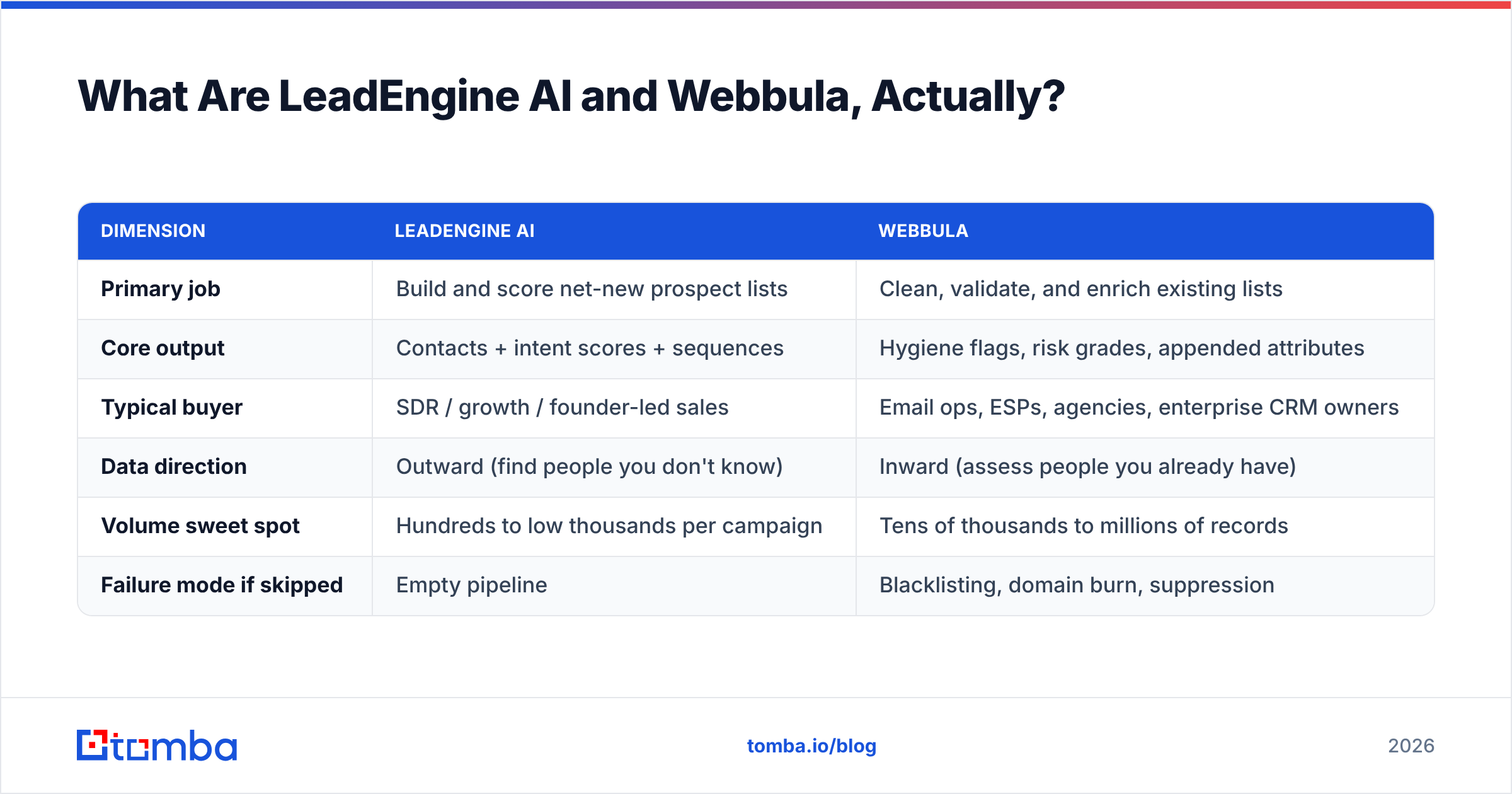
Here is the shape of the difference:
| Dimension | LeadEngine AI | Webbula |
|---|---|---|
| Primary job | Build and score net-new prospect lists | Clean, validate, and enrich existing lists |
| Core output | Contacts + intent scores + sequences | Hygiene flags, risk grades, appended attributes |
| Typical buyer | SDR / growth / founder-led sales | Email ops, ESPs, agencies, enterprise CRM owners |
| Data direction | Outward (find people you don't know) | Inward (assess people you already have) |
| Volume sweet spot | Hundreds to low thousands per campaign | Tens of thousands to millions of records |
| Failure mode if skipped | Empty pipeline | Blacklisting, domain burn, suppression |
LeadEngine AI vs Webbula: Head-to-Head Comparison#
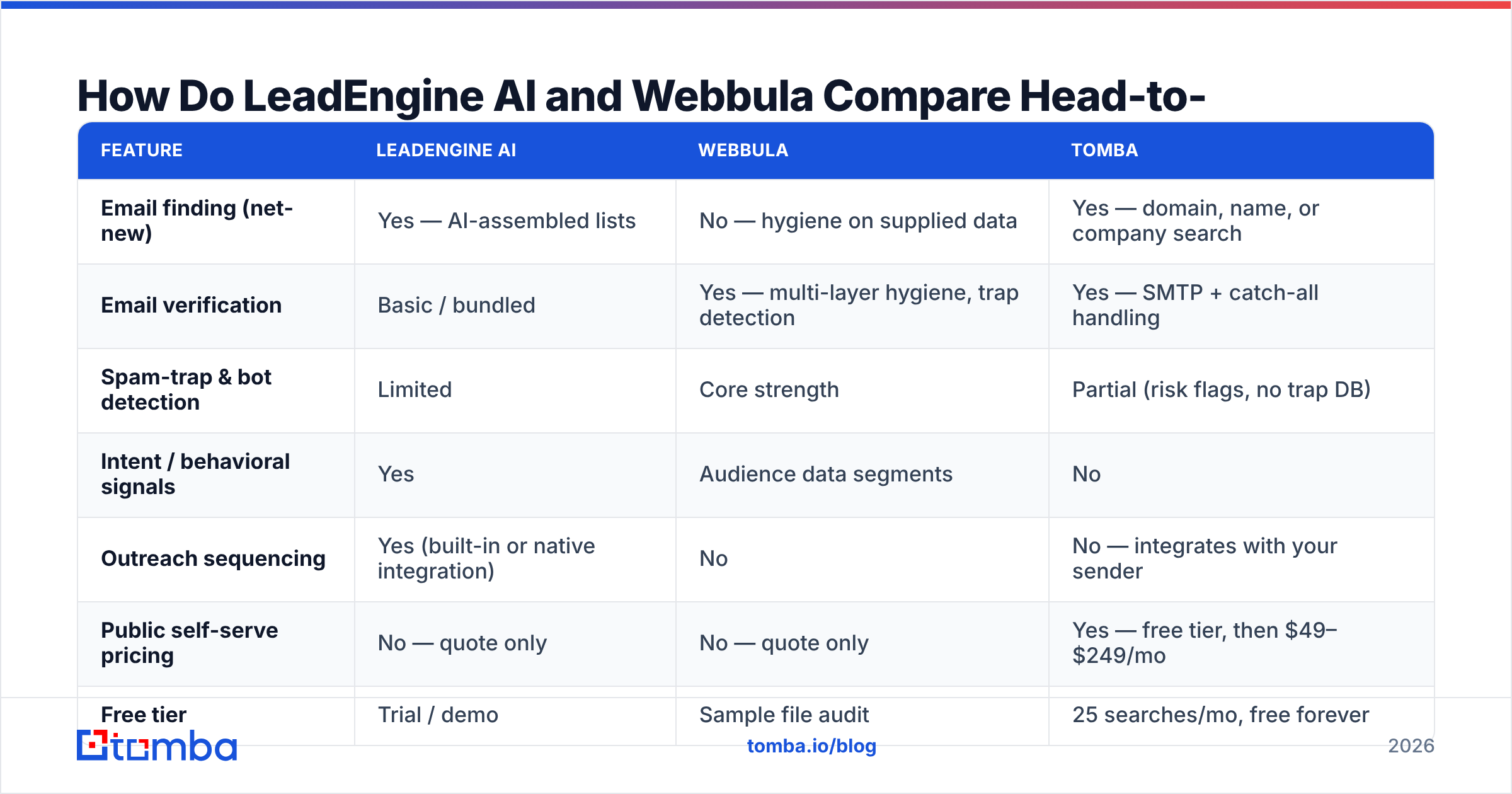
The jobs differ, but buyers still compare them. Usually a budget holder asks one question: which one fixes our outbound? This table maps the points that come up in real buying talks.
| Feature | LeadEngine AI | Webbula | Tomba |
|---|---|---|---|
| Email finding (net-new) | Yes — AI-assembled lists | No — hygiene on supplied data | Yes — domain, name, or company search |
| Email verification | Basic / bundled | Yes — multi-layer hygiene, trap detection | Yes — SMTP + catch-all handling |
| Spam-trap & bot detection | Limited | Core strength | Partial (risk flags, no trap DB) |
| Intent / behavioral signals | Yes | Audience data segments | No |
| Outreach sequencing | Yes (built-in or native integration) | No | No — integrates with your sender |
| Public self-serve pricing | No — quote only | No — quote only | Yes — free tier, then $49–$249/mo |
| Free tier | Trial / demo | Sample file audit | 25 searches/mo, free forever |
| API access | Yes | Yes | Yes — Tomba API, CLI, MCP |
| Minimum commitment | Typically annual | Typically annual or volume-based | Monthly, cancel anytime |
| Best for | Filling an empty pipeline fast | Protecting a large sending reputation | Precise, affordable contact discovery |
Two things stand out. First, only one of the three lets you pay by card and start the same day. Second, the columns barely overlap. So the real question is not which tool wins. It is which gap costs you the most money right now.

What Does Webbula Actually Do Well?#
Webbula is strong on risk. A normal verifier asks whether a mailbox exists. Hygiene asks a harder question: should you send to it at all?
Webbula grades against these groups:
- Spam traps and honeypots — addresses that never belonged to a person. Blocklist operators plant them. One hit can hurt a shared IP for weeks.
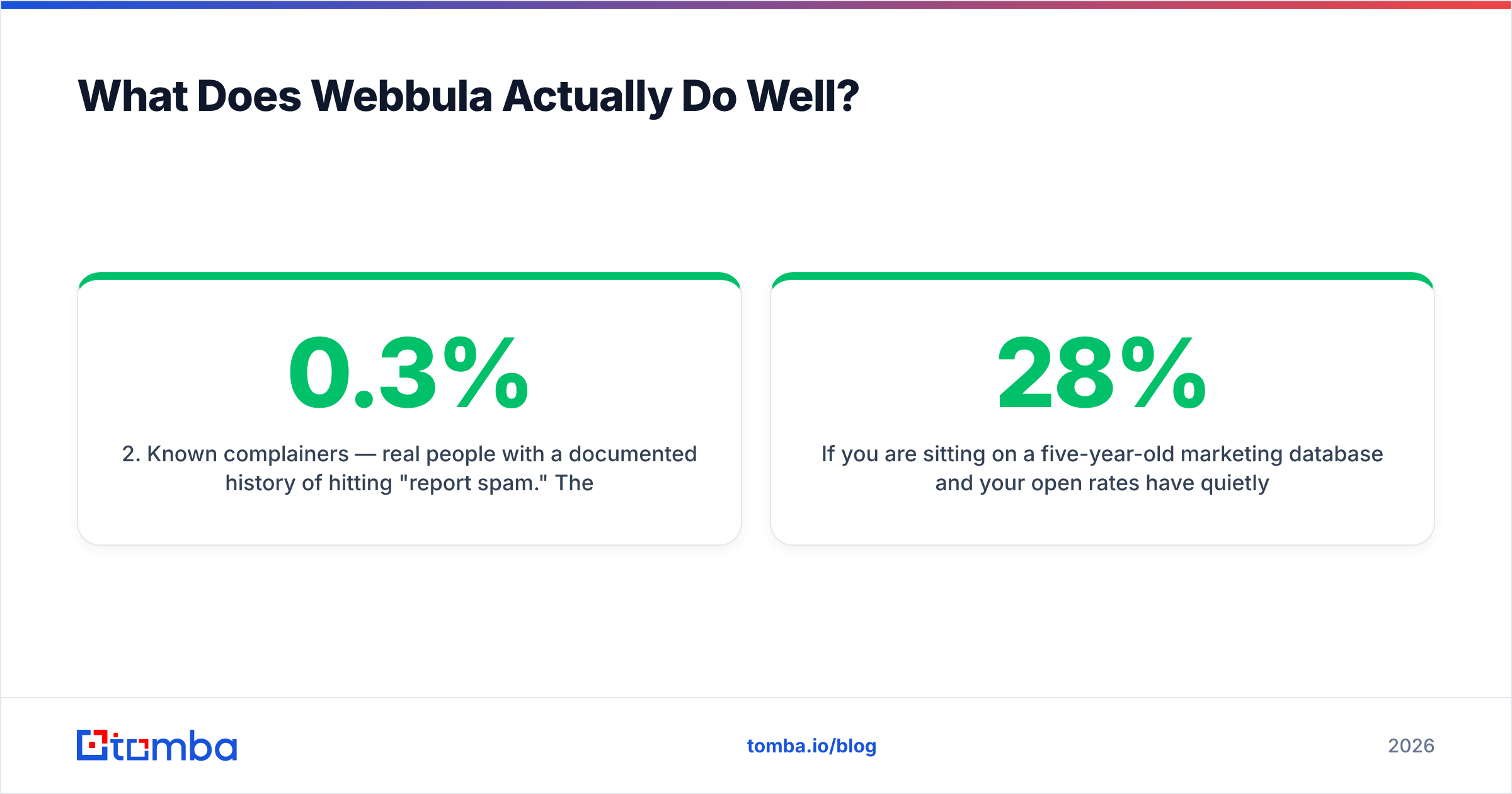
- Known complainers — real people who often hit "report spam." They push your complaint rate past the 0.3% line that Gmail and Yahoo now enforce.
- Bots — scanner clicks that skew your open and click rates. Bad campaigns start to look good.
- Litigators — a small group, but an expensive one in US email. This is why legal teams sign off on hygiene spend.
- Dead mailboxes — they still accept mail, but nobody reads it. They drag down inbox placement.
- Appends — extra company and person data layered onto records you already hold.
Are you sitting on a five-year-old database? Have open rates slid from 28% to 11%? This is the right product for that job. A plain verifier will not spot planted traps. The idea of data cleansing exists for this reason. "Valid" and "safe to send" are two different tests.
The trade-offs are real too. Hygiene is priced per record and sold in volume tiers. That makes it pricey next to basic verification. Big files take hours, not seconds. And hygiene creates nothing. If your list is small, Webbula makes it smaller and cleaner. That is correct, but it does not fill a pipeline.
Where Does LeadEngine AI Fit?#
LeadEngine AI answers the other fear. You have no list. Or you have 400 contacts you scraped six months ago. And quota starts Monday.
AI prospecting tools all run the same loop. You define an ideal customer in plain words. The system queries several data sources. It dedupes, enriches, and scores for fit and intent. Then it pushes contacts into sequences. When it works, a week of list building shrinks to an afternoon.
The honest caveats:
- Coverage swings by segment. AI lists are strong in US mid-market SaaS. They get thin in EMEA manufacturing, in regulated fields, and at companies under 20 people.
- "Enriched" is not "verified." Many tools return guessed addresses with a confidence score. A score is a guess. An SMTP reply is proof.
- Intent data only points. Use it to order your sequence. Do not treat it as proof that someone wants to buy.
- Bundled sending locks you in. If one vendor owns your list and your sequencer, leaving gets costly.
That last point bites teams more than they expect. Reviews on G2 show the same pattern across AI prospecting tools. High marks for speed. Lower marks for data accuracy and for contract terms at renewal.
Which Has Better Data Accuracy: LeadEngine AI vs Webbula?#
They measure accuracy in different ways. One number would mislead you. Use this instead:
| Accuracy question | Who answers it better |
|---|---|
| "Does this mailbox exist right now?" | Webbula (hygiene) or a dedicated verifier |
| "Is this address safe to send to?" | Webbula, clearly |
| "Does this person work here and own this problem?" | LeadEngine AI, via company and intent layers |
| "Is this the right address format for this domain?" | Either — but a dedicated finder is faster and cheaper |
| "Will this catch-all domain accept my mail?" | Neither reliably — use a specialist catch-all tool |
Rows four and five are where teams overpay. Finding the right address at a known company is a solved problem. Confirming that it resolves is solved too. You do not need an enterprise contract for either one.
A dedicated email verifier checks syntax, MX records, throwaway domains, role accounts, and the SMTP reply. A catch-all verifier handles accept-all domains, which break most bulk tools.
So the practical stack is simple. Find and verify with a self-serve tool for daily work. Save hygiene spend for the big old database you are scared to email.
How Much Do LeadEngine AI and Webbula Cost?#
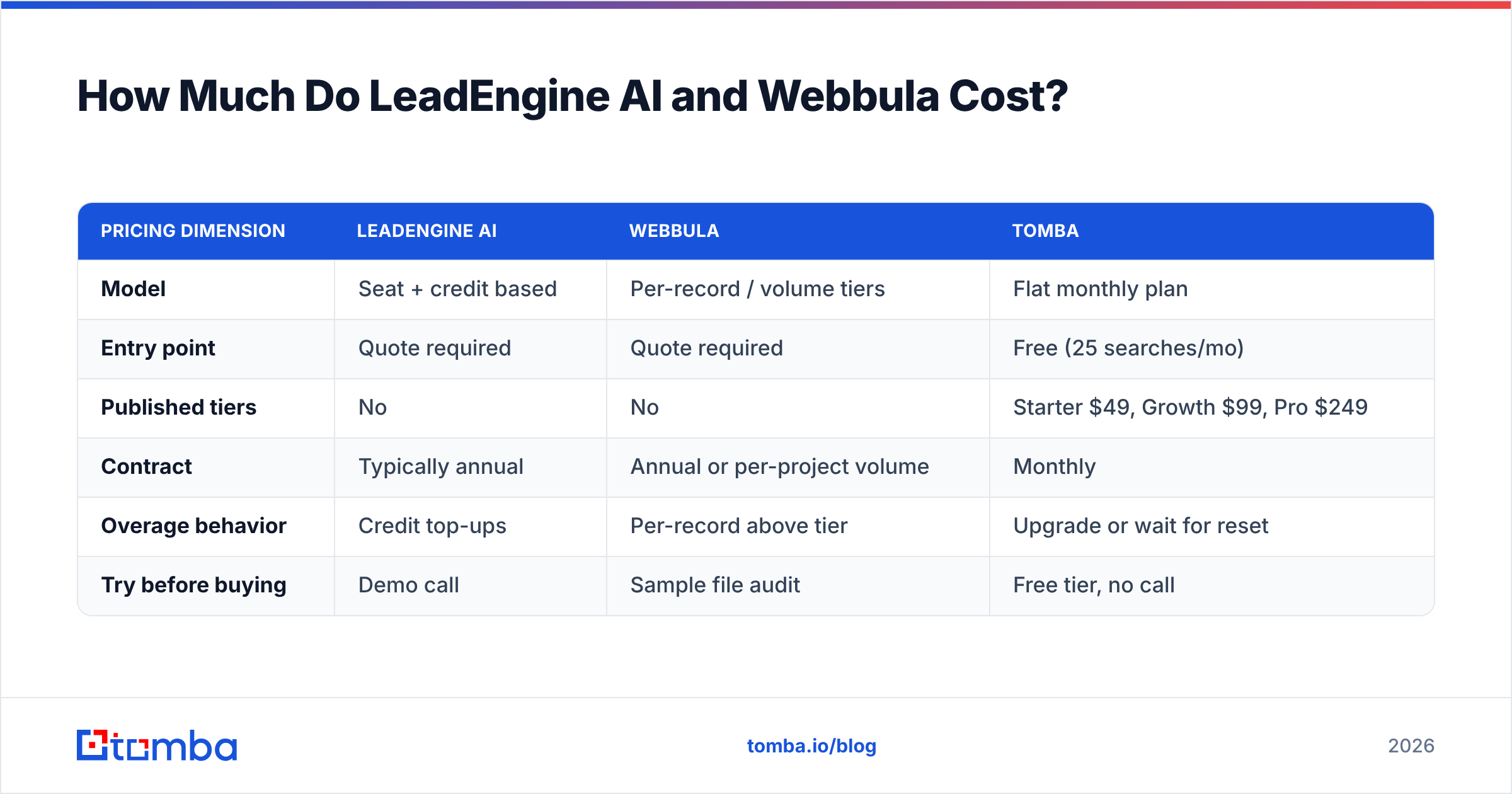
Neither vendor posts a full price list. That is a data point on its own. Quote-only pricing usually means annual deals, seat or volume minimums, and terms that favor the seller. The exception is buying at scale.
Here is what to expect:
| Pricing dimension | LeadEngine AI | Webbula | Tomba |
|---|---|---|---|
| Model | Seat + credit based | Per-record / volume tiers | Flat monthly plan |
| Entry point | Quote required | Quote required | Free (25 searches/mo) |
| Published tiers | No | No | Starter $49, Growth $99, Pro $249 |
| Contract | Typically annual | Annual or per-project volume | Monthly |
| Overage behavior | Credit top-ups | Per-record above tier | Upgrade or wait for reset |
| Try before buying | Demo call | Sample file audit | Free tier, no call |
The gap in that table is the whole case for a self-serve layer. A three-person team may need 2,000 verified contacts a month. They should not sit through a buying cycle to get them. Check the full breakdown on the Tomba pricing page and start the same evening.

Which Should You Choose for Cold Outbound?#
Match the tool to your bottleneck. Ignore the loudest pitch.
- Empty list, quota starts now. You need new contacts. Use LeadEngine AI, or a self-serve email finder if you already know the accounts.
- Bounce rate over 5% and climbing. Stop sending today. Run hygiene. It is Webbula's home turf, and it costs less than a burned domain.
- You know the accounts, not the people. Use domain search, then filter by role. No enterprise tool needed.
- 200k records of unknown quality. Clean, segment, then re-engage. Never enrich junk.
- 5,000+ contacts in one pass. Use a bulk email finder flow instead of per-seat pricing.
- A team of 20+ with compliance oversight. Now enterprise deals make sense. You buy SLAs and audit trails too.
Here is a rule from email ops teams. Spend on hygiene in line with your sending volume. Spend on discovery in line with your pipeline gap. Most teams do it backwards. They buy the pricey shield while reps still cannot find a buyer's address.
Is There a Middle Option in the LeadEngine AI vs Webbula Debate?#
Yes. Most GTM teams under 50 people land in the middle. They run a self-serve finder and verifier every day. They buy hygiene only when the database calls for it.
In practice, that path looks like this. Find contacts by domain or by name. Verify every address before it enters the sequencer. Add company and role data to the record. Sync the result into the CRM.
Tomba covers that path: finder, verifier, catch-all handling, data enrichment, and native integrations with HubSpot, Salesforce, Pipedrive, Sheets, and Zapier. It runs on a monthly plan with a free tier. HubSpot's own sales research makes the same point year after year. Data decays all the time. So verification belongs in the weekly workflow, not in an annual project.
One thing this stack will not do: spam-trap forensics on a legacy list. If that is your problem, buy hygiene. It is the right tool and worth the quote.
Frequently Asked Questions#
Is Webbula an email finder? No. Webbula grades, cleans, and enriches addresses you supply. It does not find new contacts from a company domain.
Can LeadEngine AI replace a verifier? Only in part. Bundled checks in AI prospecting tools are usually a confidence score, not a live SMTP test. Run a real verification pass before any send.
Which is cheaper, LeadEngine AI vs Webbula? You cannot know without quotes. Both are negotiated. Hygiene is priced per record. AI prospecting is priced per seat plus credits. So the cheaper one depends on your volume.
Do I need both? Only if you prospect at volume and also keep a large legacy database. Most teams under 50 people need one layer, not two.
What about deliverability? Clean data helps, but it is not enough. Auth, warmup, volume ramp, and content all matter. Start with an SPF checker and a sending audit before you blame the list.
The Bottom Line#
LeadEngine AI wins when your pipeline is empty. Webbula wins when your sending reputation is at risk. But in the LeadEngine AI vs Webbula debate, neither one wins the most common case. Most teams just need a correct, verified email for one person at one company. That should cost tens of dollars a month, not thousands.
If that sounds like you, start with the Tomba Email Finder. Search by domain, name, or company. Verify every result before it enters your sequencer. Push clean records into your CRM in one pass. The free tier gives you 25 searches a month. Run your 25 hardest domains through it before you book a single enterprise demo.
Related guides#
// get started
Find, verify and enrich your first contacts today
Start on the free plan with 25 searches a month, then scale when your team is ready.
Free plan · No credit card required · GDPR & CCPA
// about the author