LeadEngineAI vs YAMM: Which Outreach Tool Wins in 2026?
LeadEngineAI and YAMM get compared constantly, but they solve different problems: one is an AI outbound engine, the other is a Gmail mail merge inside Google Sheets. Here is the honest breakdown, with pricing, limits, and the data gap both leave open.
TL;DR
- They are not the same category. LeadEngineAI markets itself as an AI-driven lead generation and outbound engine. YAMM (Yet Another Mail Merge) is a Google Sheets add-on that sends personalized email through your own Gmail or Google Workspace mailbox. Comparing them is comparing a sales platform to a sending utility.
- YAMM wins on price and simplicity. Annual pricing in the low tens to low hundreds of dollars, a free tier capped at 50 recipients per day, and a learning curve of roughly ten minutes if you already live in Sheets.
- LeadEngineAI wins on scope — sequencing, AI-written copy, multi-step follow-up, and built-in contact data — but pricing is quote-driven rather than published, so budget comparison requires a sales call.
- Neither solves your data problem. Both assume you already have accurate, deliverable email addresses. Bad list quality sinks a $50/year mail merge and a $1,000/month AI platform equally fast.
- Our pick: YAMM for warm, low-volume, relationship-based sending under 400/day. A dedicated cold-email platform for true outbound. Either way, run the list through a verifier before the first send.
What are LeadEngineAI and YAMM, actually?#
Start with the honest framing, because the "versus" framing hides the real decision.
YAMM is a mature, narrowly scoped tool. It installs into Google Sheets, reads a column of recipients, merges them into a Gmail draft you wrote, and sends from your own mailbox. It tracks opens, clicks, bounces, and replies, and writes the status back into the sheet. It is built by Awesome Table and has been around for over a decade — you can see the current feature set and plan structure on yamm.com. Because it sends through Gmail's normal pipeline, your sending limits are Google's limits, not YAMM's.
LeadEngineAI sits in the AI outbound category: platforms that promise to find prospects, generate personalized copy, and run multi-step sequences with minimal human input. Be careful here — public documentation for this class of tool is thin and changes fast, and LeadEngineAI does not publish a transparent self-serve price sheet the way YAMM does. Treat every capability claim as something to confirm in a trial or demo, not as a spec you can budget against today.
That difference in transparency is itself a data point. A tool you can price in 30 seconds is a tool you can cancel in 30 seconds.

Why does the category difference matter more than the feature list?#
Because it determines what you are actually buying, and what you still have to build yourself.
- Sending infrastructure. YAMM uses your mailbox. That is a feature for warm outreach (replies land in your inbox, threads look human) and a liability for cold outreach (you are burning your primary domain's reputation). LeadEngineAI-style platforms typically manage separate sending domains and inbox rotation.
- Volume ceiling. YAMM inherits Gmail's sending limits — roughly 500 external recipients per day on a consumer Gmail account and 2,000 on Workspace, with YAMM's own plan caps landing at 400 and 1,500 respectively. AI outbound platforms scale by adding mailboxes, not by raising a single account's ceiling.
- Follow-up logic. A mail merge sends one blast. Sequencing — wait three days, skip if replied, branch on open — is the single biggest functional gap between the two, and it is where most of the price difference lives.
- Data sourcing. YAMM assumes the sheet is already full. AI platforms bundle a contact database, which sounds like a saving until you measure the hit rate and bounce rate against a specialist email finder.
- Compliance and unsubscribe handling. YAMM supports unsubscribe links, but the CAN-SPAM and GDPR posture is on you. Platform tools usually centralize suppression lists across campaigns — which matters once more than two people are sending.
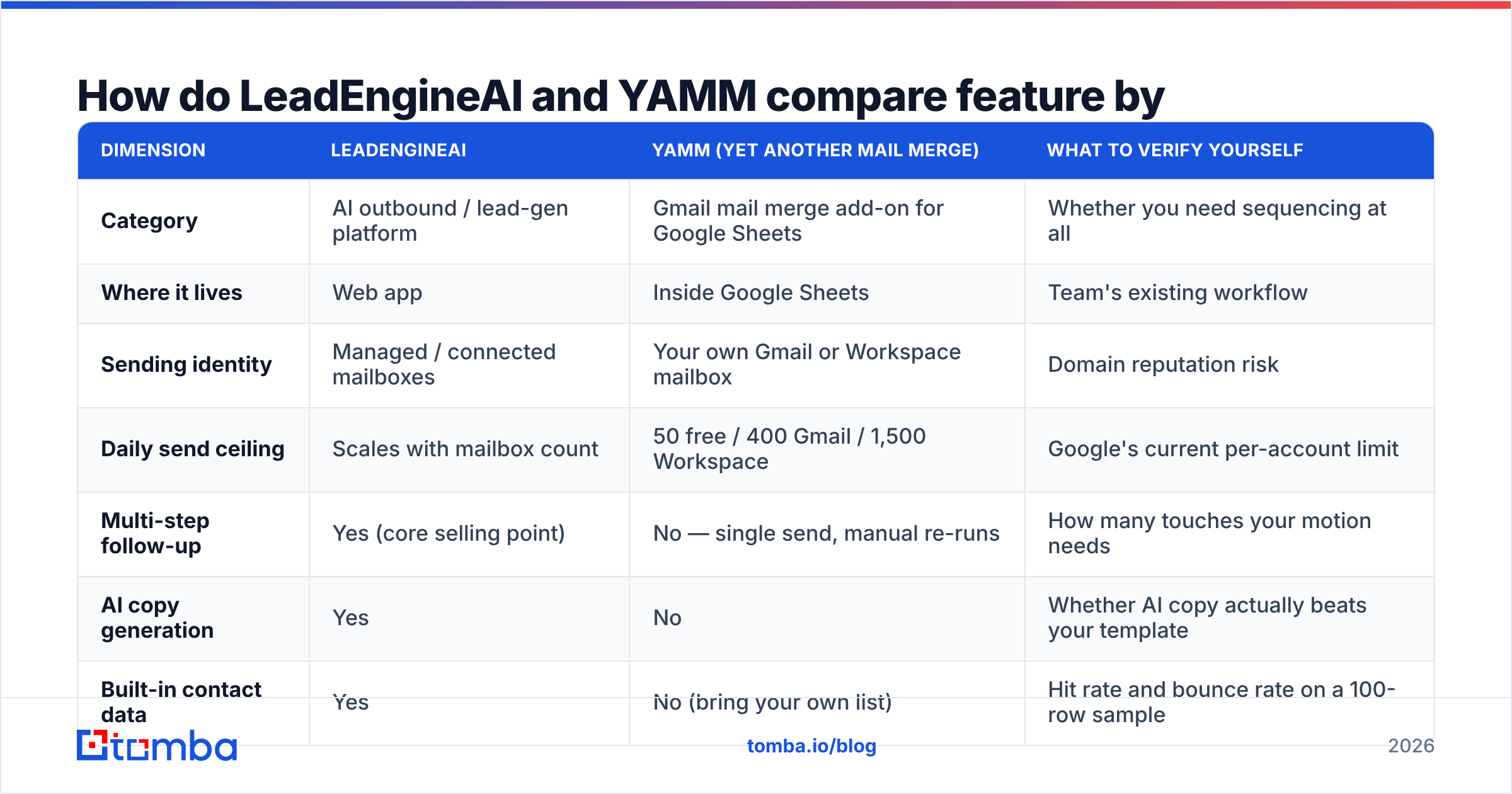
How do LeadEngineAI and YAMM compare feature by feature?#
| Dimension | LeadEngineAI | YAMM (Yet Another Mail Merge) | What to verify yourself |
|---|---|---|---|
| Category | AI outbound / lead-gen platform | Gmail mail merge add-on for Google Sheets | Whether you need sequencing at all |
| Where it lives | Web app | Inside Google Sheets | Team's existing workflow |
| Sending identity | Managed / connected mailboxes | Your own Gmail or Workspace mailbox | Domain reputation risk |
| Daily send ceiling | Scales with mailbox count | 50 free / 400 Gmail / 1,500 Workspace | Google's current per-account limit |
| Multi-step follow-up | Yes (core selling point) | No — single send, manual re-runs | How many touches your motion needs |
| AI copy generation | Yes | No | Whether AI copy actually beats your template |
| Built-in contact data | Yes | No (bring your own list) | Hit rate and bounce rate on a 100-row sample |
| Open / click tracking | Yes | Yes, written back to the sheet | Tracking pixel impact on deliverability |
| Email verification | Varies / often add-on | No | Bounce rate before and after verification |
| Pricing transparency | Quote-based, not published | Published annual tiers | Get the number in writing before piloting |
| Setup time | Days (domains, warmup, sequences) | Minutes | Cost of your own ramp-up time |
| Best fit | Scaled cold outbound teams | Solo founders, recruiters, newsletters, event invites | Your actual weekly send volume |
The pattern is consistent: YAMM is intentionally small and predictable, LeadEngineAI is intentionally broad and opaque. Neither is a defect — they are pitched at different buyers.
What does each one actually cost?#
YAMM publishes annual pricing, which in practice lands in a few tiers: a free plan capped at 50 recipients per day, a personal tier in the $20–$30/year range, a professional tier roughly double that, and a premium tier for higher daily caps and team features. Prices move, so confirm on the vendor's page before you commit — but the order of magnitude is "cheaper than one lunch per month."
LeadEngineAI does not advertise a public self-serve price at the time of writing. Tools in this category commonly land between $60 and $500+ per user per month once contact credits and sending infrastructure are included. If a vendor will not put a number on a page, assume the number is negotiable and ask for annual pricing, credit rollover terms, and what happens to your data on cancellation.
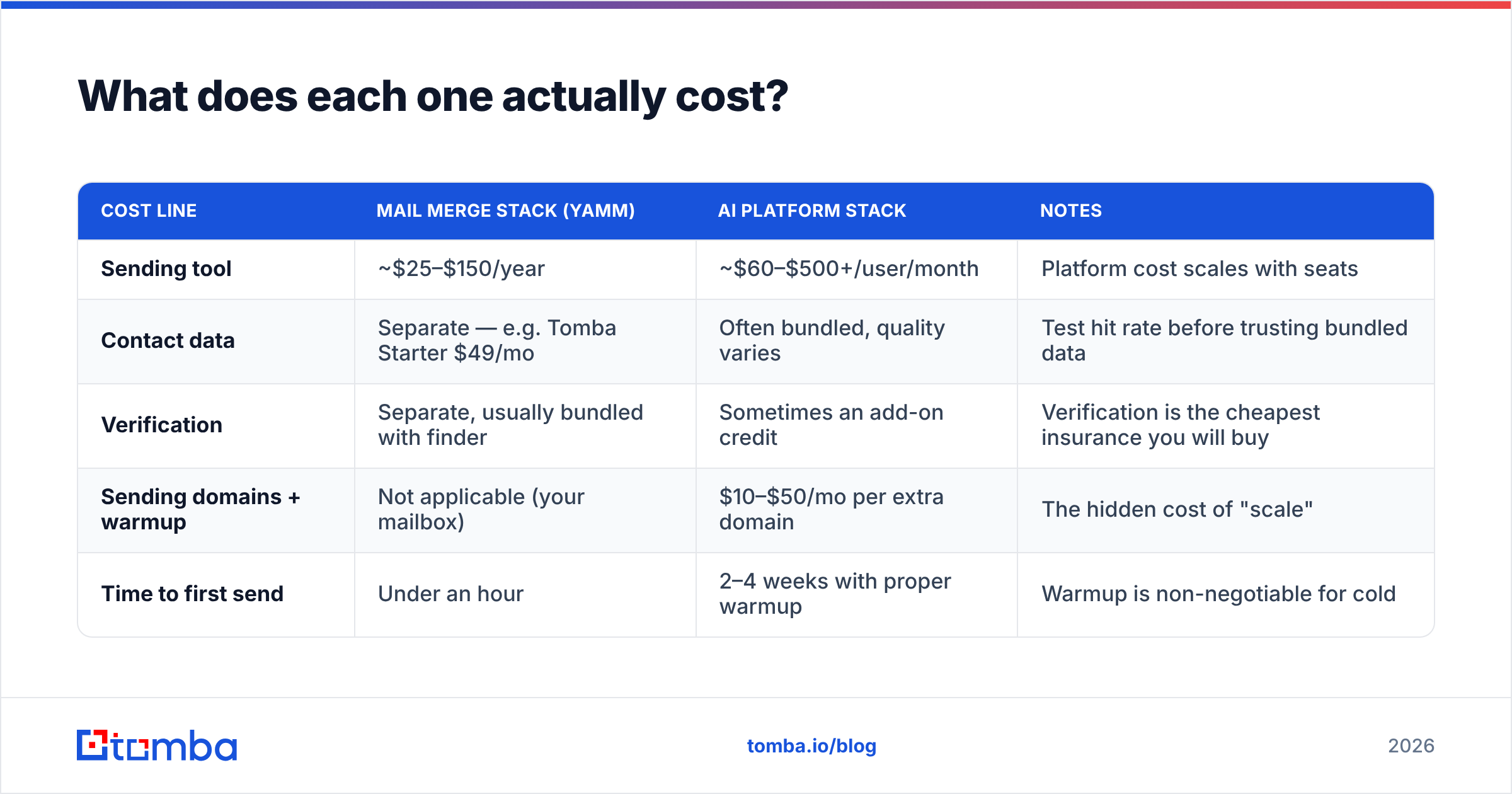
Here is the part most comparison posts skip: the tool bill is rarely the biggest line item. Your data bill is.
| Cost line | Mail merge stack (YAMM) | AI platform stack | Notes |
|---|---|---|---|
| Sending tool | ~$25–$150/year | ~$60–$500+/user/month | Platform cost scales with seats |
| Contact data | Separate — e.g. Tomba Starter $49/mo | Often bundled, quality varies | Test hit rate before trusting bundled data |
| Verification | Separate, usually bundled with finder | Sometimes an add-on credit | Verification is the cheapest insurance you will buy |
| Sending domains + warmup | Not applicable (your mailbox) | $10–$50/mo per extra domain | The hidden cost of "scale" |
| Time to first send | Under an hour | 2–4 weeks with proper warmup | Warmup is non-negotiable for cold |
A solo founder running 200 warm emails a week can be fully operational for under $60/month using YAMM plus a bulk email finder for list building. A five-person SDR team cannot — the sequencing and suppression gaps become operationally painful by week two.
Is YAMM good enough for cold outreach in 2026?#
Short answer: for genuinely cold lists, no. For warm and lukewarm, yes — and it is often the better choice.
The problem is not YAMM's quality. It is that cold outreach in 2026 runs into inbox providers that have gotten dramatically better at spotting bulk unsolicited mail. Gmail and Yahoo's bulk sender requirements now expect authenticated sending, one-click unsubscribe, and spam complaint rates under 0.3%. Sending cold volume from your primary Workspace domain — which is exactly what a mail merge does — puts your calendar invites, invoices, and customer replies in the blast radius.
Use YAMM when:
- Recipients know who you are. Event invites, customer announcements, investor updates, candidate outreach to applicants.
- Volume is under ~400/day. Above that, you are fighting Google's limits rather than using them.
- You need one send, not a sequence. Manual follow-up on 50 replies beats automated follow-up on 5,000 non-replies for most early-stage teams.
- Replies matter more than reporting. Threads in your own mailbox are easier to work than a platform inbox.
Use an outbound platform (LeadEngineAI or the many alternatives, including established players you can vet on G2) when you need separate domains, sequencing, and shared suppression across a team.
If you are unsure where your motion sits, price out the ramp first with an email warmup calculator — the number of weeks before a new domain can carry real volume usually decides the argument.
What does neither tool fix?#
Your list.
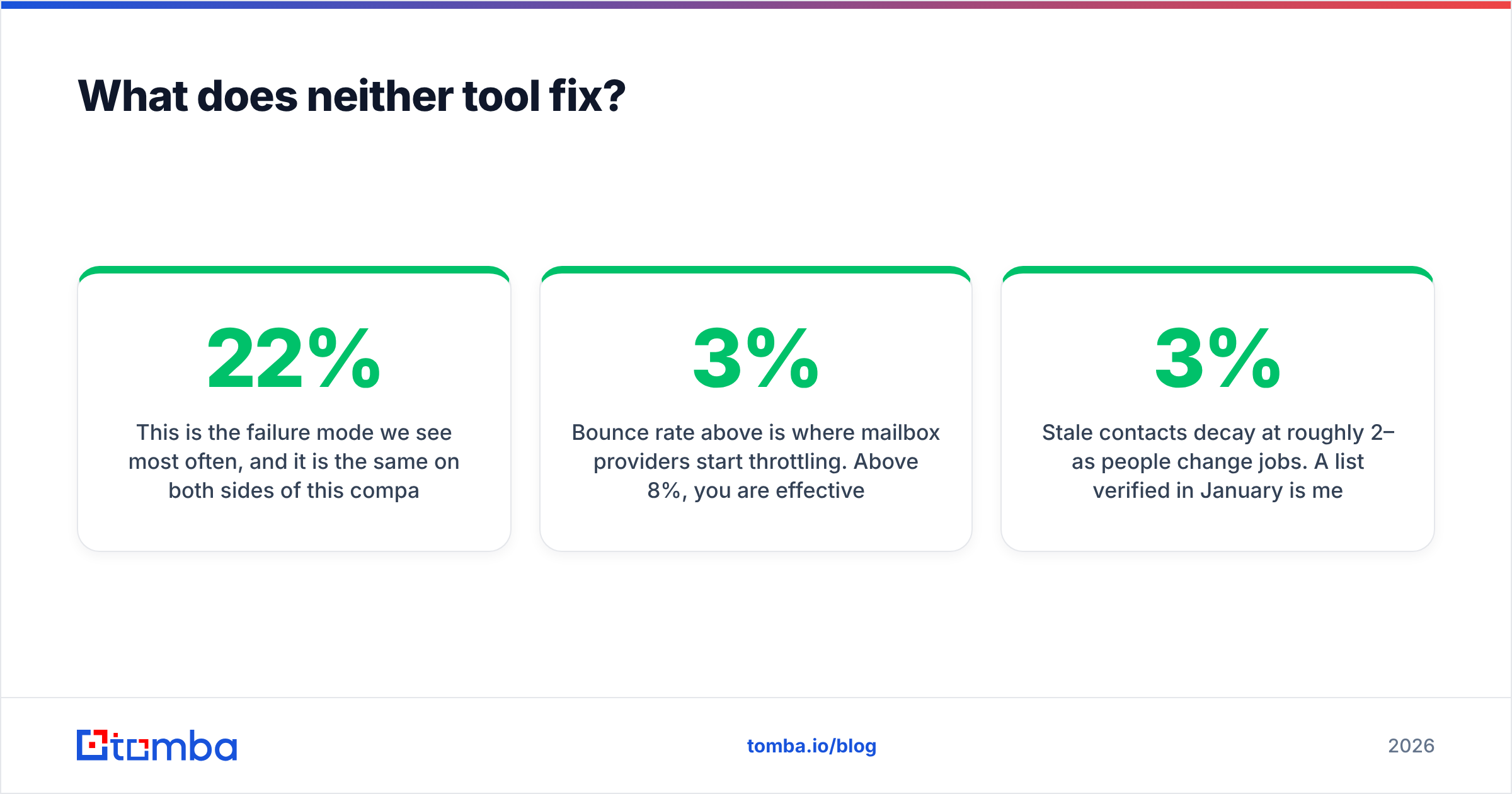
This is the failure mode we see most often, and it is the same on both sides of this comparison. Teams buy a sending tool, load a scraped or purchased CSV, and watch a 22% bounce rate torch a domain that took months to build. The tool did nothing wrong. The data did.

The mechanics are boring and they matter:
- Bounce rate above 3% is where mailbox providers start throttling. Above 8%, you are effectively blocked.
- Catch-all domains — which accept everything at the SMTP layer — are the single largest source of false confidence in verification results. A catch-all verifier is what separates a usable list from a guess.
- Role accounts (info@, sales@, support@) inflate list size and depress reply rate simultaneously.
- Stale contacts decay at roughly 2–3% per month as people change jobs. A list verified in January is meaningfully worse by June.
Neither a mail merge add-on nor an AI outbound platform is designed to be the source of truth on any of this. Run the list through a dedicated email verifier before it touches either tool, and re-verify anything older than 90 days. For background on why deliverability behaves the way it does, HubSpot's deliverability guidance and the general concept of mail merge are both worth ten minutes.
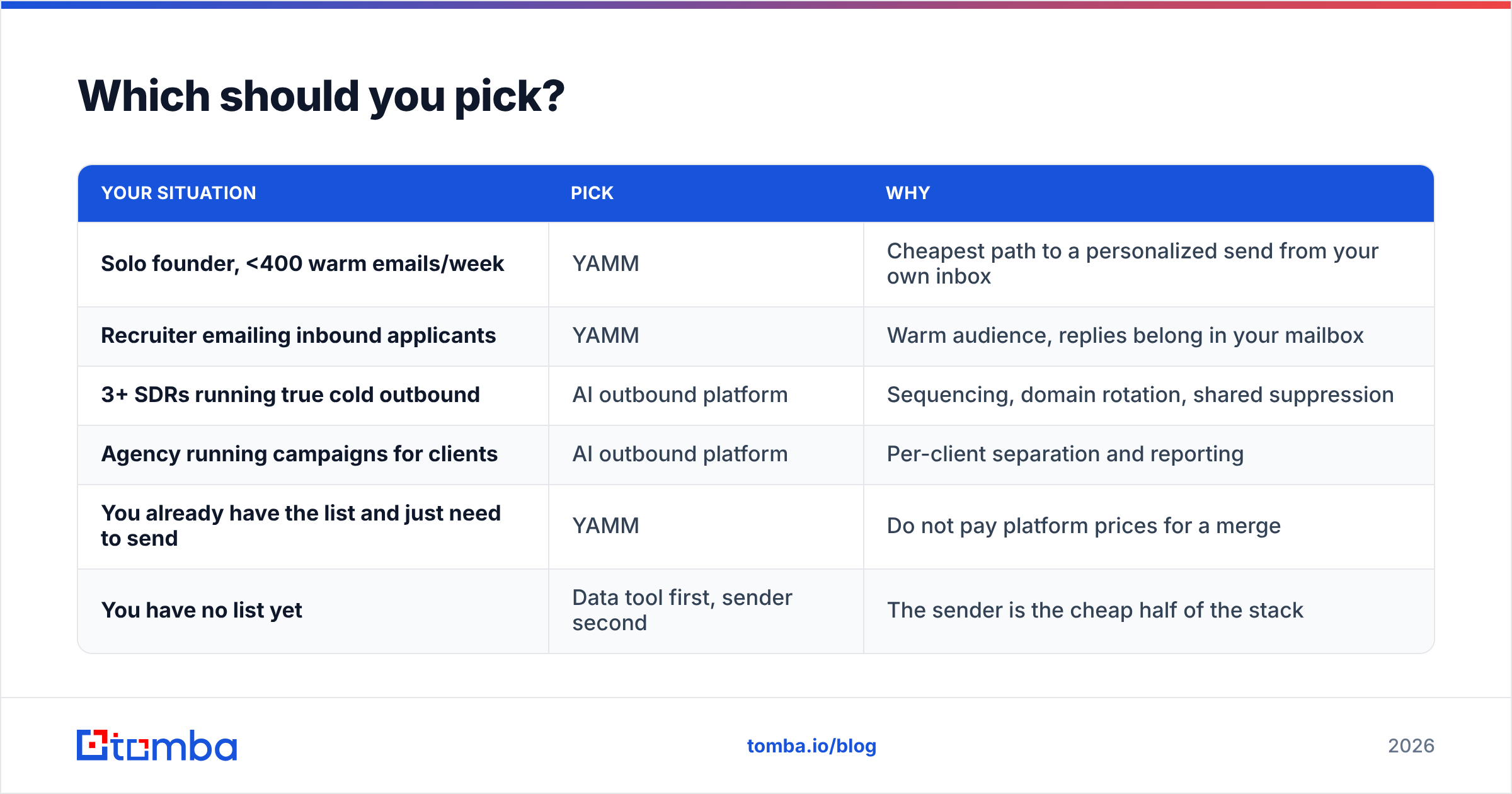
Which should you pick?#
| Your situation | Pick | Why |
|---|---|---|
| Solo founder, <400 warm emails/week | YAMM | Cheapest path to a personalized send from your own inbox |
| Recruiter emailing inbound applicants | YAMM | Warm audience, replies belong in your mailbox |
| 3+ SDRs running true cold outbound | AI outbound platform | Sequencing, domain rotation, shared suppression |
| Agency running campaigns for clients | AI outbound platform | Per-client separation and reporting |
| You already have the list and just need to send | YAMM | Do not pay platform prices for a merge |
| You have no list yet | Data tool first, sender second | The sender is the cheap half of the stack |
The honest verdict: YAMM wins the value comparison for warm sending, and loses the capability comparison for cold outbound. LeadEngineAI wins on scope, but you should insist on written pricing and a hit-rate test on its bundled data before signing anything. If the bundled data underperforms a specialist finder on a 200-row sample, you are paying platform prices for a list you would have had to replace anyway.
How do you test both without wasting a month?#
Run a controlled pilot. Same list, same copy, two senders.
- Build one clean sample list of 200 contacts in your ICP — same industry, same seniority, same geography.
- Verify it before splitting. Any bounce difference after this point is the sender's fault, not the data's.
- Split 100/100 and send the identical message through each tool in the same week.
- Measure four numbers: delivered rate, open rate, reply rate, and time you personally spent operating the tool.
- Price the winner per reply, not per seat. A $400/month platform that produces 12 replies beats a $4/month add-on that produces 2.
That fifth step is the one teams skip, and it is the only one that answers the actual question.
Start with the list, not the sender#
Both tools in this comparison are downstream of the same input: a list of real people at real companies with real, deliverable email addresses. Get that wrong and the tool choice stops mattering.
Tomba's Email Finder gives you verified professional addresses by domain, name, or company, with verification built into the same workflow so your list is clean before it ever reaches YAMM's sheet or a platform's sequence builder. The free tier covers 25 searches a month if you want to test hit rate on your own ICP first; paid plans start at $49/month on Starter and $99/month on Growth — full details on Tomba pricing.
Build the list properly, then pick the cheapest sender that does the job. In most cases, that order saves you more money than winning this comparison ever will.
Related guides#
// get started
Find, verify and enrich your first contacts today
Start on the free plan with 25 searches a month, then scale when your team is ready.
Free plan · No credit card required · GDPR & CCPA
// about the author