LeadIQ Chrome Extension: How It Works, Pricing, and Limits
A neutral breakdown of the LeadIQ Chrome extension: what it captures on LinkedIn, how accurate the data is, what credits really cost, and where cheaper tools beat it.
TL;DR
- The LeadIQ Chrome extension is a LinkedIn-first capture tool. You open a profile or a Sales Navigator list, click once, and it pushes name, work email, phone, and company data into your CRM or sequencer.
- Its real strength is workflow, not raw data volume. The capture-to-CRM path is fast and deduplicated, and it saves reps 10-20 minutes per list.
- Its real weakness is credits. Work-email and mobile credits run on separate meters, so heavy prospecting burns the monthly allowance well before month end.
- Email accuracy is solid on mid-market and enterprise domains. It is weaker on SMB, regional, and non-US companies — the same pattern most LinkedIn-based tools show.
- Need verified emails by domain or name? A dedicated email finder costs a fraction of a per-seat suite. Need LinkedIn capture plus CRM hygiene? LeadIQ earns its price.
What is the LeadIQ Chrome extension?#
The LeadIQ Chrome extension is a browser add-on. It overlays a capture panel on LinkedIn, LinkedIn Sales Navigator, and company websites. When you view a prospect, the panel shows their work email, mobile number, job title, and company data. One click sends the record to Salesforce, HubSpot, Outreach, Salesloft, or a CSV.
Think of it like a barcode scanner in a warehouse. The stock (LinkedIn) was always on the shelf. The scanner just removes the typing between seeing an item and logging it. That is the whole pitch. LeadIQ does not build a new prospecting universe. It removes the copy-paste tax on the one you already browse.
The extension is the main surface of the product. Most users spend 90% of their LeadIQ time in the sidebar, not the web app. That matters when you weigh the price. You are buying three things at once: an interface, a data layer, and a sync engine. They are not equally strong.
How does the LeadIQ Chrome extension actually work?#
The flow is simple once you break it into steps.
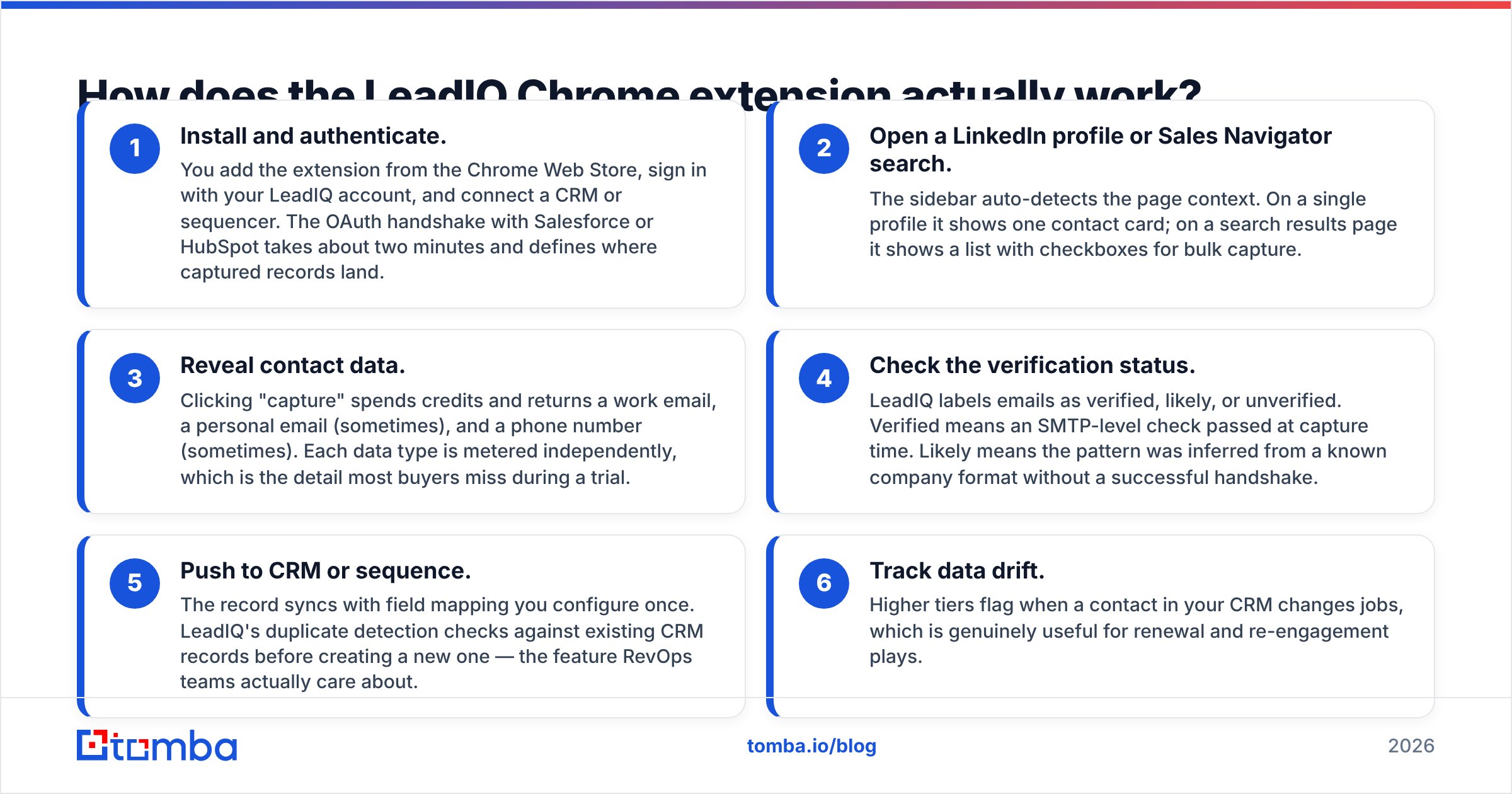
- Install and sign in. Add the extension from the Chrome Web Store, sign in, then connect a CRM or sequencer. The OAuth handshake with Salesforce or HubSpot takes about two minutes. It also sets where captured records land.
- Open a LinkedIn profile or a Sales Navigator search. The sidebar reads the page on its own. A single profile shows one contact card. A search page shows a list with checkboxes for bulk capture.
- Reveal contact data. A capture click spends credits. You get a work email, sometimes a personal email, and sometimes a phone number. Each data type runs on its own meter, and most buyers miss that during a trial.
The first three steps set your cost. The next three set your data quality.
- Check the status label. LeadIQ marks emails as verified, likely, or unverified. Verified means an SMTP check passed at capture time. Likely means the pattern was guessed from a known company format, with no handshake behind it.
- Push to CRM or sequence. The record syncs with field mapping you set up once. LeadIQ checks your CRM for duplicates before it creates a new record. That is the feature RevOps teams care about.
- Track job changes. Higher tiers flag when a contact in your CRM moves jobs. That is useful for renewal and win-back plays.
Steps 3 and 4 are where cost and quality live. Everything else is plumbing, and the plumbing works.

How accurate is the data from the LeadIQ Chrome extension?#
Accuracy depends on the shape of the company you prospect into. It does not depend on the vendor's marketing claims.
Take US mid-market and enterprise domains with clear email patterns, such as first.last@company.com. There, LeadIQ returns a verified work email for most profiles you capture. The hit rate drops on companies under roughly 50 employees. It drops again on regional European or APAC domains, and on catch-all mail servers. More results come back as "likely", which means guessed and unchecked.

Three practical notes on reading any vendor's accuracy number, LeadIQ included:
- "Verified" is a point-in-time claim. An address verified in March can bounce in September. B2B contact data decays by roughly 2-2.5% a month through job changes alone. Run any list older than a quarter through an email verifier before it hits a sequencer.
- Catch-all domains inflate coverage. A catch-all server accepts every address. A simple SMTP check then reports success for addresses that never reach a human. If your ICP leans catch-all, you need catch-all verification, not a green checkmark.
- Mobile numbers are the weakest layer everywhere. LeadIQ is no worse than its peers here. Still, do not budget a calling motion on the hope that mobile coverage matches email coverage. Expect a real gap.
The honest summary: this data is competitive, not ahead of the pack. What sets the tool apart is the status label shown inline. A careful rep can skip the "likely" records instead of sequencing them blind.
What does the LeadIQ Chrome extension cost?#
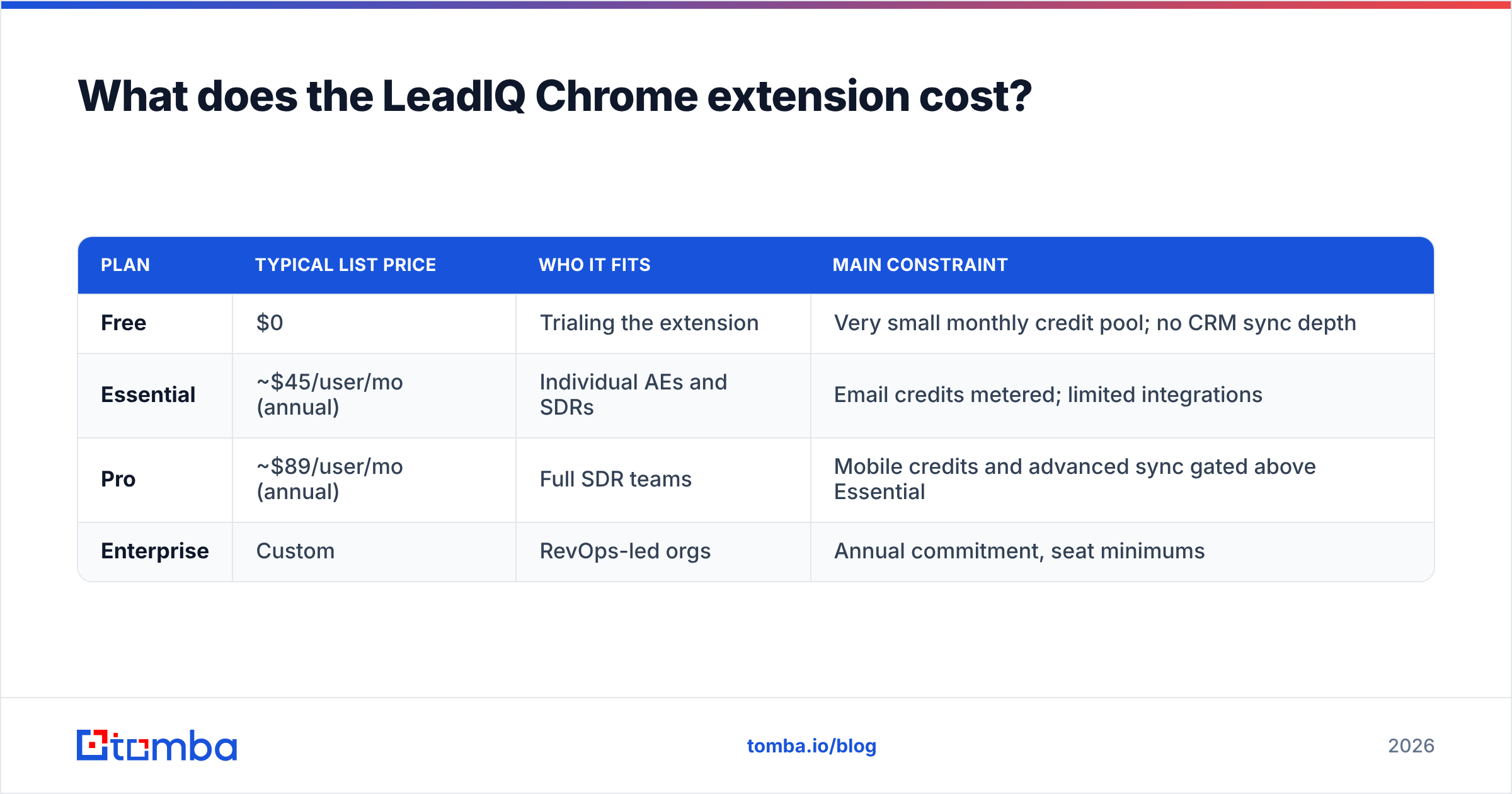
LeadIQ sells per seat and adds a credit allowance on top. Published tiers have looked like the table below. Check current numbers on leadiq.com before you build a business case. Vendors change credit allowances more often than headline prices.
| Plan | Typical list price | Who it fits | Main constraint |
|---|---|---|---|
| Free | $0 | Trialing the extension | Very small monthly credit pool; no CRM sync depth |
| Essential | ~$45/user/mo (annual) | Individual AEs and SDRs | Email credits metered; limited integrations |
| Pro | ~$89/user/mo (annual) | Full SDR teams | Mobile credits and advanced sync gated above Essential |
| Enterprise | Custom | RevOps-led orgs | Annual commitment, seat minimums |
Two cost facts that trials hide:
Credits are the real price, not the seat. A rep who works 60-80 profiles a day drains a mid-tier allowance in under three weeks. The usual fix is an upgrade or a credit top-up. That is how per-seat data tools reach two to three times their advertised cost.
Seats are the multiplier. Ten reps on a Pro-level plan cost roughly $10,000 a year before overage. Some teams only need a few thousand verified emails a month. For them, that is an expensive way to buy addresses. Many pair one or two LeadIQ seats for live LinkedIn work with a cheaper bulk source for list building.

How does the LeadIQ Chrome extension compare to other prospecting tools?#
The Chrome extension category splits into three types: LinkedIn capture tools, all-in-one sales platforms, and dedicated email finders. Each one is priced and built for a different job.

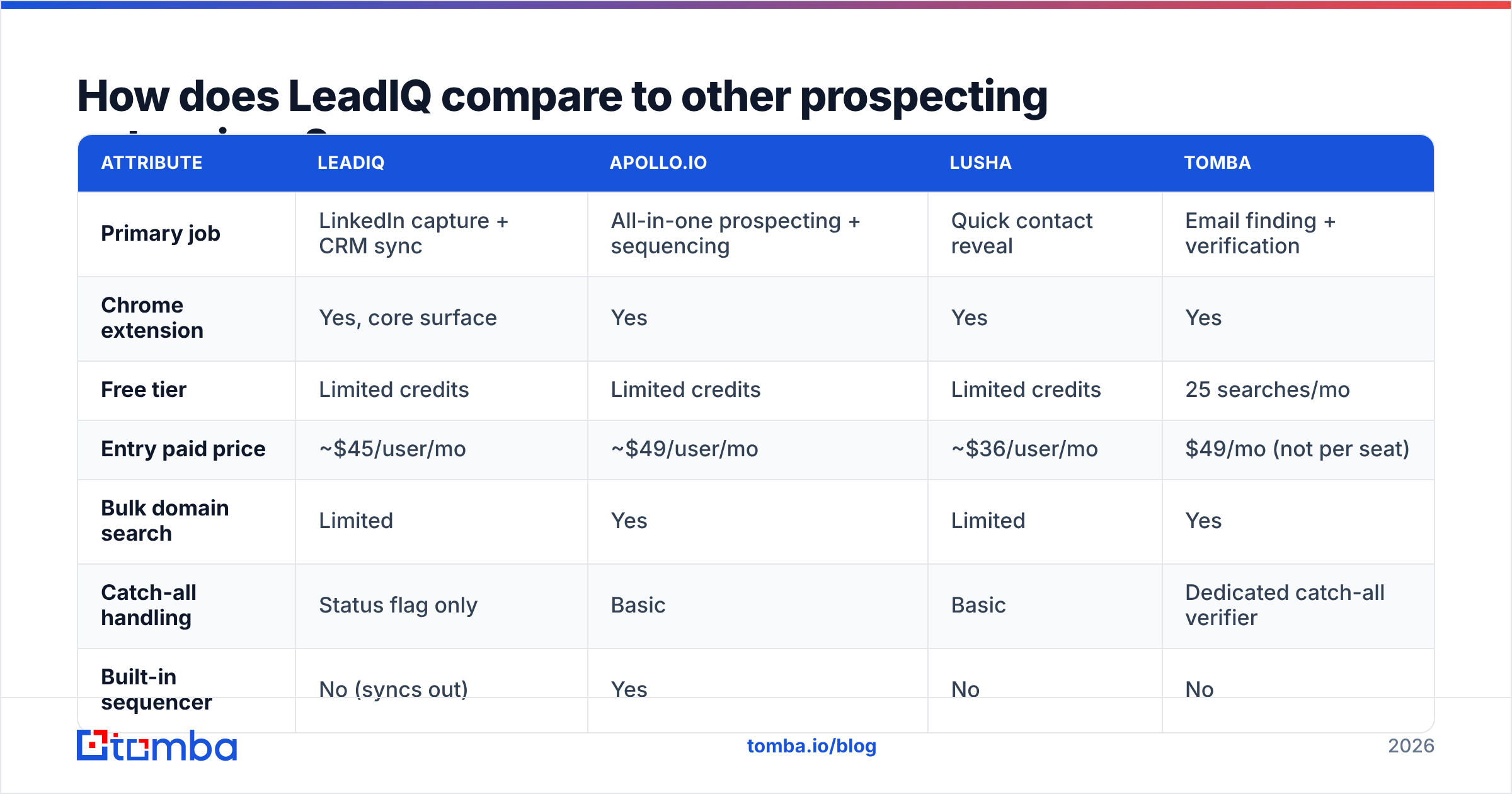
| Attribute | LeadIQ | Apollo.io | Lusha | Tomba |
|---|---|---|---|---|
| Primary job | LinkedIn capture + CRM sync | All-in-one prospecting + sequencing | Quick contact reveal | Email finding + verification |
| Chrome extension | Yes, core surface | Yes | Yes | Yes |
| Free tier | Limited credits | Limited credits | Limited credits | 25 searches/mo |
| Entry paid price | ~$45/user/mo | ~$49/user/mo | ~$36/user/mo | $49/mo (not per seat) |
| Bulk domain search | Limited | Yes | Limited | Yes |
| Catch-all handling | Status flag only | Basic | Basic | Dedicated catch-all verifier |
| Built-in sequencer | No (syncs out) | Yes | No | No |
| API access | Enterprise-oriented | Yes | Yes | Yes, on all paid plans |
| Best for | SDR teams living in Sales Navigator | Teams wanting one platform | Fast one-off lookups | Verified email supply at volume |
Read that table as a map of jobs, not a scoreboard.
- Choose LeadIQ if your reps prospect inside Sales Navigator all day, and your RevOps lead wants clean, deduplicated CRM records. The sync layer is the product.
- Choose an all-in-one like Apollo if you want data and sending on one contract. You trade depth for breadth. Our Apollo alternative page breaks down that trade-off.
- Choose a dedicated finder if what you buy each month is verified addresses. Flat pricing is not multiplied by seat count. That changes the math once more than three people need access. Our LeadIQ alternative page walks through the swap.
Peer reviews on G2 tell the same story: praise for the workflow, complaints about the credit model. That pattern belongs to the category, not to one vendor.
Who should use the LeadIQ Chrome extension?#
It is a strong fit when three things are true at once.
- LinkedIn is your main sourcing surface. Some reps build lists from Sales Navigator saved searches rather than database filters. For them, capture in context saves real time every day.
- You have a CRM you want to keep clean. Duplicate checks and field mapping justify the per-seat price. Teams that dump everything into a CSV pay for plumbing they never use.
- Your ICP is mid-market and up, and US-heavy. That is where coverage and verified rates are strongest.
It is a poor fit when:
- You need volume, not one-by-one research. Pulling 5,000 contacts across 400 domains is a domain search job. Clicking through profiles for that wastes an expensive seat.
- Only one or two people need data. Per-seat pricing punishes small teams. They need a shared data tap, not a license each.
- Your market is SMB or non-US. Test coverage on 50 real target accounts during the trial. Aggregate accuracy claims say nothing about your segment.
What are the biggest limits to plan around?#
Credit anxiety changes rep behavior. Every reveal costs a metered unit, so reps hesitate. Hesitation is a hidden tax on output. Budget more credits than you think you need, or the LeadIQ Chrome extension quietly under-delivers.
No native sending. LeadIQ stops at the CRM and sequencer line. That keeps the product clean. It also means another contract for Outreach, Salesloft, Instantly, or a peer. Compare the cost of the whole stack, not one line item.
LinkedIn dependency is a platform risk. Any extension that reads LinkedIn pages works at the platform's mercy. LinkedIn tightens its scraping defenses from time to time. Every tool in this category breaks a little when it does. Keep a second data path open so a bad week does not stall pipeline.
A status label is not list hygiene. Even verified captures need a check before send if they have sat in your CRM. A quick free email checker pass costs minutes. It protects sender reputation, which costs far more to repair than to keep.
How do you get the most out of the LeadIQ Chrome extension?#
Four changes recover most of the wasted spend.
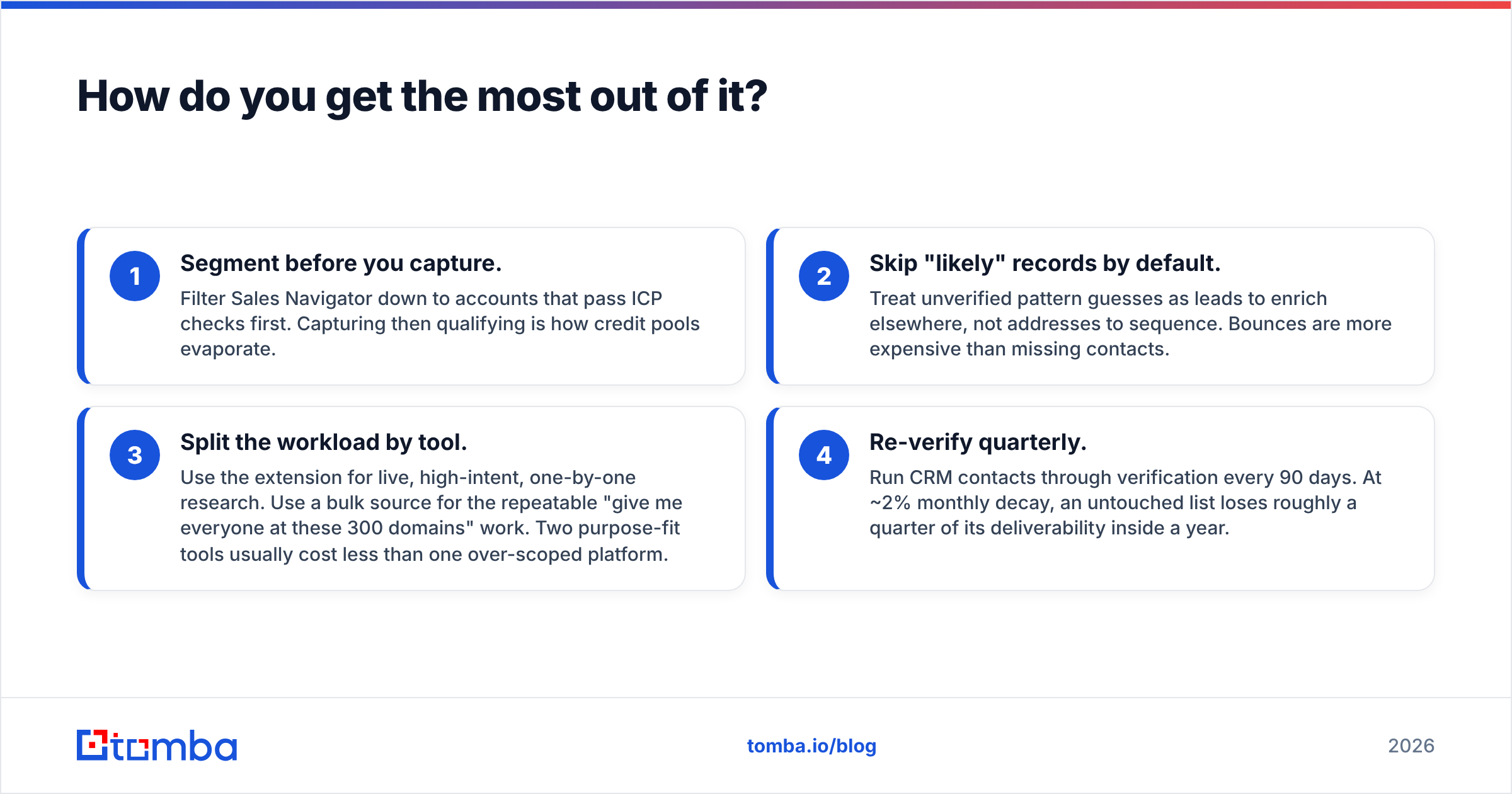
- Segment before you capture. Filter Sales Navigator down to accounts that pass your ICP check first. Capture first and qualify later, and the credit pool evaporates.
- Skip "likely" records by default. Treat guessed addresses as leads to enrich elsewhere, not as addresses to sequence. Bounces cost more than missing contacts.
- Split the work by tool. Use the extension for live, high-intent research. Use a bulk source for the "everyone at these 300 domains" work. Two fit-for-purpose tools often cost less than one over-scoped platform.
- Re-verify every quarter. Run CRM contacts through a verifier every 90 days. At roughly 2% decay a month, an untouched list loses a quarter of its reach within a year.
Is the LeadIQ Chrome extension worth it in 2026?#
Yes, for LinkedIn-native SDR teams with CRM discipline and room in the budget for per-seat pricing. The capture-to-CRM workflow is genuinely good. The status labels are clearer than most. Job-change tracking has real revenue value.
No, for lean teams, agencies, and anyone whose core need is a steady supply of verified B2B email addresses. A dedicated finder with flat pricing and an API does that job better, and for far less. Seats and credit top-ups compound fast.
Here is the clean test. Count how many of your monthly contacts come from browsing profiles. Then count how many come from a list of target domains. If browsing wins, the LeadIQ Chrome extension fits. If domains win, you are paying for an interface you barely use.
If domains win, start with the Tomba Email Finder. It finds verified work addresses by name, domain, or company at a flat monthly price. The free tier gives 25 searches, Starter is $49/mo, and Growth is $99/mo. A browser extension, an API, and catch-all checks are included, not gated behind a seat count. Run 50 of your real target accounts through both tools and compare hit rate against total cost. That one test answers the buying question better than any review page.
Related guides#
// get started
Find, verify and enrich your first contacts today
Start on the free plan with 25 searches a month, then scale when your team is ready.
Free plan · No credit card required · GDPR & CCPA
// about the author