Leadloft Pros and Cons (2026): An Honest Review for Sales Teams
Leadloft puts prospecting, sequences, LinkedIn automation and a light CRM into one $99-per-seat plan. Here's where that bundle saves you money, where it falls short, and who should pick something else.
TL;DR
- Leadloft is an all-in-one outbound platform. It combines a B2B contact database, an email finder, email sequences, LinkedIn automation, call tasks and a lightweight CRM.
- Its biggest strength is the pricing model. The core plan is sold as "unlimited" prospecting for a flat fee per user (listed at $99/user/month on Leadloft's pricing page when we checked), so you don't have to count credits.
- Its biggest weaknesses are shallow A/B testing, limited reporting, and data quality that depends on how strict you are about verification.
- Leadloft suits small teams and founders who want one login for simple outbound. Teams that tune campaigns closely, or that already run Salesforce or HubSpot, will probably find it too limited.
- If you only need accurate emails to feed a sequencer you already use, a dedicated email finder costs less and is easier to control.
What is Leadloft?#
Leadloft is a sales prospecting and engagement platform for small and mid-sized B2B teams. Most outbound stacks are built from three or four separate tools: a data provider, an email finder, a sequencer and a CRM. Leadloft puts all of those into one product.
According to the vendor, the platform has four parts:
- Prospecting. Search a B2B contact database, find emails, and build lead lists with AI help.
- Outreach. Run multi-step sequences that mix email, LinkedIn actions and call tasks.
- CRM. Track contacts, deals and conversations without a separate CRM.
- Scale AI (managed tier). An AI prospector builds lists, an AI writer drafts copy, a playbook builder designs sequences, and AI SDR features handle replies and meeting scheduling.
An all-in-one tool is a bit like a Swiss Army knife. It's very handy when you need a bit of everything, but it's rarely the best tool for any single job. Most of the pros and cons below come from that trade-off.
How much does Leadloft cost in 2026?#
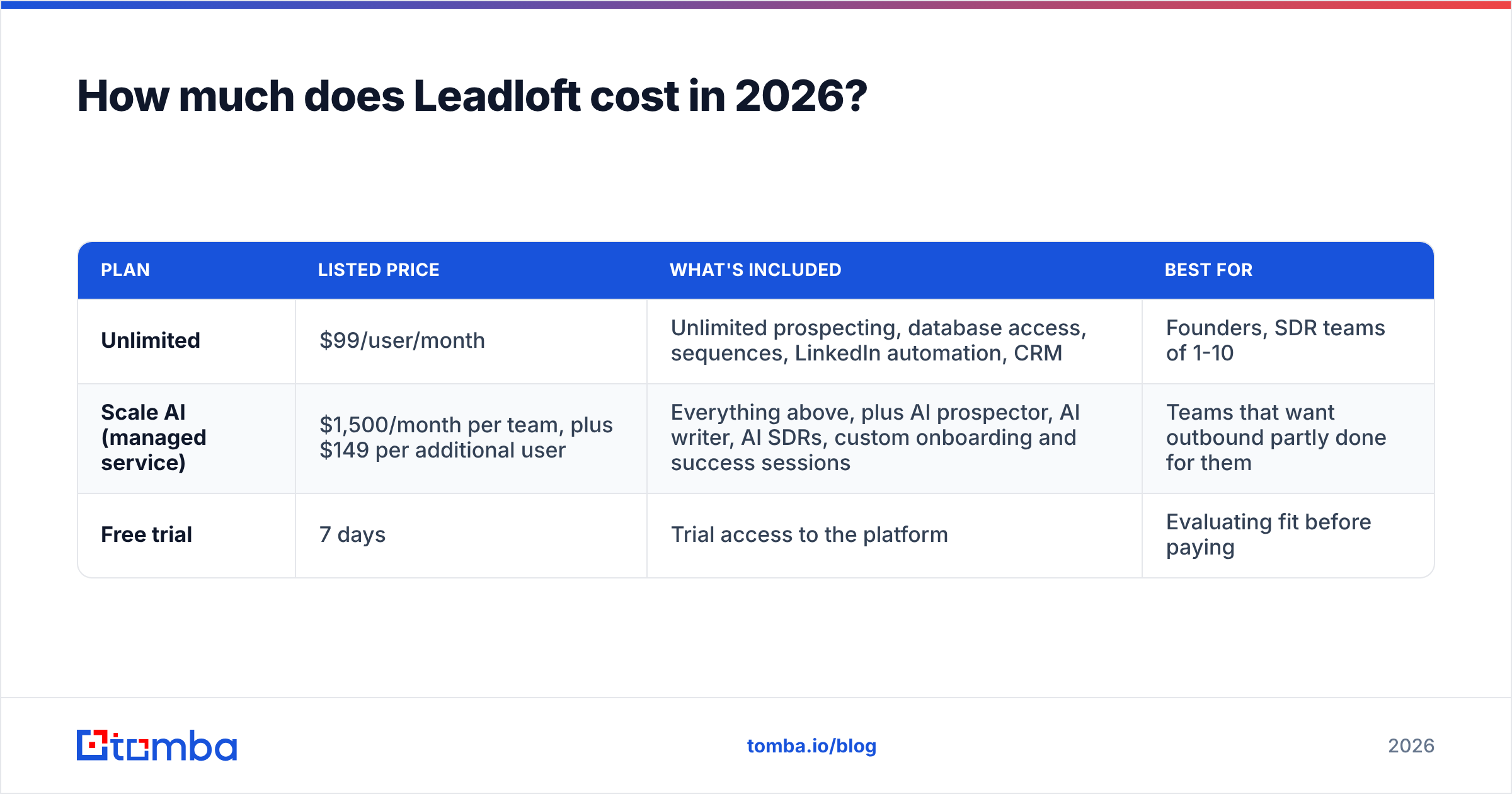
Leadloft publishes two main tiers. Prices change, so check the official pricing page before you commit. At the time of writing, the structure was:
| Plan | Listed price | What's included | Best for |
|---|---|---|---|
| Unlimited | $99/user/month | Unlimited prospecting, database access, sequences, LinkedIn automation, CRM | Founders, SDR teams of 1-10 |
| Scale AI (managed service) | $1,500/month per team, plus $149 per additional user | Everything above, plus AI prospector, AI writer, AI SDRs, custom onboarding and success sessions | Teams that want outbound partly done for them |
| Free trial | 7 days | Trial access to the platform | Evaluating fit before paying |
Two things stand out:
- There's no permanent free tier. You get a seven-day trial, then you pay. Tools like Apollo, and most email finders including Tomba, have an ongoing free plan you can use for small volumes.
- The Scale AI jump is big. Going from $99/user to $1,500/month for a team is a different kind of purchase. You're partly paying for a service, not just software.
What are the main Leadloft pros?#
1. Flat, predictable pricing#
Credit-based pricing is the most common complaint in this category. You buy 1,000 credits, a rep exports a big list on day three, and the budget is gone. Leadloft's "unlimited prospecting" model avoids that. Reviewers on sites like G2 and Gartner Peer Insights often mention the fixed price and transparent pricing as a main reason they chose it.
For a founder doing outbound between other jobs, a predictable monthly cost is worth a lot.
2. One login instead of four#
When the database, sequencer, LinkedIn automation and CRM all live in one place, you avoid several recurring problems:
- CSV exports and imports between tools
- Duplicate contacts across systems
- Zapier chains breaking silently
- Paying four vendors, each with its own contract minimums
For a team of two or three people, cutting that tool overhead is often worth more than any single feature.
3. Multichannel sequences out of the box#
Leadloft sequences can mix email steps, LinkedIn touches and call tasks. You can build a "connect on LinkedIn, then email, then call" sequence without adding a separate LinkedIn automation tool. That's useful because response rates on single-channel email campaigns keep falling as inboxes tighten filtering.
4. A CRM that's good enough for early-stage teams#
If you don't have a CRM yet, Leadloft's built-in one covers the basics: contacts, deals, activity history. It won't replace Salesforce for a 50-rep org, but it saves a seed-stage team from setting up a full CRM before they have a repeatable pipeline.
5. A managed option if you don't have SDRs#
The Scale AI tier is effectively outbound-as-a-service with software attached. If you can't hire an SDR yet, that's a real option, provided you're comfortable with AI-drafted messages going out under your name.

What are the main Leadloft cons?#
1. Limited A/B testing#
This is the weakness reviewers mention most. Leadloft handles basic sequence variants, but analysts and users point to weak split testing compared with dedicated sequencers. If your process is "test three subject lines, keep the winner, repeat every two weeks," you'll hit the limits quickly.
2. Shallow reporting#
Reporting is the other common complaint. You get the basic metrics (opens, replies, meetings), but cohort analysis, step-level attribution and rep benchmarking are limited. A RevOps lead who wants to know which persona, sequence step and channel combination produces pipeline will probably end up exporting data to a spreadsheet.
3. "Unlimited" data still needs verification#
Unlimited prospecting only helps if the contacts are accurate. Every B2B database decays: people change jobs, domains change, catch-all servers accept everything. If you pull thousands of contacts a month and send to them unverified, your bounce rate goes up and your sender reputation drops.
The fix is simple but adds work. Run every list through an email verifier before it goes into a sequence, especially for catch-all domains. Leadloft does include verification. How much you rely on it compared with an independent second check depends on your volume and how much risk you're willing to take.
4. Integration depth is limited if you already use a CRM#
If you already run Salesforce or HubSpot, Leadloft's built-in CRM becomes redundant, and you now care about sync quality: field mapping, activity logging, deduplication. Tools built mainly as sequencers or data layers usually have more mature CRM connectors. Test the sync on your real data during the trial before you sign up.
5. Per-seat pricing grows with headcount#
Flat pricing is predictable per person, but it scales linearly. Ten reps at $99 is about $990 a month, before any extra tools. A shared-credit data tool plus a sequencer can cost less for bigger teams where not every rep prospects every day.
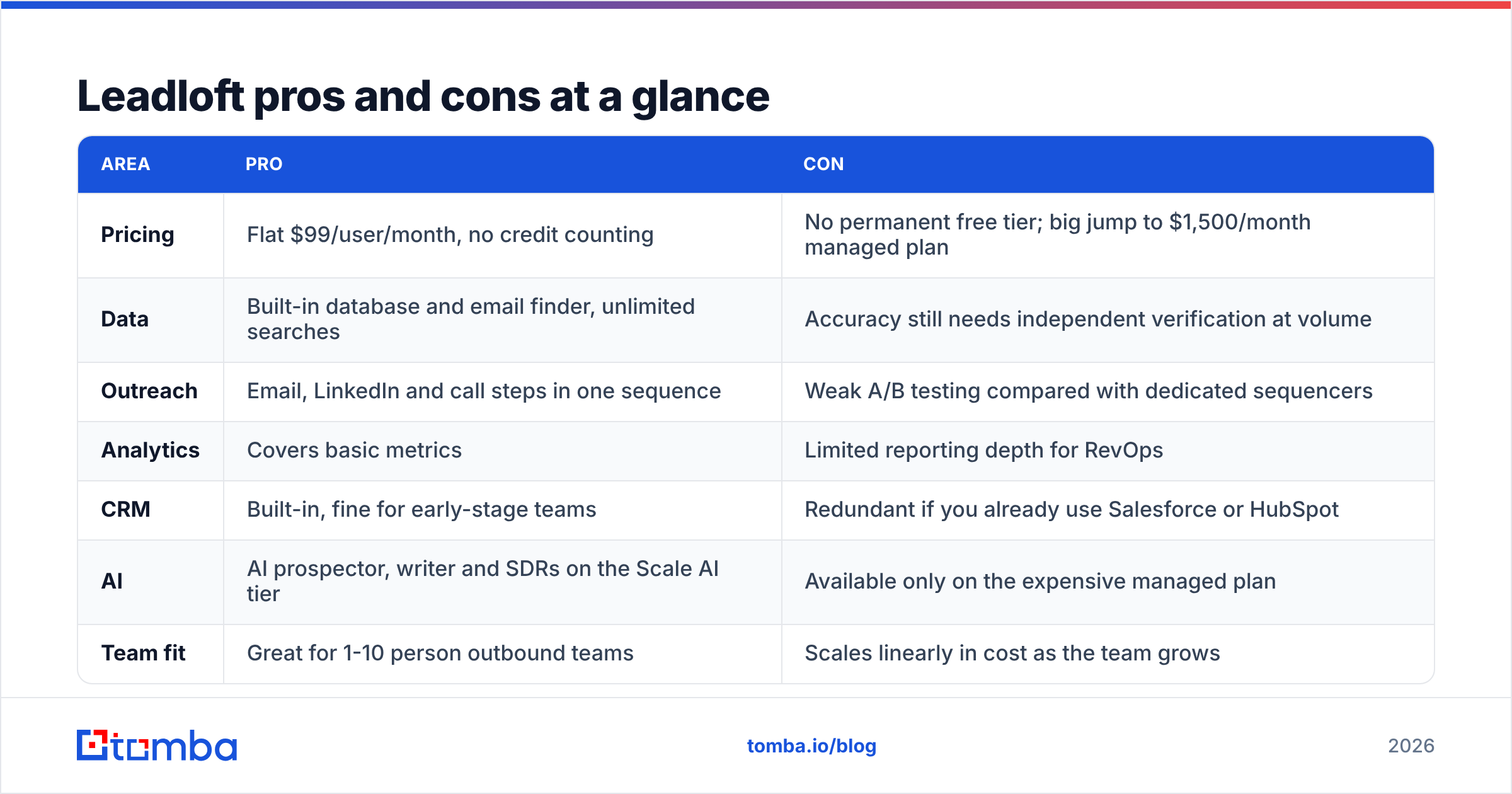
Leadloft pros and cons at a glance#
| Area | Pro | Con |
|---|---|---|
| Pricing | Flat $99/user/month, no credit counting | No permanent free tier; big jump to $1,500/month managed plan |
| Data | Built-in database and email finder, unlimited searches | Accuracy still needs independent verification at volume |
| Outreach | Email, LinkedIn and call steps in one sequence | Weak A/B testing compared with dedicated sequencers |
| Analytics | Covers basic metrics | Limited reporting depth for RevOps |
| CRM | Built-in, fine for early-stage teams | Redundant if you already use Salesforce or HubSpot |
| AI | AI prospector, writer and SDRs on the Scale AI tier | Available only on the expensive managed plan |
| Team fit | Great for 1-10 person outbound teams | Scales linearly in cost as the team grows |
Is Leadloft better than Apollo or a modular stack?#
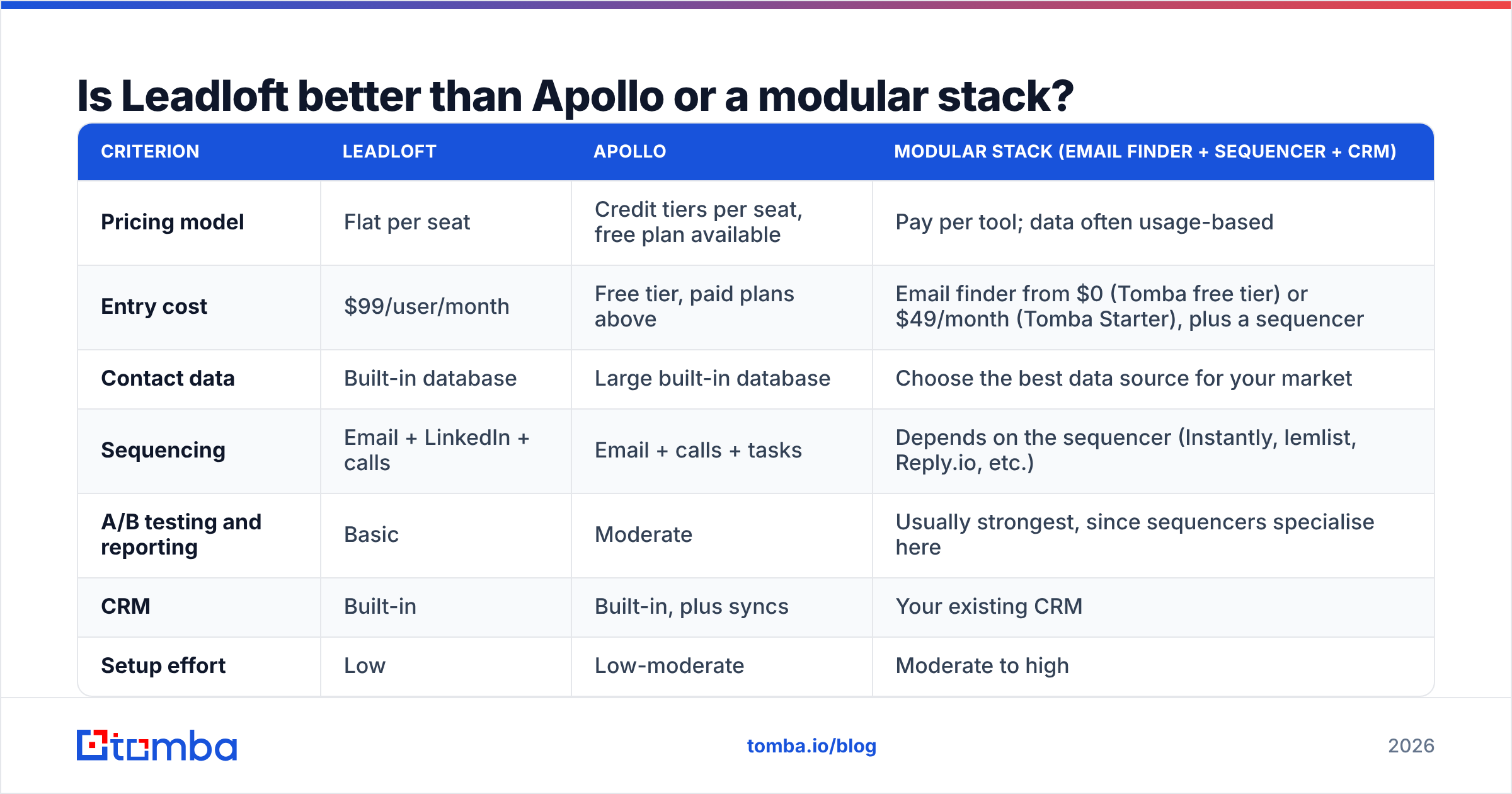
Leadloft isn't competing with one tool. It's competing with the alternative of putting together your own stack. Here's how the three common approaches compare:
| Criterion | Leadloft | Apollo | Modular stack (email finder + sequencer + CRM) |
|---|---|---|---|
| Pricing model | Flat per seat | Credit tiers per seat, free plan available | Pay per tool; data often usage-based |
| Entry cost | $99/user/month | Free tier, paid plans above | Email finder from $0 (Tomba free tier) or $49/month (Tomba Starter), plus a sequencer |
| Contact data | Built-in database | Large built-in database | Choose the best data source for your market |
| Sequencing | Email + LinkedIn + calls | Email + calls + tasks | Depends on the sequencer (Instantly, lemlist, Reply.io, etc.) |
| A/B testing and reporting | Basic | Moderate | Usually strongest, since sequencers specialise here |
| CRM | Built-in | Built-in, plus syncs | Your existing CRM |
| Setup effort | Low | Low-moderate | Moderate to high |
| Best for | Founders and small teams who want one tool | Teams that want a big database and a free start | Teams that optimise every part of outbound |
If you're weighing Apollo specifically, our Apollo alternative breakdown covers where each data provider tends to do well.
A simple way to choose:
- Pick Leadloft if simplicity and predictable spend matter more than analytics depth, and you don't have a CRM yet.
- Pick Apollo if you want a large database and a free starting point, and you can manage credit budgets.
- Build a modular stack if you already have a CRM, run high email volumes, or need proper testing and attribution.

Who should use Leadloft, and who should skip it?#
Leadloft is a good fit if you are:
- A founder or solo seller doing your own outbound
- An agency running simple multichannel campaigns for a few clients
- An early-stage team (1-10 reps) without a CRM that wants one tool and one invoice
- A team with budget but no SDRs, looking at the managed Scale AI tier
You should probably skip it if you are:
- A RevOps-led team that needs step-level attribution and rigorous split testing
- A company already committed to Salesforce or HubSpot and happy with its sequencer
- A high-volume sender who needs fine control over deliverability, inbox rotation and warmup
- A team that mainly needs accurate emails and already has an outreach tool
How do you get the most out of Leadloft if you choose it?#
If you go ahead, these habits protect your results:
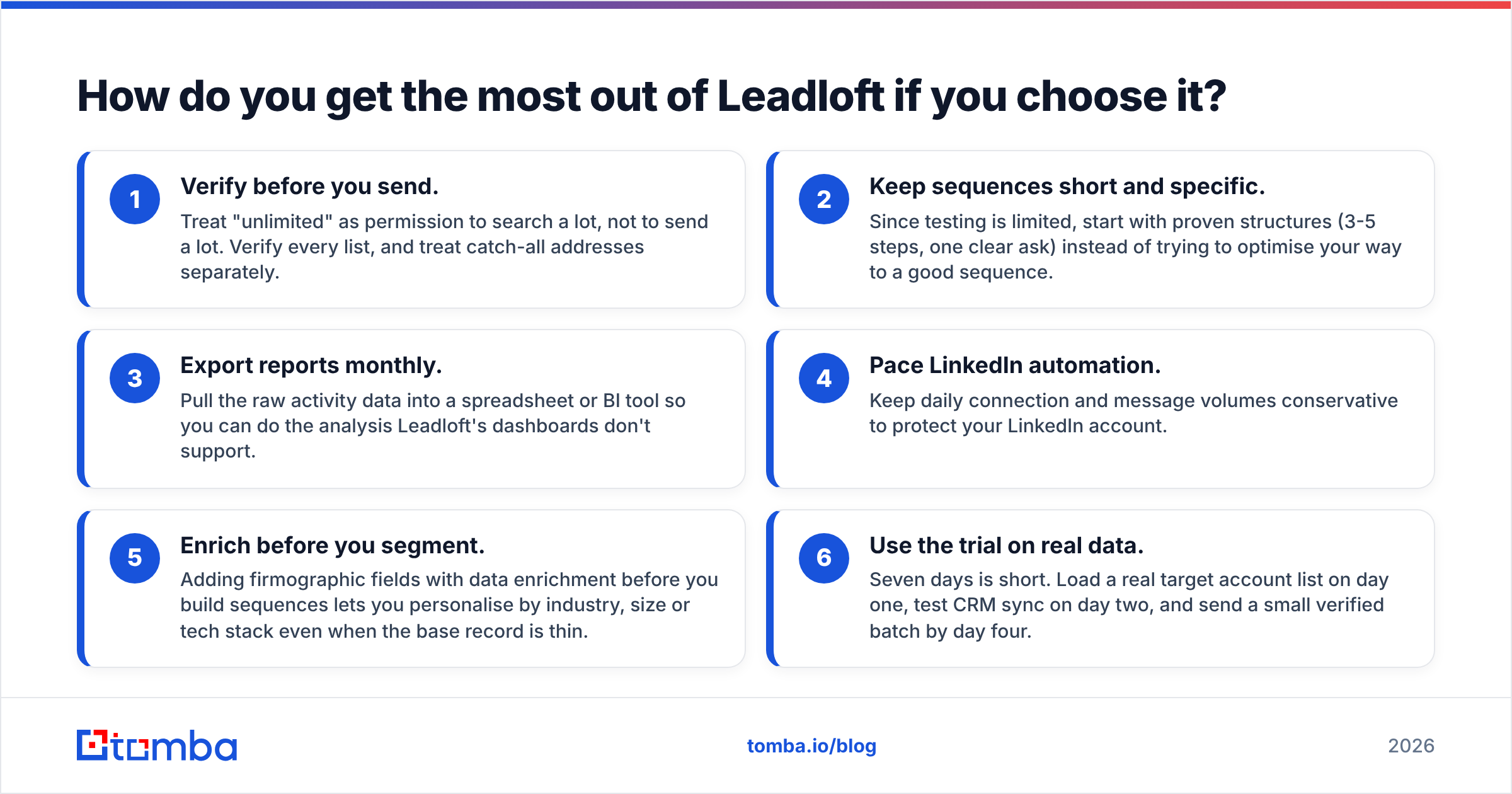
- Verify before you send. Treat "unlimited" as permission to search a lot, not to send a lot. Verify every list, and treat catch-all addresses separately.
- Keep sequences short and specific. Since testing is limited, start with proven structures (3-5 steps, one clear ask) instead of trying to optimise your way to a good sequence.
- Export reports monthly. Pull the raw activity data into a spreadsheet or BI tool so you can do the analysis Leadloft's dashboards don't support.
- Pace LinkedIn automation. Keep daily connection and message volumes conservative to protect your LinkedIn account.
- Enrich before you segment. Adding firmographic fields with data enrichment before you build sequences lets you personalise by industry, size or tech stack even when the base record is thin.
- Use the trial on real data. Seven days is short. Load a real target account list on day one, test CRM sync on day two, and send a small verified batch by day four.
What's the final verdict on Leadloft?#
Leadloft is an honest product with a clear position. It trades depth for simplicity and makes the price predictable. For small teams that want one tool to find leads, contact them on several channels and track deals, the $99 flat seat is good value. The downsides are real but narrow: basic testing, basic reporting, and the fact that unlimited data still needs checking before you send.
Before choosing, work out what your bottleneck actually is. If it's "we have too many tools and no process," Leadloft fixes that. If it's "our emails bounce and our lists are thin," an all-in-one platform doesn't solve that. Better data does.
Where does Tomba fit in?#
If your outreach tool already works and the gap is data quality, you don't need to replace your whole stack. Tomba Email Finder finds professional email addresses by domain, name or company, with built-in verification so your sequences start with deliverable contacts. It works alongside Leadloft, Apollo or any sequencer. There's a free tier with 25 searches a month, and paid plans start at $49/month (see Tomba pricing). Run a test on your next target account list and compare the bounce rate with what you're getting now.
Related guides#
// get started
Find, verify and enrich your first contacts today
Start on the free plan with 25 searches a month, then scale when your team is ready.
Free plan · No credit card required · GDPR & CCPA
// about the author