LeadLoft Reviews 2026: Features, Pricing, Pros, Cons & Verdict
LeadLoft offers prospecting, email and LinkedIn sequences, and a lightweight CRM for a flat $99 per user. We looked at what reviewers praise, where it falls short, and which teams should buy it.
TL;DR
- LeadLoft combines a prospect database, email and LinkedIn sequences, a unified inbox, and a lightweight CRM in one dashboard. Its main plan is listed at about $99 per user per month.
- Reviews are positive but there aren't many of them. G2 shows a high average rating from fewer than 20 reviews, so treat that score as a small sample.
- Reviewers like the unlimited prospecting at a flat price and how simple it is to set up. The most common complaints are thin A/B testing and basic reporting.
- It fits best for teams of 1–10 people running simple cold outbound. It fits less well for SDR teams that depend on intent signals, detailed analytics, or strict data-accuracy requirements.
- Whichever platform you choose, verify contact data before you send. The database inside any all-in-one tool is only one input to your deliverability.
What is LeadLoft?#
LeadLoft is an all-in-one outbound sales platform for small B2B teams. You build a prospect list from its company and contact database, enroll those prospects in multi-step email and LinkedIn sequences, handle replies in a shared inbox, and track deals in a simple CRM. You don't need to connect four separate tools to do this.
The pitch works because most small sales teams don't lose deals for lack of features. They lose time moving CSVs between a data vendor, a sequencer, and a CRM. LeadLoft removes those handoffs. You can check the current product details on the official LeadLoft site.
LeadLoft is not an enterprise sales engagement platform like Outreach or Salesloft, and it isn't a specialist data provider either. It sits between the two. That position explains most of what reviewers praise and most of what they criticize.
What do LeadLoft reviews actually say?#
Across the LeadLoft profile on G2 and independent write-ups, the same themes come up again and again. Here they are grouped by how often they appear.
What reviewers like:
- Unlimited prospecting at a flat price. Many data tools charge per credit, so every export costs you. LeadLoft's main plan lets you search and build lists without counting credits, and that's the benefit reviewers mention most.
- One dashboard for the full workflow. Prospecting, sequencing, and replies all happen in one place, so you don't need Zapier connections just to get a lead from list to inbox.
- Quick onboarding. Small teams say they can run a first campaign the same day. Heavier platforms often need admin setup first.
- Responsive support. Several reviewers mention the founders or support team getting involved directly. That's common at smaller vendors and hard to find at large ones.
What reviewers criticize:
- Limited split testing. You can vary copy, but A/B testing isn't as deep as in dedicated sequencers, so optimizing systematically is harder.
- Basic reporting. The analytics show you what happened but offer little help with why. Managers who want rep-level or segment-level breakdowns often export the data elsewhere.
- No signal-based prospecting. Independent reviewers note that LeadLoft works from static filters such as industry, size, and location. It does less with intent data, job changes, or hiring triggers.
- Data quality varies by segment. This is true of every bundled database. Coverage is usually strongest for US SMBs and weaker in other regions and niches.
A caution on the ratings: an average near 4.9 stars from about 16 reviews is encouraging, but it tells you much less than 4.5 stars from 1,500 reviews. Weight the specific comments more heavily than the overall score.
How much does LeadLoft cost in 2026?#
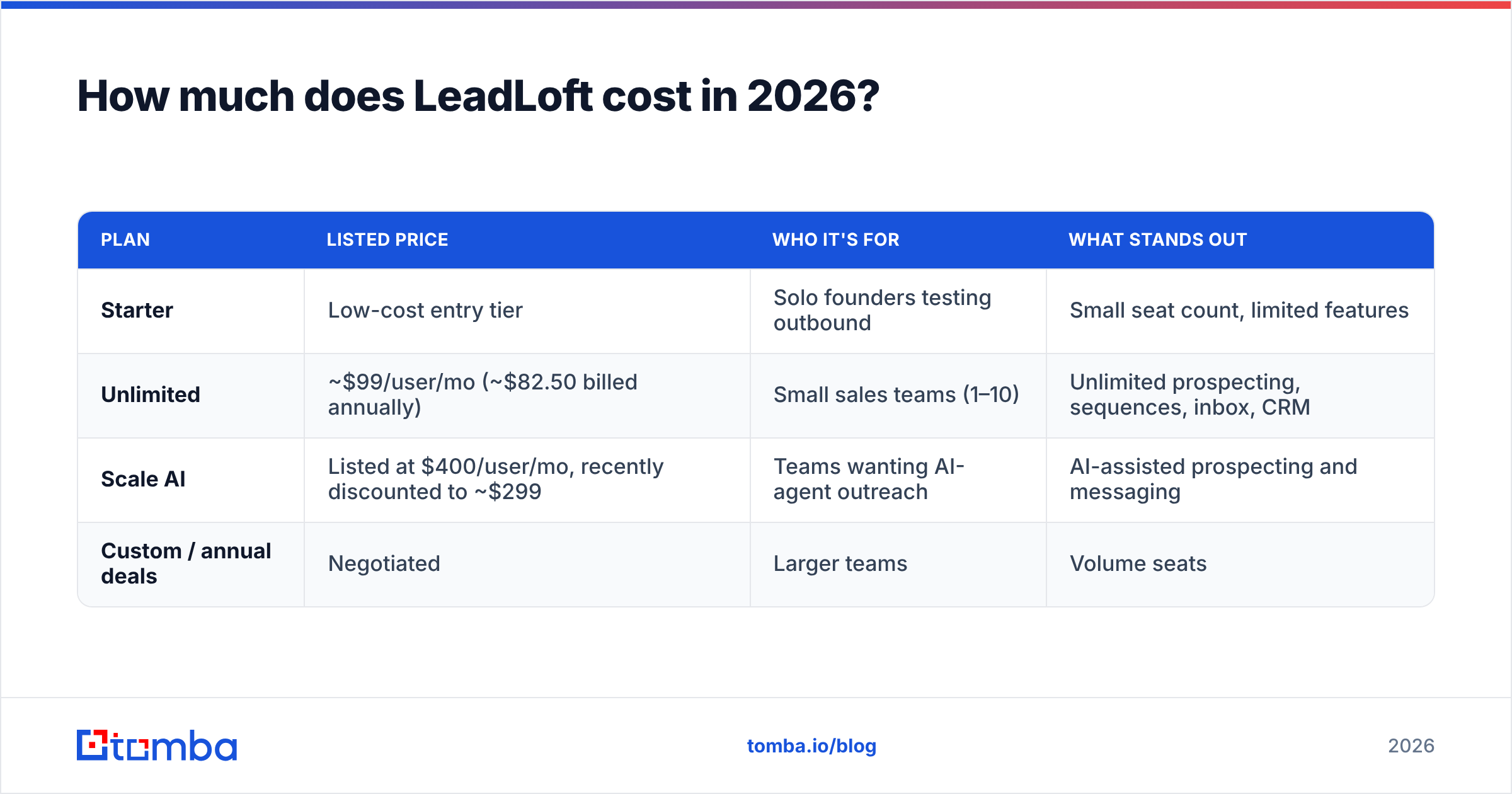
LeadLoft's pricing is simpler than most competitors'. Based on the vendor's published plans and independent pricing breakdowns, the tiers look roughly like this. Confirm on leadloft.com before you buy, because promotional pricing changes.
| Plan | Listed price | Who it's for | What stands out |
|---|---|---|---|
| Starter | Low-cost entry tier | Solo founders testing outbound | Small seat count, limited features |
| Unlimited | Small sales teams (1–10) | Unlimited prospecting, sequences, inbox, CRM | |
| Scale AI | Listed at $400/user/mo, recently discounted to ~$299 | Teams wanting AI-agent outreach | AI-assisted prospecting and messaging |
| Custom / annual deals | Negotiated | Larger teams | Volume seats |
The Unlimited plan is the one most reviewers are describing. At $99 per seat, you're paying for the bundle: data, automation, inbox, and CRM together. If you would otherwise buy a $49 data tool, a $59 sequencer, and a CRM seat, LeadLoft can come out cheaper. If you already pay for HubSpot or Salesforce, some of what you're buying overlaps with tools you have.

How does LeadLoft compare to Apollo and a point-tool stack?#
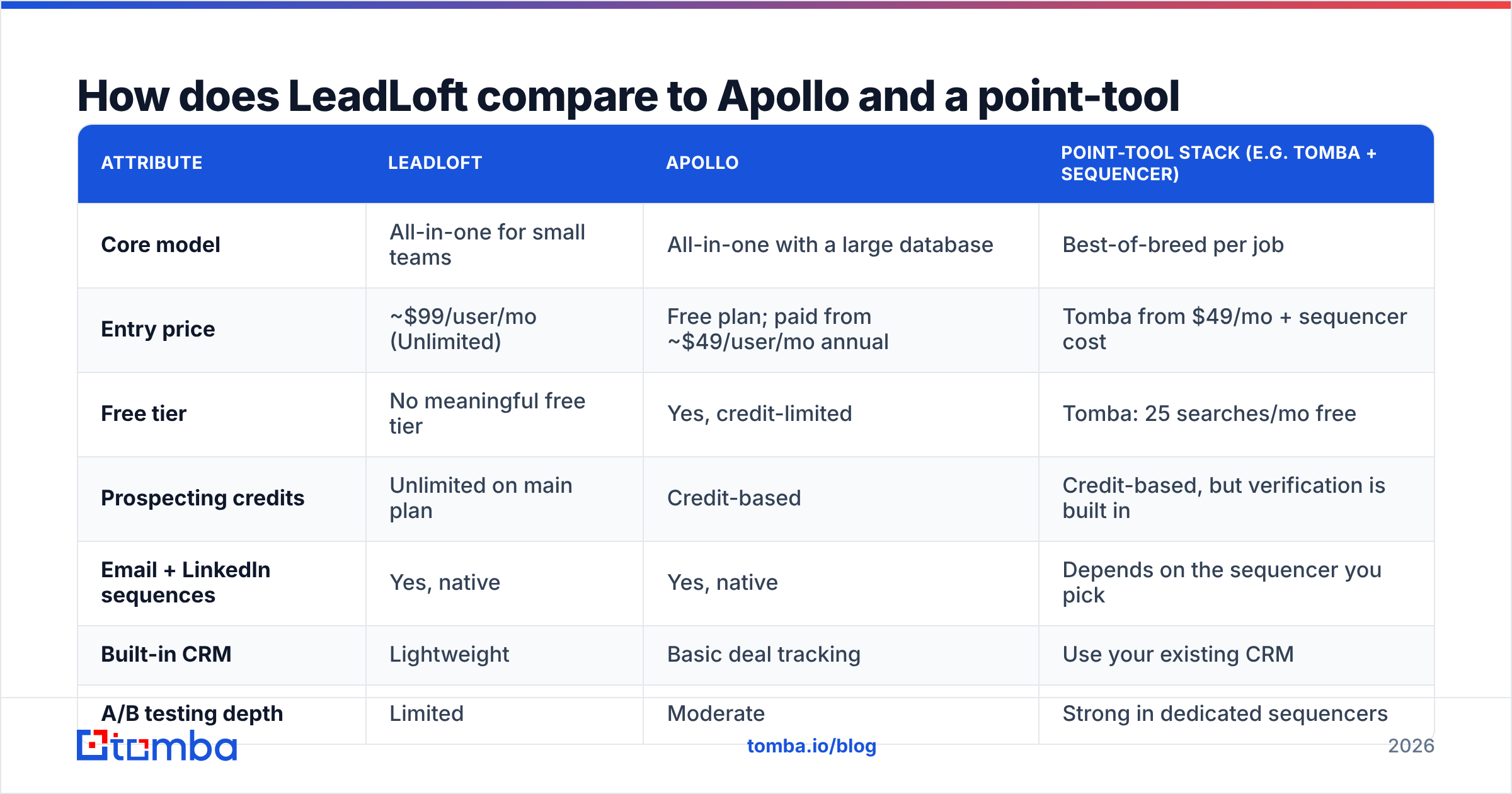
The fair comparison isn't feature against feature. It's between three ways of building an outbound stack. Apollo is the best-known all-in-one alternative. The other option is a "point-tool" stack: a dedicated email finder and verifier plus a separate sequencer.
| Attribute | LeadLoft | Apollo | Point-tool stack (e.g. Tomba + sequencer) |
|---|---|---|---|
| Core model | All-in-one for small teams | All-in-one with a large database | Best-of-breed per job |
| Entry price | ~$99/user/mo (Unlimited) | Free plan; paid from ~$49/user/mo annual | Tomba from $49/mo + sequencer cost |
| Free tier | No meaningful free tier | Yes, credit-limited | Tomba: 25 searches/mo free |
| Prospecting credits | Unlimited on main plan | Credit-based | Credit-based, but verification is built in |
| Email + LinkedIn sequences | Yes, native | Yes, native | Depends on the sequencer you pick |
| Built-in CRM | Lightweight | Basic deal tracking | Use your existing CRM |
| A/B testing depth | Limited | Moderate | Strong in dedicated sequencers |
| Reporting | Basic | Moderate | Depends on tools |
| Best for | 1–10 person teams, simple outbound | Teams wanting database scale | Teams that care most about data accuracy and flexibility |
| Main risk | Outgrowing it | Credit burn, data decay | More tools to manage |
If you're evaluating LeadLoft mainly as a cheaper Apollo, read our Apollo alternative breakdown too. For a quick side-by-side of LeadLoft against an enterprise sequencer, G2 has a LeadLoft vs Salesloft comparison built from user ratings.
Is LeadLoft's contact data accurate enough?#
This question matters most, and review scores don't answer it well. A bundled database ages at the rate your market changes. B2B contact data decays by an estimated 20–30% a year from job changes, rebrands, and domain moves. No all-in-one vendor refreshes every record continuously.
In practice:
- Unlimited prospecting doesn't mean unlimited valid emails. Pulling 5,000 contacts for free is only a good deal if most of them deliver.
- Bounce rate protects your domain. Once you send above roughly 2–3% bounces, mailbox providers start to see your sending domain as low quality. Sequences that looked fine in week one can land in spam by week three.
- Catch-all domains need separate handling. Many mid-market companies accept every address at the server level. A basic check marks these as "valid," so your list looks cleaner than it really is.
Whatever you prospect with, a sensible habit is to export the list and run it through a dedicated email verifier before enrolling it. For contacts the database can't find, such as a new VP or a niche role, use a standalone email finder that looks up addresses by name and domain. That usually recovers the high-value contacts missing from the bundled list.
This isn't a problem unique to LeadLoft. Apollo, ZoomInfo, and every other bundled database have the same limitation. Reviewers rarely mention it because it appears as a gradual drop in reply rates, not a bug they can point to.
Who should buy LeadLoft?#
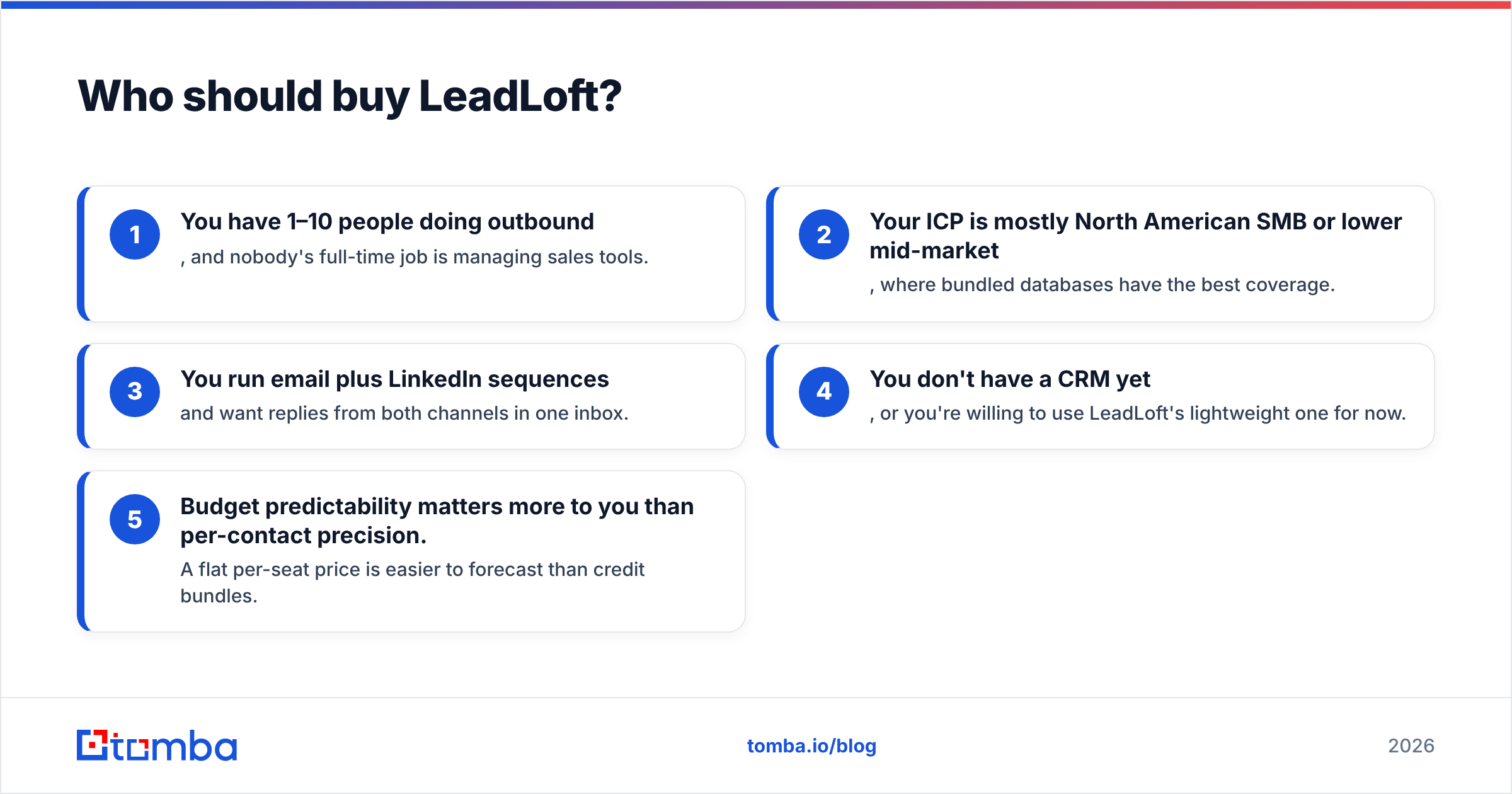
LeadLoft is a good fit if most of these describe you:
- You have 1–10 people doing outbound, and nobody's full-time job is managing sales tools.
- Your ICP is mostly North American SMB or lower mid-market, where bundled databases have the best coverage.
- You run email plus LinkedIn sequences and want replies from both channels in one inbox.
- You don't have a CRM yet, or you're willing to use LeadLoft's lightweight one for now.
- Budget predictability matters more to you than per-contact precision. A flat per-seat price is easier to forecast than credit bundles.
Who should skip LeadLoft?#
Look at other options if:
- You run an SDR team of 10 or more and need rep-level analytics, coaching dashboards, and strict A/B testing. Dedicated sales engagement platforms handle this better.
- You rely on intent or trigger signals such as funding rounds, hiring, or tech installs to prioritize accounts. LeadLoft's filter-based prospecting will feel static.
- You already have Salesforce or HubSpot configured. Paying for another CRM layer adds cost and splits your records across two systems.
- You sell into EMEA, APAC, or niche verticals. Test coverage on a sample of 200 target accounts before you commit to an annual plan.
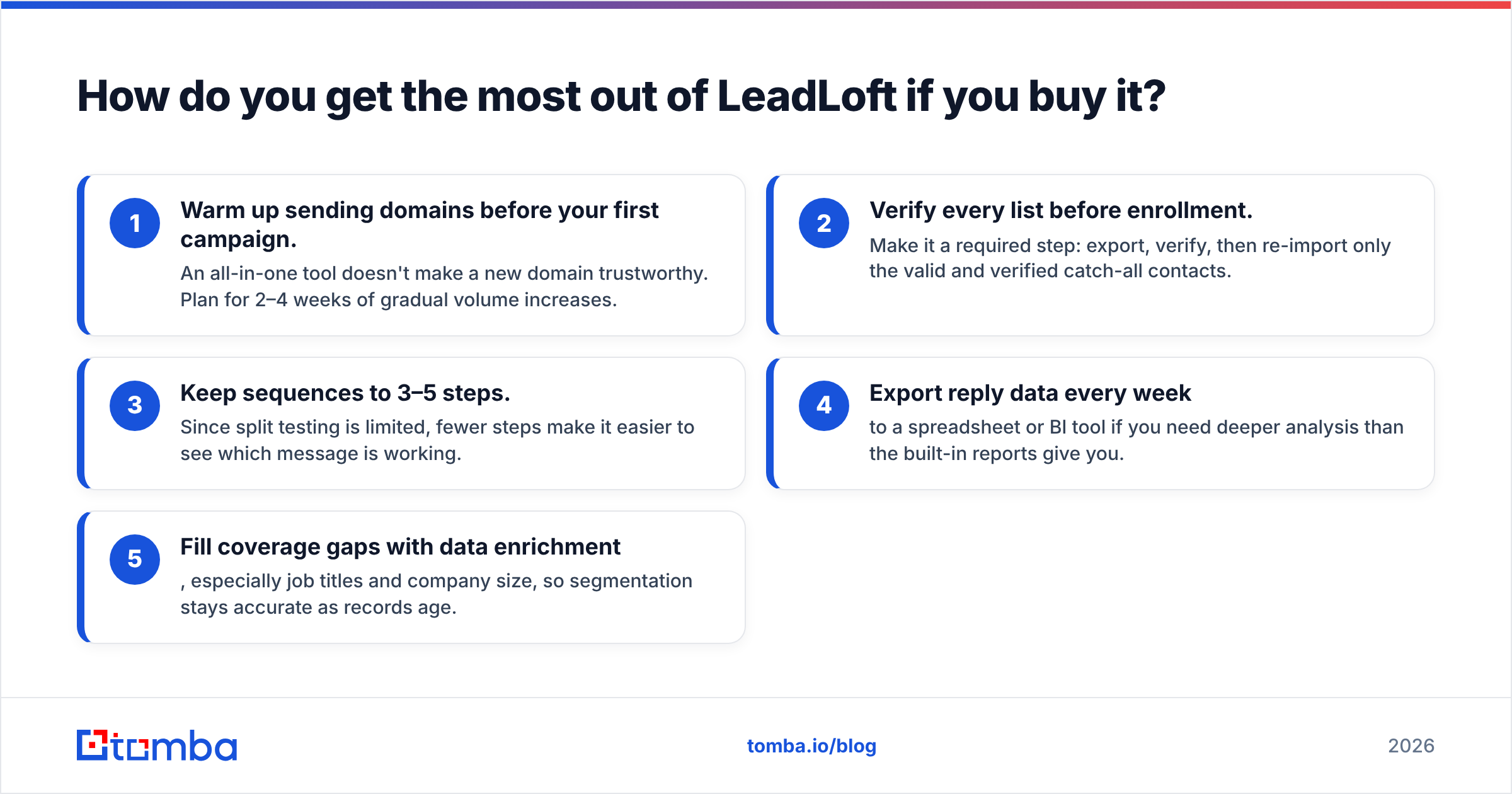
How do you get the most out of LeadLoft if you buy it?#
If LeadLoft fits your team, these habits help you avoid most of the issues reviewers report:
- Warm up sending domains before your first campaign. An all-in-one tool doesn't make a new domain trustworthy. Plan for 2–4 weeks of gradual volume increases.
- Verify every list before enrollment. Make it a required step: export, verify, then re-import only the valid and verified catch-all contacts.
- Keep sequences to 3–5 steps. Since split testing is limited, fewer steps make it easier to see which message is working.
- Export reply data every week to a spreadsheet or BI tool if you need deeper analysis than the built-in reports give you.
- Fill coverage gaps with data enrichment, especially job titles and company size, so segmentation stays accurate as records age.
Is LeadLoft worth it in 2026?#
For its target buyer, yes. A small team that wants prospecting, multichannel sequences, a shared inbox, and a basic CRM for roughly $99 a seat gets real value, fast setup, and good support. The positive reviews reflect that fairly.
The limits are just as clear. Reporting and testing are shallow, prospecting is based on filters rather than signals, and like every bundled database, its data needs an independent check before you send. Teams that grow past about 10 reps, or that measure success by per-segment conversion rates, will probably outgrow it within a year.
Our verdict: LeadLoft is a practical, affordable outbound platform for small teams. Buy it for convenience and simplicity. Don't count on it for analytics depth or perfect data, and budget for a verification step either way.
What's the best way to fix LeadLoft's data gaps?#
If you choose LeadLoft or any other all-in-one platform, the cheapest improvement is a dedicated data-accuracy step before sending. Tomba Email Finder finds professional email addresses by name, domain, or company, including contacts a bundled database misses. Verification and catch-all checks are built into the same workflow, so you only enroll addresses that will deliver. The free plan includes 25 searches a month so you can test it on your own list, and paid plans start at $49/mo. See Tomba pricing for the full tiers.
Related guides#
// get started
Find, verify and enrich your first contacts today
Start on the free plan with 25 searches a month, then scale when your team is ready.
Free plan · No credit card required · GDPR & CCPA
// about the author