Leadmine Reviews 2026: Pricing, Accuracy, Pros and Cons
Leadmine is cheap to start and easy to use, but reviewers keep mentioning bounces, credit caps and few integrations. We checked what users say, what it costs and which teams it suits.
TL;DR
- Leadmine is a low-cost email finder. You can search by person name, by domain or by company, and it runs a verification step before it returns an email. Paid plans start at about $29/mo.
- Leadmine reviews are mostly positive. At the time of writing it scores about 4.3/5 on G2 and about 4.6/5 on Capterra. Reviewers like the clean interface and the low entry price.
- Three complaints come up again and again: bounces on some "verified" results, credit limits that run out quickly, and few native integrations.
- Leadmine suits solo founders and small teams doing light, manual prospecting. Teams sending at volume, or teams that need an API, CRM sync or catch-all handling, usually outgrow it.
- If you need more coverage per dollar and a full verification stack, compare it with Tomba before you commit. The details are below.
What is Leadmine?#
Leadmine (leadmine.net) is a lead-generation tool built around one job: finding a professional email address for someone you want to contact. There are three ways to search:
- Name + domain search. Enter "Jane Doe" and "acme.com" and get Jane's most likely work email.
- Domain search. Enter a company website and get the public email addresses tied to that domain.
- Company search. Start from a company name when you don't know the domain yet.
According to its own positioning and third-party listings, Leadmine runs verification before it shows a result. The idea is that you don't pay for addresses it already knows are dead. The interface is deliberately simple: you get a search bar, a results list and an export. There's no sequencing, dialer or intent data.
That narrow focus explains most of what reviewers say, both good and bad.
What do Leadmine reviews actually say?#
We read listings on G2 and Capterra, plus independent write-ups. The same themes repeat across sources.
What reviewers like
- Ease of use. This is the most common compliment. People say they could run their first search within minutes without watching any tutorials.
- Price. The Basic plan starts at about $29/mo, which is lower than most well-known email finders. A few reviewers call it the cheapest way to get verified results.
- Clean results. Results come with a verification status, so you know which addresses are safe to send to.
- Support. Capterra reviewers rate support about 4.5/5. For a small vendor, that suggests fast, human answers.
What reviewers complain about
- Bounces. Several reviewers say some addresses marked as valid still bounced. That's normal for any finder working with catch-all domains, but it annoys people most when the tool presents results as pre-verified.
- Credit limits. Lower tiers don't include many credits, and heavy users say they hit the cap mid-month.
- Thin integrations. Many reviewers mention a limited ecosystem. There's less native CRM sync and fewer automation hooks than larger competitors offer.
- Database depth. For niche industries and small companies outside North America, coverage gets patchy.
Review volume is also low. There are dozens of reviews, not thousands. A 4.6 average based on a few dozen reviews tells you less than a 4.4 based on 2,000. Treat the star ratings as a direction, not a verdict.

How much does Leadmine cost in 2026?#
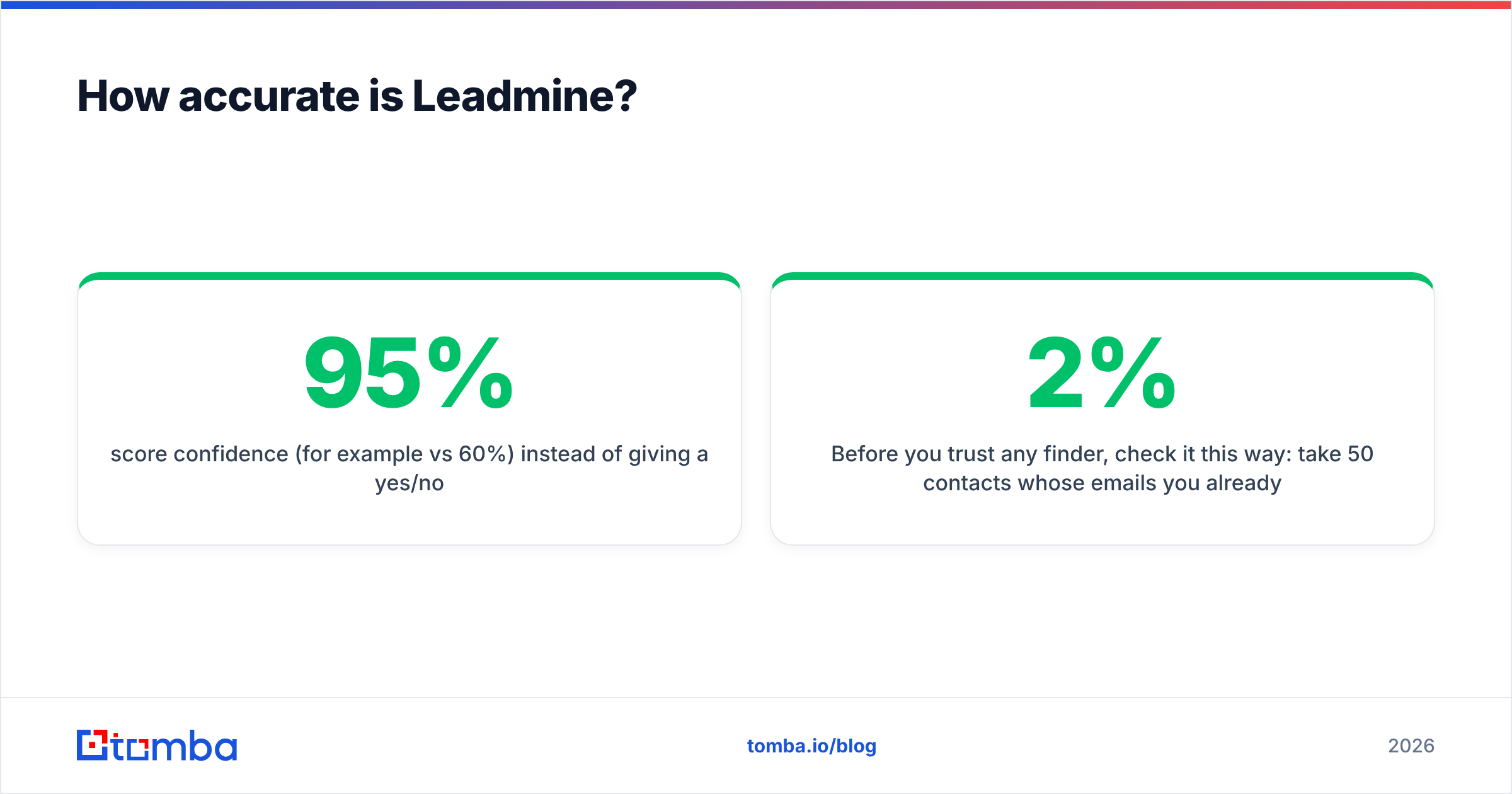
Leadmine charges by credit. Pricing listed on Leadmine's pricing page and third-party directories looks roughly like this at the time of writing. Check the live page before you buy, because small vendors change plans often.
| Plan | Monthly price | What you get (approx.) | Best for |
|---|---|---|---|
| Free | $0 | A small trial allowance of credits | Testing result quality |
| Basic | ~$29/mo | Entry credit bundle (~$0.12/credit) | Solo founders, occasional lookups |
| Essential | ~$49/mo | Larger credit bundle | Freelancers, small agencies |
| Growth | ~$99/mo | ~3,000 credits | Small SDR teams |
| Business | ~$149/mo | ~10,000 credits | Steady mid-volume prospecting |
Two things matter when you compare prices:
- Cost per verified email, not cost per credit. If a credit gets used on a search that returns nothing, or returns an address that later bounces, your real cost per usable contact goes up. Run a 50-contact test and divide what you spent by the number of emails that actually got delivered.
- Overage behaviour. Find out what happens when you run out mid-month. Can you top up, or do you have to move to the next tier?
On the Basic plan, Leadmine is cheaper than most competitors per credit. The gap narrows at Growth and Business, where tools with bigger databases and more features cost about the same.
How accurate is Leadmine?#
Accuracy is the complaint that decides whether people stay, so here is the honest version.
Every email finder, Leadmine included, does one of two things. It either matches a person to an address it has already seen in public sources, or it predicts the address from the company's naming pattern (first.last@, flast@ and so on) and then checks it with an SMTP handshake. Both approaches work well on standard domains. Both struggle with catch-all domains, which accept mail for any address. On a catch-all domain, the SMTP check says "valid" for janedoe@, jane@ and xyz123@ alike.
The bounces reviewers describe most likely come from this problem. It isn't a flaw unique to Leadmine. The difference between tools is whether they:
- flag catch-all results separately instead of calling them "valid"
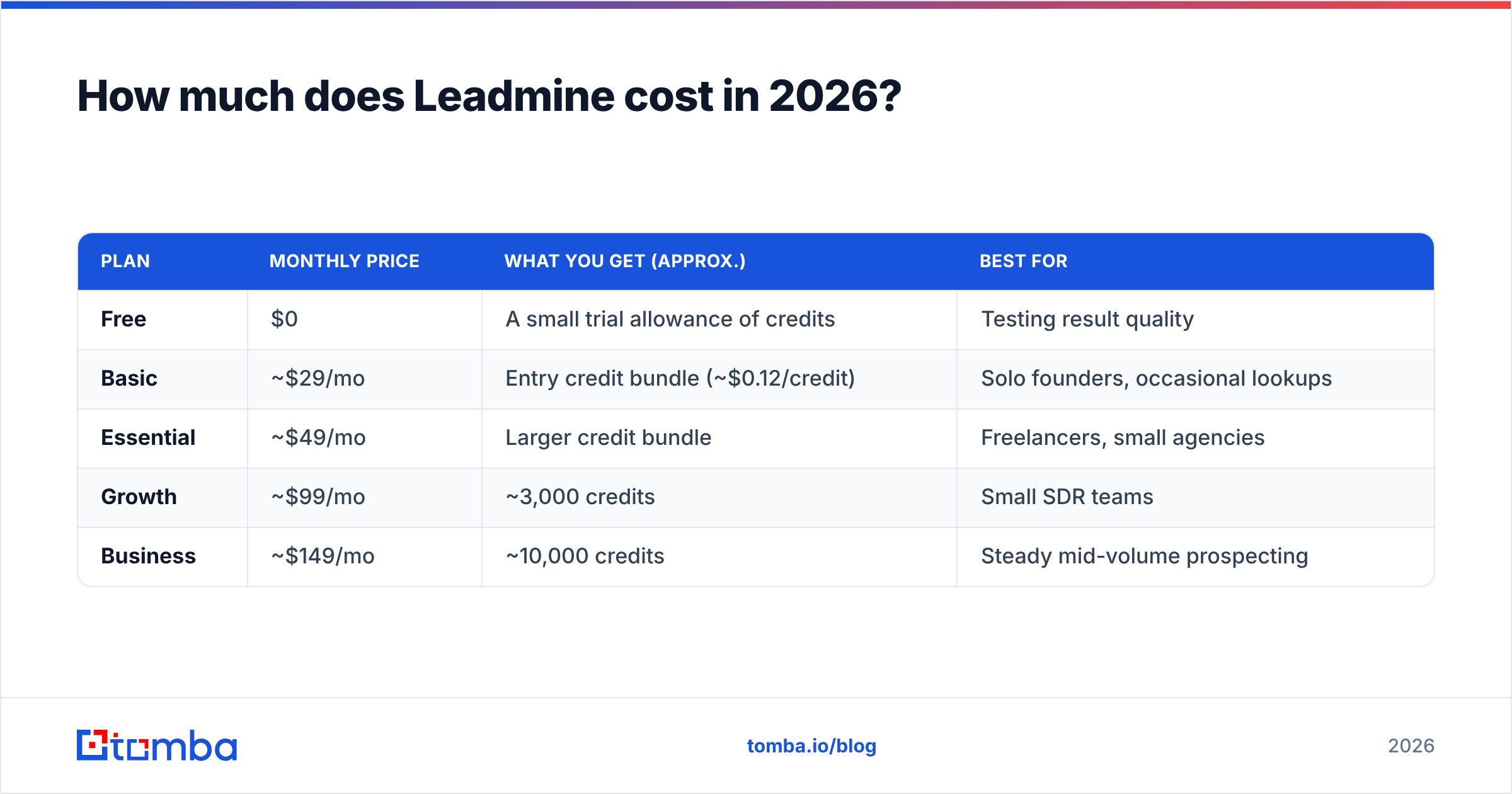
- score confidence (for example 95% vs 60%) instead of giving a yes/no
- show the public sources where the address was found

Before you trust any finder, check it this way: take 50 contacts whose emails you already know (current customers work well), run them through the tool, and count exact matches, wrong matches and misses. Then send a small warm batch and track hard bounces. Keep hard bounces under 2% to protect your sender reputation. Anything above 3–5% will cause problems with your domain.
If Leadmine returns catch-all addresses, run them through a dedicated catch-all verifier before sending. Or re-check the whole list with a separate email verifier. A second opinion costs very little compared with a burned domain.
Is Leadmine better than Tomba?#
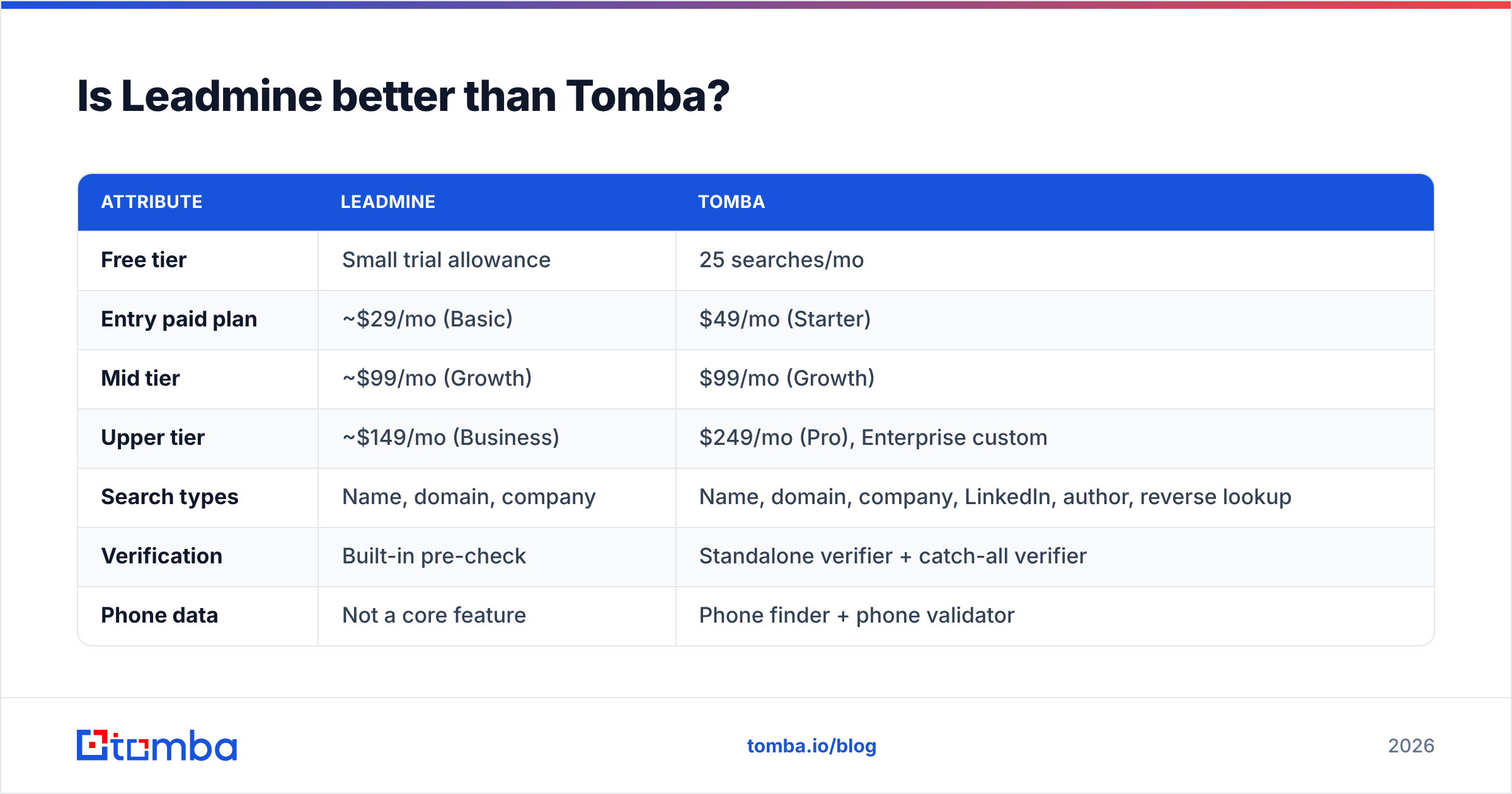
It depends on volume and workflow. The table compares the two tools on the things buyers usually ask about.
| Attribute | Leadmine | Tomba |
|---|---|---|
| Free tier | Small trial allowance | 25 searches/mo |
| Entry paid plan | ~$29/mo (Basic) | $49/mo (Starter) |
| Mid tier | ~$99/mo (Growth) | $99/mo (Growth) |
| Upper tier | ~$149/mo (Business) | $249/mo (Pro), Enterprise custom |
| Search types | Name, domain, company | Name, domain, company, LinkedIn, author, reverse lookup |
| Verification | Built-in pre-check | Standalone verifier + catch-all verifier |
| Phone data | Not a core feature | Phone finder + phone validator |
| Developer access | Limited | Public REST API, CLI, MCP server |
| Integrations | Few native options | HubSpot, Salesforce, Pipedrive, Zapier, Make, Sheets, Airtable |
| Interface | Very simple | Dashboard, Chrome extension, add-ins |
| Best fit | Light, manual lookups on a tight budget | Teams scaling outbound or building enrichment pipelines |

Where Leadmine wins: a cheaper first paid tier and a very small learning curve. If you only need 100–200 verified emails a month and do all your outreach by hand from Gmail, Leadmine does that without extra clutter.
Where Tomba wins: breadth and plumbing. Tomba adds catch-all verification, phone data, bulk jobs, a proper email finder API and native CRM connectors. As soon as your workflow involves a spreadsheet of 2,000 rows, an enrichment step in Zapier or a HubSpot sync, those features save more time than a $20 price difference.
A fair way to put it: Leadmine is a good tool with a narrow scope, and Tomba covers the wider workflow. Pick based on the workflow you'll have in six months, not the one you have today.
Who should use Leadmine?#
Leadmine fits well if you are one of these:
- A solo founder doing founder-led sales. You need a handful of emails a week and you want to pay as little as possible.
- A freelancer or small agency. You pitch a short list of hand-picked prospects and care more about simplicity than automation.
- A recruiter sourcing individual candidates. You look people up one at a time and value a fast name + domain lookup.
- Someone testing email outreach for the first time. A cheap, simple tool is a sensible way to find out if the channel works for you at all.
Who should skip Leadmine?#
Look elsewhere if any of these apply:
- You send at volume. Once you're past a few thousand contacts a month, credit caps and per-credit pricing stop being an advantage.
- You need CRM or automation sync. Reviewers consistently mention the thin integrations. If your data has to flow into Salesforce or HubSpot automatically, you'll end up doing manual exports.
- You target catch-all-heavy markets. Enterprise and mid-market companies often run catch-all mail servers. Without a dedicated catch-all check, bounce risk goes up.
- You're building a product or pipeline. Developers who need a documented API, SDKs or MCP access will find better options.
- You need phone numbers. Leadmine is an email tool. Multichannel outbound needs phone data from somewhere else.
What are the main Leadmine alternatives?#
If the reviews put you off, or you've outgrown the Basic plan, these are the usual next options:
- Tomba. Email finder with a verifier, catch-all verifier, phone finder, enrichment and API. Starter is $49/mo, and the free tier gives you 25 searches a month.
- Hunter. A well-known domain-search tool with a simple interface and a generous free tier. Hunter and Leadmine appeal to similar users.
- Snov.io. Combines email finding with basic drip sequences. Good if you want a finder and a sender in one tool.
- Apollo. A large all-in-one database plus a sequencer. It has more features, but also more setup, and data quality depends on the segment. See our Apollo alternative breakdown if you're weighing it up.
Test two tools against the same 50-contact list. Compare exact-match rate, how many results come back flagged as catch-all or risky, and your real cost per delivered email. That test takes about an hour and shows you more than any set of reviews.

How should you evaluate any email finder before buying?#
Leadmine or not, use this five-step checklist:
- Run a known-answer test. Use 50 contacts you already have verified emails for, and score exact matches.
- Check how it handles catch-all domains. Does it label them separately or mark everything as "valid"?
- Work out cost per delivered email. Divide what you spent by the number of emails that actually got delivered, not by credits bought.
- Map your workflow. Write down where the data needs to end up (CRM, sequencer, sheet) and confirm there's a native path or an API.
- Look at the review count as well as the stars. A small sample with a high average is less reliable than a large one. Read the 3-star reviews, which usually give the most specific detail.
Frequently asked questions about Leadmine#
Is Leadmine legit? Yes. It's an established small vendor with listings and verified reviews on G2, Capterra and GetApp. Review volume is modest, but the feedback is consistent.
Does Leadmine have a free plan? There's a free trial allowance so you can test result quality. It's meant for evaluation, not ongoing prospecting.
Why do some Leadmine emails bounce? Mostly because of catch-all domains and people who have changed jobs. Every finder has this problem. The fix is a second verification pass and a catch-all check before you send.
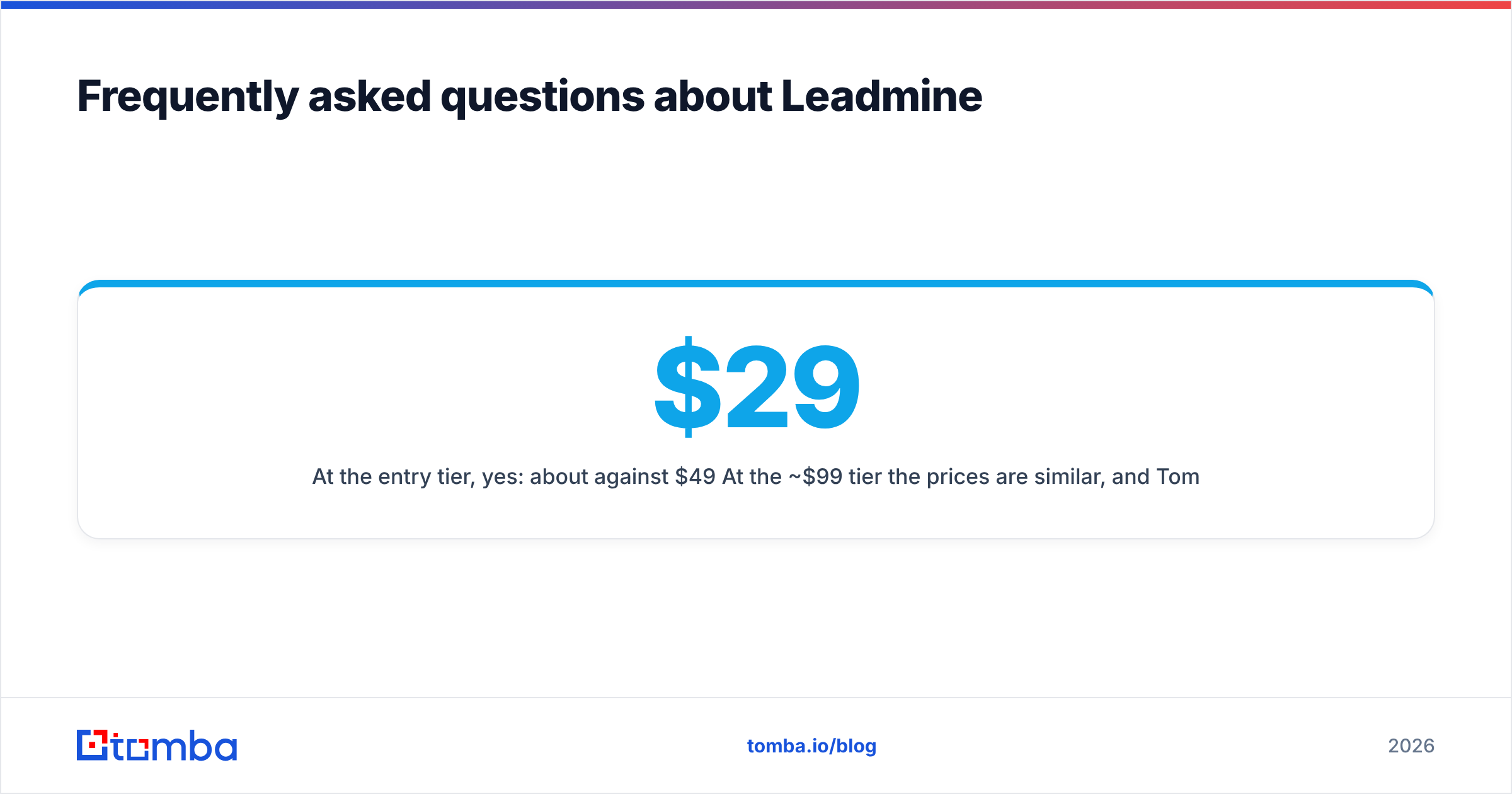
Is Leadmine cheaper than Tomba? At the entry tier, yes: about $29/mo against $49/mo. At the ~$99/mo tier the prices are similar, and Tomba adds catch-all verification, phone data, an API and CRM integrations for that price.
What's the final verdict on Leadmine?#
Leadmine reviews describe a tool that does what it says. It's cheap, clean and quick to learn, and it works for low-volume, manual prospecting. The weak spots are the ones you'd expect from a focused, budget product: bounces on hard-to-verify domains, credit caps that hurt heavier users, and not many integrations. If you look up a few hundred emails a month by hand, it's a reasonable choice. If you're building a repeatable outbound engine, you'll probably hit its limits within a quarter.
If you're going to outgrow Leadmine, start with Tomba Email Finder. It covers name, domain, company and LinkedIn searches, has built-in verification with catch-all handling, and connects to HubSpot, Salesforce, Sheets and the API when your list gets bigger. You can run your 50-contact accuracy test on the free tier (25 searches a month) and compare the results against Leadmine yourself. Then see Tomba pricing for the plan that matches your volume.
Related guides#
// get started
Find, verify and enrich your first contacts today
Start on the free plan with 25 searches a month, then scale when your team is ready.
Free plan · No credit card required · GDPR & CCPA
// about the author