Leadsforge vs Apollo.io: AI Lead Lists or All-in-One Platform?
Leadsforge builds lead lists from a plain-English prompt. Apollo.io gives you a huge database, sequences, and a dialer, and charges per seat. Here's which one fits your outbound motion in 2026, and when neither is the right buy.
TL;DR
- Leadsforge is an AI-first list builder. You describe your ideal customer in plain English and get a verified lead list back. It's built to feed cold email tools, especially Salesforge.
- Apollo.io is an all-in-one sales platform. It bundles a large contact database, sequencing, a dialer, a Chrome extension and CRM sync, and it's priced per seat.
- If you're a founder or a small agency that mostly needs clean lists quickly, Leadsforge usually means less setup and less wasted spend on features you won't use.
- If you have a team of SDRs who need one place to prospect, sequence and call, Apollo's breadth is hard to beat, but check the per-seat costs and minimum seat counts before you commit.
- If what you actually need is accurate email addresses for accounts you've already picked, a dedicated email finder plus verifier costs less than either platform.
What is the real difference between Leadsforge and Apollo.io?#
People compare these two tools, but they were built for different jobs.
Leadsforge comes from the Forge ecosystem, the same company behind Salesforge, Warmforge and Infraforge. Its main feature is a chat-style search: you type something like "Heads of RevOps at US SaaS companies with 50–200 employees that raised a Series A in the last 12 months," and it turns that into filters and returns a list. It also offers lookalike searches (paste in a company you like and it finds similar ones) plus enrichment. Everything is designed to go straight into a sending tool.
Apollo.io is a full go-to-market platform. The database is the entry point, but most of the value is in what sits on top of it: multi-step sequences, a built-in dialer, meeting scheduling, intent and job-change signals, a LinkedIn Chrome extension, and two-way sync with HubSpot and Salesforce. Apollo has added AI features over the last two years, but the product still assumes you'll learn its filters and run your whole outbound motion inside it.
In short, Leadsforge is a specialist list builder and Apollo is a general-purpose sales platform. Deciding which of those you need matters more than any individual feature.
How do Leadsforge and Apollo.io work under the hood?#
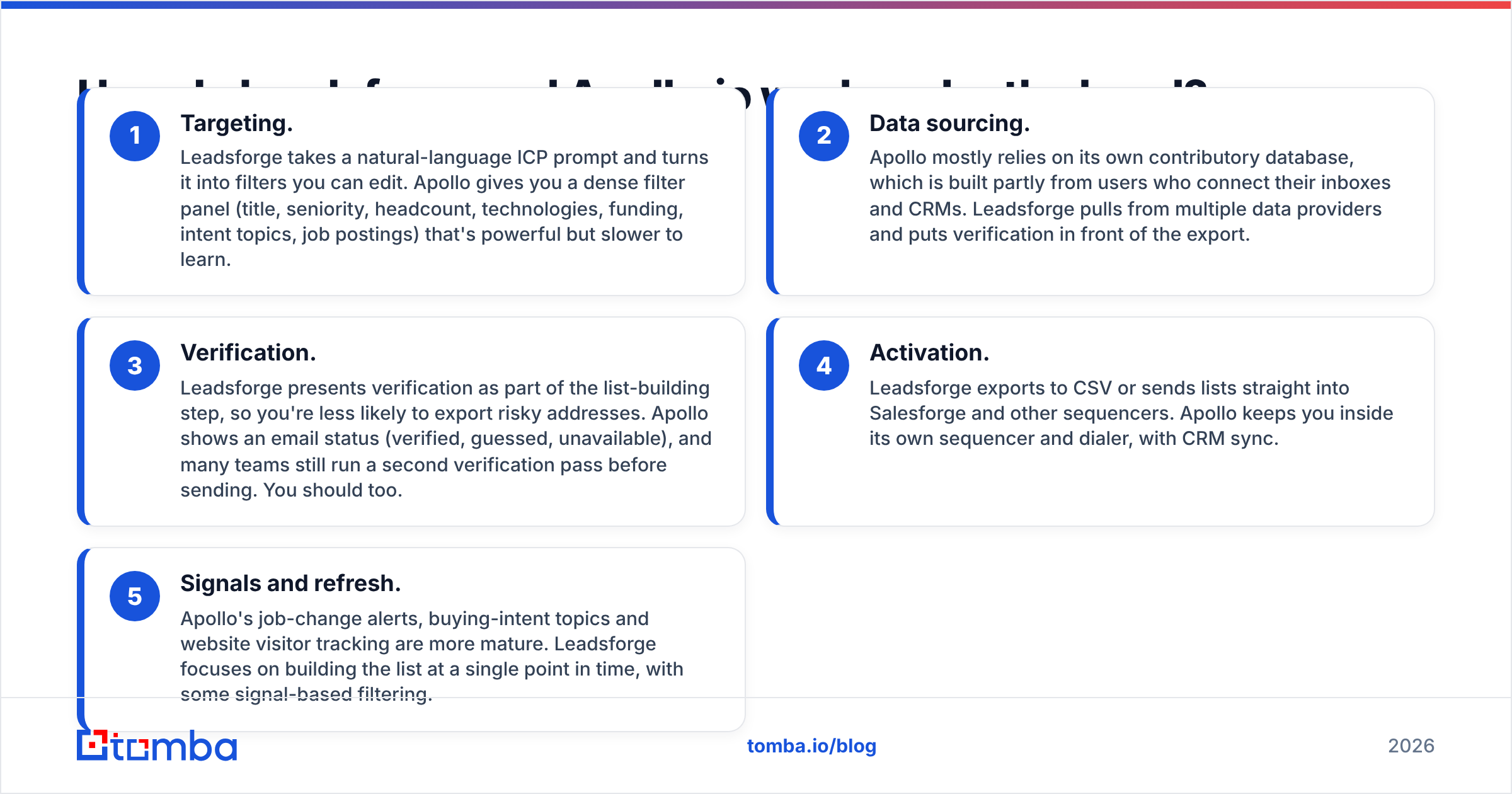
Here's how the two tools handle the five stages of a typical outbound workflow:
- Targeting. Leadsforge takes a natural-language ICP prompt and turns it into filters you can edit. Apollo gives you a dense filter panel (title, seniority, headcount, technologies, funding, intent topics, job postings) that's powerful but slower to learn.
- Data sourcing. Apollo mostly relies on its own contributory database, which is built partly from users who connect their inboxes and CRMs. Leadsforge pulls from multiple data providers and puts verification in front of the export.
- Verification. Leadsforge presents verification as part of the list-building step, so you're less likely to export risky addresses. Apollo shows an email status (verified, guessed, unavailable), and many teams still run a second verification pass before sending. You should too.
- Activation. Leadsforge exports to CSV or sends lists straight into Salesforge and other sequencers. Apollo keeps you inside its own sequencer and dialer, with CRM sync.
- Signals and refresh. Apollo's job-change alerts, buying-intent topics and website visitor tracking are more mature. Leadsforge focuses on building the list at a single point in time, with some signal-based filtering.
Your choice mostly depends on where you want step 4 to happen. If you already use Instantly, Smartlead or Salesforge for sending, Apollo's sequencer is something you'd pay for and never open.

How do Leadsforge and Apollo.io compare feature by feature?#
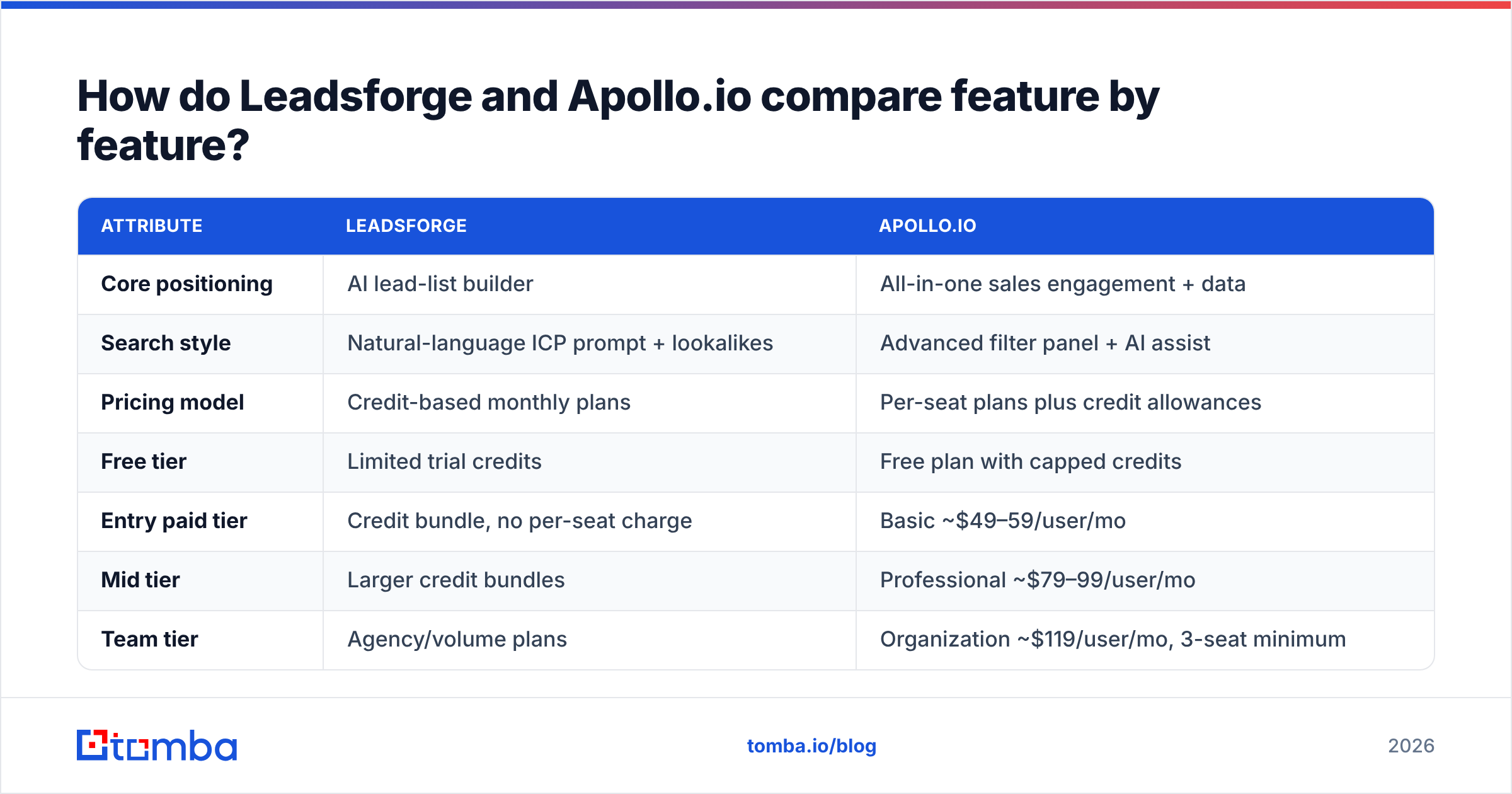
The table below reflects publicly listed plans and features at the time of writing. Both vendors change their packaging often, so check the Apollo.io pricing page and the Leadsforge site before you buy.
| Attribute | Leadsforge | Apollo.io |
|---|---|---|
| Core positioning | AI lead-list builder | All-in-one sales engagement + data |
| Search style | Natural-language ICP prompt + lookalikes | Advanced filter panel + AI assist |
| Pricing model | Credit-based monthly plans | Per-seat plans plus credit allowances |
| Free tier | Limited trial credits | Free plan with capped credits |
| Entry paid tier | Credit bundle, no per-seat charge | Basic ~$49–59/user/mo |
| Mid tier | Larger credit bundles | Professional ~$79–99/user/mo |
| Team tier | Agency/volume plans | Organization ~$119/user/mo, 3-seat minimum |
| Built-in sequencer | No (pairs with Salesforge) | Yes |
| Dialer | No | Yes |
| Chrome extension for LinkedIn | Limited | Yes, mature |
| CRM sync | Via export/integrations | Native HubSpot and Salesforce |
| Intent / job-change signals | Basic | Strong |
| Learning curve | Low | Medium to high |
| Best fit | Founders, agencies, lean outbound teams | SDR teams running outbound end to end |

Which has better data accuracy: Leadsforge or Apollo.io?#
Nobody can give you a single accuracy percentage for either tool that holds up everywhere. Accuracy depends heavily on segment. In both tools, US tech companies with 50–500 employees resolve well. Coverage gets thinner for European mid-market companies, regulated industries and anyone who changed jobs in the last quarter.
Here's what shows up consistently in user reviews and in bounce-rate tests:
- Apollo's database is enormous, but it's uneven. It holds hundreds of millions of contacts, so you'll almost always find someone. The complaints on G2 reviews of Apollo.io mostly involve stale job titles and "verified" emails that still bounce. Those problems are most common in older records and outside North America.
- Leadsforge puts precision ahead of volume. Because it pulls from several sources and verifies before export, lists tend to come out smaller and cleaner. That's what you want for cold email, where a 5%+ bounce rate can put a sending domain at risk.
- Catch-all domains are a weak spot for both. Many B2B companies accept mail for any address, so a standard SMTP check can't confirm a mailbox exists. Neither tool fully solves this.

The practical rule: whichever tool you use, run exported lists through an independent email verifier before they reach a sequencer. It adds a few minutes and protects the domain reputation you've spent weeks warming.
Is Leadsforge cheaper than Apollo.io?#
For most small teams, Leadsforge ends up cheaper. That's not because each credit costs less. It's because you aren't paying for seats and features you don't use.
Apollo's pricing works fine for a solo user on the Basic plan. It gets expensive when three things happen together:
- You add people. Every SDR, founder and part-time contractor who needs access is another seat.
- You need team features. Advanced reporting, custom roles and some automation sit on the Organization tier, which has historically required at least three seats. That puts the entry point for the tier above $350/month even if only one person uses it heavily.
- You export at volume. Credits for exports and mobile numbers run out faster than you'd expect, and top-ups add to the bill.
Leadsforge charges for the leads themselves. If you're an agency building lists for five clients from one login, that model is a better fit. The downside is that you'll need to pay separately for a sequencer, inbox warmup and possibly a dialer. By the time you add those, the total can come close to what Apollo would have cost.
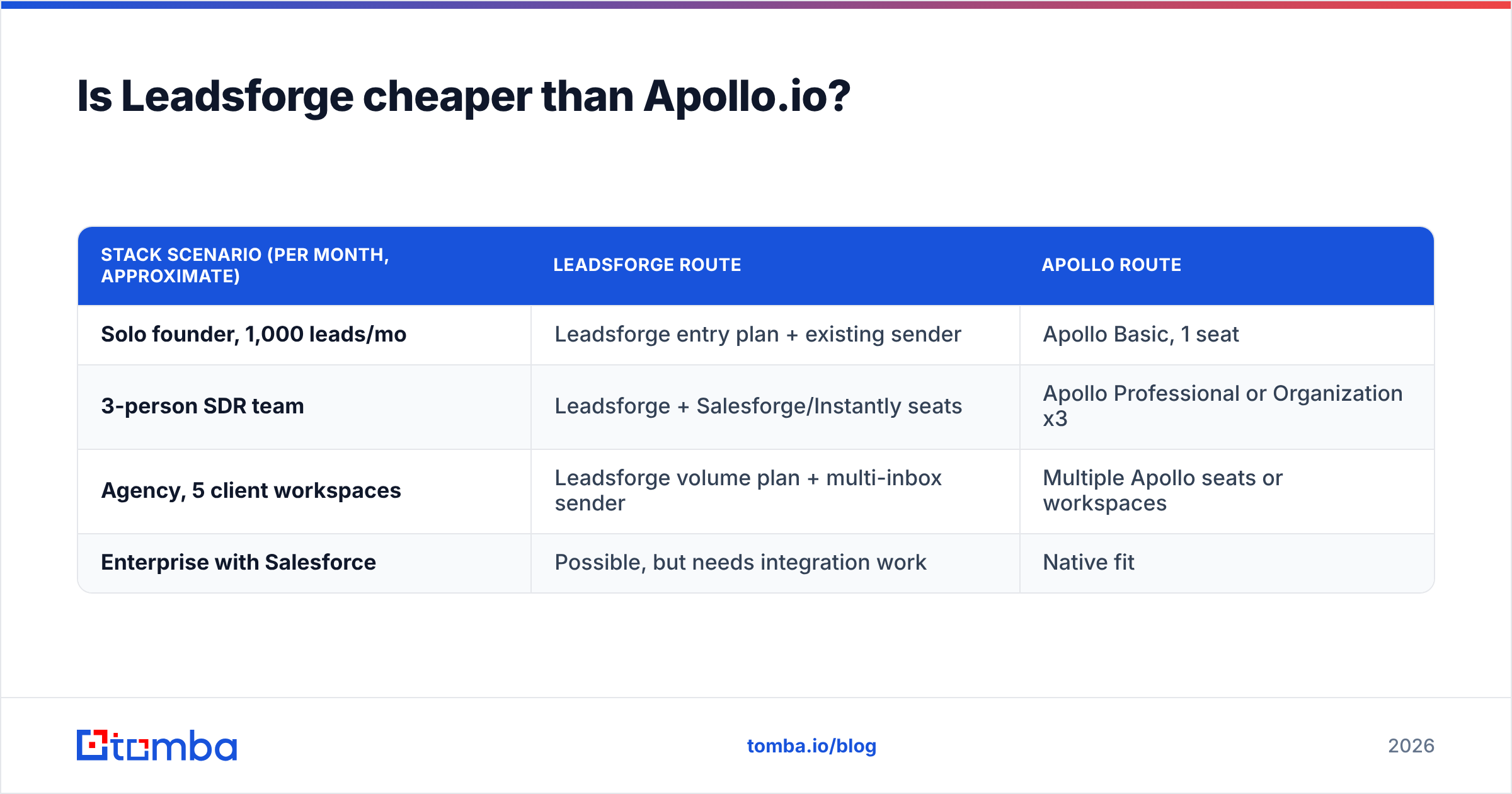
A fair way to compare: add up the full cost of your outbound stack, not the sticker price of one tool.
| Stack scenario (per month, approximate) | Leadsforge route | Apollo route |
|---|---|---|
| Solo founder, 1,000 leads/mo | Leadsforge entry plan + existing sender | Apollo Basic, 1 seat |
| 3-person SDR team | Leadsforge + Salesforge/Instantly seats | Apollo Professional or Organization x3 |
| Agency, 5 client workspaces | Leadsforge volume plan + multi-inbox sender | Multiple Apollo seats or workspaces |
| Enterprise with Salesforce | Possible, but needs integration work | Native fit |

When should you choose Leadsforge?#
Leadsforge is the better pick when:
- You already have a sending tool. If Salesforge, Instantly, Smartlead or lemlist handles your sequences, you only need lists, and Leadsforge doesn't charge you for a second sequencer.
- Your ICP is easy to describe but slow to filter. Typing a sentence instead of clicking through twelve filters saves real time when you're testing a new vertical every week.
- You run an agency. Credit-based pricing and fast list turnaround fit a model where you build and hand off campaigns for several clients.
- Deliverability comes first. Smaller, pre-verified lists protect your domains better than large, loosely filtered exports.
Where it falls short: there's no dialer, the signal data is thinner, and CRM workflows depend on integrations rather than native sync. If your reps live in Salesforce, you'll notice the gaps.
When should you choose Apollo.io?#
Apollo is the better pick when:
- You want one login for the whole SDR day. Prospecting, sequencing, calling and logging activity in one place saves a lot of tool switching for a team of several reps.
- You rely on signals. Job changes, funding events, hiring activity and intent topics help you time outreach, and Apollo's signal layer is more mature.
- You need CRM hygiene. Native two-way sync with HubSpot and Salesforce keeps records current without Zapier chains.
- You prospect on LinkedIn every day. The Chrome extension is one of the best-developed in the category.
Where it falls short: seat-based pricing grows with headcount, data quality varies outside core segments, and the interface asks a lot of new users. If you want a cheaper or narrower option, our breakdown of the best Apollo alternative tools covers the trade-offs in more detail.
Is there a third option most teams overlook?#
Yes. Plenty of teams comparing Leadsforge and Apollo don't need a full list builder. They already know their target accounts from CRM data, event lists, partner referrals or a TAM spreadsheet. What they're missing is the right person's email address at those accounts, and a way to confirm it won't bounce.
For that job, a dedicated email finder is usually more accurate and cheaper:
- Account-first prospecting. Run a domain search on a target company to see every public professional address and the company's email pattern.
- Name-plus-domain lookups. If you know "Jane Smith at acme.com," a finder resolves the exact address and gives you a confidence score.
- Verification including catch-alls. Checking catch-all domains separately recovers leads that generic tools mark "unknown."
- Spreadsheet and API workflows. Bulk upload a CSV, or call an API from Clay, n8n or your own scripts, without paying for sequencing seats.
This isn't a replacement for Apollo's full platform or for Leadsforge's AI discovery. It's the right tool when your bottleneck is contact accuracy rather than discovering new companies. Many teams use Apollo or Leadsforge for discovery and a separate finder and verifier to clean up what they export.
How do you decide between Leadsforge and Apollo.io in 2026?#
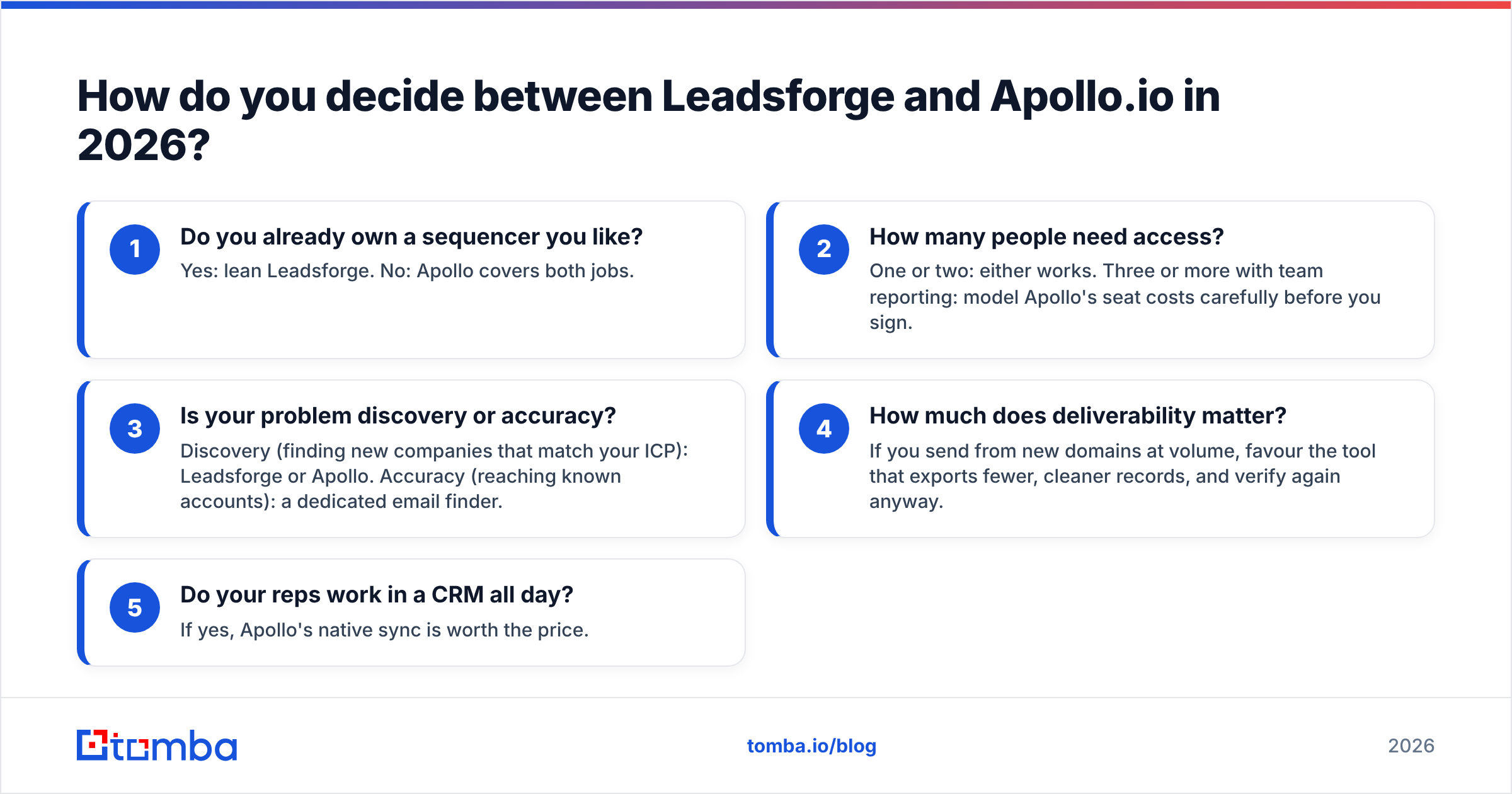
Work through these questions in order:
- Do you already own a sequencer you like? Yes: lean Leadsforge. No: Apollo covers both jobs.
- How many people need access? One or two: either works. Three or more with team reporting: model Apollo's seat costs carefully before you sign.
- Is your problem discovery or accuracy? Discovery (finding new companies that match your ICP): Leadsforge or Apollo. Accuracy (reaching known accounts): a dedicated email finder.
- How much does deliverability matter? If you send from new domains at volume, favour the tool that exports fewer, cleaner records, and verify again anyway.
- Do your reps work in a CRM all day? If yes, Apollo's native sync is worth the price.
Run a two-week pilot on each shortlisted tool with the same ICP, export 500 contacts from each, verify them independently, and compare bounce rate, reply rate and time spent per list. A test on your own data will tell you more than any comparison article, including this one.
Frequently asked questions#
Is Leadsforge built on Apollo's data?#
Leadsforge doesn't publicly describe itself as an Apollo reseller. It says it aggregates multiple data sources and verifies contacts before export. For specifics on sources, ask the vendor directly during your trial.
Can I use Leadsforge and Apollo together?#
Yes. Some teams use Apollo's signals and extension for account research and Leadsforge for fast, AI-assisted list builds in new verticals. Watch for duplicate spend on overlapping credits.
Does Apollo.io have a free plan in 2026?#
Apollo still offers a free plan with limited credits and features, suitable for testing but not for sustained outbound. Paid plans unlock higher export limits, sequences at scale, and team features.
Which tool is better for agencies?#
Leadsforge's credit-based model and quick list building usually suit agencies better. Apollo works for agencies too, but per-seat pricing across client workspaces adds up quickly.
What's the bottom line on Leadsforge vs Apollo.io?#
Pick Leadsforge if you want to describe an ICP and get a clean, verified list without paying for a platform you'll only half use. Pick Apollo.io if your team needs a single system for prospecting, sequencing, calling and CRM sync, and the seat cost makes sense for your headcount.
If you're really after accurate contact data for accounts you've already chosen, Tomba Email Finder is the lower-cost option. You can find verified professional emails by name, domain or company, check catch-all addresses, and run bulk lookups from a spreadsheet, the Chrome extension or the API. Start on the free tier (25 searches a month) to test it against your own target accounts, then compare Tomba pricing from $49/mo against what you'd pay per seat elsewhere.
Related guides#
// get started
Find, verify and enrich your first contacts today
Start on the free plan with 25 searches a month, then scale when your team is ready.
Free plan · No credit card required · GDPR & CCPA
// about the author