Leadsforge vs UpLead: AI Lead Lists or a Verified B2B Database?
Leadsforge builds lead lists from a chat prompt. UpLead hands you 50+ filters and an accuracy guarantee. We compare data quality, credit costs, and workflow fit so you can pick the one that suits your outbound motion.
TL;DR
- Leadsforge is an AI-first list builder from the Forge ecosystem (Salesforge, Warmforge, Mailforge). You describe your ideal customer in plain English and get back a verified list. It's the fastest way to go from "idea" to "contacts in a sequence."
- UpLead is a mature B2B contact database with 50+ search filters, technographic and intent data, real-time email verification, and a published accuracy guarantee. It suits teams that want precise, filter-driven control.
- On pricing, Leadsforge is usually cheaper per contact at volume. UpLead's entry plan works out to roughly $0.44–$0.58 per credit, depending on billing cycle.
- Our pick: go with Leadsforge if you already run outbound on Salesforge and want speed. Go with UpLead if your ICP is narrow, tied to a tech stack, or needs mobile numbers and CRM enrichment.
- If you only need emails, a dedicated email finder plus a verifier is often cheaper than either platform.
What is the difference between Leadsforge and UpLead?#
The short version: Leadsforge asks you to describe your leads. UpLead asks you to filter for them.
Think of Leadsforge as a sales assistant you brief in conversation: "Find me heads of RevOps at Series A–C SaaS companies in the US with 50–200 employees." It interprets the request, runs the search, and returns a list you can refine by chatting further. UpLead is closer to a library catalog. You pick industry, headcount, revenue, location, job function, seniority, technologies used, and intent topics, and the database returns exactly what matches.
Neither approach is objectively better. They serve different people:
- SDRs and founders who want a list in five minutes tend to like Leadsforge.
- RevOps teams and account-based marketers who need repeatable, auditable filters tend to like UpLead.
The rest of this comparison covers where each tool does well, where it falls short, and what you'll actually pay.
What is Leadsforge?#
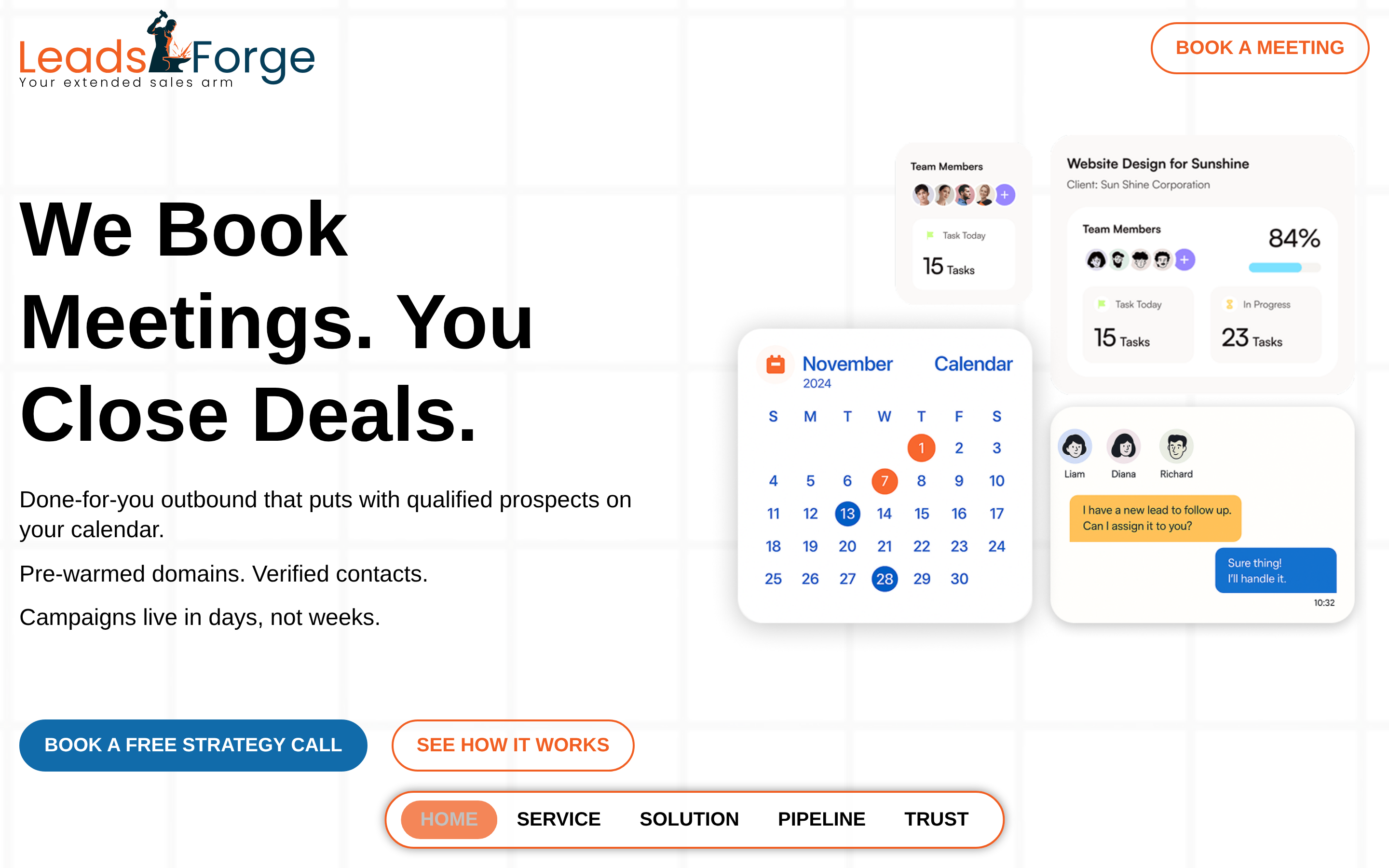
Leadsforge is an AI lead-generation tool built by the team behind Salesforge. It launched as a "ChatGPT for lead gen." The main interface is a prompt box instead of a filter sidebar.
Core capabilities:
- Natural-language ICP search. Describe your target buyer and Leadsforge turns it into search criteria.
- Lookalike search. Give it a best-fit customer and it finds similar companies and contacts.
- Verified emails on export. Contacts are verified before you pay for them, which protects bounce rates.
- Native handoff to Salesforge. Lists move straight into sequences, with Warmforge and Mailforge handling mailbox warmup and infrastructure.
- Enrichment signals such as company growth, hiring activity, and funding, depending on plan.
Leadsforge works best as the top of a full outbound stack. If you already send from Salesforge, the loop from list to sequence to warm inbox is short. If you use a different sequencer, you'll export CSVs or connect through integrations. That still works, but you lose some of the benefit.
Where it's weaker: the AI layer is only as good as your prompt. Vague prompts return vague lists, and niche technographic targeting ("companies running Snowflake and dbt but not Fivetran") is less precise than a dedicated filter.
What is UpLead?#
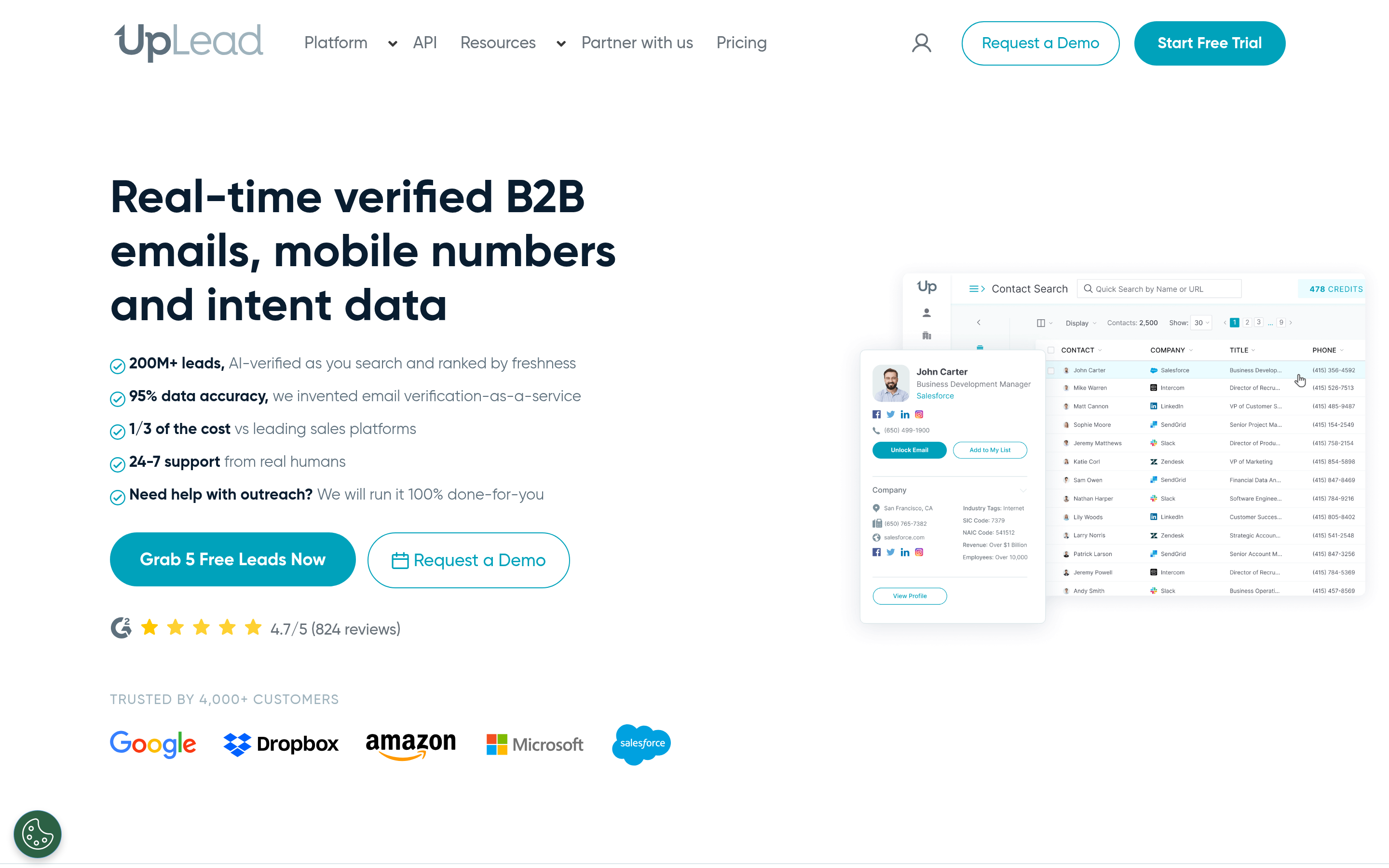
UpLead has been around since 2017. It's one of the better-known "clean data" B2B databases. The pitch is simple: accurate contacts, verified in real time, with a published data-accuracy guarantee (currently marketed as 95%).
Core capabilities:
- 50+ search filters covering firmographics, job title, seniority, department, and location.
- Technographics across thousands of tracked technologies, which is useful if you sell into a specific stack.
- Intent data that shows accounts actively researching topics related to your product.
- Real-time email verification at the moment you unlock a contact, so you don't pay for stale records.
- Mobile direct dials on higher tiers.
- Chrome extension plus native CRM integrations (Salesforce, HubSpot, Pipedrive, Zoho, and others).
- Enrichment of existing CRM records and CSV uploads.
UpLead feels like traditional sales-intelligence software, and that's a strength if you want predictability. You'll get the same results for the same filters next quarter, which matters for territory planning and ABM lists.
Where it's weaker: it's pricier per contact at entry level, the interface takes longer to learn than a chat box, and database depth outside North America and Western Europe is thinner than the biggest enterprise players.

How do Leadsforge and UpLead compare side by side?#
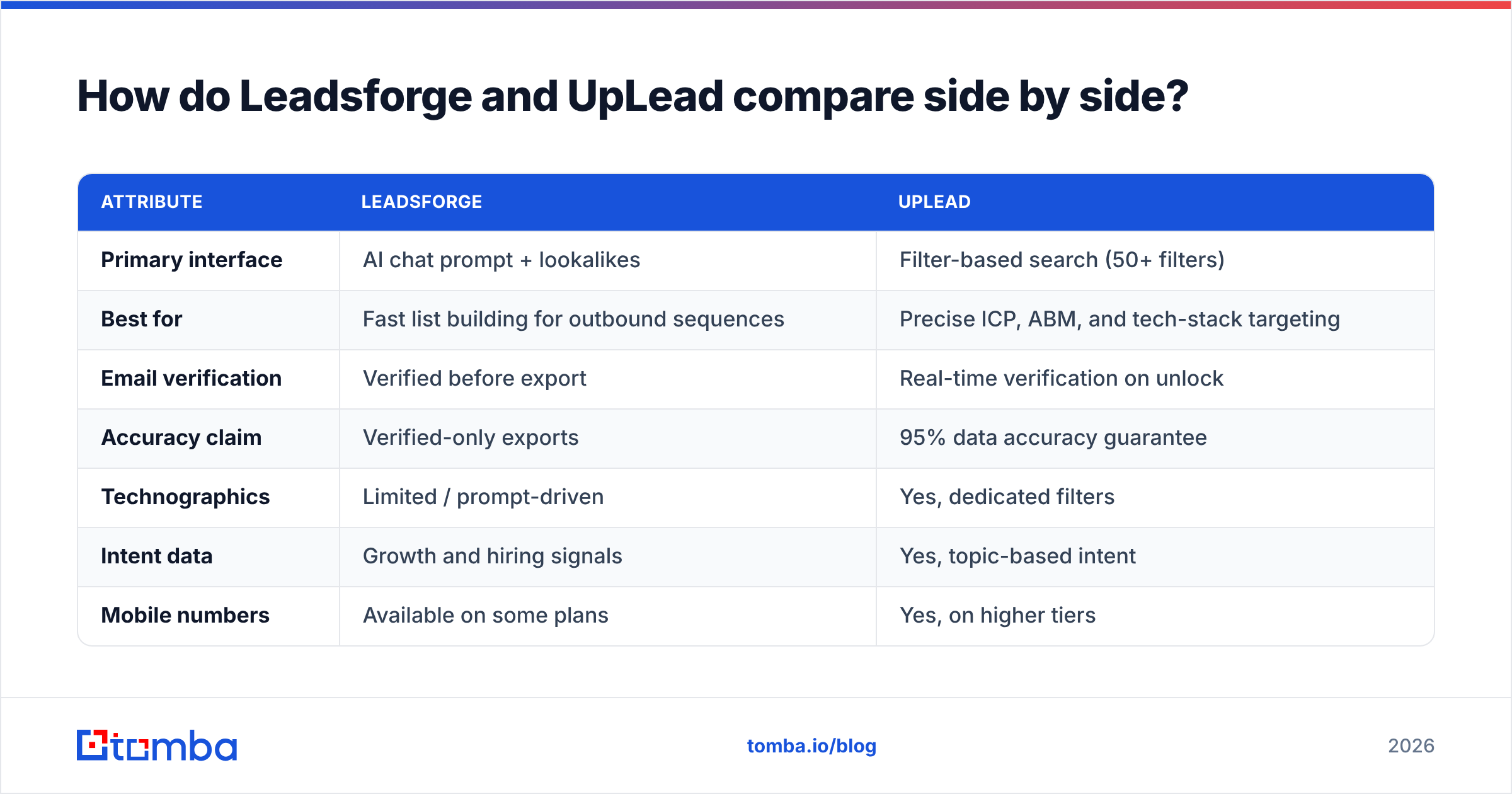
Here is the head-to-head on the attributes that matter most to outbound teams. Pricing reflects publicly listed plans at the time of writing. Both vendors change plans often, so confirm on their pricing pages before you buy.
| Attribute | Leadsforge | UpLead |
|---|---|---|
| Primary interface | AI chat prompt + lookalikes | Filter-based search (50+ filters) |
| Best for | Fast list building for outbound sequences | Precise ICP, ABM, and tech-stack targeting |
| Email verification | Verified before export | Real-time verification on unlock |
| Accuracy claim | Verified-only exports | 95% data accuracy guarantee |
| Technographics | Limited / prompt-driven | Yes, dedicated filters |
| Intent data | Growth and hiring signals | Yes, topic-based intent |
| Mobile numbers | Available on some plans | Yes, on higher tiers |
| Free option | Free trial credits on signup | 7-day trial (5 credits) |
| Entry pricing | Low-cost credit plans (check site) | Essentials from ~$99/mo monthly, ~$74/mo annual |
| Native sequencer | Salesforge (same ecosystem) | None, integrates with CRMs and tools |
| CRM integrations | Via export / integrations | Salesforce, HubSpot, Pipedrive, Zoho, more |
| Learning curve | Very low | Moderate |
The pattern is clear. Leadsforge gives up some precision for speed and ecosystem fit. UpLead gives up some speed for control and data depth.
Which tool has more accurate data?#
Accuracy is where most buyers get burned, so the useful question is: what happens when a contact is wrong?
UpLead addresses this with real-time verification at unlock. When you reveal a contact, UpLead checks the email against the mail server right then. If it fails, you aren't charged a credit. Combined with the 95% accuracy guarantee, this gives you a clear contractual baseline. Independent reviews on G2 regularly mention data quality as one of UpLead's strongest points.
Leadsforge uses a similar "only pay for verified" model. Emails go through verification before they land in your list, and because the tool feeds into a cold-email ecosystem that cares a lot about deliverability (Warmforge exists to protect sender reputation), the incentive to ship clean data is built in.
The caveat for both is catch-all domains. Many mid-market and enterprise companies accept every address at the server level, so a standard SMTP check can't confirm whether jane.doe@company.com really exists. Both tools will label these as "accept-all" or "risky" rather than "valid." If a large share of your ICP sits on catch-all domains, you'll need a second-pass check. Running your final list through a dedicated email verifier before launch is cheap insurance either way.
Verdict on accuracy: UpLead's written guarantee and credit-back policy give it a slight edge for teams that need accountability. In day-to-day bounce rates, most users report both tools landing in a similar, acceptable range once catch-alls are handled separately.
How much do Leadsforge and UpLead really cost?#
List price is only half of it. What matters is cost per usable contact.
UpLead pricing breakdown#
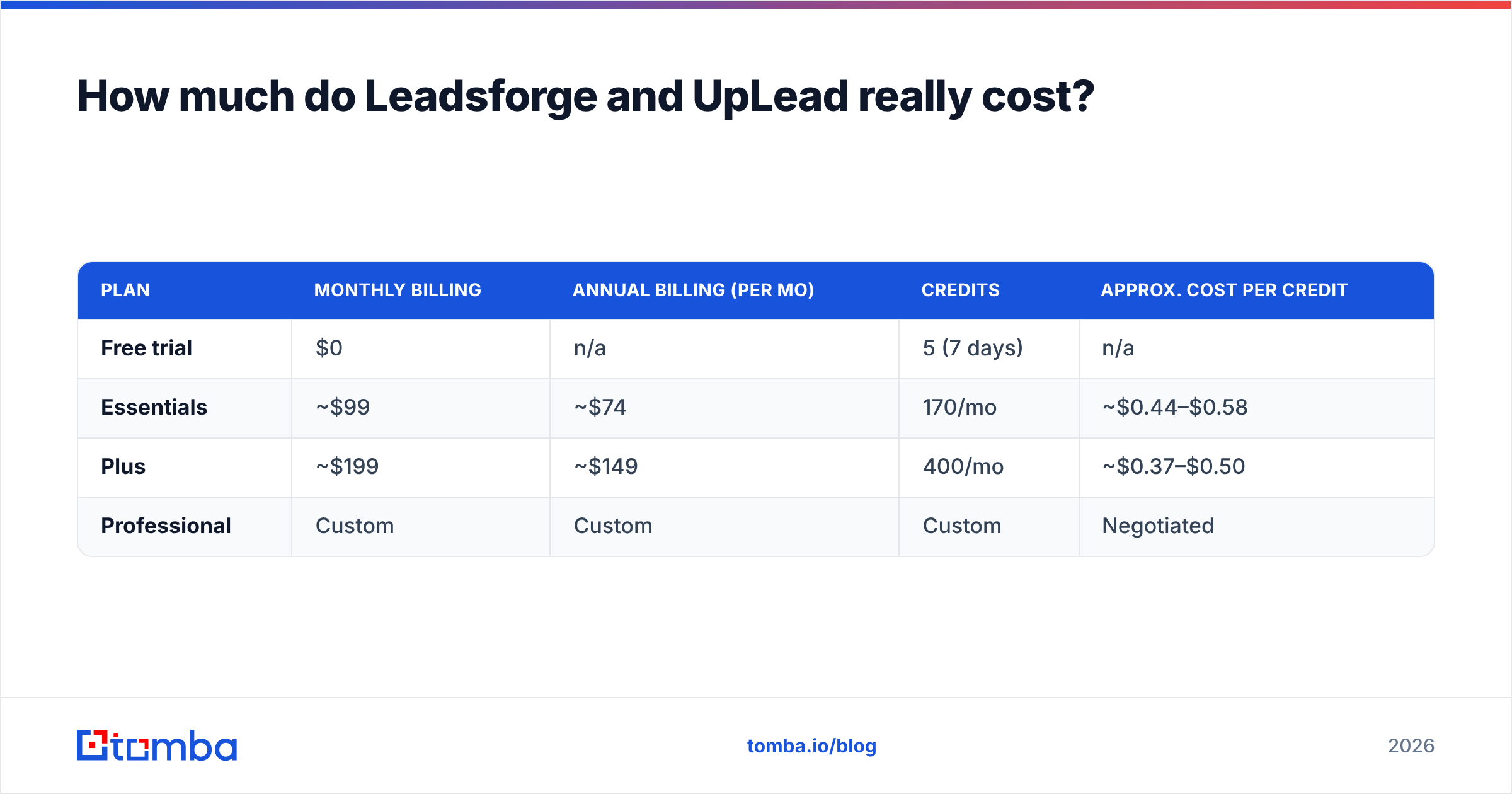
At the time of writing, UpLead's public tiers look roughly like this:
| Plan | Monthly billing | Annual billing (per mo) | Credits | Approx. cost per credit |
|---|---|---|---|---|
| Free trial | $0 | n/a | 5 (7 days) | n/a |
| Essentials | ~$99 | ~$74 | 170/mo | ~$0.44–$0.58 |
| Plus | ~$199 | ~$149 | 400/mo | ~$0.37–$0.50 |
| Professional | Custom | Custom | Custom | Negotiated |
One email typically costs one credit. Mobile numbers and some premium data points can cost more. Plus and above unlock features such as intent data, technographic filters, and phone numbers, so the "real" entry point for many teams is Plus, not Essentials.

Leadsforge pricing breakdown#
Leadsforge also uses credits, with lower-priced entry plans and volume tiers that bring per-contact cost down as you scale. New accounts get free trial credits to test list quality before paying. Plans and credit allowances have changed several times since launch, so check leadsforge.ai for current numbers instead of relying on third-party screenshots.
The bigger cost factor is bundling. If you also pay for Salesforge, Warmforge, and Mailforge, the Forge ecosystem can replace three or four separate tools. If you only need lists, you're paying for a tool designed to sit in front of a sequencer you may not use.
What does that mean for a real budget?#
Say you need 1,000 verified emails a month:
- On UpLead Essentials (170 credits), you'd need a custom or higher tier. At Plus-level pricing, expect $400–$500/mo at list rates.
- On Leadsforge, the same volume usually fits into a mid-tier plan at a noticeably lower monthly spend, especially billed annually.
- On a standalone email finder, the cost can be lower still if you already know which companies you're targeting. That's covered below.
Which workflow fits your team?#
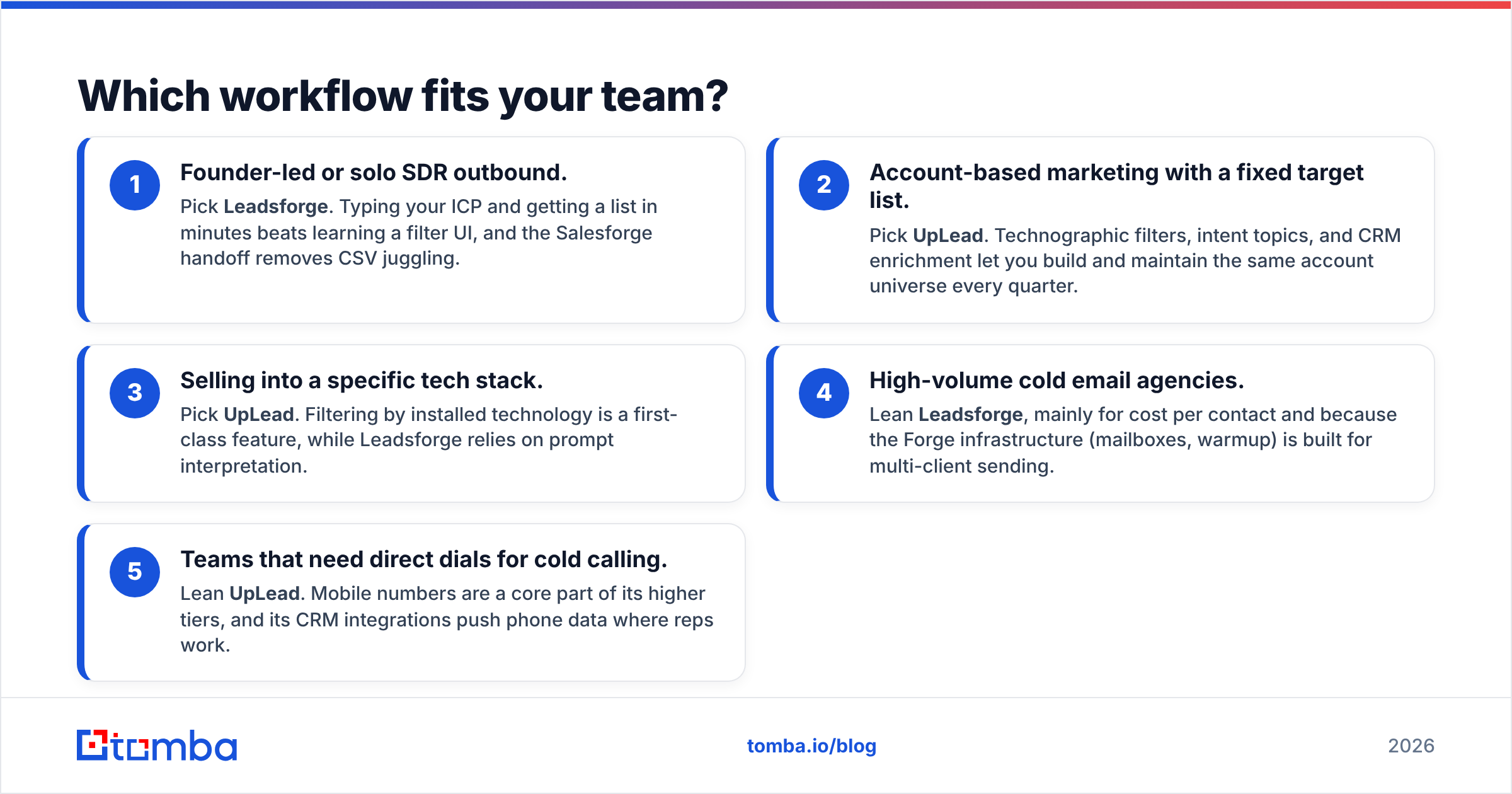
Choose based on how your team actually works, not on feature lists. These five scenarios cover most buyers:
- Founder-led or solo SDR outbound. Pick Leadsforge. Typing your ICP and getting a list in minutes beats learning a filter UI, and the Salesforge handoff removes CSV juggling.
- Account-based marketing with a fixed target list. Pick UpLead. Technographic filters, intent topics, and CRM enrichment let you build and maintain the same account universe every quarter.
- Selling into a specific tech stack. Pick UpLead. Filtering by installed technology is a first-class feature, while Leadsforge relies on prompt interpretation.
- High-volume cold email agencies. Lean Leadsforge, mainly for cost per contact and because the Forge infrastructure (mailboxes, warmup) is built for multi-client sending.
- Teams that need direct dials for cold calling. Lean UpLead. Mobile numbers are a core part of its higher tiers, and its CRM integrations push phone data where reps work.
If you land in the middle, try both. Each offers free trial credits, and running the same ICP through both tools for 50 contacts will tell you more than any review.
What are the pros and cons of each?#
Leadsforge#
Pros
- Fastest route from ICP idea to verified list
- Lookalike search is useful for expanding from your best customers
- Tight integration with Salesforge, Warmforge, and Mailforge
- Generally lower per-contact cost at volume
Cons
- Output quality depends on how well you write the prompt
- Less granular for technographic and niche targeting
- Most valuable inside the Forge ecosystem, less so as a standalone tool
- Younger product, so features and pricing change frequently
UpLead#
Pros
- 95% accuracy guarantee with credit-back on failed verifications
- Deep filters, including technographics and intent
- Strong native CRM integrations and enrichment
- Predictable, repeatable searches for RevOps and ABM
Cons
- Entry plan credits run out quickly (170/mo on Essentials)
- Key features locked behind Plus and above
- Steeper learning curve than chat-based tools
- Coverage outside North America and Western Europe is thinner than enterprise-tier providers
Is there a cheaper alternative to Leadsforge and UpLead?#
Yes, depending on what you actually need.
Both Leadsforge and UpLead are discovery tools: they help you find who to target. Many teams already know their target accounts from a CRM, an event attendee list, a LinkedIn search, or a partner referral. What they're missing is the email address. In that case, paying for a full database is overkill.
A dedicated email finder takes a name plus a company domain and returns the most likely professional address, with a confidence score and sources. Pair it with verification and you have a clean list at a fraction of database pricing. Tomba, for example, has a free tier (25 searches/month), Starter at $49/mo, Growth at $99/mo, and Pro at $249/mo. See Tomba pricing for credit details.
This approach also works well alongside either platform. Use Leadsforge or UpLead to discover accounts, then run gaps (contacts the database couldn't find, or catch-all results) through a finder and verifier. Teams comparing broader databases may also want to look at the usual Apollo.io alternatives before committing to an annual contract.
For context on where these tools fit in the wider market, Gartner's sales technology research groups them under sales intelligence and data enrichment. It's a crowded space where data freshness varies more than vendors admit.
Which should you choose: Leadsforge or UpLead?#
Here's our recommendation:
- Choose Leadsforge if you want the fastest path from ICP to live sequence, you already use (or plan to use) Salesforge, and cost per contact at volume matters more than filter precision.
- Choose UpLead if you need repeatable, filter-driven targeting, technographic or intent data, mobile numbers, and a contractual accuracy guarantee for RevOps accountability.
- Choose neither (yet) if you already know your target accounts and just need verified emails. A standalone finder plus verifier will be cheaper and faster.
Neither tool wins everywhere. Leadsforge is built for speed and cost at volume. UpLead is built for control and accountability. Decide which of those your outbound motion is limited by right now.
Frequently asked questions#
Is Leadsforge better than UpLead?#
Leadsforge is better for speed and ease of use, especially inside the Salesforge ecosystem. UpLead is better for precise filtering, technographics, intent data, and CRM enrichment. The right choice depends on your workflow, not on an overall ranking.
Does UpLead charge for bounced emails?#
UpLead verifies emails in real time when you unlock a contact, and it doesn't charge credits for contacts that fail verification. Catch-all addresses may still be delivered as "accept-all," so verify those separately before sending.
Can I use Leadsforge without Salesforge?#
Yes. You can export lists as CSV or push them to other tools. You'll give up some of the workflow benefits that come from the native Forge integration.
What's the cheapest way to get verified B2B emails?#
If you already know the person and company, an email finder combined with an email verifier is usually the cheapest route. Full databases like Leadsforge and UpLead are worth it when you need help deciding who to contact.
Already know who you want to reach? Skip the database subscription and go straight to the address. Tomba Email Finder turns a name and company domain into a verified professional email in seconds, with confidence scores and public sources for every result. Start with 25 free searches a month, then scale on plans from $49/mo when your outbound volume grows.
Related guides#
// get started
Find, verify and enrich your first contacts today
Start on the free plan with 25 searches a month, then scale when your team is ready.
Free plan · No credit card required · GDPR & CCPA
// about the author