LeadzenAI vs Supersend (2026): Lead Data Tool or Outreach Engine?
LeadzenAI finds prospects. Supersend emails and messages them. We compare what each one does well, where each falls short, and how to put them in the right order in your outbound stack.
TL;DR
- LeadzenAI and Supersend don't really compete. LeadzenAI is an AI-assisted B2B lead and contact data tool. Supersend is a multichannel outreach platform that runs sequences across email and social channels.
- Pick LeadzenAI if your problem is who to contact: building lists, finding decision-makers, and pulling contact details.
- Pick Supersend if your problem is how to contact them at scale: many sending inboxes, warmup, sequences, and one shared inbox for replies.
- Most outbound teams need both layers. The weak point in that setup is the handoff between them: contacts that haven't been verified go into sequences and cause bounces.
- Whatever you choose, verify every email before it reaches a sending tool. That single step protects your domain more than any sequencing feature.
What is the real difference between LeadzenAI and Supersend?#
Most people searching "leadzenai vs supersend" expect two rival products. In practice they handle two different stages of the outbound pipeline.
LeadzenAI (leadzen.ai) sits at the data layer. You describe the people you want, such as "Heads of Marketing at Series A SaaS companies in the UK", and the platform returns matching profiles with contact details where it has them. It is built for prospect discovery. It also offers a browser extension for pulling contact information while you browse profiles.
Supersend (supersend.io) sits at the execution layer. You bring a list, connect sending accounts, and build multichannel sequences: email steps, social touches, delays, and branching. Its selling points are sending infrastructure: support for many inboxes, rotation across senders, warmup, and a combined inbox where replies from every account land in one place.
A kitchen analogy helps. LeadzenAI is the grocery supplier and Supersend is the stove. If you compare them on the same scorecard, you'll end up disappointed with whichever one you bought for the wrong job.
So the useful question is which gap in your pipeline is costing you more right now.
How do LeadzenAI and Supersend fit into an outbound stack?#
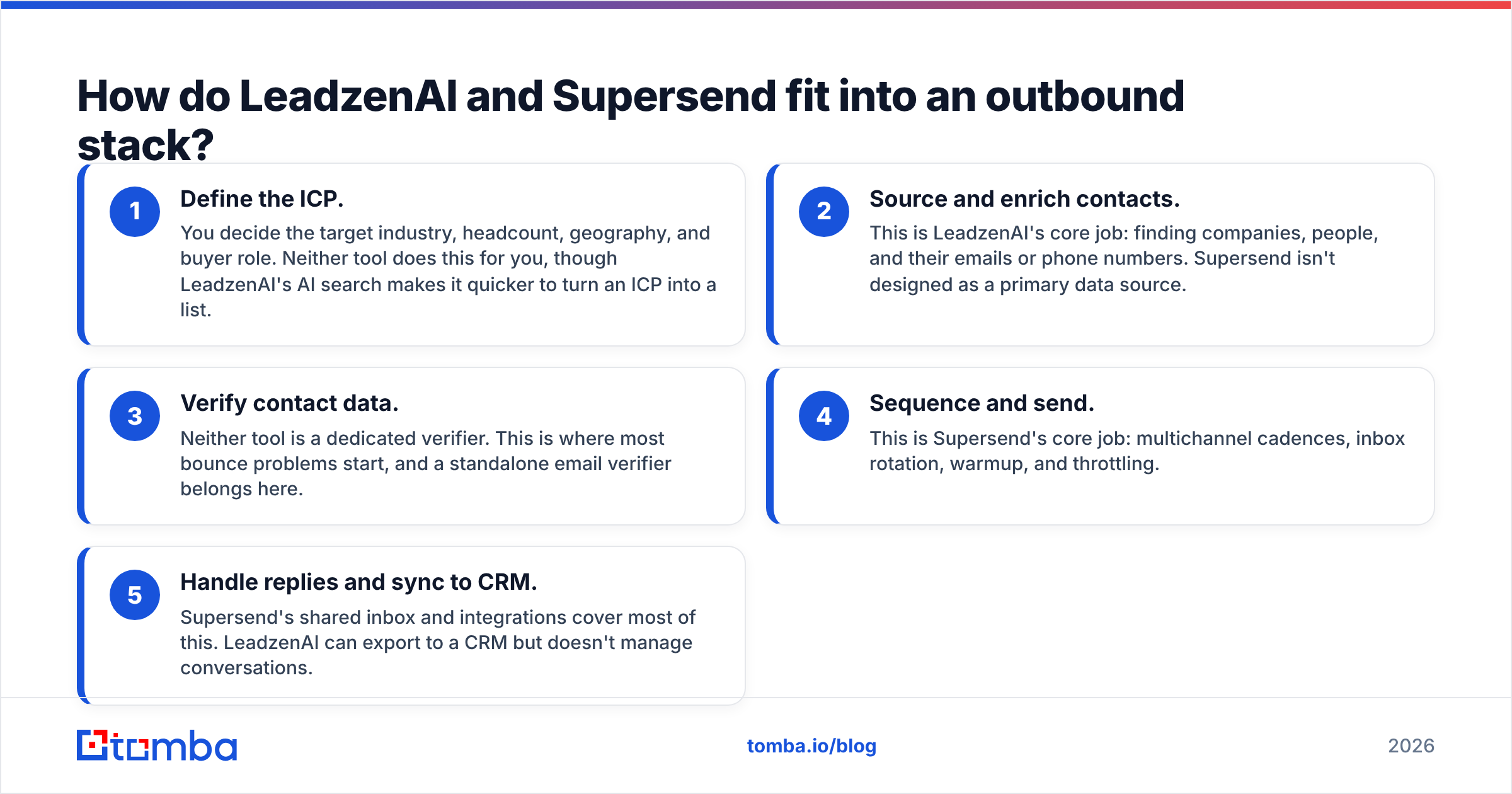
A working outbound motion has five stages. Here is where each tool helps and where it doesn't:
- Define the ICP. You decide the target industry, headcount, geography, and buyer role. Neither tool does this for you, though LeadzenAI's AI search makes it quicker to turn an ICP into a list.
- Source and enrich contacts. This is LeadzenAI's core job: finding companies, people, and their emails or phone numbers. Supersend isn't designed as a primary data source.
- Verify contact data. Neither tool is a dedicated verifier. This is where most bounce problems start, and a standalone email verifier belongs here.
- Sequence and send. This is Supersend's core job: multichannel cadences, inbox rotation, warmup, and throttling.
- Handle replies and sync to CRM. Supersend's shared inbox and integrations cover most of this. LeadzenAI can export to a CRM but doesn't manage conversations.
Stage 3 matters most. Teams often buy a data tool and a sending tool, connect them with a CSV export, and skip verification entirely. Then they're surprised when their sender reputation drops in the third week.

How do LeadzenAI and Supersend compare feature by feature?#
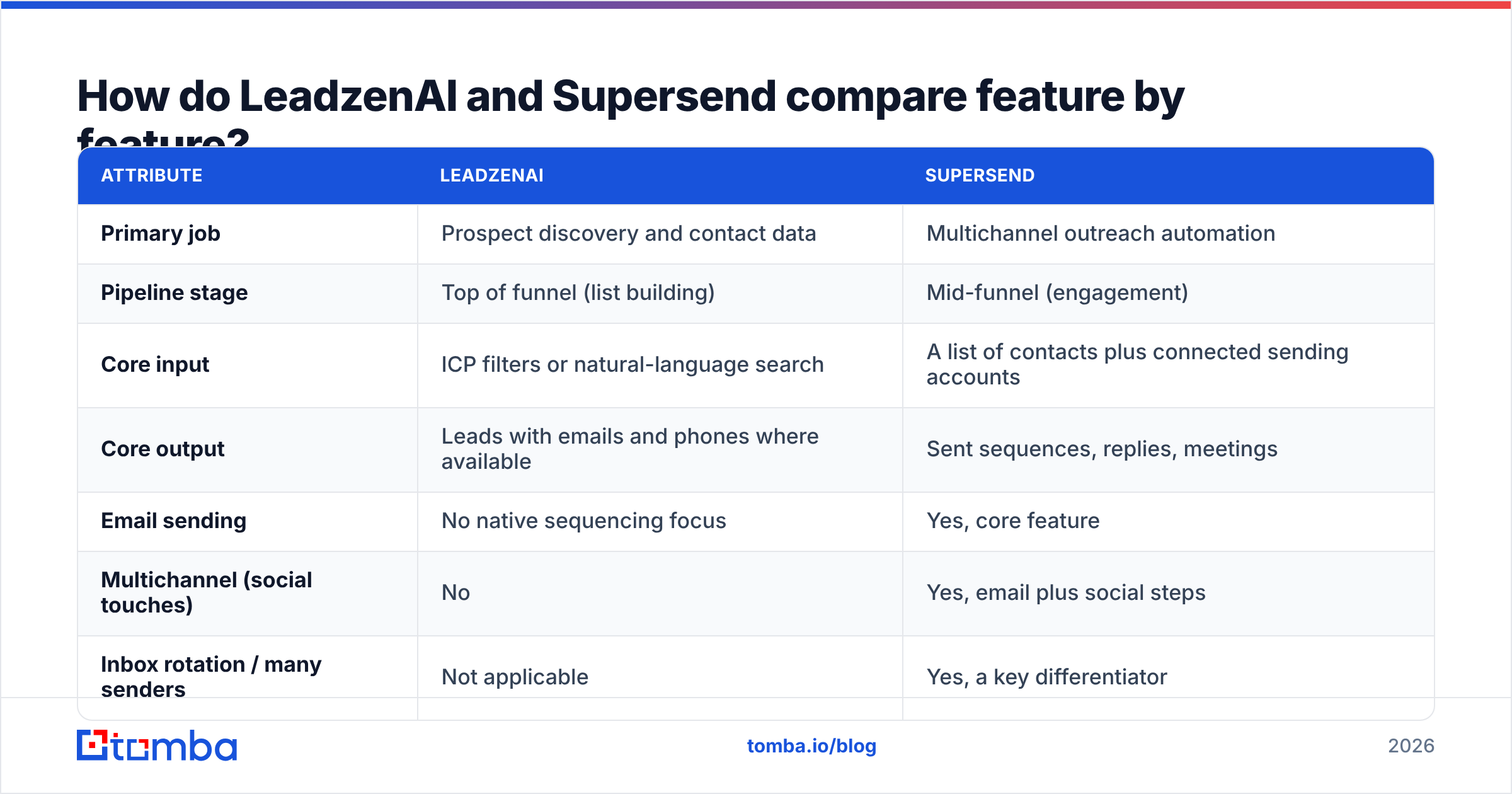
The table below compares the two tools on the attributes that actually affect a buying decision. Pricing for both vendors changes often and depends on seats and credits, so check their pricing pages before committing. We've described the model instead of quoting numbers that may be out of date.
| Attribute | LeadzenAI | Supersend |
|---|---|---|
| Primary job | Prospect discovery and contact data | Multichannel outreach automation |
| Pipeline stage | Top of funnel (list building) | Mid-funnel (engagement) |
| Core input | ICP filters or natural-language search | A list of contacts plus connected sending accounts |
| Core output | Leads with emails and phones where available | Sent sequences, replies, meetings |
| Email sending | No native sequencing focus | Yes, core feature |
| Multichannel (social touches) | No | Yes, email plus social steps |
| Inbox rotation / many senders | Not applicable | Yes, a key differentiator |
| Email warmup | Not applicable | Built in |
| Unified reply inbox | No | Yes |
| Contact database | Yes, core feature | Not its main purpose |
| Browser extension | Yes, for grabbing contacts from profiles | Not a central part of the workflow |
| Dedicated email verification | Limited; not a standalone verifier | Not a standalone verifier |
| Pricing model | Credit-based plans (data consumption) | Subscription tiers tied to sending scale/seats |
| Best buyer | Founders, SDRs, and agencies short on leads | Agencies and SDR teams with lists but weak sending setups |
| Main risk | Data freshness varies by segment | Sending unverified lists damages domains fast |
Two rows are worth a closer look.
Inbox rotation is the main reason teams choose Supersend over single-inbox tools. Mailbox providers throttle and penalise high volume from one address. Spreading 1,000 daily emails across 20 warmed inboxes at 50 each is a very different reputational situation from sending 1,000 from a single inbox. Google publishes its bulk sender rules in the Gmail sender guidelines, and staying well under those thresholds per inbox is the whole idea behind rotation.
Dedicated email verification is the gap both tools share. LeadzenAI returns contacts, and Supersend sends to whatever contacts you give it. Neither one's main job is checking, contact by contact, whether an address is deliverable, risky, or on a catch-all domain.
When is LeadzenAI the better choice?#
Choose LeadzenAI if you have sending capacity but not enough good people to send to.
Signs you're in this situation:
- Your list-building is manual. SDRs spend their mornings copying names from LinkedIn into spreadsheets.
- Your ICP is clear but your coverage isn't. You know you want VPs of Operations at mid-market logistics firms, but you can only find a few dozen.
- You need phone numbers as well as emails. LeadzenAI includes phone data, which helps if your motion mixes calls and email.
- You're an early-stage founder doing outbound yourself. A searchable database with AI-assisted filtering saves hours each week.
Where LeadzenAI is weaker:
- Coverage varies by region and segment. Any B2B database has thin spots. Contacts in niche verticals or less-covered geographies can be missing or out of date. Test with a sample of your actual ICP before you buy credits in bulk.
- Being in the database doesn't mean the address is deliverable. An email that was valid six months ago may belong to someone who has since left. Plan to re-verify before sending.
- It doesn't run campaigns. You still need a sending tool, whether that's Supersend or something else.
On review sites such as G2, users of lead-data tools raise the same issues repeatedly: data accuracy in specific segments, how credits are consumed, and export limits. Look for those points when you read reviews, not the overall star rating.
When is Supersend the better choice?#
Choose Supersend if you already have lists but your sending infrastructure is limiting you.
Signs you're in this situation:
- You're running out of sending capacity. One or two inboxes aren't enough, and managing ten separately is a mess.
- Replies are spread across accounts. Reps miss positive replies because they're sitting in an inbox nobody checked.
- You want multichannel sequences. For example, a social profile visit, then an email, then a social message, then a follow-up email, all in one cadence rather than across three tools.
- You're an agency running outbound for several clients. Many inboxes, many domains, and a single dashboard is the setup Supersend is built for.
Where Supersend is weaker:
- It doesn't fix bad data. Better sending doesn't help much if 12% of your list bounces. It mainly means you hurt more domains at the same time.
- Setup takes real work. Getting the most out of rotation means buying secondary domains, setting up SPF/DKIM/DMARC on each one, and warming inboxes for weeks before scaling. Budget time for this.
- Multichannel steps carry platform risk. Automated social actions depend on each network's tolerance for automation. Keep volumes conservative.
Which one is cheaper in practice?#
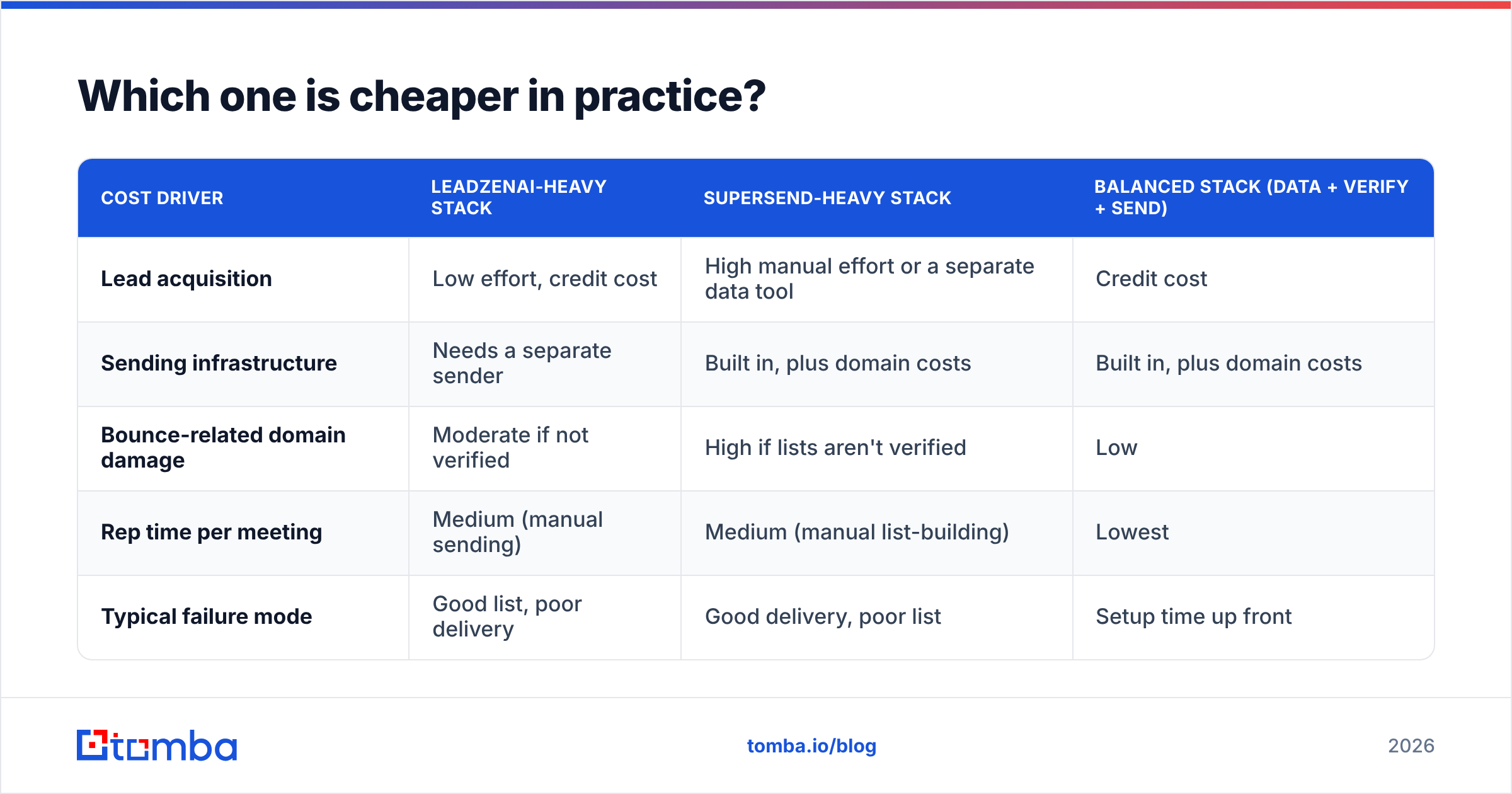
The subscription price is the smaller part of the cost. What matters is cost per booked meeting, and that depends mostly on data quality.
Here is a simple way to model it:
| Cost driver | LeadzenAI-heavy stack | Supersend-heavy stack | Balanced stack (data + verify + send) |
|---|---|---|---|
| Lead acquisition | Low effort, credit cost | High manual effort or a separate data tool | Credit cost |
| Sending infrastructure | Needs a separate sender | Built in, plus domain costs | Built in, plus domain costs |
| Bounce-related domain damage | Moderate if not verified | High if lists aren't verified | Low |
| Rep time per meeting | Medium (manual sending) | Medium (manual list-building) | Lowest |
| Typical failure mode | Good list, poor delivery | Good delivery, poor list | Setup time up front |
The balanced stack costs the most per month and the least per meeting, because each tool handles the stage it was designed for. That includes a separate verification step between the data and sending layers.
If you're choosing between one tool and the other on a limited budget, fix the bigger constraint first. Having no leads is a LeadzenAI problem. Having leads but poor delivery is a Supersend problem.
Where does email verification fit between the two?#
This is the step most comparisons leave out.
A typical flow looks like this: export 2,000 contacts from a data tool, upload them to a sequencer, and launch. If 8% of those addresses are invalid, you've sent 160 hard bounces across your inboxes in the first week. Mailbox providers read a high bounce rate as a sign that you bought a list, and your inbox placement suffers across all your sending domains.
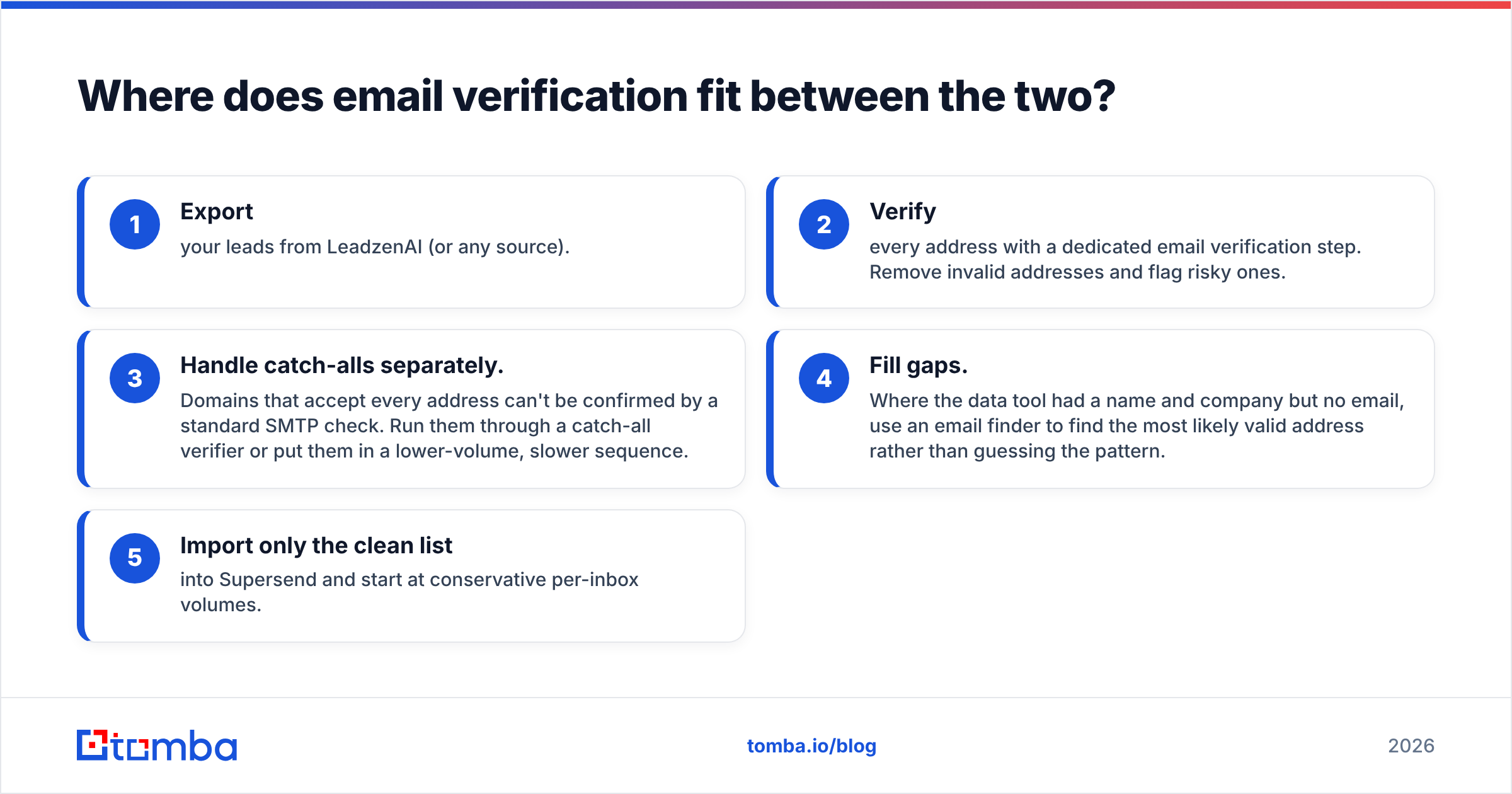
A tidier flow:
- Export your leads from LeadzenAI (or any source).
- Verify every address with a dedicated email verification step. Remove invalid addresses and flag risky ones.
- Handle catch-alls separately. Domains that accept every address can't be confirmed by a standard SMTP check. Run them through a catch-all verifier or put them in a lower-volume, slower sequence.
- Fill gaps. Where the data tool had a name and company but no email, use an email finder to find the most likely valid address rather than guessing the pattern.
- Import only the clean list into Supersend and start at conservative per-inbox volumes.
The goal is to keep bounce rates low enough that they never register with providers. Most deliverability practitioners aim to stay under about 2%, and verified lists get well below that.
Is LeadzenAI or Supersend better for agencies?#
It depends on who provides the lists.
- If clients hand you lists (common in white-label lead-gen), Supersend is the more important purchase. Your value is delivery, and inbox rotation across client domains is exactly what you need.
- If you build the lists (common with full-service outbound agencies), you need a data layer as well, and LeadzenAI or a comparable database is essential.
- In either case, verification is your insurance. Agencies manage domain reputation for many clients at once. One bad list can take down a client's primary domain, and you'll be the one explaining it.
Is LeadzenAI or Supersend better for solo founders?#
For a founder doing outbound part-time, start with data. You probably don't have enough sending volume yet for inbox rotation to matter. Two or three warmed inboxes and a basic sequencer will handle a few hundred emails a week.
Lack of time for manual prospecting is usually what stops founders. A data tool with AI-assisted search solves that directly. Add a multichannel platform like Supersend once you're consistently booking meetings and hitting per-inbox volume limits.
What are the alternatives if neither fits?#
If LeadzenAI and Supersend don't match your workflow, here's how the alternatives break down:
- All-in-one platforms combine a database with a built-in sequencer. They're convenient, but each layer is usually weaker than a specialist tool. See our Apollo alternative breakdown for the trade-offs.
- Specialist data plus specialist sender means a focused email finder and verifier paired with a dedicated sending platform. This takes more setup and usually delivers the best results.
- Other multichannel sequencers exist if Supersend's approach doesn't suit you. Compare them on inbox rotation, warmup quality, and reply management, not on how many features they list.
So, LeadzenAI vs Supersend: which should you pick?#
Our view as a neutral reviewer:
- Choose LeadzenAI if lead supply is your constraint and you already have a way to send.
- Choose Supersend if sending capacity and reply management are your constraint and you already have lists.
- Choose both, with verification between them, if you're running outbound seriously. Data, verification, and sending are three separate jobs, and the stacks that perform best treat them that way.
Neither tool is better in the abstract, because each is built for a different stage. What matters is putting them in the right order and not skipping the verification step between them.
Where does Tomba fit in this stack?#
Tomba sits between LeadzenAI and Supersend, or replaces the data layer entirely if you'd rather find addresses on demand than buy database credits. With Tomba Email Finder, you enter a name and company domain and get the most likely professional email address, with a confidence score and built-in verification. The result is a clean list you can import into Supersend or any other sequencer without risking your domains. There's a free tier (25 searches a month) for testing against your own ICP, and paid plans start at $49/mo. See Tomba pricing for the full breakdown, and verify your next list before it reaches a sending tool.
Related guides#
// get started
Find, verify and enrich your first contacts today
Start on the free plan with 25 searches a month, then scale when your team is ready.
Free plan · No credit card required · GDPR & CCPA
// about the author