9 Less Annoying CRM Alternatives for Small Teams in 2026
Less Annoying CRM is simple, cheap, and friendly. It also lacks sequences, deep automation, and built-in lead data. Here are 9 alternatives, what each one fixes, and what each one costs.
TL;DR
- Less Annoying CRM (LACRM) is still one of the easiest CRMs for very small teams: one plan, about $15/user/month, and free human support. People usually leave because it has little automation, no multi-step email sequences, and a small set of integrations.
- Pipedrive is the best pick if you want a visual pipeline plus automation. HubSpot CRM is best if you want a free tier that grows into marketing. Zoho CRM and Freshsales give you the most features per dollar.
- If you liked LACRM for its simplicity, Capsule and folk are the closest in feel. Close is the one built for outbound calling and email volume.
- A CRM doesn't fill itself with data. Whichever one you choose, you still need a way to find and verify contact emails before they go into it.
- Pricing below is starting list price as of 2026. Vendors change plans often, so check the pricing page before you commit.
Less Annoying CRM built its brand on being the opposite of Salesforce: no tiers, no upsells, and a support line that a person actually answers. That's a real advantage. It also has a ceiling. Once you want automated follow-ups, a proper sales pipeline with forecasting, or a CRM that plugs into your outbound stack, LACRM starts to feel less like "less annoying" and more like "not enough."
This guide covers nine Less Annoying CRM alternatives, what each one does better, where each one is worse, and which team each one suits.
What is Less Annoying CRM, and why do teams look for alternatives?#
Less Annoying CRM is a contact manager and CRM for small businesses. You get contacts, companies, pipelines, tasks, a shared calendar, notes, and email logging, all on one plan priced per user. There's a 30-day free trial and no contract.
What it does well:
- Low learning curve. Most teams are working in it within an afternoon.
- Predictable pricing. There is one plan, so you won't find features locked behind a higher tier.
- Support. Every customer gets free phone and email support. At this price point, that's rare.
Why teams leave:
- Little automation. You can't build branching workflows, lead routing, or trigger-based task creation the way you can in Pipedrive or HubSpot.
- No native email sequences. If you run outbound, you'll need a separate engagement tool and a way to sync it.
- Few integrations. The ecosystem is small compared with HubSpot's marketplace or Zapier-heavy CRMs.
- Limited reporting. There's basic pipeline reporting and not much for forecasting or rep performance.
- No lead data. LACRM stores contacts you already have. It doesn't help you find new ones.
If none of those bother you, stay with LACRM. For a 2-5 person service business it's hard to beat. The alternatives below are for teams that have run into one of those limits.
How should you evaluate a Less Annoying CRM alternative?#
Before you look at logos, decide which of LACRM's gaps you actually need filled. Most bad CRM migrations happen because a team buys for features it never switches on.
- Automation depth: Do you need "create a task when a deal moves stage," or full multi-branch workflows with lead scoring? The first is cheap. The second pushes you into mid-tier plans.
- Outbound email: Do reps send sequences from inside the CRM, or from a dedicated tool like Instantly or Reply.io? If it's the CRM, native sequences matter more than anything else on this list.
- Integration surface: Count the tools that have to talk to your CRM: calendar, inbox, phone, enrichment, billing. Then check for native connectors rather than Zapier-only support.
- Price at your real seat count: A $0 free tier often turns into $50+/user once you need the features that made you switch. Price out the plan you'll really use for 12 months.
- Simplicity budget: LACRM users usually value a clean UI. Every added feature adds clutter. Decide how much complexity your team will put up with.
- Data quality: A CRM is only as useful as the emails and phone numbers in it. Plan how contacts get in and how they stay valid.
What are the best Less Annoying CRM alternatives in 2026?#
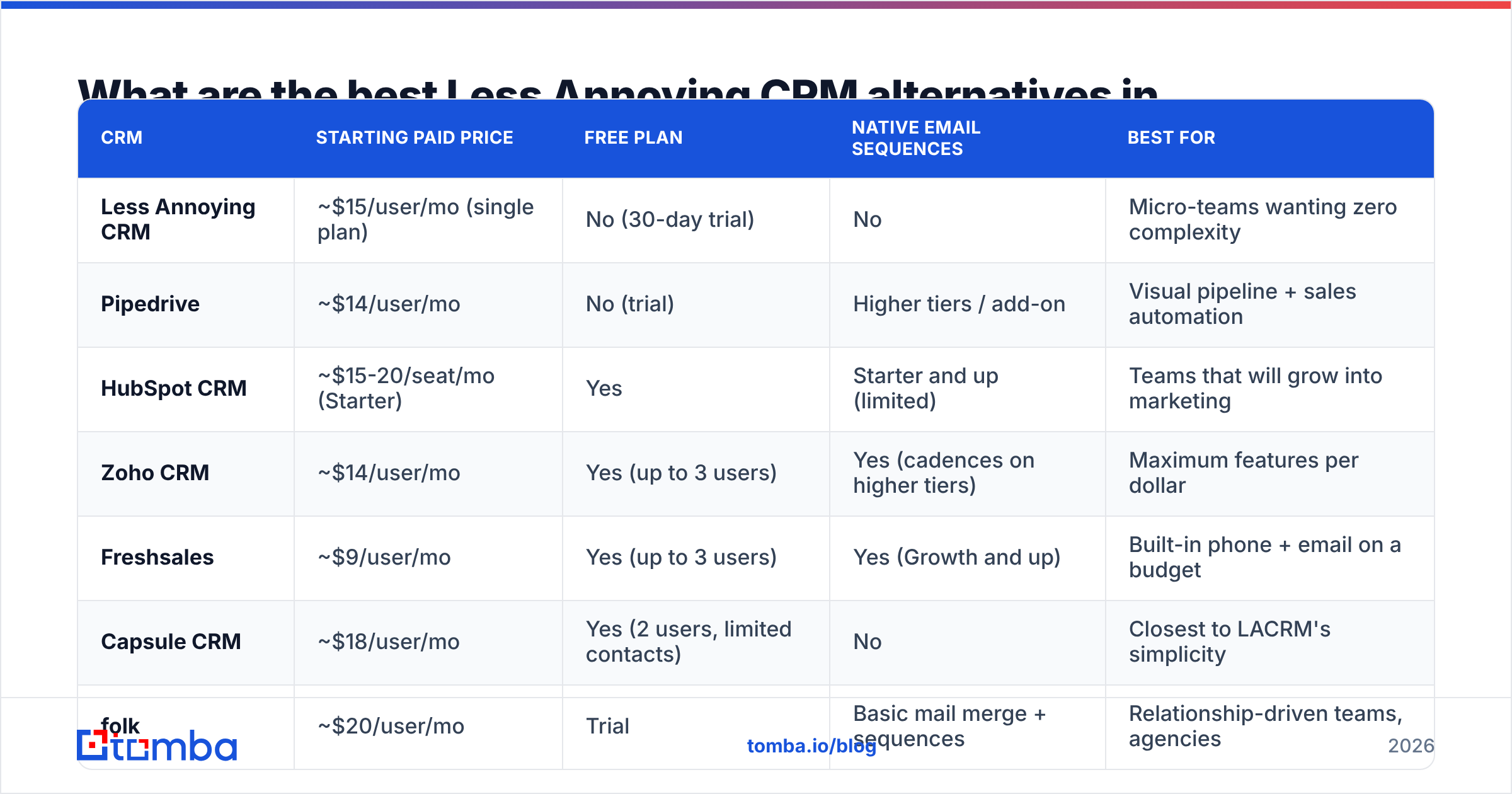
Here's the side-by-side. Prices are the lowest paid tier, per user per month, billed annually unless noted.
| CRM | Starting paid price | Free plan | Native email sequences | Best for |
|---|---|---|---|---|
| Less Annoying CRM | ~$15/user/mo (single plan) | No (30-day trial) | No | Micro-teams wanting zero complexity |
| Pipedrive | ~$14/user/mo | No (trial) | Higher tiers / add-on | Visual pipeline + sales automation |
| HubSpot CRM | ~$15-20/seat/mo (Starter) | Yes | Starter and up (limited) | Teams that will grow into marketing |
| Zoho CRM | ~$14/user/mo | Yes (up to 3 users) | Yes (cadences on higher tiers) | Maximum features per dollar |
| Freshsales | ~$9/user/mo | Yes (up to 3 users) | Yes (Growth and up) | Built-in phone + email on a budget |
| Capsule CRM | ~$18/user/mo | Yes (2 users, limited contacts) | No | Closest to LACRM's simplicity |
| folk | ~$20/user/mo | Trial | Basic mail merge + sequences | Relationship-driven teams, agencies |
| Close | ~$35/user/mo | Trial | Yes (core strength) | High-volume outbound calling + email |
| Salesforce Starter Suite | ~$25/user/mo | Trial | Basic | Teams planning to scale into Salesforce |
| Nimble | ~$25/user/mo | Trial | Basic group email | Social-heavy relationship management |
1. Pipedrive: best for a visual sales pipeline#
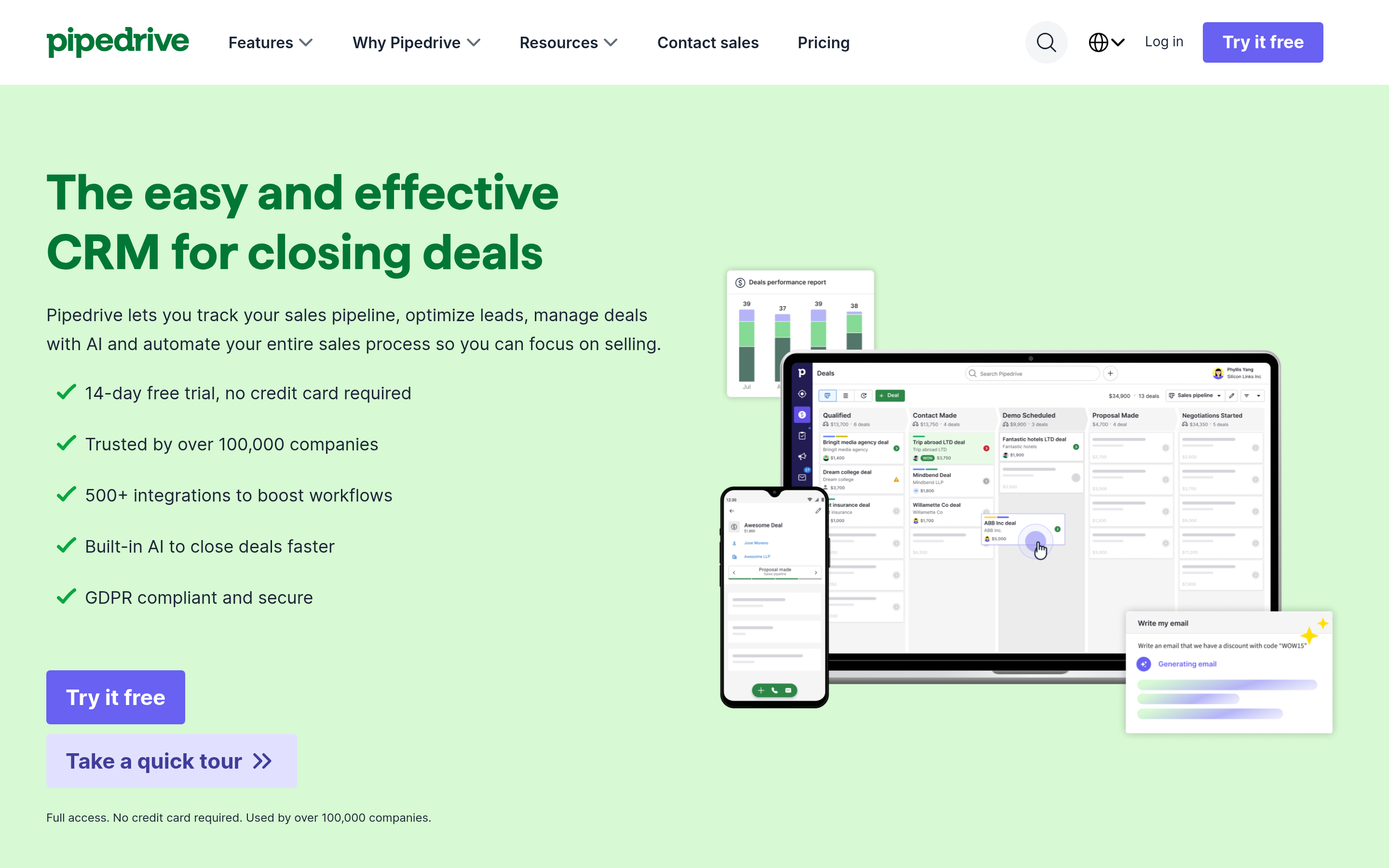
Pipedrive is the most common move for LACRM users. The deal board is its strongest feature: drag a card across stages and triggers fire, tasks get created, and the forecast updates. It feels as simple as LACRM on day one and gives you much more room to grow.
- Better than LACRM at: workflow automation, pipeline reporting, a large integration marketplace, and native mobile apps.
- Worse than LACRM at: support (tiered, and not phone-first), and pricing that climbs quickly once you add the LeadBooster or Campaigns add-ons.
- Pick it if: you run a deal-driven sales process with 3-20 reps.
Pipedrive has a native Pipedrive integration path for enrichment tools, so filling contact emails on new deals can be automated rather than done by hand.
2. HubSpot CRM: best free tier that scales#
HubSpot CRM has a free plan with unlimited users, contact management, deal pipelines, meeting scheduling, and email tracking. Starter adds basic sequences and removes HubSpot branding. From there you can move into Marketing Hub and Service Hub without changing platforms.
- Better than LACRM at: free entry, integrations (the marketplace has well over 1,000 apps), and a marketing-to-sales path.
- Worse than LACRM at: simplicity. HubSpot's UI is busy, and the jump from Starter to Professional is steep (hundreds of dollars a month).
- Pick it if: you expect marketing and sales to share one system within a year.
3. Zoho CRM: best value for features#
Zoho CRM has more features per dollar than almost anything else on this list: workflow rules, lead scoring, cadences, territory management, and Zia AI on higher tiers. The free edition covers up to three users.
- Better than LACRM at: automation, customization, and reporting depth.
- Worse than LACRM at: onboarding. Expect a real setup project, and the UI can feel dated in places.
- Pick it if: you have one person willing to own the configuration.
4. Freshsales: best built-in phone and email for the money#
Freshsales (from Freshworks) includes a built-in dialer, email sequences, and AI deal insights at a low entry price. The free plan supports up to three users with basic contact and deal management.
- Better than LACRM at: sequences, built-in calling, and lead scoring.
- Worse than LACRM at: support responsiveness on lower tiers. Some features are gated in confusing ways across plans.
- Pick it if: your reps both call and email, and you don't want to pay for three separate tools.
5. Capsule CRM: closest to LACRM's feel#
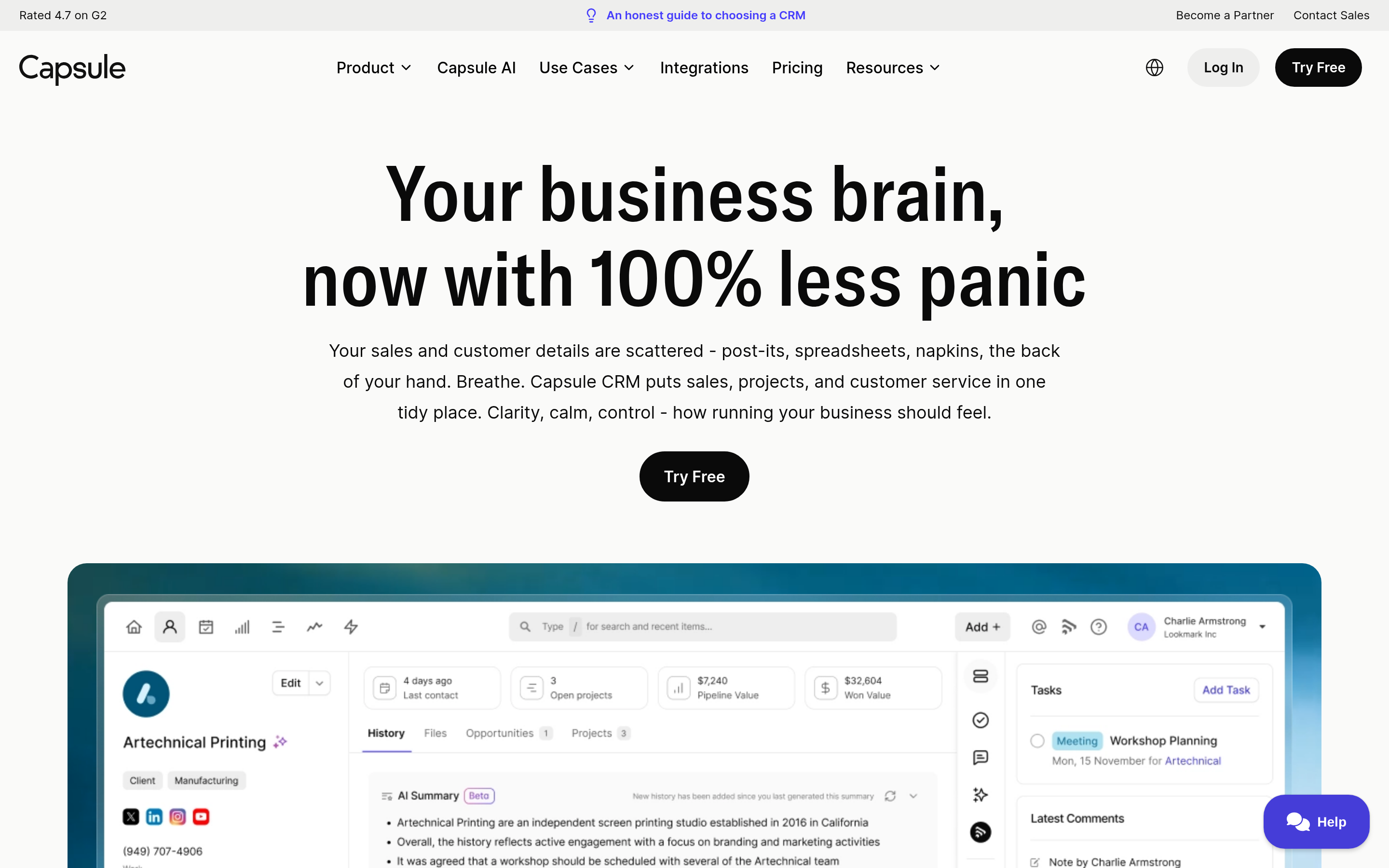
Capsule is the alternative most LACRM fans end up liking. It's clean, focused on contacts and pipelines, and doesn't try to be a marketing suite. Paid tiers add workflow automation ("Tracks") and multiple pipelines, which LACRM can't match.
- Better than LACRM at: light automation, native mobile apps, and more integrations (Xero, Mailchimp, Google Workspace, Microsoft 365).
- Worse than LACRM at: support depth, and per-seat cost on upper tiers.
- Pick it if: you want LACRM's simplicity plus a little automation.
6. folk: best for relationship-driven teams#

folk is a newer CRM built around lists and relationships rather than rigid pipelines. It suits agencies, investors, recruiters, and founders doing partnership outreach. It includes a Chrome extension for capturing contacts from LinkedIn and email, plus basic mail merge.
- Better than LACRM at: a modern UI, contact capture, and flexible views.
- Worse than LACRM at: classic sales reporting and forecasting.
- Pick it if: your "pipeline" is really a network.
7. Close: best for outbound-heavy sales teams#
Close is built for teams that live on the phone and in their inbox. It has a power dialer, SMS, multi-step email sequences, and call recording, all native. It's the most expensive tool here per seat, and the only one designed for outbound from the start.
- Better than LACRM at: everything related to outbound volume.
- Worse than LACRM at: price and simplicity for non-sales users.
- Pick it if: your reps make 50+ touches a day.
8. Salesforce Starter Suite: best on-ramp to enterprise#
Salesforce's Starter Suite packages sales, service, and email marketing into a small-business plan. It's much simpler than full Sales Cloud and puts you on a platform you'll never outgrow.
- Better than LACRM at: ecosystem, scalability, and AppExchange integrations.
- Worse than LACRM at: almost all of LACRM's core strengths: ease of use, admin overhead, and total cost once you upgrade.
- Pick it if: investors or enterprise customers expect you to be on Salesforce eventually.
9. Nimble: best for social and relationship context#
Nimble pulls social profile data and communication history into each contact record and works as a browser sidebar across the web and inbox. It's closer to LACRM in scope than HubSpot, with more contact context.
- Better than LACRM at: contact enrichment from social sources and inbox integration.
- Worse than LACRM at: pipeline depth and reporting.
- Pick it if: your team sells through relationships and social touchpoints.
Which alternative is right for your team size and motion?#
Most readers can skip straight to a shortlist:
- Solo founder or 1-3 people, mostly relationship selling: stay on LACRM, or try Capsule or folk.
- 3-15 reps, deal-driven B2B sales: Pipedrive first, then Freshsales.
- Marketing and sales under one roof: HubSpot CRM.
- Tight budget, willing to configure: Zoho CRM.
- Outbound SDR team with calling quotas: Close.
- Planning for enterprise scale: Salesforce Starter Suite.
For independent validation, read recent verified reviews on G2's CRM category. Filter by company size so you're comparing against teams like yours, not enterprise admins with a different set of complaints.
What do most teams forget when switching CRMs?#
Migration guides focus on field mapping and CSV exports. Data quality is the part that actually hurts after the move.
When you export from LACRM, you're exporting years of contacts: people who changed jobs, domains that were acquired, and emails that now bounce. Import that into Pipedrive or HubSpot and connect a sequence tool, and your first campaign damages your sender reputation before a rep books a single meeting.
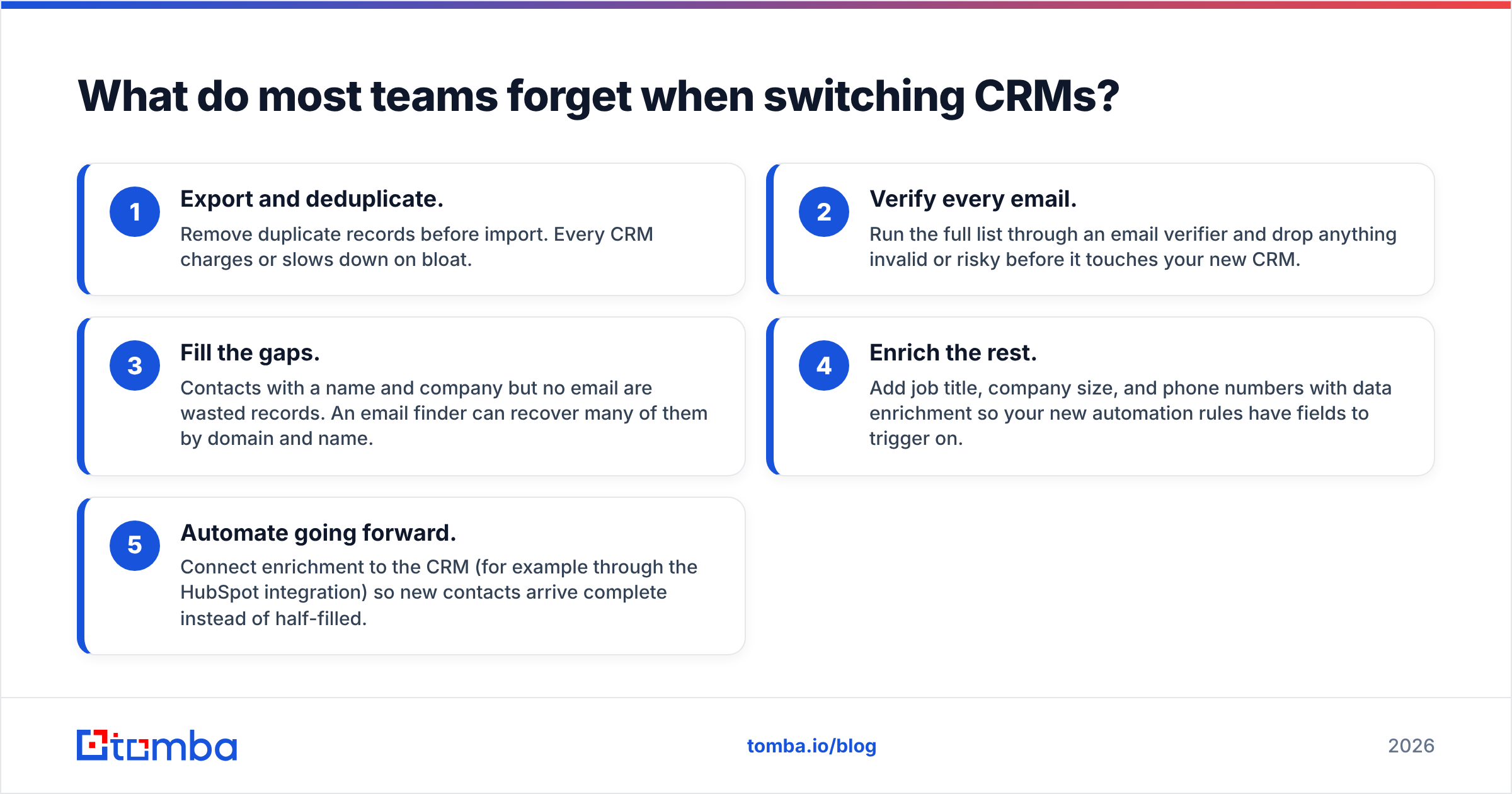
A clean migration looks like this:
- Export and deduplicate. Remove duplicate records before import. Every CRM charges or slows down on bloat.
- Verify every email. Run the full list through an email verifier and drop anything invalid or risky before it touches your new CRM.
- Fill the gaps. Contacts with a name and company but no email are wasted records. An email finder can recover many of them by domain and name.
- Enrich the rest. Add job title, company size, and phone numbers with data enrichment so your new automation rules have fields to trigger on.
- Automate going forward. Connect enrichment to the CRM (for example through the HubSpot integration) so new contacts arrive complete instead of half-filled.

This matters because LACRM's missing automation is often why teams switch in the first place. Automation depends on data. A workflow that routes leads by company size does nothing if company size is blank on 60% of records.
Is Less Annoying CRM still worth it in 2026?#
Yes, for the right team. If you have fewer than five users, sell mainly through relationships and referrals, and value a support line you can call, LACRM is still one of the best-value CRMs available. Its refusal to add complexity is deliberate, not a sign of neglect.
It's the wrong choice if any of these are true:
- You run outbound email sequences at volume.
- You need automation beyond basic reminders.
- Your stack depends on native integrations with enrichment, calling, or marketing tools.
- Leadership wants pipeline forecasting and rep-level reporting.
In those cases, one of the Less Annoying CRM alternatives above will pay for itself quickly, as long as you migrate clean data into it.
Frequently asked questions#
What is the cheapest alternative to Less Annoying CRM?#
HubSpot CRM, Zoho CRM, and Freshsales all have free plans. HubSpot's free plan allows unlimited users. Zoho and Freshsales cap their free plans at three users. Among paid plans, Freshsales and Pipedrive start below LACRM's roughly $15/user/month when billed annually.
Which CRM is most similar to Less Annoying CRM?#
Capsule CRM is the closest in philosophy: clean interface, contact-first design, and no marketing-suite sprawl. folk is a close second for teams that manage relationships more than deals.
Does Less Annoying CRM have email automation?#
LACRM supports email logging and basic email features but doesn't offer native multi-step email sequences. Teams that need sequences usually add a separate engagement tool or move to Freshsales, Close, HubSpot Starter, or Zoho.
Can I migrate from Less Annoying CRM without losing data?#
Yes. LACRM lets you export contacts, companies, and pipeline data to CSV. Deduplicate and verify the emails before importing into your new CRM so bounces don't hurt your sending domain on day one.
Which Tomba tool helps after you pick a CRM?#
Whichever CRM you choose, it will only be as good as the contacts you put into it. Tomba Email Finder finds professional email addresses by domain, name, or company, so records that were missing an email become usable before your first automated sequence. It works alongside HubSpot, Pipedrive, Salesforce, and most of the CRMs above. There's a free tier with 25 searches a month so you can test it on your own migration list, and paid plans start at $49/month.
Related guides#
// get started
Find, verify and enrich your first contacts today
Start on the free plan with 25 searches a month, then scale when your team is ready.
Free plan · No credit card required · GDPR & CCPA
// about the author