LimeLeads Pricing 2026: Plans, Credit Costs and Real Value
LimeLeads charges $99 to $400 a month for 500 to 5,000 credits. Here is what one verified contact really costs you, where the limits are, and when a cheaper setup makes more sense.
TL;DR
- LimeLeads has three paid plans: Pro at $99/mo (500 credits), Business at $150/mo (1,500 credits) and Enterprise at $400/mo (5,000 credits). You pay annually to get the 35% discount.
- One exported contact costs about $0.20 on Pro, $0.10 on Business and $0.08 on Enterprise. The biggest price jump is between Pro and Business, so that's where the upgrade decision matters most.
- Credits are refunded for hard-bounced emails and for contacts that fail verification. That makes the real cost per usable lead fairer than many flat-rate databases.
- There's a free trial but no free plan that stays free. If you only need a few hundred contacts a month, or you already know which companies you're targeting, a domain-based email finder usually costs less.
- LimeLeads works best when you want a filtered list of US SMB contacts. It's a weaker fit when you're enriching accounts you already have.
What is LimeLeads?#
LimeLeads is a B2B contact database. You filter companies and people by industry, location, company size, job title and seniority, then export the matches with verified email addresses. It's built for list building rather than one-off lookups. You pick a segment such as "HR directors at 50–200 employee logistics firms in Texas," check the record count, and export it.
That model shapes the pricing. You don't pay per search. You pay per exported contact, and emails are verified at export time. If a contact fails verification, the credit goes back to you. The vendor's product page at limeleads.com describes the dataset as focused on North American businesses, which matches what users report on Capterra's LimeLeads listing.
An analogy helps here. LimeLeads is like a wholesale store: you walk in, fill a cart based on criteria, and pay per item at checkout. An email finder is more like a locksmith: you arrive with a specific door (a company domain or a named person) and pay to get that one opened. Both are useful, but the cost math works very differently.
How much does LimeLeads cost in 2026?#
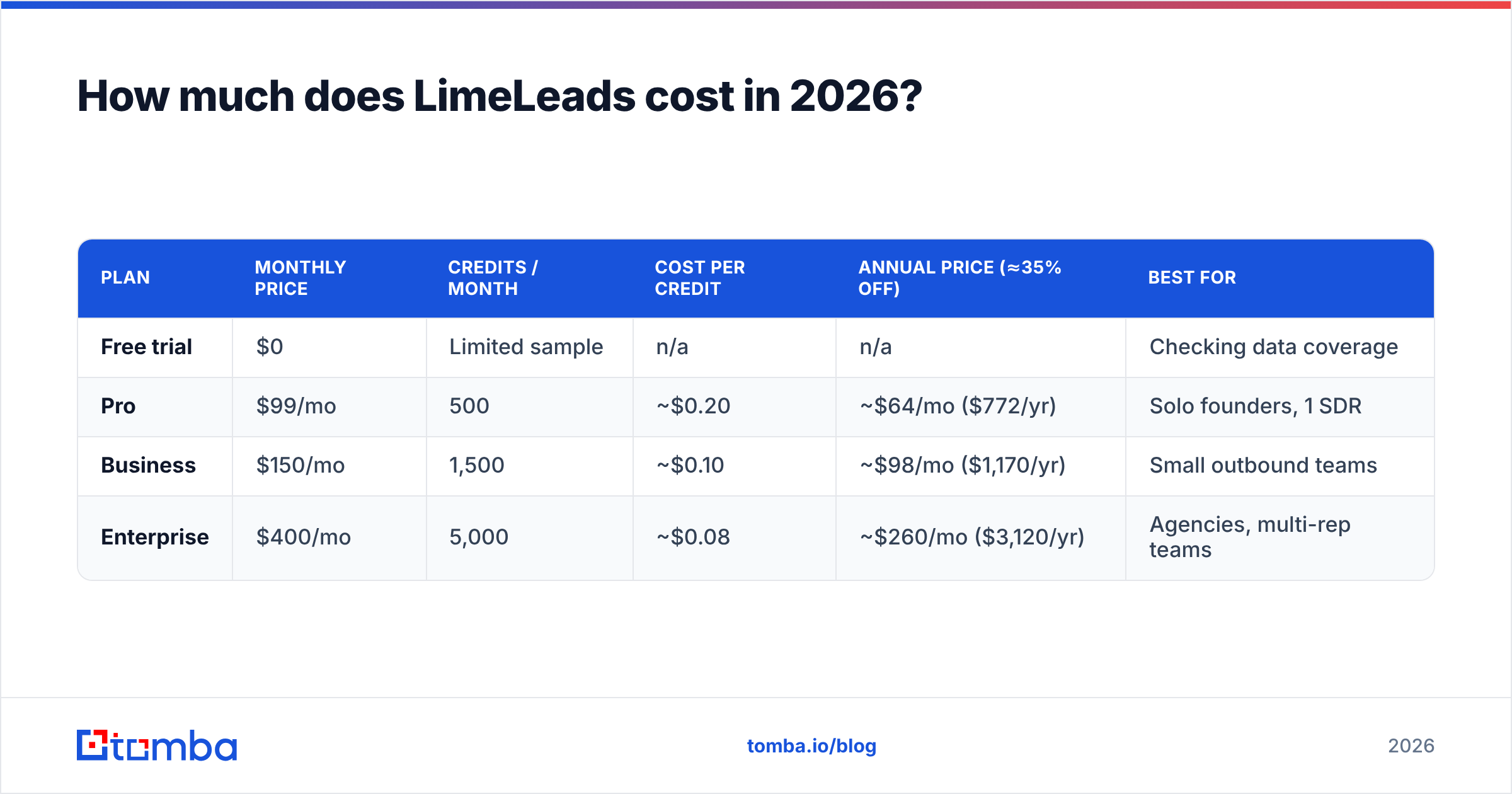
Here are the current published tiers. Prices are monthly, with annual prepayment knocking roughly 35% off:
| Plan | Monthly price | Credits / month | Cost per credit | Annual price (≈35% off) | Best for |
|---|---|---|---|---|---|
| Free trial | $0 | Limited sample | n/a | n/a | Checking data coverage |
| Pro | $99/mo | 500 | ~$0.20 | ~$64/mo ($772/yr) | Solo founders, 1 SDR |
| Business | $150/mo | 1,500 | ~$0.10 | ~$98/mo ($1,170/yr) | Small outbound teams |
| Enterprise | $400/mo | 5,000 | ~$0.08 | ~$260/mo ($3,120/yr) | Agencies, multi-rep teams |
Two things stand out.
First, Business is the plan that makes the pricing work. For $51 more a month than Pro you get three times the credits, and your per-contact cost falls by half. If you think you'll export more than about 400 contacts a month, Pro is almost never the right pick.
Second, going from Business to Enterprise saves less than you'd expect. Per-credit cost only drops from ~$0.10 to ~$0.08. Enterprise makes sense if you actually use 5,000 contacts a month, not because it looks more professional.
Vendors change pricing often, so check the live numbers on LimeLeads' site before you commit to an annual contract.

What does one LimeLeads credit actually buy you?#
The sticker price per credit is only half the picture. Here's what shapes your real cost per usable lead:
- One credit = one exported contact. Browsing, filtering and previewing counts don't use credits. You only pay when you export, so you can size a segment before spending anything.
- Refunds on hard bounces. If a verified email hard-bounces, LimeLeads credits it back. Few databases do this, and it lowers your effective cost.
- Refunds on failed verification. Contacts whose emails fail real-time verification at export aren't charged. You won't pay for records you can't use.
- Shared credit pools on team accounts. Credits sit at the account level, so one heavy user can run the pool dry for everyone else. Plan your allocation.
- Monthly credits, no rollover by default. Like most subscription databases, unused credits don't carry into the next month. If your outbound is seasonal, you pay for idle months.
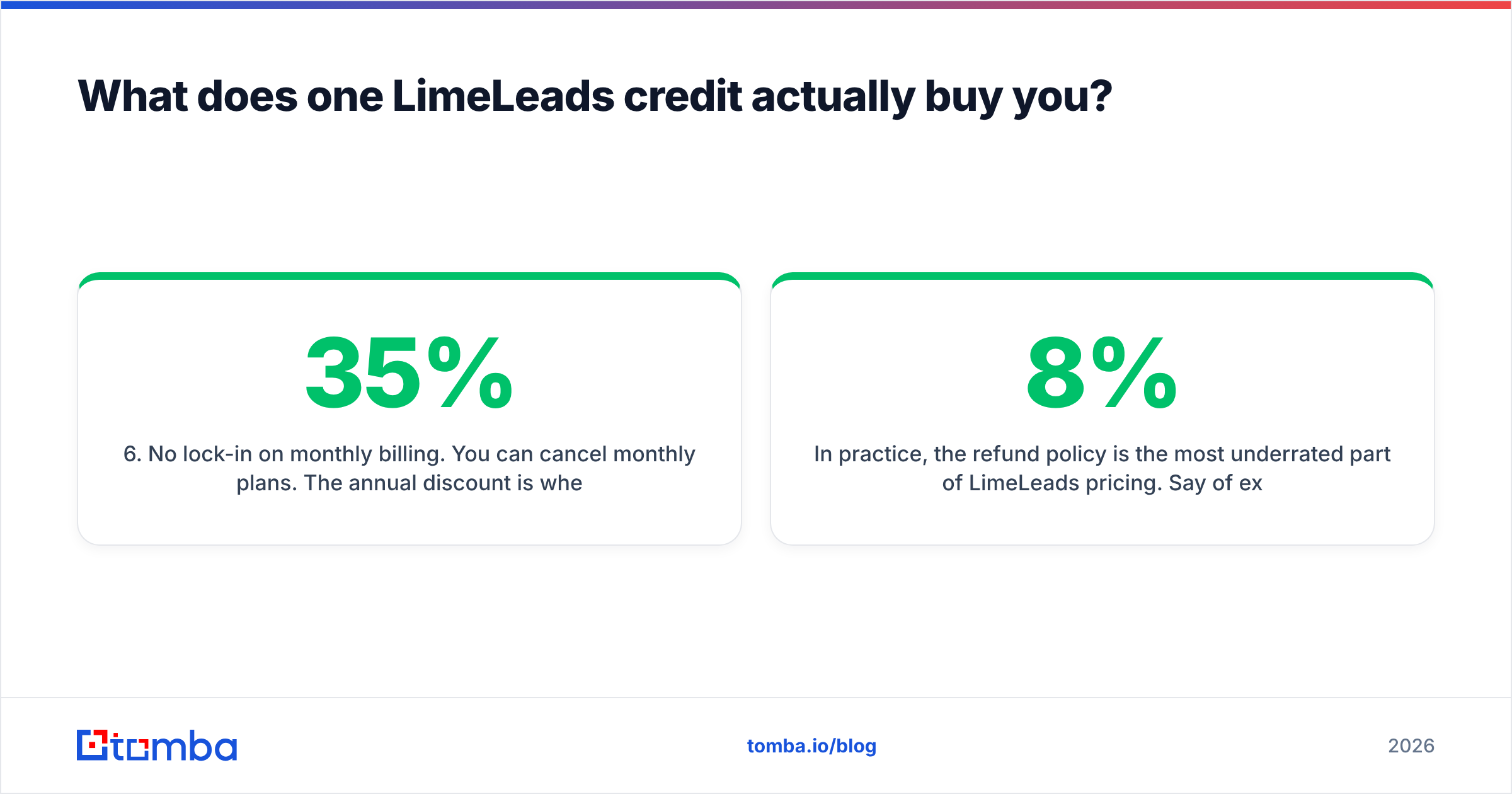
- No lock-in on monthly billing. You can cancel monthly plans. The 35% annual discount is where the commitment kicks in.
In practice, the refund policy is the most underrated part of LimeLeads pricing. Say 8% of exports would have bounced. A no-refund database at $0.10/contact really costs about $0.109 per deliverable contact. On LimeLeads, the listed $0.10 stays close to what you actually pay.
Are there hidden costs in LimeLeads pricing?#
"Hidden" is too strong, since LimeLeads is fairly transparent. But these costs don't appear on the pricing table:
- Unused credits. The most common one. If you buy Business and only export 700 contacts, you paid ~$0.21 per contact, the same as Pro.
- Missing phone numbers and deep enrichment. LimeLeads is mainly an email-plus-firmographics database. If your team cold calls, expect to add a phone data source.
- Coverage outside North America. If you sell into DACH, the Nordics or APAC, filters can return thin results. You may pay for a subscription you can only partly use.
- Re-verification before sending. Verification happens at export. If you sit on a list for 60–90 days, some of those emails will decay. Running the list through an email verifier before a campaign is cheap insurance and protects your sender domain.
- CRM sync. CSV and Excel exports are standard. If you want contacts flowing straight into HubSpot or Salesforce with dedupe rules, budget time for that workflow or a separate integration tool.
None of these break the deal. They're just the gap between "$99/month" and your actual monthly spend.
Is LimeLeads worth it?#
Yes, if your workflow is "build a filtered list of SMB contacts and email them." It's much less compelling if your workflow is "I have 300 target accounts and need the right person at each."
LimeLeads is a good buy when:
- You prospect US and Canadian SMBs by industry, headcount and title
- You need a few thousand fresh contacts a month on a steady schedule
- You care about bounce rate and want the refund safety net
- You don't want the complexity or seat pricing of an all-in-one platform like Apollo or ZoomInfo
LimeLeads is a poor fit when:
- You run account-based outbound against a named account list
- You need strong international coverage
- Your volume is irregular, so fixed monthly credits go unused
- You need direct dials as much as emails
User reviews on G2 and Capterra follow the same split. People praise data accuracy and the refund policy, and point to limited coverage outside the US and a smaller feature set than bigger platforms. The review count is also fairly low, so run a meaningful trial before paying for a year.
How does LimeLeads pricing compare to alternatives?#
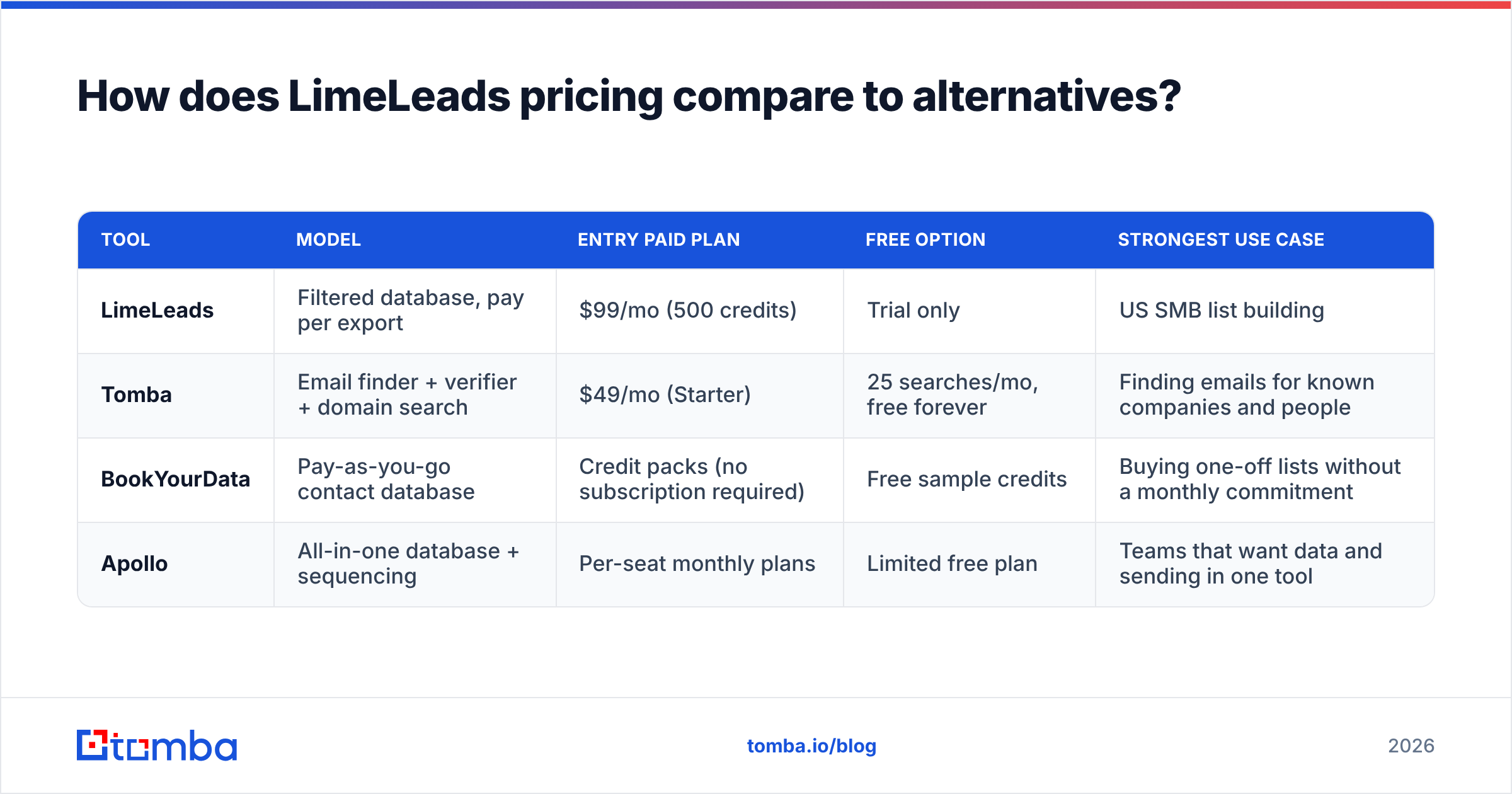
LimeLeads competes with two kinds of tools. One is contact databases, where you filter and export lists. The other is email finders, where you look up emails by domain or by person. Here's how the pricing models compare at a high level:
| Tool | Model | Entry paid plan | Free option | Strongest use case |
|---|---|---|---|---|
| LimeLeads | Filtered database, pay per export | $99/mo (500 credits) | Trial only | US SMB list building |
| Tomba | Email finder + verifier + domain search | $49/mo (Starter) | 25 searches/mo, free forever | Finding emails for known companies and people |
| BookYourData | Pay-as-you-go contact database | Credit packs (no subscription required) | Free sample credits | Buying one-off lists without a monthly commitment |
| Apollo | All-in-one database + sequencing | Per-seat monthly plans | Limited free plan | Teams that want data and sending in one tool |
A few honest observations:
- BookYourData is the closest match to LimeLeads' "filter and export" approach. Because you buy credits rather than a subscription, it can be cheaper for teams whose volume goes up and down. If unused monthly credits are what bothers you about LimeLeads, look here.
- Apollo gives you more per dollar in raw record count, but you're paying for a sequencing platform too. If you already have Instantly, Lemlist or Outreach, much of that value is duplicated. There's a longer breakdown in our Apollo alternative comparison.
- Tomba solves a different problem. You don't browse a database by criteria. You enter a company domain or a person's name and company, and you get their professional email with a confidence score and sources. For account-based outbound, where you already know the targets, a domain search gives you every public email at an account in one query. That's often more useful than a title-filtered export.
The Starter plan's price gap is real, $49 versus $99. But the models aren't interchangeable. Choose based on whether your bottleneck is finding who to target (database) or reaching people you've already picked (finder). See Tomba pricing for current search allowances per tier.

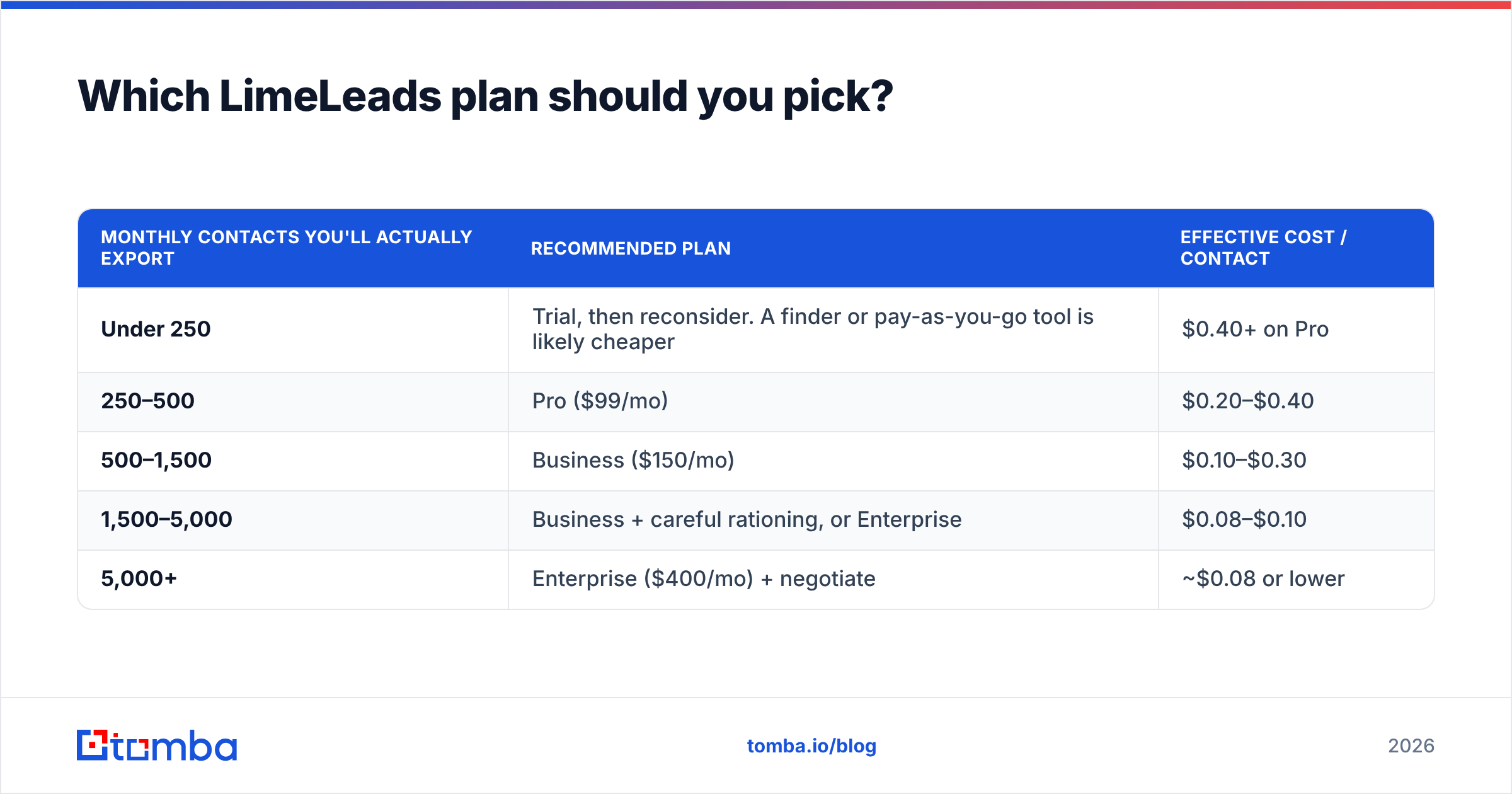
Which LimeLeads plan should you pick?#
Use your actual monthly export volume, not the volume you hope for:
| Monthly contacts you'll actually export | Recommended plan | Effective cost / contact |
|---|---|---|
| Under 250 | Trial, then reconsider. A finder or pay-as-you-go tool is likely cheaper | $0.40+ on Pro |
| 250–500 | Pro ($99/mo) | $0.20–$0.40 |
| 500–1,500 | Business ($150/mo) | $0.10–$0.30 |
| 1,500–5,000 | Business + careful rationing, or Enterprise | $0.08–$0.10 |
| 5,000+ | Enterprise ($400/mo) + negotiate | ~$0.08 or lower |
Two practical tips:
- Run three months on monthly billing first. Track real exports. Only switch to annual (and the 35% discount) once you know your volume is steady.
- Size the segment before you subscribe. Use the trial to check how many records your core ICP filter returns. If your total addressable list is 2,000 contacts, a year of Business gives you 18,000 credits you'll never use.
How do you get more out of whichever tool you choose?#
Wherever your contacts come from, the same habits protect both your budget and your deliverability:
- Verify right before sending, not only at export. B2B email data decays steadily as people change jobs. A list pulled in January isn't the same list in April.
- Deduplicate across sources. If you combine LimeLeads exports with other data, dedupe before importing into your CRM so you don't email the same person twice.
- Use the right tool for each job. Filtered databases are good for net-new discovery. A dedicated email finder is better for filling gaps, such as the decision-maker the database missed, or a contact at a company too small to be well covered.
- Watch your bounce rate per source. If one source consistently bounces above 3–5%, you're overpaying for it, whatever the per-credit price says.
Bottom line#
LimeLeads pricing is simple and fairly priced for what it does: $99, $150 or $400 a month for 500, 1,500 or 5,000 verified exports, with refunds on bounces. The Business plan is the sweet spot. Pro is expensive per contact, and Enterprise only pays off at real scale. It's a solid choice for teams building US SMB lists on a regular schedule, and a less efficient one for account-based outbound, international prospecting, or irregular volume.
If you already know which companies you want to reach and just need the right email addresses, you don't need a $99/month database subscription. Tomba Email Finder finds professional emails by domain, name or company, verifies them, and starts with a free-forever tier of 25 searches a month. Paid plans start at $49/mo when you need more. Try it on your next target account list and compare the cost per usable contact with what you're paying now.
Related guides#
// get started
Find, verify and enrich your first contacts today
Start on the free plan with 25 searches a month, then scale when your team is ready.
Free plan · No credit card required · GDPR & CCPA
// about the author