LimeLeads Pros and Cons: An Honest 2026 Review for B2B Teams
LimeLeads makes US B2B list building simple and lets unused credits roll over. It also starts at $99/mo, has limited coverage outside North America, and has few reviews. Here is where it fits and where it doesn't.
TL;DR
- LimeLeads is a simple B2B contact database. You filter by industry, location, company size and job title, then spend credits to unlock contacts. It works best for US-focused SMB outbound.
- Biggest pros: the filters are clean and quick to learn, unused credits roll over, and emails are checked when you unlock them. Reviewers also say the list quality is good for the price.
- Biggest cons: paid plans start at $99/mo, coverage is thin outside North America, it has very few independent reviews, and it had a widely reported data exposure incident in 2020.
- Buy it if you mostly build US lists by filter and want credits that don't expire. Skip it if you already know which companies you're targeting and just need verified emails. A domain-based email finder is cheaper for that.
- Before you sign up for any plan, check the per-credit cost at the volume you actually use. The gap between tiers is large.
What is LimeLeads?#
LimeLeads is a B2B lead database built for small sales teams, agencies and founders who run their own outbound. It isn't a full sales engagement suite or an intent-data platform. The workflow has three steps:
- Filter companies and contacts by industry, headcount, location, revenue band and job title.
- Preview the matching records, with contact details hidden.
- Unlock the contacts you want. Each unlock costs one credit. Then you export to CSV or push the list into your outreach tool.
Think of it like a wholesale warehouse, not a personal shopper. You walk the aisles (filters), fill your cart (preview), and pay per item at checkout (unlock). That's efficient if you know which aisle you need. It's wasteful if you only came for five specific items and had to buy a membership to get in.
That framing sets up the real question behind LimeLeads' pros and cons: does your team discover prospects by filter, or does it already have a target account list and just need to find the right emails? LimeLeads is built for the first job.
You can see the vendor's current feature set on the official LimeLeads site.
How much does LimeLeads cost in 2026?#
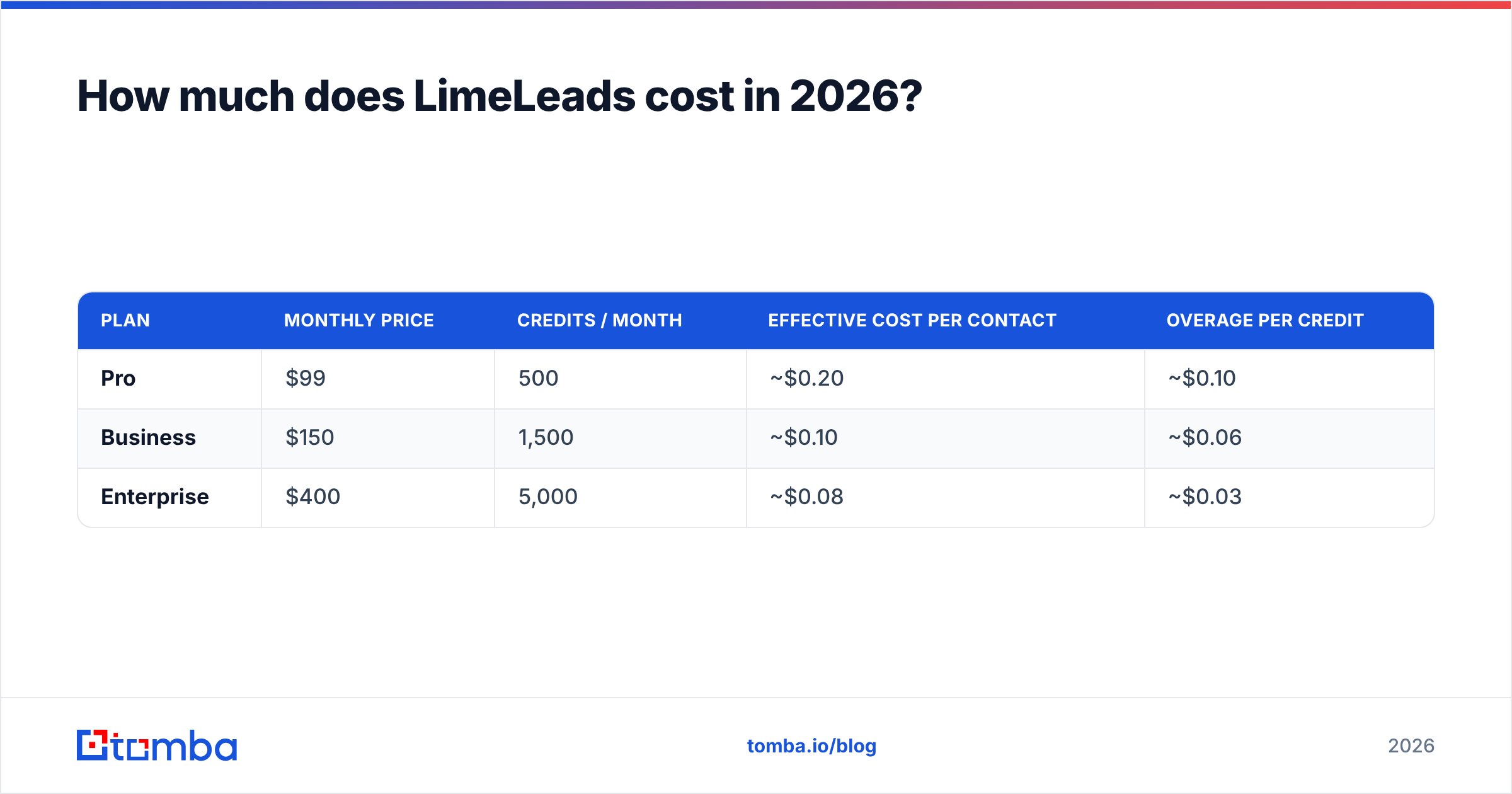
At the time of writing, third-party pricing trackers list three self-serve tiers, with about 35% off for annual billing. Check the vendor's pricing page before you buy, because B2B data vendors change plans often.
| Plan | Monthly price | Credits / month | Effective cost per contact | Overage per credit |
|---|---|---|---|---|
| Pro | $99 | 500 | ~$0.20 | ~$0.10 |
| Business | $150 | 1,500 | ~$0.10 | ~$0.06 |
| Enterprise | $400 | 5,000 | ~$0.08 | ~$0.03 |
Two details matter more than the sticker prices:
- Credits roll over. Most competitors reset your balance every month. With LimeLeads, a slow month doesn't burn your budget. That's an honest, material advantage.
- The Pro tier is the expensive one. At about $0.20 per contact, the entry plan costs twice as much per unlock as Business. If you'll use more than about 750 contacts a month, jumping to Business is cheaper per contact, even though the invoice is bigger.
The Capterra listing for LimeLeads tracks plan changes and alternatives if you want a second source on pricing.
What are the main LimeLeads pros?#
Here are the strengths that come up repeatedly in reviews and in hands-on use:
- Low learning curve. The filter UI is plain and fast. A new SDR can build a usable list in the first session without training. G2 reviewers specifically mention the clear UI and how easy it is to create a list and pull leads.
- Granular targeting for US SMB lists. Industry, employee count, state/city and title filters stack cleanly. That makes "HVAC companies in Texas with 10–50 employees, owner or GM" a two-minute job.
- Credits don't expire. Rollover credits suit seasonal teams, agencies with lumpy client demand, and founders who prospect in bursts.
- Emails are checked when you unlock them. LimeLeads validates contacts as you unlock them rather than handing you a stale dump. You still should re-verify before a big send, but fewer obvious bounces make it through.
- Good value per lead at mid volume. One G2 reviewer said the lists were comparable to sources costing "4–5 times more." At the Business tier, around $0.10 per contact is competitive for a filter-first database.
- No annual lock-in required. Monthly billing lets you test the data on your own ICP before you commit.

What are the main LimeLeads cons?#
The weaknesses are just as consistent:
- $99 entry price. There is no low-cost plan for someone who needs 50 verified contacts a month. Solo founders and early-stage teams pay the highest per-contact rate on the ladder.
- Thin international coverage. Reviewers flag low data availability in Southeast Asia, the Middle East/Africa and Latin America. If your ICP is in EMEA or APAC, run a sample search before you pay.
- Very few independent reviews. At the time of writing, the G2 profile for LimeLeads has too few reviews for G2 to generate buying insights. That doesn't mean the product is bad. It means you're buying with less social proof than you'd get from larger vendors, so your own trial carries more weight.
- Email accuracy isn't best-in-class. Some users ask for better email accuracy. Unlock-time checks help, but they don't replace a dedicated verification pass. That matters most on catch-all domains, where an SMTP check can't confirm the mailbox exists.
- 2020 data exposure incident. In early 2020, security researchers reported that an unsecured LimeLeads server exposed roughly 49 million records. The company fixed it. For most buyers it's history, but if your security or procurement team runs vendor reviews, expect questions.
- Database only. There are no sequences, no CRM and no intent signals. You'll need a separate sending tool, and probably a separate verifier.
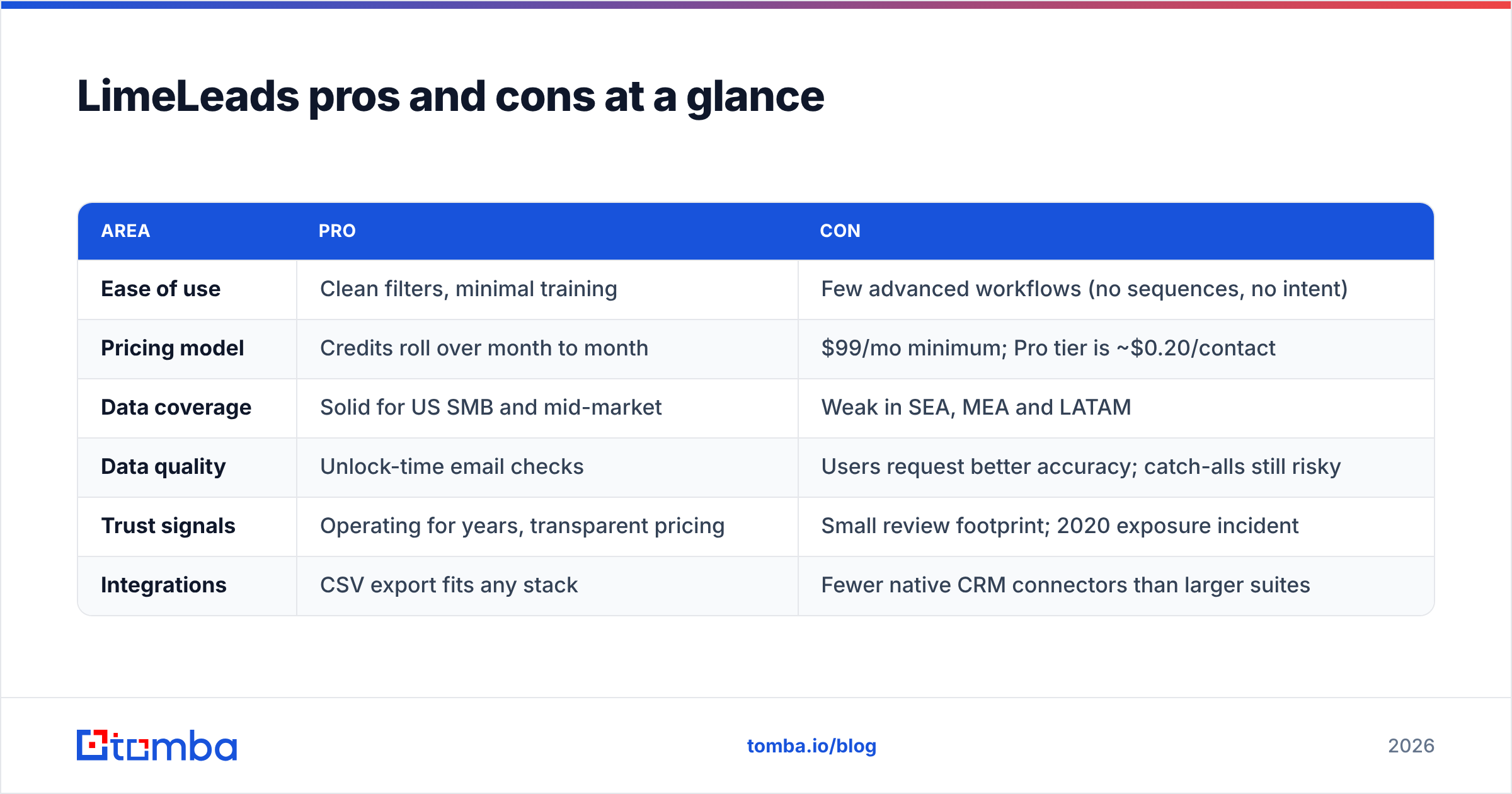
LimeLeads pros and cons at a glance#
| Area | Pro | Con |
|---|---|---|
| Ease of use | Clean filters, minimal training | Few advanced workflows (no sequences, no intent) |
| Pricing model | Credits roll over month to month | $99/mo minimum; Pro tier is ~$0.20/contact |
| Data coverage | Solid for US SMB and mid-market | Weak in SEA, MEA and LATAM |
| Data quality | Unlock-time email checks | Users request better accuracy; catch-alls still risky |
| Trust signals | Operating for years, transparent pricing | Small review footprint; 2020 exposure incident |
| Integrations | CSV export fits any stack | Fewer native CRM connectors than larger suites |
Who should use LimeLeads, and who shouldn't?#
LimeLeads isn't good or bad in general. It fits some teams and not others.
Good fit:
- US-focused agencies building lists for several clients. Rollover credits smooth out uneven demand.
- SMB-targeting sales teams who prospect by vertical and geography, not by named account.
- Teams at 750–5,000 contacts a month who can land in the Business or Enterprise tier, where the per-contact math is attractive.
Poor fit:
- ABM and named-account teams. If you already have a list of 200 target domains, a filter database adds cost without adding much. You need to find the right people at those companies, not discover new ones.
- International sellers. Test coverage first. If a sample search in your core region comes back thin, you'll pay for records you can't use.
- Very low volume users. If you need fewer than 100 contacts a month, $99 buys you expensive unlocks.
- Security-sensitive buyers with strict vendor-risk processes. Budget time for the review.
How does LimeLeads compare with an email-finder approach?#
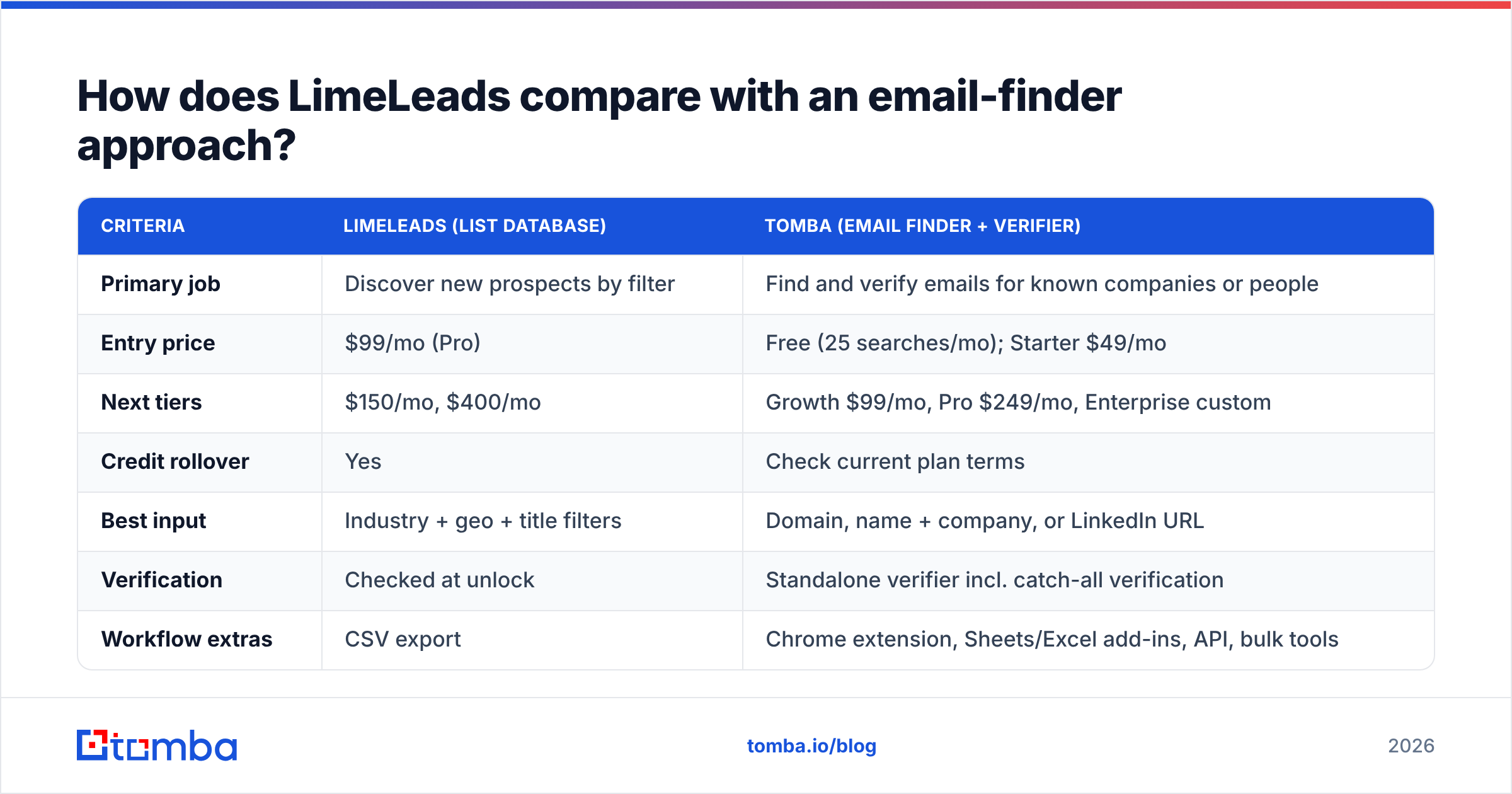
This is the decision most buyers are actually making. You can buy a list from a database (LimeLeads, BookYourData, Apollo, ZoomInfo), or you can find emails for accounts you already chose using a domain- or name-based finder. Both are valid. They answer different questions.
| Criteria | LimeLeads (list database) | Tomba (email finder + verifier) |
|---|---|---|
| Primary job | Discover new prospects by filter | Find and verify emails for known companies or people |
| Entry price | $99/mo (Pro) | Free (25 searches/mo); Starter $49/mo |
| Next tiers | $150/mo, $400/mo | Growth $99/mo, Pro $249/mo, Enterprise custom |
| Credit rollover | Yes | Check current plan terms |
| Best input | Industry + geo + title filters | Domain, name + company, or LinkedIn URL |
| Verification | Checked at unlock | Standalone verifier incl. catch-all verification |
| Workflow extras | CSV export | Chrome extension, Sheets/Excel add-ins, API, bulk tools |
| Geographic focus | Strongest in North America | Domain-based, so works wherever the company has a website |
Many teams end up using both kinds of tool. They build a rough list in a database, then run it through a dedicated email verifier before sending. Or they skip the database entirely and use domain search to pull every public contact at their named target accounts.
If you're also evaluating other databases, BookYourData takes a similar pay-per-record approach with its own coverage profile. It's worth putting it in the same side-by-side trial as LimeLeads so you compare on your ICP, not on marketing pages.

How do you test LimeLeads before committing?#
Don't judge any B2B database from its demo account. Run this five-step test on your own ICP:
- Pick 50 companies you already know well, such as current customers or closed-lost deals, where you have ground-truth contacts.
- Search for them in LimeLeads and count how many exist, and how many have the decision-maker title you need.
- Unlock 50 contacts and run them through an independent verifier. Record valid, invalid, catch-all and unknown rates separately.
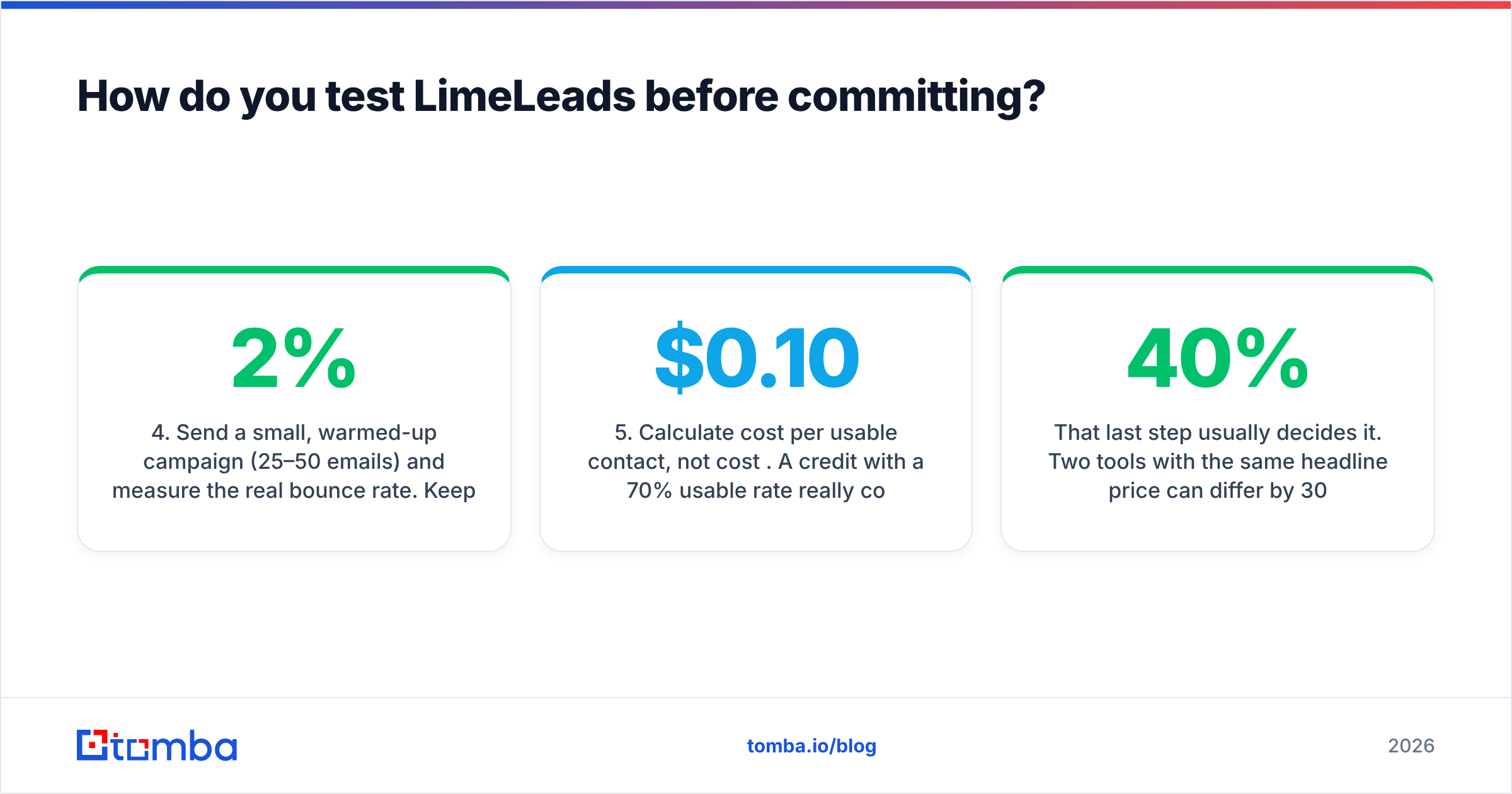
- Send a small, warmed-up campaign (25–50 emails) and measure the real bounce rate. Keep it under about 2% to protect your sender reputation.
- Calculate cost per usable contact, not cost per credit. A $0.10 credit with a 70% usable rate really costs $0.14.
That last step usually decides it. Two tools with the same headline price can differ by 30–40% on what you actually pay per usable contact once you account for bad data.
What are the best alternatives if LimeLeads isn't a fit?#
It depends on which con ruled LimeLeads out:
- Too expensive at low volume: use a finder with a free tier and a sub-$50 entry plan. Tomba's free plan covers 25 searches a month, and Starter is $49/mo. See the full Tomba pricing.
- Need international coverage: domain-based finding doesn't depend on a country-specific database, because it starts from the company's own web presence.
- Need sequences built in: look at all-in-one platforms. See our breakdown of Apollo.io alternatives for the trade-offs.
- Need verification you can trust: keep a dedicated verifier in the stack no matter which database you use.
Is LimeLeads worth it in 2026?#
Yes, if you prospect US SMBs by vertical and geography, you'll use at least 750 contacts a month, and you value credits that don't expire. At the Business tier, it's a fair-priced, low-friction list builder.
No, if you work from a named account list, sell mostly outside North America, or need fewer than about 100 contacts a month. In those cases you pay premium per-contact rates for discovery features you won't use.
Either way, run the 50-company test above before you buy. The data on your own ICP matters more than any review, including this one.
If your team already knows which companies it wants to reach, a finder is usually cheaper and more precise than a database. Tomba Email Finder returns professional emails from a domain, a name plus company, or a LinkedIn profile, and pairs with built-in verification to keep bounces low. You can start on the free plan with 25 searches a month and see how many usable contacts you get for your own target accounts before you spend anything.
Related guides#
// get started
Find, verify and enrich your first contacts today
Start on the free plan with 25 searches a month, then scale when your team is ready.
Free plan · No credit card required · GDPR & CCPA
// about the author