LimeLeads Reviews 2026: Pricing, Data Quality and Honest Verdict
LimeLeads has almost no public reviews, so buyers have to judge it on its pricing, how its credits work and its US-only data. Here is what the $99 plan actually gets you, and when another tool is the better buy.
TL;DR
- LimeLeads is a lead database focused on US B2B contacts. You filter by title, industry, company size, revenue, technology and location, preview the results, then spend credits to unlock and export contacts.
- Pricing starts at $99/mo for 500 credits (about $0.198 per contact). The per-contact cost falls to about $0.10 on Business ($150/mo) and $0.08 on Enterprise ($400/mo).
- Credits roll over and you pay no per-seat fees. Those are real advantages. Seat caps still apply: 1 seat on Pro, 2 on Business, 5 on Enterprise.
- There are very few public LimeLeads reviews. At the time of writing, G2 and Capterra each show roughly one review, so there's little social proof to lean on.
- LimeLeads fits US-only list building. If you need global coverage, finding emails by domain, or verification on a lower budget, look at alternatives.
What is LimeLeads?#
LimeLeads is a self-serve B2B prospecting database. Think of it as a searchable phone book of US companies and their employees. You pay only for the entries you actually open.
The workflow is simple:
- Build a search with filters: job title, seniority, industry, headcount, revenue, location and technologies used.
- Preview the matching records before any credits are spent.
- Unlock the contacts you want. One credit unlocks one contact.
- Export to CSV and load the list into your CRM or sequencing tool.
According to the LimeLeads homepage, contact data is checked in real time, and the company advertises "99% email data accuracy." Treat that as a vendor claim, not an independent benchmark. The database also includes direct dials and mobile numbers for some records, which helps if your team mixes email with calls.
LimeLeads sells a list-building tool. It isn't a sequencer, a dialer or a full sales-intelligence suite. That narrow scope helps if you want a clean way to pull a US lead list. It limits you if you expect intent data, sequences or a Chrome extension workflow like the one in bigger platforms.
What do LimeLeads reviews actually say?#
The short answer: not much, because very few people have written any.
At the time of writing, LimeLeads has one review on G2 with a 4.0/5 rating. G2 says there isn't enough data to generate buyer insights. On Capterra it shows 5.0/5 from a single reviewer. Two data points can't tell you how the tool performs at scale.
Here is what those reviews and third-party writeups consistently mention:
- Ease of use gets praise. The filter-then-preview flow is easy to understand, and new users don't need training.
- Pricing and coverage get pushback. The G2 reviewer raised concerns about price and thin data outside the US.
- Some commentary questions data quality. A few third-party roundups say email accuracy doesn't always match the 99% claim. That complaint is common for every database vendor, but you should check it yourself.
In practice, you can't lean on crowd sentiment to decide on LimeLeads. You have to run your own test: pull a sample, verify it and send to it. There's a checklist for that below.
How much does LimeLeads cost in 2026?#
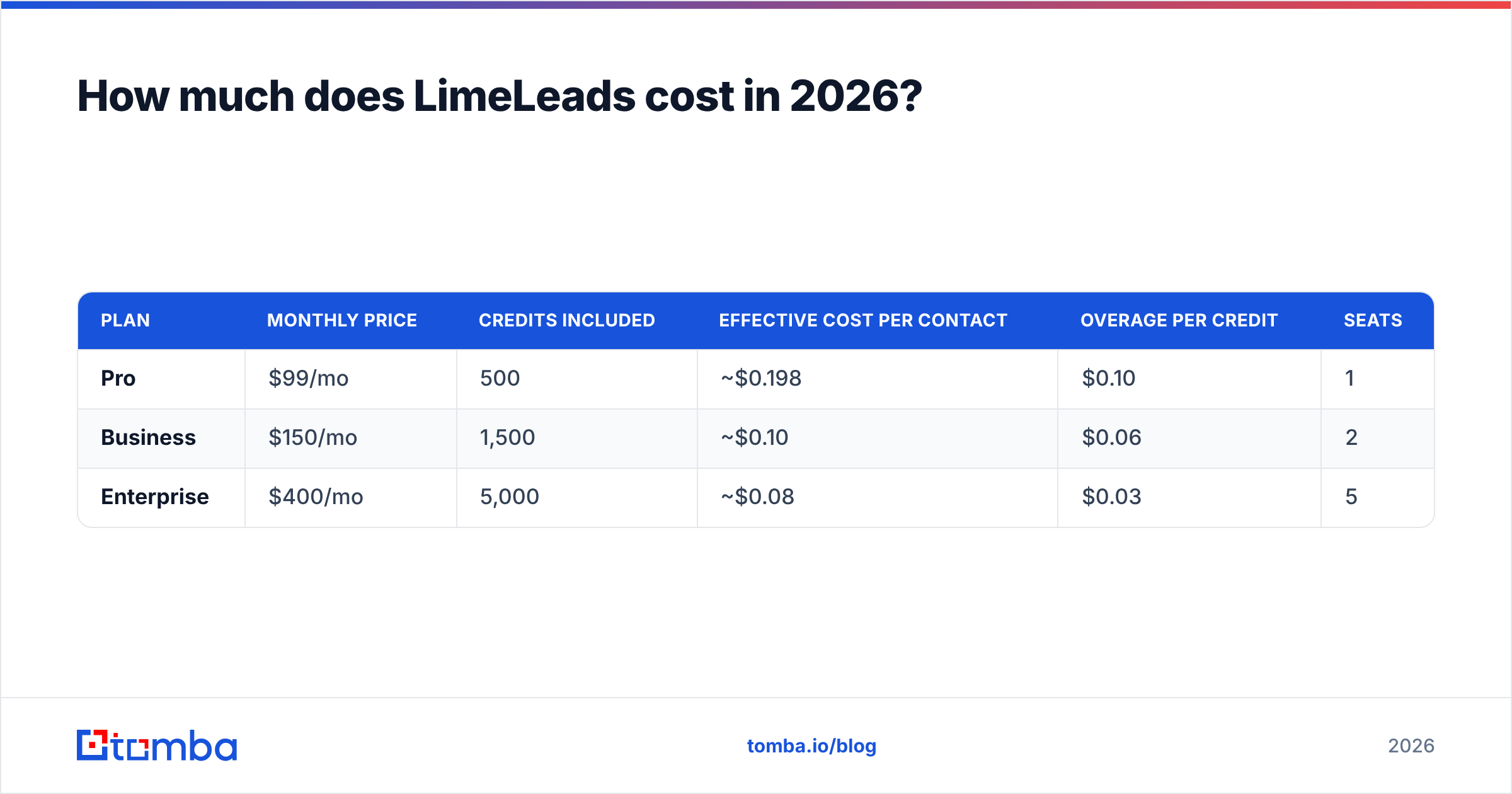
LimeLeads uses monthly plans that include credits. One credit unlocks one contact.
| Plan | Monthly price | Credits included | Effective cost per contact | Overage per credit | Seats |
|---|---|---|---|---|---|
| Pro | $99/mo | 500 | ~$0.198 | $0.10 | 1 |
| Business | $150/mo | 1,500 | ~$0.10 | $0.06 | 2 |
| Enterprise | $400/mo | 5,000 | ~$0.08 | $0.03 | 5 |
A few details matter more than the headline prices:
- Unused credits roll over. Many competitors reset credits every month. LimeLeads doesn't, so a slow month doesn't waste money.
- Annual billing saves about 35% compared with paying monthly. That's a big discount, but only take it after a month of testing.
- Overage pricing is odd. On Pro, extra credits cost $0.10, about half the effective per-contact price of the plan itself. If you regularly need more than 500 contacts, compare the price of Pro plus overages against moving up to Business.
- Free trial availability is unclear. Some directories list a free trial and others say there isn't one. Check the current offer on the LimeLeads site before you plan an evaluation around it.

The Pro plan's $0.198 per contact catches people off guard. $99/mo sounds cheap until you divide it by 500. For a solo founder pulling 300 targeted leads a month, it's fine. For an SDR team that burns through thousands of contacts, the Business or Enterprise tier is the only setup where the numbers work.
What does LimeLeads do well?#
1. The preview-before-you-pay flow. You see who matches your filters before spending anything. That prevents the common mistake of unlocking 200 contacts and finding half of them are the wrong seniority.
2. Credit rollover. Outbound volume is uneven. You might run a big campaign one month and spend the next one on follow-ups. Rollover means you don't lose credits during the quiet months.
3. No per-seat pricing on top of the plan. A shared team account removes the "$X per user per month" cost that makes larger platforms expensive for small teams. The seat caps still apply, though.
4. Phone data included. Direct dials and mobiles come with the same unlock. You don't need a separate dialer-data vendor for a basic call-plus-email motion.
5. Low learning curve. The interface is a filter panel and a results table, so there's very little to learn.
Where does LimeLeads fall short?#
US-only coverage. This is the biggest limit. If your ICP includes the UK, DACH, APAC or LatAm, LimeLeads won't cover it, and you'll need a second tool anyway.
Few independent reviews. One or two public reviews isn't enough to judge data freshness, bounce rates or support quality. You carry more risk as a buyer.
Database-only workflow. LimeLeads works when you know the kind of person you want: a VP of Marketing at a 50–200 person SaaS company in Texas. It's weaker when you know the company (for example, "I need the right contact at acme.com") or the person ("Jane Doe at Acme, what's her email?"). Those jobs call for an email finder or domain search, not a filtered database.
No built-in verification layer to rely on. LimeLeads says emails are checked in real time. Even so, any database export should go through an independent email verifier before it reaches your sending domain. Records go stale every month as people change jobs.
Low entry value for small users. $99 for 500 contacts is steep compared with tools that offer a free tier or a lower starter plan.
How should you test LimeLeads before committing?#
Reviews are scarce, so run your own test. Use this five-step checklist in your first month:
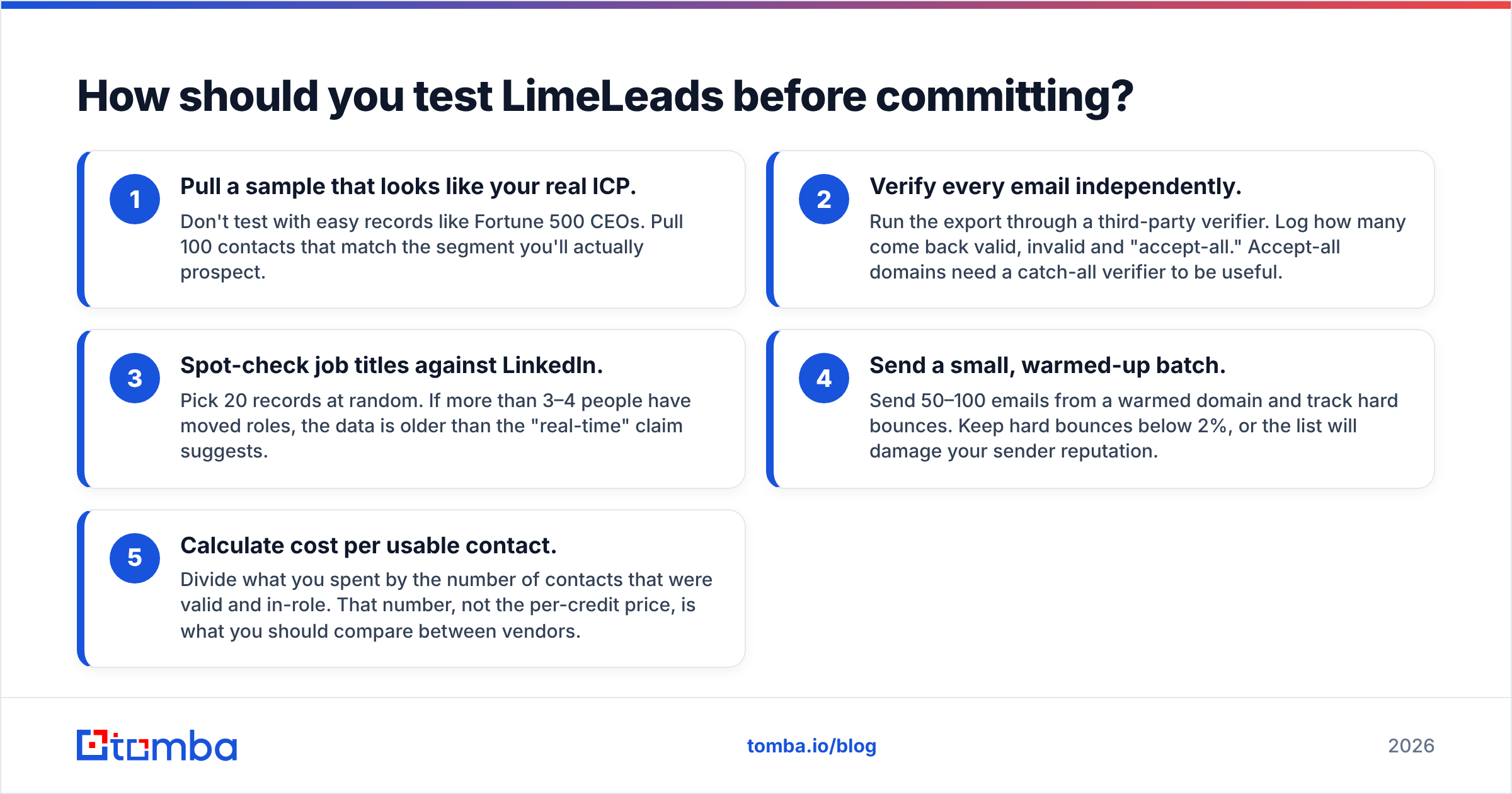
- Pull a sample that looks like your real ICP. Don't test with easy records like Fortune 500 CEOs. Pull 100 contacts that match the segment you'll actually prospect.
- Verify every email independently. Run the export through a third-party verifier. Log how many come back valid, invalid and "accept-all." Accept-all domains need a catch-all verifier to be useful.
- Spot-check job titles against LinkedIn. Pick 20 records at random. If more than 3–4 people have moved roles, the data is older than the "real-time" claim suggests.
- Send a small, warmed-up batch. Send 50–100 emails from a warmed domain and track hard bounces. Keep hard bounces below 2%, or the list will damage your sender reputation.
- Calculate cost per usable contact. Divide what you spent by the number of contacts that were valid and in-role. That number, not the per-credit price, is what you should compare between vendors.
If LimeLeads passes all five, it's a reasonable US list source. If it fails steps 2 or 3, rollover credits won't make up for it.
Is LimeLeads better than Tomba?#
They solve overlapping but different problems, so "better" depends on the job.
LimeLeads works from filters to a list: describe your ideal buyer and get back matching people. Tomba works from company or person to a verified email: start with a domain, name or company and find the right address, then verify it. Tomba also has a B2B database for prospecting, but its core product is finding and verifying email addresses.
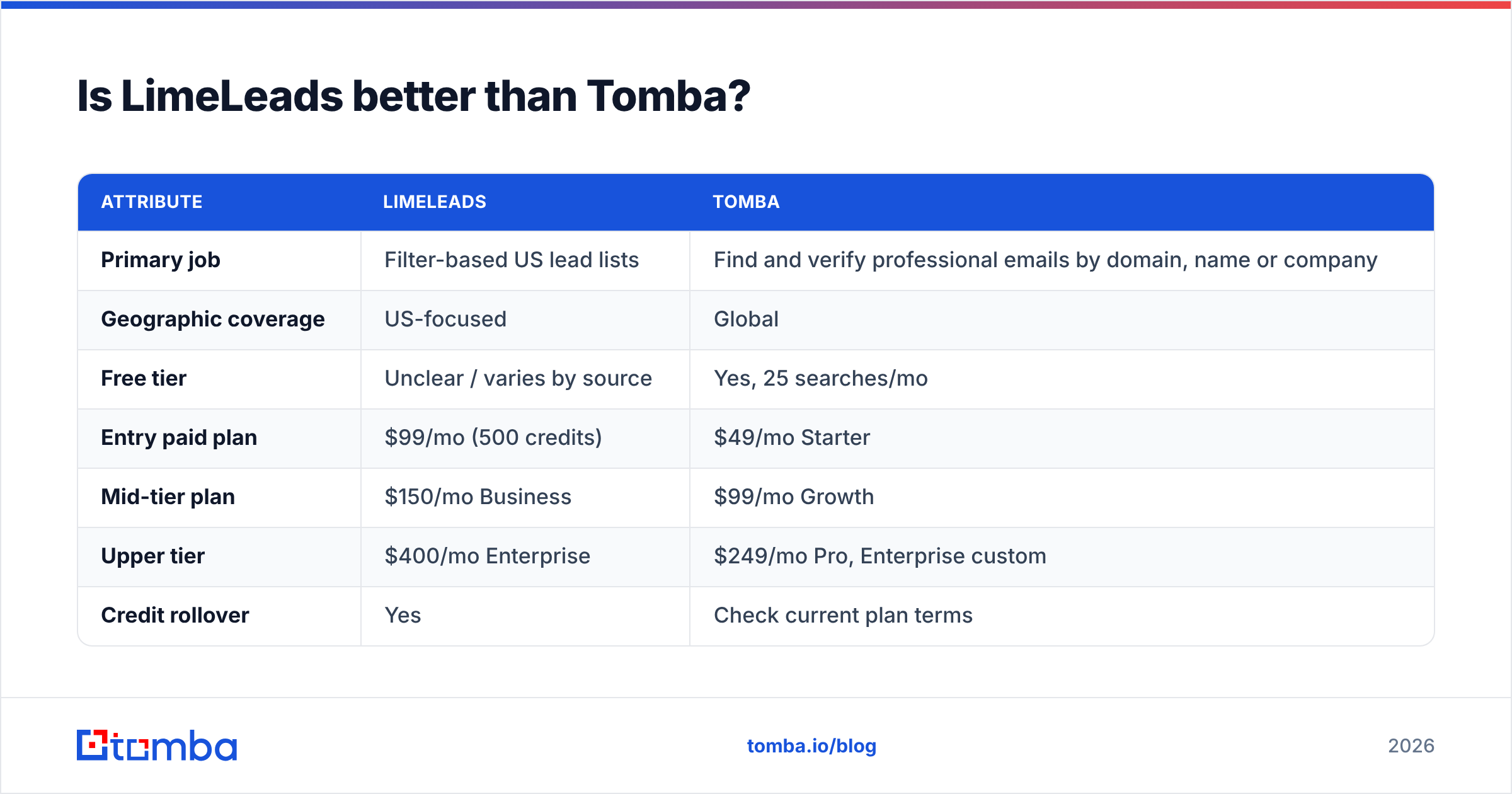
| Attribute | LimeLeads | Tomba |
|---|---|---|
| Primary job | Filter-based US lead lists | Find and verify professional emails by domain, name or company |
| Geographic coverage | US-focused | Global |
| Free tier | Unclear / varies by source | Yes, 25 searches/mo |
| Entry paid plan | $99/mo (500 credits) | $49/mo Starter |
| Mid-tier plan | $150/mo Business | $99/mo Growth |
| Upper tier | $400/mo Enterprise | $249/mo Pro, Enterprise custom |
| Credit rollover | Yes | Check current plan terms |
| Built-in email verification | Real-time check claimed | Dedicated email verifier and catch-all verifier |
| Phone data | Direct dials and mobiles | Phone finder and phone validator |
| Integrations / API | CSV export | API, CLI, Chrome extension, Sheets, CRM integrations |
| Best fit | US SMB-focused teams that want a quick list | Teams that already know which accounts to target and need accurate emails, anywhere |

Here's the honest takeaway. If your entire market is US companies and you mainly want to generate lists from filters, LimeLeads' preview flow and credit rollover are real advantages. If you do account-based outbound, where the target account list comes from your CRM, intent tool or a partner, you'll get more from an email finder that starts from the domain. It also works outside the US and costs less to start. Many teams run both: a database to find accounts and a finder plus verifier to get and clean the contacts.
Which LimeLeads alternatives are worth a look?#
What you should pick depends on why LimeLeads doesn't fit you:
- You need global coverage. Choose a tool with international data. This is the most common reason teams leave US-only databases.
- You already have target accounts. A domain-first email finder is faster and cheaper per usable contact than filtering a database for people you've already picked.
- You need a full sales platform. All-in-one tools that combine data, sequences and a dialer cost more but mean fewer tools to manage. See our Apollo alternative breakdown for how the trade-offs look.
- You mainly care about deliverability. Pair any data source with a separate verification step. No database stays clean on its own.
Before you move money, compare Tomba pricing against LimeLeads' cost per usable contact from your test, not the cost per credit.
Who should buy LimeLeads?#
Buy LimeLeads if:
- 100% of your ICP is in the United States.
- You build lists from filters rather than from a named-account list.
- Your volume varies from month to month and you'll actually benefit from credit rollover.
- A team of 1–5 people shares the account, and you want to avoid per-seat fees.
Skip LimeLeads if:
- You sell into more than one country.
- You mostly need the email address of a specific person at a specific company.
- You can't justify $99/mo before seeing proof. The small number of reviews means you're paying to be the proof.
- You need an API or native integrations to feed enrichment into your CRM automatically.
What's the final verdict on LimeLeads?#
LimeLeads is a focused, easy-to-use US lead database with fairer credit terms than most: rollover, no per-seat fees and cheaper overage rates. Its weaknesses are just as clear: US-only data, a $99 entry price that works out to nearly $0.20 per contact, and almost no public reviews to confirm the 99% accuracy claim.
If you're a US-focused team building lists from filters, it's worth a one-month test using the checklist above. If you work across regions or run account-based outbound, a domain-first email finder with built-in verification will usually cost less per usable contact.
Ready to test the alternative? Tomba Email Finder finds professional email addresses by domain, name or company, worldwide. You can verify the results in the same workflow, and the free tier (25 searches/mo) lets you check data quality before you pay. If your target list comes from accounts rather than filters, start there and compare your cost per usable contact with what LimeLeads delivers.
Related guides#
// get started
Find, verify and enrich your first contacts today
Start on the free plan with 25 searches a month, then scale when your team is ready.
Free plan · No credit card required · GDPR & CCPA
// about the author