LimeLeads vs RampedUp: Pricing, Data Quality and Best Fit in 2026
LimeLeads sells monthly credit bundles with rollover. RampedUp sells annual contracts with direct dials. Here is how they compare on price, data coverage and workflow, and which kind of team each one fits.
TL;DR
- LimeLeads is a filter-and-export B2B lead database. Paid plans start at $99/mo for 500 credits, and unused credits roll over. It suits small teams that build lists in batches.
- RampedUp is a contact-data platform built around a Chrome extension, with verified emails, direct dials and mobile numbers. Pricing has historically been sold as annual contracts starting in the low thousands of dollars per year.
- If you need phone numbers and LinkedIn-side prospecting, RampedUp is the better fit. If you need cheap, flexible monthly list building by industry and title, LimeLeads usually wins.
- Neither tool is a full email-finding and verification stack. If you mostly need to find and verify specific people's emails, a pay-as-you-go email finder is often cheaper than both.
- Pricing for both vendors changes often. Check the vendor pages before you sign anything. The figures below come from public listings as of 2026.
What are LimeLeads and RampedUp?#
Both tools sell B2B contact data, but they're designed around different workflows.
LimeLeads is a searchable B2B lead database. You filter by industry, job title, company size, location and similar fields, preview the matches, then spend credits to unlock and export contacts. Third-party listings put the database at 20M+ contacts and describe a refresh cycle of roughly every 90 days. Emails are re-verified in real time when you export. It connects natively to HubSpot, Salesforce and Zoho. Think of it as a list-building tool: you describe your ICP and it returns a CSV.
RampedUp is a sales-intelligence platform whose main entry point is a free Chrome extension. You browse a LinkedIn profile, a Sales Navigator search or a company website, and RampedUp surfaces the person's verified email, direct dial and sometimes a mobile number. It also offers a web app for list building and CRM enrichment. Think of it as a tool you use while you research: you find the person first, then ask it for their contact details.
The quickest analogy is a grocery store versus a delivery app. LimeLeads is the store, where you walk the aisles (filters) and fill a cart (export). RampedUp is the delivery app, where you already know what you want and it brings the one item to you.
How do LimeLeads and RampedUp compare side by side?#
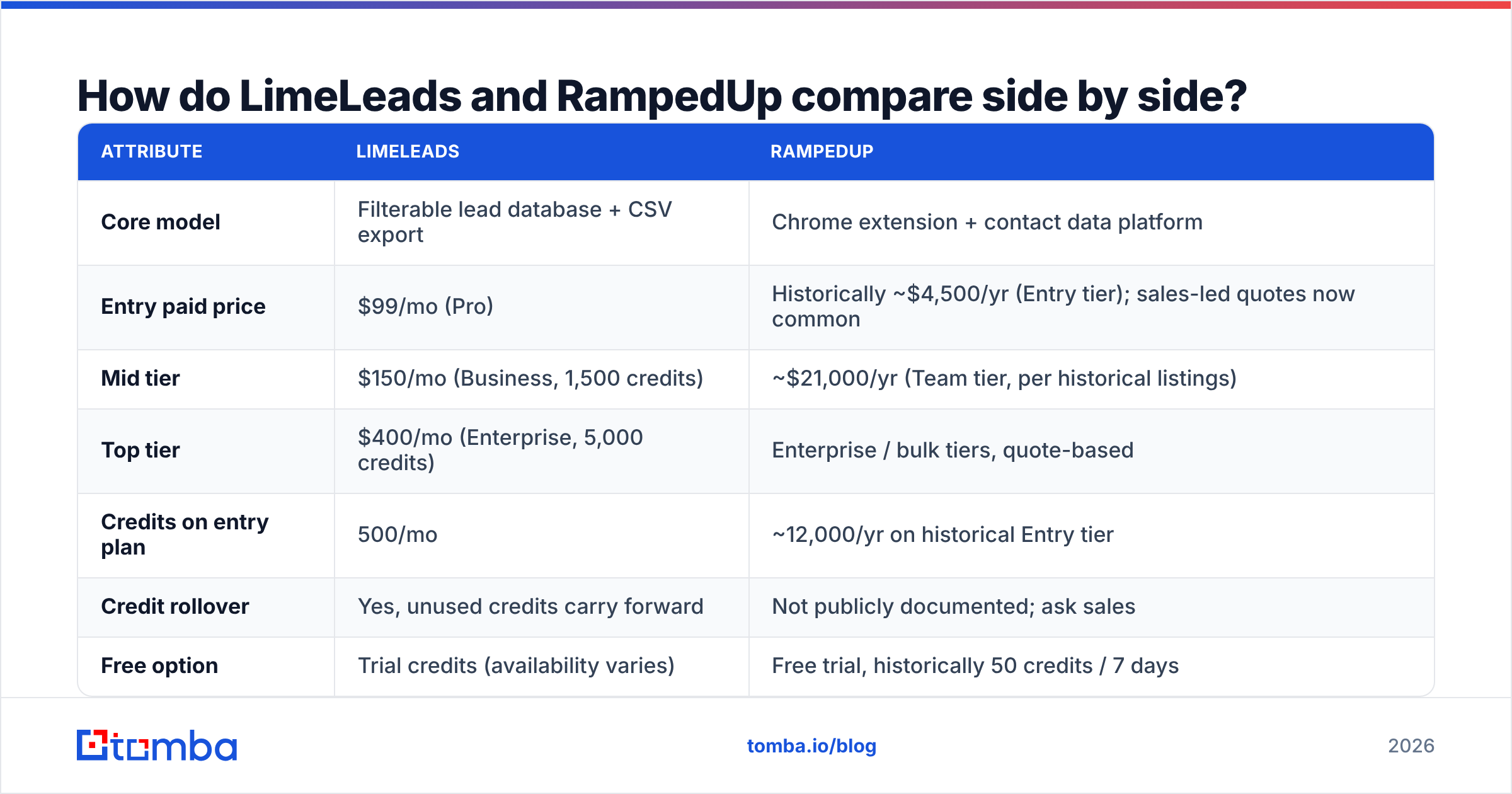
This table uses publicly listed information from vendor pages, Capterra's LimeLeads listing and G2's RampedUp comparison data. Where a vendor doesn't publish a number, the table says so.
| Attribute | LimeLeads | RampedUp |
|---|---|---|
| Core model | Filterable lead database + CSV export | Chrome extension + contact data platform |
| Entry paid price | $99/mo (Pro) | Historically ~$4,500/yr (Entry tier); sales-led quotes now common |
| Mid tier | $150/mo (Business, 1,500 credits) | ~$21,000/yr (Team tier, per historical listings) |
| Top tier | $400/mo (Enterprise, 5,000 credits) | Enterprise / bulk tiers, quote-based |
| Credits on entry plan | 500/mo | ~12,000/yr on historical Entry tier |
| Credit rollover | Yes, unused credits carry forward | Not publicly documented; ask sales |
| Free option | Trial credits (availability varies) | Free trial, historically 50 credits / 7 days |
| Phone numbers | Limited; email-first | Direct dials + mobile numbers are a core feature |
| LinkedIn / Sales Nav workflow | No native extension focus | Yes, the free Chrome extension works on LinkedIn |
| CRM integrations | HubSpot, Salesforce, Zoho | Salesforce, HubSpot and others via web app |
| Data refresh | ~90-day cycle + real-time email check on export | Not publicly specified |
| Best for | SMBs, agencies, batch list building | SDR teams doing account-based, phone-heavy outreach |
Two notes before you read too much into the price rows.
First, LimeLeads' monthly price is much easier to start with. A $99 test month is a very different decision from a four-figure annual contract, even when the annual contract works out cheaper per contact.
Second, the per-credit maths favours RampedUp if you actually use the whole annual allowance. About 12,000 credits for about $4,500 comes to roughly $0.37 per credit. LimeLeads Pro comes to $0.20 per credit (500 for $99), and Business comes to $0.10 (1,500 for $150). RampedUp credits also cover phone data, which LimeLeads mostly doesn't, so you aren't comparing identical units.
Which tool has better data quality?#
This is the question everyone asks, and no vendor answers it honestly on their own site. Here's what can be said with some confidence.
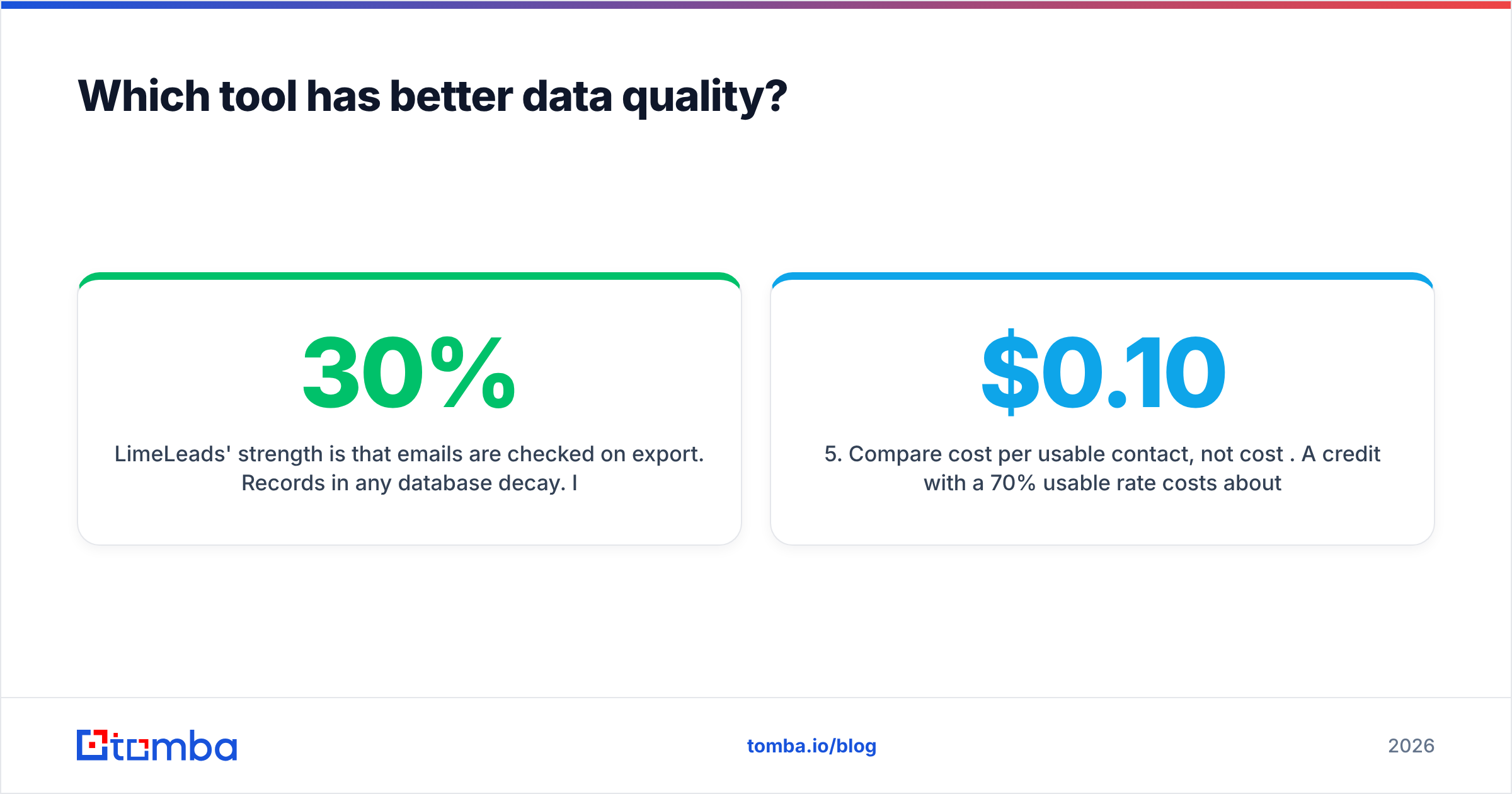
LimeLeads' strength is that emails are checked on export. Records in any database decay. Industry estimates commonly put B2B contact decay at 20-30% a year. LimeLeads re-verifies each email when you unlock it, so you're less likely to export a contact that has already bounced. The weaker point is the roughly 90-day bulk refresh cycle for everything else, such as titles, company changes and seniority. A contact can have a valid email but a job title that's a quarter out of date.
RampedUp's strength is phone data and coverage breadth. On G2's comparison pages, RampedUp's reviewer scores are about 8.8/10 for contact data availability and 9.6/10 for company data availability. Its accuracy scores are lower: about 8.1 for contact data accuracy and 8.3 for company data accuracy. That pattern is common for data platforms. They find a lot of records, but not every one is correct. The review sample is small (around 14-16 reviews), so treat these as directional numbers, not a benchmark.
Neither vendor publishes an independent accuracy audit. Run your own test before you commit:
- Pull a 100-contact sample that matches your real ICP, not the vendor's demo segment.
- Run every email through a separate verifier. Don't rely on the vendor's own "verified" badge. An independent email verifier tells you how many addresses are deliverable, risky or catch-all.
- Call 20 of the phone numbers if phone data is part of the decision. Wrong numbers and switchboards show up quickly.
- Check 20 job titles against LinkedIn to see how stale the firmographic data is.
- Compare cost per usable contact, not cost per credit. A $0.10 credit with a 70% usable rate costs about $0.14 per usable contact. A $0.37 credit with a 90% usable rate costs about $0.41.

Is LimeLeads better than RampedUp for small teams?#
For most small teams, yes. The reason is the commercial model more than the data.
LimeLeads works well when:
- You're a founder, a two-person SDR team or an agency running campaigns for clients.
- Your prospecting runs in batches: build a list of 500 VPs of Marketing at 50-200 person SaaS companies, run the sequence, repeat next month.
- Your spend varies month to month. Credit rollover means a slow month doesn't waste money.
- Email is your main channel and phone is secondary or not used.
LimeLeads falls short when:
- You need mobile numbers for cold calling.
- Your reps work account by account on LinkedIn and want contact data in the browser.
- You need data refreshed faster than quarterly for fast-moving segments like startups.
RampedUp works well when:
- You run a phone-heavy outbound motion where direct dials matter as much as emails.
- Your reps live in LinkedIn Sales Navigator and want one-click contact reveals.
- You have budget approval for an annual data contract and enough reps to use the credits.
RampedUp falls short when:
- You're a solo seller or a very early-stage team. An annual commitment in the thousands is hard to justify before you've proven the channel.
- You want transparent, self-serve pricing. Recent RampedUp pricing is mostly sales-led, so you'll likely need a call to get a quote.
What does each tool cost per usable contact?#
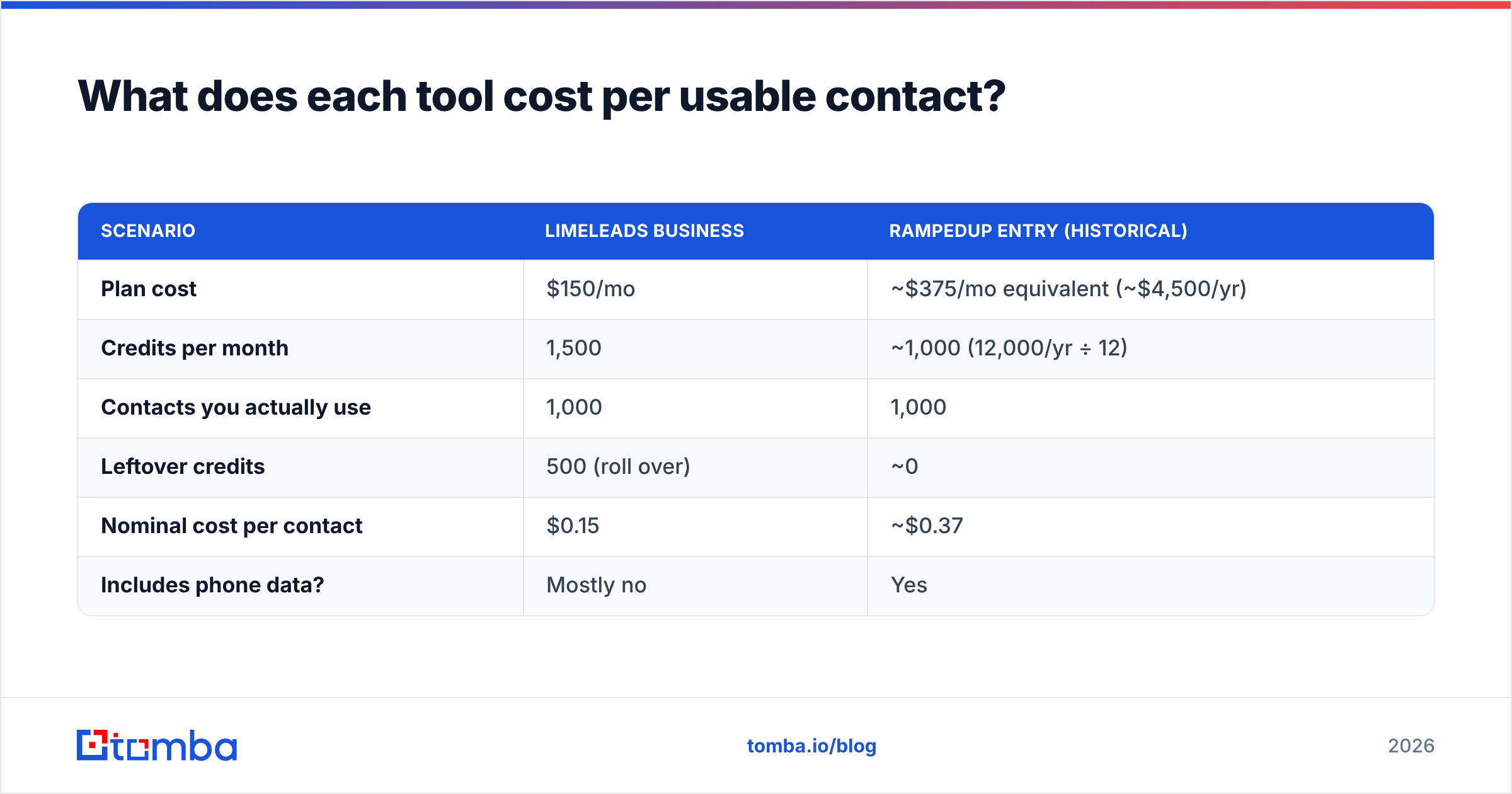
Here's a worked example for a team that needs about 1,000 net-new contacts a month for email outreach.
| Scenario | LimeLeads Business | RampedUp Entry (historical) |
|---|---|---|
| Plan cost | $150/mo | |
| Credits per month | 1,500 | ~1,000 (12,000/yr ÷ 12) |
| Contacts you actually use | 1,000 | 1,000 |
| Leftover credits | 500 (roll over) | ~0 |
| Nominal cost per contact | $0.15 | ~$0.37 |
| Includes phone data? | Mostly no | Yes |
For an email-only workflow, LimeLeads is clearly cheaper. The gap shrinks, and can reverse, once you put a dollar value on RampedUp's direct dials. If your SDRs book meetings by phone, a verified mobile number is worth far more than an email, and that's where RampedUp earns its price.
Also factor in the cost of a separate verification step. Many teams run exported lists through a second verifier before loading them into a sequencer, because bounce rates above roughly 2-3% start to hurt sender reputation. Budget a few dollars per thousand contacts for that step whichever vendor you pick.
How do the workflows feel day to day?#
LimeLeads: You log into the web app, set filters (industry, headcount, geography, title keywords, seniority), preview the matches without spending credits, then unlock the rows you want. Export goes to CSV or straight to your CRM. It's quick for repeatable segments. It's slower if you want five specific people at one target account, because it's a database and not a person lookup.
RampedUp: You install the Chrome extension, open a LinkedIn profile or a Sales Navigator results page, and the extension overlays the contact details. You can save contacts to lists or push them to Salesforce or HubSpot. The web app handles broader list building and enrichment of existing CRM records. It works well for account-based selling where each rep researches 20-40 accounts a week in depth.
If your team is split, with marketing building lists and SDRs working accounts, you may end up needing a bit of both. That's often the point where teams look at a single tool covering domain search, person lookup, verification and a browser extension, rather than paying for two data contracts.
Are there alternatives worth considering?#
Yes. The right one depends on which gap you're trying to fill.
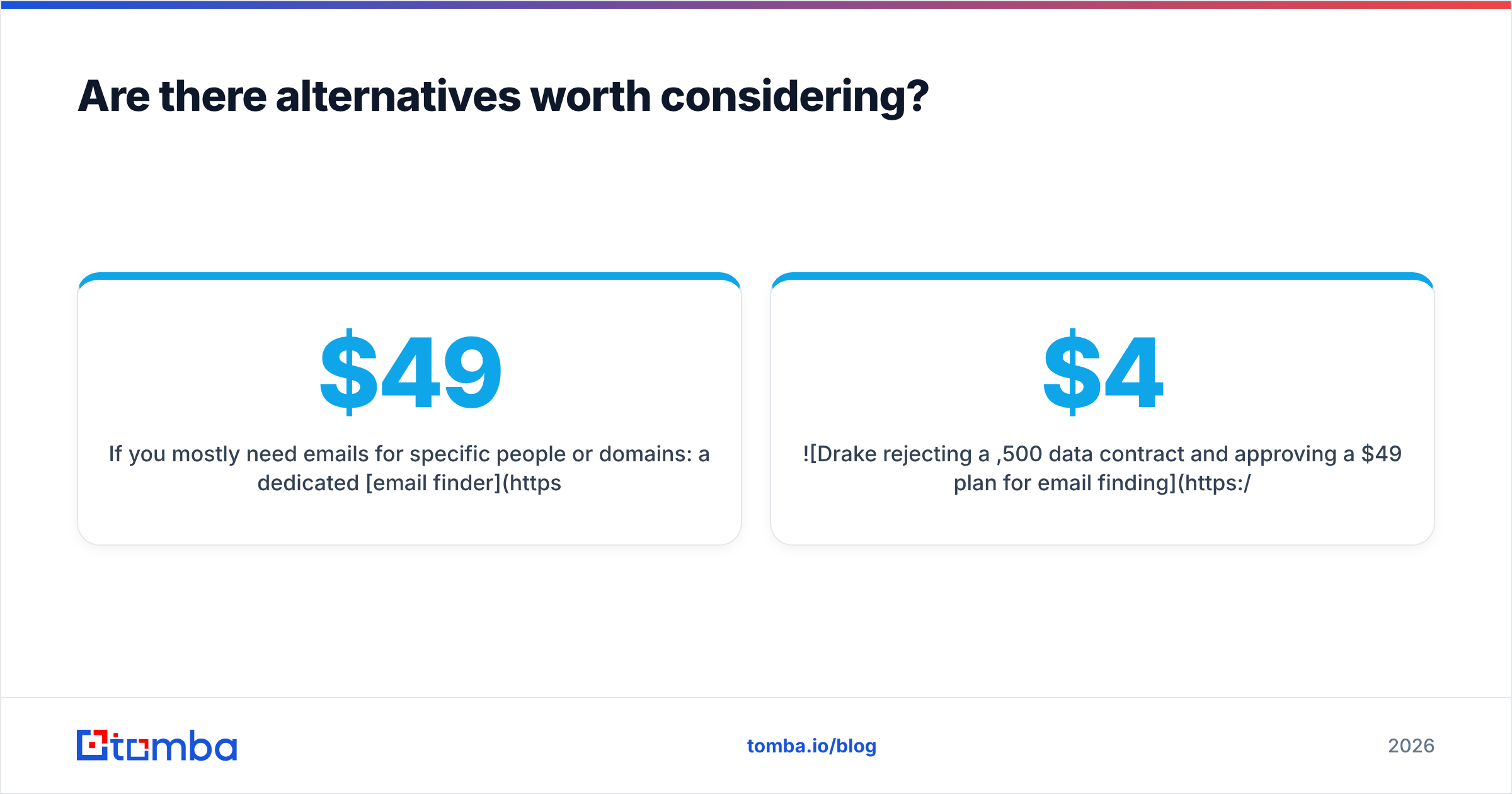
- If you mostly need emails for specific people or domains: a dedicated email finder with domain search and built-in verification is usually cheaper than either platform. Tomba, for example, starts with a free tier (25 searches/mo) and paid plans from $49/mo. Its Tomba plans scale through Growth ($99/mo) and Pro ($249/mo), and it includes a Chrome extension for LinkedIn and websites.
- If you want an all-in-one database plus sequencer: Apollo is the obvious benchmark. It's worth reading an Apollo.io alternatives breakdown before you commit, because its credit limits and data quality vary a lot by region.
- If phone data is the priority: compare RampedUp's direct dials against other phone-first vendors, and validate a sample with a phone validator before you buy seats.

Which one should you pick?#
Base the decision on three questions, in this order.
- Is phone a primary channel? If yes, shortlist RampedUp. LimeLeads isn't built for it.
- Can you commit to an annual contract today? If not, LimeLeads' monthly plans with rollover carry much less risk.
- Do you build lists by segment or research accounts one at a time? Segment-based list building points to LimeLeads. Account-by-account research in LinkedIn points to RampedUp.
Our pick: For email-first SMBs and agencies, LimeLeads is the better value. You can start at $99, credits don't expire at month end, and exports are re-verified. For SDR teams running phone-heavy outbound with budget for an annual contract, RampedUp is the stronger tool because its direct dials and Chrome extension workflow justify the higher price.
If your answers are "email only," "no annual contract" and "I need specific people, not bulk segments," you may not need either one.
What's the smartest next step?#
Run the 100-contact test from the data quality section on whichever vendor you're leaning toward, and compare it against a pay-as-you-go option before you sign. If you mainly need accurate professional emails for named prospects or target domains, start with Tomba Email Finder. You can look up emails by name, company or domain, verify them in the same step, and start on the free tier (25 searches a month) before moving to the $49/mo Starter plan. That's a low-risk way to see whether a lead database is worth paying for at all.
Related guides#
// get started
Find, verify and enrich your first contacts today
Start on the free plan with 25 searches a month, then scale when your team is ready.
Free plan · No credit card required · GDPR & CCPA
// about the author