Email Address Verification Link: How It Works and When to Skip It
A verification link proves someone owns an inbox. It can't tell you whether a cold address will bounce. Here's how links work, why they fail, and what to use when you can't send one.
TL;DR
- An email address verification link is a one-time URL sent to an inbox. It proves the person signing up controls that address. It says nothing about whether other addresses on your list are deliverable.
- A secure link needs a high-entropy token, a short expiry, single use, and a hashed copy stored server-side. Put the email address itself in the URL and you've created a security hole.
- Links often fail for boring reasons: missing SPF/DKIM, a flagged tracking domain, or corporate security scanners that "click" the link before a human sees it.
- Check the address at signup with an API before you send the link. That catches typos and disposable domains, which are the main reasons links never get clicked.
- For cold outreach you can't send a link at all. Use SMTP-level verification and a catch-all check.
What is an email address verification link?#
An email address verification link is a unique URL your app emails to someone after they give you an address. Clicking it tells your server that the person who typed the address can also read that inbox. The account then moves from "pending" to "verified."
You've seen this hundreds of times: "Confirm your email," "Activate your account," "Click to finish signing up." Marketers call the newsletter version double opt-in. Product teams call it email confirmation. People searching for a "link to e-mail address verification" usually want one of two things:
- How to build or fix the confirmation link their product sends.
- How to check an address is real without asking the owner to click anything.
These are separate problems with separate tools, and mixing them up costs money. This guide covers both.
A comparison helps. A verification link works like a courier asking the recipient to sign for a package. You get proof that a specific person received it. A verifier is more like checking the building exists and has a mailbox before you ship anything. You need the second step whenever you can't ask for a signature, which is always the case with a cold prospect.
How does a verification link actually work?#
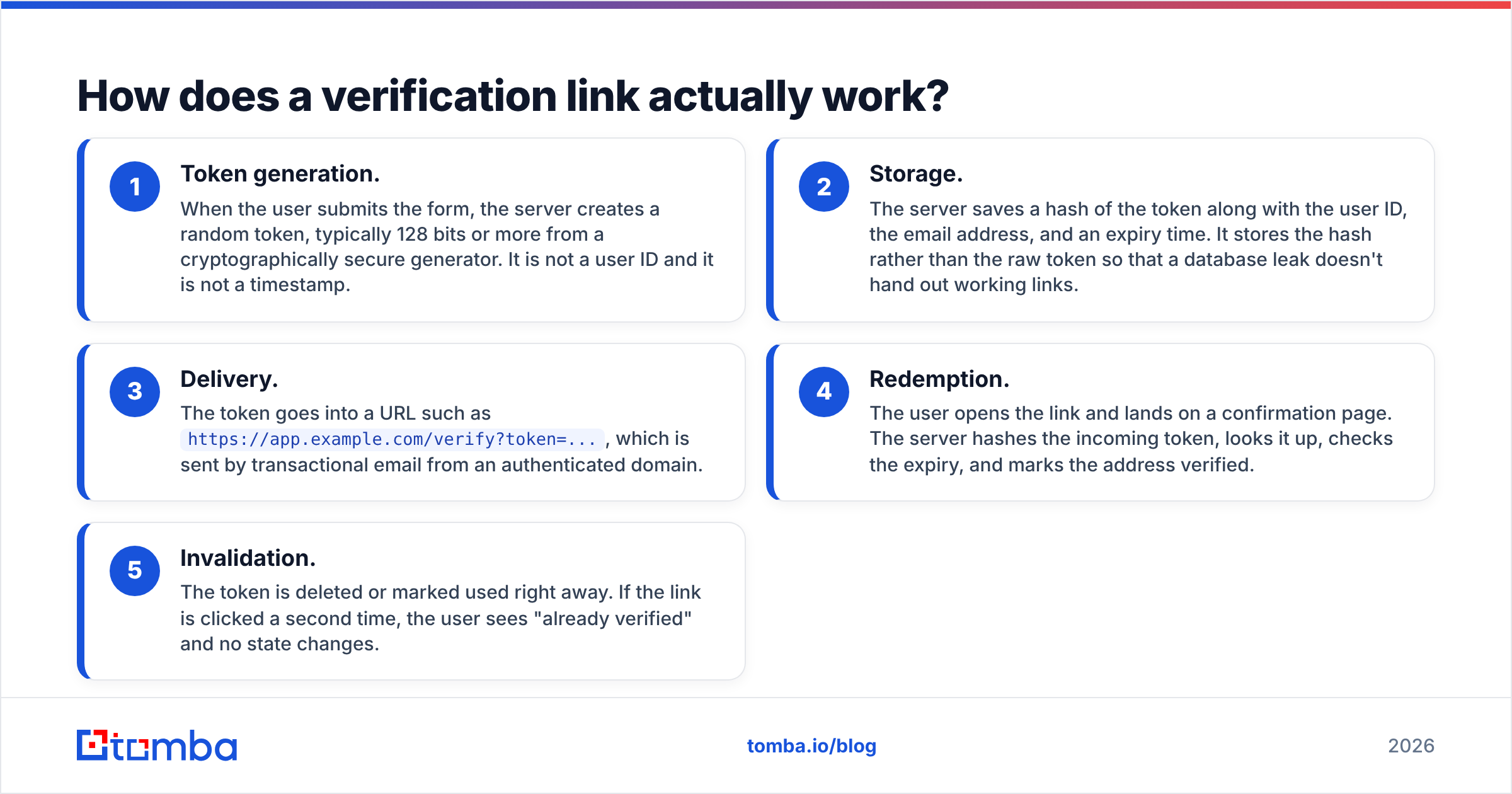
Every confirmation flow, whether it comes from a big auth provider or a hand-rolled Rails app, follows the same five steps:
- Token generation. When the user submits the form, the server creates a random token, typically 128 bits or more from a cryptographically secure generator. It is not a user ID and it is not a timestamp.
- Storage. The server saves a hash of the token along with the user ID, the email address, and an expiry time. It stores the hash rather than the raw token so that a database leak doesn't hand out working links.
- Delivery. The token goes into a URL such as
https://app.example.com/verify?token=..., which is sent by transactional email from an authenticated domain. - Redemption. The user opens the link and lands on a confirmation page. The server hashes the incoming token, looks it up, checks the expiry, and marks the address verified.
- Invalidation. The token is deleted or marked used right away. If the link is clicked a second time, the user sees "already verified" and no state changes.
If any of those steps is skipped, you get the familiar problems: links that work forever, links that anyone can guess, or links that are "used up" before the person ever opens the email.
Is a verification link the same as email verification?#
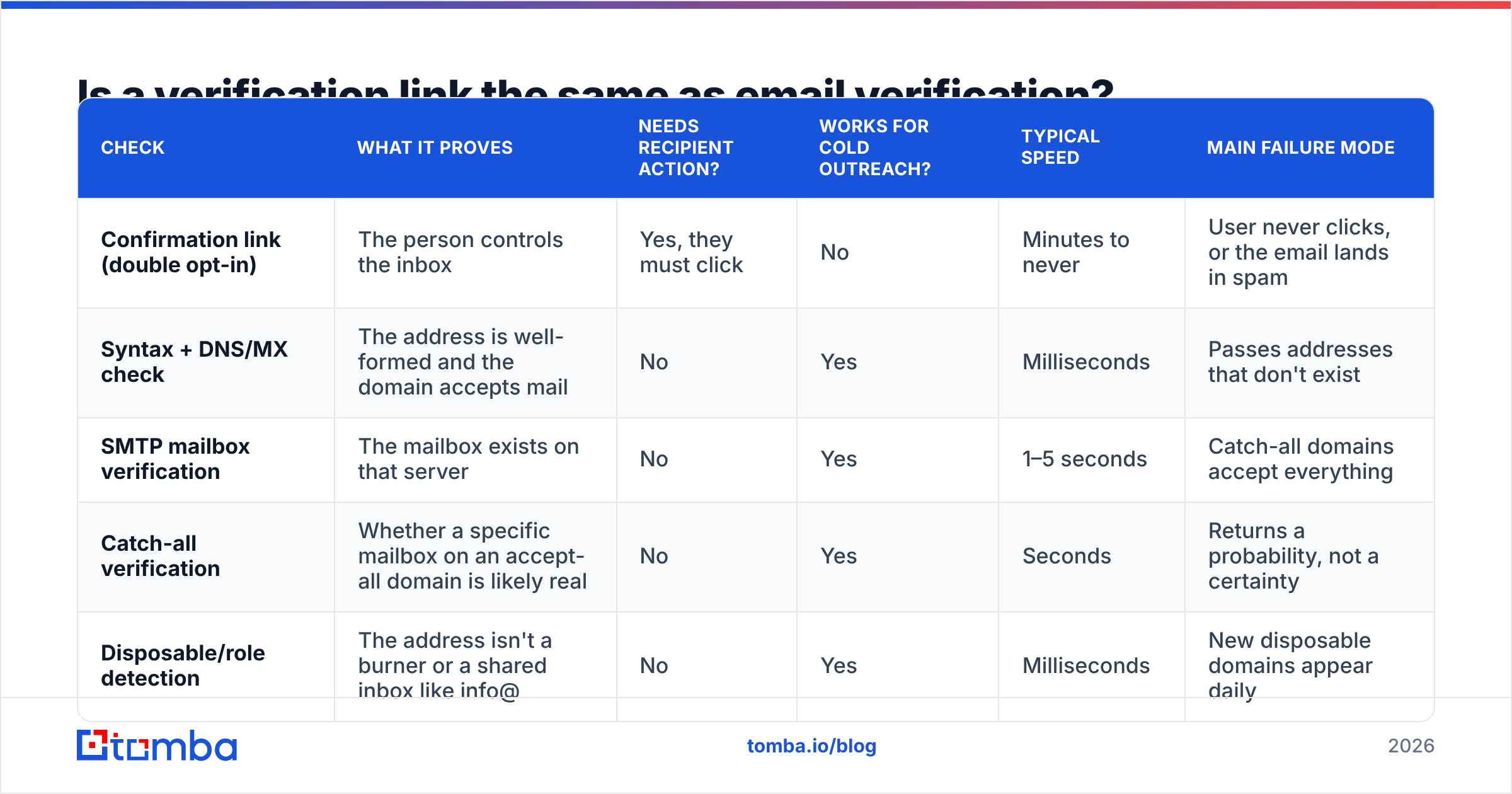
No. This is where most guides go wrong. "Email verification" covers three different checks, and a link handles only one of them.
| Check | What it proves | Needs recipient action? | Works for cold outreach? | Typical speed | Main failure mode |
|---|---|---|---|---|---|
| Confirmation link (double opt-in) | The person controls the inbox | Yes, they must click | No | Minutes to never | User never clicks, or the email lands in spam |
| Syntax + DNS/MX check | The address is well-formed and the domain accepts mail | No | Yes | Milliseconds | Passes addresses that don't exist |
| SMTP mailbox verification | The mailbox exists on that server | No | Yes | 1–5 seconds | Catch-all domains accept everything |
| Catch-all verification | Whether a specific mailbox on an accept-all domain is likely real | No | Yes | Seconds | Returns a probability, not a certainty |
| Disposable/role detection | The address isn't a burner or a shared inbox like info@ | No | Yes | Milliseconds | New disposable domains appear daily |
The link is the only check that confirms consent and ownership, which is why it remains the standard for signups, password resets, and newsletter compliance. It is also the only check that relies on a human doing something. When that human mistyped gmial.com, your link goes nowhere and your bounce rate goes up.
The practical takeaway is to layer them. Run the automated checks when the address is submitted, then send the link. Every address you reject at the form is a bounce you never have to pay for.
How do you build a secure verification link?#
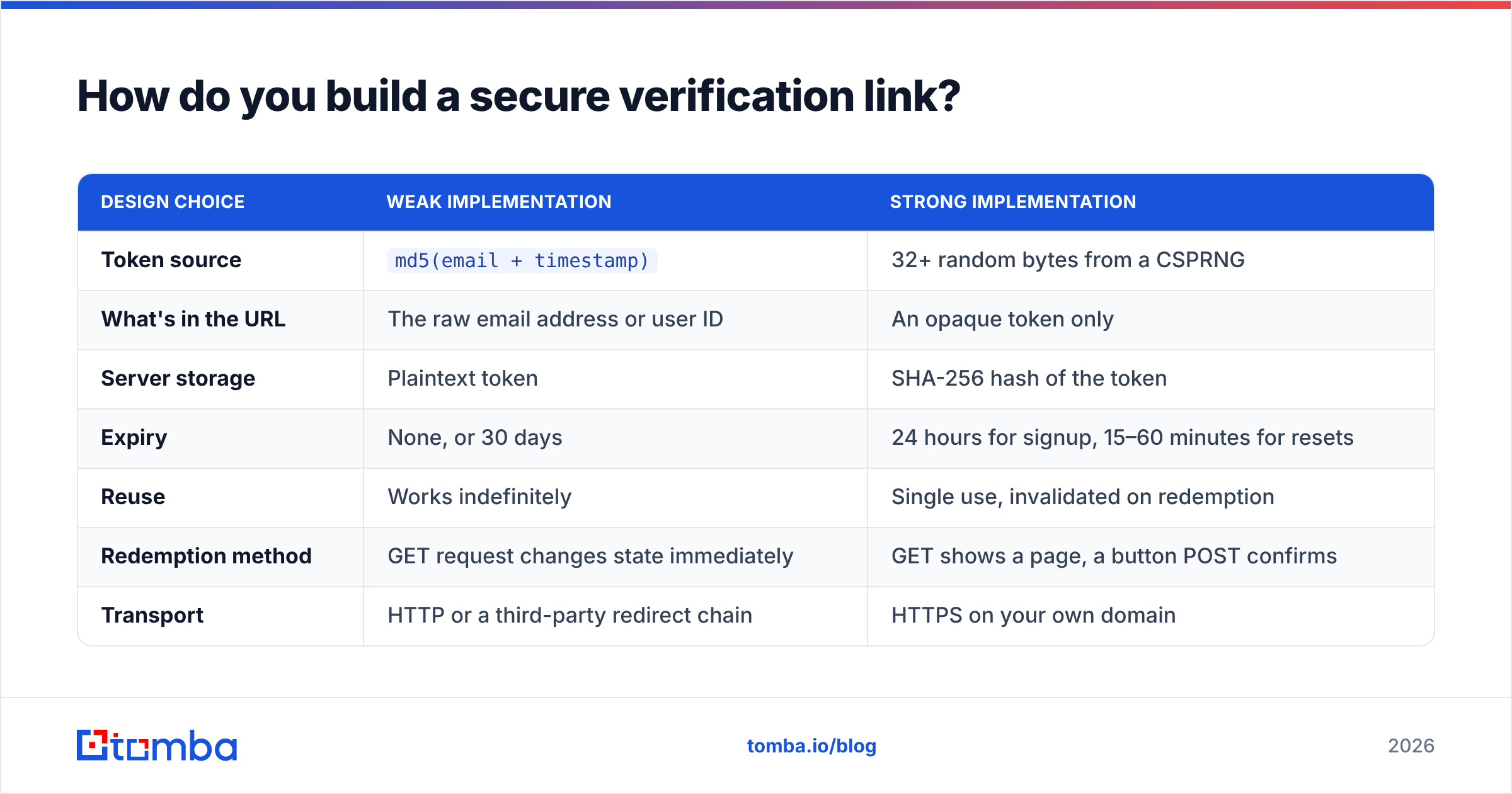
This is mostly a solved problem. The OWASP Forgot Password Cheat Sheet sets out the token rules, and they apply equally to signup confirmation. Here is what separates a weak link from a solid one:
| Design choice | Weak implementation | Strong implementation |
|---|---|---|
| Token source | md5(email + timestamp) |
32+ random bytes from a CSPRNG |
| What's in the URL | The raw email address or user ID | An opaque token only |
| Server storage | Plaintext token | SHA-256 hash of the token |
| Expiry | None, or 30 days | 24 hours for signup, 15–60 minutes for resets |
| Reuse | Works indefinitely | Single use, invalidated on redemption |
| Redemption method | GET request changes state immediately | GET shows a page, a button POST confirms |
| Transport | HTTP or a third-party redirect chain | HTTPS on your own domain |
Two of these rows need more explanation.
Don't put the address in the URL. Links such as /verify?email=jane@acme.com&code=4821 show up in browser history, proxy logs, and referrer headers. If the code is short, it can also be brute-forced. The token by itself is enough, because the server already knows which address it belongs to.
Don't change state on a GET request. Corporate mail gateways and link-scanning tools open every URL in an incoming email to look for malware. If your GET handler verifies the account, a security bot will verify it before the person has read the message. Worse, a single-use token then shows "link expired" when the real user clicks. Have the link open a page with a "Confirm my email" button that sends a POST. The user adds one click, and you get rid of an entire category of support tickets.
Why do verification links fail to arrive?#
Most "the link doesn't work" complaints are really deliverability problems. The link is fine. The email never got to the inbox. Check these, roughly in order of how often they cause trouble:
- Missing authentication. Gmail and Yahoo now require bulk senders to have SPF, DKIM, and DMARC in place, and unauthenticated mail from any sender gets filtered harder. Google's email sender guidelines list the requirements. A quick SPF checker run on your sending domain rules out the most common gap.
- Shared or flagged click-tracking domains. If your email service rewrites links through a shared tracking domain that spammers have also used, filters treat your link as suspicious. Turn off click tracking on transactional mail, or use a branded tracking domain.
- Mixing transactional and marketing traffic. Sending verification emails from the same IP and domain as promotional blasts means your password resets absorb the reputation hit from every unsubscribe and spam complaint. Separate the streams.
- Bad addresses at the form. Typos, fake entries like
test@test.com, and disposable inboxes create hard bounces, and each bounce lowers your sender reputation a little for everyone else on the list. - Slow sends. If the email takes three minutes to arrive, users click "resend," get two tokens, and the first one stops working. Queue verification mail at high priority and keep the older token valid until the newer one is redeemed.
That fourth item is the one you can fix before the email is ever sent.
When should you verify an address before sending the link?#
Always, if you can afford a few hundred milliseconds at signup. Pre-send validation catches:
- Typos in common domains:
gmial.com,hotmial.com,outlok.com. A "Did you mean gmail.com?" prompt recovers a real user who would otherwise disappear. - Domains with no MX record: the email can't be delivered, so don't send it.
- Disposable addresses: if your free trial is valuable, burner inboxes are how people exploit it.
- Non-existent mailboxes: an SMTP-level check catches
jnae@company.comwhen the real address isjane@.
The usual pattern is to call a verification API from the signup handler. Block hard failures, show a warning for risky results, and send the link only for addresses that pass or are unknown. Most teams plug an email verifier into the form backend through a REST call. Tomba, ZeroBounce, NeverBounce, and similar services all return comparable status fields (valid, invalid, accept-all, disposable, unknown), so swapping providers later mostly means changing one integration.
A useful rule of thumb: a signup that fails the pre-check should never produce a verification email. If it does, you're paying to send mail that will bounce.
To test a single address by hand, a free email checker is quicker than writing code.
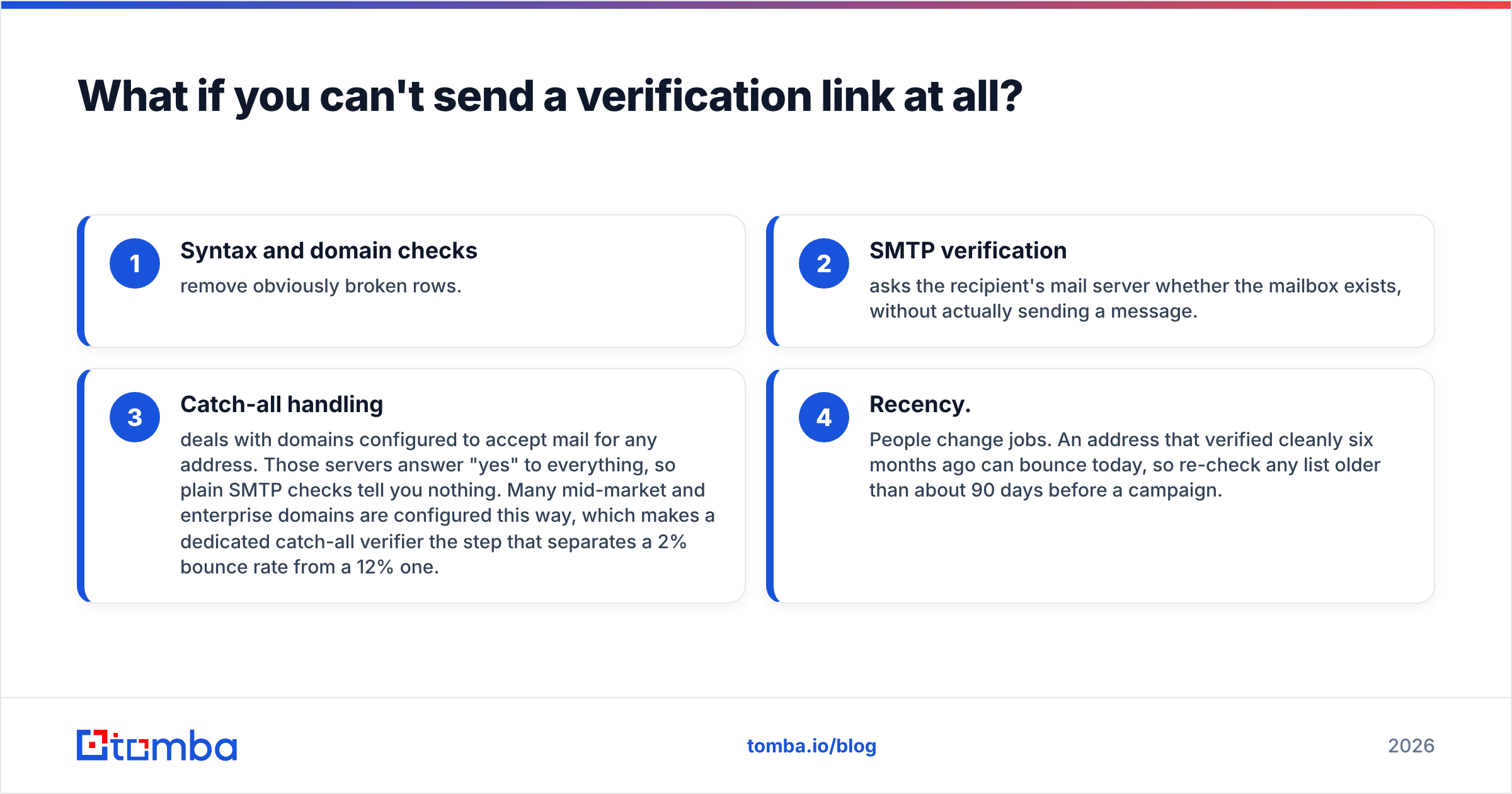
What if you can't send a verification link at all?#
This is the cold outreach case, and it's why the difference between a link and a verifier matters so much for sales teams. You can't email a prospect "please click to confirm this is your real address." The first email you send them has to arrive.
So for prospecting lists, verification is entirely server-side:
- Syntax and domain checks remove obviously broken rows.
- SMTP verification asks the recipient's mail server whether the mailbox exists, without actually sending a message.
- Catch-all handling deals with domains configured to accept mail for any address. Those servers answer "yes" to everything, so plain SMTP checks tell you nothing. Many mid-market and enterprise domains are configured this way, which makes a dedicated catch-all verifier the step that separates a 2% bounce rate from a 12% one.
- Recency. People change jobs. An address that verified cleanly six months ago can bounce today, so re-check any list older than about 90 days before a campaign.
B2B data vendors that sell contact lists, including BookYourData and others, generally run verification before delivery for this reason. It's still worth checking again on your side right before you send, because verification results start going stale the day they're produced.
Which approach fits your situation?#
Pick the approach based on the relationship you have with the address:
- Self-serve signup (SaaS, app, community): pre-validate with an API, then send a token-based confirmation link that confirms through a POST.
- Newsletter or lead magnet: the same setup, and in the EU and some other jurisdictions double opt-in also gives you evidence of consent.
- Password reset: a verification link with a short expiry (15–60 minutes) that invalidates all older reset tokens.
- Cold prospecting list: no link. Use SMTP verification plus a catch-all check, and re-verify anything older than a quarter.
- CRM hygiene: schedule bulk re-verification. Mark hard bounces and never mail them again.
Each of these uses the same building blocks, just in different combinations.
What else do people ask about verification links?#
How long should an email verification link stay valid?#
For account signup, 24 to 72 hours is standard. For password resets, keep it much shorter, between 15 and 60 minutes, because a reset link is effectively a temporary password. Always allow the user to request a new link, and make sure issuing a new one invalidates the old one.
Why does my verification link say "expired" on the first click?#
Almost always a link scanner got there first. Microsoft Defender Safe Links, Proofpoint, Mimecast, and similar tools fetch URLs in incoming mail. If opening the link consumes the token, the scanner uses it up. Move the state change to a POST behind a confirmation button.
Can I verify an email address without sending anything?#
You can confirm the mailbox exists and accepts mail using syntax, DNS, and SMTP checks. You can't prove who owns it without some kind of challenge, such as a link or a code. For prospecting, existence is what matters. For account security, ownership is what matters.
Is a 6-digit code better than a link?#
Codes work better on mobile and when users switch between devices, and scanners don't consume them. Links are one click fewer on desktop. Many products send both in the same email. If you use codes, rate-limit attempts hard, because a 6-digit code only has a million possible values.
Does double opt-in hurt list growth?#
It reduces raw signups, often noticeably. It also removes fake entries and typo addresses before they can damage your sender reputation. Most teams that measure revenue per subscriber instead of total list size find the trade worth it.
Getting the right address in the first place#
A verification link confirms an address after someone hands it to you. Outbound teams have the harder problem, because nobody hands you anything and the first send has to land. That's the gap Tomba Email Finder fills. You enter a name and a company domain, and it returns the professional address along with a verification status, so you know whether it's valid, accept-all, or risky before it goes into a sequence. The free tier includes 25 searches a month to test it on your own target accounts, and paid plans start at $49/mo when you're ready to scale. See the Tomba pricing page for the full tiers.
Related guides#
// get started
Find, verify and enrich your first contacts today
Start on the free plan with 25 searches a month, then scale when your team is ready.
Free plan · No credit card required · GDPR & CCPA
// about the author