List Building Tools: 8 Best Options for B2B Teams in 2026
Most prospect lists go stale before the first send. We compare 8 list building tools on data freshness, pricing model, and workflow fit so you can pick the right one for how your team actually prospects.
TL;DR
- List building tools fall into three types: all-in-one databases (Apollo, ZoomInfo), point tools (Tomba, Hunter, Lusha, Snov.io, BookYourData), and orchestration layers (Clay). The right one depends on your workflow, not on which vendor claims the biggest contact count.
- The number that matters is how many contacts you can actually reach. A 50,000-row list with a 12% bounce rate does less than a 5,000-row list you've verified.
- Seat-based enterprise databases make sense when a large SDR team works inside one tool all day. Credit-based point tools are usually cheaper for lean teams and founders.
- Whatever tool you pick, verify every address before you send. B2B contact data goes out of date every month.
- If your list starts from a set of target accounts, you need a domain-first tool. If it starts from a persona filter, a database-first tool fits better.
What are list building tools?#
List building tools help you find, collect, and organize contact data for the people you want to reach, usually names, job titles, company domains, email addresses, and sometimes phone numbers. For B2B teams, "list building" nearly always means a prospect list for outbound: cold email, calling, or LinkedIn outreach.
This is different from newsletter list building, which is about getting website visitors to opt in with pop-ups and lead magnets. That's a separate category. This guide covers the B2B prospecting side: tools that turn "we want to sell to VPs of Finance at 200-1,000 person SaaS companies" into a list you can load into a sequencer.
Here's an analogy. A list building tool is like a fishing boat's sonar. It tells you where the fish are. It doesn't catch them, and a sonar showing last year's fish is worse than no sonar at all. The data under the tool matters more than the interface on top of it.
What does a list building stack actually need?#
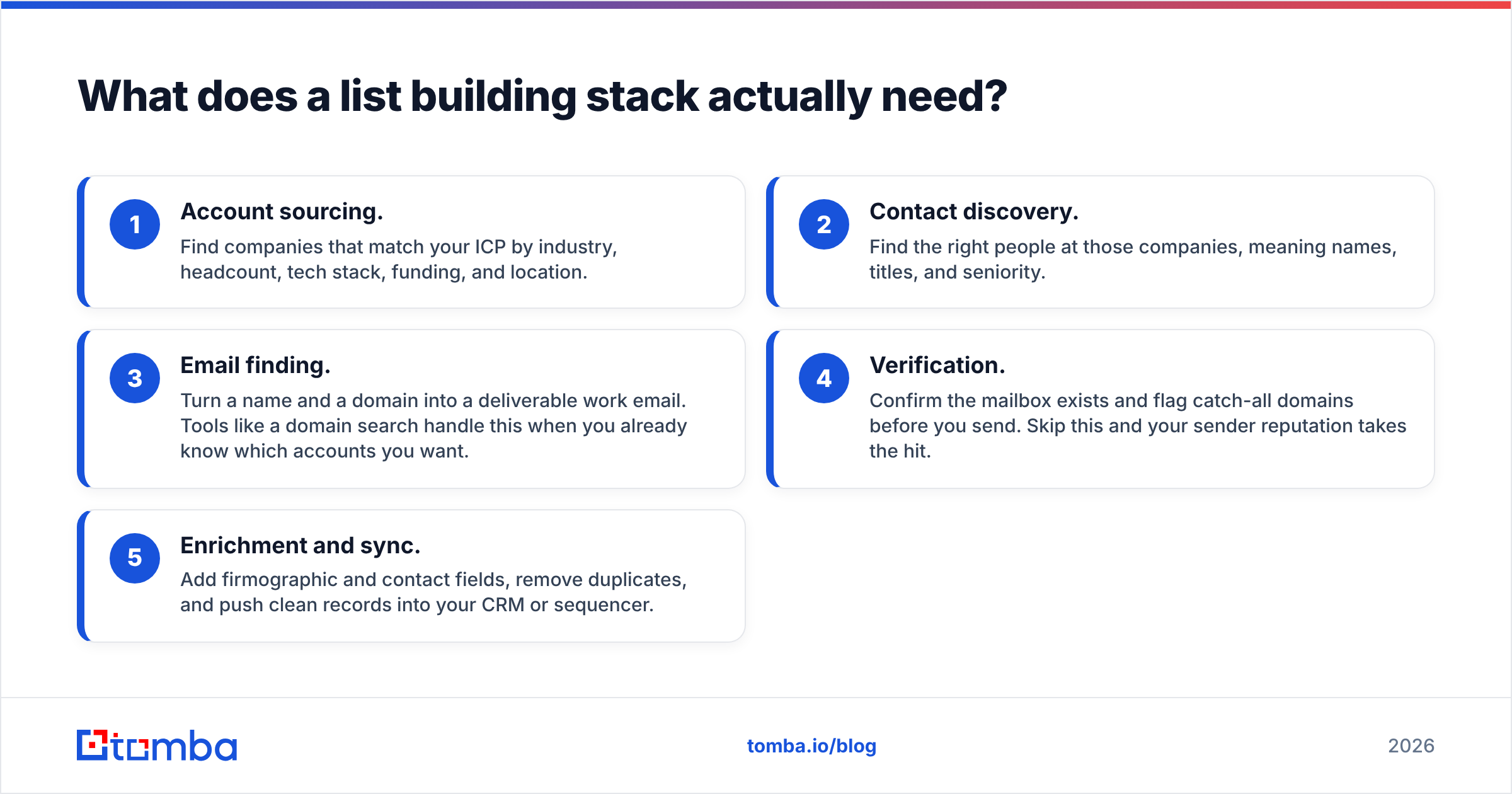
Before you compare vendors, work out which jobs you need done. Most teams need five, and no single tool does all five equally well:
- Account sourcing. Find companies that match your ICP by industry, headcount, tech stack, funding, and location.
- Contact discovery. Find the right people at those companies, meaning names, titles, and seniority.
- Email finding. Turn a name and a domain into a deliverable work email. Tools like a domain search handle this when you already know which accounts you want.
- Verification. Confirm the mailbox exists and flag catch-all domains before you send. Skip this and your sender reputation takes the hit.
- Enrichment and sync. Add firmographic and contact fields, remove duplicates, and push clean records into your CRM or sequencer.
All-in-one databases cover jobs 1, 2, and part of 5. Point tools are strongest at jobs 3 and 4. Orchestration layers like Clay connect several providers and let you build a waterfall across all five. Knowing which job is your bottleneck tells you which category to buy from.
Why do most prospect lists fail?#
Most prospect lists fail because they're out of date by the time anyone uses them. People change jobs, companies rebrand domains, and mailboxes get deactivated. Industry estimates often put B2B contact data decay at roughly a quarter to a third of records per year. That adds up to around 2-3% of your list going bad every month.

The second reason is volume thinking. Teams buy or export a huge list, send to all of it, and then wonder why email deliverability falls apart in week two. Mailbox providers watch bounce rates and spam complaints closely. Google's sender guidelines spell out the authentication and complaint-rate thresholds bulk senders have to meet, and a dirty list is the fastest way to miss them.
The third reason is a mismatch between the list and the message. A list built from a broad persona filter ("Marketing, Director+") gets generic copy and generic results. A list built from a narrow trigger ("companies that just adopted HubSpot and are hiring SDRs") supports copy that actually gets read.
Which list building tools are worth comparing in 2026?#
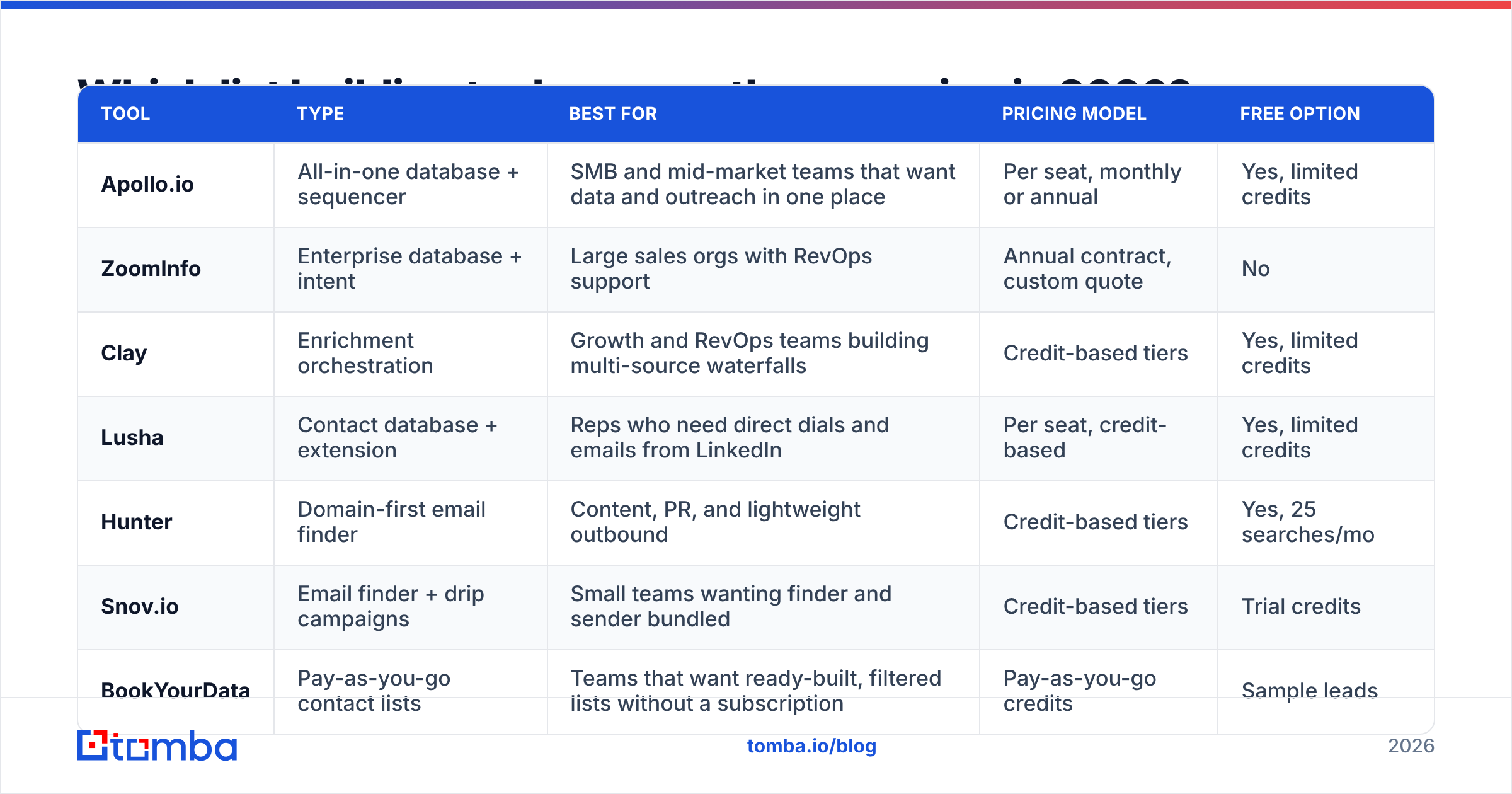
Here are eight tools that come up most often, grouped by how they work. Pricing changes often, so treat the figures below as starting points and check each vendor's current pricing page before you commit.
| Tool | Type | Best for | Pricing model | Free option |
|---|---|---|---|---|
| Apollo.io | All-in-one database + sequencer | SMB and mid-market teams that want data and outreach in one place | Per seat, monthly or annual | Yes, limited credits |
| ZoomInfo | Enterprise database + intent | Large sales orgs with RevOps support | Annual contract, custom quote | No |
| Clay | Enrichment orchestration | Growth and RevOps teams building multi-source waterfalls | Credit-based tiers | Yes, limited credits |
| Lusha | Contact database + extension | Reps who need direct dials and emails from LinkedIn | Per seat, credit-based | Yes, limited credits |
| Hunter | Domain-first email finder | Content, PR, and lightweight outbound | Credit-based tiers | Yes, 25 searches/mo |
| Snov.io | Email finder + drip campaigns | Small teams wanting finder and sender bundled | Credit-based tiers | Trial credits |
| BookYourData | Pay-as-you-go contact lists | Teams that want ready-built, filtered lists without a subscription | Pay-as-you-go credits | Sample leads |
| Tomba | Email finder + verifier + enrichment | Domain-first list building, API and spreadsheet workflows | Free, $49, $99, $249/mo, Enterprise | Yes, 25 searches/mo |
Apollo.io#
Apollo is the default choice for many startups because it combines a large contact database, filters, a Chrome extension, and a sequencer under one login. You get a lot for the price. Data quality varies by region and seniority, though, so most experienced Apollo users run an extra verification pass before they send. If you're weighing it against other options, our Apollo alternative breakdown covers the trade-offs.
Pick it if: you want one tool for sourcing and sending, and your team is under about 20 reps.
ZoomInfo#
ZoomInfo is the enterprise standard for account and contact data. It includes intent signals, org charts, and deep CRM integrations. It's powerful and priced to match, with annual contracts that are typically out of reach for early-stage teams. The value shows up when a RevOps function actually uses the intent and routing features, not just the contact search.
Pick it if: you have a large SDR team, a RevOps owner, and budget for an annual contract.
Clay#
Clay isn't a database. It's a spreadsheet-like layer that calls dozens of data providers in sequence. You can try provider A for an email, fall back to provider B, then verify, then score. It's very flexible and has a real learning curve. Teams that get good at it build highly targeted lists nobody else has.
Pick it if: you have someone technical enough to design waterfalls and want to combine multiple sources.
Lusha#
Lusha is built around a browser extension. You browse a LinkedIn profile or company site and reveal contact details inline. It's known for phone numbers as much as emails, which makes it popular with teams that call. The credit-per-reveal model is simple, but it gets expensive at high volume.
Pick it if: your reps build lists one prospect at a time from LinkedIn and need direct dials.
Hunter#
Hunter made domain search popular: enter a company domain and see the email pattern and known addresses. It's clean, simple, and well documented. It's strongest when you already know your target accounts, and lighter on persona-based filtering than the big databases.
Pick it if: your list starts from a set of domains and you want a simple UI.
Snov.io#
Snov.io bundles an email finder, a verifier, and a drip-campaign sender. For a founder or a two-person team, that bundle removes a tool from the stack. Advanced users tend to outgrow the sending side and move to a dedicated sequencer, keeping Snov.io for finding.
Pick it if: you want finding and basic sequencing in one low-cost tool.
BookYourData#
BookYourData takes a list-first approach. You filter by industry, title, location, and company size, then buy the matching contacts on a pay-as-you-go basis instead of committing to a monthly seat. It's a good fit for teams whose list building is occasional rather than constant, like campaign-based marketers, agencies building lists for clients, or founders testing a new segment before they commit to a subscription. Contacts are verified before delivery, which helps protect your sending domain.
Pick it if: you need well-filtered lists in bursts and prefer paying per contact over a recurring plan.
Tomba#
Tomba is a domain-first email finder with a verifier, catch-all checks, phone finder, and data enrichment alongside it. Its strength is flexibility in where the work happens: web app, Chrome extension, Google Sheets and Excel add-ins, a REST API, a CLI, and an MCP server for AI agents. That matters if your list building lives in a spreadsheet or an automated pipeline rather than a single dashboard. Plans run from a free tier (25 searches/mo) through Starter at $49/mo, Growth at $99/mo, and Pro at $249/mo. See Tomba pricing for credit breakdowns.
Pick it if: you start from target accounts, want verification built in, and need API or spreadsheet access without buying enterprise seats.
Is an all-in-one database better than a point tool?#
Not by default. The answer depends on who builds lists on your team and how often they do it.
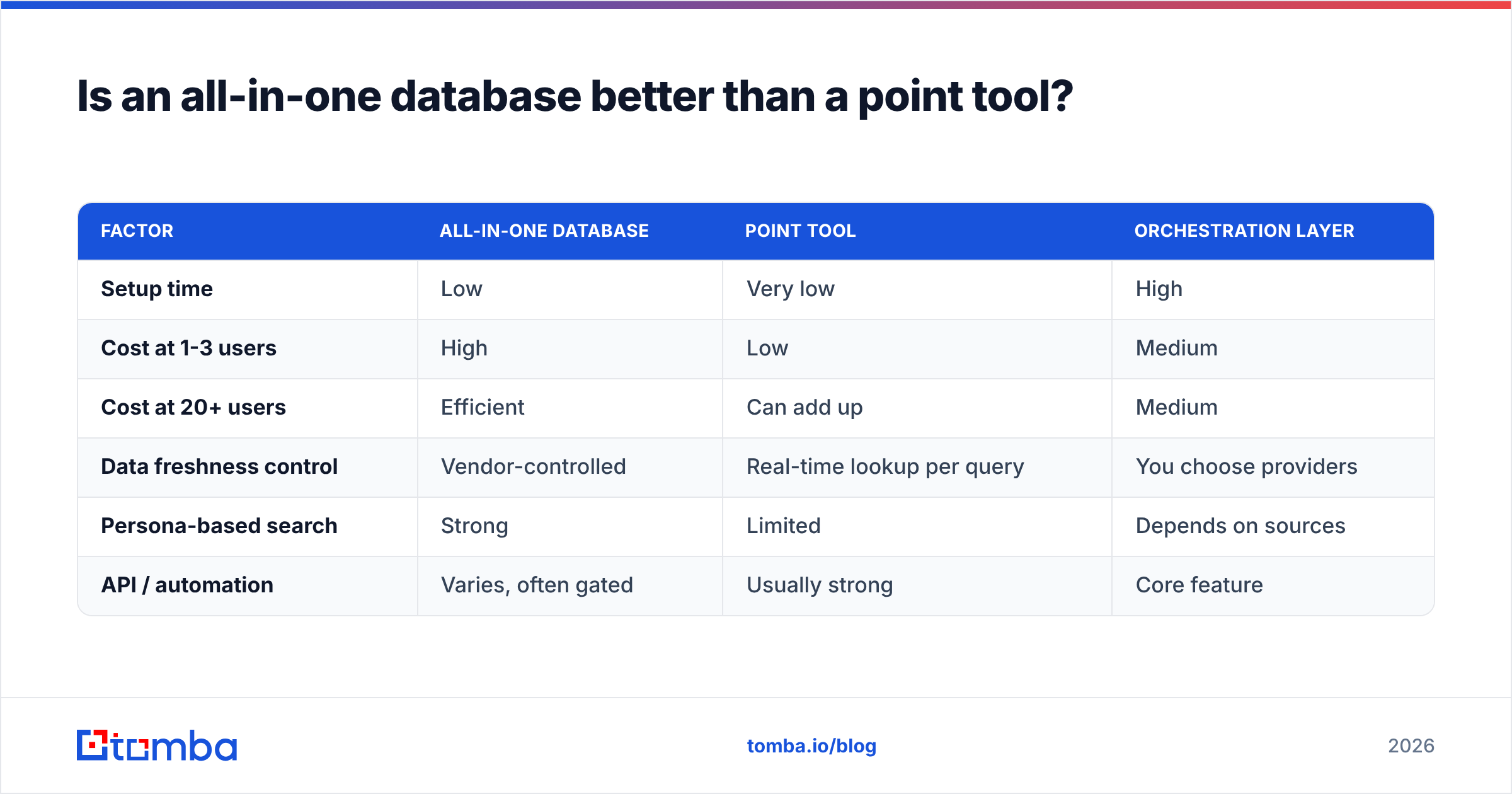
An all-in-one database wins when many reps work inside one tool every day. Shared filters, saved searches, and CRM sync reduce friction, and the per-seat cost is spread across heavy use.
Point tools win when list building is concentrated in one or two people (an SDR lead, a RevOps analyst, a founder) or when it happens inside other systems. Paying for ten seats of a database so that one person can export lists makes little sense.
A useful test: count how many hours per week each person actually spends searching for contacts. If it's under two hours for most of the team, you're paying for seats that sit idle.
| Factor | All-in-one database | Point tool | Orchestration layer |
|---|---|---|---|
| Setup time | Low | Very low | High |
| Cost at 1-3 users | High | Low | Medium |
| Cost at 20+ users | Efficient | Can add up | Medium |
| Data freshness control | Vendor-controlled | Real-time lookup per query | You choose providers |
| Persona-based search | Strong | Limited | Depends on sources |
| API / automation | Varies, often gated | Usually strong | Core feature |
How do you build a list that doesn't bounce?#
The tool matters less than the process. Here's a workflow that holds up regardless of vendor.
Start from accounts, not people. Define 100-300 target accounts using firmographics and a trigger (hiring, funding, tech adoption, leadership change). Account-first lists produce better-fit contacts than broad persona searches.
Find two or three contacts per account. Target the economic buyer plus one or two likely champions. Use a domain-first search to see the company's email pattern, then find specific people.
Verify everything, every time. Even if the vendor says the data was verified, run it through an email verifier right before you send. Verification from 60 days ago is already partly out of date. Flag catch-all domains separately and send to them in smaller batches.
Deduplicate against your CRM. Nothing burns goodwill faster than cold-emailing a current customer or an open opportunity. Match on email and domain before you import.
Keep batches small. Send in batches of a few hundred and watch bounce and reply rates before you scale. If bounces go above 2-3%, stop and clean the list before you send more.
For higher volume, bulk email finder workflows let you upload a CSV of names and domains and get back found and verified addresses in one pass. That's usually faster than working row by row in a browser extension.
What should you check before you buy?#
Vendor demos show the best data from the best segments. Run your own test before you sign anything:
- Test on your ICP, not theirs. Pull 100 contacts that match your real target segment, including regions and seniority levels where coverage is usually weaker.
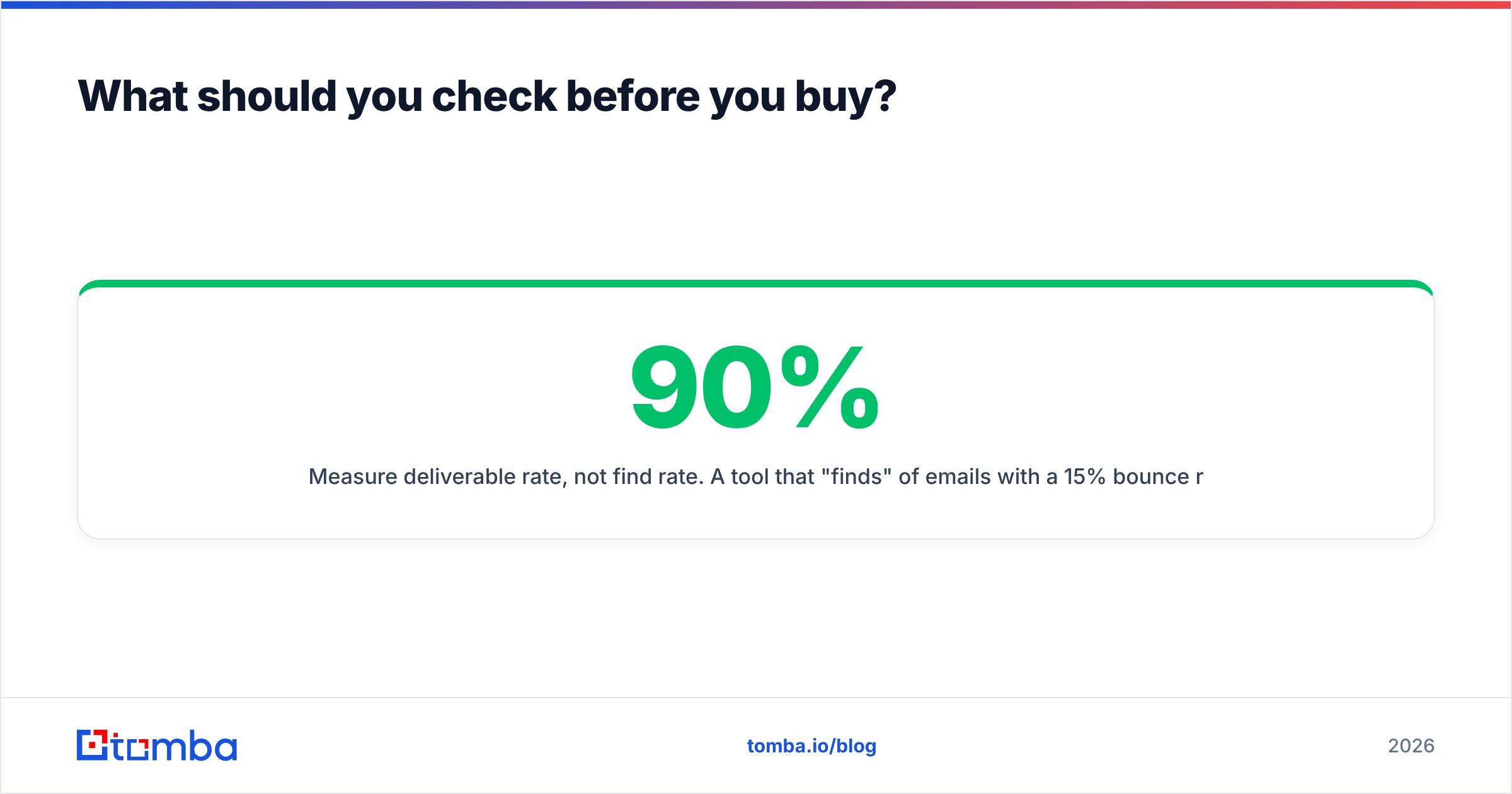
- Measure deliverable rate, not find rate. A tool that "finds" 90% of emails with a 15% bounce rate is worse than one that finds 70% with a 2% bounce rate.
- Check what a credit actually buys. Some tools charge for every lookup, others only for found or verified results. Some charge extra for phone numbers. Model your real monthly volume.
- Read recent reviews. Sites like G2 show review trends over time. A drop in data-quality scores over the last two quarters matters more than an all-time average.
- Confirm export and API terms. Some plans cap exports or gate the API behind higher tiers. If your list building runs in a pipeline, check this first.
- Ask about compliance. Ask how the vendor sources data and handles GDPR and CCPA requests, especially if you prospect into Europe.
Which list building tool should you choose?#
Here's the short version by team profile:
- Solo founder or 1-3 person team, domain-first targeting: Tomba or Hunter. Low cost, verification included, no seat overhead.
- Occasional or campaign-based list needs: BookYourData's pay-as-you-go model avoids paying for idle months.
- 5-20 reps who want data and sequencing together: Apollo, plus an extra verification step.
- Reps who call as much as they email: Lusha, for direct dials from LinkedIn.
- Technical growth team combining sources: Clay as the orchestration layer, with specialist finders and verifiers plugged in.
- Enterprise sales org with RevOps: ZoomInfo, if you'll actually use intent and routing.
Many mature teams use two tools: a database or Clay for sourcing, and a dedicated finder-plus-verifier for the final pass before sending. That combination usually beats any single vendor on deliverable rate.
Ready to build a list you can actually send to?#
If your list building starts from a set of target accounts, a domain-first workflow with built-in verification will give you more reachable contacts per dollar than a seat-based database. Tomba Email Finder lets you search by domain, name, or company, check every address before export, and run the whole process from the web app, Google Sheets, or the API. You can start on the free tier with 25 searches a month and test it against your own ICP before you pay anything.
Related guides#
// get started
Find, verify and enrich your first contacts today
Start on the free plan with 25 searches a month, then scale when your team is ready.
Free plan · No credit card required · GDPR & CCPA
// about the author