List of Keywords to Use When Extracting Emails (2026 Guide)
Most email extraction fails because of the keywords you search with, not the tool. Here are 60+ URL paths, search operators, on-page patterns and exclusion terms that find real contacts and leave out the junk.
TL;DR
- The keywords you use decide whether an email extraction gives you decision-makers or a list of
noreply@andexample@domain.complaceholders. - You need six groups of keywords: URL paths, on-page text patterns, obfuscation variants, job titles, search operators and exclusion terms. Most people forget the last group.
- Contact pages and team pages hold the most real addresses. Pages under
/people,/leadershipand/imprint(in Europe) are often better than a generic/contactform. - Keyword-driven extraction breaks down at scale. Past a few dozen domains, a domain search tool that has already indexed and verified addresses is quicker and cleaner.
- Verify every address you extract before you send to it. Scraped lists often come back with double-digit bounce rates.
What does "keywords for extracting emails" actually mean?#
It means the words, URL fragments and patterns that tell your extractor (or your Google search) where email addresses are likely to be on a page, and which matches to throw away.
Think of it like fishing. The extractor is the net, and the keywords decide where you cast it. If you cast into the wrong water, a better net won't help you.
Every email extraction workflow, whether it's a Chrome extension, a Python script, a scraping actor or a copy-paste into an email extractor, comes down to three questions:
- Where do I look? These are URL path and page-type keywords.
- What am I looking for? These are text patterns, obfuscation variants and job titles.
- What do I throw away? These are exclusion keywords.
Most guides cover the first question and skip the other two. That's why so many extracted lists end up full of image filenames, tracking pixels and privacy@ inboxes.
Which URL path keywords find the most emails?#
Page paths are the highest-leverage keywords because they tell your crawler which pages to fetch first. Here are the paths worth targeting, sorted by how often they hold named, personal addresses rather than role inboxes.
High yield (named people):
/team/our-team/people/leadership/management/aboutand/about-us/staff/directory/authors(on blogs and publishers)/board
Medium yield (mixed named and role addresses):
/contactand/contact-us/press,/media,/newsroom/partners/investorsor/investor-relations/imprintand/impressum(German-speaking sites are legally required to publish one)
Low yield (mostly role inboxes):
/careers,/jobs/legal,/privacy,/terms/support,/help
On European B2B sites, /impressum is often the only page with a named managing director and a direct address. On US SaaS sites, /about or /company usually beats /contact, because the contact page is usually a form with no visible address.

What on-page text patterns should your extractor match?#
After the crawler lands on the right page, it has to recognise an email address. A basic [a-z0-9._%+-]+@[a-z0-9.-]+\.[a-z]{2,} regex finds plain addresses, but many sites deliberately hide theirs. Match these patterns as well.
Direct signals:
mailto:(the most reliable signal on any page; always parsehrefattributes, not just visible text)@yourtargetdomain.com(quote it in searches)emaile-mailcontact:reach us atget in touchwrite tofor inquiriessend your pitch to(press and editorial pages)
Obfuscation variants (sites use these to defeat scrapers):
[at](at)at(with spaces on both sides){at}[dot](dot)dot@(the HTML entity for @)%40(the URL-encoded @)
Here's a normalisation pass you can run before your regex:
text = text.replace("[at]", "@").replace("(at)", "@").replace("{at}", "@")
text = text.replace("[dot]", ".").replace("(dot)", ".")
text = text.replace("@", "@").replace("%40", "@")
Be careful with at and dot. Replacing them blindly turns "meet us at the booth" into garbage, so only apply those replacements inside a short window around a known domain string.
The email address format allows more characters than most regexes expect, such as + tags and dotted local parts. Test your pattern against real samples before you trust it.
Which job-title keywords help you reach decision-makers?#
If you're searching (not crawling), put a job title next to the domain. Search engines then return pages where a person's name, title and address appear together: speaker bios, press releases, PDF reports and conference agendas.
founder/co-founderCEOCTOCMOhead ofVPdirectormanagerpartnershipsprocurementeditor(for PR and link-building)talent/recruiting
Pair them with a department to narrow the results: "head of" marketing, "VP" sales, director procurement.
Which Google search operators work for email extraction?#
Search operators let you extract emails without a crawler. Google documents the core set in its Refine web searches guide. These are the ones worth using:
site:restricts results to one domain (site:acme.com)"quotes"forces an exact match ("@acme.com")intext:requires the term in the page bodyinurl:requires the term in the URL (inurl:team)intitle:requires the term in the page titlefiletype:pdfsurfaces reports, decks and brochures, which often list direct contactsOR(uppercase) combines alternatives-excludes a term (-jobs)
Example strings that actually return useful results:
site:acme.com "@acme.com""@acme.com" ("head of" OR director) -careerssite:acme.com inurl:team OR inurl:people OR inurl:leadership"@acme.com" filetype:pdfsite:linkedin.com/in "acme" "head of marketing"(gets you names, not emails; you then need a finder to get the address)
One caveat: Google doesn't treat @ as a special character, and it rate-limits heavy operator use. This approach is fine for 5–20 domains per session. Beyond that you'll hit CAPTCHAs.
What exclusion keywords stop junk from polluting your list?#
This is the step most extraction workflows skip. Without exclusions, a crawl of 100 sites returns a lot of addresses nobody can reply from. Filter these out after extraction:
noreply/no-reply/donotreplyexample.com,domain.com,email.com,yourname@(placeholder text in templates)sentry,wixpress,sentry.io(error-tracking addresses baked into site code).png,.jpg,.webp,.svg(retina image filenames likelogo@2x.pngmatch email regexes)u003e,%20(encoding artifacts in the local part)privacy@,dpo@,abuse@,postmaster@,webmaster@(compliance inboxes that will never buy anything)
Then decide what to do with role-based inboxes:
info@hello@sales@support@press@careers@/jobs@admin@
Role inboxes aren't worthless. press@ is the right address for a PR pitch, and at a 10-person company hello@ often goes straight to the founder. For outbound sales, though, a role inbox usually means a shared queue and a low reply rate. Tag them separately; don't mix them in with personal addresses.
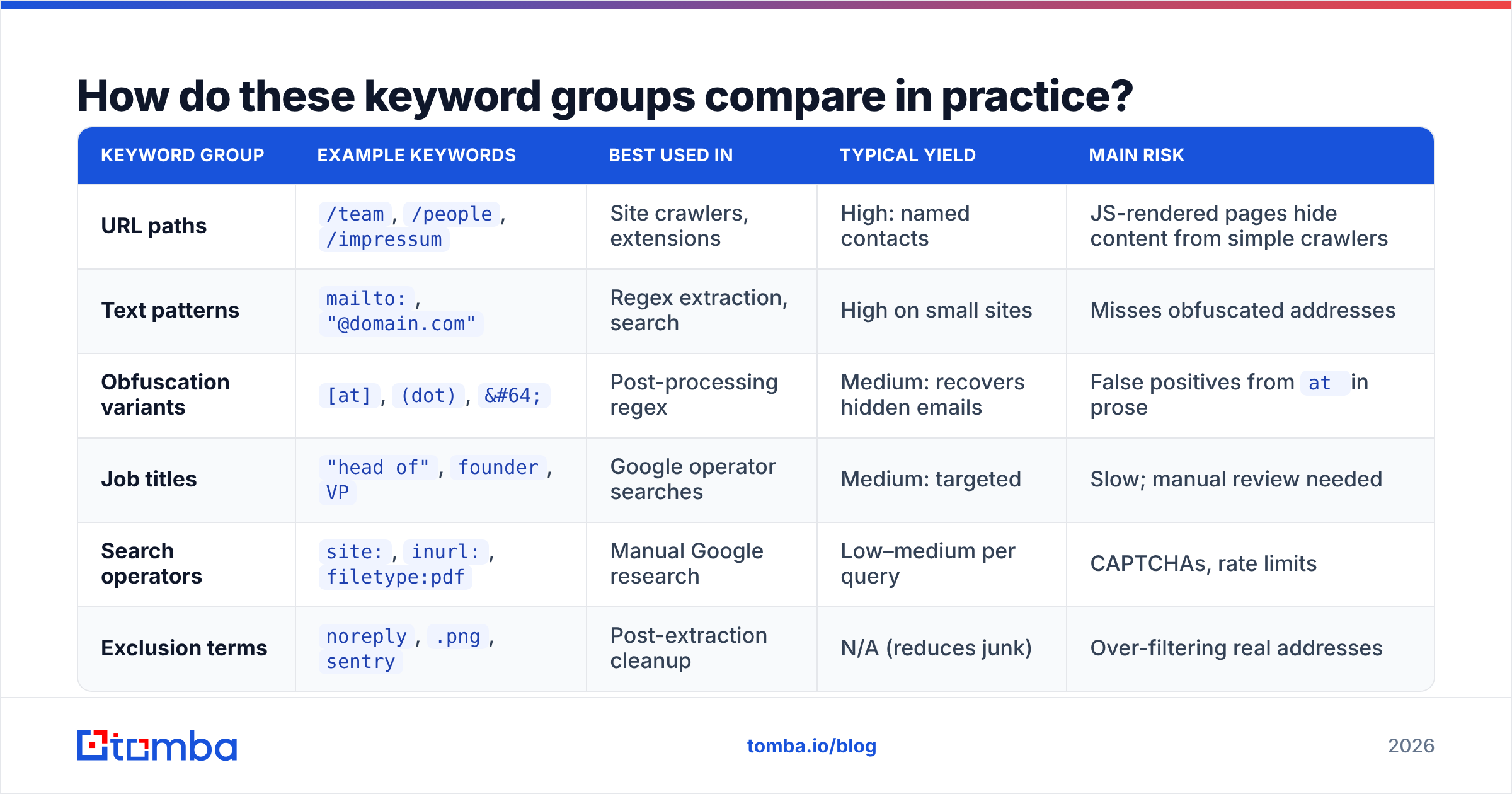
How do these keyword groups compare in practice?#
Here's how each keyword group performs on a typical B2B extraction run:
| Keyword group | Example keywords | Best used in | Typical yield | Main risk |
|---|---|---|---|---|
| URL paths | /team, /people, /impressum |
Site crawlers, extensions | High: named contacts | JS-rendered pages hide content from simple crawlers |
| Text patterns | mailto:, "@domain.com" |
Regex extraction, search | High on small sites | Misses obfuscated addresses |
| Obfuscation variants | [at], (dot), @ |
Post-processing regex | Medium: recovers hidden emails | False positives from at in prose |
| Job titles | "head of", founder, VP |
Google operator searches | Medium: targeted | Slow; manual review needed |
| Search operators | site:, inurl:, filetype:pdf |
Manual Google research | Low–medium per query | CAPTCHAs, rate limits |
| Exclusion terms | noreply, .png, sentry |
Post-extraction cleanup | N/A (reduces junk) | Over-filtering real addresses |
The pattern is clear. Keywords help you find where emails are, but they can't tell you whether an address is still valid, and they can't find addresses a site never published.
When should you stop using keywords and switch to a domain search?#
Keyword extraction only finds addresses that are published somewhere public. Most companies publish very few: a contact page, maybe a press inbox, maybe some author bios. The sales director you actually want is almost never listed.
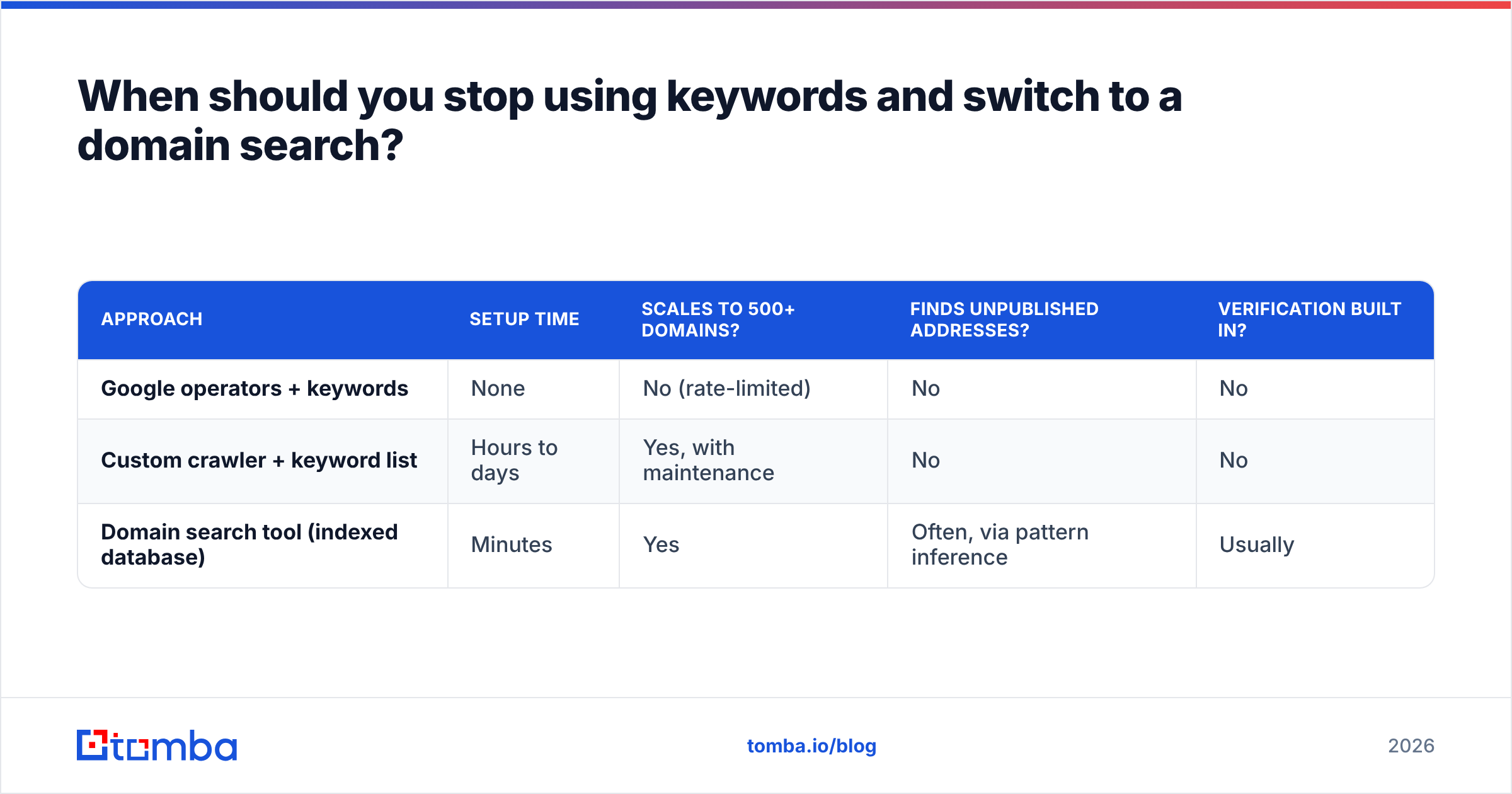
That's why you should compare the three ways of getting company emails side by side:
| Approach | Setup time | Scales to 500+ domains? | Finds unpublished addresses? | Verification built in? |
|---|---|---|---|---|
| Google operators + keywords | None | No (rate-limited) | No | No |
| Custom crawler + keyword list | Hours to days | Yes, with maintenance | No | No |
| Domain search tool (indexed database) | Minutes | Yes | Often, via pattern inference | Usually |
A domain search tool does the keyword work ahead of time. It has already crawled public sources, matched the patterns above and inferred the company's email format (first.last@, f.last@ and so on). Then it can return addresses that aren't printed on the company's own site. Tomba, Hunter, Apollo, Snov.io and BookYourData all offer some version of this. They differ mainly in database coverage, how often they re-verify, and pricing.
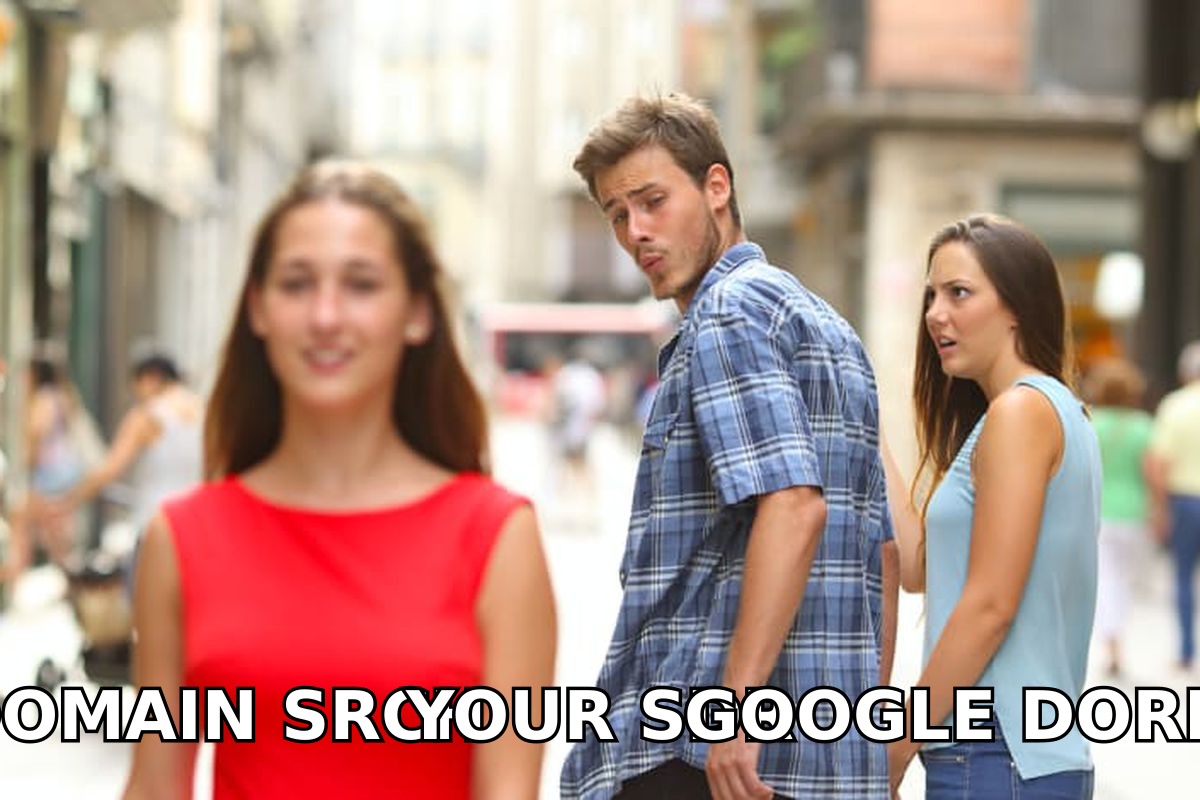
A practical split that works for most teams:
- Under 20 domains, niche targets: use keyword searches and manual extraction. It's free and precise.
- 20–500 domains: run a domain search first, then use keyword searches to fill gaps for accounts where the tool finds nothing.
- 500+ domains or recurring pipeline: use a bulk tool or an API. Hand-crafted operators don't make sense at this volume.
How do you clean and verify extracted emails?#
Every extracted list needs three passes before it goes near your sending domain.
- Deduplicate. The same address appears in the footer, the contact page and the team page, so collapse duplicates case-insensitively.
- Apply your exclusion list. Strip everything from the exclusion keywords above.
- Verify. Run the list through an email verifier to catch invalid mailboxes, disposable domains and catch-all servers. Published addresses go stale when people leave, and a team page from 2023 can easily be 20–30% outdated.
Skipping verification costs more than the bounces themselves. High bounce rates damage your sender reputation, and a damaged reputation lowers inbox placement for every campaign on that domain, including the ones sent to good addresses.
Is it legal to extract emails with keywords?#
Extracting publicly listed business emails is common practice, but what you do with them afterwards is regulated. In the EU and UK, the GDPR requires a lawful basis (usually legitimate interest for B2B outreach), a clear opt-out and a record of where you got the data. In the US, CAN-SPAM requires accurate headers, a physical address and a working unsubscribe link.
Practical rules:
- Only target business addresses tied to a relevant role.
- Record the source URL for every extracted address.
- Respect
robots.txtand site terms when crawling. - Honour opt-outs immediately and add them to a global suppression list.
This isn't legal advice. If you operate in regulated sectors or process data at volume, talk to counsel.
What does a complete keyword-driven extraction workflow look like?#
Here's the full sequence you can run this week:
- Build your target domain list from your ICP (industry, size, geography).
- Run a domain search on every domain to pull indexed, pre-verified contacts.
- For domains with thin results, crawl
/team,/people,/leadership,/aboutand/impressumusing the path keywords above. - Run Google operators for high-value accounts:
"@domain.com" ("head of" OR director) -careers. - Normalise obfuscation (
[at],(dot),@) and run your email regex. - Apply exclusions: remove
noreply, placeholders, image filenames and compliance inboxes, and tag role inboxes separately. - Verify everything, and hold back catch-all results for a smaller, lower-risk send.
- Log the source URL for each contact for compliance.
Steps 3 to 6 are where the keyword list above does its work. Steps 2 and 7 decide whether the effort leads to meetings or to bounce notifications.
Where should you go from here?#
Keywords are the right tool for precision work: a few high-value accounts, niche sites, or contacts buried in PDFs and author bios. For anything bigger, the keyword list becomes a gap-filler rather than your main source.
If you want to skip most of the manual operator work, Tomba Email Finder returns professional addresses from a name and company or a domain, with verification status attached. Start on the free tier (25 searches a month) to check it against your own target list, then move to Starter at $49/mo when you need volume. Keep the keyword list for the accounts no database covers.
Related guides#
// get started
Find, verify and enrich your first contacts today
Start on the free plan with 25 searches a month, then scale when your team is ready.
Free plan · No credit card required · GDPR & CCPA
// about the author