List Unsubscribe Header: How One-Click Unsubscribe Works in 2026
Gmail and Yahoo now require a working one-click unsubscribe from bulk senders. Here's the exact List-Unsubscribe syntax, the RFC 8058 POST rules, and the setup mistakes that quietly push your mail to spam.
TL;DR
- The List-Unsubscribe header is a hidden email header. Gmail, Yahoo, Outlook and Apple Mail read it and show a native "Unsubscribe" button next to the sender name.
- Since February 2024, Gmail and Yahoo have required one-click unsubscribe (RFC 8058) from bulk senders (5,000+ messages a day to Gmail), and opt-outs have to be honored within 2 days.
- A setup that works needs two headers,
List-UnsubscribeandList-Unsubscribe-Post, and your DKIM signature has to cover both. - The most common failures are an HTTP (not HTTPS) URL, an endpoint that only accepts GET, an unsubscribe that asks for confirmation, and headers that DKIM doesn't sign.
- A working unsubscribe button won't save a list with bad data. Clean sourcing and verification keep your complaint rate under 0.3%.
What is the List-Unsubscribe header?#
The List-Unsubscribe header is a line in your email's technical headers. It tells the mailbox provider how a recipient can opt out. The recipient never sees the raw header. They see the result: a small "Unsubscribe" link or button that Gmail, Yahoo Mail, Outlook.com or Apple Mail puts at the top of the message.
A building fire exit is a useful comparison. The fire code doesn't care how nice your lobby is. It checks whether there's a clearly marked exit that opens with one push. Mailbox providers now treat unsubscribe the same way. Your footer link is the lobby. The List-Unsubscribe header is the fire exit the inspector actually checks.
The header was first defined in RFC 2369 in 1998 for mailing lists. It stayed optional for about 25 years. Then Google and Yahoo made it mandatory for bulk senders in their 2024 sender requirements, and it became part of basic email deliverability hygiene.
Here's what a compliant pair of headers looks like:
List-Unsubscribe: <https://mail.example.com/u/7f3a9c?e=abc123>, <mailto:unsub@example.com?subject=unsubscribe-abc123>
List-Unsubscribe-Post: List-Unsubscribe=One-Click
The first line gives the mailbox provider two ways to unsubscribe the recipient: an HTTPS URL and a mailto address. The second line tells the provider that the HTTPS URL supports one-click unsubscribe as defined in RFC 8058.
Why do mailbox providers care so much about it?#
Because the alternative to an easy unsubscribe is the spam button.
If a recipient no longer wants your emails and can't find a quick way out, they click "Report spam." A complaint counts against your sender reputation in a way an unsubscribe never does. Enough complaints and your mail goes to the spam folder for everyone, including the people who wanted it.
Giving recipients a native unsubscribe button turns a would-be complaint into a clean opt-out. Mailbox providers get fewer complaints to process, recipients get less unwanted mail, and senders lose a subscriber they were going to lose anyway without taking the reputation damage.
This is also why Gmail shows the unsubscribe link more readily for senders with good reputation. A spammer's "unsubscribe" link often just confirms the address is live. A reputable sender's link actually works.
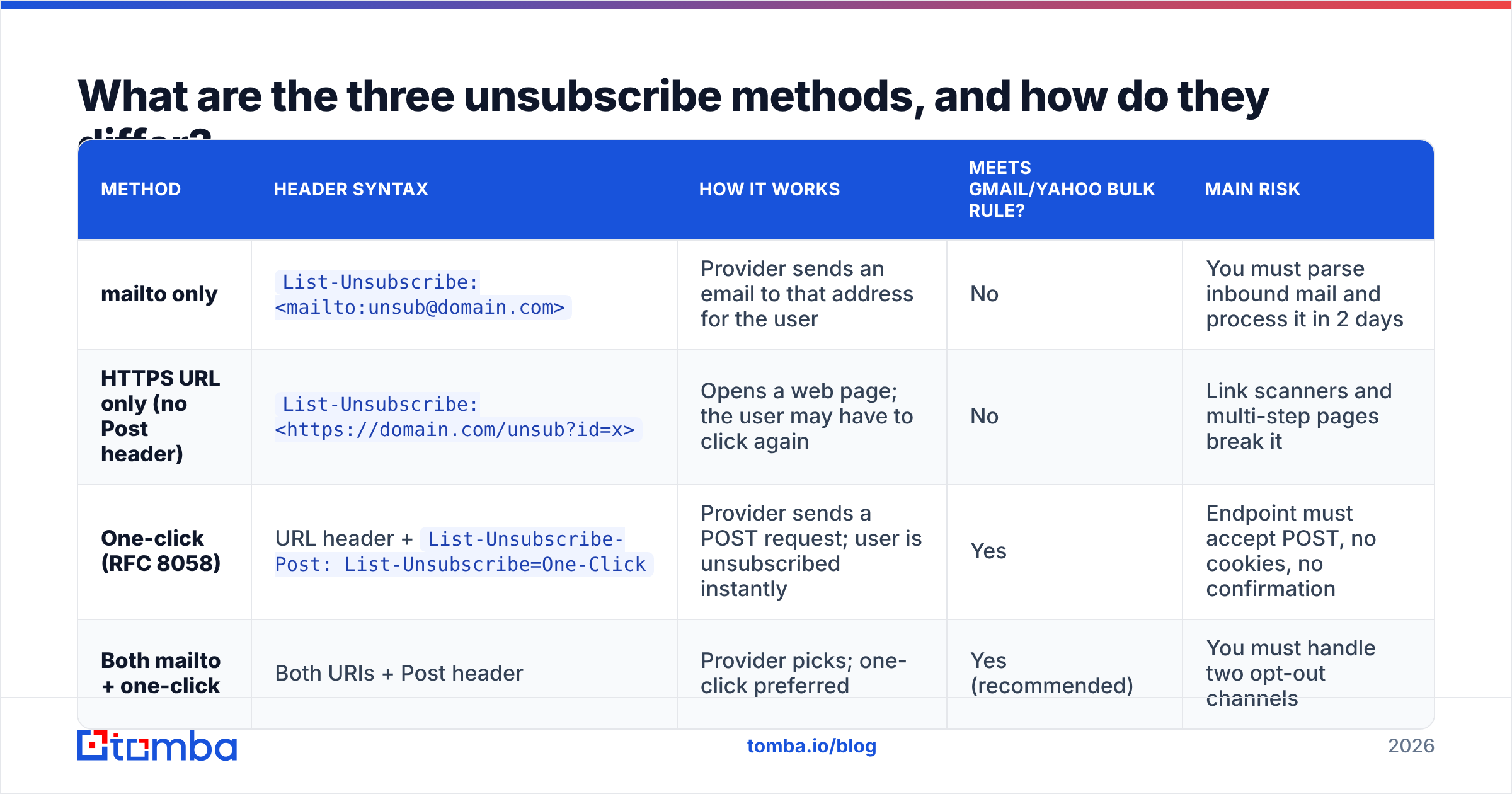
What are the three unsubscribe methods, and how do they differ?#
You can put three kinds of unsubscribe mechanism in the header. Only one of them satisfies the current Gmail and Yahoo bulk-sender rules on its own.
| Method | Header syntax | How it works | Meets Gmail/Yahoo bulk rule? | Main risk |
|---|---|---|---|---|
| mailto only | List-Unsubscribe: <mailto:unsub@domain.com> |
Provider sends an email to that address for the user | No | You must parse inbound mail and process it in 2 days |
| HTTPS URL only (no Post header) | List-Unsubscribe: <https://domain.com/unsub?id=x> |
Opens a web page; the user may have to click again | No | Link scanners and multi-step pages break it |
| One-click (RFC 8058) | URL header + List-Unsubscribe-Post: List-Unsubscribe=One-Click |
Provider sends a POST request; user is unsubscribed instantly | Yes | Endpoint must accept POST, no cookies, no confirmation |
| Both mailto + one-click | Both URIs + Post header | Provider picks; one-click preferred | Yes (recommended) | You must handle two opt-out channels |
The practical recommendation is the last row. Include an HTTPS one-click URL for Gmail and Yahoo, plus a mailto fallback for older clients and for providers that still prefer it.
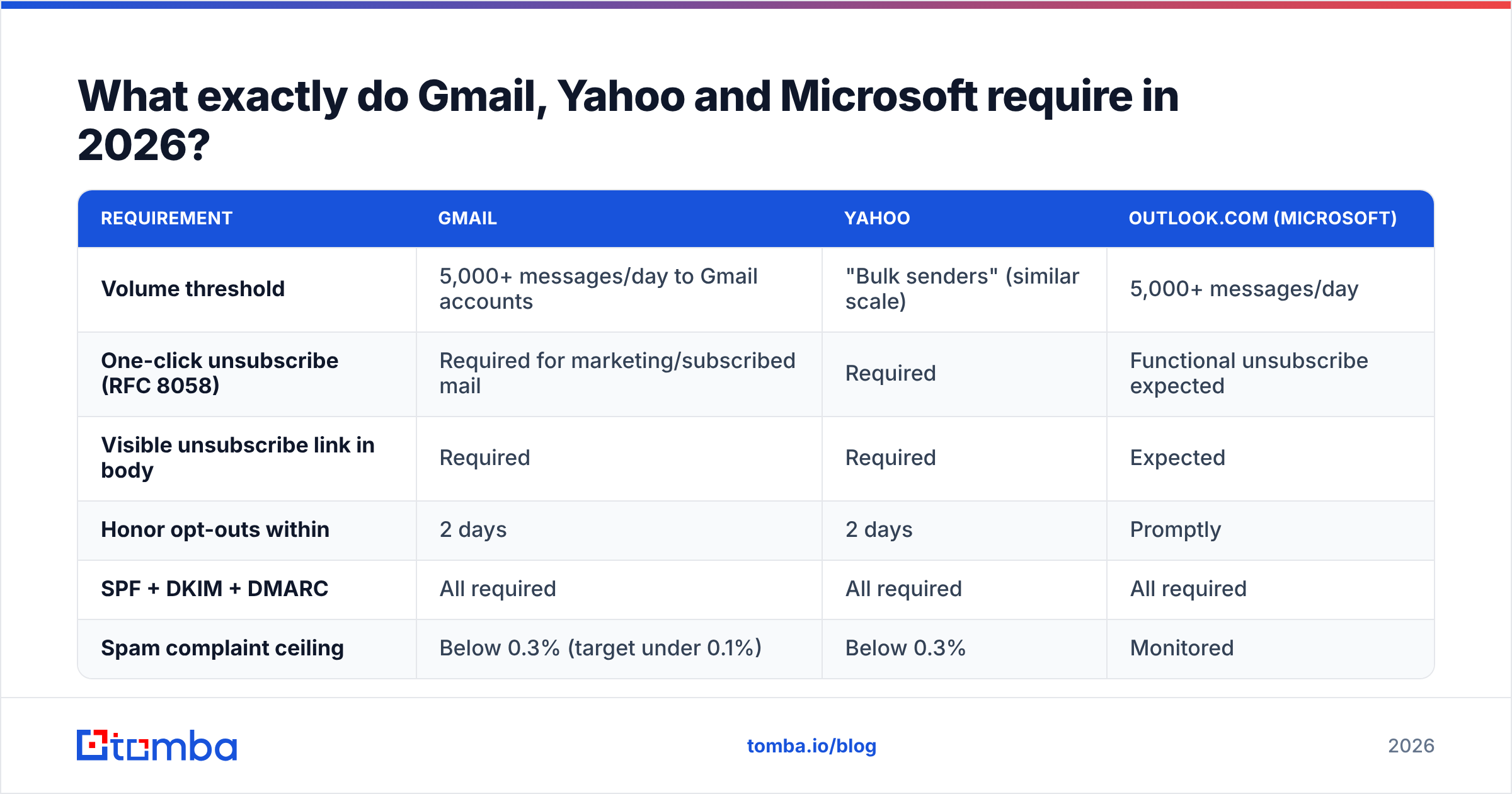
What exactly do Gmail, Yahoo and Microsoft require in 2026?#
Requirements overlap but aren't identical. Here's a summary for high-volume senders:
| Requirement | Gmail | Yahoo | Outlook.com (Microsoft) |
|---|---|---|---|
| Volume threshold | 5,000+ messages/day to Gmail accounts | "Bulk senders" (similar scale) | 5,000+ messages/day |
| One-click unsubscribe (RFC 8058) | Required for marketing/subscribed mail | Required | Functional unsubscribe expected |
| Visible unsubscribe link in body | Required | Required | Expected |
| Honor opt-outs within | 2 days | 2 days | Promptly |
| SPF + DKIM + DMARC | All required | All required | All required |
| Spam complaint ceiling | Below 0.3% (target under 0.1%) | Below 0.3% | Monitored |
Sources: Google's email sender guidelines and Yahoo's sender best practices. Transactional messages such as password resets, receipts and shipping notices are generally exempt from the unsubscribe requirement. Marketing and subscription mail isn't.
Two details trip people up:
- The 5,000 threshold is cumulative and sticky. Google counts messages across your whole sending domain. Once you cross the line, you're treated as a bulk sender going forward, even if your volume drops later.
- The body link and the header are separate requirements. A footer link doesn't cover the header requirement, and a header doesn't cover the footer requirement. You need both.
How do you implement one-click unsubscribe correctly?#
If your ESP handles it, most of the work is done for you: Mailchimp, HubSpot, Klaviyo, SendGrid and Postmark all add compliant headers when unsubscribe handling is turned on. If you run your own sending infrastructure, or a cold outreach tool where it's a per-account setting, follow this checklist.
- Generate a unique, opaque token per recipient. Put it in the URL (
/u/7f3a9c...). Don't put the raw email address in plain text in the URL; forwarded messages and logs leak it. - Serve the URL over HTTPS. RFC 8058 requires it. An
http://URL invalidates one-click. - Accept a POST request with the body
List-Unsubscribe=One-Click. That's what Gmail and Yahoo send. Your endpoint has to process the opt-out from the POST alone, with no cookies, no session, no login, and no redirect chain. - Don't unsubscribe on GET. Corporate security scanners pre-fetch every link in incoming mail. If a GET request triggers the opt-out, scanners will unsubscribe real subscribers. GET should show a normal landing page (with an optional preference center) instead.
- Return a 200 (or 202) quickly. No "Are you sure?" step. One click means one click.
- Sign both headers with DKIM. RFC 8058 requires the DKIM signature to cover
List-UnsubscribeandList-Unsubscribe-Post. If your signing config only coversFrom,To,SubjectandDate, one-click won't be trusted. - Process the opt-out within 48 hours, and sooner if possible. Suppress the address across every stream it applies to, not just the one campaign.
Here's a simple endpoint contract to hand to your developer:
POST /u/{token}
Content-Type: application/x-www-form-urlencoded

List-Unsubscribe=One-Click

→ 200 OK  (recipient suppressed; no body required)
Before you scale up, send a test to a Gmail account, open "Show original," and confirm three things: both headers are present, the DKIM result is PASS, and the h= tag in the DKIM-Signature includes list-unsubscribe and list-unsubscribe-post. While you're in the headers, run your domain through an SPF checker to confirm authentication is aligned. A perfect unsubscribe header won't help if SPF or DMARC fails first.
What are the most common List-Unsubscribe mistakes?#
These are the problems that show up most often when a sender says "we added the header but Gmail still doesn't show the button":
- Missing
List-Unsubscribe-Post. With only the URL, Gmail treats it as a legacy link, not one-click. - Header not covered by DKIM. Common with custom SMTP relays and some self-hosted setups.
- GET-only endpoint. The provider's POST gets a 405 error and the unsubscribe silently fails.
- Redirect to a login page. Anything that needs authentication breaks one-click.
- Token expiry. If links expire after 30 days, anyone who unsubscribes from an older email hits an error and clicks "Report spam" instead.
- Suppression only per campaign. The user unsubscribes, then gets your next newsletter from a different list, and reports it.
- Low reputation. Gmail sometimes hides the unsubscribe button for new or low-reputation senders even when the headers are correct. The fix is better sending behavior, not a different header.
The last point matters. The header is necessary, but it can't fix everything. Gmail displays it more reliably when your authentication, engagement and complaint rates are healthy.
Does cold email need a List-Unsubscribe header?#
This is where opinions differ, so here's the reasoning rather than a blanket rule.
Google's one-click requirement is aimed at bulk senders of marketing and subscribed messages. A B2B SDR sending 40 personalized emails a day from a secondary domain isn't technically a 5,000-a-day bulk sender. Legally, though, cold outreach still has to offer an opt-out under CAN-SPAM in the US and similar rules elsewhere.
In practice, adding the header to cold email is increasingly common, for three reasons:
- Complaint prevention. A cold prospect who isn't interested will use a native "Unsubscribe" button if it's there. If it's not, many will click "Report spam," and on a small sending domain a handful of complaints can wreck placement.
- Aggregate volume. Agencies and teams running 20+ inboxes on one root domain can reach bulk thresholds faster than they expect.
- Tooling supports it. Major cold email platforms such as Instantly, Smartlead and lemlist now let you insert unsubscribe headers per campaign or per mailbox.
The counterargument is that the visible button can look "marketing-ish" in a message that's supposed to read like a 1:1 email. Some teams accept a small hit to reply rate in exchange for lower complaint risk. For most teams sending at any real scale, that trade is worth it.

How does list quality affect whether the header even matters?#
The List-Unsubscribe header handles people who want out. It does nothing about addresses that should never have been on the list: bounces, spam traps, role accounts and people who never engaged.
Think of it as the difference between a good exit door and a good guest list. The exit keeps things orderly when someone leaves. The guest list decides whether the wrong people get in to begin with. Bounce rate, spam-trap hits and complaint rate all feed into the same reputation score, and a sender with a 6% bounce rate will struggle no matter how clean their headers are.
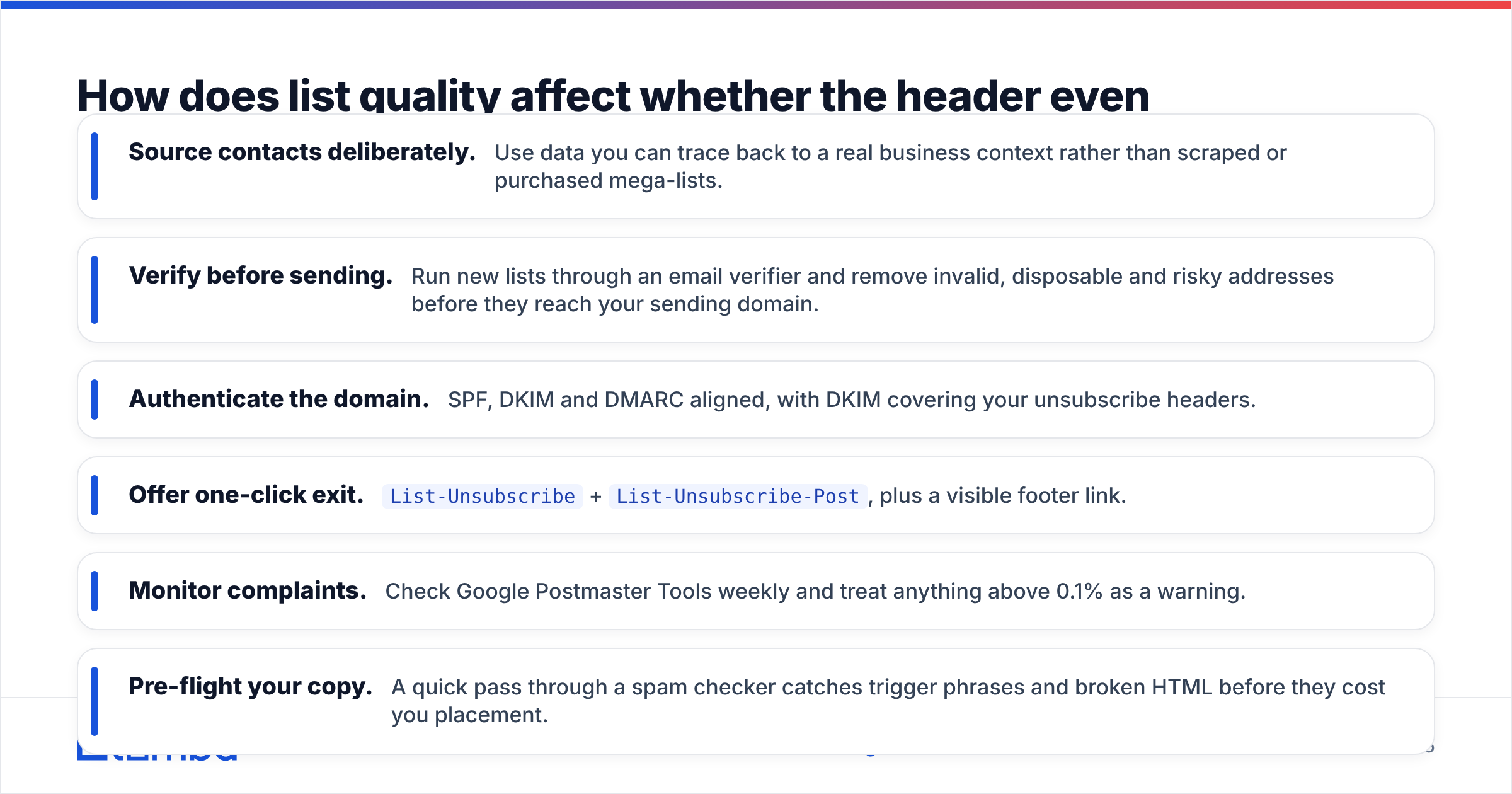
A defensible stack for outbound and newsletter senders in 2026 looks like this:
- Source contacts deliberately. Use data you can trace back to a real business context rather than scraped or purchased mega-lists.
- Verify before sending. Run new lists through an email verifier and remove invalid, disposable and risky addresses before they reach your sending domain.
- Authenticate the domain. SPF, DKIM and DMARC aligned, with DKIM covering your unsubscribe headers.
- Offer one-click exit.
List-Unsubscribe+List-Unsubscribe-Post, plus a visible footer link. - Monitor complaints. Check Google Postmaster Tools weekly and treat anything above 0.1% as a warning.
- Pre-flight your copy. A quick pass through a spam checker catches trigger phrases and broken HTML before they cost you placement.
How do you test that your List-Unsubscribe setup actually works?#
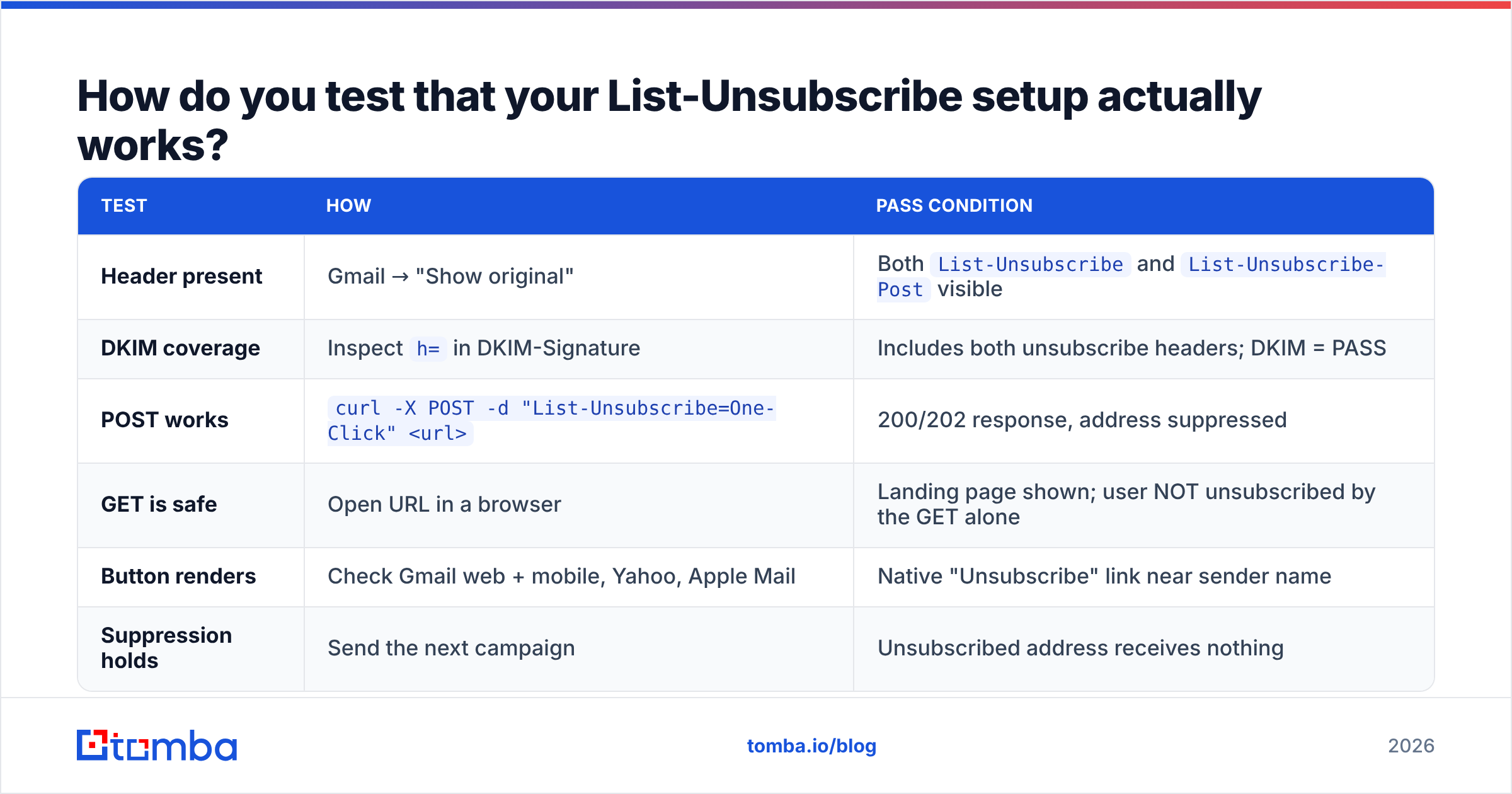
Don't take the ESP settings page's word for it. Test end to end:
| Test | How | Pass condition |
|---|---|---|
| Header present | Gmail → "Show original" | Both List-Unsubscribe and List-Unsubscribe-Post visible |
| DKIM coverage | Inspect h= in DKIM-Signature |
Includes both unsubscribe headers; DKIM = PASS |
| POST works | curl -X POST -d "List-Unsubscribe=One-Click" <url> |
200/202 response, address suppressed |
| GET is safe | Open URL in a browser | Landing page shown; user NOT unsubscribed by the GET alone |
| Button renders | Check Gmail web + mobile, Yahoo, Apple Mail | Native "Unsubscribe" link near sender name |
| Suppression holds | Send the next campaign | Unsubscribed address receives nothing |
Run this after any change to your sending provider, DKIM keys or unsubscribe service. Header regressions often come from infrastructure changes nobody connected to deliverability, like a new SMTP relay or a rotated DKIM selector that signs fewer headers.
Is the List-Unsubscribe header worth the effort for smaller senders?#
Yes, even if you're well under 5,000 messages a day.
The cost is low: two headers, one POST endpoint and one DKIM config check. The benefit is fewer spam complaints and a signal to mailbox providers that you're a legitimate sender. The requirements have also only tightened over time. Google, Yahoo and Microsoft have each raised the bar since 2024, and building a compliant setup now is easier than retrofitting one after a deliverability drop.
It's also a good excuse to audit the rest of your pipeline. If you're checking headers, you're already close to checking authentication, bounce rates and data sources, and those are where most inbox placement problems start.
Start with a list worth keeping#
A List-Unsubscribe header protects your reputation from people who want to leave. The bigger gains come from contacting the right people in the first place. Tomba Email Finder helps you find professional email addresses by domain, name or company, with verification built into the workflow. Fewer bounces, fewer complaints and fewer unsubscribes mean your one-click button does what it's meant to do: give an occasional clean exit, not act as a leak in your sender reputation. Check Tomba pricing to start on the free tier and scale when your outreach does.
Related guides#
// get started
Find, verify and enrich your first contacts today
Start on the free plan with 25 searches a month, then scale when your team is ready.
Free plan · No credit card required · GDPR & CCPA
// about the author